IPH-04211Low Power Digital Device Transmitter
Garmin International Inc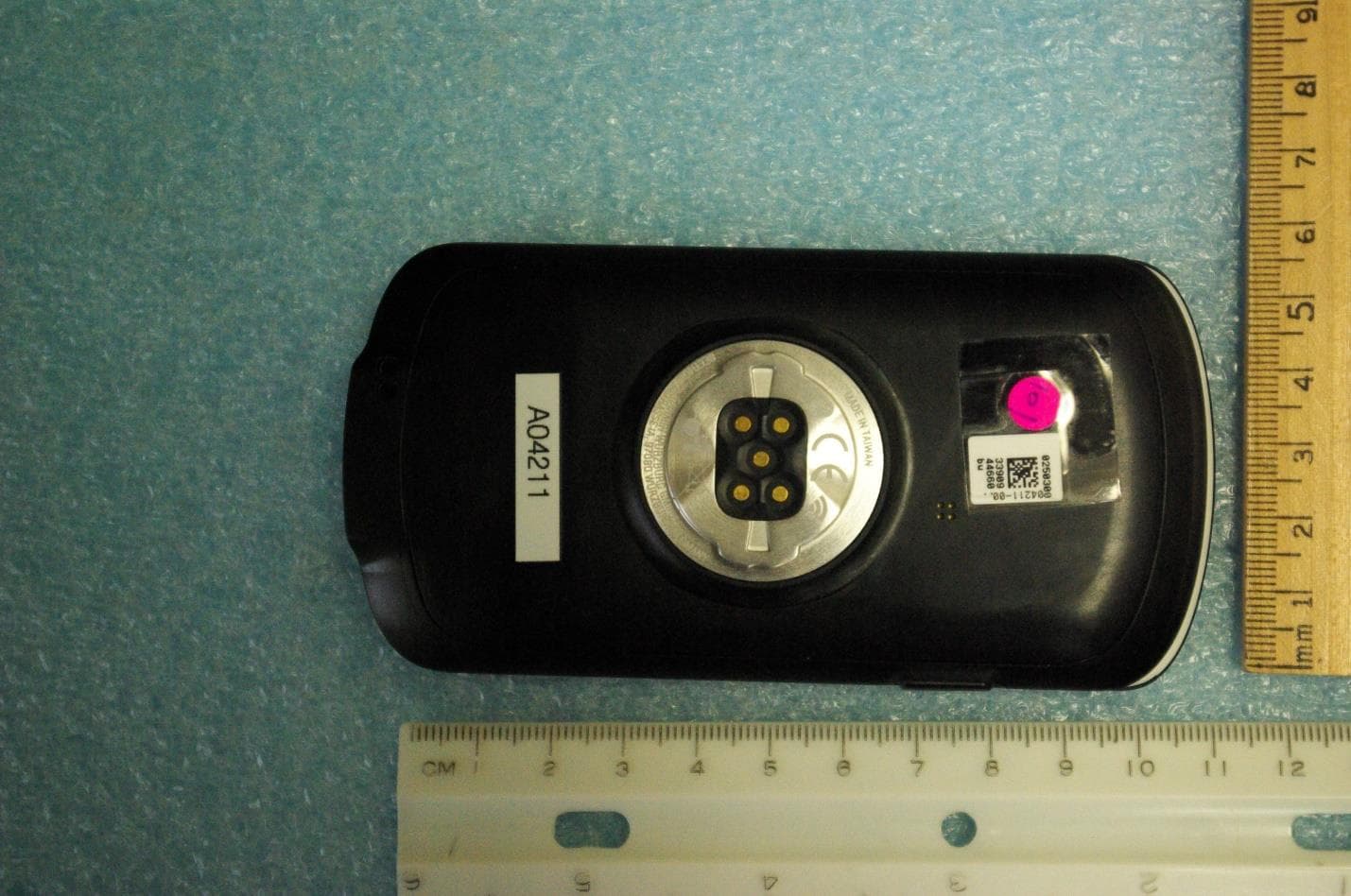
Click to zoom
Application Details
- Equipment Class
- DXX - Part 15 Low Power Communication Device Transmitter
- Date of Grant
- Apr 10, 2022
- Application Purpose
- Original Equipment
- Date of Application
- Apr 10, 2022
- Equipment Note
- Low Power Digital Device Transmitter
- Frequency Range
- 2402.00000000 - 2480.00000000
- Company
- Garmin International Inc
- Country
- United States
Documents & Files
Document Text
Text extracted from the exhibit documents filed with the FCC. Open a document above to read the original.
Users Manual
EDGE ® 1040 Quick Start Manual2 Manuel de démarrage rapide12 Manuale di avvio rapido 24 Schnellstartanleitung36 Guía de inicio rápido48 Manual de início rápido59 Edge ® 1040 Quick Start Manual Introduction WARNING See the Important Safety and Product Information guide in the product box for product warnings and other important information. Always consult your physician before you begin or modify any exercise program. Device Overview Press to enter sleep mode and wake the device. Hold to turn the device on and off and lock the touchscreen. Press to mark a new lap. USB port (under weather cap) Lift the weather cap to charge the device or connect it to a computer. Replace the weather cap to prevent damage to the USB port. Press to start and stop the activity timer. Select to open the main menu. Glances Swipe up or down to view the glances. Select to open the glance or menu. Biking profile Swipe left or right to change the biking profile. Select to open the biking profile. Electrical contacts Charge using an Edge ® external battery pack accessory. 2Quick Start Manual EN NOTE: Go to www.buy.garmin.com to purchase optional accessories. Pairing Your Phone To use the connected features of the Edge device, it must be paired directly through the Garmin Connect ™ app, instead of from the Bluetooth ® settings on your phone. 1From the app store on your phone, install and open the Garmin Connect app. 2Hold to turn on the device. The first time you turn on the device, you will select the device language. The next screen prompts you to pair with your phone. 3Follow the instructions in the app to complete the pairing and setup process. NOTE: Based on your Garmin Connect account and accessories, your device suggests activity profiles and data fields during setup. If you have sensors paired with your previous device, you can transfer them during setup. NOTE: Setting up Wi‑Fi ® and sleep mode usage on your device enables the device to sync with all your data such as training stats, course downloads, and software updates. After you pair successfully, a message appears, and your device syncs automatically with your phone. Installing the Standard Mount For the best GPS reception, position the bike mount so the front of the device is oriented toward the sky. You can install the bike mount on the stem or the handlebars. 1Select a secure location to mount the device where it does not interfere with the safe operation of your bike. 2Place the rubber disk on the back of the bike mount. Two rubber disks are included, and you can select the disk that best fits your bike. The rubber tabs align with the back of the bike mount so it stays in place. Quick Start Manual3 EN 3Place the bike mount on the bike stem. 4Attach the bike mount securely using the two bands . 5Align the tabs on the back of the device with the bike mount notches . 6Press down slightly and turn the device clockwise until it locks into place. Installing the Out-Front Mount 1Select a secure location to mount the Edge device where it does not interfere with the safe operation of your bike. 2Use the hex key to remove the screw from the handlebar connector . 3Place the rubber pad around the handlebar: • If the handlebar diameter is 25.4 mm, use the thicker pad. • If the handlebar diameter is 31.8 mm, use the thinner pad. 4Place the handlebar connector around the rubber pad. 5Replace and tighten the screw. NOTE: Garmin ® recommends tightening the screw so the mount is secure, with a maximum torque 4Quick Start Manual EN specification of 7 lbf-in. (0.8 N-m). You should check the tightness of the screw periodically. 6Align the tabs on the back of the Edge device with the bike mount notches . 7Press down slightly and turn the Edge device clockwise until it locks into place. Going for a Ride If you are using a wireless sensor or accessory, it can be paired and activated during initial setup . If your device was packaged with a wireless sensor, they are already paired and can be activated during initial setup. 1Hold to turn on the device. 2Go outside, and wait while the device locates satellites. The satellite bars turn green when the device is ready. 3From the home screen, select or to view the biking profiles. 4Select a biking profile. 5Press to start the activity timer. NOTE: History is recorded only while the activity timer is running. 6Swipe left or right to view additional data screens. You can swipe down from the top of the data screens to view the widgets. Quick Start Manual5 EN 7If necessary, tap the screen to view status overlay data (including battery life) or return to the home screen. 8Press to stop the activity timer. TIP: Before you save this ride and share it on your Garmin Connect account, you can change the ride type. Accurate ride type data is important for creating bike friendly courses. 9Select Save. 10Select . Viewing Widgets Your device is preloaded with several widgets, and more are available when you pair your device with a phone or other compatible device. 1From the home screen, swipe down from the top of the screen. The settings widget appears. A flashing icon means the device is searching for a signal. A solid icon means the signal was found or the sensor is connected. You can select any icon to change the settings. 2Swipe left or right to view more widgets. Viewing Glances Glances provide quick access to health data, activity information, built-in sensors, and more. • From the home screen, swipe up or down. The device scrolls through the glances (page 2). 6Quick Start Manual EN • Select a glance to view additional information. • Select to customize the glances. Bluetooth Connected Features The Edge device has several Bluetooth connected features for your compatible phone using the Garmin Connect and Connect IQ ™ apps. Go to www.garmin.com/apps for more information. Activity uploads to Garmin Connect: Automatically sends your activity to Garmin Connect as soon as you finish recording the activity. Audio prompts: Allows the Garmin Conn…
Text truncated - open the document above for the full version.
Users Manual
Important Safety and Product Information2 Informations importantes sur le produit et la sécurité5 guida Informazioni importanti sulla sicurezza e sul prodotto8 Wichtige Sicherheits- und Produktinformationen11 Información importante sobre el producto y tu seguridad15 Informações importantes sobre segurança e sobre o produto18 Belangrijke veiligheids- en productinformatie21 Vigtige produkt- og sikkerhedinformationer 24 Tärkeitä turvallisuus- ja tuotetietoja 26 Viktig sikkerhets- og produktinformasjon29 Guiden Viktig säkerhets- och produktinformation31 Ważne informacje dotyczące bezpieczeństwa i produktu34 Důležité bezpečnostní informace a informace o produktu37 Važne informacije o proizvodu i sigurnosti39 Pomembne informacije o varnosti in izdelku42 Important Safety and Product Information WARNING Failure to heed the following warnings could result in an accident or collision resulting in death or serious injury. Battery Warnings A lithium-ion battery is used in this device. Coin cell batteries can be used in the accessory. If these guidelines are not followed, batteries may experience a shortened life span or may present a risk of damage to the device, fire, chemical burn, electrolyte leak, and/or injury. • Do not disassemble, modify, remanufacture, puncture or damage the device or batteries. • Do not remove or attempt to remove the non-user-replaceable battery. • Do not expose the device or batteries to fire, explosion, or other hazard. • Do not use a sharp object to remove the removable batteries. • KEEP BATTERIES AWAY FROM CHILDREN. NEVER PUT BATTERIES IN MOUTH. Swallowing can lead to chemical burns, perforation of soft tissue, and death. Severe burns can occur within 2 hours of ingestion. Seek medical attention immediately. • If using an external battery charger, only use the Garmin ® accessory approved for your product. • Only replace batteries with correct replacement batteries. Using other batteries presents a risk of fire or explosion. To purchase replacement batteries, see your Garmin dealer or the Garmin website. Health Warnings • If you have a pacemaker or other internal electronic device, consult your physician before using a heart rate monitor. • Always consult your physician before beginning or modifying any exercise program. Device Warnings • Do not leave the device exposed to a heat source or in a high- temperature location, such as in the sun in an unattended vehicle. To prevent the possibility of damage, remove the device from the vehicle or store it out of direct sunlight, such as in the glove box. • Do not operate the device outside of the temperature ranges specified in the printed manual in the product packaging. • When storing the device for an extended time period, store within the temperature ranges specified in the printed manual in the product packaging. • Do not use a power cable, data cable and/or power adapter that is not approved or supplied by Garmin. Bicycle Warnings • The device allows you to send your location to an emergency contact. This is a supplemental feature and should not be relied upon as a primary method to obtain emergency assistance. The Garmin Connect ™ Mobile app does not contact emergency services on your behalf. • Always use your best judgement, and operate the bicycle in a safe manner. • Make sure your bicycle and hardware are properly maintained and that all parts are correctly installed. Off-Road Navigation Warnings If your Garmin device is able to suggest off-road routes for various outdoor activities, such as biking, hiking, and all-terrain vehicles, follow these guidelines to ensure safe off-road navigation. • Always use your best judgment and exercise common sense when making off-road navigational decisions. The Garmin device is designed to provide route suggestions only. It is not a replacement for attentiveness and proper preparation for outdoor activities. Do not follow the route suggestions if they suggest an illegal course or would put you in an unsafe situation. • Always carefully compare information displayed on the device to all available navigation sources, including trail signs, trail conditions, weather conditions, and other factors that may affect safety while navigating. For safety, always resolve any discrepancies before continuing navigation, and defer to posted signs and conditions. • Always be mindful of the effects of the environment and the inherent risks of the activity before embarking on off-road activities, especially the impact that weather and weather-related trail conditions can have on the safety of your activity. Ensure that you have the proper gear and supplies for your activity before navigating along unfamiliar paths and trails. NOTICE Failure to heed the following notice could result in personal or property damage, or negatively impact the device functionality. Battery Notices • Replaceable coin cell batteries may contain perchlorate material. Special handling may apply. See www.dtsc.ca.gov /hazardouswaste/perchlorate. • Contact your local waste disposal department to dispose of the device/batteries in accordance with applicable local laws and regulations. 2 EN GPS Notice The navigation device may experience degraded performance if you use it in proximity to any device that uses a terrestrial broadband network operating close to the frequencies used by any Global Navigation Satellite System (GNSS), such as the Global Positioning Service (GPS). Use of such devices may impair reception of GNSS signals. Product Environmental Programs Information about the Garmin product recycling program and WEEE, RoHS, REACH, and other compliance programs can be found at www.garmin.com/aboutGarmin /environment. Declaration of Conformity Hereby, Garmin declares that this product is in compliance with the Directive 2014/53/EU. The full text of the EU declaration of conformity is available at the following internet address: www.garmin.com/compliance. Innovation, Science and Economic Development Canada Compliance This devi…
Text truncated - open the document above for the full version.
Users Manual
EDGE ® 1040 Owner’s Manual © 2017–2019 Garmin Ltd. or its subsidiaries All rights reserved. Under the copyright laws, this manual may not be copied, in whole or in part, without the written consent of Garmin. Garmin reserves the right to change or improve its products and to make changes in the content of this manual without obligation to notify any person or organization of such changes or improvements. Go to www.garmin.com for current updates and supplemental information concerning the use of this product. Garmin ® , the Garmin logo, ANT+ ® , Auto Lap ® , Auto Pause ® , Edge ® , Forerunner ® , inReach ® , and Virtual Partner ® are trademarks of Garmin Ltd. or its subsidiaries, registered in the USA and other countries. Connect IQ ™ , Garmin Connect ™ , Garmin Express ™ , Varia ™ , Varia Vision ™ , and Vector ™ are trademarks of Garmin Ltd. or its subsidiaries. These trademarks may not be used without the express permission of Garmin. Android ™ is a trademark of Google Inc. Apple ® and Mac ® are trademarks of Apple, Inc., registered in the U.S. and other countries. The BLUETOOTH ® word mark and logos are owned by the Bluetooth SIG, Inc. and any use of such marks by Garmin is under license. The Cooper Institute ® , as well as any related trademarks, are the property of The Cooper Institute. Advanced heartbeat analytics by Firstbeat. Di2 ™ and Shimano STEPS ™ are trademarks of Shimano, Inc. Shimano ® is a registered trademark of Shimano, Inc. microSD ® and the microSDHC logo are trademarks of SD-3C, LLC. Training Stress Score ™ (TSS), Intensity Factor ™ (IF), and Normalized Power ™ (NP) are trademarks of Peaksware, LLC. STRAVA and Strava ™ are trademarks of Strava, Inc. Wi‑Fi ® is a registered trademark of Wi-Fi Alliance Corporation. Windows ® is a registered trademark of Microsoft Corporation in the United States and other countries. Other trademarks and trade names are those of their respective owners. This product is ANT+ ® certified. Visit www.thisisant.com/directory for a list of compatible products and apps. M/N: Table of Contents Introduction.....................................................................1 Device Overview.........................................................................1 Pairing Your Smartphone...........................................................1 Home Screen Overview..............................................................1 Viewing Widgets....................................................................1 Using the Touchscreen..........................................................1 Locking the Touchscreen.......................................................1 Charging the Device...................................................................2 About the Battery...................................................................2 Installing the Standard Mount.....................................................2 Installing the Out-Front Mount....................................................2 Releasing the Edge................................................................2 Acquiring Satellite Signals..........................................................3 Training...........................................................................3 Going for a Ride..........................................................................3 Segments....................................................................................3 Strava™ Segments................................................................3 Using the Strava Segment Explore Widget.......................3 Following a Segment From Garmin Connect.........................3 Enabling Segments................................................................3 Racing a Segment.................................................................3 Viewing Segment Details.......................................................4 Segment Options...................................................................4 Deleting a Segment...............................................................4 Workouts.....................................................................................4 Creating a Workout................................................................4 Repeating Workout Steps......................................................4 Editing a Workout...................................................................4 Following a Workout From Garmin Connect..........................4 Starting a Workout.................................................................4 Stopping a Workout...............................................................5 Deleting a Workout................................................................5 About the Training Calendar.......................................................5 Using Garmin Connect Training Plans...................................5 Training Indoors..........................................................................5 Pairing Your ANT+® Indoor Trainer.......................................5 Using an ANT+ Indoor Trainer...............................................5 Setting Resistance............................................................5 Setting Target Power........................................................5 Interval Workouts........................................................................5 Creating an Interval Workout.................................................5 Starting an Interval Workout..................................................5 Setting a Training Target............................................................6 My Stats...........................................................................6 Performance Measurements ......................................................6 Training Status.......................................................................6 About VO2 Max. Estimates....................................................6 Getting Your VO2 Max. Estimate.............…
Text truncated - open the document above for the full version.
Cover Letter(s)
Page 1 of 2 March 9, 2022 Timco Engineering Inc. 849 NW State Road 45 Newberry, FL 32669 Applicant: Garmin International, Inc. 1200 East 151st Street Olathe, KS 66062 Re: Confidentiality for submittal information regarding FCC ID: IPH-04211 Product: Transmitter operated under 47CFR Section 15C Dear Sirs: Garmin International, Inc. requests that the material in the Block Diagram, Operational Description, Schematics, and Tune up Procedure be withheld from public disclosure pursuant to Sections 0.457 and 0.459 of the Commission’s Rules following grant of the application. In support of this request, Garmin International, Inc. submits the following information. CONFIDENTIAL FILES A04211 Conf BlkDia.pdf A04211 Conf OpDes.pdf A04211 Conf Schem.pdf A04211 Conf TunPro.pdf 1. Identification of the specific information for which confidential treatment is sought: The materials set forth in the Block Diagram, Operational Description, Schematics, and Tune up Procedure which are segregated, from the non-confidential exhibits of the application, are those for which confidentiality is sought. 2. Identification of the Commission proceeding in which the information was submitted or a description of the circumstances giving rise to the submission: The proceeding is that involving the application for equipment authorization (certification) under FCC ID: IPH-04211 3. Explanation of the degree to which the information is commercial or financial, or contains a trade secret or is privileged: This material includes a detailed Block Diagram, Operational Description, Schematics, and Tune up Procedure. As such, this material is treated as highly confidential business information. ROGERS LABS, INC. 4405 West 259 th Terrace Louisburg, KS 66053 913 837-3214 Page 2 of 2 4. Explanation of the degree to which the information concerns a service that is subject to competition: The material for which confidentiality is sought is employed in the design and manufacture of this transmitting equipment that is offered on a highly competitive basis. Customers for this equipment have a variety of competing sources. 5. Explanation of how disclosure of the information could result in substantial competitive harm: Disclosure would, in effect, give away the fruits of the labors of Garmin International, Inc.’s engineering personnel, who have designed the equipment and the manufacturing process. Disclosure would also offer competitors additional unwarranted insight into the state of the product development, thereby allowing competitors an advantage, not available to Garmin International, Inc. 6. Identification of any measures taken by the submitting party to prevent unauthorized disclosure: The information for which confidential treatment is sought is kept confidential by Garmin International, Inc. and not made available to third parties except pursuant to non-disclosure agreements. 7. Identification of whether the information is available to the public and the extent of any previous disclosure of the information to third parties: To the knowledge of those preparing this application, the information has not been disclosed publicly heretofore. While the general theory of operation of this equipment has been the subject of numerous disclosures in industry the protection sought is narrowly drawn as provided in regulations. 8. Justification of the period during which the submitting party asserts that the material should not be available for public disclosure: This material should not be disclosed for at least 25 years. While improvements in design are made relatively frequently, disclosure of the design information would lead to insights into both design and manufacturing techniques that could have an adverse competitive effect for many years to come. As such, it is important that the design not be made available to unauthorized persons who might attempt to use knowledge of the design to compromise the applications for which the equipment will be employed. Should you require any further information, please contact the undersigned. Thank you for your consideration in this matter. Sincerely, Scot Rogers
Cover Letter(s)
March 17, 2022 Timco Engineering Inc. 849 NW State Road 45 Newberry, FL 32669 Applicant: Garmin International, Inc. Equipment: FCC ID: IPH-04211 1200 East 151st Street CORES number: 0005088588 Olathe, KS 66062 Re: Grant Deferral Date April 11, 2022 To Whom It May Concern: Please be advised Garmin International, Inc. requests the associated application be processed and defer issuance of the Grant of Authorization until April 11, 2022. Should you require any further information, please contact the undersigned. Thank you for your consideration in this matter. Sincerely, Scot Rogers Rogers Labs, Inc. Enclosures ROGERS LABS, INC. 4405 West 259 th Terrace Louisburg, KS 66053 Phone / Fax (913) 837-3214
Cover Letter(s)
March 17, 2022 Timco Engineering Inc. 849 NW State Road 45 Newberry, FL 32669 Applicant: Garmin International, Inc. 1200 East 151st Street Olathe, KS 66062 Re: Short-term Confidentiality request for submittal information regarding FCC ID: IPH-04211 FCC Rules: Parts 2 and 15C Dear Sirs: Garmin International, Inc. requests that the following information be withheld from public disclosure pursuant to CFR47 paragraphs 0.457 and 0.459, and KDB 726920 until May 13, 2022, (for 32 days after the Grant of Equipment Authorization). Disclosure of information would offer competitors additional unwarranted insight into the state of the product development. Short-term confidential files File A04211 Short Term Conf ExtPho.pdf A04211 Short Term Conf IntPho.pdf A04211 Short Term Conf TSup.pdf A04211 Short Term Conf UserMan.pdf A04211 Short Term Conf UserMan1.pdf A04211 Short Term Conf UserMan2.pdf Short Term Conf 45461720 - NA SAR Report Part 2 of 4 Short Term Conf 45461720 - NA SAR Report Part 3 of 4 Should you require any further information, please contact the undersigned. Thank you for your consideration in this matter. Sincerely, Scot Rogers ROGERS LABS, INC. 4405 West 259 th Terrace Louisburg, KS 66053 +1 913 837-3214
Cover Letter(s)
March 9, 2022 Timco Engineering Inc. 849 NW State Road 45 Newberry, FL 32669 Applicant: Garmin International, Inc. 1200 East 151st Street Olathe, KS 66062 CORES number: 0005088588 Equipment: FCC ID: IPH-04211 FCC Rules: Parts 2, 15C To Whom It May Concern: The form 731 and application have been electronically submitted and any attachments will be uploaded to your web site for use in obtaining a grant of certification. Confidentiality is requested as outlined below. Permanent Garmin International, Inc. requests that the material in the Block Diagram, Operational Description, Schematics, and Tune up Procedure be withheld from public disclosure pursuant to Sections 0.457 and 0.459 of the Commission’s Rules following grant of the application. A statement of confidentiality will be attached with the application at the time of submittal. CONFIDENTIAL FILES A04211 Conf BlkDia.pdf A04211 Conf OpDes.pdf A04211 Conf Schem.pdf A04211 Conf TunPro.pdf Should you require any further information, please contact the undersigned. Thank you for your consideration in this matter. Sincerely, Scot Rogers Rogers Labs, Inc. Enclosures ROGERS LABS, INC. 4405 West 259 th Terrace Louisburg, KS 66053 Phone / Fax (913) 837-3214
Cover Letter(s)
Dec. 11, 2020 Federal Communications Commission Authorization and Evaluation Division 1435 Oakland Mills Road Columbia, MD 21046 Innovation, Science and Economic Development Canada Certification and Engineering Bureau 3701 Carling Avenue PO Box 11490, Station H Ottawa, Ontario, Canada K2H 8S2 To Whom It May Concern: Pursuant to 47 CFR 2.911, Garmin International, Inc. (Garmin) has authorized the following Garmin International Associates to act on Garmin's behalf for the sole and express purpose of processing applications to the Federal Communication Commission (FCC) and Innovation, Science and Economic Development Canada (ISED) for equipment authorization or certification. Ms. Poojita Bhattu, Compliance Engineer Mr. Doug Burroughs, Senior Comp liance Engineer Mr. Jeffrey Hailey, Staff Compliance Engineer Mr. Dan Irish, Lead Compliance Engineer Mr. Ben Karsak, Compliance Engineering Team Lead Mr. Kiran Kumar, Senior Compliance Engineer Mr. Tim Olson, Senior Compliance Engineer Mr. Carlos Ortega, Senior Compliance Engineer Mr. William Pertner, Compliance Engineering Team Lead Mr. Cody Riggle, Compliance Engineer Mr. David Utt, Staff Compliance Engineer Mr. Jonathan Shafer, Senior Design Certification Engineer Ms. Sara Jones, Design Certification Engineer 2 Mr. Jay Everett, Team Leader, System Validation As such, the Garmin Associates listed above are authorized to: 1) sign Form 731, 2) sign letters of application, 3) request confidentiality, and 4) exchange data and information with the FCC, IC and/or authorized TCBs on behalf of Garmin. In addition, these individuals shall be considered "authorized individuals" to act on Garmin's behalf where an "authorized individual's" attestation is necessary or preferred. This authorization remains in effect until notified to the contrary by Garmin. Sincerely, Mr. Douglas Kealey, Manager Environmental and Regulatory Affairs
External Photos
Rogers Labs, Inc. Garmin International, Inc. SN’s: 3390944660, 3390944749 4405 West 259 th Terrace HVIN: A04211 FCC ID: IPH-04211 Louisburg, KS 66053 Test: 211115 IC: 1792A-04211 Phone/Fax: (913) 837-3214 Test to: CFR47 15C, RSS-210, RSS-247 Date: March 10, 2022 Revision 1 File: A04211 Short Term Conf ExtPho Page 1 of 4 External photographs of equipment under test Rogers Labs, Inc. Garmin International, Inc. SN’s: 3390944660, 3390944749 4405 West 259 th Terrace HVIN: A04211 FCC ID: IPH-04211 Louisburg, KS 66053 Test: 211115 IC: 1792A-04211 Phone/Fax: (913) 837-3214 Test to: CFR47 15C, RSS-210, RSS-247 Date: March 10, 2022 Revision 1 File: A04211 Short Term Conf ExtPho Page 2 of 4 Rogers Labs, Inc. Garmin International, Inc. SN’s: 3390944660, 3390944749 4405 West 259 th Terrace HVIN: A04211 FCC ID: IPH-04211 Louisburg, KS 66053 Test: 211115 IC: 1792A-04211 Phone/Fax: (913) 837-3214 Test to: CFR47 15C, RSS-210, RSS-247 Date: March 10, 2022 Revision 1 File: A04211 Short Term Conf ExtPho Page 3 of 4 Rogers Labs, Inc. Garmin International, Inc. SN’s: 3390944660, 3390944749 4405 West 259 th Terrace HVIN: A04211 FCC ID: IPH-04211 Louisburg, KS 66053 Test: 211115 IC: 1792A-04211 Phone/Fax: (913) 837-3214 Test to: CFR47 15C, RSS-210, RSS-247 Date: March 10, 2022 Revision 1 File: A04211 Short Term Conf ExtPho Page 4 of 4
ID Label/Location Info
E-Label Information The following pecific instructions are provided in the Quick Start Manual that ships with the device. The following are the specific instructions provided in the owner’s manual that is provided at www.garmin.com/manuals: The above M/N, FCC ID, and IC numbers can be found printed on the product packaging FCC ID: IPH‐04211 IC: 1792A‐04211 M/N: 04211 Getting the Owner's Man ual The owner's ma nual includes instructions for using device features and accessing regulato ry information Go to www.garmin.co m/manuals
Internal Photos
Rogers Labs, Inc. Garmin International, Inc. SN’s: 3390944660, 3390944749 4405 West 259 th Terrace HVIN: A04211 FCC ID: IPH-04211 Louisburg, KS 66053 Test: 211115 IC: 1792A-04211 Phone/Fax: (913) 837-3214 Test to: CFR47 15C, RSS-210, RSS-247 Date: March 17, 2022 Revision 1 File: A04211 Short Term Conf IntPho Page 1 of 10 Internal photographs of equipment under test Open assembly Rogers Labs, Inc. Garmin International, Inc. SN’s: 3390944660, 3390944749 4405 West 259 th Terrace HVIN: A04211 FCC ID: IPH-04211 Louisburg, KS 66053 Test: 211115 IC: 1792A-04211 Phone/Fax: (913) 837-3214 Test to: CFR47 15C, RSS-210, RSS-247 Date: March 17, 2022 Revision 1 File: A04211 Short Term Conf IntPho Page 2 of 10 Main PCB with labeling and Antenna Locations Rogers Labs, Inc. Garmin International, Inc. SN’s: 3390944660, 3390944749 4405 West 259 th Terrace HVIN: A04211 FCC ID: IPH-04211 Louisburg, KS 66053 Test: 211115 IC: 1792A-04211 Phone/Fax: (913) 837-3214 Test to: CFR47 1…
Text truncated - open the document above for the full version.
Contact Information
Applicant
Ben Karsak(Manager, Compliance Engineering)
Test Firm
Rogers Labs, a division of The Compatibility CntrPatrick Powell
Technical Specifications
| # | Rule Parts | Frequency Range | Power Output |
|---|---|---|---|
| 1 | 15C | 2.40 GHz - 2.48 GHz | - |
Other Applications from Garmin International Inc
IPH-05126
Sep 09, 2026Portable Digital Transceiver
Equipment Class
NII - Unlicensed National Information Infrastructure TXIPH-A5126
Sep 09, 2026Portable Digital Transceiver
Equipment Class
NII - Unlicensed National Information Infrastructure TXIPH-04812
Sep 01, 2026Mobile Digital Transceiver
Equipment Class
DTS - Digital Transmission SystemIPH-A04825
Sep 01, 2026Marine Stereo
Equipment Class
DSS - Part 15 Spread Spectrum TransmitterIPH-B04825
Sep 01, 2026Marine Stereo
Equipment Class
DSS - Part 15 Spread Spectrum Transmitter