IPH-A04523Extremity Worn Digital Transceiver
Garmin International Inc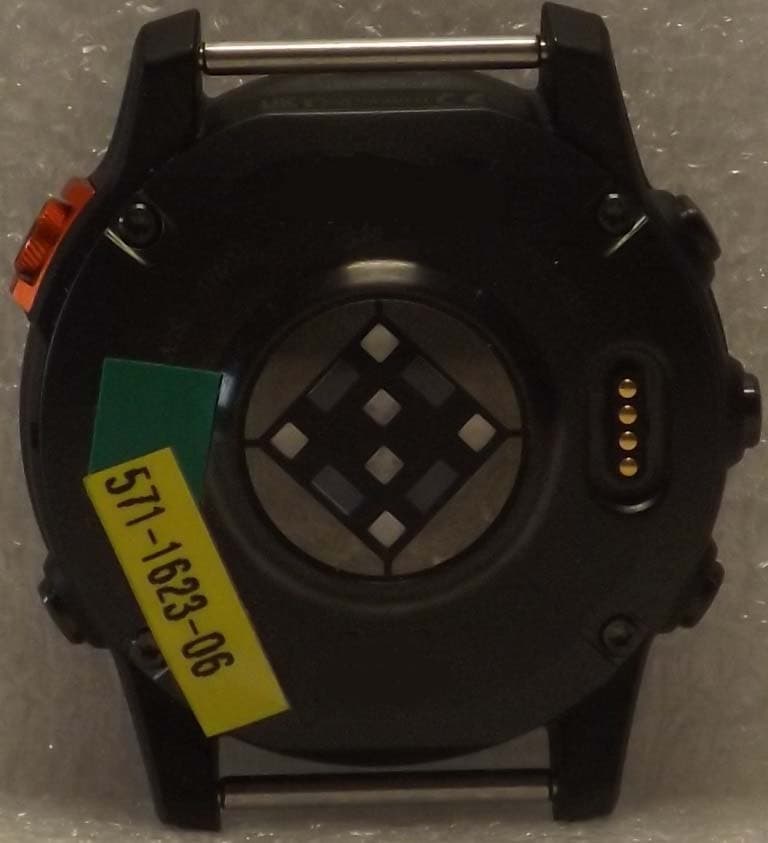
Click to zoom
Application Details
- Equipment Class
- DTS - Digital Transmission System
- Date of Grant
- May 30, 2023
- Application Purpose
- Original Equipment
- Date of Application
- May 03, 2023
- Equipment Note
- Extremity Worn Digital Transceiver
- Frequency Range
- 2412.00000000 - 2462.00000000
- Company
- Garmin International Inc
- Country
- United States
Documents & Files
Document Text
Text extracted from the exhibit documents filed with the FCC. Open a document above to read the original.
Users Manual
CONFIDENTIAL This drawing and the specifications contained herein are the property of GARMIN Ltd. or its subsidiaries and may not be reproduced or used in whole or in part as the basis for manufacture or sale of products without written permission. Garmin Ltd. or its subsidiaries C/O Garmin International, Inc. 1200 E. 151 st Street Olathe, Kansas 66062 USA Sheet 1 of 1 Specification Control Document Drawing Number: 190-02837-94 Description: fenix 7 Pro Graphical Quick Start Manual (WW) Revision: A Drawn By: KJC 03/23/23 Revision History Rev. Date Description of Change ECO No. A 03/23/23 Production Release ---- Printing Specifications Tolerance: ±0.0787" (±2 mm) Material: 100-lb matte finish offset. Approved equivalents allowed. Color: 4-color process. Bindery: Not applicable Folds: See drawing. Trimmed Dimensions: See drawing. Finished Dimensions: See drawing. Content Management System (CMS) Details GUID: NA Version: NA Printed Languages EN-US, FR-FR, IT-IT, DE-DE, ES-XM, PT-BR Notes InDesign source files. 0º to 45ºC (32º to 113ºF) -20º to 45ºC (-4º to 113ºF) fenix7pro_qsm.indd 1fenix7pro_qsm.indd 13/23/2023 12:59:40 PM3/23/2023 12:59:40 PM 190-02837-94_0A March 2023 Printed in Taiwan support.garmin.com © 2023 Garmin Ltd. or its subsidiaries. Garmin ® , the Garmin logo, and fēnix ® are trademarks of Garmin Ltd. or its subsidiaries, registered in the USA and other countries. Garmin Connect TM is a trademark of Garmin Ltd. or its subsidiaries. The BLUETOOTH ® word mark and logos are owned by the Bluetooth SIG, Inc. and any use of such marks by Garmin is under license. NameM/NWireless FrequencyEU SAR (W/kg) DAS UE (W/kg) fēnix 7S A045222.4 GHz @ 19.5 dBm maximum0.12 limb; 0.11 torso 0,12 membre; 0,11 tronc fēnix 7A045232.4 GHz @ 19.5 dBm maximum0.26 limb; 0.22 torso 0,26 membre; 0,22 tronc fēnix 7XA045242.4 GHz @ 19.5 dBm maximum0.29 limb; <0.10 torso 0,29 membre; <0,10 tronc El número de registro COFETEL/IFETEL puede ser revisado en el manual a través de la siguiente página de internet. fenix7pro_qsm.indd 2fenix7pro_qsm.indd 23/23/2023 12:59:45 PM3/23/2023 12:59:45 PM PartInformation: SpecItemAttributionReport1 of1Item: 190-02837-94 Rev:A IR#160249Creation Date: 23-Mar-2023 01:36 PM CST GPN:190-02837-94 Description:fenix 7 Pro Graphical Quick Start Manual (WW) Part Type:Manuals / Printed Literature Lifecycle Phase:Production Rev:A IR#160249 ItemAttribution: Document Review Required: Item Notes: ESD Sensitive: Moisture Sensitive: Limited Shelf Life: Magnetic Sensitive: Part Approval Requirements: Part Number Predecessor:Revision: AdditionalRequirements: Compliance Requirement:(-00) This part shall comply with Garmin Banned & Restricted Substances document 001-00211-00. Component RoHS Requirement:This part will not require RoHS Compliance Additional Requirement: DrawingRevisiontoPartVersion:
Users Manual
FĒNIX ® 7 SERIES Owner’s Manual © 2022 Garmin Ltd. or its subsidiaries All rights reserved. Under the copyright laws, this manual may not be copied, in whole or in part, without the written consent of Garmin. Garmin reserves the right to change or improve its products and to make changes in the content of this manual without obligation to notify any person or organization of such changes or improvements. Go to www.garmin.com for current updates and supplemental information concerning the use of this product. Garmin ® , the Garmin logo, fēnix ® , ANT ® , ANT+ ® , Approach ® , Auto Lap ® , Auto Pause ® , Edge ® , inReach ® , QuickFit ® , TracBack ® , VIRB ® , Virtual Partner ® , and Xero ® are trademarks of Garmin Ltd. or its subsidiaries, registered in the USA and other countries. Body Battery ™ , Connect IQ ™ , Firstbeat Analytics ™ , Garmin AutoShot ™ , Garmin Connect ™ , Garmin Explore ™ , Garmin Express ™ , Garmin Golf ™ , Garmin Index ™ , Garmin Move IQ ™ , Garmin Pay ™ , Health Snapshot ™ , HRM-Dual ™ , HRM-Pro ™ , HRM-Run ™ , HRM-Swim ™ , HRM-Tri ™ , NextFork ™ , Rally ™ , SatIQ ™ , tempe ™ , Varia ™ , and Vector ™ are trademarks of Garmin Ltd. or its subsidiaries. These trademarks may not be used without the express permission of Garmin. Android ™ is a trademark of Google LLC. Apple ® , iPhone ® , iTunes ® , and Mac ® are trademarks of Apple Inc., registered in the U.S. and other countries. The BLUETOOTH ® word mark and logos are owned by the Bluetooth SIG, Inc. and any use of such marks by Garmin is under license. The Cooper Institute ® , as well as any related trademarks, are the property of The Cooper Institute. Di2 ™ is a trademark of Shimano, Inc. Shimano ® is a registered trademark of Shimano, Inc. iOS ® is a registered trademark of Cisco Systems, Inc. used under license by Apple Inc. STRAVA and Strava ™ are trademarks of Strava, Inc. Training Stress Score ™ (TSS), Intensity Factor ™ (IF), and Normalized Power ™ (NP) are trademarks of Peaksware, LLC. Wi‑Fi ® is a registered mark of Wi-Fi Alliance Corporation. Windows ® is a registered trademark of Microsoft Corporation in the United States and other countries. Zwift ™ is a trademark of Zwift, Inc. Other trademarks and trade names are those of their respective owners. This product is ANT+ ® certified. Visit www.thisisant.com/directory for a list of compatible products and apps. Table of Contents Introduction......................................1 Getting Started........................................1 Device Overview......................................1 Enabling and Disabling the Touchscreen........................................2 Using the Watch......................................2 Clocks..............................................2 Setting an Alarm......................................2 Editing an Alarm..................................2 Starting the Countdown Timer...............3 Deleting a Timer..................................3 Using the Stopwatch...............................4 Adding Alternate Time Zones.................4 Editing an Alternate Time Zone..........5 Activities and Apps...........................5 Starting an Activity..................................5 Tips for Recording Activities..............5 Stopping an Activity................................6 Evaluating an Activity..........................6 Running....................................................6 Going for a Track Run.........................6 Tips for Recording a Track Run......7 Going for a Virtual Run........................7 Calibrating the Treadmill Distance.....7 Recording an Ultra Run Activity..........7 Swimming................................................8 Swim Terminology...............................8 Stroke Types........................................8 Tips for Swimming Activities..............8 Auto Rest and Manual Rest................9 Training with the Drill Log...................9 Multisport................................................9 Triathlon Training................................9 Creating a Multisport Activity...........10 Indoor Activities....................................10 Health Snapshot™.............................10 Recording a Strength Training Activity...............................................11 Recording a HIIT Activity..................11 Using an Indoor Trainer....................12 Climbing Sports.....................................12 Recording an Indoor Climbing Activity...............................................12 Recording a Bouldering Activity.......13 Starting an Expedition...........................13 Recording a Track Point Manually...13 Viewing Track Points........................13 Going Hunting.......................................14 Marine Activities...................................14 Sailing.................................................14 Tack Assist....................................14 Calibrating the Tack Assist.......15 Entering a Fixed Tack Angle......15 Entering a True Wind Direction.....................................15 Tips for Getting the Best Lift Estimate.....................................15 Sail Racing.....................................15 Setting the Starting Line............16 Starting a Race...........................16 Water Sports......................................17 Viewing Your Water Sport Runs....17 Fishing................................................17 Going Fishing.................................17 Tides...................................................17 Viewing Tide Information..............17 Setting a Tide Alert....................18 Anchor................................................18 Marking Your Anchor Location.....18 Anchor Settings.............................19 Skiing and Winter Sports......................19 Viewing Your Ski Runs......................19 Recording a Backcountry Skiing or Snowboarding Activity......................19 Cross-Country Skiing Power Data....19 Golfing.....................................…
Text truncated - open the document above for the full version.
Users Manual
Tips for Erratic Heart Rate Data If the heart rate data is erratic or does not appear, you can try these tips. •Clean and dry your arm before putting on the watch. •Avoid wearing sunscreen, lotion, and insect repellent under the watch. •Avoid scratching the heart rate sensor on the back of the watch. •Wear the watch above your wrist bone. The watch should be snug but comfortable. •Wait until the icon is solid before starting your activity. •Warm up for 5 to 10 minutes and get a heart rate reading before starting your activity. NOTE: In cold environments, warm up indoors. •Rinse the watch with fresh water after each workout. •While exercising, use a silicone band. Wrist Heart Rate Monitor Settings Hold MENU, and select Sensors & Accessories > Wrist Heart Rate. Status: Enables or disables the wrist heart rate monitor. The default value is Auto, which automatically uses the wrist heart rate monitor unless you pair an external heart rate monitor. NOTE: Disabling the wrist heart rate monitor also disables the wrist-based pulse oximeter sensor. You can perform a manual reading from the pulse oximeter glance. While Swimming: Enables or disables the wrist heart rate monitor during swimming activities. Abnormal Heart Rate Alerts: Allows you to set the watch to alert you when your heart rate exceeds or drops below a target value (Setting an Abnormal Heart Rate Alert, page 75). Broadcast Heart Rate: Allows you to begin broadcasting your heart rate data to a paired device (Broadcasting Heart Rate Data, page 76). Setting an Abnormal Heart Rate Alert CAUTION This feature only alerts you when your heart rate exceeds or drops below a certain number of beats per minute, as selected by the user, after a period of inactivity. This feature does not notify you of any potential heart condition and is not intended to treat or diagnose any medical condition or disease. Always defer to your health care provider for any heart-related issues. You can set the heart rate threshold value. 1Hold MENU. 2Select Sensors & Accessories > Wrist Heart Rate > Abnormal Heart Rate Alerts. 3Select High Alert or Low Alert. 4Set the heart rate threshold value. Each time your heart rate exceeds or drops below the threshold value, a message appears and the watch vibrates. Sensors and Accessories75 Broadcasting Heart Rate Data You can broadcast your heart rate data from your watch and view it on paired devices. Broadcasting heart rate data decreases battery life. TIP: You can customize the activity settings to broadcast your heart rate data automatically when you begin an activity (Activities and App Settings, page 32). For example, you can broadcast your heart rate data to an Edge device while cycling. 1Select an option: •Hold MENU, and select Sensors & Accessories > Wrist Heart Rate > Broadcast Heart Rate. •Hold LIGHT to open the controls menu, and select . NOTE: You can add options to the controls menu (Customizing the Controls Menu, page 71). 2Press START. The watch starts broadcasting your heart rate data. 3Pair your watch with your compatible device. NOTE: The pairing instructions differ for each Garmin compatible device. See your owner's manual. 4Press STOP to stop broadcasting your heart rate data. Pulse Oximeter Your watch has a wrist-based pulse oximeter to gauge the peripheral saturation of oxygen in your blood (SpO2). As your altitude increases, the level of oxygen in your blood can decrease. Knowing your oxygen saturation can help you determine how your body is acclimating to high altitudes for alpine sport and expedition. You can manually begin a pulse oximeter reading by viewing the pulse oximeter glance (Getting Pulse Oximeter Readings, page 77). You can also turn on all-day readings (Setting the Pulse Oximeter Mode, page 77). When you view the pulse oximeter glance while you are not moving, your watch analyzes your oxygen saturation and your elevation. The elevation profile helps indicate how your pulse oximeter readings are changing, relative to your to elevation. On the watch, your pulse oximeter reading appears as an oxygen saturation percentage and color on the graph. On your Garmin Connect account, you can view additional details about your pulse oximeter readings, including trends over multiple days. For more information about pulse oximeter accuracy, go to garmin.com/ataccuracy. 76Sensors and Accessories The elevation scale. A graph of your average oxygen saturation readings for the last 24 hours. Your most recent oxygen saturation reading. The oxygen saturation percentage scale. A graph of your elevation readings for the last 24 hours. Getting Pulse Oximeter Readings You can manually begin a pulse oximeter reading by viewing the pulse oximeter glance. The glance displays your most recent blood oxygen saturation percentage, a graph of your hourly average readings for the last 24 hours, and a graph of your elevation for the last 24 hours. NOTE: The first time you view the pulse oximeter glance, the watch must acquire satellite signals to determine your elevation. You should go outside, and wait while the watch locates satellites. 1While you are sitting or inactive, press UP or DOWN to view the pulse oximeter glance. 2Press START to view glance details and begin a pulse oximeter reading. 3Remain motionless for up to 30 seconds. NOTE: If you are too active for the watch to get a pulse oximeter reading, a message appears instead of a percentage. You can check again after several minutes of inactivity. For best results, hold the arm wearing the watch at heart level while the watch reads your blood oxygen saturation. 4Press DOWN to view a graph of your pulse oximeter readings for the last seven days. Setting the Pulse Oximeter Mode 1Hold MENU. 2Select Sensors & Accessories > Pulse Oximeter > Pulse Ox Mode. 3Select an option: •To turn off automatic measurements, select Manual Check. •To turn on continuous measurements while you sleep, select During Sleep. NOTE: Unusual sleep positions can cause abnormally low sleep-t…
Text truncated - open the document above for the full version.
Users Manual
IMPORTANT SAFETY AND PRODUCT INFORMATION WARNING Failure to heed the following warnings could result in an accident or medical event resulting in death or serious injury. Marine Warnings If your device provides tide information, this feature is for informational purposes only. It is the user's responsibility to heed all posted tide or water related guidance, to remain aware of your surroundings, and to use safe judgment around the water at all times. Failure to heed this warning could result in property damage, serious personal injury, or death. If your device includes the anchor feature, you should use it as a tool for situational awareness only, as it may not prevent groundings or collisions in all circumstances. You are responsible for safe and prudent operation of your vessel, for remaining aware of your surroundings, and for using safe judgment on the water at all times. Failure to heed this warning could result in property damage, serious personal injury, or death. Battery Warnings A lithium-ion battery is used in this device. If these guidelines are not followed, batteries may experience a shortened life span or may present a risk of damage to the device, fire, chemical burn, electrolyte leak, and/or injury. • Do not expose the device or batteries to fire, explosion, or other hazard. • Do not disassemble, modify, remanufacture, puncture, or damage the device or batteries. • Do not remove or attempt to remove the non-user-replaceable battery. Device Warnings • To avoid possible device damage, do not leave the device exposed to a heat source or in a high-temperature location, such as in the sun in an unattended vehicle. • Do not operate or store the device for an extended time period outside of the applicable temperature range listed in the printed manual in the product packaging. • Do not use a power cable, data cable, and/or power adapter that is not supplied by Garmin ® or is not properly certified. Health Warnings • If you have a pacemaker or other internal electronic device, consult your physician before using a heart rate monitor. • The optical wrist heart rate monitor and pulse oximeter emit lights and flash occasionally. Consult your physician if you have epilepsy or are sensitive to bright or flashing lights. • This device may have a flashlight that can be programmed to flash at various intervals. Consult your physician if you have epilepsy or are sensitive to bright or flashing lights. • Always consult your physician before beginning or modifying any exercise program. • The device, accessories, heart rate monitor, pulse oximeter, and related data are intended to be used only for recreational purposes, not medical purposes, and are not intended to diagnose, monitor, treat, cure, or prevent any disease or condition. • The heart rate and blood oxygen saturation readings are for reference only, and no responsibility is accepted for the consequences of any erroneous readings. • While the optical wrist heart rate monitor and pulse oximeter technologies typically provide accurate estimates of a user's heart rate and blood oxygen saturation respectively, there are inherent limitations with the technologies that may cause some of the readings to be inaccurate under certain circumstances, including the user's physical characteristics, device fit and position, and type and intensity of activity. • Activity trackers rely on sensors that track your movement and other metrics. The data provided by these devices is intended to be a close estimation of your activity and metrics tracked, but may not be completely accurate. Safety and Tracking Warning The assistance feature allows you to send your location to an emergency contact. This is a supplemental feature and should not be relied upon as a primary method to obtain emergency assistance. The Garmin Connect ™ app does not contact emergency services on your behalf. The incident detection feature is only available during certain outdoor activities. For more information, see the device owner's manual. Bicycle Warnings • Always use your best judgement, and operate the bicycle in a safe manner. • Make sure your bicycle and hardware are properly maintained and that all parts are correctly installed. Navigation Warnings If your Garmin device uses or accepts map data, follow these guidelines to ensure safe navigating. • Always carefully compare information displayed on the device to all available navigation sources, including weather conditions, maps, street/ trail signs and conditions, waterway restrictions, and other factors that may affect safety. Always resolve any discrepancies or questions before continuing navigation, and defer to posted signs and conditions. • Use this device only as a navigational aid. Do not attempt to use the device for any purpose requiring precise measurement of direction, distance, location, or topography. • Always use your best judgment and exercise common sense when making off-road navigational decisions. The device is designed to provide route suggestions only. It is not a replacement for attentiveness and proper preparation for outdoor activities. Do not follow the route suggestions if they suggest an illegal course or would put you in an unsafe situation. • Always be mindful of the effects of the environment and the inherent risks of the activity before embarking on off-road activities, especially the impact that weather and weather-related trail conditions can have on the safety of your activity. Ensure that you have the proper gear and supplies for your activity before navigating unfamiliar paths and trails. CAUTION Failure to heed the following cautions could result in minor or moderate injury, or property damage. Skin Irritation Some users may experience skin irritation after prolonged use of the watch, especially if the user has sensitive skin or allergies. If you notice any skin irritation, remove the watch and give your skin time to heal. To help prevent skin irritation, ensure the watch is clean and dr…
Text truncated - open the document above for the full version.
Attestation Statements
Federal Communications Commission Authorization and Evaluation Division 1435 Oakland Mills Road Columbia, MD 21046 Date: April 1, 2023 SUBJECT: FCC Application for FCC ID: IPH-A04523 To Whom It May Concern: Garmin International, Inc. will continue to apply processes and procedures to ensure compliance with 47 CFR 2 requirements regarding products produced under Supplier’s Declaration of Conformity procedure for class B computer peripheral portion as applicable to this composite filing. Sincerely, Ben Karsak Manager Compliance Engineering Garmin International, Inc.
Attestation Statements
Rev 1/26/2023 Federal Communications Commission Authorization and Evaluation Division 7435 Oakland Mills Road Columbia, MD 21046 USA Date: January 30, 2023 Ref: Attestation Statements Part 2.911(d)(5)(i) Filing FCC ID: IPH-A04523 Garmin International, Inc., Garmin (“the applicant”) certifies that, as of the date of the filing of the application, the applicant is not identified on the Covered List as an entity producing “covered” equipment. Sincerely, Ben Karsak
Attestation Statements
Rev 1/26/2023 Federal Communications Commission Authorization and Evaluation Division 7435 Oakland Mills Road Columbia, MD 21046 USA Date: January 30, 2023 Ref: Attestation Statements Part 2.911(d)(5)(ii) Filing FCC ID: IPH-A04523 Garmin International, Inc., Garmin (“the applicant”) certifies that the equipment for which authorization is sought is not “covered” equipment prohibited from receiving an equipment authorization pursuant to section 2.903 of the FCC rules. Sincerely, Ben Karsak
Attestation Statements
Rev 1/26/2023 Federal Communications Commission Authorization and Evaluation Division 7435 Oakland Mills Road Columbia, MD 21046 USA Date: January 30, 2023 Ref: Attestation Statements Part 2.911(d)(7) Filing FCC ID: IPH-A04523 Garmin International, Inc., Garmin certifies that, as of the date of the filing of the application, Garmin International, Inc.. is our designated U.S. agent for service of process for the above referenced FCC ID. Garmin International, Inc., accepts to maintain an agent for no less than one year after the grantee has terminated all marketing and importation or the conclusion of any Commission-related proceeding involving the equipment. Garmin International, Inc. accepts, as of the date of the filing of the application, the obligation of the designated U.S. agent for service of process for the above referenced FCC ID. Designated U.S. Agent Information: FRN: 0005088588 Name: Garmin International, Inc. Address: 1200 East 151 st Street, Olathe, Kansas, 66062 Contact Person: Ben Karsak Tel.: 913-397-8200 Email: [email protected] Sincerely, Garmin International, Inc. Ben Karsak
Cover Letter(s)
February 2, 2023 Federal Communications Commission Equip Approval Services Post Office Box 358315 Pittsburgh, Pennsylvania 15215-5315 To Whom It May Concern: Pursuant to 47 CFR 2.911, Garmin International, Inc. (Garmin) has authorized Art Voss, Technical Manager, Celltech, 21-364 Lougheed Rd, Kelowna, BC, V1X 7R8, Canada to act on Garmin’s behalf for the sole and express purpose of processing applications to the Federal Communication Commission (FCC) for equipment FCC authorization. This authorization is limited to FCC ID: IPH-A04523. Consistent with the foregoing, Art Voss is authorized to: 1) Sign Form 731, 2) Sign letters of application, 3) Request confidentiality, and 4) Exchange data and information with the FCC, and authorized TCBs on behalf of Garmin. This authorization is not assignable to other beyond Art Voss. No party to this application is subject to a denial of benefits, including FCC benefits, pursuant to Section 5301 of the Anti-Drug Abuse Act of 1988, 21 U.S.C 862. We also declare that the information provided to the FCC is true and correct to the best of our knowledge (47 CFR 2.911(d)) and we have been informed of the grantee responsibilities (47 CFR 2.909) with regard to certified equipment. This authorization expires February 2, 2024. Sincerely, Chris Strauss Compliance Team Leader
Cover Letter(s)
May 6, 2022 Federal Communications Commission Authorization and Evaluation Division 1435 Oakland Mills Road Columbia, MD 21046 Innovation, Science and Economic Development Canada Certification and Engineering Bureau 3701 Carling Avenue PO Box 11490, Station H Ottawa, Ontario, Canada K2H 8S2 To Whom It May Concern: Pursuant to 47 CFR 2.911, Garmin International, Inc. (Garmin) has authorized the following Garmin International Associates to act on Garmin's behalf for the sole and express purpose of processing applications to the Federal Communication Commission (FCC) and Innovation, Science and Economic Development Canada (ISED) for equipment authorization or certification. Mr. Chris Strauss, Compliance Engineering Team Lead Mr. William Pertner, Compliance Engineering Team Lead Mr. Jay Everett, Compliance Engineering Team Lead Mr. Mike Moranha, Compliance Engineer Ms. Poojita Bhattu, Compliance Engineer Mr. Doug Burroughs, Compliance Engineer Mr. Jeffrey Hailey, Compliance Engineer Mr. Dan Irish, Compliance Engineer Mr. Kiran Kumar, Compliance Engineer Mr. Tim Olson, Compliance Engineer Mr. Carlos Ortega, Compliance Engineer Mr. Cody Riggle, Compliance Engineer Mr. David Utt, Staff Compliance Engineer Mr. Jonathan Shafer, Design Certification Engineer Ms. Sara Jones, Design Certification Engineer As such, the Garmin Associates listed above are authorized to: 1) sign Form 731, 2) sign letters of application, 3) request confidentiality, and 4) exchange data and information with the FCC, IC and/or authorized TCBs on behalf of Garmin. In addition, these individuals shall be considered "authorized individuals" to act on Garmin's behalf where an "authorized individual's" attestation is necessary or preferred. This authorization remains in effect until notified to the contrary by Garmin. Sincerely, Ben Karsak Manager Compliance Engineering Garmin International, Inc.
Cover Letter(s)
Timco Engineering Inc. 849 NW State Road 45 Newberry, FL 32669 Re: Confidentiality for submittal information regarding FCC ID: IPH-A04523 Product: Transmitter operated under 47CFR Section 15C Dear Sirs: Garmin International, Inc. requests that the material in the Block Diagram, Operational Description, and Schematics be withheld from public disclosure pursuant to Sections 0.457 and 0.459 of the Commission’s Rules following grant of the application. In support of this request, Garmin International, Inc. submits the following information. CONFIDENTIAL FILES A04523 Block Diagram.pdf Exhibit 10 – Block Diagram A04523 Operating Description.pdf Exhibit 11 – Operation Description A04523 Schematic.pdf Exhibit 12 – Schematic Diagram 1. Identification of the specific information for which confidential treatment is sought: The materials set forth in the Block Diagram, Operational Description, and Schematics which are segregated, from the non-confidential exhibits of the application, are those for which confidentiality is sought. 2. Identification of the Commission proceeding in which the information was submitted or a description of the circumstances giving rise to the submission: The proceeding is that involving the application for equipment authorization (certification) under FCC ID: IPH-A04523 3. Explanation of the degree to which the information is commercial or financial, or contains a trade secret or is privileged: This material includes a detailed Block Diagram, Operational Description, and Schematics. As such, this material is treated as highly confidential business information. 4. Explanation of the degree to which the information concerns a service that is subject to competition: The material for which confidentiality is sought is employed in the design and manufacture of this transmitting equipment that is offered on a highly competitive basis. Customers for this equipment have a variety of competing sources. 5. Explanation of how disclosure of the information could result in substantial competitive harm: Disclosure would, in effect, give away the fruits of the labors of Garmin International, Inc.’s engineering personnel, who have designed the equipment and the manufacturing process. Disclosure would also offer competitors additional unwarranted insight into the state of the product development, thereby allowing competitors an advantage, not available to Garmin International, Inc. 6. Identification of any measures taken by the submitting party to prevent unauthorized disclosure: The information for which confidential treatment is sought is kept confidential by Garmin International, Inc. and not made available to third parties except pursuant to non-disclosure agreements. 7. Identification of whether the information is available to the public and the extent of any previous disclosure of the information to third parties: To the knowledge of those preparing this application, the information has not been disclosed publicly heretofore. While the general theory of operation of this equipment has been the subject of numerous disclosures in industry the protection sought is narrowly drawn as provided in regulations. 8. Justification of the period during which the submitting party asserts that the material should not be available for public disclosure: This mat…
Text truncated - open the document above for the full version.
Contact Information
Applicant
Ben Karsak(Manager, Compliance Engineering)
Test Firm
CELLTECH LABS INC.Ben Hewson
Technical Specifications
| # | Rule Parts | Frequency Range | Power Output |
|---|---|---|---|
| 1 | 15C | 2.41 GHz - 2.46 GHz | 60.00 mW |
Other Applications from Garmin International Inc
IPH-05126
Sep 09, 2026Portable Digital Transceiver
Equipment Class
NII - Unlicensed National Information Infrastructure TXIPH-A5126
Sep 09, 2026Portable Digital Transceiver
Equipment Class
NII - Unlicensed National Information Infrastructure TXIPH-04812
Sep 01, 2026Mobile Digital Transceiver
Equipment Class
DTS - Digital Transmission SystemIPH-A04825
Sep 01, 2026Marine Stereo
Equipment Class
DSS - Part 15 Spread Spectrum TransmitterIPH-B04825
Sep 01, 2026Marine Stereo
Equipment Class
DSS - Part 15 Spread Spectrum Transmitter