KBCIX-NW620IX-NW620 CDMA/EV-DO
General Dynamics Itronix Corporation
Click to zoom
Application Details
- Equipment Class
- PCB - PCS Licensed Transmitter
- Date of Grant
- Mar 13, 2007
- Application Purpose
- Original Equipment
- Date of Application
- Mar 13, 2007
- Equipment Note
- IX-NW620 CDMA/EV-DO
- Frequency Range
- 824.70000000 - 848.31000000
- Country
- United States
Documents & Files
Document Text
Text extracted from the exhibit documents filed with the FCC. Open a document above to read the original.
Users Manual
Getting Started Congratulations on your purchase of the Itronix GoBook PRO II computer! Your new GoBook PRO II features the most innovative advances in portable computing technology. It combines state-of-the-art ergonomics with sophisticated architecture to provide you with a personal computer that is compact, powerful, and easy to use. Designed for a wide range of general, business, and personal productivity applications, the semi-rugged, wireless ready GoBook PRO II is an ideal choice wherever you need a computer; in the office, at home, and on the road. Your GoBook II is both expandable and portable, supporting the features you expect in a desktop computer but with the mobility of a laptop. This online document, GoBook PRO II Help, contains all the information you need to set up and use your new GoBook PRO II. For information on printing, navigating or otherwise using GoBook PRO II Help see the How to Use This Help System topics. Unpacking Your System Inside your packaging you will find: GoBook ® PRO II Help Page 1 of 100GoBook PRO II Help 5/16/2005file://C:\Documents%20and%20Settings\barvillj.ITRXNT1\Local%20Settings\Temp\~hh7... Standard Options Where to Look For Information Features This computer was designed with the user in mind. Here are just a few of its many features: Performance Multimedia Connectivity Human-centric design and ergonomics Expansion See Specifications for more information. The First Time. . . Before using your computer, install the battery and then attach the computer to AC power. Installing the battery: 72_0128_001 16 May 2005 © 2005 Itronix Corporation. All rights reserved. GoBook ® PRO II Help 72_0128_001 16 May 2005 © 2005 Itronix Corporation. All rights reserved. GoBook ® PRO II Help 1. Line up the battery connectors. 2. Press gently on the battery until it clicks into place. Page 2 of 100GoBook PRO II Help 5/16/2005file://C:\Documents%20and%20Settings\barvillj.ITRXNT1\Local%20Settings\Temp\~hh7... Attaching AC Power: Begin Using the Computer 3. Slide the battery locks toward the outside of the computer to lock the battery. 1. Connect the AC adapter power cord to the AC adapter. 2. Connect the AC adapter to the DC power port on the rear panel of your computer. 3. Connect the AC adapter power cord to a properly grounded AC outlet. NOTE It is recommended you use a quality surge protector . insert picture 1. Slide the display cover release latch to the right. 2. Open the display to a comfortable viewing angle. 3. Press the power switch to turn on the power. The POST (power-on self-test) routine executes and Windows begins loading. NOTE When using a battery pack for the first time, fully charge the battery, then Page 3 of 100GoBook PRO II Help 5/16/2005file://C:\Documents%20and%20Settings\barvillj.ITRXNT1\Local%20Settings\Temp\~hh7... Turning off Your Computer Turning off the computer properly is important to maintaining your computer. Select Start, Shut Down and follow the instructions on the screen. If you are going to be away from the computer for a short period, there are ways to conserve power without shutting down the system. See Power Saving Modes for details. NOTE If you are unable to shut down your computer normally, press and hold the power button more than four seconds to turn off the computer. If you turn off the computer and want to turn it on again, wait at least two seconds before powering up. CAUTION Shutting off the computer improperly may result in data loss. Loading Windows This section is for installing the Windows operating system only. If you are installing a different operating system, please check with your vendor for installation details. Your computer will begin loading Windows once you turn on the power. Wait a few seconds for Windows setup to load. The Windows setup will prompt you for the product key number. You can find the product key number on a sticker attached to the bottom of the computer. 1. Type your name, and, if applicable, the name of your company. 2. Read the End User's License Agreement. Click Next to accept it. 3. Enter the product key number. You can find this on the Certificate of Authenticity on a sticker attached to the computer. Click Finish . 4. The Start Wizar d will prompt you to set the date, and your local time. disconnect the adapter to use up the battery before recharging again. Perform this action twice to condition the battery pack. Calibrating the battery before use is also highly recommended. Refer to Power Management, for more information. 72_0128_001 16 May 2005 © 2005 Itronix Corporation. All rights reserved. GoBook ® PRO II Help Page 4 of 100GoBook PRO II Help 5/16/2005file://C:\Documents%20and%20Settings\barvillj.ITRXNT1\Local%20Settings\Temp\~hh7... Some software comes pre-loaded with Windows. New users can familiarize themselves with this software by selecting All Programs from the start menu, then clicking on programs to run them. CAUTION When you are installing the Windows operating system and enter the product key number, we strongly recommend connecting the AC adapter - DO NOT use battery alone to avoid warning messages. Startup Problems? If your computer does not operate, try these solutions. z Connect the AC adapter to charge the battery if it is not charged. NOTE The Power LED on the AC adapter should be lit as well as the External Power Indicator on the GoBook PRO II if the AC adapter is connected and functioning properly. Additionally, one of the power icons should appear in the task tray. z If the AC adapter is connected but the unit will still not turn on, make sure the electrical outlet you are using works. z Check to make sure the battery is installed and charged properly. z If the battery does not begin charging, remove the battery, connect the AC adapter, and turn on the computer by pressing the Power Button. Reinstall the battery. The Battery Indicator is solid orange while the battery is charging. The Troubleshooting section lists additional solutions you can try. Safety and Erg…
Text truncated - open the document above for the full version.
Users Manual
GoBook ® PRO II Radio Specific Safety Information Identification GoBook PRO II (IX600) Radio Specific Safety Information October 2005 · Revision 001 Copyright Notice © Copyright 2005 Itronix Corporation. All rights reserved. No part of this document may be reproduced, transmitted, transcribed, stored in a retrieval system, or translated into any other language or computer language in whole or in part, in any form or by anymeans, whether it be electronic, mechanical, magnetic, optical, manual, or otherwise, without the prior written consent of Itronix Corporation, 12825 E. Mirabeau Parkway, Spokane Valley, Washington 99216. Disclaimer This document is printed in the U.S.A. Itronix Corporation reserves the right to revise the manual and make periodic changes to the content without a direct or inferred obligation to Itronix to notify any person of such revision or changes. Itronix Corporation does not assume responsibility for the use of this help manual, nor for any patent infringements or other rights or third parties who may use the manual. This document contains valuable trade secrets and proprietary information of Itronix Corporation. This product is available for purchase under the terms of the Itronix Hardware Purchase and Software License Agreement. Itronix hardware products may be reconditioned, or be manufactured from parts and components that may be new, used, rebuilt, or recycled and in some cases, the hardware product may not be new and may have been previously installed. In any event, Itronix warranty terms apply. Trademark and Patent Notice Itronix is a registered trademark of Itronix Corporation. GoBook PRO II is a registered trademark of Itronix Corporation Microsoft, MS, Windows, and MS-DOS are registered trademarks of Microsoft Corporation. IBM is a trademark of International Business Machines Corporation. Warnings and Safety Information WARNING It is important that only authorized Itronix personnel attempt repairs on Itronix equipment as this might void any maintenance contract with your company. Unauthorized service personnel might be subject to shock hazard on some Itronix equipment if removal of protective covers is attempted. Changes or Modifications not expressly approved by the party responsible for compliance could void the users authority to operate the equipment. Internal radio(s) may display an individual FCCIdentifier which are not applicable to this configuration. Only the FCC Identifier(s) (KBCIX-NW620, KBCIX600-IWLBT, KBCIX600-IWL and KBCIX600-BT) displayed on the label located on the bottom side of the IX600 Laptop PC apply to this PC configuration. The radios installed in the IX600 Laptop PC must not be co-located or operating in conjunction with any other antenna or transmitter than specified within the FCC ID Certification(s) as displayed on the label. Safety Information This Laptop PC configuration contains a WWAN radio transmitter. When using the WWAN transmitter, a minimum separation distance of 20 cm must be maintained between the back of the display screen and all users/bystanders. The WWAN transmitter should be turned off before carrying the Laptop PC in order to comply with FCC/IC RF exposure requirements. © 2005 Itronix Corporation. All rights reserved.
Users Manual
Revision 7/7/05 VERIZON WIRELESS V620 USER MANUAL V V E E R R I I Z Z O O N N V V 6 6 2 2 0 0 U U S S E E R R M M A A N N U U A A L L Revision 7/7/05 2 WELCOME Congratulations on purchasing a Verizon Wireless V620 PC Card and VZAccess Manager. Using our wireless PC Card with your laptop, you can connect to the Internet, corporate intranet, and your email while you're away from the office at high speed. This manual will provide information needed to get started and effectively use your new PC Card and VZAccess Manager software. WIRELESS COMMUNICATIONS Important Notice Due to the transmission and reception properties of wireless communications, data can occasionally be lost or delayed. This can be due to the variation in radio signal strength that results from changes in the characteristics of the radio transmission path. Although data loss is rare, the environment where you operate the modem may adversely affect communications. Variations in radio signal strength are referred to as fading. Fading is caused by several different factors including signal reflection, the ionosphere, and interference from other radio channels. Verizon Wireless or its partners will not be held responsible for damages of any kind resulting from the delays or errors in data transmitted or received with the V620, or failure of the V620 to transmit or receive such data. SAFETY HAZARDS Do not operate the V620 in an environment that may be susceptible to radio interference resulting in danger specifically; ¾Areas where prohibited by the law oFollow any special rules and regulations and obey all signs and notices. Always turn off the host device and remove the modem from the card slot when instructed to do so, or when you suspect that it may cause interference or danger. ¾Where explosive atmospheres may be present oDo not operate your modem in any area where a potentially explosive atmosphere may exist. Sparks in such areas could cause an explosion or fire resulting in bodily injury or even death. Be aware and comply with all signs and instructions. oUsers are advised not to operate the modem while at a refueling point or service station. Users are reminded to observe restrictions on the use of radio equipment in fuel depots (fuel storage and distribution areas), chemical plants or where blasting operations are in progress. oAreas with a potentially explosive atmosphere are often but not always clearly marked. Potential locations can include gas stations, below deck on boats, chemical transfer or storage facilities, vehicles using liquefied petroleum gas (such as propane or butane), areas where the air contains chemicals or particles, such as grain, dust or metal powders, and any other area where you would normally be advised to turn off your vehicle engine. ¾Near Medical and life support equipment oDo not operate your modem in any area where medical equipment, life support equipment, or near any equipment that may be susceptible to any form of radio interference. In such areas, the host communications device must be turned off. The modem may transmit signals that could interfere with this equipment. ¾On an aircraft, either on the ground or airborne V V E E R R I I Z Z O O N N V V 6 6 2 2 0 0 U U S S E E R R M M A A N N U U A A L L Revision 7/7/05 3 oIn addition to FAA requirements, many airline regulations state that you must suspend wireless operations before boarding an airplane. Please ensure that the host device is turned off and your modem is removed from the card slot prior to boarding aircraft in order to comply with these regulations. The modem can transmit signals that could interfere with various onboard systems and controls. ¾While operating a vehicle oThe driver or operator of any vehicle should not operate a wireless data device while in control of a vehicle. Doing so will detract from the driver or operator's control and operation of that vehicle. In some countries, operating such communications devices while in control of a vehicle is an offence. LIMITATION OF LIABILITY The information contained in this document is subject to change without notice and should not be construed as a commitment by Verizon Wireless Inc. COPYRIGHT ©2005 Verizon Wireless, Inc. PATENTS AND LICENSES Licensed by QUALCOMM Incorporated under one or more of the following Patents: 4,901,307 5,490,165 5,056,109 5,504,773 5,101,501 5,506,865 5,109,390 5,511,073 5,228,054 5,535,239 5,267,261 5,544,196 5,267,262 5,568,483 5,337,338 5,600,754 5,414,796 5,657,420 5,416,797 5,659,569 5,710,784 5,778,338 Software Drivers License Proprietary Rights Provisions: The software drivers provided with this product are copyrighted by Verizon Wireless and/or Verizon Wireless’ suppliers. And although copyrighted, the software drivers are unpublished and embody valuable trade secrets proprietary to Verizon Wireless and/or Verizon Wireless’ suppliers. The disassembly, decompilation, and/or Reverse Engineering of the software drivers for any purpose is strictly prohibited by international law. The copying of the software drivers, except for a reasonable number of back-up copies is strictly prohibited by international law. It is forbidden by international law to provide access to the software drivers to any person for any purpose other than processing the internal data for the intended use of the software drivers. U.S. Government Restricted Rights Clause: The software drivers are classified as "Commercial Computer Software" and the U.S. Government is acquiring only "Restricted Rights" in the software drivers and their Documentation. U.S. Government Export Administration Act Compliance Clause: It is forbidden by US law to export, license or otherwise transfer the software drivers or Derivative Works to any country where such transfer is prohibited by the United States Export Administration Act, or any successor legislation, or in violation of the laws of any other country. V V E E R R I I Z Z O O N N V V 6 6 2 2 0 0 U U S S E E R R M M A A N N U U A A L L …
Text truncated - open the document above for the full version.
Cover Letter(s)
12825 E. Mirabeau Parkway SPOKANE VALLEY, W A 99216 509.624.6600 800.441.1309 FAX 509.626.4203 www.itronix.com February 21, 2007 Federal Communications Commission Equipment Authorization Branch 7435 Oakland Mills Road Columbia, MD 21046 Re: Itronix Corporation FCC ID: KBCIX-NW620 FCC Part 24(E) - Certification Request for Long-Term Confidentiality Pursuant to 47 CFR 0.457(d) and 47 CFR 0.459 of the FCC Rules, Itronix Corporation and Novatel Wireless Inc. hereby request confidentiality as outlined below: Exhibit Type File Name Schematics V620 Schematic.pdf Operational Description V620 Theory of Operation.pdf Tune Up Info V620 Tuning and Alignment Procedure.pdf Parts List V620 Parts List.pdf These documents contain detailed system and equipment description and related information about the product in which Itronix Corporation and Novatel Wireless Inc. consider proprietary, confidential, and a custom design and, otherwise, would not release to the general public. Since this design is a basis from which future technological products will evolve, Itronix Corporation and Novatel Wireless Inc. consider this information would be of benefit to its competitors, and that the disclosure of the information in these documents would give competitors an unfair advantage in the market. Sincerely,
Cover Letter(s)
Celltech Labs Inc. 1955 Moss Court, Kelowna, B.C. Canada V1Y 9L3 Tel. 250-448-7047 • Fax. 250-448-7046 • e-mail: [email protected] www.celltechlabs.com February 21, 2007 Timco Engineering, Inc. Telecommunication Certification Body 849 NW State Road 45 Newberry, FL 32669 SUBJECT: ITRONIX CORPORATION FCC ID: KBCIX-NW620 Part 24(E) - Certification Limited Modular Approval On behalf of Itronix Corporation is a Limited Modular Approval application for Part 24(E) Certification of the V620 Dual-Band CDMA/EV-DO PCMCIA Modem (manufactured by Novatel W ireless, Inc.) installed in the Itronix Corporation IX600 Series Rugged Laptop PC utilizing an internal SkyCross meandering line antenna installed behind the LCD display and a MaxRad vehicle-mount antenna utilized with the Itronix IX600 vehicle dock. The V620 Dual-Band CDMA/EV-DO PCMCIA Modem is installed in the IX600 Laptop PC by Itronix Corporation prior to shipment based on specific customer configuration requirements and is not intended for installation or reconfiguration by the end user. The V620 Dual-Band CDMA/EV-DO PCMCIA Modem can be co-located in the IX600 Laptop PC with an optional 802.11abg W LAN Mini- PCI Card Model: W M3B2915ABG (manufactured by Intel Corporation). A Limited Modular Approval Certification has been issued for the WLAN installed in the IX600 Laptop PC under the FCC ID: KBCIX600-IW L. The W LAN is installed in the IX600 Laptop PC by Itronix Corporation prior to shipment based on specific customer configuration requirements and is not intended for installation or reconfiguration by the end user. The W LAN and WWAN cannot transmit simultaneously (please refer to applicant’s radio management attestation letter). The V620 Dual-Band CDMA/EV-DO PCMCIA Modem can also be co-located in the IX600 Laptop PC with an optional Bluetooth Model: BCM92035NMD (manufactured by Broadcom Corporation). A Limited Modular Approval Certification has been issued for the Bluetooth installed in the IX600 Laptop PC under the FCC ID: KBCIX600-BT. The Bluetooth is installed in the IX600 Laptop PC by Itronix Corporation prior to shipment based on specific customer configuration requirements and is not intended for installation or reconfiguration by the end user. The WWAN and Bluetooth can transmit simultaneously. Radiated spurious emissions measurements were evaluated for co-transmit operation of the WW AN and Bluetooth and the results were in compliance. A Limited Modular Approval Certification has also been issued for the W LAN and Bluetooth co-located within the IX600 Laptop PC under the FCC ID: KBCIX600-IW LBT. The IX600 Laptop PC may be configured by Itronix Corporation to contain either the W LAN and/or Bluetooth with the WW AN depending on the specific customer requirement. Depending on the specific transmitter configuration(s) installed based on customer requirement, Itronix Corporation will label the IX600 Laptop PC with the associated FCC ID(s) as listed above and within this application. Device Model(s): IX-NW620 Device Classification: PCS Licensed Transmitter (PCB) Transmitter Type: Dual-Band CDMA(1xRTT)/EV-DO(Rev.0) PCMCIA Modem Host PC Type: Itronix IX600 Series Rugged Laptop PC Frequency Range(s): 1851.25 - 1908.75 MHz (PCS CDMA/EV-DO) 824.70 - 848.31 MHz (Cellular CDMA/EV-DO) Antenna Type(s) Tested: Internal SkyCross Meandering Line (P/N: 59-0479-004R) External MaxRad Vehicle-Mount (P/N: BMLPVDB800/1900) RF Exposure Category: Mobile Submitted within this application is the TCB Form 731, applicant’s agency authorization letter, applicant’s confidentiality request, applicant’s radio management attestation letter, Parts 24(E) and 22(H) EMC measurement report and test setup photographs, MPE RF exposure calculation data, FCC ID label(s) and location, internal and external device photographs, V620 user manual, IX600 user manual (provided to the user with the built-in software on the Laptop PC), Radio-Specific Safety Information (provided to the user in hard copy format), and the confidential exhibits (please refer to the applicant’s long-term confidentiality request letter submitted with this application for list of exhibits). If you have any questions or comments concerning the above, please contact the undersigned. Sincerely, Jonathan Hughes General Manager Celltech Labs Inc. cc: Itronix Corporation
External Photos
2007 Celltech Labs Inc. ITRONIX CORPORATION FCC ID: KBCIX-NW 620 (Model: IX-NW 620) Dual-Band CDMA/EV-DO PCMCIA Modem installed in IX600 Rugged Laptop PC Celltech Project No.: 804 Front of IX600 Rugged Laptop PC (PCMCIA Hatch Cover Removed) Back of IX600 Rugged Laptop PC (PCMCIA Hatch Cover Removed) EXTERNAL DUT PHOTOGRAPHS 2007 Celltech Labs Inc. ITRONIX CORPORATION FCC ID: KBCIX-NW 620 (Model: IX-NW 620) Dual-Band CDMA/EV-DO PCMCIA Modem installed in IX600 Rugged Laptop PC Celltech Project No.: 804 Left Side of IX600 Rugged Laptop PC Right Side of IX600 Rugged Laptop PC (PCMCIA Hatch Cover Removed) EXTERNAL DUT PHOTOGRAPHS 2007 Celltech Labs Inc. ITRONIX CORPORATION FCC ID: KBCIX-NW 620 (Model: IX-NW 620) Dual-Band CDMA/EV-DO PCMCIA Modem installed in IX600 Rugged Laptop PC Celltech Project No.: 804 EXTERNAL DUT PHOTOGRAPHS IX600 PCMCIA Hatch (P/N: 53-0040-001R) - Top View IX600 PCMCIA Hatch (P/N: 53-0040-001R) - Side View 2007 Celltech Labs Inc. ITRONIX CORPORATION FCC ID: KBCIX-NW 620 (Model: IX-NW 620) Dual-Band CDMA/EV-DO PCMCIA Modem installed in IX600 Rugged Laptop PC Celltech Project No.: 804 Bottom of IX600 Rugged Laptop PC Front of IX600 Rugged Laptop PC - LCD Display Closed EXTERNAL DUT PHOTOGRAPHS 2007 Celltech Labs Inc. ITRONIX CORPORATION FCC ID: KBCIX-NW 620 (Model: IX-NW 620) Dual-Band CDMA/EV-DO PCMCIA Modem installed in IX600 Rugged Laptop PC Celltech Project No.: 804 IX600 Rugged Laptop PC - Battery Compartment IX600 Rugged Laptop PC - Lithium-ion Battery Dual-Band CDMA/EV-DO Card installed in IX600 Rugged Laptop PC PCMCIA Slot IX600 Rugged Laptop PC - PCMCIA Slot EXTERNAL DUT PHOTOGRAPHS 2007 Celltech Labs Inc. ITRONIX CORPORATION FCC ID: KBCIX-NW 620 (Model: IX-NW 620) Dual-Band CDMA/EV-DO PCMCIA Modem installed in IX600 Rugged Laptop PC Celltech Project No.: 804 IX600 Rugged Laptop PC with AC Power Supply AC Power Supply EXTERNAL DUT PHOTOGRAPHS 2007 Celltech Labs Inc. ITRONIX CORPORATION FCC ID: KBCIX-NW 620 (Model: IX-NW 620) Dual-Band CDMA/EV-DO PCMCIA Modem installed in IX600 Rugged Laptop PC Celltech Project No.: 804 IX600 Rugged Laptop PC installed in Vehicle Cradle with MaxRad Vehicle-Mount Antenna IX600 Rugged Laptop PC installed in Vehicle Cradle EXTERNAL DUT PHOTOGRAPHS 2007 Celltech Labs Inc. ITRONIX CORPORATION FCC ID: KBCIX-NW 620 (Model: IX-NW 620) Dual-Band CDMA/EV-DO PCMCIA Modem installed in IX600 Rugged Laptop PC Celltech Project No.: 804 IX600 Vehicle Cradle (P/N: 50-0178-001R) Back of Vehicle Cradle MaxRad Vehicle-Mount Antenna (P/N: BMLPVDB800/1900) EXTERNAL DUT PHOTOGRAPHS
External Photos
2007 Celltech Labs Inc. ITRONIX CORPORATION FCC ID: KBCIX-NW 620 (Model: IX-NW 620) Dual-Band CDMA/EV-DO PCMCIA Modem installed in IX600 Rugged Laptop PC Celltech Project No.: 804 IX600 PCMCIA HATCH 2007 Celltech Labs Inc. ITRONIX CORPORATION FCC ID: KBCIX-NW 620 (Model: IX-NW 620) Dual-Band CDMA/EV-DO PCMCIA Modem installed in IX600 Rugged Laptop PC Celltech Project No.: 804 IX600 PCMCIA HATCHIX600 PCMCIA HATCH
External Photos
International Standards Laboratory Report Number: ISL-05LR018P HC LAB:NVLAP:200234-0;VCCI: R-341,C-354;NEMKO:ELA 113a,113c;BSMI:SL2-IN-E-0037;SL2-R1-E-0037;CNLA:1178 LT LAB:NVLAP:200234-0;VCCI: R-1435,C-1440;NEMKO:ELA 113b,113d;BSMI:SL2-IN-E-0013;CNLA:0997 -4- EUT-4. International Standards Laboratory Report Number: ISL-05LR018P HC LAB:NVLAP:200234-0;VCCI: R-341,C-354;NEMKO:ELA 113a,113c;BSMI:SL2-IN-E-0037;SL2-R1-E-0037;CNLA:1178 LT LAB:NVLAP:200234-0;VCCI: R-1435,C-1440;NEMKO:ELA 113b,113d;BSMI:SL2-IN-E-0013;CNLA:0997 -5- EUT-5. International Standards Laboratory Report Number: ISL-05LR018P HC LAB:NVLAP:200234-0;VCCI: R-341,C-354;NEMKO:ELA 113a,113c;BSMI:SL2-IN-E-0037;SL2-R1-E-0037;CNLA:1178 LT LAB:NVLAP:200234-0;VCCI: R-1435,C-1440;NEMKO:ELA 113b,113d;BSMI:SL2-IN-E-0013;CNLA:0997 -6- EUT-6. International Standards Laboratory Report Number: ISL-05LR018P HC LAB:NVLAP:200234-0;VCCI: R-341,C-354;NEMKO:ELA 113a,113c;BSMI:SL2-IN-E-0037;SL2-R1-E-0037;CNLA:1178 LT LAB:NVLAP:200234-0;VCCI: R-1435,C-1440;NEMKO:ELA 113b,113d;BSMI:SL2-IN-E-0013;CNLA:0997 -7- EUT-7. International Standards Laboratory Report Number: ISL-05LR018P HC LAB:NVLAP:200234-0;VCCI: R-341,C-354;NEMKO:ELA 113a,113c;BSMI:SL2-IN-E-0037;SL2-R1-E-0037;CNLA:1178 LT LAB:NVLAP:200234-0;VCCI: R-1435,C-1440;NEMKO:ELA 113b,113d;BSMI:SL2-IN-E-0013;CNLA:0997 -8- EUT-8. International Standards Laboratory Report Number: ISL-05LR018P HC LAB:NVLAP:200234-0;VCCI: R-341,C-354;NEMKO:ELA 113a,113c;BSMI:SL2-IN-E-0037;SL2-R1-E-0037;CNLA:1178 LT LAB:NVLAP:200234-0;VCCI: R-1435,C-1440;NEMKO:ELA 113b,113d;BSMI:SL2-IN-E-0013;CNLA:0997 -9- EUT-9. International Standards Laboratory Report Number: ISL-05LR018P HC LAB:NVLAP:200234-0;VCCI: R-341,C-354;NEMKO:ELA 113a,113c;BSMI:SL2-IN-E-0037;SL2-R1-E-0037;CNLA:1178 LT LAB:NVLAP:200234-0;VCCI: R-1435,C-1440;NEMKO:ELA 113b,113d;BSMI:SL2-IN-E-0013;CNLA:0997 -10- EUT-10. International Standards Laboratory Report Number: ISL-05LR018P HC LAB:NVLAP:200234-0;VCCI: R-341,C-354;NEMKO:ELA 113a,113c;BSMI:SL2-IN-E-0037;SL2-R1-E-0037;CNLA:1178 LT LAB:NVLAP:200234-0;VCCI: R-1435,C-1440;NEMKO:ELA 113b,113d;BSMI:SL2-IN-E-0013;CNLA:0997 -11- EUT-11. International Standards Laboratory Report Number: ISL-05LR018P HC LAB:NVLAP:200234-0;VCCI: R-341,C-354;NEMKO:ELA 113a,113c;BSMI:SL2-IN-E-0037;SL2-R1-E-0037;CNLA:1178 LT LAB:NVLAP:200234-0;VCCI: R-1435,C-1440;NEMKO:ELA 113b,113d;BSMI:SL2-IN-E-0013;CNLA:0997 -12- EUT-12. International Standards Laboratory Report Number: ISL-05LR018P HC LAB:NVLAP:200234-0;VCCI: R-341,C-354;NEMKO:ELA 113a,113c;BSMI:SL2-IN-E-0037;SL2-R1-E-0037;CNLA:1178 LT LAB:NVLAP:200234-0;VCCI: R-1435,C-1440;NEMKO:ELA 113b,113d;BSMI:SL2-IN-E-0013;CNLA:0997 -13- EUT-13.
ID Label/Location Info
2007 Celltech Labs Inc. ITRONIX CORPORATION FCC ID: KBCIX-NW 620 (Model: IX-NW 620) Dual-Band CDMA/EV-DO PCMCIA Modem installed in IX600 Rugged Laptop PC Celltech Project No.: 804 Front of IX600 Rugged Laptop PC (PCMCIA Hatch Cover Removed) Back of IX600 Rugged Laptop PC (PCMCIA Hatch Cover Removed) EXTERNAL DUT PHOTOGRAPHS 2007 Celltech Labs Inc. ITRONIX CORPORATION FCC ID: KBCIX-NW 620 (Model: IX-NW 620) Dual-Band CDMA/EV-DO PCMCIA Modem installed in IX600 Rugged Laptop PC Celltech Project No.: 804 Left Side of IX600 Rugged Laptop PC Right Side of IX600 Rugged Laptop PC (PCMCIA Hatch Cover Removed) EXTERNAL DUT PHOTOGRAPHS 2007 Celltech Labs Inc. ITRONIX CORPORATION FCC ID: KBCIX-NW 620 (Model: IX-NW 620) Dual-Band CDMA/EV-DO PCMCIA Modem installed in IX600 Rugged Laptop PC Celltech Project No.: 804 EXTERNAL DUT PHOTOGRAPHS IX600 PCMCIA Hatch (P/N: 53-0040-001R) - Top View IX600 PCMCIA Hatch (P/N: 53-0040-001R) - Side View 2007 Celltech Labs Inc. ITRONIX CORPORATION FCC ID: KBCIX-NW 620 (Model: IX-NW 620) Dual-Band CDMA/EV-DO PCMCIA Modem installed in IX600 Rugged Laptop PC Celltech Project No.: 804 Bottom of IX600 Rugged Laptop PC Front of IX600 Rugged Laptop PC - LCD Display Closed EXTERNAL DUT PHOTOGRAPHS 2007 Celltech Labs Inc. ITRONIX CORPORATION FCC ID: KBCIX-NW 620 (Model: IX-NW 620) Dual-Band CDMA/EV-DO PCMCIA Modem installed in IX600 Rugged Laptop PC Celltech Project No.: 804 IX600 Rugged Laptop PC - Battery Compartment IX600 Rugged Laptop PC - Lithium-ion Battery Dual-Band CDMA/EV-DO Card installed in IX600 Rugged Laptop PC PCMCIA Slot IX600 Rugged Laptop PC - PCMCIA Slot EXTERNAL DUT PHOTOGRAPHS 2007 Celltech Labs Inc. ITRONIX CORPORATION FCC ID: KBCIX-NW 620 (Model: IX-NW 620) Dual-Band CDMA/EV-DO PCMCIA Modem installed in IX600 Rugged Laptop PC Celltech Project No.: 804 IX600 Rugged Laptop PC with AC Power Supply AC Power Supply EXTERNAL DUT PHOTOGRAPHS 2007 Celltech Labs Inc. ITRONIX CORPORATION FCC ID: KBCIX-NW 620 (Model: IX-NW 620) Dual-Band CDMA/EV-DO PCMCIA Modem installed in IX600 Rugged Laptop PC Celltech Project No.: 804 IX600 Rugged Laptop PC installed in Vehicle Cradle with MaxRad Vehicle-Mount Antenna IX600 Rugged Laptop PC installed in Vehicle Cradle EXTERNAL DUT PHOTOGRAPHS 2007 Celltech Labs Inc. ITRONIX CORPORATION FCC ID: KBCIX-NW 620 (Model: IX-NW 620) Dual-Band CDMA/EV-DO PCMCIA Modem installed in IX600 Rugged Laptop PC Celltech Project No.: 804 IX600 Vehicle Cradle (P/N: 50-0178-001R) Back of Vehicle Cradle MaxRad Vehicle-Mount Antenna (P/N: BMLPVDB800/1900) EXTERNAL DUT PHOTOGRAPHS
Internal Photos
2007 Celltech Labs Inc. ITRONIX CORPORATION FCC ID: KBCIX-NW 620 (Model: IX-NW 620) Dual-Band CDMA/EV-DO PCMCIA Modem installed in IX600 Rugged Laptop PC Celltech Project No.: 804 INTERNAL DUT PHOTOGRAPHS Dual-Band CDMA/EV-DO PCMCIA Card 2007 Celltech Labs Inc. ITRONIX CORPORATION FCC ID: KBCIX-NW 620 (Model: IX-NW 620) Dual-Band CDMA/EV-DO PCMCIA Modem installed in IX600 Rugged Laptop PC Celltech Project No.: 804 INTERNAL DUT PHOTOGRAPHS Dual-Band CDMA/EV-DO PCMCIA Card 2007 Celltech Labs Inc. ITRONIX CORPORATION FCC ID: KBCIX-NW 620 (Model: IX-NW 620) Dual-Band CDMA/EV-DO PCMCIA Modem installed in IX600 Rugged Laptop PC Celltech Project No.: 804 INTERNAL DUT PHOTOGRAPHS 2007 Celltech Labs Inc. ITRONIX CORPORATION FCC ID: KBCIX-NW 620 (Model: IX-NW 620) Dual-Band CDMA/EV-DO PCMCIA Modem installed in IX600 Rugged Laptop PC Celltech Project No.: 804 GPS Receive Antenna INTERNAL DU…
Text truncated - open the document above for the full version.
Contact Information
Applicant
Ray Garcia(Agency Manager)
Test Firm
Celltech Labs Inc.Ben Hewson
Technical Specifications
| # | Rule Parts | Frequency Range | Power Output | Emission | Tolerance |
|---|---|---|---|---|---|
| 2 | 22H | 824.7 MHz - 848.31 MHz | 296.00 mW | 1M25F9W | 2.5 ppm |
Other Applications from General Dynamics Itronix Corporation

KBCIX-BR-51
Jan 20, 2008IX-BTBR51
Equipment Class
DSS - Part 15 Spread Spectrum Transmitter
KBCIX-MC8775
May 30, 2007IX-MC8775
Equipment Class
PCB - PCS Licensed Transmitter
KBCIX-4965AGN
May 21, 2007IX-4965AGN
Equipment Class
NII - Unlicensed National Information Infrastructure TX
KBCIX-AC595
Apr 19, 2007IX-AC595 DUAL-BAND CDMA/EV-DO PCMCIA MODEM CARD
Equipment Class
PCB - PCS Licensed Transmitter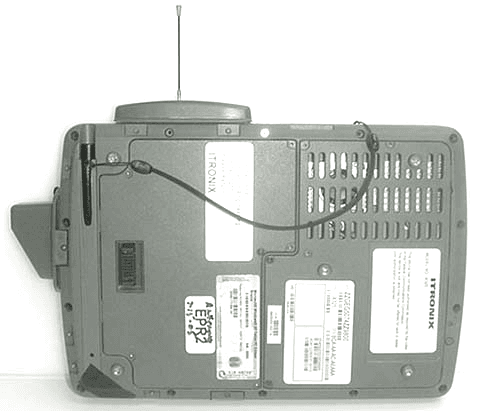
KBCIX325A860IWLBT
Nov 13, 2006TABLET PC w/ WLAN, BLUETOOTH & GSM/GPRS/EDGE/UMTS
Equipment Class
DTS - Digital Transmission System