KDYMG6130Wireless Console
Paradox Security Systems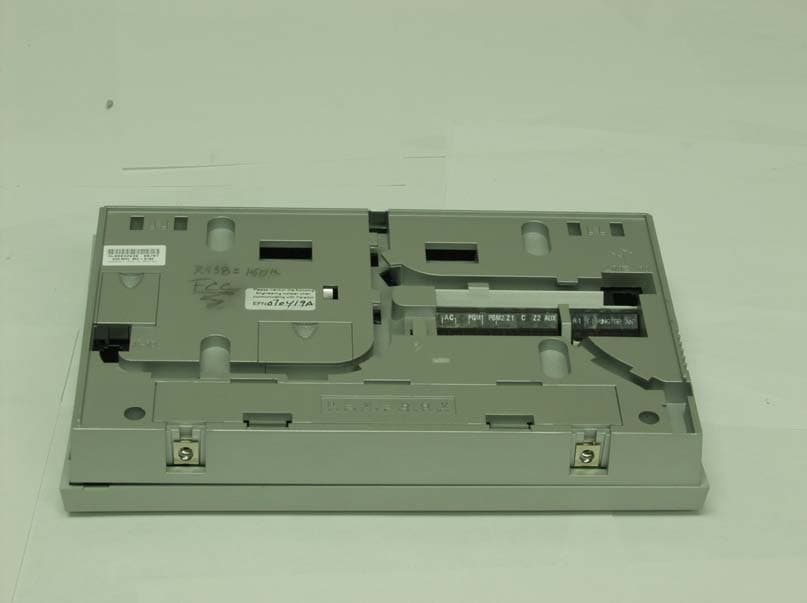
Click to zoom
Application Details
- Equipment Class
- DSR - Part 15 Remote Control/Security Device Transceiver
- Date of Grant
- Jul 23, 2007
- Application Purpose
- Original Equipment
- Date of Application
- Jul 19, 2007
- Equipment Note
- Wireless Console
- Frequency Range
- 433.92000000 - 433.92000000
- Company
- Paradox Security Systems
- Country
- Canada
Documents & Files
Document Text
Text extracted from the exhibit documents filed with the FCC. Open a document above to read the original.
Users Manual
All-In-One Wireless Security System V2.0 Model #: MG-6130 / MG-6160 Reference and Installation Manual We hope this product performs to your complete satisfaction. Should you have any questions or comments, please visit www.paradox.com and send us your comments. Paradox Magellan Systems 1 Table of Contents Introduction................................................... 3 About Magellan and this Manual............................. 3 Conventions ............................................................ 3 Specifications .......................................................... 3 Quick Setup................................................... 4 Installation..................................................... 7 AC Power................................................................ 7 DC Power................................................................ 7 Backup Battery Pack............................................... 7 Auxiliary Output....................................................... 7 Telephone Line Connections .................................. 8 Programmable Outputs (PGMs) ............................. 8 Hardwire Zone Connections ................................... 9 WinLoad Connection............................................. 10 UIP-256 Universal In-Field Programmer Connection. 10 X10 Transmitter Connection (MG-6160 only) ....... 10 Connecting a Paradox Memory Key (PMC-3)....... 10 Location and Mounting.......................................... 11 Connecting the Radio Antenna (MG-6160 only) ... 12 Programming Methods .............................. 13 WinLoad Installer Upload/Download Software...... 13 Programming Using the Built-in Keypad ............... 13 Programming Using a Paradox Memory Key........ 13 User Codes.................................................. 14 User Code Length................................................. 14 Installer Code........................................................ 14 Maintenance Code................................................ 14 System Master Code ............................................ 14 Duress Code ......................................................... 14 Zone Programming..................................... 15 Zone Programming Overview ............................... 15 Zone Definitions .................................................... 15 Zone Options ........................................................ 17 Zones 31 and 32 Become Hardwire Zones .......... 18 EOL (End-Of-Line) Zones ..................................... 18 Assigning Wireless Zone Transmitters ................. 19 Assigning Wireless Doorbells to the Console ....... 19 Deleting Assigned Wireless Transmitters ............. 19 Viewing Wireless Transmitter Signal Strength ...... 19 Assigning Remote Controls.................................. 20 Programming the Remote Control’s Buttons ........ 20 Assigning Wireless Keypads................................. 21 Assigning Wireless Repeaters .............................. 21 Wireless Repeater Options ................................... 21 Arming and Disarming ............................... 22 Regular Arming Switches to Stay Arming ............. 22 Regular Arming Switches to Force Arming ........... 22 Stay Arming Switches to Force Arming................. 22 Timed Auto-Arming ............................................... 22 No Movement Auto-Arming ................................... 22 Auto-Arming Options ............................................. 23 One-Touch Arming................................................ 23 Exit Delay .............................................................. 23 Bell Squawk on Arm/Disarm with Remote Control 23 No Exit Delay when Arming with Remote Control . 23 Exit Delay Termination .......................................... 23 Follow Zone Switches to Entry Delay 2................. 23 Closing Delinquency Timer ................................... 23 Stay Arm Siren Delay ............................................ 23 Alarm Options............................................. 24 Bell Cut-off Timer .................................................. 24 Wireless Transmitter Supervision Options ............ 24 Check-in Supervision Options ............................... 24 Tamper Recognition Options ................................ 24 Wireless PGM Supervision Options ...................... 25 Wireless Keypad Supervision Options .................. 25 Wireless Repeater Supervision Options ............... 25 Wireless PGM Console Supervision Options (Follow Alarm/Follow Bell) ................................................. 25 Backup Alarm Reporting Option............................ 25 Panic Alarms ......................................................... 26 Reporting and Dialer Settings................... 27 Report Codes ........................................................ 27 Console Telephone Numbers ............................... 29 Console Account Number ..................................... 30 Reporting Formats ................................................ 30 Event Call Direction............................................... 31 Delay Between Dialing Attempts ........................... 31 Alternate Dial Option ............................................. 31 Force Dial Option .................................................. 31 Dialing Method ...................................................... 32 Pulse Ratio............................................................ 32 Switch to Pulse Dialing on 5th Attempt ................. 32 Telephone Line Monitoring (TLM) ......................... 32 Recent Close Delay .............................................. 32 Auto-Test Report ................................................... 32 Power Failure Report Delay .................................. 33 Disarm Reporting Options ..................................... 33 Zone Restore Report Options ............................... 33 RF Jamming Supervision ...............…
Text truncated - open the document above for the full version.
Users Manual
All-In-One Wireless Security System V2.0 Programming Guide Model # MG-6130 / MG-6160 We hope this product performs to your complete satisfaction. Should you have any questions or comments, please visit www.paradox.com and send us your comments. Table of Contents Things You Should Know ..................................... 2 About This Programming Guide........................................... 2 Conventions ......................................................................... 2 Installer Code (Default: 0000 / 000000) ............................... 2 Maintenance Code (Default: 1111 / 111111) ....................... 2 Master Code (Default: 1234 / 123456)................................. 2 Entering Programming Mode ............................... 2 Single Digit Data Entry Method............................................ 2 Feature Select Programming Method.................................. 3 Decimal and Hexadecimal Values ....................................... 3 Installer Quick Keys .............................................. 3 Zone Programming................................................ 4 Remote Control Button Programming................. 5 System Timers ....................................................... 6 On-board Programmable Outputs (PGMs) .......... 6 System Options ..................................................... 7 Communicator Settings ..................................... 10 Report Codes ....................................................... 11 System Settings................................................... 13 Wireless Transmitter Assignment...................... 13 Wireless Output Assignment .............................. 14 Wireless Keypad Assignment ............................. 14 Wireless Repeater Assignment........................... 14 Wireless Programmable Output (PGM) Settings 14 Wireless Supervision Options ............................ 14 Wireless Repeater Options.................................. 16 Appendix 1: PGM Event Table ............................ 18 Appendix 2: Specifications ................................. 20 Appendix 3: Connection Diagrams..................... 21 Power Connections ........................................................... 21 Telephone Line Connections ............................................ 22 PGM Connections ............................................................. 23 Hardwire Zone Connections.............................................. 24 Connecting the Radio Antenna (MG-6160 only) ............... 24 Connecting to a UIP-256 ................................................... 25 X10 Transmitter Connections (MG-6160 only).................. 25 Connecting Magellan to WinLoad ..................................... 26 Connecting a Paradox Memory Key (PMC-4) ................... 26 Tabletop Mounting ............................................................ 27 Mounting Magellan on the Wall ......................................... 27 Appendix 4: Ademco Contact ID Report Codes 28 Appendix 5: Automatic Report Code List .......... 30 2Programming Guide Things You Should Know About This Programming Guide This programming guide should be used in conjunction with the Magellan Reference & Installation Manual which can be downloaded from our website at paradox.com. Use this guide to record the settings programmed for this console. Conventions Installer Code (Default: 0000 / 000000) The Installer code is used to enter programming mode (see Entering Programming Mode on page 2), which allows you to program all the features, options and commands of the Magellan console except user codes. The Installer code can be 4 or 6 digits in length (see section [090] option [1] on page 7) where each digit can be any value from 0 to 9. See section [181] on page 13 to change the default code. Maintenance Code (Default: 1111 / 111111) The Maintenance code is similar to the Installer code. It can be used to enter programming mode (see Entering Programming Mode on page 2), which allows you to program all the features, options and commands except for the Magellan console’s communication settings (sections [108] to [112], sections [180] to [182]) as well as any user codes. The Maintenance code can be 4 or 6 digits in length (see section [090] option [1] on page 7) where each digit can be any value from 0 to 9. See section [182] on page 13 to change the default code (Installer only). Master Code (Default: 1234 / 123456) With the System Master code a user can use any arming method and can program user codes. The System Master code can be 4 or 6 digits in length (see section [090] option [1] on page 7), where each digit can be any digit from 0 to 9. The System Master code cannot be changed by the Installer or Maintenance code, but it can be reset to default. See section [200] on page 13 to reset to default. Entering Programming Mode Use the built-in keypad to access Magellan’s installer programming mode. To access programming mode: 1. Press and hold the [0] key. 2. Enter your [ INSTALLER CODE] or [MAINTENANCE CODE]. 3. Enter the 3-digit [ SECTION] you wish to program. 4. Enter the required [DATA]. 5. Press the [*] key to clear data or to go back one step. Press the [#] key to save changes. There are two methods that can be used to enter data when in programming mode: Single Digit Data Entry and Feature Select Programming methods. Single Digit Data Entry Method After entering programming mode, some sections will require that you enter decimal values from 000 to 255. Other sections will require that you enter hexadecimal values from 0 to F. The required data will be clearly indicated in this manual. When entering the final digit in a section, Magellan will automatically save and advance to the next section. Refer to Figure 1 on page 3 to see the keys and their equivalent decimal and/or hexadecimal value. This symbol designates a warning or important information. This symbol designates a suggestion or reminder. This symbol designates a referen…
Text truncated - open the document above for the full version.
Users Manual
All-In-One Wireless Console (MG-6130 / MG-6160) User Guide We hope this product performs to your complete satisfac tion. Should you have any questions or comments, please visit www.paradox.com and send us your comments. MG-6130 MG-6160 Magellan 1 Table of Contents Overview..................... ............................... 2 Introduction ......................................................... 3Basic Operation .................................................. 6 Arming / Disarming ..................... ............. 9 Arming................................................................. 9Disarming .......................................................... 12Fire Alarms........................................................ 13Panic Alarms ..................................................... 16 Consumer Features ................................ 18 Message Center................................................ 18FM Radio Feature (MG-6160 only) ................... 19Alarm Clock....................................................... 20Speakerphone (MG-6160 only)......................... 21Chime Zones..................................................... 22Console Keypad Settings.................................. 22Time and Date .................................................. 23Programmable Outputs (PGMs) ....................... 23 Trouble Display.................................................. 23Making a Service Call (MG-6160 only) .............. 24Demo Mode ....................................................... 24X10 Automation (MG-6160 only) ....................... 24 Access System Featur es by Phone....... 25 Access System Features by Phone................... 25 Advanced Features ......... ........................ 27 Programming User Codes ................................. 27Adding a Remote Control to an Existing User ... 28Setting the Language ........................................ 29Voice Reporting ................................................. 29Utility Reporting ................................................. 30Pager Reporting ................................................ 31Bell Cut-Off Timer .............................................. 32System Test....................................................... 32Zone Labels ....................................................... 32 2 User Guide Chapter 1: OverviewWhat’s in this chapter:• Introduction • Basic Operation This chapter will give you a basic overview of your Ma gellan system. It will cover Magellan’s light indicators, keypads and remote controls. This chapter also includes sections explaining how to use this guide as well as a list of conventions used throughout the manual. Overview 3 IntroductionMagellan is the first security system to combine security with popular consumer features and a stylish design. Magellan looks d ifferent from anything else in the security industry. Install it anywher e in your home or small business–Magellan blends beautifully wit h any décor. Listen to the radio, leave a message or use your system as a telephone, alarm clock or monitoring device. Magellan consists of wireless detection devices installed at specif ic entry and exit points, as well as other vulnerable areas, such as windows. These devices protect the premises and communicate with Magellan’s main console. If you have armed the system and a device detects a breach, a siren will be acti vated and your monitoring station will imm ediately be notified by phone. Choose fr om wireless motion detectors with pet immunity, door contac ts, and remote controls that automate yo ur most frequently used security functio ns. With Magellan you have security and so much more: • Built-in FM radio (page 19)* • Speakerphone (page 21)* • Family message center (page 18) • Telephone access to system features (page 25) • Alarm clock (page 20) • Chime zones (page 22) • Voice, Utility and Pager reporting (page 29 to page 31) • One-touch arming (page 11) and panic keys (page 16) • Full, Force, Stay, Instant and Automatic arming (page 9)** • X10 home automation (page 24)* • 32 wireless zones, 16 remote controls and 16 users available * Available with the MG-6160 only.** Please note that Force arming and Auto-arming are not for use in UL installations. 4 User Guide How to Use this GuideThis manual employs an icon-based instruction format to display the steps required to use Mage llan’s features. The icon-based instructions are designed to be used in conjunction with the on- screen instructions being displayed on the Magellan console. In other words, as you are following the instructions shown in this guide, you should also be reading what is being displayed on the LCD screen. All of the icons display ed in this guide are explained in Conventions on page 5. ExampleWhen setting the Magellan console’s time and date (page 23), the following will be displayed: A- Press the [ MENU ] action key (the right action key located under the right side of the LCD screen). B- Press the [3] key on the main keypad. C- Select the time format that Magellan will follow; press the [12 HRS ] action key (the left action key under the LCD screen) to select the 12-hour format or the [24 HRS ] action key (the center action key under the LCD screen) to select the 24-hour format. D- Program the desired time (following the time format selected before) and then the date. D C B A Menu Enter the time and date 12Hrs 24Hrs Select the console’s time format or Overview 5 Conventions Icon Definition Icon Definition Reference to another manual or guide. Enter the System Master code on the main keypad. Warning or important information. Enter your User code on the main keypad. Reminder or suggestion. Enter a time value (such as when programming Magellan’s date and time) on the main keypad. [ DATA ] or [ KEY ] Type required data or press the designated key on either the main or center keypad. Enter numerical data for the specified feature on the main keypad. Record voice label when pro…
Text truncated - open the document above for the full version.
Cover Letter(s)
March 29th, 2007 Nemko Canada Inc 303 River Road Ottawa, Ontario, Canada K1V 1H2 Attn: Director of Certification Authority to Act as Agent On our behalf, I appoint Nemko Canada Inc. to act as our agent in the preparation of this application for equipment certification. I certify that submitted documents properly describe the device or system for which equipment certification is sought. I also certify that each unit manufactured, imported or marketed, as defined in the Federal Communications Commission’s regulations will have affixed to it a label identical to that submitted for approval with this application. For instances where our authorized agent signs the application for certification on our behalf, I acknowledge that all responsibility for complying with the terms and conditions for certification, as specified by Nemko Canada Inc, still resides with Paradox Security Systems, 780 Industrial Blvd, St-Eustache, Quebec, CANADA, J7R 5V3 Dated this 29th Day of March 2007 Agency agreement expiration date: December 31 st 2007 By: NABIL NAHOUL Signature Printed Title: Certification Manager On behalf of : Paradox Security Systems Telephone: (450) 491-7444 ext 209
Cover Letter(s)
March 29th, 2007 Equipment Autorisation Division Federal Communications Commission 7435 Oakland Mills Road Columbia, MD 21046 FCC ID: KDYMG6130 Product Name: Magelan model MG6130 Request for Confidentiality Pursuant to Sections 0.457 and 0.459 of the commissions rules, we hereby request that the following documents be held confidential: • Schematics • Block diagram • Operational description These materials contain trade secrets and proprietary information and are not customarily released to the public. The public disclosure of this information might be harmful to the company and provide unjustified benefits to our competitors. Dated this 29th Day of March 2007 By: NABIL NAHOUL Signature Printed Title: Certification Manager On behalf of : Paradox Security Systems Telephone: (450) 491-7444 ext 209
External Photos
External photos for Panel
ID Label/Location Info
LABEL REQUIREMENTS RF IC & FCC Paeadox Security Systems Model No.: MG6130 IC: 2438A-MG6130 FCC ID: KDYMG6130 * This device complies with Part 15 of the FCC Rules. Operation is subject to the following two conditions: (1) This device may not cause harmful interference, and (2) This device must accept any interference received, including interference that may cause undesired operation. Made in CANADA ** If label format is not in full scale, please indicate the dimensions of the label. MUST APPEAR ON THE OUTSIDE OF THE CERTIFIED UNIT. ALL INFORMATION MUST APPEAR ON THE LABEL.
Internal Photos
MG6160-MG6130 main board MG6130-main board MG6130-RF board MG6160-6130-RF board in enclosure MG6160-RF board MG6160 Main Board MG6160-MG6130_RF board-Traces
Parts List/Tune Up Info
QTY REFERENCE VALUE PARADOX# DESCRIPTION SUPPLIER CATALOGUE# 1 PCB 900-5005-040 9005005040 MAGELLAN CLOCK PCB ONPRESS PRINTED CIRCUITS LIMITED 900-5005-040-R (4 LAYERS) 109 C36,R406,R414,C414,C416, N/U C428,C434,C442,C444,C446,R448,C448,C451,R454,Q500,C502,C504,C513,C514,C520,L522,C522,R525,L528,C530,C604,C606,U1200,R1200,Q1200,L1200,F1200,DT1200,D1200,CDA1200,C1200,R1201,R1202,Q1202,D1202,R1203,R1204,Q1204,L1204,C1204,R1205,R1206,Q1206,L1206,C1206,R1207,R1208,L1208,C1208,R1210,C1210,R1211,R1212,C1212,R1213,R1214,C1214,C1216,R1218,C1218,R1220,C1220,R1222,C1222,R1224,C1224,R1226,C1226,R1228,C1228,R1230,C1230,R1232,C1232,R1234,C1234,R1236,C1236,R1238,C1238,C1239,R1240,C1240,R1242,C1242,R1244,C1244,R1246,C1246,R1248,C1248,C1250,C1252,C1254,C1256,C1258,C1260,C1262,C1264,C1266,C1268,C1270,C1272,R1216 1 C400 22PF 2102200603 CAP 0603, 22PF NPO 5% SAMSUNG C/O C.S.C. CL10C220JB8NNND 7 C401,C404,C432,C466,C506,C510,C512 1NF 2101020603 CAP 0603, 1NF X7R 10% SAMSUNG C/O C.S.C. CL10B102KB8NNND 10 C402,C524,C601,C602,C605, 100NF 2101040603 CAP 0603, 100NF X7R 10% 16V SAMSUNG C/O C.S.C. CL10B104KO8NNND C607,C608,C609,C610,C611 5 C406,C412,C435,C490,L501 100PF 2101010603 CAP 0603, 100PF SAMSUNG C/O C.S.C. CL10C101JB8NNND 1 C418 2PF 2100002603 CAP 0603, 2PF +/-0.1PF NPO SAMSUNG C/O C.S.C. CL10C020BB8NNND 3 C420,C423,C525 5PF 2100005603 CAP 0603, 5PF +/-0.1PF NPO SAMSUNG C/O C.S.C. CL10C050BB8ANND 2 C422,C532 10PF 2101000603 CAP 0603, 10PF +/-0.25PF NPO SAMSUNG C/O C.S.C. CL10C100CB8NNND 1 C424 1.5PF 2100015603 CAP 0603, 1.5PF SAMSUNG C/O C.S.C. CL10C1R5BB8ANND 11 C426,C456,C470,C472,C476, 10NF 2101030603 CAP 0603, 10NF X7R 10% SAMSUNG C/O C.S.C. CL10B103KB8NNND C482,C486,C508,C600,C700,C701 1 C430 18PF 2101800603 CAP 0603, 18PF SAMSUNG C/O C.S.C. CL10C180JB8NNND 1 C431 27PF 2102700603 CAP 0603, 27PF NPO 5% SAMSUNG C/O C.S.C. CL10C270JB8NNND 1 C436 10NH 2290010603 INDUCTOR 10NH 0603 SAMSUNG C/O C.S.C. CIH10T10NJNC 1 C450 5.6PF 2105060603 CAP 0603, 5.6PF +/-0.25PF NPO SAMSUNG C/O C.S.C. CL10C5R6CB8ANND 2 C452,C468 47NF 2104730603 CAP 0603, 47NF X7R 10% SAMSUNG C/O C.S.C. CL10B473KA8NNND 1 C454 1UF 2101050603 CAP 0603, 1UF/16V SAMSUNG C/O C.S.C. CL10F105ZO8NNND 2 C458,C460 1.5NF 2101520603 CAP 0603, 1.5NF SIMCONA MA0603XR152K500 (MERITEK) PARADOX SECURITY SYSTEMS MG-6130 (CLOCK)_433MHz (900-5005-040) NO ECO JUN 19,2007 1 of 3 QTY REFERENCE VALUE PARADOX# DESCRIPTION SUPPLIER CATALOGUE# PARADOX SECURITY SYSTEMS MG-6130 (CLOCK)_433MHz (900-5005-040) NO ECO JUN 19,2007 1 C462 22NF 2102230603 CAP 0603, 22NF X7R SAMSUNG C/O C.S.C. CL10B223KB8NNND 4 C474,C478,C480,C484 220PF 2102210603 CAP 0603, 220PF SAMSUNG C/O C.S.C. CL10C221JB8NNND 1 C488 47UF/6.3V(SMT) 2110470063 CAP ELEC SMT, 47UF/6.3V 5X5.2 SAMWHA C/O C.S.C. SC0J476M05005VR 2 C492,C496 15PF 2101500603 CAP 0603, 15PF NPO 5% SAMSUNG C/O C.S.C. CL10C150JB8NNND 1 C494 3-10PF 2143010000 CAP TRIMMER 3-10PF (SMD) SUNTAN TECHNOLOGY CO. LTD. TSC3S510T1R 1 C498 8PF 2100008603 CAP 0603, 8PF +/-0.25PF NPO SAMSUNG C/O C.S.C. CL10C080CB8ANND 7 R416,R449,R490,R492,C526,C528,C540 0R0 2000000603 RES 0603 5%,0 OHM SAMSUNG C/O C.S.C. RC1608J000AS (SAMSUNG ) 1 F500 FILTER-10.7MHZ 1211107250 FILTER 10.7MHZ (SMT) MURATA INC C/O GMA SFECV10M7JA00-RO 1 HD2 HEADER 11X2 2400211000 HEADER STRAIGHT 2X11 2MM PINREX TECHNOLOGY CORP. 220-92-11GB03 1 LCD1400 CLOCK-LCD 2 LD234,LD236 SUPER YELLOW 2221105035 KINGBRIGHT CORPORATION APTR3216SYCK 1 LD238 RED 2221105000 LED SMDR RED DOME (REVERSED) KINGBRIGHT CORPORATION APTD3216SR01R13 3 LD248,LD250,LD264 GREEN 2221105010 LED SMDR GREEN (REVERSED) KINGBRIGHT CORPORATION APTR3216SGC-R13 8 LD232,LD252,LD254,LD262,LD263, GREEN (DOME) 2221105015 LED SMDR GREEN DOME 1206 (REVERSED) KINGBRIGHT CORPORATION APTD3216SG01R13 LD265,LD266,LD268 1 L500 22NH 2290022603 INDUCTOR 22NH 0603 SAMSUNG C/O C.S.C. CIH10T22NJNC 1 L506 18.5NH 2291805000 INDUCTOR AIR CORE 18.5NH SMD ALLIED COMPONENTS INTERNATIONAL SMAC20-5-RC-TR (2200/REEL 13") 1 L508 33NH 2290033603 INDUCTOR 33NH 0603 SAMSUNG C/O C.S.C. CIH10T33NJNC 2 L510,L512 39NH 2290390603 INDUCTOR 39NH 0603 SAMSUNG C/O C.S.C. CIH10T39NJNC 1 L514 100NH 2290100603 INDUCTOR 100NH 0603 SAMSUNG C/O C.S.C. CIH10TR10JNC 1 L516 560NH 2290561000 INDUCTOR 560NH SMD COILCRAFT 1008CS-561XJLC 2 L518,L520 8NH 2290008000 INDUCTOR AIR CORE 8NH SMD ALLIED COMPONENTS INTERNATIONAL SMAC20-3-RC-TR (2200/REEL 13") 1 L526 12NH 2290012603 INDUCTOR 12NH 0603 SAMSUNG C/O C.S.C. CIH10T12NJNC 1 P1 ANT 1250433950 LEVEN CO., LTD. 900-4500-127-R REV A 3 P301,P303,P306 CON1 1 P302 PAD 1 Q400 SMBT2907A 2312907000 TRANS SMBT2907A SOT-23 DIODES INC. C/O GMA MMBT2907A-7-F (DIODES INC.) 1 R3 TRACE 1 R242 100R 2001010603 RES 0603 5%,100 OHM SAMSUNG C/O C.S.C. RC1608J101AS (SAMSUNG) 2 R245,R246 47R 2004700603 RES 0603 5%,47 OHM SAMSUNG C/O C.S.C. RC1608J470AS 9 R401,R500,R502,R504,R506, 10K 2001030603 RES 0603 5%,10K SAMSUNG C/O C.S.C. RC1608J103AS R510,R512,R514,R516 3 R403,R1403,R1407 680R 2006810603 RES 0603 5%,680 OHM SAMSUNG C/O C.S.C. RC1608J681AS (SAMSUNG) 2 R410,R456 1K0 2001020603 RES 0603 5%,1K0 SAMSUNG C/O C.S.C. RC1608J102AS 1 R418 470PF 2104710603 CAP 0603, 470PF SAMSUNG C/O C.S.C. CL10C471JB8NNND 1 R422 330R 2003310603 RES 0603 5%,330 OHM SAMSUNG C/O C.S.C. RC1608J331AS (SAMSUNG) 1 R426 150K_1% 2001503603 RES 0603 1%,150K SAMSUNG C/O C.S.C. RC1608F1503AS (SAMSUNG) 2 R428,R432 10R 2001000603 RES 0603 5%,10 OHM SAMSUNG C/O C.S.C. RC1608J100AS 3 R429,R462,R464 2K2 2002220603 RES 0603 5%,2K2 SAMSUNG C/O C.S.C. RC1608J222AS 1 R438 150K 2001540603 RES 0603 5%,150K SAMSUNG C/O C.S.C. RC1608J154AS 1 R444 1K2 2001220603 RES 0603 5%,1K2 SAMSUNG C/O C.S.C. RC1608J122AS 1 R458 1K5 2001520603 RES 0603 5%,1K5 SAMSUNG C/O C.S.C. RC1608J152AS 1 R505 27K 2002730603 RES 0603 5%,27K SAMSUNG C/O C.S.C. RC1608J273AS (SAMSUNG) ANTENNA WIRE 433MHZ 14.6CM FOR MAGELLANLED SMDR YELLOW SUPER 1206 (REVERSED) 2 of 3 QTY REFERENCE VALUE PARADOX# DESCRIPTION SUPPLIER CATALOGUE# PARADOX SECURITY SYSTEMS MG-6130 (CLOCK)_433MHz (900-5005-040) NO ECO JUN 19,2007 6 R1400…
Text truncated - open the document above for the full version.
Test Report
www.nemko.com Test Report: 82588-3TRFWL Applicant: Paradox Security Systems 780 Industrial Blvd Ste-Eustache, Quebec J7R 5V3 Apparatus: MG6160/MG6130 433MHz Control Panel FCC ID: KDYMG6160 In Accordance With: FCC Part 15 Subpart C, 15.231 Periodic operation in the band 40.66-40.70MHz and above 70 MHz. Tested By: Nemko Canada Inc. 303 River Road Ottawa, Ontario K1V 1H2 Authorized By: Jason Nixon, Telecom Specialist Date: June 4, 2007 Total Number of Pages: 21 Nemko Canada Inc. REPORT SUMMARY Report Number: 82588-3TRFWL FCC ID: KDYMG6160 Specification: FCC Part 15 Subpart C, 15.231 Report Summary These tests were conducted on a sample of the equipment for the purpose of demonstrating compliance with Part 15, Subpart C. Radiated tests were conducted in accordance with ANSI C63.4-2003. Radiated emissions are made on an open area test site. A description of the test facility is on file with the FCC. The assessment summary is as follows: Apparatus Assessed: MG6160 433MHz Control Panel Specification: FCC Part 15 Subpart C, 15.231 Compliance Status: Complies Exclusions: None Non-compliances: None Report Release History: Original Release Author: Xu Jin, Wireless Specialist Note that the results contained in this report relate only to the items tested and were obtained in the period between the date of initial receipt of samples and the date of issue of the report. This test report has been completed in accordance with the requirements of ISO/IEC 17025. Nemko Canada Inc. authorizes the applicant to reproduce this report provided it is reproduced in its entirety and for use by the company’s employees only. Any use which a third party makes of this report, or any reliance on or decisions to be made based on it, are the responsibility of such third parties. Nemko Canada Inc. accepts no responsibility for damages, if any, suffered by any third party as a result of decisions made or actions based on this report. Page 2 of 21 Nemko Canada Inc. REPORT SUMMARY Report Number: 82588-3TRFWL FCC ID: KDYMG6160 Specification: FCC Part 15 Subpart C, 15.231 TABLE OF CONTENTS Report Summary.........................................................................................................................................2 Section 1: Equipment Under Test..............................................................................................................4 1.1 Product Identification.................................................................................................................................4 1.2 Samples Submitted for Assessment............................................................................................................4 1.3 Technical Specifications of the EUT..........................................................................................................5 Section 2: Test Conditions..........................................................................................................................6 2.1 Specifications.............................................................................................................................................6 2.2 Deviations From Laboratory Test Procedures ....................................................................…
Text truncated - open the document above for the full version.
Contact Information
Applicant
Alex Chaplik(Certification Manager)
Technical Contact
Non-Technical Contact
Nemko Canada
[email protected]613-737-9680
Test Firm
Nemko Canada Inc. (Ottawa)Charles Neal
Technical Specifications
| # | Rule Parts | Frequency Range | Power Output |
|---|---|---|---|
| 1 | 15.231 | 433.92 MHz - 433.92 MHz | - |
Other Applications from Paradox Security Systems
KDYX45
May 07, 2026Hybrid Head Unit/Console
Equipment Class
DSS - Part 15 Spread Spectrum TransmitterKDYZP2M
Dec 23, 2025Dual Input /Output Wireless Bus Expander Two Garage Door
Equipment Class
DSS - Part 15 Spread Spectrum TransmitterKDYK70M
Dec 12, 20257 inch Touchscreen Keypad
Equipment Class
DTS - Digital Transmission SystemKDYDCT12M
Nov 25, 2025Door /Window Magnetic Contact + Zone
Equipment Class
DSS - Part 15 Spread Spectrum Transmitter
KDYPGM8M
Nov 25, 2025PGM Expander
Equipment Class
DSS - Part 15 Spread Spectrum Transmitter