KG6CD-1560B15 Inches TFT LCD Monitor
Godwing Electronics Co Ltd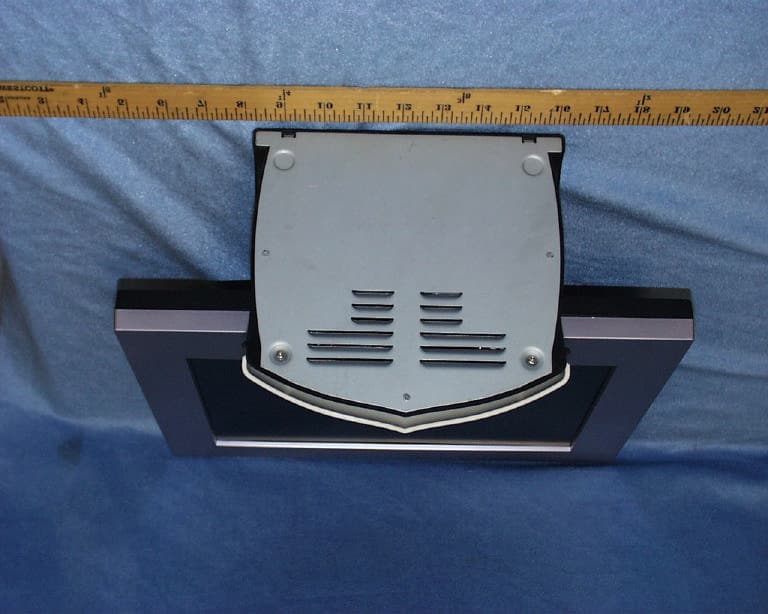
Click to zoom
Application Details
- Equipment Class
- JBP - Part 15 Class B Computing Device Peripheral
- Date of Grant
- Mar 20, 2002
- Application Purpose
- Original Equipment
- Date of Application
- Mar 20, 2002
- Equipment Note
- 15 Inches TFT LCD Monitor
- Company
- Godwing Electronics Co Ltd
- Country
- China
Documents & Files
Document Text
Text extracted from the exhibit documents filed with the FCC. Open a document above to read the original.
Users Manual
CONTENTS 1 Introduction................................................................2 2 Precautions.................................................................2 3 Cleaning the TFT LCD Color Monitor.................................3 4 Package contents..........................................................3 5 Installation ...............................................................3 a. Installation location(Illustrate vertical scope)...................4 b. Connect the signal cable............................................4 c. Connect the power cord.............................................4 6 Operation .................................................................4 a. Angle of pitch and horizontal position adjustment..............4 b. Power Switch and power-on....................................... 5 c. OSD Function Control Keys.......................................6 d. OSD Adjustments ...................................................6 e. OSD Chart Illustration.............................................7 7 Troubleshooting...................................................... 11 8 Technical Data............................................................12 1 c. Introduction The advantages of LCD monitor are that it has not harmful X radiation caused by high energy electron bombing the screen. It also has not air pollution caused by screen high voltage static electricity molecule adsorbing. And because of its soft and steady image quality, your eyes will never feel dry and sore. This monitor has more features as follows: High resolution, high contrast color TFT LCD providing sharp, flicker-free images. Power management circuit conforming to VESA ® DPMS TM standard that reduces energy consumption when the LCD is not in use. Equipped with DDC1 TM and DDC2B TM for Plug & Play compatibility. Supports a true VGA resolution of 1024X768 as well as VGA modes for IBM or PC compatibles and Power Macintosh, Power PC, and Macintosh compatibles. Saves more than 2/3 of space (foot print) & energy (power). Two speakers each 2W, able to use in multi-media application. International Standard Met: UL, CSA, FCC, TV/GS, CE and U.S. FCC Standard Built-In Power Supply has power-saving function. 2Precautions Sit at least 18” from the TFT LCD Color Monitor. Do not apply pressure to the screen because the LCD is very delicate. Do not touch the screen directly with your fingers, because you may damage the screen, and the oil from your skin is difficult to remove. Do not place anything on top of the LCD. Ensure the area around the LCD clean and moisture-free. Do not place heavy objects on the power cord, video or audio cables, or 2 on the LCD. If smoke, abnormal noise, or strange odor is present, immediately switch the LCD off and call your dealer. It is dangerous to continue using the LCD. Never remove the rear cover, because the display unit contains high-voltage parts and you may suffer electric shock if you touch these parts. Always handle your LCD with care when moving it. 3.Cleaning the TFT LCD Color Monitor To clean the screen: 1. Gently wipe the screen with a clean camel hair lens brush, or a soft, clean, lint-free cloth. This removes dust and other particles that can scratch the screen. 2. If it still not clean, blow on the screen and gently wipe with a soft, clean, lint-free cloth. Never pour or spray any liquid directly onto the screen or case of the LCD. DO NOT APPLY PRESSURE TO THE SCREEN. d. Package content Your TFT LCD Color Monitor package includes the following: e. 15 inch TFT LCD Color Monitor f. Power Cord g. Signal Cable h. User’s manual i. Audio Cable If any of the above items missed or damaged, please contact your distributor. 5Installation 3 a Select location j. Make sure that your monitor will be set up on a stable surface. k. The Power socket will be near the monitor. l. Choose a well-ventilated space to position your monitor. m. Avoid exposing the LCD to direct sunlight. n. Adjust the environmental light for the best viewing condition. b. Connect the signal cable o. Plug in the ends of the signal cable to the monitor and the computer separately, and tighten the connection bolts. c. Connect the power cord Plug in the female end of the power cord to the back of the monitor. Plug in the male end of the power cord to the power socket. 6Operation p. Inclination and horizontal position adjustment Inclination range-5~ +145as follows: 4 Horizontal position adjustment turn the monitor to any directions you wish. b. Power Switch and power-on Power Switch Power switch locates on the back of monitorPress I , turn monitor on press O, turn monitor offOnce the power switch turns on, you needn’t turn it off, you need only control and switch on the panel. When PC powers off or enters power-saving state, the power of monitor will automatically change to power-saving state. WARNINGYou must pull out the power cord from the socket, if you want your monitor is thoroughly on power-off condition. Display Switch Display switch is at position on the panel(Fig4-1)Using this switch, you can switch on and off the monitor screen at anytime. Display Indicator The LED locates on the front panel(Fig4-1)When LED turns green, the monitor is ready to use; When LED is not bright, the monitor is on power saving mode, or, the power-off mode. 5 q. OSD(On Screen Display) Keys Your TFT-LCD Color Monitor is controlled by five easy to use buttons----Screen ON/OFF , Menu, +, -, Select(Fig4-1). r. OSD Controls and Adjustments OSD menu will be appears by clicking the menu key. You can use the four OSD keys for controls and adjustments of optional value.(e.g. brightness, contrast, etc.) The functions of OSD keys are as follows: Keys Switch function Menu First click: Pop up the OSD main menu. Second click: Remove OSD Menu or move to Previous Menu. + Move to next menu item or increase current optional value. - Move to previous menu item or decrease current optional value. Select Select and confirm Screen ON/OFF 6 s…
Text truncated - open the document above for the full version.
Block Diagram
CD-1560B Block Diagram ADC Scaler uProcessor Timing Controller B/L Inverter B/L Lamp(CN21,CN22) Source Driver B/L Lamp(CN23,CN24) TFT LCD Panel 1024 x 768 Power DPMS Power DC/DC Gate Driver Analog RGB (CN101) OSD (CN102) 12V (CN104)
ID Label/Location Info
PROPOSED FCC ID LABEL AND LOCATION SHENZHEN GODWING ELECTRONICS CO., LTD. This device complies with Part 15 of the FCC Rules. Operation is subject to the following two conditions: (1) this device may not cause harmful interference, and (2) this device must accept any interference received, including interference that may cause undesired operation. FCC ID: KG6CD-1560B FCC ID LABEL
Test Report
FCC CFR47 PART 15 DIGITAL DEVICE TEST REPORT FOR 15” TFT COLOR MONITOR W/ MAX. RESOLUTION OF 1024X768 NON-INTERLACE (60KHz) MODEL: CD-1560B FCC ID: KG6CD-1560B REPORT NUMBER: 02C1157-1 ISSUE DATE: MARCH 4, 2002 Prepared for SHENZHEN GODWING ELECTRONICS CO., LTD. 2/F, 706 BLDG. PENGJI INDUSTRIAL AREA LIANTANG, SHENZHEN, GUANGDONG 518004 PRC Prepared by COMPLIANCE CERTIFICATION SERVICES 561F MONTEREY ROAD MORGAN HILL, CA 95037 USA TEL: (408) 463-0885 FAX: (408) 463-0888 REPORT NO: 02C1157-1 FCC ID: KG6CD-1560B DATE: MARCH 4, 2002 EUT: 15” TFT COLOR MONITOR W/ MAX. RESOLUTION OF 1024X768 NON-INTERLACED (60KHz) COMPLIANCE CERTIFICATION SERVICES DOCUMENT NO:CCSUP4002C 561F MONTEREY ROAD, MORGAN HILL, CA 95037 USA TEL:(408) 463-0885 FAX:(408) 463-0888 This report shall not be reproduced except in full, without the written approval of CCS. This document may be altered or revised by Compliance Certification Services personnel only, and shall be noted in the revision section of the document. TABLE OF CONTENTS PAGE 1. VERIFICATION OF COMPLIANCE...............................................................................3 2. PRODUCT DESCRIPTION................................................................................................4 3. TESTED SYSTEM DETAILS.............................................................................................4 4. TEST FACILITY..................................................................................................................5 5. ACCREDITATION AND LISTING...................................................................................5 6. MEASUREMENT INSTRUMENTATION.......................................................................5 7. MEASURING INSTRUMENT CALIBRATION..............................................................5 8. UNITS OF MEASUREMENT.............................................................................................6 9. ANTENNAS...........................................................................................................................7 10. CLASSIFICATION OF DIGITAL DEVICE.....................................................................7 11. RADIATED EMISSION LIMITS......................................................................................8 12. CONDUCTED EMISSION LIMITS.................................................................................9 13. CONDUCTED EMISSION TEST PROCEDURE.........................................................10 14. RADIATED EMISSION TEST PROCEDURE..............................................................11 15. AMBIENT CONDITIONS................................................................................................12 16. SYSTEM TEST CONFIGURATION..............................................................................12 17. EQUIPMENT MODIFICATIONS..................................................................................13 18. EUT SETUP PHOTOS......................................................................................................14 19. TEST EQUIPMENT LIST...............................................................................................16 20. TEST RESULT SUMMARY............................................................................................17 APPENDICES.............................................................................................................................19 ß EXTERNAL I/O CABLE CONSTRUCTION DESCRIPTION ß CONFIGURATION BLOCK DIAGRAM ß RADIATED EMISSION DATA ß CONDUCTED EMISSION DATA REPORT NO: 02C1157-1 FCC ID: KG6CD-1560B DATE: MARCH 4, 2002 EUT: 15” TFT COLOR MONITOR W/ MAX. RESOLUTION OF 1024X768 NON-INTERLACED (60KHz) Page 3 of 24 COMPLIANCE CERTIFICATION SERVICES DOCUMENT NO:CCSUP4002C 561F MONTEREY ROAD, MORGAN HILL, CA 95037 USA TEL:(408) 463-0885 FAX:(408) 463-0888 This report shall not be reproduced except in full, without the written approval of CCS. This document may be altered or revised by Compliance Certification Services personnel only, and shall be noted in the revision section of the document. 1. VERIFICATION OF COMPLIANCE COMPANY NAME: SHENZHEN GODWING ELECTRONICS CO., LTD. 2/F, 706 BLDG. PENGJI INDUSTRIAL AREA LIANTANG, SHENZHEN, GUANGDONG 518004 PRC CONTACT PERSON: YONG ZHAO TELEPHONE NO: 755-573-2767 MODEL NO/NAME: CD-1560B DATE TESTED: MARCH 4, 2002 SERIAL NO: N/A TYPE OF EQUIPMENT: INFORMATION TECHNOLOGY EQUIPMENT (ITE) MEASUREMENT DISTANCE: ( ) 3 METER (X) 10 METER TECHNICAL LIMIT: CLASS B FCC RULES: PART 15, SUBPART B, SECTIONS 15.107 & 15.109 MEASUREMENT PROCEDURE ANSI C63.4:92 EQUIPMENT AUTHORIZATION PROCEDURE CERTIFICATION MODIFICATIONS MADE ON EUT YES NO DEVIATIONS FROM MEASUREMENT PROCEDURE YES (refer to section 20 for comments) NO RADIATED EMISSION TEST RESULT [email protected]/VERTICAL CONDUCTED EMISSION TEST RESULT [email protected]/L2 The above equipment was tested by Compliance Certification Services for compliance with the requirements set forth in the FCC CFR 47, PART 15. The results of testing in this report apply to the product/system which was tested only. Other similar equipment will not necessarily produce the same results due to production tolerance and measurement uncertainties. Warning : This document reports conditions under which testing was conducted and results of tests performed. This document may not be altered or revised in any way unless done so by Compliance Certification Services and all revisions are duly noted in the revisions section. Any alteration of this document not carried out by Compliance Certification will constitute fraud and shall nullify the document. Tested By: CHIN PANG / EMC TECHNICIAN COMPLIANCE CERTIFICATION SERVICES Approved & Released For CCS By: THU CHAN / SENIOR EMC ENGINEER COMPLIANCE CERTIFICATION SERVICES REPORT NO: 02C1157-1 FCC ID: KG6CD-1560B DATE: MARCH 4, 2002 EUT: 15” TFT COLOR MONITOR W/ MAX. RESOLUTION OF 1024X768 NON-INTERLACED (60KHz) Page 4 of 24 COMPLIANCE CERTIFICATION S…
Text truncated - open the document above for the full version.
Contact Information
Applicant
Yong Zhao
86 755-335-9896Fax: 86 755-362-0169
Test Firm
Compliance Certification Services IncSteve Cheng
Technical Specifications
| # | Rule Parts | Frequency Range | Power Output |
|---|---|---|---|
| 1 | 15B | - | - |
Other Applications from Godwing Electronics Co Ltd
KG6M170T
Mar 12, 200317" LCD Monitor
Equipment Class
JBP - Part 15 Class B Computing Device Peripheral
KG6CD-1248
Jan 15, 200212" TFT-LCD Monitor
Equipment Class
JBP - Part 15 Class B Computing Device PeripheralKG6MD-935A
Jun 16, 1996Monitor Maximum Resolution 1024X768 (i)
Equipment Class
JBP - Part 15 Class B Computing Device PeripheralKG6141518M
Oct 24, 1993Monochrome Monitor
Equipment Class
JBP - Part 15 Class B Computing Device PeripheralKG6142838M
Mar 09, 1993VGA Monitor, Maximum Resolution, 1024 x 768 (Interlaced)
Equipment Class
JBP - Part 15 Class B Computing Device Peripheral