M5U-101-460FRS transceiver PAWN 101-460
Head Connection Systems Ltd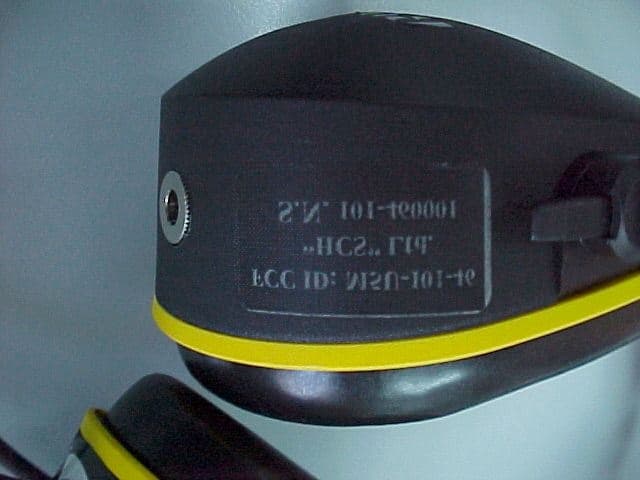
Click to zoom
Application Details
- Equipment Class
- FRT - Part 95 Family Radio Body Worn Transmitter
- Date of Grant
- Jun 21, 1999
- Application Purpose
- Original Equipment
- Date of Application
- May 12, 1999
- Equipment Note
- FRS transceiver PAWN 101-460
- Frequency Range
- 462.56250000 - 467.71250000
- Company
- Head Connection Systems Ltd
- Country
- Israel
Documents & Files
Document Text
Text extracted from the exhibit documents filed with the FCC. Open a document above to read the original.
Users Manual
HCS HEAD CONNECTION SYSTEMS LTd. P rivate A ddress W ireless N etwork Two Way Communication System for Extreme Noise Environment PAWN 101-MODEL 460 OPERATING MANUAL Thank you for buying this HCS transceiver. This instruction manual contains important safety and operating instruction. Please read it carefully before using the Headset. HEAD CONNECTION SYSTEMS LTd. 112 Soundview Drive, Port Washington NY, 11050 - 1750 Tel: (516) 944-7559/3 Fax: (516) 944-7556 For Extreme Noise Environment -2- 1. PAWN 101-460 (Private Address Wireless Network) was tested and approved according the FCC part 95 for UHF licence free. FCC ID: M5U-101-460 DESCRIPTION PAWN is a two-way, 8 frequencies\ channels, wireless FM transceiver, rechargeable battery operated, built into a highly efficient hearing protection device, developed by HCS for secure voice communications in noisy environments. The unit provides intelligible speech in noise levels up to 140 dB(A)!. FUNCTIONALITY PAWN allows wireless communication with an optional base-station on the same frequency. The noise-suppressing microphone efficiently reduces background noise and improves voice intelligibility in noisy environments. Transmission can be initiated by manually operating the push-to-talk switch or hands free VOX system. APPLICATIONS The applications for PAWN are many; Floor shop, Power plants, Forestry, Construction, Quarry, Education and other areas where secure communication over short distances are essential, in noisy areas. 2. OPERATING INSTRUCTIONS Simplified controls make PAWN Headsets easy to use and simple to set-up. A four-position switch selects the operating mode, either VOX /PTT or PTT . Rotary switch controls On/Off/Volume . Four- position rotary switch for easy pre-set frequencies changing. PRODUCT LAYOUT 1. Volume and On/Off control for adjusting the volume level in the headset. 2. 4-way switch -VOX/PTT setting with three alternatives for adjusting VOX circuit’s sensitivity, to ensure "Hands- Free" correct microphone activation in relation to external noise levels. The PTT position which is activating via the ”talk” button. 3. Frequency setting , a four -position pre-set channels. 4. Charging socket. 5. PTT - ”talk” button for manual transmission. 5 2 1 4 3 -3- TRANSMITTING AND RECEIVING: The headset is in receiving mode, when it turned on by the Volume/ On/Off switch . To transmit voice makes sure that the microphone is very close to your mouth (about ½ “) and the white dot on the microphone is against your mouth. Push the PTT button or adjust the VOX sensitivity and start talking. After releasing the PTT or when you stop talking in VOX mod, you and all other recipients will hear a beep tone. ADJUSTMENT OF THE VOX SENSITIVITY: • Maximum sensitivity (first VOX level) is appropriate for communication in low noise levels. A low voice signal will activate the transmission. • The third VOX level (lowest sensitivity) is appropriate for transmissions in high noise levels and require an increased voice signal in order to activate the transmitter. The optimum choice of sensitivity adjustment is dependent upon the actual noise level. • When manual operation of the transmitter is desired, the VOX/PTT switch must be in PTT position. Press the PTT switch during transmit, release for receiving. N OTE :W HEN TRANSMITTING , YOU SHOULD HEAR YOUR OWN VOICE THROUGH THE SPEAKERS . Should the transmitter not work properly in VOX mode: • Is the VOX sensitivity setting appropriate for the level of your voice? • Is the microphone positioned in close proximity to your mouth? • Is the other user transmitting, or is the VOX sensitivity set so high that the transmitter is constantly activated? • Are you speaking loud enough? Suggestions for proper operation: • When using VOX mode, speak in a constant flow and avoid silent periods between words. • Inform the other listener when your transmission stops. • When you receive a transmission, the PAWN block VOX transmission, PTT is always available. 3. BATTRY MAINTENANCE AND CHARGING PROCEDURE Important: Before first use charge the battery for 10 hours. 1st. Always charge with power turned off. 2nd. To save battery power, the unit is programmed to self shut-off within 60 min. if no activity, receiving or transmitting is detected. A chirp tone will be herd 30 second before shutdown. 3rd. When the battery is almost empty, A number of alert short tone beep will be heard before shutdown, and the red LED light will blink. -4- Important: For best functionality, remove hair around the ears from under the cushions to improve the acoustical seal against the head. Eyeglass temples should be as thin as possible and conform close to the head. Turn on the headset and adjust the volume for best listening level. 4. Hard Hat Attachment Slide the hard hat attachment into the hard hat slot and press down until it snaps into position. When the cups are in either store or ventilation position, the operating position is accomplished by pressing the cups against the head until the clicking sound indicates that the cups are in operating position. In order to prevent leakage, ensure that the neither the cup or the suspension touches the hard hat when the cups are in the operating position. 5. HEADSET MAINTENANCE AND USER INFORMATION PAWN must be worn, adjusted, cleaned and maintained in accordance with the instructions in this manual. ♦ In order to fully benefit from the superior noise attenuation, wear PAWN 100% of the time you are exposed to noise! ♦ Regularly cleans the outside of PAWN using warm water and a mild detergent. ♦ ♦♦ ♦ WORNNING: The unit must not be submerged in water. ♦ Do not store or place PAWN in temperatures exceeding +55 C (13O F). Do not place the unit behind a car windshield or in direct sunlight. ♦ Certain chemicals may negatively effect this product. The manufacturer can provide further information. ♦ PAWN and especially the cushions may degrade over time and should be examined regularly to verify that they are n…
Text truncated - open the document above for the full version.
Users Manual
HCS HEAD CONNECTION SYSTEMS LTd. P rivate A ddress W ireless N etwork Two Way Communication System for Extreme Noise Environment PAWN 101-MODEL 460 OPERATING MANUAL Thank you for buying this HCS transceiver. This instruction manual contains important safety and operating instruction. Please read it carefully before using the Headset. HEAD CONNECTION SYSTEMS LTd. 112 Soundview Drive, Port Washington NY, 11050 - 1750 Tel: (516) 944-7559/3 Fax: (516) 944-7556 For Extreme Noise Environment -2- 1. PAWN 101-460 (Private Address Wireless Network) was tested and approved according the FCC part 95 for UHF licence free. FCC ID: M5U-101-460 DESCRIPTION PAWN is a two-way, 8 frequencies\ channels, wireless FM transceiver, rechargeable battery operated, built into a highly efficient hearing protection device, developed by HCS for secure voice communications in noisy environments. The unit provides intelligible speech in noise levels up to 140 dB(A)!. FUNCTIONALITY PAWN allows wireless communication with an optional base-station on the same frequency. The noise-suppressing microphone efficiently reduces background noise and improves voice intelligibility in noisy environments. Transmission can be initiated by manually operating the push-to-talk switch or hands free VOX system. APPLICATIONS The applications for PAWN are many; Floor shop, Power plants, Forestry, Construction, Quarry, Education and other areas where secure communication over short distances are essential, in noisy areas. 2. OPERATING INSTRUCTIONS Simplified controls make PAWN Headsets easy to use and simple to set-up. A four-position switch selects the operating mode, either VOX /PTT or PTT . Rotary switch controls On/Off/Volume . Four- position rotary switch for easy pre-set frequencies changing. PRODUCT LAYOUT 1. Volume and On/Off control for adjusting the volume level in the headset. 2. 4-way switch -VOX/PTT setting with three alternatives for adjusting VOX circuit’s sensitivity, to ensure "Hands- Free" correct microphone activation in relation to external noise levels. The PTT position which is activating via the ”talk” button. 3. Frequency setting , a four -position pre-set channels. 4. Charging socket. 5. PTT - ”talk” button for manual transmission. 5 2 1 4 3 -3- TRANSMITTING AND RECEIVING: The headset is in receiving mode, when it turned on by the Volume/ On/Off switch . To transmit voice makes sure that the microphone is very close to your mouth (about ½ “) and the white dot on the microphone is against your mouth. Push the PTT button or adjust the VOX sensitivity and start talking. After releasing the PTT or when you stop talking in VOX mod, you and all other recipients will hear a beep tone. ADJUSTMENT OF THE VOX SENSITIVITY: • Maximum sensitivity (first VOX level) is appropriate for communication in low noise levels. A low voice signal will activate the transmission. • The third VOX level (lowest sensitivity) is appropriate for transmissions in high noise levels and require an increased voice signal in order to activate the transmitter. The optimum choice of sensitivity adjustment is dependent upon the actual noise level. • When manual operation of the transmitter is desired, the VOX/PTT switch must be in PTT position. Press the PTT switch during transmit, release for receiving. N OTE :W HEN TRANSMITTING , YOU SHOULD HEAR YOUR OWN VOICE THROUGH THE SPEAKERS . Should the transmitter not work properly in VOX mode: • Is the VOX sensitivity setting appropriate for the level of your voice? • Is the microphone positioned in close proximity to your mouth? • Is the other user transmitting, or is the VOX sensitivity set so high that the transmitter is constantly activated? • Are you speaking loud enough? Suggestions for proper operation: • When using VOX mode, speak in a constant flow and avoid silent periods between words. • Inform the other listener when your transmission stops. • When you receive a transmission, the PAWN block VOX transmission, PTT is always available. 3. BATTRY MAINTENANCE AND CHARGING PROCEDURE Important: Before first use charge the battery for 10 hours. 1st. Always charge with power turned off. 2nd. To save battery power, the unit is programmed to self shut-off within 60 min. if no activity, receiving or transmitting is detected. A chirp tone will be herd 30 second before shutdown. 3rd. When the battery is almost empty, A number of alert short tone beep will be heard before shutdown, and the red LED light will blink. -4- Important: For best functionality, remove hair around the ears from under the cushions to improve the acoustical seal against the head. Eyeglass temples should be as thin as possible and conform close to the head. Turn on the headset and adjust the volume for best listening level. 4. Hard Hat Attachment Slide the hard hat attachment into the hard hat slot and press down until it snaps into position. When the cups are in either store or ventilation position, the operating position is accomplished by pressing the cups against the head until the clicking sound indicates that the cups are in operating position. In order to prevent leakage, ensure that the neither the cup or the suspension touches the hard hat when the cups are in the operating position. 5. HEADSET MAINTENANCE AND USER INFORMATION PAWN must be worn, adjusted, cleaned and maintained in accordance with the instructions in this manual. ♦ In order to fully benefit from the superior noise attenuation, wear PAWN 100% of the time you are exposed to noise! ♦ Regularly cleans the outside of PAWN using warm water and a mild detergent. ♦ ♦♦ ♦ WORNNING: The unit must not be submerged in water. ♦ Do not store or place PAWN in temperatures exceeding +55 C (13O F). Do not place the unit behind a car windshield or in direct sunlight. ♦ Certain chemicals may negatively effect this product. The manufacturer can provide further information. ♦ PAWN and especially the cushions may degrade over time and should be examined regularly to verify that they are n…
Text truncated - open the document above for the full version.
Users Manual
HCS HEAD CONNECTION SYSTEMS LTd. P rivate A ddress W ireless N etwork Two Way Communication System for Extreme Noise Environment PAWN 101-MODEL 460 OPERATING MANUAL Thank you for buying this HCS transceiver. This instruction manual contains important safety and operating instruction. Please read it carefully before using the Headset. HEAD CONNECTION SYSTEMS LTd. 112 Soundview Drive, Port Washington NY, 11050 - 1750 Tel: (516) 944-7559/3 Fax: (516) 944-7556 For Extreme Noise Environment -2- 1. PAWN 101-460 (Private Address Wireless Network) was tested and approved according the FCC part 95 for UHF licence free. FCC ID: M5U-101-460 DESCRIPTION PAWN is a two-way, 8 frequencies\ channels, wireless FM transceiver, rechargeable battery operated, built into a highly efficient hearing protection device, developed by HCS for secure voice communications in noisy environments. The unit provides intelligible speech in noise levels up to 140 dB(A)!. FUNCTIONALITY PAWN allows wireless communication with an optional base-station on the same frequency. The noise-suppressing microphone efficiently reduces background noise and improves voice intelligibility in noisy environments. Transmission can be initiated by manually operating the push-to-talk switch or hands free VOX system. APPLICATIONS The applications for PAWN are many; Floor shop, Power plants, Forestry, Construction, Quarry, Education and other areas where secure communication over short distances are essential, in noisy areas. 2. OPERATING INSTRUCTIONS Simplified controls make PAWN Headsets easy to use and simple to set-up. A four-position switch selects the operating mode, either VOX /PTT or PTT . Rotary switch controls On/Off/Volume . Four- position rotary switch for easy pre-set frequencies changing. PRODUCT LAYOUT 1. Volume and On/Off control for adjusting the volume level in the headset. 2. 4-way switch -VOX/PTT setting with three alternatives for adjusting VOX circuit’s sensitivity, to ensure "Hands- Free" correct microphone activation in relation to external noise levels. The PTT position which is activating via the ”talk” button. 3. Frequency setting , a four -position pre-set channels. 4. Charging socket. 5. PTT - ”talk” button for manual transmission. 5 2 1 4 3 -3- TRANSMITTING AND RECEIVING: The headset is in receiving mode, when it turned on by the Volume/ On/Off switch . To transmit voice makes sure that the microphone is very close to your mouth (about ½ “) and the white dot on the microphone is against your mouth. Push the PTT button or adjust the VOX sensitivity and start talking. After releasing the PTT or when you stop talking in VOX mod, you and all other recipients will hear a beep tone. ADJUSTMENT OF THE VOX SENSITIVITY: • Maximum sensitivity (first VOX level) is appropriate for communication in low noise levels. A low voice signal will activate the transmission. • The third VOX level (lowest sensitivity) is appropriate for transmissions in high noise levels and require an increased voice signal in order to activate the transmitter. The optimum choice of sensitivity adjustment is dependent upon the actual noise level. • When manual operation of the transmitter is desired, the VOX/PTT switch must be in PTT position. Press the PTT switch during transmit, release for receiving. N OTE :W HEN TRANSMITTING , YOU SHOULD HEAR YOUR OWN VOICE THROUGH THE SPEAKERS . Should the transmitter not work properly in VOX mode: • Is the VOX sensitivity setting appropriate for the level of your voice? • Is the microphone positioned in close proximity to your mouth? • Is the other user transmitting, or is the VOX sensitivity set so high that the transmitter is constantly activated? • Are you speaking loud enough? Suggestions for proper operation: • When using VOX mode, speak in a constant flow and avoid silent periods between words. • Inform the other listener when your transmission stops. • When you receive a transmission, the PAWN block VOX transmission, PTT is always available. 3. BATTRY MAINTENANCE AND CHARGING PROCEDURE Important: Before first use charge the battery for 10 hours. 1st. Always charge with power turned off. 2nd. To save battery power, the unit is programmed to self shut-off within 60 min. if no activity, receiving or transmitting is detected. A chirp tone will be herd 30 second before shutdown. 3rd. When the battery is almost empty, A number of alert short tone beep will be heard before shutdown, and the red LED light will blink. -4- Important: For best functionality, remove hair around the ears from under the cushions to improve the acoustical seal against the head. Eyeglass temples should be as thin as possible and conform close to the head. Turn on the headset and adjust the volume for best listening level. 4. Hard Hat Attachment Slide the hard hat attachment into the hard hat slot and press down until it snaps into position. When the cups are in either store or ventilation position, the operating position is accomplished by pressing the cups against the head until the clicking sound indicates that the cups are in operating position. In order to prevent leakage, ensure that the neither the cup or the suspension touches the hard hat when the cups are in the operating position. 5. HEADSET MAINTENANCE AND USER INFORMATION PAWN must be worn, adjusted, cleaned and maintained in accordance with the instructions in this manual. ♦ In order to fully benefit from the superior noise attenuation, wear PAWN 100% of the time you are exposed to noise! ♦ Regularly cleans the outside of PAWN using warm water and a mild detergent. ♦ ♦♦ ♦ WORNNING: The unit must not be submerged in water. ♦ Do not store or place PAWN in temperatures exceeding +55 C (13O F). Do not place the unit behind a car windshield or in direct sunlight. ♦ Certain chemicals may negatively effect this product. The manufacturer can provide further information. ♦ PAWN and especially the cushions may degrade over time and should be examined regularly to verify that they are n…
Text truncated - open the document above for the full version.
Users Manual
HCS HEAD CONNECTION SYSTEMS LTd. P rivate A ddress W ireless N etwork Two Way Communication System for Extreme Noise Environment PAWN 101-MODEL 460 OPERATING MANUAL Thank you for buying this HCS transceiver. This instruction manual contains important safety and operating instruction. Please read it carefully before using the Headset. HEAD CONNECTION SYSTEMS LTd. 112 Soundview Drive, Port Washington NY, 11050 - 1750 Tel: (516) 944-7559/3 Fax: (516) 944-7556 For Extreme Noise Environment -2- 1. PAWN 101-460 (Private Address Wireless Network) was tested and approved according the FCC part 95 for UHF licence free. FCC ID: M5U-101-460 DESCRIPTION PAWN is a two-way, 8 frequencies\ channels, wireless FM transceiver, rechargeable battery operated, built into a highly efficient hearing protection device, developed by HCS for secure voice communications in noisy environments. The unit provides intelligible speech in noise levels up to 140 dB(A)!. FUNCTIONALITY PAWN allows wireless communication with an optional base-station on the same frequency. The noise-suppressing microphone efficiently reduces background noise and improves voice intelligibility in noisy environments. Transmission can be initiated by manually operating the push-to-talk switch or hands free VOX system. APPLICATIONS The applications for PAWN are many; Floor shop, Power plants, Forestry, Construction, Quarry, Education and other areas where secure communication over short distances are essential, in noisy areas. 2. OPERATING INSTRUCTIONS Simplified controls make PAWN Headsets easy to use and simple to set-up. A four-position switch selects the operating mode, either VOX /PTT or PTT . Rotary switch controls On/Off/Volume . Four- position rotary switch for easy pre-set frequencies changing. PRODUCT LAYOUT 1. Volume and On/Off control for adjusting the volume level in the headset. 2. 4-way switch -VOX/PTT setting with three alternatives for adjusting VOX circuit’s sensitivity, to ensure "Hands- Free" correct microphone activation in relation to external noise levels. The PTT position which is activating via the ”talk” button. 3. Frequency setting , a four -position pre-set channels. 4. Charging socket. 5. PTT - ”talk” button for manual transmission. 5 2 1 4 3 -3- TRANSMITTING AND RECEIVING: The headset is in receiving mode, when it turned on by the Volume/ On/Off switch . To transmit voice makes sure that the microphone is very close to your mouth (about ½ “) and the white dot on the microphone is against your mouth. Push the PTT button or adjust the VOX sensitivity and start talking. After releasing the PTT or when you stop talking in VOX mod, you and all other recipients will hear a beep tone. ADJUSTMENT OF THE VOX SENSITIVITY: • Maximum sensitivity (first VOX level) is appropriate for communication in low noise levels. A low voice signal will activate the transmission. • The third VOX level (lowest sensitivity) is appropriate for transmissions in high noise levels and require an increased voice signal in order to activate the transmitter. The optimum choice of sensitivity adjustment is dependent upon the actual noise level. • When manual operation of the transmitter is desired, the VOX/PTT switch must be in PTT position. Press the PTT switch during transmit, release for receiving. N OTE :W HEN TRANSMITTING , YOU SHOULD HEAR YOUR OWN VOICE THROUGH THE SPEAKERS . Should the transmitter not work properly in VOX mode: • Is the VOX sensitivity setting appropriate for the level of your voice? • Is the microphone positioned in close proximity to your mouth? • Is the other user transmitting, or is the VOX sensitivity set so high that the transmitter is constantly activated? • Are you speaking loud enough? Suggestions for proper operation: • When using VOX mode, speak in a constant flow and avoid silent periods between words. • Inform the other listener when your transmission stops. • When you receive a transmission, the PAWN block VOX transmission, PTT is always available. 3. BATTRY MAINTENANCE AND CHARGING PROCEDURE Important: Before first use charge the battery for 10 hours. 1st. Always charge with power turned off. 2nd. To save battery power, the unit is programmed to self shut-off within 60 min. if no activity, receiving or transmitting is detected. A chirp tone will be herd 30 second before shutdown. 3rd. When the battery is almost empty, A number of alert short tone beep will be heard before shutdown, and the red LED light will blink. -4- Important: For best functionality, remove hair around the ears from under the cushions to improve the acoustical seal against the head. Eyeglass temples should be as thin as possible and conform close to the head. Turn on the headset and adjust the volume for best listening level. 4. Hard Hat Attachment Slide the hard hat attachment into the hard hat slot and press down until it snaps into position. When the cups are in either store or ventilation position, the operating position is accomplished by pressing the cups against the head until the clicking sound indicates that the cups are in operating position. In order to prevent leakage, ensure that the neither the cup or the suspension touches the hard hat when the cups are in the operating position. 5. HEADSET MAINTENANCE AND USER INFORMATION PAWN must be worn, adjusted, cleaned and maintained in accordance with the instructions in this manual. ♦ In order to fully benefit from the superior noise attenuation, wear PAWN 100% of the time you are exposed to noise! ♦ Regularly cleans the outside of PAWN using warm water and a mild detergent. ♦ ♦♦ ♦ WORNNING: The unit must not be submerged in water. ♦ Do not store or place PAWN in temperatures exceeding +55 C (13O F). Do not place the unit behind a car windshield or in direct sunlight. ♦ Certain chemicals may negatively effect this product. The manufacturer can provide further information. ♦ PAWN and especially the cushions may degrade over time and should be examined regularly to verify that they are n…
Text truncated - open the document above for the full version.
Block Diagram
- HEAD CONNECTION LTD. - ASSEMBLY SCHEMATICS PAWN460- EXTERNAL WIRING HEAD CONNECTION SY STEMS LTD. Tit le Size Document Number Rev CHANNELSELECT VOXSELECT PAWN400 REV 0 CARD LEFTCUP RIGHT CUP BROWNREDVIOLETBLACKDARK REDPINKDARK BROWN YELLOW GREENWHITEPURPLEGRAYWHITEBLUE YELOW GRAYPINK WHITE GREEN YELLOW DARK BROWN PINKDARK RED BROWN BRIDGE SOLDERx10 CABLE SHILDED 6WIRE LiYD11Y0033 206 R+T SHIELD VIOLET BLACK Shield VOX1VOX2VOX3 VOX_SENSE SP16 +BAT GREENGREENGREEN9 SP12 CH_B SP10 REDREDPURPLE11 BLUEBLUEBLUE14 BLACK BROWNBROWN1 BLACKBLACKGRAY12 BROWN SP14 SPKR+SPKR- SP15 4 MI C 3 MI C GLED REDRED2 CH_A SP9 WHITEWHITEWHITE10 WHITE13WHITE PTT SP4 SP3 SP7SP8 SP5 SP11 SP6 SP13 SP17 D33MM R ED LED D3BAT-65 ANT1ALINCO/ EA0050A SW4 C&K MB04-L1NZQ A 1234 6789 B SW3 C&K/ MB04-L1NZQ A 1234 6789 B J3 ORBITEC/ OR775550 + - MI C 1 ELECOM/ MFD-68 + - LS2ELECOM/4025FK6E +- R10220/ 0.2Watt BT1PANASONIC/ Ni-MH 3.6V/1300mAh J3MOLEX/ 51021-1400 123456789 1011121314 SW2 APEM-18535CD 1 32 2 1 2 1 2 1 2 1 2 1 2 1 2 1 - HEAD CONNECTION LTD. - RF SECTION BLCK DIAGRAM
Cover Letter(s)
תרבח "שאר רשק" תוכרעמ עב"מ בשומ ןב-ןמש 11 דוקימ 73115 "HEAD CONNECTION” COMPNY LTD. MOSHAV BEN-SHEMEN 11 ISRAEL 73115 TEL: 972-8-9211918 FAX: 972-8-9247547 “HEAD CONNECTION” SYSTEMS "שאר רשק" תוכרעמ עב"מ May 16, 1999 FEDERAL COMMUNICATIONS COMMISSION EQUIPMENT APPROVAL SERVICES P.O.B. 358315 Pittsburgh, PA 15251-5315 USA Subject: Application for certification of FRS transceiver, FCC ID:M5U-101-460 Dear Gentlemen, Please find attached our application for certification of FRS transceiver, model PAWN 101-460, FCC ID: M5U-101-460, prepared in accordance with FCC Rules, parts 2 and 95. The transceiver testing and this application for certification were performed by Hermon Laboratories, which is listed by FCC. Hermon Labs responsible person is Dr. Edward Usoskin, tel: 01197266288001, fax:01197266288277, e-mail: [email protected]. We hope this application satisfies your requirements. Sincerely yours, Mr. Yoram Peled, Head Connection Systems Ltd.
External Photos
FCC ID:M5U-101-460 Date: May, 1999 Project number:13038 Page 1 of 6 EXTERNAL PHOTOS Contain 5 pages follow this page FCC ID:M5U-101-460 Date: May, 1999 Project number:13038 Page 2 of 6 Photograph No.1 PAWN-101-460 transceiver general view FCC ID:M5U-101-460 Date: May, 1999 Project number:13038 Page 3 of 6 Photograph No.2 PAWN-101-460 transceiver general view FCC ID:M5U-101-460 Date: May, 1999 Project number:13038 Page 4 of 6 Photograph No.3 PAWN-101-460 transceiver general view with label FCC ID:M5U-101-460 Date: May, 1999 Project number:13038 Page 5 of 6 Photograph No.4 PAWN-101-460 transceiver switch view FCC ID:M5U-101-460 Date: May, 1999 Project number:13038 Page 6 of 6 Photograph No.5 PAWN-101-460 transceiver switch
External Photos
FCC ID:M5U-101-460 Date: May, 1999 Project number:13038 Page 1 of 6 EXTERNAL PHOTOS Contain 5 pages follow this page FCC ID:M5U-101-460 Date: May, 1999 Project number:13038 Page 2 of 6 Photograph No.1 PAWN-101-460 transceiver general view FCC ID:M5U-101-460 Date: May, 1999 Project number:13038 Page 3 of 6 Photograph No.2 PAWN-101-460 transceiver general view FCC ID:M5U-101-460 Date: May, 1999 Project number:13038 Page 4 of 6 Photograph No.3 PAWN-101-460 transceiver general view with label FCC ID:M5U-101-460 Date: May, 1999 Project number:13038 Page 5 of 6 Photograph No.4 PAWN-101-460 transceiver switch view FCC ID:M5U-101-460 Date: May, 1999 Project number:13038 Page 6 of 6 Photograph No.5 PAWN-101-460 transceiver switch
External Photos
FCC ID:M5U-101-460 Date: May, 1999 Project number:13038 Page 1 of 6 EXTERNAL PHOTOS Contain 5 pages follow this page FCC ID:M5U-101-460 Date: May, 1999 Project number:13038 Page 2 of 6 Photograph No.1 PAWN-101-460 transceiver general view FCC ID:M5U-101-460 Date: May, 1999 Project number:13038 Page 3 of 6 Photograph No.2 PAWN-101-460 transceiver general view FCC ID:M5U-101-460 Date: May, 1999 Project number:13038 Page 4 of 6 Photograph No.3 PAWN-101-460 transceiver general view with label FCC ID:M5U-101-460 Date: May, 1999 Project number:13038 Page 5 of 6 Photograph No.4 PAWN-101-460 transceiver switch view FCC ID:M5U-101-460 Date: May, 1999 Project number:13038 Page 6 of 6 Photograph No.5 PAWN-101-460 transceiver switch
ID Label/Location Info
FCC ID:M5U-101-460 Date: May, 1999 Project number:13038 Page 1 of 6 EXTERNAL PHOTOS Contain 5 pages follow this page FCC ID:M5U-101-460 Date: May, 1999 Project number:13038 Page 2 of 6 Photograph No.1 PAWN-101-460 transceiver general view FCC ID:M5U-101-460 Date: May, 1999 Project number:13038 Page 3 of 6 Photograph No.2 PAWN-101-460 transceiver general view FCC ID:M5U-101-460 Date: May, 1999 Project number:13038 Page 4 of 6 Photograph No.3 PAWN-101-460 transceiver general view with label FCC ID:M5U-101-460 Date: May, 1999 Project number:13038 Page 5 of 6 Photograph No.4 PAWN-101-460 transceiver switch view FCC ID:M5U-101-460 Date: May, 1999 Project number:13038 Page 6 of 6 Photograph No.5 PAWN-101-460 transceiver switch
ID Label/Location Info
FCC ID:M5U-101-460 Date: May, 1999 Project number:13038 Page 1 of 3 LABEL This section contains 2 pages follow this page. The label placement is shown in photograph No.2, a statement according to FCC §15.19 is provided in User Manual, page 7. FCC ID:M5U-101-460 Date: May, 1999 Project number:13038 Page 2 of 3 Photograph No.1 PAWN-101-460 label FCC ID:M5U-101-460 Date: May, 1999 Project number:13038 Page 3 of 3 Photograph No.2 PAWN-101-460 label placement
ID Label/Location Info
FCC ID:M5U-101-460 Date: May, 1999 Project number:13038 Page 1 of 3 LABEL This section contains 2 pages follow this page. The label placement is shown in photograph No.2, a statement according to FCC §15.19 is provided in User Manual, page 7. FCC ID:M5U-101-460 Date: May, 1999 Project number:13038 Page 2 of 3 Photograph No.1 PAWN-101-460 label FCC ID:M5U-101-460 Date: May, 1999 Project number:13038 Page 3 of 3 Photograph No.2 PAWN-101-460 label placement
Internal Photos
FCC ID:M5U-101-460 Date: May, 1999 Project number:13038 Page 1 of 9 INTERNAL PHOTOS Contain 8 pages follow this page FCC ID…
Text truncated - open the document above for the full version.
Contact Information
Applicant
Yoram Peled(General Manager)
Technical Contact
Hermon LaboratoriesEdward Usoskin
[email protected]011 972 6628 8001
HaRakevet Industrial Zone · Binyamina · Israel
Non-Technical Contact
Head Connection Systems Ltd .Yoram Peled
[email protected]011 972 8921 1918
Test Firm
Hermon Laboratories Ltd.Alexander Usoskin
Technical Specifications
| # | Rule Parts | Frequency Range | Power Output | Emission | Tolerance |
|---|---|---|---|---|---|
| 1 | 95 | 462.5625 MHz - 467.7125 MHz | 500.00 mW | 12K5F3E | 0.0002500000 % |
Other Applications from Head Connection Systems Ltd

M5U-101-460C
May 08, 2000Private address wireless network PAWN 101-460C
Equipment Class
TNB - Licensed Non-Broadcast Station Transmitter