M7C-MID117MID
Hena Digital Technology (Shenzhen) Co., Ltd.
Click to zoom
Application Details
- Equipment Class
- JBC - Part 15 Class B Computing Device/Personal Computer
- Date of Grant
- Jan 09, 2014
- Application Purpose
- Original Equipment
- Date of Application
- Jan 09, 2014
- Equipment Note
- MID
- Country
- China
Documents & Files
Document Text
Text extracted from the exhibit documents filed with the FCC. Open a document above to read the original.
Users Manual
USER MANUAL MID-7526CM MID-7526 ROCKCHIPS3026 双核 4.2系统 前置摄像头 无HDMI 无蓝牙 标准说明书,70g书纸,135x102mm,钉装 4.2系统 Table of Contents Table of Contents......................................P1 Features..................................................P2 Unit at a Glance .......................................P3 Getting Started....................................P4-P5 About Applications...............................P5-P6 Preinstalled Applications...........................P6 Connect to a Wi-Fi network....................P7 Optional Connections...............................P8 Specifications.........................................P9 .... . 1 Features 2 Browse the Web. Visit your favorite websites Check your e-mail Keep in touch with friends and family Watch YouTube™ videos Browse the world’s most popular video- sharing community Read your favorite books Download thousands of books with the included E-book reader * Discover thousands of apps for Android™ Games, applications, and more with marketplace(need for customer installed) Connect to the Internet wirelessly High-speed Wi-Fi 802.11 b/g/n networking Enjoy your media library anywhere Portable powerhouse plays popular music, video,and photo formats microSD memory card reader Increase your storage capacity (up to 32 GB supported) Built-in camera Convenient front-facing camera with 0.3MP Automatic orientation detection Read any way you want; the display adjusts automatically! Reading books in the EPub format requires the included E-book reader application. Unit at a Glance 3 5. 6. TF CARD Load external microSD memory cards here. 4. Adapter In Charge and power the tablet with adapter. VOL+/VOL- Press VOL+ to increase the volume level. Press VOL- to decrease the volume level. 1. 2. 3. POWER Press to turn the unit on, or to turn the screen on or off. Press and hold to access the Power Off menu. Headphone Audio output connection for headphones. Micro USB OTG Connect to a USB device. 1 2 3 4 5 6 Getting Started Turning the Tablet on or off Turning the Screen On or off When the screen is bright, short press power key can turn off the screen, then short press power key can turn on screen. 1. Turn on the tablet: Long Press the Power key 5S to start device. 2. Turn off the tablet: Long Press the Power key 5S to power off interface. Touch ok key to power off. To conserve battery power, the screen can be set to turn off automatically when the tablet is not in use (between 1 minute and 30 minutes). This Screen timeout option can be found in the Display menu. 4 Getting Started 5 Unlocking the Screen About Applications To open an application, touch the application icon on the home screen or in the Launcher where you can tap the icon right up on the home screen to get in.. Launcher screen: The screen shown above is for illustrative purposes only. Reserves the right to modify and improve the final list of applications available on the tablet. When the screen turns off, you will have to unlock the screen when you turn it back on. To unlock the screen, drag the lock icon across the screen towards the lock icon. . About Applications 6 Preinstalled Applications Some applications have been installed on your tablet for your convenience. These applications include: Browse the web. Perform simple mathematical operations. Take pictures or videos with the frontfacing camera. Check your e-mail. Play music. Access the Settings menu to adjust the tablet’s options. Preinstalled Applications Installing Applications You can also download an install additional applications from the device’s applications marketplace, the web browser, or other sources. The tablet must be set to allow installation of applications from non-Market sources. The Unknown sources option can be set in the Application settings menu. 7 Connect to a Wi-Fi network 1.Turn on WIFI: Turn on the wi-fi button in the setting menu. The tablet can search and display list of the available Wi-Fi networks. 2.Connect to WIFI network: choose the wifi network to join, then input the password can be connected. 3. add network: Press the add button in the wifi interface can add the network. Input SSID, choose the security, then input password. 4.Other function: scan、wps pin entry、wi-fi direct and advanced function in the menu of the wifi interface. 8 Optional Connections Connecting to a Computer 3.Mount the storage. Touch button Turn on USB storage to mount the tablet’s built-in storage. When it is mounted, you can copy files to or from your tablet. Connect the tablet to a computer to transfer files. 1.Connect your tablet to the computer. With the included USB cable: Plug the small end of the cable into the USB 2.0 high speed connector of the tablet. Plug the large end of the cable into an available USB 2.0 high speed port on the computer. 2.When your tablet is connected,slide up the USB icon right down on the screen and then touch icon USB connected. 9 Specifications Music was tested with a 128 kbps MP3 file; video was tested with a 1920x1080 MPEG-4/AVC file; browsing was tested with the screen brightness set to default. Actual playback results may vary. Processor RAM Storage Display Wi-Fi Networking Audio Output PC Interface Additional Features Operating System Power Playback Time (hours) Rockchip3026 (Dual core 1GHz Cortex A9) 4~16GB(option) flash built-in; micro SD card slot (max.32GB supported) 7.0”TFT LCD(800x480), Capcitive touchscreen IEEE 802.11 b/g/n 3.5mm headphone USB 2.0 high speed Up to 8 hours music, 3 hours video, 3 hours web browsing Built-in microphone Front facing camera(0.3MP) 1W speaker Android™ 4.2.2 Rechargeable Li-poly battery power Adapter(DC 5V, 1.5A) 512MB DDR3 FCC Notice This device complies with Part 15 of the FCC Rules. Operation is subject to the following two conditions: (1) This device may not cause harmful interference, and (2) this device must accept any interference received, including interference that may cause undesired operation. NOTE 1: This equipment has been tested and found to comply with …
Text truncated - open the document above for the full version.
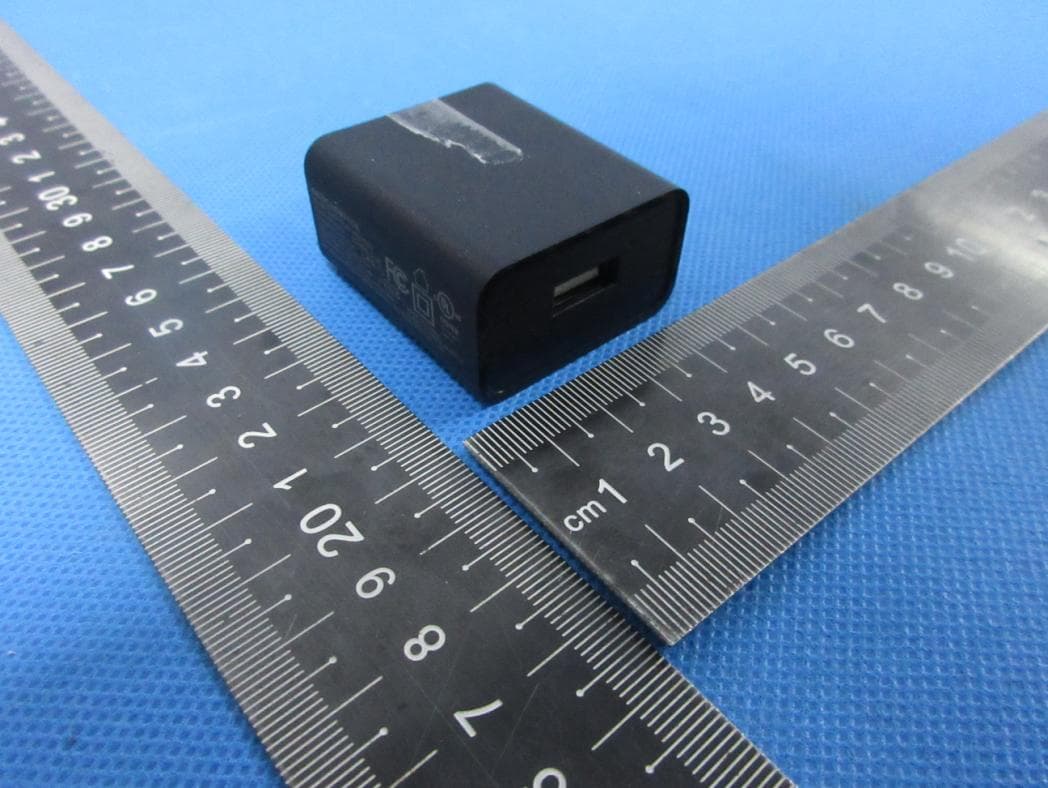
External Photos
Hena Digital Technology Co., Ltd Model: MID7526CM REPORT NO.: STR13128172I-1 FCC PART 15.247 EXHIBIT 2 - EUT EXTERNAL PHOTOGRAPHS EUT View 1 EUT View 2 Hena Digital Technology Co., Ltd Model: MID7526CM REPORT NO.: STR13128172I-1 FCC PART 15.247 EUT View 3 EUT View 4 Hena Digital Technology Co., Ltd Model: MID7526CM REPORT NO.: STR13128172I-1 FCC PART 15.247 EUT View 5 EUT View 6 Hena Digital Technology Co., Ltd Model: MID7526CM REPORT NO.: STR13128172I-1 FCC PART 15.247 EUT View 7 Antenna View WIFI Antenna
ID Label/Location Info
Hena Digital Technology Co., Ltd Model: MID7526CM REPORT NO.: STR13128172I-1 FCC PART 15.247 EXHIBIT 1 - PRODUCT LABELING Proposed FCC ID Label Format FCC ID: M7C-MID117 This device complies with Part 15 of the FCC Rules. Operation is subject to the following two conditions: (1) This device may not cause harmful interference, and (2) this device must accept any interference received, including interference that may cause undesired operation. Specifications: Text is Black in color and justified. Labels are printed in indelible ink on permanent adhesive silk-screened onto the EUT or shall be affixed at a conspicuous location on the EUT. ` Proposed Label Location on EUT FCC ID Label Location
ID Label/Location Info
Hena Digital Technology Co., Ltd Model: MID7526CM REPORT NO.: STR13128172I-1 FCC PART 15.247 EXHIBIT 1 - PRODUCT LABELING Proposed FCC ID Label Format FCC ID: M7C-MID117 This device complies with Part 15 of the FCC Rules. Operation is subject to the following two conditions: (1) This device may not cause harmful interference, and (2) this device must accept any interference received, including interference that may cause undesired operation. Specifications: Text is Black in color and justified. Labels are printed in indelible ink on permanent adhesive silk-screened onto the EUT or shall be affixed at a conspicuous location on the EUT. ` Proposed Label Location on EUT FCC ID Label Location
Internal Photos
Hena Digital Technology Co., Ltd Model: MID7526CM REPORT NO.: STR13128172I-1 FCC PART 15.247 EXHIBIT 3 - EUT INTERNAL PHOTOGRAPHS EUT Housing and Board View Solder Board-Component View 1 Hena Digital Technology Co., Ltd Model: MID7526CM REPORT NO.: STR13128172I-1 FCC PART 15.247 Solder Board-Component View 2
RF Exposure Info
RF Exposure Requirements Product Description: MID Model No.: MID7526CM FCC ID: M7C-MID117 Acorrding to the KDB-447498 D01 V05, the following RF exposure evaluation shall to demonstrate RF exposure compliance. Wi-Fi (802.11b/g/n) Tx frequency range: 2412~2472MHz Device category: Portable Device (Distance: 5mm) Maximum Conducted Output Power: 7.18dBm Maximum Antenna Gain: 2.0 dBi Maximum EIRP Output Power: 8.2794mW (9.18dBm) Limit: 10mW Source-based time-averaged EIRP output power is 8.2794 mW < 10 mW So the transmitter complies with the RF exposure requirements and the SAR is not required.
Test Report
Hena Digital Technology (Shenzhen) Co., Ltd Model: MID7526CM REPORT NO.: STR13128172I-2 PAGE 1 OF 16 FCC PART 15B FCC Part 15B Measurement and Test Report For Hena Digital Technology (Shenzhen) Co., Ltd 3F, South Tower, Jiuzhou Electric Building, Southern No, 12Rd, High-tech Industrial Park, Nanshan District, Shenzhen, China FCC ID: M7C-MID117 Test Rule(s): FCC Part 15 Subpart B Product Description: MID Tested Model: MID7526CM Report No.: STR13128172I-2 Tested Date: 2013-12-12 to 2013-12-31 Issued Date: 2013-12-31 Tested By: Lebron Wang/ Engineer Reviewed By: Lahm Peng / EMC Manager Approved & Authorized By: Jandy so / PSQ Manager Prepared By: Shenzhen SEM.Test Technology Co., Ltd. 1/F, Building A, Hongwei Industrial Park, Liuxian 2nd Road, Bao'an District, Shenzhen, P.R.C.(518101) Tel.: +86-755-33663308 Fax.: +86-755-33663309 Website: www.semtest.com.cn Note: This test report is limited to the above client company and the product model only. It may not be duplicated without prior permitted by Shenzhen SEM.Test Technology Co., Ltd. Hena Digital Technology (Shenzhen) Co., Ltd Model: MID7526CM REPORT NO.: STR13128172I-2 PAGE 2 OF 16 FCC PART 15B TABLE OF CONTENTS 1. GENERAL INFORMATION ................................................................................................................................... 3 1.1 PRODUCT DESCRIPTION FOR EQUIPMENT UNDER TEST (EUT) ............................................................................... 3 1.2 TEST STANDARDS ................................................................................................................................................... 4 1.3 TEST METHODOLOGY ............................................................................................................................................. 4 1.4 TEST FACILITY ....................................................................................................................................................... 4 1.5 EUT SETUP AND OPERATION MODE ...................................................................................................................... 5 2. SUMMARY OF TEST RESULTS ........................................................................................................................... 6 3. CONDUCTED EMISSIONS .................................................................................................................................... 7 3.1 MEASUREMENT UNCERTAINTY .............................................................................................................................. 7 3.2 TEST EQUIPMENT LIST AND DETAILS ..................................................................................................................... 7 3.3 TEST PROCEDURE ................................................................................................................................................... 7 3.4 BASIC TEST SETUP BLOCK DIAGRAM ..................................................................................................................... 7 3.5 ENVIRONMENTAL CONDITIONS .............................................................................................................................. 8 3.6 SUMMARY OF TEST RESULTS/PLOTS ...................................................................................................................... 8 3.7 CONDUCTED EMISSIONS TEST DATA ...................................................................................................................... 8 4. RADIATED EMISSIONS ....................................................................................................................................... 11 4.1 MEASUREMENT UNCERTAINTY ............................................................................................................................ 11 4.2 TEST EQUIPMENT LIST AND DETAILS ................................................................................................................... 11 4.3 TEST PROCEDURE ................................................................................................................................................. 11 4.4 TEST RECEIVER SETUP ......................................................................................................................................... 12 4.5 CORRECTED AMPLITUDE & MARGIN CALCULATION ............................................................................................ 12 4.6 ENVIRONMENTAL CONDITIONS ............................................................................................................................ 12 4.7 SUMMARY OF TEST RESULTS/PLOTS .................................................................................................................... 12 Hena Digital Technology (Shenzhen) Co., Ltd Model: MID7526CM REPORT NO.: STR13128172I-2 PAGE 3 OF 16 FCC PART 15B 1. GENERAL INFORMATION 1.1 Product Description for Equipment Under Test (EUT) Client Information Applicant: Hena Digital Technology (Shenzhen) Co., Ltd Address of applicant: 3F, South Tower, Jiuzhou Electric Building, Southern No, 12Rd, High-tech Industrial Park, Nanshan District, Shenzhen, China Manufacturer: Hena Digital Technology (Shenzhen) Co., Ltd Address of manufacturer: 3F, South Tower, Jiuzhou Electric Building, Southern No, 12Rd, High-tech Industrial Park, Nanshan District, Shenzhen, China General Description of EUT Product Name: MID Trade Name: / Model No.: MID7526CM Adding Model(s): NID-7010,MID7526HCM,MID7526CE,MID7526HCE,MY7526P, MW-7526, MY75**P, MY75**G, MY75**E, MY75**S, MW75**P, MW75**G, MW75**E, MW75**S, MID75**CM, MID75**CE, MID75**HCM, MID75**HCE(** Can be 01-99) Note: The test data is gathered from a production sample, provided by the manufacturer. The appearance of others models listed in the report is different from main-test model MID7526CM, but the circuit and the electronic construction do not change, declared by the manufacturer. Techn…
Text truncated - open the document above for the full version.
Test Setup Photos
Hena Digital Technology Co., Ltd Model: MID7526CM REPORT NO.: STR13128172I-2 FCC PART 15B EXHIBIT 4 - TEST SETUP PHOTOGRAPHS Conducted Emission Test Setup Radiation Emission Test Setup(Below 30MHz) Charging & Playing Mode Hena Digital Technology Co., Ltd Model: MID7526CM REPORT NO.: STR13128172I-2 FCC PART 15B Radiation Emission Test Setup(30MHz to 1GHz) Charging & Playing Mode Radiation Emission Test Setup(Above 1GHz) Charging & Playing Mode
Contact Information
Applicant
Yang tunbo(Compliance engineer)
Test Firm
SEM.Test Compliance Service Co., Ltd.Jandy So
Technical Specifications
| # | Rule Parts | Frequency Range | Power Output |
|---|---|---|---|
| 1 | 15B | - | - |
Other Applications from Hena Digital Technology (Shenzhen) Co., Ltd.
M7CM15QF6
Apr 11, 2022Tablet PC
Equipment Class
DSS - Part 15 Spread Spectrum Transmitter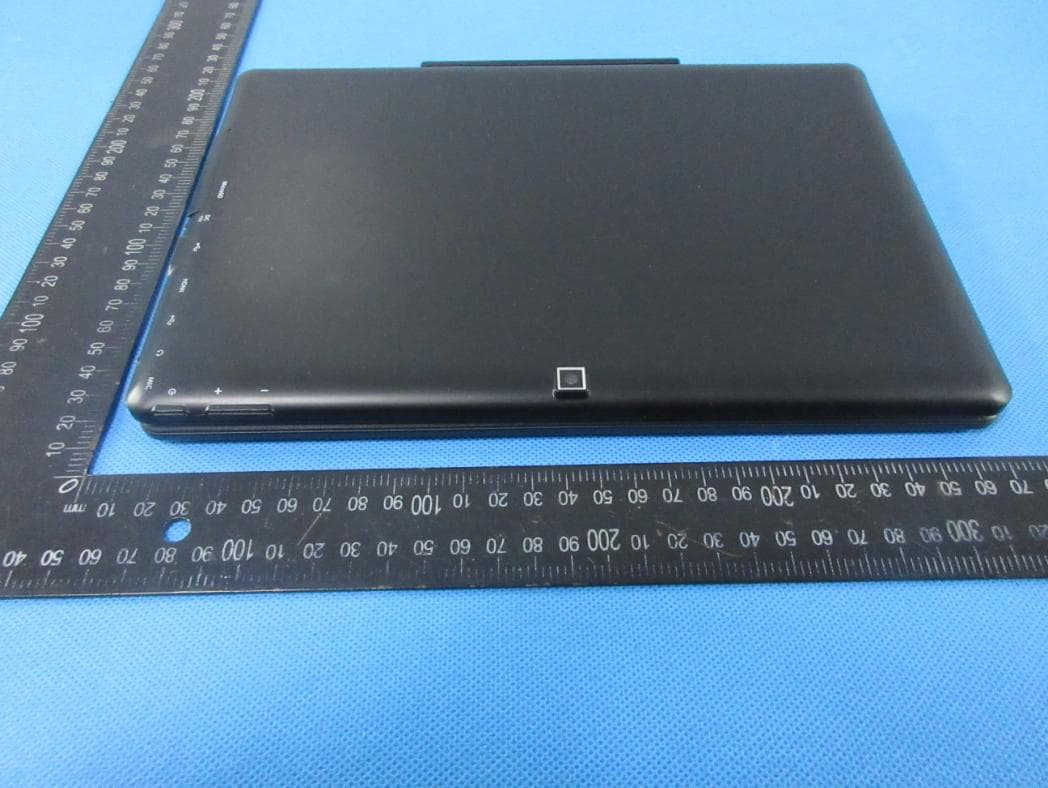
M7CMG10Q16
Apr 11, 2022Notebook
Equipment Class
DSS - Part 15 Spread Spectrum Transmitter
M7C-PAD842IW
Dec 30, 2015MID
Equipment Class
DTS - Digital Transmission System
M7C-PAD941IW
Nov 16, 2015MID
Equipment Class
DTS - Digital Transmission System
M7C-MID121
Sep 01, 2015MID
Equipment Class
DSS - Part 15 Spread Spectrum Transmitter