M7CMID012Multimedia Internet Device
Hena Digital Technology (Shenzhen) Co., Ltd.
Click to zoom
Application Details
- Equipment Class
- DTS - Digital Transmission System
- Date of Grant
- Mar 06, 2013
- Application Purpose
- Original Equipment
- Date of Application
- Mar 06, 2013
- Equipment Note
- Multimedia Internet Device
- Frequency Range
- 2412.00000000 - 2462.00000000
- Country
- China
Documents & Files
Document Text
Text extracted from the exhibit documents filed with the FCC. Open a document above to read the original.
Users Manual
USER'S MANUAL MID-1506CM MID-1506CM RK2928方案 前后摄像头 标准说明书,70g书纸,135x102mm,钉装 ENGLISH MANUAL Table of Contents Table of Contents......................................P1 Features..................................................P2 Unit at a Glance .......................................P3 Getting Started....................................P4-P5 About Applications...............................P5-P6 Preinstalled Applications...........................P6 Connect to a Wi-Fi network...................P7-P8 Optional Connections.........................P9-P10 Specifications.........................................P10 1 Features 2 Browse the Web. Visit your favorite websites Check your e-mail Keep in touch with friends and family Watch YouTube™ videos Browse the world’s most popular video- sharing community Read your favorite books Download thousands of books with the included E-book reader * Discover thousands of apps for Android™ Games, applications, and more with marketplace(need for customer installed) Connect to the Internet wirelessly High-speed Wi-Fi 802.11 b/g/n networking Enjoy your media library anywhere Portable powerhouse plays popular music, video,and photo formats microSD memory card reader Increase your storage capacity (up to 32 GB supported) Built-in camera Convenient front-facing camera(0.3MP) Automatic orientation detection Read any way you want; the display adjusts automatically! Reading books in the ePub format requires the included E-book reader application. Requires optional HDMI cable (Type A-to-Type C). 1080p HD video playback requires a video file encoded at 1080p. Streaming video quality will be affected by the source, and the quality and condition of your network connection. Unit at a Glance 3 1. Power Press to turn the unit on, or to turn the screen on or off. Press and hold to access the Power Off menu. 2.Headphone Audio output connection for headphones. 3. HDMI Connect to a TV or other displays. 4.USB OTG AND HOST Connect to a USB device or a computer to transfer data (e.g. music, videos,photos, files). Connect to a USB device 5. RESET Press this button to force off the system when the device is halted. 6.DC IN 5V Connect to an adapter or a computer to supply power. 7.TF-CARD Load external TF-cards here. 8. Return key 9.VOL+/VOL- VOL+ to increase the volume level. Press VOL- to decrease the volume level. 10.Camera Use it to take pictures or capture videos. Press T F C A R D R E S E T VOL-VOL+ H D M I D C I N 5 V 1 2 3 4 5 6 7 10 10 8 9 Getting Started Turning the Tablet on or off 2. Touch ok the screen to turn off the tablet. Turning the Screen On or off (Standby) When the tablet is on, you can turn off the screen to conserve battery power. Simply press the Power key once to turn the screen off. Press the Power key again to turn the screen back on. To turn the tablet on: Press and hold the Power key until the LCD screen turns on. Wait until the Home screen appears; the tablet is now ready for use. To turn the tablet off: 1.Press and hold the Power key until the Device Options menu appears. To conserve battery power, the screen can be set to turn off automatically when the tablet is not in use . This Screen timeout option can be found in the Display menu. 4 Getting Started 5 Unlocking the Screen About Applications To open an application, touch the application icon on the home screen or in the Launcher where you can tap the icon right up on the home screen to get in.. Launcher screen: The screen shown above is for illustrative purposes only. Reserves the right to modify and improve the final list of applications available on the tablet. When the screen turns off, you will have to unlock the screen when you turn it back on. To unlock the screen, drag the lock icon across the screen towards the unlock icon. . About Applications 6 Preinstalled Applications Some applications have been installed on your tablet for your convenience. These applications include: Browse the web. Perform simple mathematical operations. Take pictures or videos with the frontfacing camera. Check your e-mail. Play music. Access the Settings menu to adjust the tablet’s options. Preinstalled Applications Installing Applications You can also download an install additional applications from the device’s applications marketplace, the web browser, or other sources. The tablet must be set to allow installation of applications from non-Market sources. The Unknown sources option can be set in the Application settings menu. Music Settings 7 Connect to a Wi-Fi network The Notification bar displays icons that indicate your tablet’s Wi-Fi status. Notification that an open Wi-Fi network is in range. Connected to a Wi-Fi network (waves indicate connection strength). When Wi-Fi is on, the tablet will look for and display a list of available Wi-Fi networks. [no icon] There are no Wi-Fi networks in range, or the Wi-Fi radio is off. 1. Turn on the Wi-Fi radio if it is not already on. To turn on Wi-Fi: a.Go to the Home screen: Press the Home key. b.Open the Settings menu: tap the icon right up on the home screen to get into the launcher, then touch Settings icon. c.Open the Wireless & networks menu: Slide the icon to ON status. If a network that you have connected to previously is found, the tablet will connect to it.If you don’t see your network in the list, you can force the tablet to re-scan. To scan for networks, tap the Menu key, and then touch Scan. WIFI1 8 Connect to a Wi-Fi network To learn about how to add a Wi-Fi network when it is not in range or when the router is set to obscure the network name (SSID); or to configure advanced Wi-Fi options, please refer to the manual. When you have successfully connected to a Wi-Fi network, the Notifications bar at the the low of the screen will show a Wi-Fi signal indicator. 2. Select an available Wi-Fi network to connect to: In the same Wi-Fi settings menu above,touch a network in the list. If the network is open,the tablet will prompt you to confirm connection to the …
Text truncated - open the document above for the full version.
Cover Letter(s)
Hena Digital Technology (Shenzhen) Co., Ltd.FCC Confidentiality Request Number: CF303 Version: V05 Date: 21-05-2012 (Permanent or also called long term confidentiality is the normal method to keep certain docuements confidential, and may apply to schematics, block diagrams, operational description and bill of materials.) To: Federal Communications Commission Equipment Authorization Branch 7435 Oakland Mills Road Columbia, MD 21046 Pursuant to 47 CFR Section 0.459(a) & (b), we, (the applicant / grantee) Company nameHena Digital Technology (Shenzhen) Co., Ltd. Address3F, South Tower, Jiuzhou Electric building, Southern No., 12Rd., High-tech Industrial Park, Nanshan District CityShenzhen CountryChina request for this certification filing under: Grantee CodeProduct Number FCC ID:M7CMID012 to maintain permanent confidentiality for the following documents submitted within this application: (please cross what is applicable, or add other documents) ExhibitDescription VOperational Descriptionexplaining the functioning of the block diagram VBlock Diagramsshowing the systematic building blocks of the EUT VSchematics Diagramsshowing components, their values and interconnection Above materials crossed contain secrets, proprietary and technical information, which would customarily be guarded from competitors under 47 CFR, section 0.457(d)(2). Disclosure or publication or any portion of this company confidential material to other parties could cause substantial competitive harm and provide unjustified benefits for competitors. We understand that pursuant to 47 CFR section 0.457(d)(1)(ii) disclosure of the applicant and all accompanying documentation will not be made before the date of the grant. The documents indicated as confidential above, are not publicly available elsewhere. Attestation: City and Country:Date:Name: (this must be a person) Function:Signature: (or official company stamp) Enschede, The Netherlands 2013-03-07M.Koop (authorized) Manager
External Photos
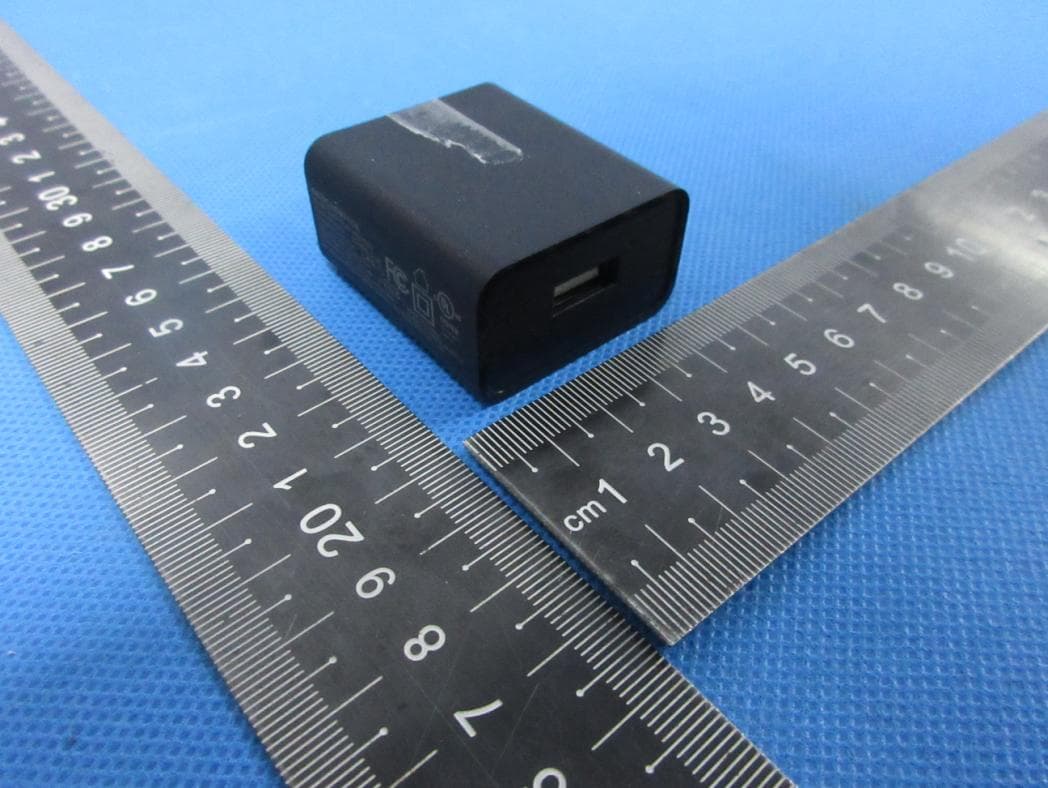
EUT EXTERNAL PHOTOGRAPHS EUT –Whole View EUT-Front View EUT-Side View EUT –Adapter View EUT –Adapter View
ID Label/Location Info
This device complies with Part 15 of the FCC Rules. Operation is subject to the following two conditions: 1. This device may not cause harmful interference, and 2. This device must accept any interference received, including interference that may cause undesired operation.
Internal Photos
EUT INTERNAL PHOTOGRAPHS EUT –Uncovered View Antenna location EUT PCB View EUT Battery View EUT –WI-FI Module View EUT LCD View
RF Exposure Info
FCC RF Exposure EUT Description: MID Model No.: MID1506CM FCC ID: M7CMID012 1. Applicable Standard According to §1.1307(b)(5), systems operating under the provisions of this section shall be operated in a manner that ensure that the public is not exposed to radio frequency energy level in excess of the Commission’s guideline. This is a Portable device. KDB 447498 D01 General RF Exposure Guidance v05 was used as the guidance. According to §1.1310 and §2.1093 RF exposure is calculated. 2. RF Exposure Calculation Result: 802.11b/g/n: Frequency: 2412-2462 MHz Modulation: DSSS (CCK, OFDM, DBPSK, DQPSK) Mid-Channel: 2.412 GHz (channel 01) Antenna Gain: G = 2 dBi According to the requirement of KDB 447498 D01 General RF Exposure Guidance v05 Appendix A SAR Test Exclusion Thresholds for 100 MHz – 6 GHz and ≤ 50 mm. The Max Peak Power measured and achieved in 11b mode is: 9.75 dBm = 9.4 mW < 10 mW (Thresholds) and the exact distance from (the closest part of) the internal antenna to the outside surface of the tablet is greater than 5mm. The SAR measurement is not necessary.
Test Report
Test Report of FCC CFR 47 Part 15 Subpart C On Behalf of Hena Digital Technology (Shenzhen) Co., Ltd. FCC ID: M7CMID012 Product Description: MID Model No.: MID1506CM Supplementary Model: MID1506CP;MID1506CE;MID1506CG;MID15**CM;MID15**CP; MID15**CE;MID15**CG;MID1506CM#;MID1506CP#;MID1506CE#; MID1506CG#;MID15**CM#; MID15**CP#; MID15**CE#; MID15**CG#;LT1041;(“**”can be 01-99; “#”can be A-Z); Brand Name: HENA; KLU Prepared for: Hena Digital Technology (Shenzhen) Co., Ltd. 3F, South Tower, Jiuzhou Electric building, Southern No., 12Rd., High-tech Industrial Park, Nanshan District, Shenzhen, China Prepared by: Shenzhen Bontek Compliance Testing Laboratory Co., Ltd. 1/F, Block East H-3, OCT Eastern Ind. Zone, Qiaocheng East Road, Nanshan, Shenzhen, China Tel: 86-755-86337020 Fax: 86-755-86337028 Report No.: BCT13BR-0191E-2 Issue Date: March 4, 2013 Test Date: February 20~March 4, 2013 Tested by: Reviewed by: Lion Cai Kendy Wang Approved by: Tony Wu Report No.: BCT13BR-0191E-2 Page 2 of 73 FCC ID: M7CMID012 TABLE OF CONTENTS 1. GENERAL INFORMATION........................................................................................................................ 4 1.1 PRODUCT DESCRIPTION FOR EQUIPMENT UNDER TEST (EUT) .................................................................. 4 1.2 TEST STANDARDS................................................................................................................................... 5 1.3 TEST FACILITY........................................................................................................................................ 5 2. SYSTEM TEST CONFIGURATION ........................................................................................................... 6 2.1 EUT CONFIGURATION............................................................................................................................. 6 2.2 EUT EXERCISE....................................................................................................................................... 6 2.3 GENERAL TEST PROCEDURES................................................................................................................. 6 2.4 MEASUREMENT UNCERTAINTY................................................................................................................. 6 2.5 LIST OF MEASURING EQUIPMENTS USED.................................................................................................. 7 3. SUMMARY OF TEST RESULTS ............................................................................................................... 8 4. TEST OF AC POWER LINE CONDUCTED EMISSION ........................................................................... 9 4.1 APPLICABLE STANDARD........................................................................................................................... 9 4.2 TEST SETUP DIAGRAM............................................................................................................................ 9 4.3 TEST RESULT......................................................................................................................................... 9 5. TEST OF MAXIMUM PEAK OUTPUT POWER ...................................................................................... 12 5.1 APPLICABLE STANDARD......................................................................................................................... 12 5.2 EUT SETUP.......................................................................................................................................... 12 5.3 TEST EQUIPMENT LIST AND DETAILS...................................................................................................... 12 5.4 TEST PROCEDURE................................................................................................................................12 5.5 TEST RESULT....................................................................................................................................... 12 6. TEST OF PEAK POWER SPECTRAL DENSITY ................................................................................... 22 6.1 APPLICABLE STANDARD......................................................................................................................... 22 6.2 EUT SETUP.......................................................................................................................................... 22 6.3 TEST EQUIPMENT LIST AND DETAILS...................................................................................................... 22 6.4 TEST PROCEDURE................................................................................................................................22 6.5 TEST RESULT....................................................................................................................................... 22 7. TEST OF 6DB BANDWIDTH ................................................................................................................... 32 7.1 APPLICABLE STANDARD......................................................................................................................... 32 7.2 EUT SETUP.......................................................................................................................................... 32 7.3 TEST EQUIPMENT LIST AND DETAILS...................................................................................................... 32 7.4 TEST PROCEDURE................................................................................................................................32 7.5 TEST RESULT....................................................................................................................................... 32 8. TEST OF CONDUCTED SPURIOUS EMISSION.................................................................................... 43 8.1 APPLICABLE STANDARD.....................…
Text truncated - open the document above for the full version.
Test Setup Photos
TEST SETUP PHOTOGRAPHS Conducted Emission Conducted Emission Radiated Emission 30MHz To 1G Radiated Emission 30MHz To 1G Radiation Emission Less Than 30 MHz Radiated Emission Above 1GHz
Contact Information
Applicant
Yang tunbo(Compliance engineer)
Technical Contact
Test Firm
Bontek Compliance Testing Laboratory LtdTony Wu
Technical Specifications
| # | Rule Parts | Frequency Range | Power Output |
|---|---|---|---|
| 1 | 15C | 2.41 GHz - 2.46 GHz | 9.40 mW |
Other Applications from Hena Digital Technology (Shenzhen) Co., Ltd.
M7CM15QF6
Apr 11, 2022Tablet PC
Equipment Class
DSS - Part 15 Spread Spectrum Transmitter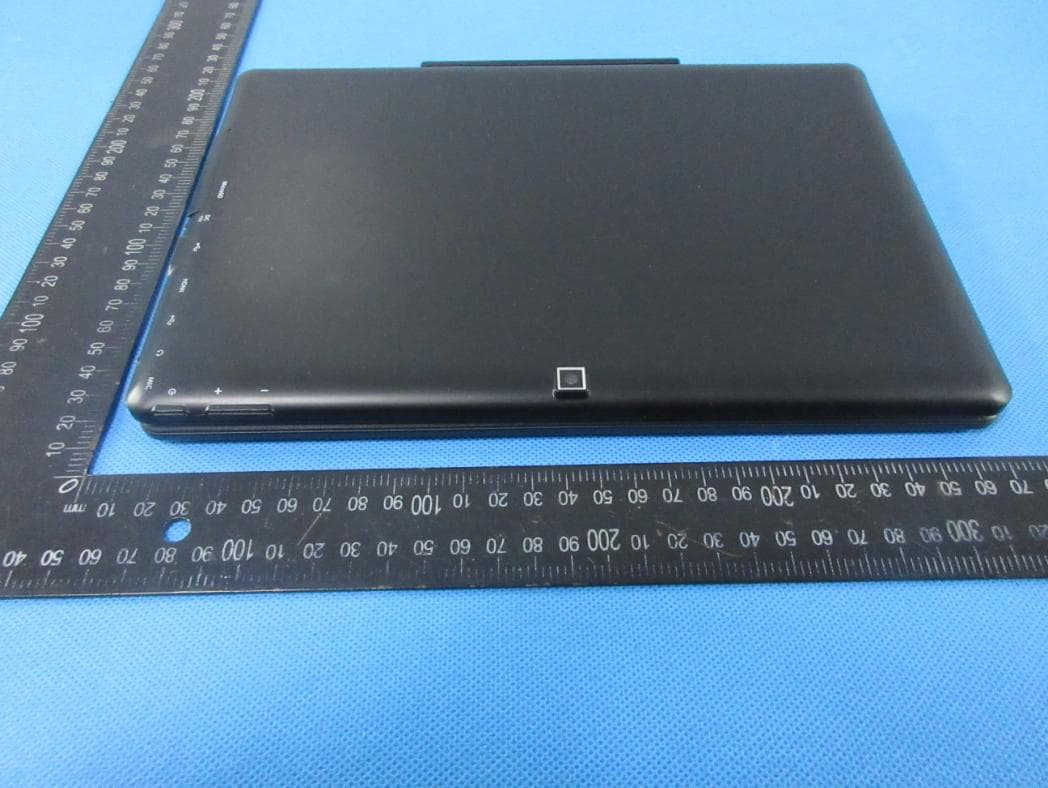
M7CMG10Q16
Apr 11, 2022Notebook
Equipment Class
DSS - Part 15 Spread Spectrum Transmitter
M7C-PAD842IW
Dec 30, 2015MID
Equipment Class
DTS - Digital Transmission System
M7C-PAD941IW
Nov 16, 2015MID
Equipment Class
DTS - Digital Transmission System
M7C-MID121
Sep 01, 2015MID
Equipment Class
DSS - Part 15 Spread Spectrum Transmitter