MXF-BV1501Camtalk
Gemtek Technology Co., Ltd.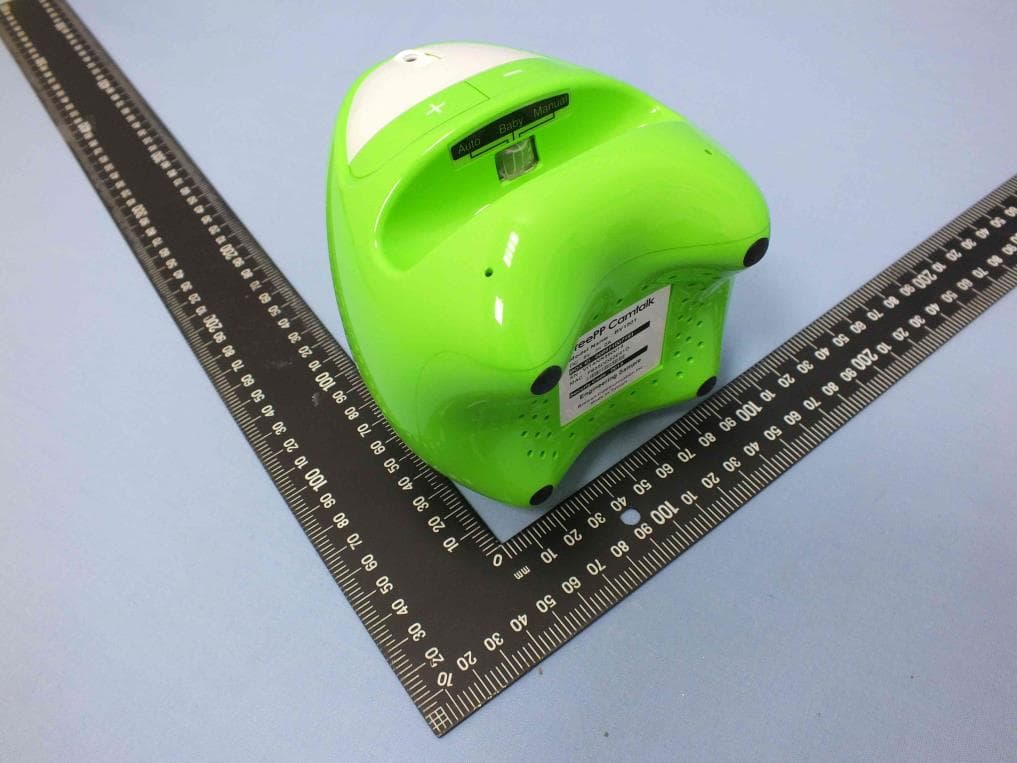
Click to zoom
Application Details
- Equipment Class
- DTS - Digital Transmission System
- Date of Grant
- Nov 07, 2013
- Application Purpose
- Original Equipment
- Date of Application
- Nov 05, 2013
- Equipment Note
- Camtalk
- Frequency Range
- 2412.00000000 - 2462.00000000
- Company
- Gemtek Technology Co., Ltd.
- Country
- Taiwan
Documents & Files
Document Text
Text extracted from the exhibit documents filed with the FCC. Open a document above to read the original.
Users Manual
LAN WPS/Reset Blue on:Idle mode Blue blinking:Incoming Call Red on:Booting up Red blinking:Error Pink on:Ongoing Call Press 1 time for WPS. Over 3 seconds for Reset. Insert USB storage(FAT32) for recording functions. Video on/off Enable or disable during conversation. Power LED & Switch, Choose scenario you want. Adjustable Camera Status Volume Control Video Indicator Phone 2Phone 1 720P HD Camera Speaker Power USB Camtalk Front Side Camtalk Back Side Camtalk Label Example Instructions Enter Box ID to make the call. Security Code Box ID Press Call button 1 or 2 to dial out. Press video plus either button 1 or 2 simultaneously to memorize the last incoming call number for speed dialing. Auto/Baby/Manual mode On Auto and Baby Monitor mode, person making incoming call needs to enter the security code (4 digits). The security code can be customized in settings later. Made in Taiwan Browan Communications Inc. CCAXXXXXXXXXXX FCC ID : MXF-BV1501 Model Name : BV1501 DC : 5V 2A Box ID : 008971007000 Security code : 4567 MAC : F835DDXXXXXX SN : VITANR334567 Made in Taiwan Browan Communications Inc. CCAXXXXXXXXXXX FCC ID : MXF-BV1501 Model Name : BV1501 DC : 5V 2A Box ID : 008971007000 Security code : 4567 MAC : F835DDXXXXXX SN : VITANR334567 1. You can record your own Ringtone. 2. Press Video on/off button for 3 seconds to set the last voice message as Ringtone. PS:MP3, 3GP, WAV formats are supported as Ringtone. Customize your own Ringtone 1. Camtalk will become Access Point (AP) if no RJ45 Cable is connected to it (Around 90 seconds after boot up and when Red light is blinking) 2. Use your computer or mobile device to connect to Cam talk via wireless (SSID is Camtalk + last 6 digits of MAC) 3. Type `192.168.1.1 ́ into your Browser to set it up (Default password is ‘admin’) Access Camtalk without internet cable Real time & Scheduling Voice Message 1. Press Voice message button on APP to send a message. This also can be scheduled, sliding finger up after message is recorded. 2. The message will be reproduced 5 times. Once every 30 seconds. 3. Press Video on/off button in Camtalk to pick it up Set Up Speed Dial Button 1. Camtalk can memorize two sets of FreePP contacts for speed dial. 2. To configure them, press video plus either button 1 or 2 simultaneously to memorize the last incoming call number for speed dialing. 3. Finally release those buttons and you will hear an alert, indicating the phone number was successfully saved. How to Call FreePP APP > Camtalk 1.Use the dial pad of the APP to key in the Camtalk Box ID and complete phone call. 2.Follow voice instructions to enter Security code in order to access Camtalk.(Auto or Baby Monitor mode only) Camtalk to FreePP APP & Product Use Phone 1 or 2 for speed dial. To configure them, call the Camtalk from your smartphone and hang up. Then, hold the Video on/off button first and press Phone 1 or 2 whichever you want to save that last phone call number. Finally release those buttons and you will hear an alert, indicating the phone number was successfully saved. Repeat same process if you want to save another number in Phone 1 or 2. QuestionAnswer Q&A Manual Baby Monitor Auto Two way Single way( To APP) Two way Voice single/ Two way 1M 3~4M 1M Mic Range Pick up mode Auto Auto Manual Yes No Yes Alerts for Pick up & hang up Yes No Yes Voice mes- sage Pets, Home care Baby care Family & Friends Scenario Mode Advance Settings For more features and options, please use the setting page via FreePP APP. 1. Wireless 2. White List 3. Do not disturb mode 4. Upload Ringtone & Alert 5. Motion Detection Note: All configurations can be done through Internet Browser. Only need to identify the Camtalk IP, type IP address into browser and follow the instructions. 6. Loop Recording 7. Scheduling Recording 8. Interval Photos 9. Others advance settings Quick Guide Quick Setting Set Up Speed Dial Button 1. Plug Power & LAN cable first, wait until blue light turns on and make sure your Smartphone or Tablet is connected to the same Router(Only for configuration). 2. Download FreePP APP from Apple Store or Google Play on your mobile device. After registration, go to Contact list and you will find the FreePP Device option on top of Contacts. Use it to search. 3. Click on the device and you can start to set it up.(Default password is ‘admin’) 1. Check the Power cable. 2. Check the outlet on the wall. 3. Unplug the power adapter and plug it again. No Sign of Power 1. Make sure LAN cable is properly connected and ensure Status LED is Blue. (Blue light takes 90~120 seconds to turn on) 2. Check whether the Router is properly connected to Internet. 3. Check Speed dial button has been already set. Can’t pick up or dial FreePP phone call。 1. Check the status of LAN cable. 2. Disconnect and connect power supply. 3. Try another LAN cable. 4. Check whether the Router is properly connected to Internet. 5. Try to reset your device. (Press over 3 seconds) 6. Check the IP status of the Camtalk via FreePP APP. If there is no IP displayed, please check your Router or contact your Internet Service Provider. No Blue light displays on FreePP logo(Idle Mode)
Users Manual
Dealer Stamp Warranty Statement (Store stamp) (1)Please have the dealer from whom you have purchased this product fill in your purchase data and affix a warranty stamp. (2)This warranty only applies to the product itself and does not include accessories. (3)This warranty is valid for one year from the original purchase date of this Product. Please register your product online to extend the warranty period for one more year. (4) Please save this warranty card as no replacement card will be issued if the original is lost. (5) Browan reserves the right to revise, explain, and describe the warranty of this Product. Browan reserves the right to change the warranty terms at any time without notice. Please visit our website for the latest version of the warranty terms. Product name Browan Communication Co Ltd. Purchasing date Address: No. 15-1, Zhonghua Road, Hsinchu Industrial Park, HuKou, Hsinchu, Taiwan, R.O.C. Zip code: 30352 Web: www.FreePP.com Customer service: +886-3-5981104 Federal Communication Commission Interference Statement This equipment has been tested and found to comply with the limits for a Class B digital device, pursuant to Part 15 of the FCC Rules. These limits are designed to provide reasonable protection against harmful interference in a residential installation. This equipment generates, uses and can radiate radio frequency energy and, if not installed and used in accordance with the instructions, may cause harmful interference to radio communications. However, there is no guarantee that interference will not occur in a particular installation. If this equipment does cause harmful interference to radio or television reception, which can be determined by turning the equipment off and on, the user is encouraged to try to correct the interference by one or more of the following measures: Reorient or relocate the receiving antenna. Increase the separation between the equipment and receiver. Connect the equipment into an outlet on a circuit different from that to which the receiver is connected. Consult the dealer or an experienced radio/TV technician for help. FCC Caution: Any changes or modifications not expressly approved by the party responsible for compliance could void the user's authority to operate this equipment. This device complies with Part 15 of the FCC Rules. Operation is subject to the following two conditions: (1) This device may not cause harmful interference, and (2) this device must accept any interference received, including interference that may cause undesired operation. This device and its antenna(s) must not be co-located or operating in conjunction with any other antenna or transmitter. IMPORTANT NOTE: FCC Radiation Exposure Statement: This equipment complies with FCC radiation exposure limits set forth for an uncontrolled environment. This equipment should be installed and operated with minimum distance 20cm between the radiator & your body. Country Code selection feature to be disabled for products marketed to the US/CANADA
External Photos
Project No.: EP372402 Page No. : 1 of 26 Photographs of EUT Project No.: EP372402 Page No. : 2 of 26 Project No.: EP372402 Page No. : 3 of 26 Project No.: EP372402 Page No. : 4 of 26 Project No.: EP372402 Page No. : 5 of 26 Project No.: EP372402 Page No. : 6 of 26
ID Label/Location Info
Label Location
Internal Photos
Project No.: EP372402 Page No. : 7 of 26 Project No.: EP372402 Page No. : 8 of 26 Project No.: EP372402 Page No. : 9 of 26 Project No.: EP372402 Page No. : 10 of 26 Project No.: EP372402 Page No. : 11 of 26 Project No.: EP372402 Page No. : 12 of 26 Project No.: EP372402 Page No. : 13 of 26 Project No.: EP372402 Page No. : 14 of 26 Project No.: EP372402 Page No. : 15 of 26 Project No.: EP372402 Page No. : 16 of 26 Project No.: EP372402 Page No. : 17 of 26 Project No.: EP372402 Page No. : 18 of 26 Project No.: EP372402 Page No. : 19 of 26 Project No.: EP372402 Page No. : 20 of 26 Project No.: EP372402 Page No. : 21 of 26 Project No.: EP372402 Page No. : 22 of 26 Project No.: EP372402 Page No. : 23 of 26 Project No.: EP372402 Page No. : 24 of 26 Project No.: EP372402 Page No. : 25 of 26 Project No.: EP372402 Page No. : 26 of 26
RF Exposure Info
Report No.: FA372402 Page : 1 of 5 Report Version: Rev. 01 FCC RF Exposure Report FCC ID : MXF-BV1501 Equipment : Camtalk Model No. : BV1501 Brand Name : FreePP Applicant : Gemtek Technology Co., Ltd. Address : No. 15-1 Zhonghua Road, Hsinchu Industrial Park, Hukou, Hsinchu, Taiwan, 30352. Standard : 47 CFR FCC Part 2.1091 Received Date : Jul. 24, 2013 Tested Date : Jul. 18 ~ Oct. 05, 2013 We, International Certification Corp., would like to declare that the tested sample has been evaluated and in compliance with the requirement of the above standards. The test results contained in this report refer exclusively to the product. It may be duplicated completely for legal use with the approval of the applicant. It shall not be reproduced except in full without the written approval of our laboratory. Approved & Reviewed by: Gary Chang / Manager Ty: XXX Report No.: FA372402 Page : 2 of 5 Report Version: Rev. 01 Table of Contents 1 MPE EVALUATION OF MOBILE DEVICES ......................................................................................... 4 1.1 LIMITS FOR GENERAL POPULATION/UNCONTROLLED EXPOSURE............................................. 4 1.2 MPE EVALUATION FORMULA ............................................................................................................. 4 1.3 MPE EVALUATION RESULTS .............................................................................................................. 4 2 TEST LABORATORY INFORMATION ................................................................................................. 5 Report No.: FA372402 Page : 3 of 5 Report Version: Rev. 01 Release Record Report No. Version Description Issued Date FA372402 Rev. 01 Initial issue Oct. 28, 2013 Report No.: FA372402 Page : 4 of 5 Report Version: Rev. 01 1 MPE EVALUATION OF MOBILE DEVICES Human exposure to RF emissions from mobile devices (47 CFR §2.1091) may be evaluated based on the MPE limits adopted by the FCC for electric and magnetic field strength and/or power density, as appropriate, since exposures are assumed to occur at distances of 20 cm or more from persons. 1.1 LIMITS FOR GENERAL POPULATION/UNCONTROLLED EXPOSURE Frequency Range (MHz) Power Density (mW /cm 2 ) Averaging Time (minutes) 300~1500 F/1500 30 1500~100000 1.0 30 1.2 MPE EVALUATION FORMULA Pd = 2 **4RPi Pt Where Pd= Power density in mW/cm 2 Pt= EIRP in Mw Pi= 3.1416 R= Measurement distance 1.3 MPE EVALUATION RESULTS MPE Evaluation of Single Transmission Frequency Band (MHz) Modulation Mode Max Power (dBm) Antenna Gain (dBi) Distance (cm) Power Density (mW/cm 2 ) Limit (mW/cm 2 ) 2412-2462 802.11b 23.59 3.52 20 0.102 1 802.11g 20.23 3.52 20 0.047 1 802.11n (HT20) 19.55 3.52 20 0.040 1 802.11n (HT40) 20.15 3.52 20 0.046 1 Report No.: FA372402 Page : 5 of 5 Report Version: Rev. 01 2 Test laboratory information Established in 2012, ICC provides foremost EMC & RF Testing and advisory consultation services by our skilled engineers and technicians. Our services employ a wide variety of advanced edge test equipment and one of the widest certification extents in the business. International Certification Corp, it is our definitive objective is to institute long term, trust-based associations with our clients. The expectation we set up with our clients is based on outstanding service, practical expertise and devotion to a certified value structure. Our passion is to grant our clients with best EMC / RF services by oriented knowledgeable and accommodating staff. Our Test sites are located at Linkou District and Kwei Shan Hsiang. Location map can be found on our website http://www.icertifi.com.tw. Linkou Kwei Shan Tel: 886-3-271-8666 Tel: 886-3-271-8666 No. 30-2, Ding Fwu Tsuen, Lin Kou District, New Taipei City, Taiwan, R.O.C. No. 3-1, Lane 6, Wen San 3rd St., Kwei Shan Hsiang, Tao Yuan Hsien 333, Taiwan, R.O.C. If you have any suggestion, please feel free to contact us as below information Tel: 886-3-271-8666 Fax: 886-3-318-0155 Email: [email protected] ══END══
Test Report
Report No.: FR372402 Page : 1 of 62 Report Version: Rev. 02 FCC Test Report FCC ID : MXF-BV1501 Equipment : Camtalk Model No. : BV1501 Brand Name : FreePP Applicant : Gemtek Technology Co., Ltd. Address : No. 15-1 Zhonghua Road, Hsinchu Industrial Park, Hukou, Hsinchu, Taiwan, 30352. Standard : 47 CFR FCC Part 15.247 Received Date : Jul. 18, 2013 Tested Date : Jul. 18 ~ Nov. 06, 2013 We, International Certification Corp., w ould like to declare that the tested sample has been ev aluated and in compliance w ith the requirement of the abov e standards. The test results contained in this report refer exclusively to the product. It may be duplicated completely for legal use with the approv al of the applicant. It shall not be reproduced except in full w ithout the w ritten approv al of our laboratory. Approv ed & Rev iew ed by: Gary Chang / Manager Ty: XXX Report No.: FR372402 Page : 2 of 62 Report Version: Rev. 02 Table of Contents 1 GENERAL DESCRIPTION .......................................................................................................... 5 1.1 Information.................................................................................................................................. 5 1.2 Local Support Equipment List....................................................................................................... 8 1.3 T est Setup Chart ......................................................................................................................... 9 1.4 T he Equipment List.................................................................................................................... 10 1.5 T est Standards.......................................................................................................................... 11 1.6 Measurement Uncertainty .......................................................................................................... 12 2 TES T CONFIGURATION........................................................................................................... 13 2.1 T esting Condition ...................................................................................................................... 13 2.2 T he Worst T est Modes and Channel Details................................................................................ 13 3 TRANSMITTER TEST RESUL TS............................................................................................... 14 3.1 Conducted Emissions ................................................................................................................ 14 3.2 6dB and Occupied Bandwidth .................................................................................................... 17 3.3 RF Output Power....................................................................................................................... 20 3.4 Power Spectral Density.............................................................................................................. 23 3.5 Unwanted Emissions into Restricted Frequency Bands ................................................................ 25 3.6 Unwanted Emissions into Non-Restricted Frequency Bands......................................................... 53 4 TES T LABORATORY INFORMATION ....................................................................................... 62 Report No.: FR372402 Page : 3 of 62 Report Version: Rev. 02 Release Record Report No. Version Description Issued Date FR372402 Rev. 01 Initial issue Oct. 28, 2013 FR372402 Rev. 02 Removed 3G dongle and added USB flash to support unit Nov. 6, 2013 Report No.: FR372402 Page : 4 of 62 Report Version: Rev. 02 Summary of Test Results FCC Rules Test Items Measured Result 15.207 Conducted Emissions [dBuV]: 0.461MHz 41.48 (Margin -5.19dB) - AV Pass 15.247(d) 15.209 Radiated Emissions [dBuV/m at 3m]: 2384.00MHz 52.95 (Margin -1.05dB) – AV [dBuV/m at 3m]: 2483.50MHz 72.95 (Margin -1.05dB) – PK Pass 15.247(b)(3) Fundamental Emission Output Power Power [dBm]: 11b: 25.68 11g: 27.64 HT 20: 27.21 HT 40: 27.13 Pass 15.247(a)(2) 6dB Bandwidth Meet the requirement of limit Pass 15.247(e) Power Spectral Density Meet the requirement of limit Pass 15.203 Antenna Requirement Meet the requirement of limit Pass Report No.: FR372402 Page : 5 of 62 Report Version: Rev. 02 1 General Description 1.1 Information 1.1.1 Specification of the Equipment under Test (EUT) RF General Information Frequency Range (MHz) IEEE Std. 802.11 Ch. Freq. (MHz) Channel Number Transmit Chains (N TX ) Data Rate / MCS 2400-2483.5 b 2412-2462 1-11 [11] 2 1-11 Mbps 2400-2483.5 g 2412-2462 1-11 [11] 2 6-54 Mbps 2400-2483.5 n (HT 20) 2412-2462 1-11 [11] 2 MCS 0-15 2400-2483.5 n (HT 40) 2422-2452 3-9 [7] 2 MCS 0-15 Note 1: RF output power specifies that Maximum Peak Conducted Output Power. Note 2: 802.11b uses a combination of DSSS-DBPSK, DQPSK, CCK modulation. Note 3: 802.11g/n uses a combination of OFDM-BPSK, QPSK, 16QAM, 64QAM modulation. 1.1.2 Antenna Details Ant. No. Model Type Gain (dBi) Connector Remark 1 ANT _Left PIFA 3.52 --- --- 2 ANT _Right PIFA 2.5 --- --- 1.1.3 EUT Operational Condition Pow er Supply Type DC 5V from AC adapter Report No.: FR372402 Page : 6 of 62 Report Version: Rev. 02 1.1.4 Accessories Accessories No. Equipment Description 1 AC Adapter 1 Brand Name: LEI (IT E power supply) Model Name: MU10-Q050200-A1 Power Rating: I/P: 100-240Vac, 50-60Hz, 0.3A O/P: 5Vdc, 2A Power Line: 1.5m non-shielded cable w/o core 2 AC Adapter 2 Brand Name: AOEM Model Name: ADS012PM-W 050200 Power Rating: I/P: 100-240Vac, 50-60Hz, 0.5A O/P: 5Vdc, 2A Power Line: 1.5m non-shielded cable w/o core 3 AC Adapter 3 Brand Name: DVE Model Name: DSA-12PFA-05 FUS Power Rating: I/P: 100-240Vac, 50-60Hz, 0.5A O/P: 5Vdc, 2.0A Power Line: 1.5m non-shielded cable w/o core 4 RJ45 90cm shielded w/o core Report No.: FR372402 Page : 7 of 62 Report Version: Rev. 02 1.1.5 Channel List Frequency band (MHz) 2400~2483.5 802.11 b / g / n HT20 802…
Text truncated - open the document above for the full version.
Test Setup Photos
Report No.: FR372402 Page: : 1 of 2 Report Version: Rev. 01 Photographs of the Test Configuration Conducted Emission Test Report No.: FR372402 Page: : 2 of 2 Report Version: Rev. 01 Radiated Emission Test
Contact Information
Applicant
Adam Wang(Manager)
Technical Contact
International Certification Corp.Gary Chang
886-3-271-8628
Taiwan
Non-Technical Contact
International Certification Corp.Wendy Liao
886-3-271-8629
Test Firm
International Certification Corp.Jeff Chuang
Technical Specifications
| # | Rule Parts | Frequency Range | Power Output |
|---|---|---|---|
| 1 | 15C | 2.41 GHz - 2.46 GHz | 580.00 mW |
Other Applications from Gemtek Technology Co., Ltd.
MXF-WRTQ411BE
Jul 16, 2026Wi-Fi 7 Tri-Band Router
Equipment Class
6ID - 15E 6 GHz Low Power Indoor Access PointMXF-XR1710G
Apr 18, 2024Wi-Fi 7 Router
Equipment Class
NII - Unlicensed National Information Infrastructure TX
MXF-W1701K
Oct 17, 2023Tri-Band AP
Equipment Class
6ID - 15E 6 GHz Low Power Indoor Access Point
MXF-EL4000
Mar 01, 2022Wireless Home Internet
Equipment Class
NII - Unlicensed National Information Infrastructure TX
MXF-C5500XK
Jul 28, 2021C5500XK Modem
Equipment Class
DSS - Part 15 Spread Spectrum Transmitter