MXF-WRTB283NDual band Router
Gemtek Technology Co., Ltd.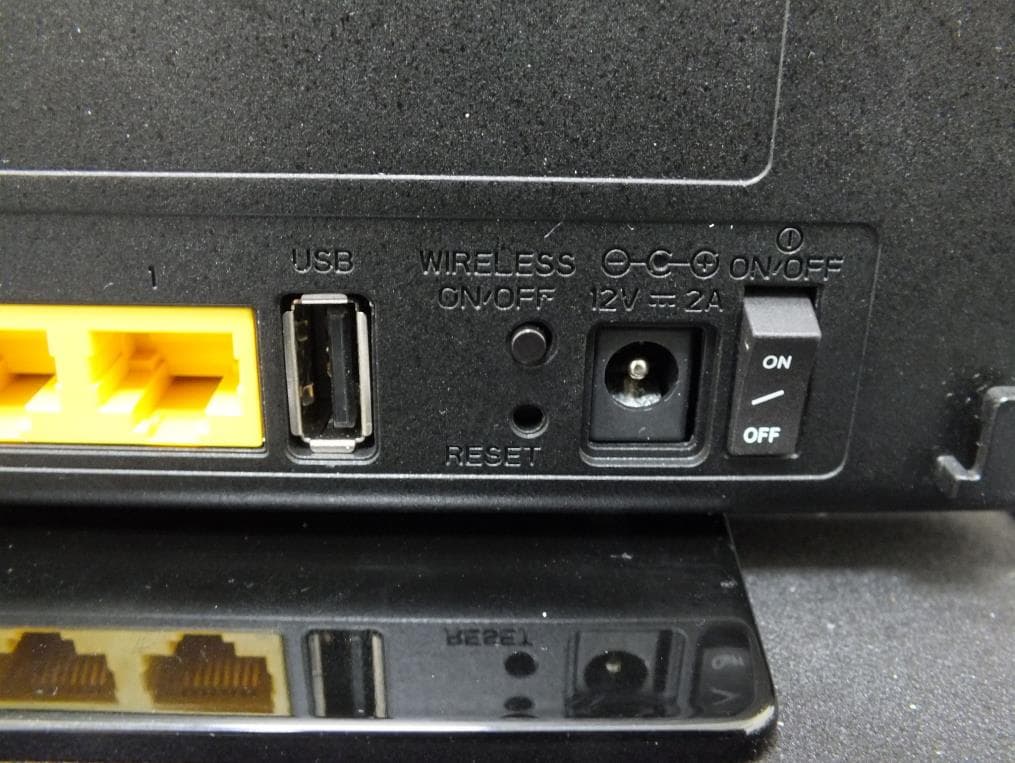
Click to zoom
Application Details
- Equipment Class
- DTS - Digital Transmission System
- Date of Grant
- Apr 21, 2013
- Application Purpose
- Original Equipment
- Date of Application
- Apr 19, 2013
- Equipment Note
- Dual band Router
- Frequency Range
- 5745.00000000 - 5825.00000000
- Company
- Gemtek Technology Co., Ltd.
- Country
- Taiwan
Documents & Files
Document Text
Text extracted from the exhibit documents filed with the FCC. Open a document above to read the original.
Users Manual
User Manual for WRTB-283N Preface Gemtek reserves the right to revise this publication and to make changes in the content hereof without obligation to notify any person or organization of such revisions or changes. Manual Revisions Revision 1.0 Date March 15, 2013 • Initial release Description Trademarks Gemtek and the Gemtek logo are trademarks or registered trademarks of Gemtek Corporation or its subsidiaries in the United States or other countries. All other company or product names mentioned herein are trademarks or registered trademarks of their respective companies. Copyright © 2013 by Gemtek Inc. All rights reserved. This publication may not be reproduced, in whole or in part, without prior expressed written permission from Gemtek Inc. Product Overview WRTB-283N Ethernet Cable Power Adapter CD-ROM with Manual and Setup Wizard If any of the above items are missing, please contact your reseller. Note: Using a power supply with a different voltage rating than the one included with the WRTB-283N will cause damage and void the warranty. System Requirements • An Ethernet-based Cable or DSL modem Network Requirements Web-based Configuration Utility Requirements CD Installation Wizard Requirements • IEEE 802.11n or 802.11g wireless clients • IEEE 802.11a wireless clients • 10/100/1000 Ethernet Computer with the following: • Windows®, Macintosh, or Linux-based operating system • An installed Ethernet adapter Browser Requirements: • Internet Explorer 6.0 or higher • Chrome 2.0 or higher • Firefox 3.0 or higher • Safari 3.0 or higher (with Java 1.3.1 or higher) Windows® Users: Make sure you have the latest version of Java installed. Visit www.java.com to download the latest version. Computer with the following: • Windows® 7, Vista®, or XP with Service Pack 2 • An installed Ethernet adapter • CD-ROM drive TOTAL PERFORMANCE Introduction Combines award winning router features and 802.11a/n/g wireless technology to provide the best wireless performance. TOTAL SECURITY The most complete set of security features including Active Firewall and WPA2™ to protect your network against outside intruders. TOTAL COVERAGE Provides greater wireless signal rates even at farther distances for best-in-class Whole Home Coverage. ULTIMATE PERFORMANCE The Gemtek WRTB-283N is a 802.11n/802.11a compliant device that delivers real world performance of up to 13x faster than an 802.11g wireless connection (also faster than a 100Mbps wired Ethernet connection). Create a secure wireless network to share photos, files, music, video, printers, and network storage throughout your home. Connect the WRTB-283N to a cable or DSL modem and share your high-speed Internet access with everyone on the network. In addition, this Router includes a Quality of Service (QoS) engine that keeps digital phone calls (VoIP) and online gaming smooth and responsive, providing a better Internet experience. EXTENDED WHOLE HOME COVERAGE This high performance router provides superior Whole Home Coverage while reducing dead spots. The WRTB-283N is designed for use in bigger homes and for users who demand higher performance networking. Add a notebook or desktop adapter and stay connected to your network from virtually anywhere in your home. TOTAL NETWORK SECURITY The WRTB-283N supports all of the latest wireless security features to prevent unauthorized access, be it from over the wireless network or from the Internet. Support for WPA standards ensure that you’ll be able to use the best possible encryption method, regardless of your client devices. In addition, this WRTB-283N utilizes dual active firewalls (SPI and NAT) to prevent potential attacks from across the Internet. * Maximum wireless signal rate derived from IEEE Standard 802.11a, 802.11g, and 802.11n specifications. Actual data throughput wil vary. Network conditions and environmental factors, including volume of network traffic, building materials and construction, and network overhead, lower actual data throughput rate. Environmental conditions will adversely affect wireless signal range. Features • FasterWirelessNetworking - The WRTB-283N provides up to 900Mbps* wireless connection with other 802.11n wireless clients. This capability allows users to participate in real-time activities online, such as video streaming, online gaming, and real-time audio. The performance of this 802.11n wireless router gives you the freedom of wireless networking at speeds 13x faster than 802.11g. • Compatiblewith802.11a/gDevices - The WRTB-283N is still fully compatible with the IEEE 802.11g and 802.11a standards, so it can connect with existing 802.11g and 802.11a PCI, USB, and Cardbus adapters. • AdvancedFirewallFeatures - The Web-based user interface displays a number of advanced network management features including: • Content Filtering - Easily applied content filtering based on MAC Address, URL, and/or Domain Name. • Filter Scheduling - These filters can be scheduled to be active on certain days or for a duration of hours or minutes. • SecureMultiple/ConcurrentSessions - The WRTB-283N can pass through VPN sessions. It supports multiple and concurrent IPSec and PPTP sessions, so users behind the WRTB-283N can securely access corporate networks. • User-friendlySetupWizard - Through its easy-to-use Web-based user interface, the WRTB-283N lets you control what information is accessible to those on the wireless network, whether from the Internet or from your company’s server. Configure your router to your specific settings within minutes. * Maximum wireless signal rate derived from IEEE Standard 802.11a, 802.11g, and 802.11n specifications. Actual data throughput will vary. Network conditions and environmental factors, including volume of network traffic, building materials and construction, and network overhead, lower actual data throughput rate. Environmental conditions will adversely affect wireless signal range. • FastandGuaranteeWirelessStreamingforVideoQuality-Whether set-top box or gaming console s…
Text truncated - open the document above for the full version.
Users Manual
Troubleshooting This chapter provides solutions to problems that can occur during the installation and operation of the WRTB-283N. Read the following descriptions if you are having problems. (The examples below are illustrated in Windows® XP. If you have a different operating system, the screenshots on your computer will look similar to the following examples.) 1. Why can’t I access the web-based configuration utility? When entering the IP address of the Gemtek router (192.168.0.1 for example), you are not connecting to a website on the Internet or have to be connected to the Internet. The device has the utility built-in to a ROM chip in the device itself. Your computer must be on the same IP subnet to connect to the web-based utility. • Make sure you have an updated Java-enabled web browser. We recommend the following: • Internet Explorer 6.0 or higher • Chrome 2.0 or higher • Safari 3.0 or higher • Firefox 3.0 or higher • Verify physical connectivity by checking for solid link lights on the device. If you do not get a solid link light, try using a different cable or connect to a different port on the device if possible. If the computer is turned off, the link light may not be on. • Disable any internet security software running on the computer. Software firewal s such as Zone Alarm, Black Ice, Sygate, Norton Personal Firewal , and Windows XP firewal may block access to the configuration pages. Check the help files included with your firewal software for more information on disabling or configuring it. • Configure your Internet settings: • Go to Start > Settings > Control Panel. Double-click the Internet Options Icon. From the Security tab, click the button to restore the settings to their defaults. • Click the Connection tab and set the dial-up option to Never Dial a Connection. Click the LAN Settings button. Make sure nothing is checked. Click OK. • Go to the Advanced tab and click the button to restore these settings to their defaults. Click OK three times. • Close your web browser (if open) and open it. • Access the web management. Open your web browser and enter the IP address of your Gemtek router in the address bar. This should open the login page for your the web management. • If you stil cannot access the configuration, unplug the power to the router for 10 seconds and plug back in. Wait about 30 seconds and try accessing the configuration. If you have multiple computers, try connecting using a different computer. 2. What can I do if I forgot my password? If you forgot your password, you must reset your router. Unfortunately this process will change all your settings back to the factory defaults. To reset the router, locate the reset button (hole) on the rear panel of the unit. With the router powered on, use a paperclip to hold the button down for 10 seconds. Release the button and the router will go through its reboot process. Wait about 30 seconds to access the router. The default IP address is 192.168.0.1. When logging in, the username is admin and leave the password box empty. 3. Why can’t I connect to certain sites or send and receive emails when connecting through my router? If you are having a problem sending or receiving email, or connecting to secure sites such as eBay, banking sites, and Hotmail, we suggest lowering the MTU in increments of ten (Ex. 1492, 1482, 1472, etc). Note: AOL DSL+ users must use MTU of 1400. To find the proper MTU Size, you’ll have to do a special ping of the destination you’re trying to go to. A destination could be another computer, or a URL. • Click on Start and then click Run. • Windows® 95, 98, and Me users type in command (Windows NT, 2000, XP, Vista® and 7 users type in cmd) and press Enter (or click OK). • Once the window opens, you’ll need to do a special ping. Use the following syntax: ping [url] [-f] [-l] [MTU value] Example: ping yahoo.com -f -l 1472 You should start at 1472 and work your way down by 10 each time. Once you get a reply, go up by 2 until you get a fragmented packet. Take that value and add 28 to the value to account for the various TCP/IP headers. For example, lets say that 1452 was the proper value, the actual MTU size would be 1480, which is the optimum for the network we’re working with (1452+28=1480). Once you find your MTU, you can now configure your router with the proper MTU size. To change the MTU rate on your router follow the steps below: • Open your browser, enter the IP address of your router (192.168.0.1) and click OK. • Enter your username (admin) and password (blank by default). Click OK to enter the web configuration page for the device. • Click on Setup and then click Manual Configure. • To change the MTU enter the number in the MTU field and click Save Settings to save your settings. • Test your email. If changing the MTU does not resolve the problem, continue changing the MTU in increments of ten. Wireless Basics Gemtek wireless products are based on industry standards to provide easy-to-use and compatible high-speed wireless connectivity within your home, business or public access wireless networks. Strictly adhering to the IEEE standard, the Gemtek wireless family of products will allow you to securely access the data you want, when and where you want it. You will be able to enjoy the freedom that wireless networking delivers. A wireless local area network (WLAN) is a cellular computer network that transmits and receives data with radio signals instead of wires. Wireless LANs are used increasingly in both home and office environments, and public areas such as airports, coffee shops and universities. Innovative ways to utilize WLAN technology are helping people to work and communicate more efficiently. Increased mobility and the absence of cabling and other fixed infrastructure have proven to be beneficial for many users. Wireless users can use the same applications they use on a wired network. Wireless adapter cards used on laptop and desktop systems support the same protocols as Ethernet adapter…
Text truncated - open the document above for the full version.
External Photos
International Certification Corp. No. 3-1, Lane 6, Wen San 3rd St., Kwei Shan Hsiang, Tao Yuan Hsien 333, Taiwan, R.O.C. Tel: 886-3-271-8666 Fax: 886-3-318-0155 Project No.: 320801 Page No. : 1 of 19 Photographs of EUT International Certification Corp. No. 3-1, Lane 6, Wen San 3rd St., Kwei Shan Hsiang, Tao Yuan Hsien 333, Taiwan, R.O.C. Tel: 886-3-271-8666 Fax: 886-3-318-0155 Project No.: 320801 Page No. : 2 of 19 International Certification Corp. No. 3-1, Lane 6, Wen San 3rd St., Kwei Shan Hsiang, Tao Yuan Hsien 333, Taiwan, R.O.C. Tel: 886-3-271-8666 Fax: 886-3-318-0155 Project No.: 320801 Page No. : 3 of 19 International Certification Corp. No. 3-1, Lane 6, Wen San 3rd St., Kwei Shan Hsiang, Tao Yuan Hsien 333, Taiwan, R.O.C. Tel: 886-3-271-8666 Fax: 886-3-318-0155 Project No.: 320801 Page No. : 4 of 19
ID Label/Location Info
Label location
Internal Photos
International Certification Corp. No. 3-1, Lane 6, Wen San 3rd St., Kwei Shan Hsiang, Tao Yuan Hsien 333, Taiwan, R.O.C. Tel: 886-3-271-8666 Fax: 886-3-318-0155 Project No.: 320801 Page No. : 5 of 19 International Certification Corp. No. 3-1, Lane 6, Wen San 3rd St., Kwei Shan Hsiang, Tao Yuan Hsien 333, Taiwan, R.O.C. Tel: 886-3-271-8666 Fax: 886-3-318-0155 Project No.: 320801 Page No. : 6 of 19 International Certification Corp. No. 3-1, Lane 6, Wen San 3rd St., Kwei Shan Hsiang, Tao Yuan Hsien 333, Taiwan, R.O.C. Tel: 886-3-271-8666 Fax: 886-3-318-0155 Project No.: 320801 Page No. : 7 of 19 International Certification Corp. No. 3-1, Lane 6, Wen San 3rd St., Kwei Shan Hsiang, Tao Yuan Hsien 333, Taiwan, R.O.C. Tel: 886-3-271-8666 Fax: 886-3-318-0155 Project No.: 320801 Page No. : 8 of 19 International Certification Corp. No. 3-1, Lane 6, Wen San 3rd St., Kwei Shan Hsiang, Tao Yuan Hsien 333, Taiwan, R.O.C. Tel: 886-3-271-8666 Fax: 886-3-318-0155 Project No.: 320801 Page No. : 9 of 19 International Certification Corp. No. 3-1, Lane 6, Wen San 3rd St., Kwei Shan Hsiang, Tao Yuan Hsien 333, Taiwan, R.O.C. Tel: 886-3-271-8666 Fax: 886-3-318-0155 Project No.: 320801 Page No. : 10 of 19 International Certification Corp. No. 3-1, Lane 6, Wen San 3rd St., Kwei Shan Hsiang, Tao Yuan Hsien 333, Taiwan, R.O.C. Tel: 886-3-271-8666 Fax: 886-3-318-0155 Project No.: 320801 Page No. : 11 of 19 International Certification Corp. No. 3-1, Lane 6, Wen San 3rd St., Kwei Shan Hsiang, Tao Yuan Hsien 333, Taiwan, R.O.C. Tel: 886-3-271-8666 Fax: 886-3-318-0155 Project No.: 320801 Page No. : 12 of 19 International Certification Corp. No. 3-1, Lane 6, Wen San 3rd St., Kwei Shan Hsiang, Tao Yuan Hsien 333, Taiwan, R.O.C. Tel: 886-3-271-8666 Fax: 886-3-318-0155 Project No.: 320801 Page No. : 13 of 19 International Certification Corp. No. 3-1, Lane 6, Wen San 3rd St., Kwei Shan Hsiang, Tao Yuan Hsien 333, Taiwan, R.O.C. Tel: 886-3-271-8666 Fax: 886-3-318-0155 Project No.: 320801 Page No. : 14 of 19 International Certification Corp. No. 3-1, Lane 6, Wen San 3rd St., Kwei Shan Hsiang, Tao Yuan Hsien 333, Taiwan, R.O.C. Tel: 886-3-271-8666 Fax: 886-3-318-0155 Project No.: 320801 Page No. : 15 of 19 International Certification Corp. No. 3-1, Lane 6, Wen San 3rd St., Kwei Shan Hsiang, Tao Yuan Hsien 333, Taiwan, R.O.C. Tel: 886-3-271-8666 Fax: 886-3-318-0155 Project No.: 320801 Page No. : 16 of 19 International Certification Corp. No. 3-1, Lane 6, Wen San 3rd St., Kwei Shan Hsiang, Tao Yuan Hsien 333, Taiwan, R.O.C. Tel: 886-3-271-8666 Fax: 886-3-318-0155 Project No.: 320801 Page No. : 17 of 19 International Certification Corp. No. 3-1, Lane 6, Wen San 3rd St., Kwei Shan Hsiang, Tao Yuan Hsien 333, Taiwan, R.O.C. Tel: 886-3-271-8666 Fax: 886-3-318-0155 Project No.: 320801 Page No. : 18 of 19 International Certification Corp. No. 3-1, Lane 6, Wen San 3rd St., Kwei Shan Hsiang, Tao Yuan Hsien 333, Taiwan, R.O.C. Tel: 886-3-271-8666 Fax: 886-3-318-0155 Project No.: 320801 Page No. : 19 of 19
RF Exposure Info
International Certification Corp. No. 3-1, Lane 6, Wen San 3rd St., Kwei Shan Hsiang, Tao Yuan Hsien 333, Taiwan, R.O.C. Tel: 886-3-271-8666 Fax: 886-3-318-0155 Report No.: FA320801 Page : 1 of 4 Report Version: Rev. 01 FCC RF Exposure Report FCC ID : MXF-WRTB283N Equipment : Dual band Router Model No. : WRTB-283N Brand Name : Gemtek Applicant : Gemtek Technology Co., Ltd. Address : No. 15-1 Zhanghua Road, Hsinchu Industrial Park, Hukou, Hsinchu, Taiwan, 30352. Standard : 47 CFR FCC Part 2.1091 Received Date : Feb. 08, 2013 Tested Date : Feb. 20 ~ Apr. 02, 2013 We, International Certification Corp., would like to declare that the tested sample has been evaluated and in compliance with the requirement of the above standards. The test results contained in this report refer exclusively to the product. It may be duplicated completely for legal use with the approval of the applicant. It shall not be reproduced except in full without the written approval of our laboratory. Approved & Reviewed by: Gary Chang / Manager Ty: XXX International Certification Corp. No. 3-1, Lane 6, Wen San 3rd St., Kwei Shan Hsiang, Tao Yuan Hsien 333, Taiwan, R.O.C. Tel: 886-3-271-8666 Fax: 886-3-318-0155 Report No.: FA320801 Page : 2 of 4 Report Version: Rev. 01 Table of Contents 1 MPE EVALUATION OF MOBILE DEVICES ......................................................................................... 4 1.1 LIMITS FOR GENERAL POPULATION/UNCONTROLLED EXPOSURE............................................. 4 1.2 MPE EVALUATION FORMULA ............................................................................................................. 4 1.3 MPE EVALUATION RESULTS .............................................................................................................. 4 International Certification Corp. No. 3-1, Lane 6, Wen San 3rd St., Kwei Shan Hsiang, Tao Yuan Hsien 333, Taiwan, R.O.C. Tel: 886-3-271-8666 Fax: 886-3-318-0155 Report No.: FA320801 Page : 3 of 4 Report Version: Rev. 01 Release Record Report No. Version Description Issued Date FA320801 Rev. 01 Initial issue Apr. 12, 2013 International Certification Corp. No. 3-1, Lane 6, Wen San 3rd St., Kwei Shan Hsiang, Tao Yuan Hsien 333, Taiwan, R.O.C. Tel: 886-3-271-8666 Fax: 886-3-318-0155 Report No.: FA320801 Page : 4 of 4 Report Version: Rev. 01 1 MPE EVALUATION OF MOBILE DEVICES Human exposure to RF emissions from mobile devices (47 CFR §2.1091) may be evaluated based on the MPE limits adopted by the FCC for electric and magnetic field strength and/or power density, as appropriate, since exposures are assumed to occur at distances of 20 cm or more from persons. 1.1 LIMITS FOR GENERAL POPULATION/UNCONTROLLED EXPOSURE Frequency Range (MHz) Power Density (mW /cm 2 ) Averaging Time (minutes) 300~1500 F/1500 30 1500~100000 1.0 30 1.2 MPE EVALUATION FORMULA Pd = 2 **4RPi Pt Where Pd= Power density in mW/cm 2 Pt= EIRP in Mw Pi= 3.1416 R= Measurement distance 1.3 MPE EVALUATION RESULTS Frequency Range (MHz) Maximum Conducted Power (dBm) Antenna Gain (dBi) Distance (cm) Power Density (mW/cm 2 ) Limit (mW/cm 2 ) 2412~2462 28.91 3.76 20 0.368 1 5180~5240 16.80 2.58 20 0.017 1 5745~5825 28.97 5.46 20 0.552 1 CONCULSION: Both of the WLAN 2.4G & 5.0G can transmit simultaneously, the formula of calculated the MPE is: CPD1 / LPD1 + CPD2 / LPD2 + ......etc. < 1 CPD = Calculation power density LPD = Limit of power density 1. WLAN 2.4G + WLAN 5.0G = 0.92 Therefore, the maximum calculation of this situation is 0.92, which is less than the “1” limit. ══END══
Test Report
International Certification Corp. No. 3-1, Lane 6, Wen San 3rd St., Kwei Shan Hsiang, Tao Yuan Hsien 333, Taiwan, R.O.C. Tel: 886-3-271-8666 Fax: 886-3-318-0155 Report No.: FR320801AC Page : 1 of 71 Report Version: Rev. 01 FCC Test Report FCC ID : MXF-WRTB283N Equipment : Dual band Router Model No. : WRTB-283N Brand Name : Gemtek Applicant : Gemtek Technology Co., Ltd. Address : No. 15-1 Zhanghua Road, Hsinchu Industrial Park, Hukou, Hsinchu, Taiwan, 30352. Standard : 47 CFR FCC Part 15.247 Received Date : Feb. 08, 2013 Tested Date : Feb. 20 ~ Apr. 02, 2013 We, International Certification Corp., would like to declare that the tested sample has been evaluated and in compliance with the requirement of the above standards. The test results contained in this report refer exclusively to the product. It may be duplicated completely for legal use with the approval of the applicant. It shall not be reproduced except in full without the written approval of our laboratory. Approved & Reviewed by: Gary Chang / Manager Ty: XXX International Certification Corp. No. 3-1, Lane 6, Wen San 3rd St., Kwei Shan Hsiang, Tao Yuan Hsien 333, Taiwan, R.O.C. Tel: 886-3-271-8666 Fax: 886-3-318-0155 Report No.: FR320801AC Page : 2 of 71 Report Version: Rev. 01 Table of Contents 1 GENERAL DESCRIPTION .................................................................................................................... 5 1.1 Information .............................................................................................................................................. 5 1.2 Test Setup Chart .................................................................................................................................... 7 1.3 Local Support Equipment List ................................................................................................................ 7 1.4 The Equipment List ................................................................................................................................ 8 1.5 Test Standards ....................................................................................................................................... 9 1.6 Measurement Uncertainty ...................................................................................................................... 9 2 TEST CONFIGURATION ..................................................................................................................... 10 2.1 Testing Condition ................................................................................................................................. 10 2.2 The Worst Test Modes and Channel Details ....................................................................................... 10 3 TRANSMITTER TEST RESULTS ........................................................................................................ 12 3.1 Conducted Emissions ........................................................................................................................... 12 3.2 6dB Bandwidth ..................................................................................................................................... 17 3.3 RF Output Power .................................................................................................................................. 19 3.4 Power Spectral Density ........................................................................................................................ 21 3.5 Unwanted Emissions into Restricted Frequency Bands ...................................................................... 23 3.6 Unwanted Emissions into Non-Restricted Frequency Bands .............................................................. 65 International Certification Corp. No. 3-1, Lane 6, Wen San 3rd St., Kwei Shan Hsiang, Tao Yuan Hsien 333, Taiwan, R.O.C. Tel: 886-3-271-8666 Fax: 886-3-318-0155 Report No.: FR320801AC Page : 3 of 71 Report Version: Rev. 01 Release Record Report No. Version Description Issued Date FR320801AC Rev. 01 Initial issue Apr. 16, 2013 International Certification Corp. No. 3-1, Lane 6, Wen San 3rd St., Kwei Shan Hsiang, Tao Yuan Hsien 333, Taiwan, R.O.C. Tel: 886-3-271-8666 Fax: 886-3-318-0155 Report No.: FR320801AC Page : 4 of 71 Report Version: Rev. 01 Summary of Test Results FCC Rules Test Items Measured Result 15.207 Conducted Emissions [dBuV]: 0.162MHz 50.42 (Margin 4.96dB) - AV Pass 15.247(d) 15.209 Radiated Emissions [dBuV/m at 3m]: 4874, 2390, 2483.5MHz 53.00 (Margin 1.00dB) - AV Pass 15.247(b)(3) Fundamental Emission Output Power Power [dBm]: 11b: 23.20 11g: 25.90 HT20: 28.91 HT40: 24.50 Pass 15.247(a)(2) 6dB Bandwidth Meet the requirement of limit Pass 15.247(e) Power Spectral Density Meet the requirement of limit Pass 15.203 Antenna Requirement Meet the requirement of limit Pass International Certification Corp. No. 3-1, Lane 6, Wen San 3rd St., Kwei Shan Hsiang, Tao Yuan Hsien 333, Taiwan, R.O.C. Tel: 886-3-271-8666 Fax: 886-3-318-0155 Report No.: FR320801AC Page : 5 of 71 Report Version: Rev. 01 1 General Description 1.1 Information 1.1.1 Specification of the Equipment under Test (EUT) RF General Information Frequency Range (MHz) IEEE Std. 802.11 Ch. Freq. (MHz) Channel Number Transmit Chains (N TX ) Data Rate / MCS 2400-2483.5 b 2412-2462 1-11 [11] 1 1-11 Mbps 2400-2483.5 g 2412-2462 1-11 [11] 1 6-54 Mbps 2400-2483.5 n (HT20) 2412-2462 1-11 [11] 2 MCS 8-15 2400-2483.5 n (HT40) 2422-2452 3-9 [7] 2 MCS 8-15 Note 1: RF output power specifies that Maximum Peak Conducted Output Power. Note 2: 802.11b uses a combination of DSSS-DBPSK, DQPSK, CCK modulation. Note 3: 802.11g/n uses a combination of OFDM-BPSK, QPSK, 16QAM, 64QAM modulation. 1.1.2 Antenna Details Ant. No. Type Gain (dBi) Connector Remark 1 Printed 0.48 --- --- 2 Embedded 3.76 UFL --- 1.1.3 EUT Operational Condition Supply Voltage AC mains DC Type of DC Source Internal DC supply External DC adapter Battery International Certificat…
Text truncated - open the document above for the full version.
Test Report
International Certification Corp. No. 3-1, Lane 6, Wen San 3rd St., Kwei Shan Hsiang, Tao Yuan Hsien 333, Taiwan, R.O.C. Tel: 886-3-271-8666 Fax: 886-3-318-0155 Report No.: FR320801AI Page : 1 of 55 Report Version: Rev. 01 FCC Test Report FCC ID : MXF-WRTB283N Equipment : Dual band Router Model No. : WRTB-283N Brand Name : Gemtek Applicant : Gemtek Technology Co., Ltd. Address : No. 15-1 Zhanghua Road, Hsinchu Industrial Park, Hukou, Hsinchu, Taiwan, 30352. Standard : 47 CFR FCC Part 15.247 Received Date : Feb. 08, 2013 Tested Date : Feb. 20 ~ Apr. 02, 2013 We, International Certification Corp., would like to declare that the tested sample has been evaluated and in compliance with the requirement of the above standards. The test results contained in this report refer exclusively to the product. It may be duplicated completely for legal use with the approval of the applicant. It shall not be reproduced except in full without the written approval of our laboratory. Approved & Reviewed by: Gary Chang / Manager Ty: XXX International Certification Corp. No. 3-1, Lane 6, Wen San 3rd St., Kwei Shan Hsiang, Tao Yuan Hsien 333, Taiwan, R.O.C. Tel: 886-3-271-8666 Fax: 886-3-318-0155 Report No.: FR320801AI Page : 2 of 55 Report Version: Rev. 01 Table of Contents 1 GENERAL DESCRIPTION .................................................................................................................... 5 1.1 Information .............................................................................................................................................. 5 1.2 Test Setup Chart .................................................................................................................................... 7 1.3 Local Support Equipment List ................................................................................................................ 7 1.4 The Equipment List ................................................................................................................................ 8 1.5 Test Standards ....................................................................................................................................... 9 1.6 Measurement Uncertainty ...................................................................................................................... 9 2 TEST CONFIGURATION ..................................................................................................................... 10 2.1 Testing Condition ................................................................................................................................. 10 2.2 The Worst Test Modes and Channel Details ....................................................................................... 10 3 TRANSMITTER TEST RESULTS ........................................................................................................ 12 3.1 Conducted Emissions ........................................................................................................................... 12 3.2 6dB Bandwidth ..................................................................................................................................... 17 3.3 RF Output Power .................................................................................................................................. 19 3.4 Power Spectral Density ........................................................................................................................ 21 3.5 Unwanted Emissions into Restricted Frequency Bands ...................................................................... 23 3.6 Unwanted Emissions into Non-Restricted Frequency Bands .............................................................. 51 International Certification Corp. No. 3-1, Lane 6, Wen San 3rd St., Kwei Shan Hsiang, Tao Yuan Hsien 333, Taiwan, R.O.C. Tel: 886-3-271-8666 Fax: 886-3-318-0155 Report No.: FR320801AI Page : 3 of 55 Report Version: Rev. 01 Release Record Report No. Version Description Issued Date FR320801AI Rev. 01 Initial issue Apr. 16, 2013 International Certification Corp. No. 3-1, Lane 6, Wen San 3rd St., Kwei Shan Hsiang, Tao Yuan Hsien 333, Taiwan, R.O.C. Tel: 886-3-271-8666 Fax: 886-3-318-0155 Report No.: FR320801AI Page : 4 of 55 Report Version: Rev. 01 Summary of Test Results FCC Rules Test Items Measured Result 15.207 Conducted Emissions [dBuV]: 4.696MHz 37.65 (Margin 8.35dB) - AV Pass 15.247(d) 15.209 Radiated Emissions [dBuV/m at 3m]: 229.82MHz 44.86 (Margin 1.14dB) - AV Pass 15.247(b)(3) Fundamental Emission Output Power Power [dBm]: 11a: …
Text truncated - open the document above for the full version.
Contact Information
Applicant
Adam Wang(Manager)
Technical Contact
International Certification CorpGary Chang
[email protected]886-3-271-8628
No.3-1,Lane 6,Wen San 3rd St.Kewi Shan Hsiang, · Taiwan
Non-Technical Contact
International Certification CorpWendy Liao
Test Firm
International Certification Corp.Fu-Cheng Chuang
Technical Specifications
| # | Rule Parts | Frequency Range | Power Output |
|---|---|---|---|
| 2 | 15C | 5.75 GHz - 5.83 GHz | 790.00 mW |
Other Applications from Gemtek Technology Co., Ltd.
MXF-WRTQ411BE
Jul 16, 2026Wi-Fi 7 Tri-Band Router
Equipment Class
6ID - 15E 6 GHz Low Power Indoor Access PointMXF-XR1710G
Apr 18, 2024Wi-Fi 7 Router
Equipment Class
NII - Unlicensed National Information Infrastructure TX
MXF-W1701K
Oct 17, 2023Tri-Band AP
Equipment Class
6ID - 15E 6 GHz Low Power Indoor Access Point
MXF-EL4000
Mar 01, 2022Wireless Home Internet
Equipment Class
NII - Unlicensed National Information Infrastructure TX
MXF-C5500XK
Jul 28, 2021C5500XK Modem
Equipment Class
DSS - Part 15 Spread Spectrum Transmitter