NKS-PD4Tablet
PeopleNet Communications Corporation
Click to zoom
Application Details
- Equipment Class
- DTS - Digital Transmission System
- Date of Grant
- Dec 08, 2013
- Application Purpose
- Original Equipment
- Date of Application
- Dec 08, 2013
- Equipment Note
- Tablet
- Frequency Range
- 2412.00000000 - 2462.00000000
- Country
- United States
Documents & Files
Document Text
Text extracted from the exhibit documents filed with the FCC. Open a document above to read the original.
Users Manual
TABLET ® & PD.4 QUICK REFERENCE GUIDE PeopleNet Customer Support 888-346-3486 US Headquarters Canada Contact PeopleNet PeopleNet Canada (888) 346-3486 4400 Baker Road 1100 Burloak Dr. • Suite 300 (952) 908-6129 Fax Minnetonka, MN 55343-8684 Burlington, Ontario L 7L 6B2 info @ peoplenetonline.com USA Canada www.peoplenetonline.com PeopleNet TABLET, eDriver Logs and OnBoard Event Recording are registered trademarks of PeopleNet. CoPilot Truck is a trademark of ALK Technologies, Inc. Pro-TREAD In-Cab is a trademark of ITI Corporation and Pro-TREAD. TripPak SCANNING is a trademark of ACS Expedited Solutions. ©2013 PeopleNet. All rights reserved. This information is subject to change without notice. Printed in U.S.A. 10/13 D-011-0504-AB TABLE OF CONTENTSTABLE OF CONTENTS SIGNATURE CAPTURE (TABLET) ............................26 USING THE BAR CODE SCANNER (TABLET) ........27 IN-CAB PRINTING & PDF VIEWING (TABLET) .....28 ENGINE DATA ................................................................29 Onboard Event Recording (OER) ..........................................30 Fault Codes ...........................................................................31 SYSTEM DIAGNOSTICS .............................................32 AUTOMATED WORKFLOW .........................................33 Workflow Routing with In-Cab Navigation...........................35 CONNECTING TO A WI-FI NETWORK ....................36 BROWSING THE INTERNET .......................................37 DEVICE TRAINING VIDEOS ......................................38 IN-CAB NAVIGATION (NaviGo) ...................................39 Searching a Location ............................................................39 Preview Route ......................................................................41 Safety View ..........................................................................42 Exit ........................................................................................42 Feedback for Locations ........................................................42 IN-CAB NAVIGATION (CoPilot Truck)......................43 Searching a Location ............................................................43 Preview Route ......................................................................45 Exit ........................................................................................45 IN-CAB TRAINING ............................................................46 IN-CAB SCANNING ..........................................................48 OVERVIEW .............................................................................4 Status Icons ............................................................................5 TABLET Docking Station LEDs ..............................................5 Soft Keyboard .........................................................................5 TABLET Keypad Buttons ........................................................6 TABLET LEDs .........................................................................7 PD.4 Device Buttons ..............................................................7 UN-DOCKING TABLET ......................................................8 USING THE DISPLAY ........................................................9 Home Screen ..........................................................................9 Screen Header ........................................................................9 Action Bar ...............................................................................9 Custom Fleet Home Setup ...................................................10 Returning to Default Home ..................................................11 SAFE MODE ........................................................................11 eDriver ® Logs ........................................................................12 Instant Fuel Efficiency ..........................................................12 Trip Average ..........................................................................12 Miles Today ..........................................................................12 Brightness Control ................................................................12 Safe Mode Messaging .........................................................13 DRIVERS & USERS ..........................................................14 Logging In .............................................................................14 Changing Current Drivers .....................................................15 Changing Active Users .........................................................15 Logging Out ..........................................................................16 MESSAGES ..........................................................................16 Reading a New Message .....................................................16 Sending a New Message .....................................................19 Sending a Form ....................................................................20 Using the Address Book .......................................................21 Hot Keys ...............................................................................22 Text to Speech ......................................................................23 IMAGE CAPTURE (TABLET)..........................................24 Using the Camera .................................................................24 Importing an Image ..............................................................25 32 4 OVERVIEWOVERVIEW 5 Home Button The Home button brings you back to the Home Screen. Status Icons The status icons are located in the lower left corner of the on screen display. Information Bar The information bar includes the current date and time, as well as content provided by applications such as Automated Workflow, or the Login Manager. For instance, the information bar may display distance and direction to a location, or the name o…
Text truncated - open the document above for the full version.
Users Manual
PeopleNet Display.4 User Manual Revision A August, 2013 PeopleNet Display.4 User Manual Important Notice PeopleNet. All rights reserved. PeopleNet. reserves the right to alter the equipment specifications and descriptions in this publication without prior notice. No part of this publication shall be deemed to be part of any contract or warranty unless specifically incorporated by reference into such contract or warranty. The information contained herein is merely descriptive in nature, and does not constitute a binding offer for the sale of the product described herein. All usage of the PeopleNet logotype or trademarks is forbidden without prior written approval from PeopleNet. Information in this manual is subjected to change without notice. PeopleNet maintains no liability or responsibility to any person or entity with respect to any loss or damage arising from the information contained in this book. Other company and brand products and service names are trademarks or registered trademarks of their respective holders, for example: ARM Cortex™, Microsoft™, and Microsoft™ products (Windows Embedded CE™, Compact Framework™, Microsoft Active Sync™, and Visual Studio™). Please refer to PeopleNet’s website (http://www.peoplenetonline.com/) for further information or contact us directly (http://www.peoplenetonline.com/contact-us). PeopleNet Display.4 User Manual Table of Contents Safety Precautions ............................................................................................................................ 1 Usage Precautions ......................................................................................................................... 1 Power Supply ................................................................................................................................ 2 Overall Description ............................................................................................................................ 3 Unit image..................................................................................................................................... 3 Context ......................................................................................................................................... 3 Product Main functions ................................................................................................................. 4 Electrical Requirements..................................................................................................................... 4 power ........................................................................................................................................... 4 input power ............................................................................................................................... 4 Power control ............................................................................................................................ 4 Connectivity / Cable ...................................................................................................................... 5 system wiring ................................................................................................................................ 5 Mechanical and Mounting Requirements .......................................................................................... 6 Unit mounting ............................................................................................................................... 6 Device Installation steps .................................................................................................................... 7 Vehicle Battery Connection ............................................................................................................... 7 Electrical Installation Procedure ........................................................................................................ 8 Environmental requirements............................................................................................................. 8 Operating temperature ................................................................................................................. 8 Storage temperature ..................................................................................................................... 8 Humidity ....................................................................................................................................... 8 Vibration ....................................................................................................................................... 8 Ingress protection (IP rating) ......................................................................................................... 8 Chemical resistance ....................................................................................................................... 9 Flame retardant ............................................................................................................................ 9 UV resistance ................................................................................................................................ 9 PeopleNet Display.4 User Manual Revision History Revision Date Change A August, 2013 Document created PeopleNet Display.4 User Manual 1 Safety Precautions Usage Precautions Read the following safety precautions before installation or operation. WARNING! Abnormal Conditions Should the DISPLAY.4 become hot or start to emit smoke or a strange odor, immediately turn off the power and contact your original dealer or an authorized service provider. Continued usage is dangerous and may result in fire or electric shock. WARNING! Foreign Objects Should any foreign matter get into the DISPLAY.4, immediately turn off the power and contact your original dealer or an authorized service provider. WARNING! Damage Caused by Dropping Should you drop the d…
Text truncated - open the document above for the full version.
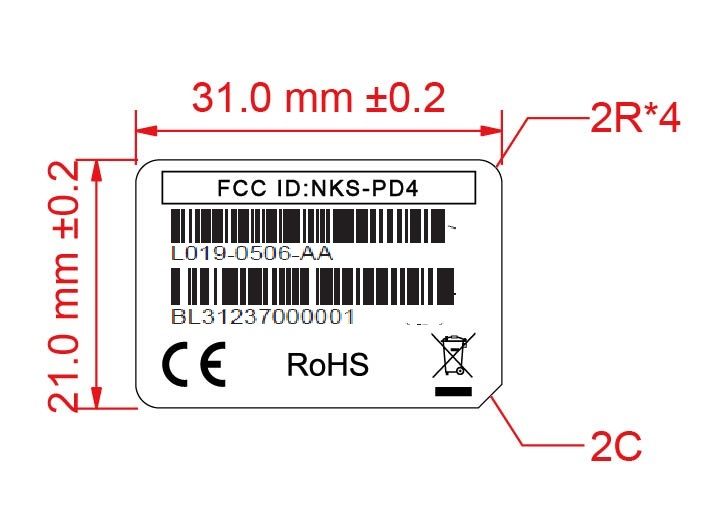
ID Label/Location Info
Label Location 50
Test Report
Report No.SH13080021R01 Page 2 of 39 DIRECTORY 1. General Information ......................................................................................................... 4 1.1 Applicant ............................................................................................................................. 4 1.2 Manufacturer ....................................................................................................................... 4 1.3 Description of EUT ............................................................................................................. 5 2. Facilities and Accreditations ............................................................................................ 6 2.1 Test Facility ......................................................................................................................... 6 2.2 Environmental Conditions .................................................................................................. 6 2.3 Measurement Uncertainty ................................................................................................... 6 2.4 List of Equipments Used ..................................................................................................... 6 3. Test Standards and Results .............................................................................................. 7 4. Test Conditions Setting ..................................................................................................... 8 5. Test Result .......................................................................................................................... 9 5.1 Radiated Emission Test ....................................................................................................... 9 5.2 6dB Bandwidth Measurement ........................................................................................... 12 5.3 Maximum Peak Output Power .......................................................................................... 18 5.4 Band Edge ......................................................................................................................... 19 5.5 Conducted Spurious Emission .......................................................................................... 24 5.6 Power Spectrum Density Measurement ............................................................................ 34 Report No.SH13080021R01 Page 3 of 39 Change History Issue Date Reason for change 1.0 Sep.6, 2013 First edition Report No.SH13080021R01 Page 4 of 39 1. General Information 1.1 Applicant PeopleNet Communications Corporation 4400 Baker Road, Minnetonka, Minnesota, USA 1.2 Manufacturer Waysion Technology (Xiamen) Co., LTD 3E, Rihua Building, No. 8, Xinfeng 2 nd Road, Torch High-Tech Zone, Xiamen, Fujian, China Report No.SH13080021R01 Page 5 of 39 1.3 Description of EUT EUT Name ............................ : PeopleNet Display.4 Model Name ......................... : L019-0506 Brand Name .......................... : PeopleNet Trade Name .......................... : PeopleNet Display.4 Hardware Version ................. : V1.0 Software Version .................. : V1.0 Modulation Technology ........ : DSSS,OFDM Frequency Range .................. : 2400MHz~2483.5MHz Number of Channels ............. : 11 Antenna Type ........................ : PIFA Antenna Gain ........................ : 2.0 dBi NOTE 1 :The EUT supports 802.11b, 802.11g and 802.11n, the 802.11b, 802.11g, and 802.11nwas tested in this report. NOTE 2: For a more detailed description, please refer to Specification or User’s Manual supplied by the applicant and/or manufacture. Report No.SH13080021R01 Page 6 of 39 2. Facilities and Accreditations 2.1 Test Facility Shanghai MORLAB Communications Technology Co., Ltd. is a third party testing organization accredited by China National Accreditation Service for Conformity Assessment (CNAS) according to ISO/IEC 17025. The accreditation certificate number is L1659. A 9*6*6(m) fully anechoic chamber was used for the radiated spurious emissions test. 2.2 Environmental Conditions Ambient temperature: 20~25°C Relative humidity: 40~60% Atmosphere pressure: 96kPa 2.3 Measurement Uncertainty The uncertainty is calculated using the methods suggested in the "Guide to the Expression of Uncertainty in Measurement" (GUM) published by ISO. Uncertainty of Conducted Emission: ±1.76dB Uncertainty of Radiated Emission: ±3.16dB 2.4 List of Equipments Used Description Manufacturer Model Serial No. Cal. Date Cal. Due Test Receiver Rohde & SchwarzESIB26 A0304218 2013.06.14 1year Test Receiver Schwarzbeck FCKL1528A0304230 2013.08.26 1year Spectrum Analyzer Rohde & SchwarzFSP13 M-030176 2013.06.22 1year Spectrum Analyzer Rohde & SchwarzFSU26 200880 2013.06.18 1year Spectrum Analyzer Agilent E4440A MY46187763 2013.07.26 1year Power Meter Agilent E4416A MY45101575 2013.07.14 1year Power Sensor Agilent E9327A MY44421258 2013.07.14 1year LISN Schwarzbeck NSLK8127A0304233 2013.08.22 1year Loop Antenna Rohde & SchwarzHFH2-Z2 A0304220 2013.06.18 1year Ultra Broadband Ant. Rohde & SchwarzHL562 A0304224 2013.06.18 1year Horn Ant. Rohde & SchwarzHF906 100150 2013.06.18 1year Horn Ant. Schwarzbeck BBHA9170 BBHA9170171 2013.07.22 1year NOTE: Equipments listed above have been calibrated and are in the period of validation. Report No.SH13080021R01 Page 7 of 39 3. Test Standards and Results According to the specifications of the manufacturer, the EUT must comply with the requirements of the following standards: z FCC Part 15 Subpart C §15.247 z ANSI C63.4-2009 Note: 1. All test items were verified and recorded according to the standards and without any deviation during the test. 2. This EUT has also been tested and complied with the requirements of FCC Part 15, Subpart B, recorded in a separate test report. Test items and the results are as bellow: No. FCC Rules Test Type Limits Result 1 §15.207 Conducted Emission 15.207(a) NA 2 §15.209 §15.247(d) Radiate…
Text truncated - open the document above for the full version.
Test Setup Photos
Radiated Measurement RF Measurement WIFI TEST BT TEST
Contact Information
Applicant
Alan Johnson(Director, Hardware Engineering)
Test Firm
Shanghai Skylabs Co., LtdLenoard Bao
Technical Specifications
| # | Rule Parts | Frequency Range | Power Output |
|---|---|---|---|
| 1 | 15C | 2.41 GHz - 2.46 GHz | 6.10 mW |
Other Applications from PeopleNet Communications Corporation
NKS-MA1BA1TE1
Nov 25, 2020Trimble Gateway NA
Equipment Class
DSS - Part 15 Spread Spectrum Transmitter
NKS-PA1
Nov 24, 2020Trimble Gateway NA
Equipment Class
DSS - Part 15 Spread Spectrum Transmitter
NKS-MS5
Mar 29, 2015PeopleNet Connected Tablet
Equipment Class
DSS - Part 15 Spread Spectrum TransmitterNKS-PNCC1000
Oct 08, 1997Mobile
Equipment Class
TNB - Licensed Non-Broadcast Station Transmitter