O5ZSPA-930Numeric Radio Paging Receiver
SHINIL INDUSTRIAL CO., LTD.
Click to zoom
Application Details
- Equipment Class
- CXX - Communications Rcvr for use w/ licensed Tx and CBs
- Date of Grant
- Nov 08, 2001
- Application Purpose
- Original Equipment
- Date of Application
- Nov 08, 2001
- Equipment Note
- Numeric Radio Paging Receiver
- Frequency Range
- 929.01250000 - 931.98750000
- Company
- SHINIL INDUSTRIAL CO., LTD.
- Country
- South Korea
Documents & Files
Document Text
Text extracted from the exhibit documents filed with the FCC. Open a document above to read the original.
Users Manual
POCSAG ALPHA DISPLAY PAGER Operating Manual Model:SPA-930 SHINIL INDUSTRIAL Co., Ltd, 2 CONTENTS - FEATURES ----------------------------------------------------------------------------------------------- 3 - DESCRIPTION OF INDICATORS & SYMBOLS ------------------------- 4 - CONTROL BUTTONS ------------------------------------------------------------------------- 5 - OPERATION -------------------------------------------------------------------------------------------- 5 Turning Pager On --------------------------------------------------------------------------------- 5 Turning Pager Off ----------------------------------------------------------------------------- 5 Read Personal Message ------------------------------------------------------------------ 5 Delete Personal Message ---------------------------------------------------------------- 6 Lock Personal Message ---------------------------------------------------------------- 6 Unlock Personal Message ---------------------------------------------------------------- 6 Move Personal Message to Notebook ------------------------------------------ 6 Read Mail-Drop / Delete Individual & All Mail-Drop ------------------ 6 Function Menu ------------------------------------------------------------------------------------ 7 1) Calendar ----------------------------------------------------------------------------------------- 7 2) Setting the Incoming Message Alert --------------------------------------- 7 3) Setting the Date and Time ---------------------------------------------------------- 8 4) Setting the Alarm ------------------------------------------------------------------------ 8 5) Setting Auto Power On/Off -------------------------------------------------------- 9 6) Setting the Scroll On/Off ------------------------------------------------------------- 9 7) Reminder Alert for Unread Message --------------------------------------- 9 8) Setting the Display Duration Time -------------------------------------------- 10 9) Setting the Character Type ------------------------------------------------------- 10 Notebook --------------------------------------------------------------------------------------------- 10 Others ----------------------------------------------------------------------------------------------------- 10 1) Easy Way to Change Alert Mode 2) Out of Range 3) Battery Indicator 4) Automatic Message Deletion 5) Lamp On/Off 3 FEATURES - 2/4 Line Display besides Icon Indicator Line - 16/21 Character Display per Line - Address Capability: 16 - Message Storage: 30,000 Characters Maximum - Personal Message Slot: 70 (including 20 Notebook Slots) - Mail-Drop Message Slot: 16 - Message Lock up to 30 Personal Messages - 8 User Selectable Alert (3 Tones, 5 Melodies) - Message Scrolling On/Off (On ; Normal / Slow / Fixed / Fast ; Off ) - Incoming Message Time & Date Stamping - User Selectable Date Display (Date/Month/Year or Month/Date/Year or Year/Month/Date) - Message Deletion (All or Individual Message) - Backlight (button press to turn on) - Remind Alert for Unread Message (2, 5, 10, 15 and 30 min) - Backup Battery (For retention memory when replacing battery) - Battery Replacement Alarm - User Selectable Alert Mode: Alert / Vibration / Alert after Vibration / Silence - Memory Full Indication - Duplicate Message Indication - 5 Selectable Display Duration Times (4, 8, 12, 16, 20 sec) - Service Area Indication - Auto Power On/Off - Mail-Drop Alert On/Off - Time Clock - Alarm Function (TIME=Time of Day, DAY=Day of Week plus Time, DATE=Calendar Date plus Time) - Calendar 4 DESCRIPTION OF INDICATORS & SYMBOLS n Indicators n Symbols 4 Duplicate Message Service Area Unread Message Battery Indicator Vibration Mode Audible Mode Message Remain to Read Read Mail-Drop Calendar Set Incoming message Alert Set Time, Date Set Alarm Set Auto Power On/Off Set Scrolling Speed Set Alert Periodic Time for Unread Message Set Time for Display Duration Turn Pager Off Individual Message 'DELETE' All Message 'DELETE' Lock Message Unlock Message Duplicate Message Unread Message Read Message Return to previous screen Audible Alert Vibrating Alert Audible Alert with Vibration Silence Alert On for Incoming Mail Alert Off for Incoming Mail 5 CONTROL BUTTONS Used to go left through the Function menu and your messages, to decrease the numbers through the functions like time, alarm, date settings. Used to go right through the Function menu and your messages, to increase the numbers through the functions like time, alarm, date settings. Used to read messages, to select a pager function If pressing for 1 second at Function menu, return to the previous menu. OPERATION Turning Pager On Press . "Pager On? Yes" is displayed. Press again. When the pager is on and no activity is taking place, the Standby screen is displayed. The Standby screen displays the service area indicator and may display other indicators according to the current pager status. Turning Pager Off ∂ From the Top screen, ∑ Press or to move the cursor to Function Set, press . ∑ Press or to move the cursor to . 6 ∏ Press . "Pager Off? No" is displayed. π Press or to display "Pager Off? Yes". ∫ Press again to turn the pager off. Your pager is now off and the screen is blank. Read Personal Message ∂ From the Top screen, ∑ Press or to move the cursor to Read Message, press . The number indicates the count of messages that are unread. ∑ Press to display the Message status screen. ∏ The very left black envelope symbol means the latest and unread message. On the right lower corner, the pager shows the date when the message was received. : Unread Message : Read Message : Locked Message (See Lock Message on page 7 ) π Press to read the message after moving the flashing cursor by or . ∫ In the message screen, "07" indicates the (07) am 11 : 34 John got a promotion. 7 message is 7th incoming one and the receiving time is am 11:34. indicates the message Message Screen is duplicate Delete Personal Message ∂ From the Message…
Text truncated - open the document above for the full version.
External Photos
KTI01E-F1152 FCC ID : 05ZSPA-930 Korea Technology Institute Co., Ltd. Page 1 of 2 External photo-Front KTI01E-F1152 FCC ID : 05ZSPA-930 Korea Technology Institute Co., Ltd. Page 2 of 2 External photo-Rear
ID Label/Location Info
Korea Technology Institute Co., Ltd. Page 1 of 1 FCC ID Sample Label Model Number: SPA-930 FCC ID : 05ZSPA-930 SHINIL Industrial Co., Ltd. Made in Korea This device complies with part 15 of the FCC Rules. Operation is subject to the following two conditions: (1)This device may not cause harmful interference, and (2)This device must accept any interference received, including interference that may cause undesired operation.
ID Label/Location Info
Korea Technology Institute Co., Ltd. Page 1 of 1 Label location
Internal Photos
KTI01E-F1152 FCC ID : 05ZSPA-930 Korea Technology Institute Co., Ltd. Page 1 of 4 Internal photo KTI01E-F1152 FCC ID : 05ZSPA-930 Korea Technology Institute Co., Ltd. Page 2 of 4 Internal photo KTI01E-F1152 FCC ID : 05ZSPA-930 Korea Technology Institute Co., Ltd. Page 3 of 4 Internal photo KTI01E-F1152 FCC ID : 05ZSPA-930 Korea Technology Institute Co., Ltd. Page 4 of 4 Internal photo
Test Report
KTI01E-F1152 FCC ID : 05ZSPA-930 Korea Technology Institute Co., Ltd. Page 1 of 12 Certificate of Compliance Test Report No.: KTI01E-F1152 Registration No.: 99058 Applicant: SHINIL Industrial Co., Ltd. Applicant Address: 119-1,SASA-DONG,ANSAN-SHI,KYUNGI-DO,425-220,KOREA Product: Paging Receiver Frequency Range: 929.0125-931.9875 FCC ID: 05ZSPA-930 Model No. SPA-930 Receipt No.: KTI20011031 Date of receipt: Oct, 31, 2001 Date of Issue: Nov, 6, 2001 Testing location Korea Technology Institute Co., Ltd. 51-19, Sanglim3-Ri, Docheok-Myeun, Gwangju-Shi, Gyeungki-Do, Korea Test Standards: ANSI. C63.4 : 1992 Rule Parts: FCC Part 15, Subpart B Equipment Class: Numeric Radio Paging Receiver(CYY) Test Result: The above mentioned product has been tested and passed. Tested by: S. B. Kim/ Engineer Signature Date Approved by: G. C. Min/ President Signature Date Other Aspects : Abbreviations : OK, Pass=passed Fail=failed N/A=not applicable This test report is not permitted to copy partly without our permission. This test result is dependent on only equipment to be used. This test result is based on a single evaluation of one sample of the above mentioned. This test report must not be used by the client to claim product endorsement by NVLAP or any agency of the U.S Government. We certify this test report has been based on the measurement standards that is traceable to the national or international standards. KTI01E-F1152 FCC ID : 05ZSPA-930 Korea Technology Institute Co., Ltd. Page 2 of 12 Contents 1. 2. 3. 4. 5. 6. Annex1 Annex2 Contents List of Tables List of Figures List of Photographs General Test Site 2.1 Location 2.2 List of Test and Measurement Instruments 2.3 Test Data 2.4 Test Environment Description of the tested samples 3.1 Rating and Physical characteristics 3.2 Submitted documents Measurement conditions 4.1 Modes of operation 4.2 Uncertainty 4.3 Test Setup Emission Test 5.1 Conducted Emissions 5.2 Radiated Emissions Photographs of the Test Set-up Label Photographs of EUT 2 2 2 3 3 3 3 4 4 4 5 5 5 6 6 6 7 8 8 10 13 14~15 16~21 List of Tables Table 1 List of test and measurement equipment Table 2 Test Data. Conducted Emissions Table 3 Test Data. Radiated Emissions List of Photographs Photograph 1 Setup for Radiated Emissions 4 9 11 13 KTI01E-F1152 FCC ID : 05ZSPA-930 Korea Technology Institute Co., Ltd. Page 3 of 12 1. General This equipment has been shown to be capable of compliance with the applicable technical standards and was tested in accordance with the measurement procedures as indicated in this report. We attest to the accuracy of data. All measurements reported herein were performed by Korea Technology Institute Co., LTD. And were made under Chief Engineer’s supervision. We assume full responsibility for the completeness of these measurements and vouch for the qualifications of all persons taking them. 2. Test Site Korea Technology Institute Co., LTD 2.1 Location 51-19, Sanglim3-Ri, Docheok-Myeun, Gwangju-Shi, Gyeungki-Do, Korea The Test Site is in compliance with ANSI C63.4/1992 for measurement of radio Interference. KTI01E-F1152 FCC ID : 05ZSPA-930 Korea Technology Institute Co., Ltd. Page 4 of 12 2.2 List of Test and Measurement Instruments Table 1 : List of Test and Measurement Equipment Conducted Emissions Kind of Equipment Type S/N Calibrated until Spectrum Analyzer R3261C 61720427 11.2001 Field Strength Meter ESPC 832827/011 9.2002 LISN ESH3-Z5 8254601019 9.2002 LISN KNW407 8-1097-7 9.2002 Pulse limiter ESH3Z2 357.8810.52 9.2002 Conducted Cable N/A N/A 11.2001 Radiated Emissions Kind of Equipment Type S/N Calibrated until Field Strength Meter ESPC 832827/011 9.2002 Spectrum Analyzer R3261C 61720427 11.2001 Pre Amplifier 8447D 2944A06874 11.2001 Log Periodic Antenna 3146 9105-1343 11.2001 Biconical Antenna 3110 9105-3100 11.2001 Open Site Cable N/A N/A 11.2001 Antenna Mast DETT-03 N/A N/A Antenna & Turntable controller DETT-03 91X519 N/A 2.3 Test Date Date of Application : Oct. 31, 2001 Date of Test : Nov. 2, 2001 2.4 Test Environment See each test item’s description. KTI01E-F1152 FCC ID : 05ZSPA-930 Korea Technology Institute Co., Ltd. Page 5 of 12 3. Description of the tested samples The EUT is Paging Receiver. 3.1 Rating and Physical Characteristics Frequency range : 929.0125-931.9875MHz Using battery:1.5V 3.2 Submitted Documents User’s Guide Block Diagram KTI01E-F1152 FCC ID : 05ZSPA-930 Korea Technology Institute Co., Ltd. Page 6 of 12 4. Measurement Conditions Testing Input Voltage : DC 1.5V 4.1 Modes of Operation The EUT was in the following normal mode during all testing; Prior to a measurement, the Pager shall be operated until stabilization has been reached. 4.2 Uncertainty 1) Radiated disturbance UC (Combined standard Uncertainty) = 1.8dB Expanded uncertainty U=KUc K = 2 U = 3.6dB 2) Conducted disturbance UC = 0.88dB U = KUc=2xUc = 1.8dB KTI01E-F1152 FCC ID : 05ZSPA-930 Korea Technology Institute Co., Ltd. Page 7 of 12 4.3 Test setup EUT KTI01E-F1152 FCC ID : 05ZSPA-930 Korea Technology Institute Co., Ltd. Page 8 of 12 5. EMISSION Test 5.1 Conducted Emissions Result : Not Applicable The line-conducted facility is located inside a 2.3M x 3.5M x 5.5M shielded closure. The shielding effectiveness of the shielded room is in accordance with MIL-Std-285 or NSA 605- 05. A 1m x 1.5m wooden table 80cm. High is placed 80cm away from the vertical wall and 1.5m away from the side wall of the shielded room. R&S Model ESH3-Z5(10kHz-30MHz) 50ohm/50 uH line-Impedance Stabilization Networks(LISN) are bonded to the shielded room. The EUT is powered from the R&S LISN and the support equipment is powered from the Kyoritsu LISN. Power to the LISN are filtered by a high-current high-insertion loss shield enclosures power line filters(100dB 14kHz-1Ghz). The purpose of the filter is to attenuate ambient signal interference and this filter is also bonded to the shielded enclosure. All electrical cables are shielded by braided tinned copper zipper tubing with inner diameter of 1/2”. If the EU…
Text truncated - open the document above for the full version.
Test Setup Photos
Korea Technology Institute Co., Ltd. Page 1 of 1 6. Photograph of the Test Set-Up Photograph 1 : Setup for radiated Emissions
Contact Information
Applicant
KI-HONG LEE(TEAM MANAGER)
Test Firm
Korea Technology Institute Co., Ltd.Seung Hyun Song
Technical Specifications
| # | Rule Parts | Frequency Range | Power Output |
|---|---|---|---|
| 1 | 15B | 929.0125 MHz - 931.9875 MHz | - |
Other Applications from SHINIL INDUSTRIAL CO., LTD.

O5ZIFA-930
Feb 07, 2002Numeric Radio Paging Receiver
Equipment Class
CYY - Communications Receiver used w/Pt 15 Transmitter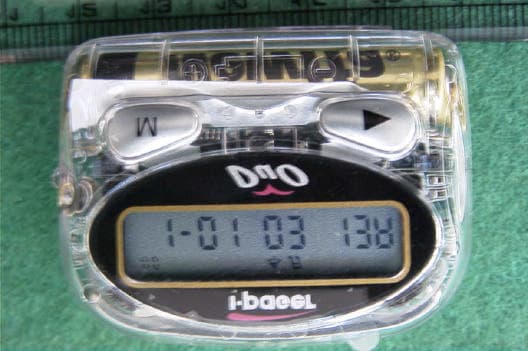
O5ZIWP-150M
Nov 08, 2001Numeric Radio Paging Receiver
Equipment Class
CXX - Communications Rcvr for use w/ licensed Tx and CBs
O5ZIWP-450M
Nov 08, 2001Numeric Radio Paging Receiver
Equipment Class
CXX - Communications Rcvr for use w/ licensed Tx and CBs
O5ZSPA-150
Nov 08, 2001Numeric Radio Paging Receiver
Equipment Class
CXX - Communications Rcvr for use w/ licensed Tx and CBs
O5ZSPA-450
Nov 08, 2001Numeric Radio Paging Receiver
Equipment Class
CXX - Communications Rcvr for use w/ licensed Tx and CBs