O8FNYNY2Handspring Treo Handheld Computer
Palm Inc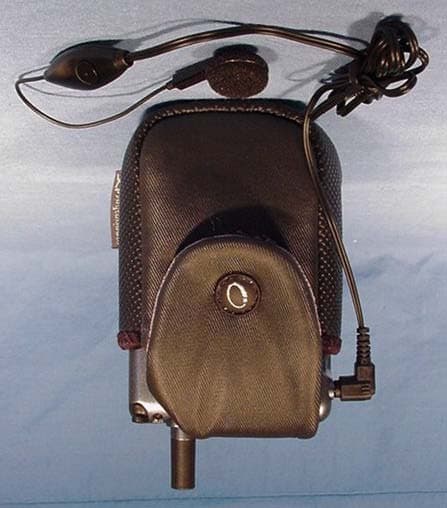
Click to zoom
Application Details
- Equipment Class
- PCE - PCS Licensed Transmitter held to ear
- Date of Grant
- May 06, 2002
- Application Purpose
- Original Equipment
- Date of Application
- May 06, 2002
- Equipment Note
- Handspring Treo Handheld Computer
- Frequency Range
- 1850.20000000 - 1908.80000000
- Company
- Palm Inc
- Country
- United States
Documents & Files
Document Text
Text extracted from the exhibit documents filed with the FCC. Open a document above to read the original.
Users Manual
1 Applicant: Handspring, Inc. Permissive Change application to FCC ID: O8F-NYNY This is the RF Exposure warning that will appear in the user manual for the Treo 270. At this time, a final manual for the Treo 270 is not available, however it will be very similar to the Preliminary Treo 270 manual included in this application. This statement will appear towards the back of the manual with other regulatory and safety information. (Note that this is the same statement that appears in the current Treo 180 and Treo G180 user manuals.) Exposure To Radio Frequency Energy (SAR) In order to comply with FCC RF exposure safety guidelines users MUST use a Handspring brand body worn accessory during body-worn operation. Use of accessories not provided by Handspring or that have not been tested for RF exposure compliance with this product may not comply with the FCC RF exposure safety guidelines and should not be used. See http://www.fcc.gov/oet/rfsafety/ for more information on RF exposure safety.
Users Manual
Contentsi Contents Getting Up and Running ................................................1 Charging the Battery .....................................................5 Using the Keyboard ......................................................6 Adjusting the Screen Display.......................................... 8 Using Your Phone.......................................................... 9 Date Book Plus ............................................................16 Blazer Web Browser....................................................19 SMS Messages ............................................................20 Preferences and Other Settings ....................................22 Synchronizing Data with Your Computer ......................25 Beaming Information ...................................................29 Resetting Your Handheld .............................................30 Using the Electronic User Guide....................................31 Troubleshooting ..........................................................32 FCC Statement.............................................................35 ii Copyright Copyright © 2001 Handspring, Inc. All rights reserved. Handspring and the Handspring logo are trademarks of Handspring, Inc., and may be registered in some jurisdictions. Graffiti, HotSync, and Palm OS are registered trademarks, and Palm is a trademark of Palm, Inc. or its subsidiaries. All other trademarks are the property of their respective owners. Disclaimer and limitation of liability Handspring, Inc. and its suppliers assume no responsibility for any damage or loss resulting from the use of this guide. Handspring, Inc. and its suppliers assume no responsibility for any loss or claims by third parties which may arise through the use of this software. Handspring, Inc. and its suppliers assume no re- sponsibility for any damage or loss caused by deletion of data as a result of malfunction, dead battery, or repairs. Be sure to make backup copies of all important data on other media to protect against data loss. Important:For warranty information and a copy of the End User License Agreement applicable to your Handspring product, please see the Handspring web site at www.handspring.com/support/ug_warranties.jhtml. If you would like a copy of these materials mailed to you, or if you have any questions, please contact Handspring Customer Support. The information included on this web site sets forth Handspring's sole and complete warranty and software licensing obligations with respect to your Handspring product. Use of the product indicates your acceptance of the terms of the warranty and the End User License Agreement. Software download available Palm™ Desktop software and the electronic User Guide are supplied on a CD-ROM disc. If you do not have access to a CD-ROM drive for your computer, you can download both of these items from www.handspring.com. Part #: ##-####-## Getting Up and Running1 Getting Up and Running Congratulations on the purchase of your new Manhattan™ handheld computer. Here’s how to get up and running quickly: n Complete all the steps on the Manhattan Start Here card. n Use this Quick Reference Guide to learn how to enter text and perform basic tasks. n Check the electronic User Guide in the Handspring folder on your computer to learn more about using your handheld. Tip: If you’re upgrading from another Palm OS ® handheld, see page 26 for upgrade instructions. 2 Getting Up and Running Getting to know your Manhattan handheld computer Speaker Jog rocker Blazer/Find button SMS Messages/ Application Launcher button Headset jack Phone button Date Book Plus button Scroll buttons Microphone Getting Up and Running3 The color of the LED and the blink state indicate the following: Green/solid = Charging complete Green/fast blink = Call in progress Green/slow blink = Radio on; in coverage area Red/solid = Charging battery Red/fast blink = Low battery Red/slow blink = Radio on; no coverage No light = Radio off Stylus IR port Power button LED Ringer switch Antenna 4 Getting Up and Running Turning your Manhattan on and off Your Manhattan is both a handheld computer and a radio for wireless communications. You can turn the handheld and the radio on and off independently of each other. When you turn on the handheld, you can use the various applications while the radio is off. However, to make or receive a call, you need to turn on the radio. Turning the handheld on and off Do any of the following: nOpen the lid to turn it on, or close the lid to turn it off. nPress and release the power button. Turning the radio on and off nHold down the power button until you hear the confirmation tones to turn the radio (and other wireless features) on and off. The ascending tone indicates the radio is on and the descending tone indicates the radio is off. Charging the Battery5 Charging the Battery Your handheld battery provides approximately 2 hours of talk time or 72 hours of standby time. If the battery drains to the reserve level, you can still use your handheld applications for about 1 day, but there is not enough power to use the phone and other wireless features. It takes approximately 1 hour to charge a fully drained battery. To charge the battery do one of the following: nWhen you’re near your computer, connect your handheld to the HotSync ® cable with the AC adapter connected to a wall outlet as shown on page 27. nWhen travelling, connect the AC adapter cable directly to your handheld as shown here. Tip:The LED is solid red while your handheld charges. When the LED turns green, your handheld is charged. If the LED does not turn on, make sure the AC adapter cable is connected to a wall outlet. LED 6 Using the Keyboard Using the Keyboard Entering text Use your thumbs to press the keys. Each letter key has three modes: nNormal: types a lowercase letter. nShift: types an uppercase letter. nOption: types the number/symbol, or activates the function, that appears in blue above the …
Text truncated - open the document above for the full version.
Users Manual
Getting to Know Your Treo™ . . . . . . . . . . . . . . . . . . . . . . . . . . . . . . . . . . . . . . . . . . . . . . . . 1 Turning Your Treo On and Off . . . . . . . . . . . . . . . . . . . . . . . . . . . . . . . . . . . . . . . . . . . . . . 3 The Backlight, Display, and LED . . . . . . . . . . . . . . . . . . . . . . . . . . . . . . . . . . . . . . . . . . . . . 4 Charging the Battery . . . . . . . . . . . . . . . . . . . . . . . . . . . . . . . . . . . . . . . . . . . . . . . . . . . . . .6 Using the Keyboard . . . . . . . . . . . . . . . . . . . . . . . . . . . . . . . . . . . . . . . . . . . . . . . . . . . . . . .7 Using Your Phone . . . . . . . . . . . . . . . . . . . . . . . . . . . . . . . . . . . . . . . . . . . . . . . . . . . . . . . .9 Date Book Plus . . . . . . . . . . . . . . . . . . . . . . . . . . . . . . . . . . . . . . . . . . . . . . . . . . . . . . . . . . 18 Blazer Web Browser . . . . . . . . . . . . . . . . . . . . . . . . . . . . . . . . . . . . . . . . . . . . . . . . . . . . . 21 SMS Messages . . . . . . . . . . . . . . . . . . . . . . . . . . . . . . . . . . . . . . . . . . . . . . . . . . . . . . . . .22 Accessing Other Applications . . . . . . . . . . . . . . . . . . . . . . . . . . . . . . . . . . . . . . . . . . . . . . 24 Preferences and Other Settings . . . . . . . . . . . . . . . . . . . . . . . . . . . . . . . . . . . . . . . . . . . . 25 Synchronizing Data with Your Computer . . . . . . . . . . . . . . . . . . . . . . . . . . . . . . . . . . . . . 28 Beaming Information . . . . . . . . . . . . . . . . . . . . . . . . . . . . . . . . . . . . . . . . . . . . . . . . . . . . . 32 Resetting Your Communicator . . . . . . . . . . . . . . . . . . . . . . . . . . . . . . . . . . . . . . . . . . . . . 33 Using the Electronic User Guide . . . . . . . . . . . . . . . . . . . . . . . . . . . . . . . . . . . . . . . . . . . 34 Troubleshooting . . . . . . . . . . . . . . . . . . . . . . . . . . . . . . . . . . . . . . . . . . . . . . . . . . . . . . . . . 35 FCC Statement . . . . . . . . . . . . . . . . . . . . . . . . . . . . . . . . . . . . . . . . . . . . . . . . . . . . . . . . . .38 Contents Copyright Copyright © 2002 Handspring, Inc. All rights reserved. Handspring, Treo, and the Treo logo are trade- marks of Handspring, Inc. and may be registered in some jurisdictions. Blazer and the Handspring logo are trademarks of Handspring, Inc., are registered trademarks in the U.S.A., and may be registered in other jurisdictions. Palm OS and HotSync are registered trademarks and Palm and the Palm Powered logo are trademarks of Palm, Inc. and are used by Handspring under license. All other trademarks and trade names are the property of their respective owners. Disclaimer and limitation of liability Handspring, Inc. and its suppliers assume no responsibility for any damage or loss resulting from the use of this guide. Handspring, Inc. and its suppliers assume no responsibility for any loss or claims by third parties that may arise through the use of this software. Handspring, Inc. and its suppliers assume no responsibility for any damage or loss caused by deletion of data as a result of malfunction, dead battery, or repairs. Be sure to make backup copies of all important data on other media to protect against data loss. Warranty and License Agreement For warranty information and a copy of the End User License Agreement applicable to your Handspring product, please see the electronic User Guide supplied on the CD-ROM disc included with this product. Additionally, you can view the warranty on our web site at: http://support.handspring.com/esupport/forms/hsFileList.jsp?Type=Warranties. The information included in the User Guide sets forth Handspring's sole and complete warranty and software licensing obligations with respect to your Handspring product. Use of the product indicates your acceptance of the terms of the warranty and the End User License Agreement. Software download available Palm™ Desktop software and the electronic User Guide are supplied on a CD-ROM disc. If you do not have access to a CD-ROM drive for your computer, you can download both of these items from www.handspring.com. Responsible Party Handspring, Inc. 189 Bernardo Avenue Mountain View, California 94043-5203 United States of America (650) 230-5000 50-0861-00 Getting to Know Your Treo™Page 1 Getting to Know Your Treo™ Congratulations on the purchase of your new Handspring Treo™ communicator. Here’s how to get up and running quickly: Tip:If you’re upgrading from another Palm OS ® handheld, see page 30 for upgrade instructions. nLocate your SIM (Subscriber Identity Module) card which contains your account information. If a SIM card did not come with your Treo, your wireless service provider will give you one when you subscribe to their service. nInsert your SIM card into your Treo and set it up for wireless communications by following the steps on the Treo Start Here card. nRun the Welcome application on your communicator to learn how to use the keyboard. nUse this Quick Reference Guide to learn how to perform basic tasks. nCheck the electronic User Guide in the Handspring folder on your computer to learn more about using your communicator. Tip:To learn more about the ringer switch settings, see page 26. Stylus IR port Power button LED Ringer switch Antenna Page 2 Getting to Know Your Treo™ Tip:You can use the rocker switch as an alternate method to perform a variety of tasks, such as adjusting the volume level on your phone. The rocker switch functions change based on the application you are using. To use the rocker switch, roll the dial up or down, press it in and release it, or press and hold it. For more information, see the electronic User Guide. Speaker Rocker switch Blazer ® / CityTime button SMS Messages/ Calculator button Headset jack PhoneBook/ Memo Pad button Date Book Plus/ To Do List button Scroll buttons Microphone Turning Your Treo On and OffPage 3 Turning Your Treo On and Off Your Tr…
Text truncated - open the document above for the full version.
Cover Letter(s)
4 May, 2002 Federal Communications Commission Authorization and Evaluation Division Equipment Authorization Division 7345 Oakland Mills Road Columbia, Maryland 21046 To whom it may concern, Handspring requests that the following documents contained in this Part 24 certification application be withheld from public disclosure. All schematic diagrams (Treo 180, 180G and 270) All electrical block diagrams (Treo 180, 180G and 270) All Parts lists (Treo 180, 180G and 270) RF Module technical Specifications Handspring also certifies that no party to this application is subject to denial of benefits, including FCC benefits, pursuant to section 5301 of the anti-drug abuse act of 1988, 21 U.S.C 853(a) Sincerely David Waitt Lead HW QA Engineer Handspring, Inc. 189 Bernardo Ave. Mountain View, CA 94043
Cover Letter(s)
FCC Certification Application for FCC ID: O8FNYNY2 Summary Report for Handspring, Inc. Models: Treo 180 Treo 180g Treo 270 Prepared by: David Waitt Handspring Inc. (650) 230-5384 Units tested Feb/Mar 2002 Schematics and block diagrams subject to the attached confidentiality statement Handspring, Inc. 189 Bernardo Ave. Mountain View, CA 94043 Handspring, Inc FCC Permissive Change Application Mar 2002 Treo180_treo270_cert_app_summary_rpt.doc (dw8) Page 2 of 3 General Information Units Under Test: Handspring Treo 180, Treo 180G and Treo 270 Tested For: Handspring, Inc 189 Bernardo Ave. Mt View, CA 94043 Tested By: Celltech Research Laboratories 1955 Moss Court Kelowna, BC, Canada Tested: Feb / March 2002 Objective: The objective of this new certification request is to incorporate recent changes into the Treo product line. The scope of the changes is outlined below. Background: Handspring has made minor changes to both the Treo 180 and the Treo 180G products. These two products were previously certified by the FCC under FCC ID: O8FNYNY. It was intended that these changes be filed as a permissive change, however, the based on recommendations from the FCC, a new certification application is being filed. The Treo 180 product line has been on the market for several months under the previous FCC ID O8FNYNY. Additional changes from the original Treo 180 have resulted in the creation of a new Treo, the Treo 270. Summary of changes: TREO 180 and TREO 180g In an effort to improve the performance of the product, the antenna matching circuitry and the antenna itself have been tuned. These adjustments did not significantly alter the antenna gain and the topology of the matching circuitry did not change, only the component values have changed. There have also been other very minor changes that would not affect the RF operating characteristics of the product (i.e. moving a resistor on the PCB to allow more clearance around a screw head). Class B radiated emissions have been retested and a DOC has been prepared. TREO 270 The Treo 270 is basically a Treo 180 that incorporates a color display. The major changes to the Treo 270 are those changes associated with incorporation of the color display. Class B emissions have been tested and found to be in compliance, thus a DOC has been prepared. It is important to stress the fact that all three products use the same RF module from the same vendor ( which has not changed at all), as well as the same antenna. Given these changes, it was prudent to verify that Part 24 emissions and SAR were still in compliance. These parameters were tested on all three products. Additional Information FCC Part 24 radiated and a conducted emission testing and SAR testing was performed by Celltech Labs in Kelowna BC, Canada. SAR testing was conducted on the unit in “body worn” and “handheld” configurations for the 1.9 GHz band. When the units are body worn, it is expected that the units will be used with a headset and worn on the body in a Handspring accessory made for, and tested with, this product. The “RF Exposure Warning” statement contained in the “Quick Reference Guide” informs the user that use of the Handspring case is required when used in a body worn configuration in order to comply with FCC and Industrie Canada requirements. This statement is unchanged from the statement that currently appears in the Treo 180 Quick Reference Guide that was previously approved by the FCC. Handspring, Inc FCC Permissive Change Application Mar 2002 Treo180_treo270_cert_app_summary_rpt.doc (dw8) Page 3 of 3 It is worth noting that while the schematics of the three products are essentially identical, the physical appearance of the PCS is not. The Treo 270 PCA looks significantly different form the Treo 180 and Treo 180G PCA. This is due to the fact that the additional thickness (Z-Axis) of the color display (as compared to the monochrome 180 and 180G display) intruded on certain areas of the PC board. This mechanical interference resulted in our using much smaller components on the Treo 270 to implement some of the circuitry. Hence the circuitry takes up less space on the PCB the difference in physical appearance. An operational description of the RF module may be of interest. If so, I have uploaded the RF module technical specifications (These are to be held confidential per the confidentiality request). This module is a purchased component and therefore there is no “Tune-Up” procedure available to Handspring and Handspring cannot “Tune” or adjust any of the operating characteristics of the RF module. Parts lists for circuit boards of the three products have also been uploaded and are subject to the confidentiality as requested. This application is for a PCE device. While the devices could be worn on the body in a belt pouch or held to the face and used like a small speakerphone. Handspring feels that most common use of the device will be held to the ear. Note that the Block diagram and schematics are identical for both models of Treo 180s which may seem odd given that one is Graffiti and the other uses a keyboard. This is due to the fact that from the point of view of the PCB, it does not “know” or care where the text entry is coming from, either the graffiti area or the keyboard. All the PCB “sees” is an incoming bit pattern that represents characters. It does not know or care where the characters are coming from. One final note, in several of the reports the products are referred to by their Handspring internal Product names. The table below translates internal names to actual product names: Manhattan = Treo 180 Shea = Treo 180g Atlanta = Treo 270 Results Summary The following tests were performed to demonstrate compliance with FCC Part 24 and OET 65-C. Detailed results are contained in the Celltech Part 24 and SAR reports uploaded with this application. The results below are maximums, detailed results are contained in the included reports.. Test Spec Treo 180 Treo 180g Treo 270 Radiated Emis…
Text truncated - open the document above for the full version.
External Photos
CELLTECH RESEARCH INC.Test Report S/N: 030402-216O8F 1955 Moss Court, KelownaTest Date(s): March 04-05,27, 2002 B.C. Canada V1Y 9L3FCC SAR Evaluation _________________________________________________________________________________________________________________ © 2002 Celltech Research Inc. HANDSPRING FCC ID: O8FNYNY2 Single-Mode PCS GSM Phone/PDA (1850-1910MHz) MANHATTAN UNIT - PROFILE PHOTOGRAPHS CELLTECH RESEARCH INC.Test Report S/N: 030402-216O8F 1955 Moss Court, KelownaTest Date(s): March 04-05,27, 2002 B.C. Canada V1Y 9L3FCC SAR Evaluation _________________________________________________________________________________________________________________ © 2002 Celltech Research Inc. HANDSPRING FCC ID: O8FNYNY2 Single-Mode PCS GSM Phone/PDA (1850-1910MHz) MANHATTAN UNIT - BELT-HOLSTER & BELT-CLIP PHOTOGRAPHS CELLTECH RESEARCH INC.Test Report S/N: 030402-216O8F 1955 Moss Court, KelownaTest Date(s): March 04-05,27, 2002 B.C. Canada V1Y 9L3FCC SAR Evaluation _________________________________________________________________________________________________________________ © 2002 Celltech Research Inc. HANDSPRING FCC ID: O8FNYNY2 Single-Mode PCS GSM Phone/PDA (1850-1910MHz) MANHATTAN UNIT - BELT-HOLSTER & BELT-CLIP PHOTOGRAPHS ANTENNA PHOTOGRAPH CELLTECH RESEARCH INC.Test Report S/N: 030402-216O8F 1955 Moss Court, KelownaTest Date(s): March 04-05,27, 2002 B.C. Canada V1Y 9L3FCC SAR Evaluation _________________________________________________________________________________________________________________ © 2002 Celltech Research Inc. HANDSPRING FCC ID: O8FNYNY2 Single-Mode PCS GSM Phone/PDA (1850-1910MHz) SHEA UNIT - PROFILE PHOTOGRAPHS CELLTECH RESEARCH INC.Test Report S/N: 030402-216O8F 1955 Moss Court, KelownaTest Date(s): March 04-05,27, 2002 B.C. Canada V1Y 9L3FCC SAR Evaluation _________________________________________________________________________________________________________________ © 2002 Celltech Research Inc. HANDSPRING FCC ID: O8FNYNY2 Single-Mode PCS GSM Phone/PDA (1850-1910MHz) SHEA UNIT - BELT-HOLSTER & BELT-CLIP PHOTOGRAPHS CELLTECH RESEARCH INC.Test Report S/N: 030402-216O8F 1955 Moss Court, KelownaTest Date(s): March 04-05,27, 2002 B.C. Canada V1Y 9L3FCC SAR Evaluation _________________________________________________________________________________________________________________ © 2002 Celltech Research Inc. HANDSPRING FCC ID: O8FNYNY2 Single-Mode PCS GSM Phone/PDA (1850-1910MHz) SHEA UNIT - BELT-HOLSTER & BELT-CLIP PHOTOGRAPHS ANTENNA PHOTOGRAPH CELLTECH RESEARCH INC.Test Report S/N: 030402-216O8F 1955 Moss Court, KelownaTest Date(s): March 04-05,27, 2002 B.C. Canada V1Y 9L3FCC SAR Evaluation _________________________________________________________________________________________________________________ © 2002 Celltech Research Inc. HANDSPRING FCC ID: O8FNYNY2 Single-Mode PCS GSM Phone/PDA (1850-1910MHz) ATLANTA UNIT - PROFILE PHOTOGRAPHS CELLTECH RESEARCH INC.Test Report S/N: 030402-216O8F 1955 Moss Court, KelownaTest Date(s): March 04-05,27, 2002 B.C. Canada V1Y 9L3FCC SAR Evaluation _________________________________________________________________________________________________________________ © 2002 Celltech Research Inc. HANDSPRING FCC ID: O8FNYNY2 Single-Mode PCS GSM Phone/PDA (1850-1910MHz) ATLANTA UNIT – BELT-HOLSTER & BELT-CLIP PHOTOGRAPHS CELLTECH RESEARCH INC.Test Report S/N: 030402-216O8F 1955 Moss Court, KelownaTest Date(s): March 04-05,27, 2002 B.C. Canada V1Y 9L3FCC SAR Evaluation _________________________________________________________________________________________________________________ © 2002 Celltech Research Inc. HANDSPRING FCC ID: O8FNYNY2 Single-Mode PCS GSM Phone/PDA (1850-1910MHz) ATLANTA UNIT – BELT-HOLSTER & BELT-CLIP PHOTOGRAPHS ANTENNA PHOTOGRAPH
ID Label/Location Info
51-0521-00 D Label Outline Artwork, Label, Regulatory 9/1900 MASH Model No. 180 DO NOT PRINT THIS BOUNDAREY Viewable Inside This Boundary Open Open NOTES: 1. Label Text/Graphics Color to be Process Black 2. Label Background Color to be Pantone 8240 3. See Detailed Drawing, Handspring PN 50-0700-00, for label material and dimensions. Rev-03 Added "A" Tick artwork and changed label background color to Pantone 8240 Rev-04A Added Model Number "k180" Rev-05A Removed A Tick and Changed to Model No. 180 Rev-A PVT Release, added CE and Canada Number Rev-B Remove CE numbers, move model number Rev-C Change first character of FCC ID from zero to the letter O Rev-D Modify FCC ID to O8FNYNY2
ID Label/Location Info
51-0609-00 A Label Outline Artwork, Label, Regulatory 9/1900 Atlanta Model No. 270 DO NOT PRINT THIS BOUNDAREY Viewable Inside This Boundary Open Open NOTES: 1. Label Text/Graphics Color to be Process Black 2. Label Background Color to be Pantone 8240 3. See Detailed Drawing, Handspring PN 50-0750-DOC, for label material and dimensions. Rev-01 First Release of 9/1900 Reg Label Artwork Rev-02 Remove CE numbers, move model number Rev-03 Change first character of FCC ID from zero to the letter O Rev-A Modify FCC ID to O8FNYNY2 2002
Internal Photos
CELLTECH RESEARCH INC.Test Report S/N: 030402-216O8F 1955 Moss Court, KelownaTest Date(s): March 04-05,27, 2002 B.C. Canada V1Y 9L3FCC SAR Evaluation _________________________________________________________________________________________________________________ © 2002 Celltech Research Inc. HANDSPRING FCC ID: O8FNYNY2 Single-Mode PCS GSM Phone/PDA (1850-1910MHz) MANHATTAN UNIT - INTERNAL PHOTOGRAPHS CELLTECH RESEARCH INC.Test Report S/N: 030402-216O8F 1955 Moss Court, KelownaTest Date(s): March 04-05,27, 2002 B.C. Canada V1Y 9L3FCC SAR Evaluation _________________________________________________________________________________________________________________ © 2002 Celltech Research Inc. HANDSPRING FCC ID: O8FNYNY2 Single-Mode PCS GSM Phone/PDA (1850-1910MHz) MANHATTAN UNIT - INTERNAL PHOTOGRAPHS CELLTECH RESEARCH INC.Test Report S/N: 030402-216O8F 1955 Moss Court, KelownaTest Date(s): March 04-05,27, 2002 B.C. Canada V1Y 9L3FCC SAR Evaluation _________________________________________________________________________________________________________________ © 2002 Celltech Research Inc. HANDSPRING FCC ID: O8FNYNY2 Single-Mode PCS GSM Phone/PDA (1850-1910MHz) SHEA UNIT - INTERNAL PHOTOGRAPHS CELLTECH RESEARCH INC.Test Report S/N: 030402-216O8F 1955 Moss Court, KelownaTest Date(s): March 04-05,27, 2002 B.C. Canada V1Y 9L3FCC SAR Evaluation _________________________________________________________________________________________________________________ © 2002 Celltech Research Inc. HANDSPRING FCC ID: O8FNYNY2 Single-Mode PCS GSM Phone/PDA (1850-1910MHz) SHEA UNIT - INTERNAL PHOTOGRAPHS CELLTECH RESEARCH INC.Test Report S/N: 030402-216O8F 1955 Moss Court, KelownaTest Date(s): March 04-05,27, 2002 B.C. Canada V1Y 9L3FCC SAR Evaluation _________________________________________________________________________________________________________________ © 2002 Celltech Research Inc. HANDSPRING FCC ID: O8FNYNY2 Single-Mode PCS GSM Phone/PDA (1850-1910MHz) SHEA UNIT - INTERNAL PHOTOGRAPHS CELLTECH RESEARCH INC.Test Report S/N: 030402-216O8F 1955 Moss Court, KelownaTest Date(s): March 04-05,27, 2002 B.C. Canada V1Y 9L3FCC SAR Evaluation _________________________________________________________________________________________________________________ © 2002 Celltech Research Inc. HANDSPRING FCC ID: O8FNYNY2 Single-Mode PCS GSM Phone/PDA (1850-1910MHz) ATLANTA UNIT - INTERNAL PHOTOGRAPHS CELLTECH RESEARCH INC.Test Report S/N: 030402-216O8F 1955 Moss Court, KelownaTest Date(s): March 04-05,27, 2002 B.C. Canada V1Y 9L3FCC SAR Evaluation _________________________________________________________________________________________________________________ © 2002 Celltech Research Inc. HANDSPRING FCC ID: O8FNYNY2 Single-Mode PCS GSM Phone/PDA (1850-1910MHz) ATLANTA UNIT - INTERNAL PHOTOGRAPHS
RF Exposure Info
CELLTECH RESEARCH INC.Test Report S/N: 030402-216O8F 1955 Moss Court, KelownaTest Date(s): March 04-05,27, 2002 B.C. Canada V1Y 9L3FCC SAR Evaluation _________________________________________________________________________________________________________________ © 2002 Celltech Research Inc. CERTIFICATE OF COMPLIANCE SAR EVALUATION Celltech Research Inc. declares under its sole responsibility that this device was found to be in compliance with the Specific Absorption Rate (SAR) RF exposure requirements specified in FCC OET Bulletin 65, Supplement C, Edition 01-01 (uncontrolled exposure/general population) and was tested in accordance with the appropriate measurement standards, guidelines, and recommended practices specified in American National Standards Institute C95.1-1992. I attest to the accuracy of data. All measurements were performed by me or were made under my supervision and are correct to the best of my knowledge and belief. I assume full responsibility for the completeness of these measurements and vouch for the qualifications of all persons taking them. This test report shall not be reproduced partially, or in full, without the prior written approval of Celltech Research Inc. The results and statements contained in this report pertain only to the device(s) evaluated. Shawn McMillen General Manager Celltech Research Inc. Test Lab: CELLTECH RESEARCH INC. Testing and Engineering Lab 1955 Moss Court Kelowna, B.C. Canada V1Y 9L3 Phone: 250 - 860-3130 Fax: 250 - 860-3110 e-mail: [email protected] web site: www.celltechlabs.com Applicant Information: HANDSPRING INC. 189 Bernardo Avenue Mountain View, CA 94043 FCC Classification:Part 24 Licensed Portable Transmitter Held to Ear (PCE) FCC Rule Part(s): 2.1093; ET Docket 96.326 FCC ID: O8FNYNY2 Model Name(s):MANHATTAN, SHEA, ATLANTA Equipment Type:Single-Mode PCS GSM Phone/PDA Tx Frequency Range:1850.2- 1909.8 MHz Nominal RF Conducted Pwr: 30.0 dBm Max. RF Output Power:1.04 Watts (EIRP) Body-Worn Accessories:Belt-Clip, Belt-Holster, Ear-Microphone Battery Type(s):3.7V 850mAh Lithium-Ion Antenna Type(s):Fixed Stubby CELLTECH RESEARCH INC.Test Report S/N: 030402-216O8F 1955 Moss Court, KelownaTest Date(s): March 04-05,27, 2002 B.C. Canada V1Y 9L3FCC SAR Evaluation _________________________________________________________________________________________________________________ © 2002 Celltech Res…
Text truncated - open the document above for the full version.
Contact Information
Applicant
Helen Zhao(Sr. Regulatory Compliance Engineer)
Technical Contact
Handspring, Inc.David Waitt
[email protected]650 230 5384
189 Bernado Ave · Mt. View, California · United States
Technical Specifications
| # | Rule Parts | Frequency Range | Power Output | Emission | Tolerance |
|---|---|---|---|---|---|
| 1 | 24E | 1.85 GHz - 1.91 GHz | 1.04 W | 250KGXW | 0.1000000000 ppm |
Other Applications from Palm Inc

O8F-BROY
Feb 21, 2011Phone
Equipment Class
PCE - PCS Licensed Transmitter held to ear
O8F-BROU
Feb 10, 2011Phone
Equipment Class
DXX - Part 15 Low Power Communication Device Transmitter
O8F-ROAE
Oct 18, 2010CDMA/1x EVDO phone with 802.11 b/g and Bluetooth
Equipment Class
DTS - Digital Transmission System
O8F-ROAU
Oct 18, 2010UMTS Phone with 802.11b/g and Bluetooth
Equipment Class
PCE - PCS Licensed Transmitter held to ear
O8F-ROAY
Oct 05, 2010GSM phone with 802.11a/b/g and Bluetooth
Equipment Class
DTS - Digital Transmission System