O8TEIGERMNCMP3 Player
EIGER M&C CO., LTD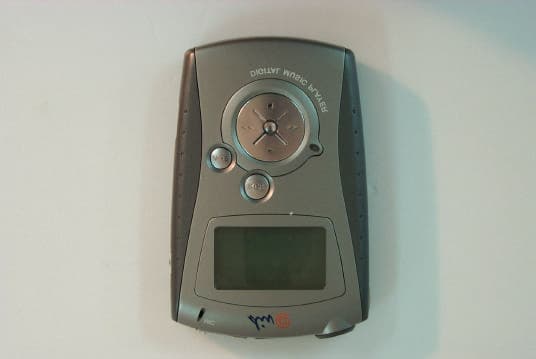
Click to zoom
Application Details
- Equipment Class
- JBP - Part 15 Class B Computing Device Peripheral
- Date of Grant
- Sep 27, 2000
- Application Purpose
- Original Equipment
- Date of Application
- Sep 27, 2000
- Equipment Note
- MP3 Player
- Company
- EIGER M&C CO., LTD
- Country
- South Korea
Documents & Files
Document Text
Text extracted from the exhibit documents filed with the FCC. Open a document above to read the original.
Users Manual
1 Div@-S64 User's Guide Div@-S64 The portable MP3/WMA/Voice files player using the flash memory and SmartMedia card. 2 Copyright Notices Under the copyright laws, neither the documentation nor the software may be copied, photocopied, reproduced, translated, or reduced to any electronic medium or machine-readable form, in whole or in part, without the prior written consent of SAEHAN MEDIA CO., LTD. Copyright (c) 2000 SAEHAN MEDIA CO., LTD All rights reserved. Microsoft, Windows 95, and Windows 98 are registered trademarks of Microsoft Corporation. Div@-S64 is a registered trademark of SAEHAN MEDIA CO., LTD 3 Table of Contents Chapter 1: Connecting your Div@-S64 to a PC 1. System information 2. What’s in the Div@-S64 box 3. Using the battery compartment 4. Battery status 5. Connecting your Div@-S64 player to a PC Chapter 2: How to install the software 1. How to set up the Div@-S64 Manager software 2. How to uninstall the Div@-S64 Manager Chapter 3: How to use the Div@-S64 software 1. Opening Div@-S64 Manager 2. Div@-S64 Manager description Chapter 4: How to use the Div@-S64 player 1. Div@-S64 player overview 2. The display panel 3. Div@-S64 player operation 4. How do I replace the SmartMedia card? Chapter 5: Div@-S64 general information and specifications 1. What is Div@-S64 2. How does Div@-S64 work? 3. Characteristics - advantages of Div@-S64 4. Product specifications Chapter 6: Appendix 1. Precautions 2. Warranty conditions 3. Regulatory notice 4. Trouble shootings 4 Chapter 1 Connecting your Div@-S64 to a PC This chapter describes how to connect your Div@-S64 player that uses its on-board 64MB flash memory and a SmartMedia card to a PC. This allows you to transfer MP3/WMA/Voice files and/or data files between your Div@-S64 player and your PC. 1. System information 2. What’s in the Div@-S64 box 3. Using the Battery compartment 4. Battery status 5. Connecting your Div@-S64 player to a PC 5 1. System Information The minimum system requirements for your computer: l Windows 95/98 l Pentium 133MHz or faster l 100% USB Protocal compatible port l CD-ROM drive l 10MB free hard disk space l 32MB RAM You will need more hard disk space depending on the size of the MP3/WMA/Voice files you want to use. 2. What’s in the Div@-S64 box? The Div@-S64 package comes with several extra components. Please check to be sure all the following items came in your box. Player USB Cable Earphone 1.5V AA Battery Install CD User’s Guide • Div@-S64 player (1) ±◊∏≤ √fl∞° ±◊∏≤ √fl∞° ±◊∏≤ √fl∞° ±◊∏≤ √fl∞° ±◊∏≤ √fl∞° ±◊∏≤ √fl∞° 6 • USB cable (1) • Earphone (1 pair) • AA size 1.5V Alkaline battery (1) • Installation CD (1) • User’s guide (1) 3. Using the battery compartment The battery lid is located on the bottom of the player. Push the battery lid out and then up to open the battery lid. The supplied battery is an AA size 1.5V Alkaline battery. Insert the battery into the slot in accordance with positive and negative symbols matching those of the battery. Battery lid operation Note: You may use any 1.5V AA size batteries. Use of an Alkaline battery is recommended for more playback time. 4. Battery status This is the three-level gage for battery level indicates. This icon has 5 states in display battery level. Bellow table is brief state description of battery level and display. State Display Comment Full Battery full 2/3 Battery 2/3 1/3 Battery 1/3 Empty Battery empty Battery Low Blink battery icon frame Battery state and display 5. Connecting your Div@-S64 player to a PC open insert or remove close 7 To complete setup, you should connect the Div@-S64 player to your computer. l Locate the supplied USB cable and compare the two ends of the cable. One end of the cable has the larger connector and the other end has the smaller connector. l Match the end of the larger connector to USB port on the back of your computer, and then plug the other end into the jack below the left side of the Div@-S64 player. l AC/DC adapter to connect to the Div@-S64 player using a wall outlet is optional. If you want to use a DC adapter, it should be a 3V 300mA DC adapter. 8 Chapter 2 How to install the software This chapter describes how to install Div@-S64 Manager software. Div@-S64 Manager is the communication software that allows your computer to share information with your DIV@-S64. In order for your player to work properly, Div@-S64 Manager software must be installed correctly under Windows 95 /98 or Windows 2000. 1. How to set up Div@-S64 Manager software 2. How to uninstall Div@-S64 Manager 9 1. How to set up Div@-S64 Manager software If the DIV@ player is not recognized by Div@-S64 Manager software after installing Div@-S64 Manager software, Installation instruction for Div@-S64 Manager software is described as follows: 1. Insert the installation CD into your CD ROM drive (say “D:\” is the name of your CD ROM drive). The setup file for the English version of Div@-S64 Manager software is located in the "D:\" folder. 2. “SETUP.EXE” is the setup file for the "Div@-S64 Manager" software. Now, enter "d:\setup.exe" where "d:\" is the folder containing the "SETUP.EXE" file on your CD ROM drive. Pressing the OK button will start Div@-S64 Manager software installation. From the "License Agreement ” dialog box, click the "Yes" button to continue the software installation. 10 2. If you want to change the destination directory to another directory other than the default in the dialog box, click the "Browse" button to select the directory where you wish to copy Div@-S64 Manager files. Now, click the "Next" button to continue installation. 3. You can click the "Back" button to re-configure the installation information. To continue installation, click the "Next" button to start copying necessary files into the installation directory. 4. Wait until the Div@-S64 Manager copies the necessary files. 11 5. Now, click the "Finish" button. This will finish Div@-S64 Manager software setup. Note: If your system had an old version …
Text truncated - open the document above for the full version.
Block Diagram
Div@ S64 Block Diagram -
External Photos
Test Report No. CTK00 - F046 Certitek standards Laboratory Co., Ltd. VCCI Registration No. R-948, C-986 FCC Registration No. 93250 Issue: 2000-09-20 Page 11 of 15 www.certitek.com Certitek Standards Laboratory Co., Ltd. 386-1, Ho-Dong, Yongin-City, Kyunggi-Do, KOREA 449-100 4. Photographs EUT (Front/Rear)
ID Label/Location Info
Test Report No. CTK00 - F046 Certitek standards Laboratory Co., Ltd. VCCI Registration No. R-948, C-986 FCC Registration No. 93250 Issue: 2000-09-20 Page 11 of 15 www.certitek.com Certitek Standards Laboratory Co., Ltd. 386-1, Ho-Dong, Yongin-City, Kyunggi-Do, KOREA 449-100 4. Photographs EUT (Front/Rear)
Internal Photos
Test Report No. CTK00 - F046 Certitek standards Laboratory Co., Ltd. VCCI Registration No. R-948, C-986 FCC Registration No. 93250 Issue: 2000-09-20 Page 12 of 15 www.certitek.com Certitek Standards Laboratory Co., Ltd. 386-1, Ho-Dong, Yongin-City, Kyunggi-Do, KOREA 449-100 Main Board (Front/Rear) Test Report No. CTK00 - F046 Certitek standards Laboratory Co., Ltd. VCCI Registration No. R-948, C-986 FCC Registration No. 93250 Issue: 2000-09-20 Page 13 of 15 www.certitek.com Certitek Standards Laboratory Co., Ltd. 386-1, Ho-Dong, Yongin-City, Kyunggi-Do, KOREA 449-100 Memory Board (Front/Rear)
Test Report
Test Report No. CTK00 - F046 Certitek standards Laboratory Co., Ltd. VCCI Registration No. R-948, C-986 FCC Registration No. 93250 Issue: 2000-09-20 Page 1 of 15 www.certitek.com Certitek Standards Laboratory Co., Ltd. 386-1, Ho-Dong, Yongin-City, Kyunggi-Do, KOREA 449-100 Model : Div@-S64 FCC ID O8TEIGERMNC Product type MP3 Player Serial No. - Applicant EIGER M&C CO., LTD Address 562-6 Woman-Dong, Paldal-gu, Suwon City, Kyungki-Do, KOREA Manufacturer EIGER M&C CO., LTD Address 562-6 Woman-Dong, Paldal-gu, Suwon City, Kyungki-Do, KOREA Test specification (Standard) : FCC Part15 Subpart B Class B Test Result : In compliance Tested by (Test engineer) 2000-09-20 Young Joon, Park Date Name Signature Reviewed by (EMC Manager) 2000-09-20 James, Hong Date Name Signature Definition : Applicable, : Not Applicable, N/A : Not Applicable, - : Not Applicable The test result only responds to the tested sample. No single part of this document may be reproduced without permission from Certitek Standards Laboratory Co., Ltd. Tel: +82-31-339-9970, Fax: +82-31-339-9972 E E E M M M C C C - - - T T T e e e s s s t t t R R R e e e p p p o o o r r r t t t Test Report No. CTK00 - F046 Certitek standards Laboratory Co., Ltd. VCCI Registration No. R-948, C-986 FCC Registration No. 93250 Issue: 2000-09-20 Page 2 of 15 www.certitek.com Certitek Standards Laboratory Co., Ltd. 386-1, Ho-Dong, Yongin-City, Kyunggi-Do, KOREA 449-100 Table of contents 1. EUT description................................................................................................................................3 Introduction..............................................................................................................................................................3 Identification............................................................................................................................................................3 Electrical rating.......................................................................................................................................................3 2. Test Set-up............................................................................................................................................4 Test Mode..................................................................................................................................................................4 Cable configuration................................................................................................................................................4 Cable description....................................................................................................................................................5 Auxiliary equipment..............................................................................................................................................5 Test software.............................................................................................................................................................5 Measurement Procedures.....................................................................................................................................6 3. Test Result............................................................................................................................................7 Test summary...........................................................................................................................................................7 Radiated emission...................................................................................................................................................8 Conducted emission...............................................................................................................................................9 4. Photographs......................................................................................................................................11 EUT (Front/Rear)..................................................................................................................................................11 Main Board (Front/Rear)...................................................................................................................................12 Memory Board (Front/Rear)............................................................................................................................13 Radiated emission.................................................................................................................................................14 Conducted emission.............................................................................................................................................15 Test Report No. CTK00 - F046 Certitek standards Laboratory Co., Ltd. VCCI Registration No. R-948, C-986 FCC Registration No. 93250 Issue: 2000-09-20 Page 3 of 15 www.certitek.com Certitek Standards Laboratory Co., Ltd. 386-1, Ho-Dong, Yongin-City, Kyunggi-Do, KOREA 449-100 1. EUT description Introduction Div@-S64 is a MP3 Player. Identification Receipt date : 2000-09-14 Model : Div@-S64 Manufacturer : EIGER M&C CO., LTD Address : 562-6 Woman-Dong, Paldal-gu, Suwon City, Kyungki-Do, KOREA Contact person : Jong-Kuk Lee (Research Manager) Telephone : +82 - 31 - 211 - 7092 Facsimile : +82 - 31 - 211 - 7004 Peripheral Device Ports Port name Description Earphone Connect to Earphone USB Connect to PC’s USB Port DC IN Connect to Adaptor Electrical rating Input : AA Battery (1EA) Output : - Test Report No. CTK00 - F046 Certitek standards Laboratory Co., Ltd. VCCI Registration No. R-948, C-986 FCC Registration No. 93250 Issue: 2000-09-20 Page 4 of 15 www.certitek.com Certitek Standards Laboratory Co., Ltd. 386-1, Ho-Dong, Yongin-City, Kyunggi-Do, KOREA 449-100 2. Test Set-up Test Mode Play mode & Data transfer mode. Cable config…
Text truncated - open the document above for the full version.
Test Setup Photos
Test Report No. CTK00 - F046 Certitek standards Laboratory Co., Ltd. VCCI Registration No. R-948, C-986 FCC Registration No. 93250 Issue: 2000-09-20 Page 14 of 15 www.certitek.com Certitek Standards Laboratory Co., Ltd. 386-1, Ho-Dong, Yongin-City, Kyunggi-Do, KOREA 449-100 Radiated emission Test Report No. CTK00 - F046 Certitek standards Laboratory Co., Ltd. VCCI Registration No. R-948, C-986 FCC Registration No. 93250 Issue: 2000-09-20 Page 15 of 15 www.certitek.com Certitek Standards Laboratory Co., Ltd. 386-1, Ho-Dong, Yongin-City, Kyunggi-Do, KOREA 449-100 Conducted emission
Contact Information
Applicant
Jong-Kuk Lee(Research Manager)
Test Firm
CTK Co., Ltd.Jang-Hee Hong
Technical Specifications
| # | Rule Parts | Frequency Range | Power Output |
|---|---|---|---|
| 1 | 15B | - | - |
Other Applications from EIGER M&C CO., LTD

O8TMP-K80
May 13, 2001MP3 Player with FM Transmitter
Equipment Class
DXX - Part 15 Low Power Communication Device Transmitter