OMC420612Tablet
iFIT Health and Fitness, Inc.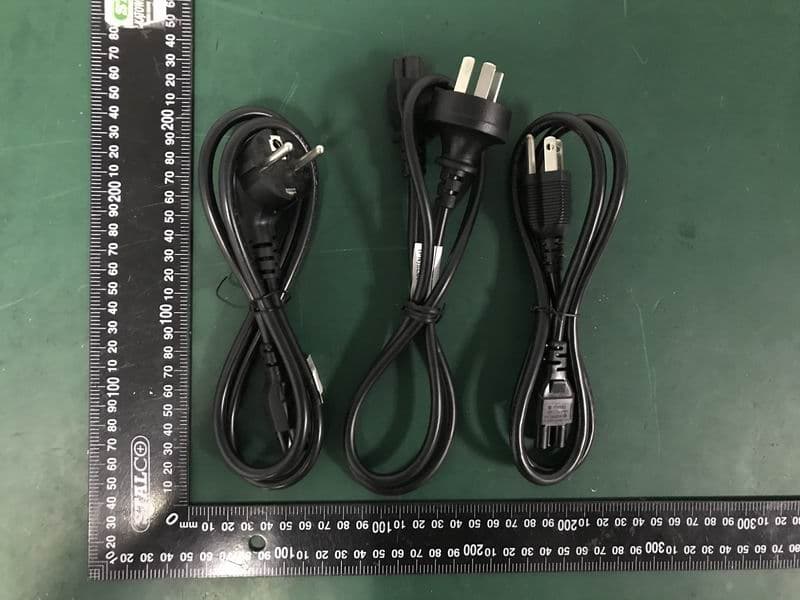
Click to zoom
Application Details
- Equipment Class
- DTS - Digital Transmission System
- Date of Grant
- Sep 15, 2020
- Application Purpose
- Original Equipment
- Date of Application
- Sep 15, 2020
- Equipment Note
- Tablet
- Frequency Range
- 2412.00000000 - 2462.00000000
- Country
- United States
Documents & Files
Document Text
Text extracted from the exhibit documents filed with the FCC. Open a document above to read the original.
Users Manual
1 ICON Tablet Model: MP21-ARGON2-MIRROR 2 Directions Meanings of icons: Forbidding: forbid improper operations to avoid damaging the tablet. Caution: cautions for operators to avoid potential damages. Please note and remember. Importance: important information, common notes, definitions, general knowledge and references, etc. Other trademarks and trade name may be used in this manual to refer to either the entities claiming the marks and names or their products. The manufacture disclaims any proprietary interest in trademarks and trade names other than its own. Information in this manual is subject to change without notice. Reproduction in any manner whatsoever without the written permission from the manufacture is strictly forbidden. Product images in this manual are for your reference only. 3 Contents Directions ....................................................................... 2 Safety Precautions ........................................................ 5 1 Know Your Tablet ....................................................... 7 2 Get to Know Your System .......................................... 7 2-1 Enter APPs Menu ................................................... 11 2-2 Add screen shortcuts ............................................. 12 2-3 Delete screen shortcuts/widgets ........................... 12 2-4On-screen Keyboard ............................................... 13 3 System Settings ........................................................ 14 3-1 Wireless & networks ............................................... 14 3-2 Device ...................................................................... 21 3-3 Personal .................................................................. 23 3-4 System ..................................................................... 23 4 4 Camera ....................................................................... 24 5 Specifications ........................................................... 26 6 CE Mark ..................................................................... 27 7 Assembly & Using .................................................... 31 5 Safety Precautions 1. DO NOT expose the tablet to dirty or dusty environment. Keep the environment clean and dry. 2. DO NOT place or drop objects on the top of the tablet. DO NOT shove any foreign objects into the tablet. DO NOT cover the LCD Screen strongly. 3. DO NOT expose the tablet to strong magnetic or electrical fields; DO NOT place the floppy disk near or on the tablet, which may loss the data of the floppy disk. 4. DO NOT leave the tablet facing the sun as it can damage the LCD Screen, especially in the car. 5. DO NOT expose the tablet to or use near liquids, rain, or moisture. 6. DO NOT throw the tablet in municipal waste. Check local regulations for disposal of electronic products. 8. DO NOT insert anything into the tablet that may result in short circuit or damage the circuit. 9. Power off the tablet, if you want to install or remove some external devices which are not support hot-plug. 10. DO NOT disassemble the tablet, only a certified service technician should perform repairs on your computer. Otherwise, problems may result and the manufacturer should not hold responsibility for the damage. 11. 12. Device using temperature 40°C MAX. 13. RECYCLING This product bears the selective sorting symbol for Waste electrical and electronic equipment (WEEE). This means that this product must be handled pursuant to European directive 2012/19/EU in order to be recycled or dismantled to minimize its impact on the environment. User has the choice to give his product to a competent 6 recycling organization or to the retailer when he buys an new electrical or electronic equipment. 14. For AC/DC Adapter, the socket-outlet shall be installed near the equipment and shall be easily accessible. 15. Any changes or modifications not expressly approved by the party responsible for compliance could void the user’s authority to operate the equipment. 7 1 Know Your Tablet KEYS: connect to the console host through a cable, so that the host can control the volume or reset. AUDIO JACK: connect to the console host through a cable to provide audio signal output. 2 Get to Know Your System Connect to the power supply and then it will display the home screen as below picture 8 Picture2-1 Click on the screen for ten times, pause for 5 seconds and then do it again for ten times’ clicks to enter the Setting priviledged mode as below. 9 Picture 2-2 10 : tap to return to the previous page. : tap to enter Home screen. : tap to open recent APPs list menu. If it’s your first time to use the tablet, the system will enter the guide menu. Please finish the initial setting following the instructions. Notification Quick settings Notification Picture 2-3 11 2-1 Enter APPs Menu On the home page,slide the screen from bottom to top, the system will enter the APPs Menu as shown in picture 2-3 Picture2-4 12 2-2 Add screen shortcuts On the home page, touch and hold the blank area to popup menu to change wallpaper; Enter APPs Menu ,touch and hold an APPS icon to add it to the home screen. 2-3 Delete screen shortcuts/widgets On the home screen, touch and hold the shortcut or widget to be deleted until the icon “×” appears at the top middle of the home screen. Drag the shortcuts to the remove icon to delete. 13 2-4On-screen Keyboard Just touch a text field to open the on-screen keyboard; Touch on the tool bar to close it. Toggle letters & numbers Space Go Picture 2-5 14 3 System Settings Picture 3-1 3-1 Wireless & networks 3-1-1 Wi-Fi 15 Touch the Wi-Fi swtich behind of the Wi-Fi item to turn on the Wi-Fi function and then the system will auto-scan the available networks to display as shown in picture 3-2. Select one network and input its password if necessary to connect. Touch to perform advanced Wi-Fi settings. Picture 3-2 16 3-1-2 Bluetooth The Bluetooth function enables you to exchange files between the tablet and other Blu…
Text truncated - open the document above for the full version.
External Photos
EST Technology Co., Ltd. Page 1 of 4 PHOTO EUT External Photos M/N: MP21-ARGON2-MIRROR EST Technology Co., Ltd. Page 2 of 4 External Photos M/N: MP21-ARGON2-MIRROR EST Technology Co., Ltd. Page 3 of 4 External Photos M/N: MP21-ARGON2-MIRROR EST Technology Co., Ltd. Page 4 of 4 Power Supply Cable plugs Different power cable plugs, apply to different parts of the country.(United States, Canada, Europe, Australia)
ID Label/Location Info
Label
Internal Photos
EST Technology Co., Ltd. Page 1 of 9 PHOTO EUT Internal Photos M/N: MP21-ARGON2-MIRROR EST Technology Co., Ltd. Page 2 of 9 Internal Photos M/N: MP21-ARGON2-MIRROR EST Technology Co., Ltd. Page 3 of 9 Internal Photos M/N: MP21-ARGON2-MIRROR EST Technology Co., Ltd. Page 4 of 9 Internal Photos M/N: MP21-ARGON2-MIRROR EST Technology Co., Ltd. Page 5 of 9 Internal Photos M/N: MP21-ARGON2-MIRROR EST Technology Co., Ltd. Page 6 of 9 Internal Photos M/N: MP21-ARGON2-MIRROR EST Technology Co., Ltd. Page 7 of 9 Internal Photos M/N: MP21-ARGON2-MIRROR EST Technology Co., Ltd. Page 8 of 9 Internal Photos M/N: MP21-ARGON2-MIRROR EST Technology Co., Ltd. Page 9 of 9 Internal Photos M/N: MP21-ARGON2-MIRROR
RF Exposure Info
FCC ID: OMC420612 EST Technology Co. ,Ltd Report No. ESTE-R2008217 Page 1 of 6 FCC 47 CFR MPE REPORT Icon Health and Fitness,Inc. Tablet Model Number: MP21-ARGON2-MIRROR FCC ID: OMC420612 Prepared for: Icon Health and Fitness,Inc. 1500 South 1000 West,Logan Utah United States 84321 Prepared By: EST Technology Co., Ltd. Chilingxiang, Qishantou, Santun, Houjie, Dongguan, Guangdong, China Tel: 86-769-83081888-808 Report Number: ESTE-R2008217 Date of Test: Jul. 31~Aug. 21, 2020 Date of Report: Aug. 26, 2020 FCC ID: OMC420612 EST Technology Co. ,Ltd Report No. ESTE-R2008217 Page 2 of 6 Maximum Permissible Exposure 1. Applicable Standards Systems operating under the provisions of this section shall be operated in a manner that ensures that the public is not exposed to radio frequency energy level in excess limit for maximum permissible exposure. In accordance with 47 CFR FCC Part 2 Subpart J, section 2.1091 this device has been defined as a mobile device whereby a distance of 0.2m normally can be maintained between the user and the device. 1.1. Limits for Maximum Permissible Exposure (MPE) (a) Limits for Occupational/Controlled Exposure Frequency Range (MHz) Electric Field Strength (E) (V/m) Magnetic Field Strength (H) (A/m) Power Density (S) (mW/cm 2 ) Averaging Times ︱E︱ 2 ,︱H︱ 2 or S (minutes) 0.3-3.0 614 1.63 (100)* 6 3.0-30 1842/f 4.89/f (900/f)* 6 30-300 61.4 0.163 1.0 6 300-1500 F/300 6 1500-10000 5 6 (b) Limits for General Population / Uncontrolled Exposure Frequency Range (MHz) Electric Field Strength (E) (V/m) Magnetic Field Strength (H) (A/m) Power Density (S) (mW/cm 2 ) Averaging Times ︱E︱ 2 ,︱H︱ 2 or S (minutes) 0.3-1.34 614 1.63 (100)* 30 1.34-30 824/f 2.19/f (180/f)* 30 30-300 27.5 0.073 0.2 30 300-1500 F/1500 30 1500-10000 1.o 30 Note: f=frequency in MHz; *Plane-wave equivalent power density FCC ID: OMC420612 EST Technology Co. ,Ltd Report No. ESTE-R2008217 Page 3 of 6 1.2. MPE Calculation Method E (V/m) = d G×P×30 Power Density: Pd (W/m 2 ) = 377 E 2 E = Electric Field (V/m) P = Peak RF output Power (W) G = EUT Antenna numeric gain (numeric) d = Separation distance between radiator and human body (m) The formula can be changed to Pd = 2 d×377 G×P×30 From the peak EUT RF output power, the minimum mobile separation distance, d=0.2m, as well as the gain of the used antenna, the RF power density can be obtained FCC ID: OMC420612 EST Technology Co. ,Ltd Report No. ESTE-R2008217 Page 4 of 6 2. Conducted Power Result Mode Frequency (MHz) Peak output power (dBm) Peak output power (mW) Target power (dBm) Antenna gain (dBi) (Linear) GFSK 2402 5.18 3.296 5 ±2 2.9 1.95 2441 5.21 3.319 5 ±2 2.9 1.95 2480 5.13 3.258 5 ±2 2.9 1.95 π /4-DQPSK 2402 3.97 2.495 3 ±2 2.9 1.95 2441 4.05 2.541 4 ±2 2.9 1.95 2480 3.92 2.466 3 ±2 2.9 1.95 8-DPSK 2402 3.85 2.427 3 ±2 2.9 1.95 2441 4.01 2.518 4 ±2 2.9 1.95 2480 3.89 2.449 3 ±2 2.9 1.95 BLE 2402 5.22 3.327 5 ±2 2.9 1.95 2440 5.23 3.334 5 ±2 2.9 1.95 2480 5.17 3.289 5 ±2 2.9 1.95 IEEE 802.11b 2412 15.57 36.058 15 ±2 2.9 1.95 2437 16.12 40.926 16 ±2 2.9 1.95 2462 16.01 39.902 16 ±2 2.9 1.95 IEEE 802.11g 2412 19.20 83.176 19 ±2 2.9 1.95 2437 19.38 86.696 19 ±2 2.9 1.95 2462 19.85 96.605 19 ±2 2.9 1.95 IEEE 802.11n HT20 2412 19.48 88.716 19 ±2 2.9 1.95 2437 19.70 93.325 19 ±2 2.9 1.95 2462 19.75 94.406 19 ±2 2.9 1.95 IEEE 802.11a 5180 11.91 15.524 11 ±2 2.9 1.95 5200 10.72 11.803 10 ±2 2.9 1.95 5240 12.44 17.539 12 ±2 2.9 1.95 5260 12.24 16.749 12 ±2 2.9 1.95 5300 12.65 18.408 12 ±2 2.9 1.95 5320 12.79 19.011 12 ±2 2.9 1.95 5500 10.26 10.617 10 ±2 2.9 1.95 5580 10.46 11.117 10 ±2 2.9 1.95 5700 12.16 16.444 12 ±2 2.9 1.95 5745 11.39 13.772 11 ±2 2.9 1.95 5785 9.63 9.183 9 ±2 2.9 1.95 5825 8.64 7.311 8 ±2 2.9 1.95 FCC ID: OMC420612 EST Technology Co. ,Ltd Report No. ESTE-R2008217 Page 5 of 6 Mode Frequency (MHz) Peak output power (dBm) Peak output power (mW) Target power (dBm) Antenna gain (dBi) (Linear) IEEE 802.11n HT20 5180 11.14 13.002 11 ± 2 2.9 1.95 5200 10.77 11.940 10 ± 2 2.9 1.95 5240 12.49 17.742 12 ± 2 2.9 1.95 5260 12.26 16.827 12 ± 2 2.9 1.95 5300 12.36 17.219 12 ± 2 2.9 1.95 5320 13.32 21.478 13 ± 2 2.9 1.95 5500 9.87 9.705 9 ± 2 2.9 1.95 5580 10.04 10.093 10 ± 2 2.9 1.95 5700 12.16 16.444 12 ± 2 2.9 1.95 5745 10.99 12.560 10 ± 2 2.9 1.95 5785 10.01 10.023 10 ± 2 2.9 1.95 5825 8.27 6.714 8 ± 2 2.9 1.95 IEEE 802.11n HT40 5190 11.05 12.735 11 ± 2 2.9 1.95 5230 11.77 15.031 11 ± 2 2.9 1.95 5270 12.22 16.672 12 ± 2 2.9 1.95 5310 12.75 18.836 12 ± 2 2.9 1.95 5510 9.14 8.204 9 ± 2 2.9 1.95 5590 12.43 17.498 12 ± 2 2.9 1.95 5670 12.56 18.030 12 ± 2 2.9 1.95 5755 11.35 13.646 11 ± 2 2.9 1.95 5795 9.89 9.750 9 ± 2 2.9 1.95 FCC ID: OMC420612 EST Technology Co. ,Ltd Report No. ESTE-R2008217 Page 6 of 6 Calculated Result and Limit Mode Target power (dBm) Antenna gain Power Density (S) (mW/cm 2 ) Limited of Power Density (S) (mW/cm 2 ) Test Result (dBi) (Linear) 2.4G Band GFSK 7 2.9 1.95 0.00194 1 Compiles π /4-DQPSK 6 2.9 1.95 0.00154 1 Compiles 8-DPSK 6 2.9 1.95 0.00154 1 Compiles BLE 7 2.9 1.95 0.00194 1 Compiles IEEE 802.11b 18 2.9 1.95 0.02448 1 Compiles IEEE 802.11g 21 2.9 1.95 0.04883 1 Compiles IEEE 802.11n HT20 21 2.9 1.95 0.04883 1 Compiles 5G Band IEEE 802.11a 14 2.9 1.95 0.00974 1 Compiles IEEE 802.11n HT20 15 2.9 1.95 0.01227 1 Compiles IEEE 802.11n HT40 14 2.9 1.95 0.00974 1 Compiles Mode Power Density (S) (mW/cm 2 ) total (mW/cm 2 ) Limited of Power Density (S) (mW/cm 2 ) Test Result BT 0.00194 0.06498 1 Compiles BLE 0.00194 1 Compiles 2.4GWi Fi 0.04883 1 Compiles 5GWi Fi 0.01227 1 Compiles End of Test Report
Test Report
FCC ID: OMC420612 EST Technology Co., Ltd Report No. ESTE-R2008190 Page 1 of 52 FCC PART 15C TEST REPORT FOR CERTIFICATION On Behalf of Icon Health and Fitness,Inc. Tablet Model Number: MP21-ARGON2-MIRROR FCC ID: OMC420612 Prepared for: Icon Health and Fitness,Inc. 1500 South 1000 West,Logan Utah United States 84321 Prepared By: EST Technology Co., Ltd. Chilingxiang, Qishantou, Santun, Houjie, Dongguan, Guangdong, China Tel: 86-769-83081888-808 Report Number: ESTE-R2008190 Date of Test: Jul. 31~Aug. 21, 2020 Date of Report: Aug. 26, 2020 FCC ID: OMC420612 EST Technology Co., Ltd Report No. ESTE-R2008190 Page 2 of 52 TABLE OF CONTENTS Description Page TEST REPORT VERIFICATION......................................................................................................................... 3 1. GENERAL INFORMATION ................................................................................................................. 5 1.1. Description of Device (EUT) ........................................................................................................... 5 1.2. Antenna Information ........................................................................................................................ 5 2. SUMMARY OF TEST ......................................................................................................................... 6 2.1. Summary of test result ...................................................................................................................... 6 2.2. Test Facilities ................................................................................................................................... 7 2.3. Measurement uncertainty ................................................................................................................. 8 2.4. Assistant equipment used for test ..................................................................................................... 8 2.5. Block Diagram ................................................................................................................................. 8 2.6. Test Mode ......................................................................................................................................... 9 2.7. Power Setting of Test Software ........................................................................................................ 9 2.8. Duty Cycle ...................................................................................................................................... 10 2.9. Channel List ................................................................................................................................... 11 2.10. Test Equipment List ....................................................................................................................... 12 3. 6DB BANDWIDTH .......................................................................................................................... 13 3.1. Limit ............................................................................................................................................... 13 3.2. Test Setup ....................................................................................................................................... 13 3.3. Spectrum Analyzer Setting ............................................................................................................. 13 3.4. Test Procedure ................................................................................................................................ 13 3.5. Test Result ...................................................................................................................................... 14 4. MAXIMUM PEAK OUTPUT POWER ................................................................................................. 16 4.1. Limit ............................................................................................................................................... 16 4.2. Test Setup ....................................................................................................................................... 16 4.3. Spectrum Analyzer Setting ............................................................................................................. 16 4.4. Test Procedure ................................................................................................................................ 16 4.5. Test Result ...................................................................................................................................... 17 5. POWER SPECTRAL DENSITY .......................................................................................................... 19 5.1. Limit ............................................................................................................................................... 19 5.2. Test Setup ....................................................................................................................................... 19 5.3. Spectrum Analyzer Setting ............................................................................................................. 19 5.4. Test Procedure ................................................................................................................................ 19 5.5. Test Result ...................................................................................................................................... 20 6. CONDUCTED BAND EDGE ............................................................................................................. 22 6.1. Limit ............................................................................................................................................... 22 6.2. Test Setup ................................................................................................................…
Text truncated - open the document above for the full version.
Test Report
FCC ID: OMC420612 EST Technology Co., Ltd Report No. ESTE-R2008191 Page 1 of 69 FCC PART 15C TEST REPORT FOR CERTIFICATION On Behalf of Icon Health and Fitness,Inc. Tablet Model Number: MP21-ARGON2-MIRROR FCC ID: OMC420612 Prepared for: Icon Health and Fitness,Inc. 1500 South 1000 West,Logan Utah United States 84321 Prepared By: EST Technology Co., Ltd. Chilingxiang, Qishantou, Santun, Houjie, Dongguan, Guangdong, China Tel: 86-769-83081888-808 Report Number: ESTE-R2008191 Date of Test: Jul. 31~Aug. 21, 2020 Date of Report: Aug. 26, 2020 FCC ID: OMC420612 EST Technology Co., Ltd Report No. ESTE-R2008191 Page 2 of 69 TABLE OF CONTENTS Description Page TEST REPORT VERIFICATION......................................................................................................................... 3 1. GENERAL INFORMATION ................................................................................................................. 5 1.1. Description of Device (EUT) ........................................................................................................... 5 1.2. Antenna Information ........................................................................................................................ 5 2. SUMMARY OF TEST ......................................................................................................................... 6 2.1. Summary of test result ...................................................................................................................... 6 2.2. Test Facilities ................................................................................................................................... 7 2.3. Measurement uncertainty ................................................................................................................. 8 2.4. Assistant equipment used for test ..................................................................................................... 8 2.5. Block Diagram ................................................................................................................................. 8 2.6. Test Mode ......................................................................................................................................... 9 2.7. Power Setting of Test Software ...................................................................................................... 10 2.8. Duty Cycle ...................................................................................................................................... 10 2.9. Channel List ................................................................................................................................... 13 2.10. Test Equipment List ....................................................................................................................... 14 3. 6DB BANDWIDTH .......................................................................................................................... 15 3.1. Limit ............................................................................................................................................... 15 3.2. Test Setup ....................................................................................................................................... 15 3.3. Spectrum Analyzer Setting ............................................................................................................. 15 3.4. Test Procedure ................................................................................................................................ 15 3.5. Test Result ...................................................................................................................................... 16 4. MAXIMUM PEAK OUTPUT POWER ................................................................................................. 23 4.1. Limit ............................................................................................................................................... 23 4.2. Test Setup ....................................................................................................................................... 23 4.3. Spectrum Analyzer Setting ............................................................................................................. 23 4.4. Test Procedure ................................................................................................................................ 23 4.5. Test Result ...................................................................................................................................... 24 5. POWER SPECTRAL DENSITY .......................................................................................................... 31 5.1. Limit ............................................................................................................................................... 31 5.2. Test Setup ....................................................................................................................................... 31 5.3. Spectrum Analyzer Setting ............................................................................................................. 31 5.4. Test Procedure ................................................................................................................................ 31 5.5. Test Result ...................................................................................................................................... 32 6. CONDUCTED BAND EDGE ............................................................................................................. 39 6.1. Limit ............................................................................................................................................... 39 6.2. Test Setup .................................................................................................................…
Text truncated - open the document above for the full version.
Test Setup Photos
ConductedTest RadiatedTest(Below1GHz) RadiatedTest(Above1GHz) DFS
Contact Information
Applicant
Kris Luthy(Regulatory Compliance Engineer)
Technical Contact
Non-Technical Contact
EST Technology Co., Ltd.Iceman Hu
[email protected]86-769-83081888
Test Firm
EST Technology Co., Ltd.Iceman Hu
[email protected]+86 0769-83081888
Technical Specifications
| # | Rule Parts | Frequency Range | Power Output |
|---|---|---|---|
| 2 | 15C | 2.41 GHz - 2.46 GHz | 96.61 mW |
Other Applications from iFIT Health and Fitness, Inc.
OMC-CESIUM1
Sep 07, 2026Tablet
Equipment Class
DSS - Part 15 Spread Spectrum TransmitterOMC453584C
Aug 21, 2024Tablet
Equipment Class
DSS - Part 15 Spread Spectrum TransmitterOMC453084
Jul 15, 2024Tablet
Equipment Class
NII - Unlicensed National Information Infrastructure TXOMC453584V
May 10, 2024Tablet
Equipment Class
DSS - Part 15 Spread Spectrum Transmitter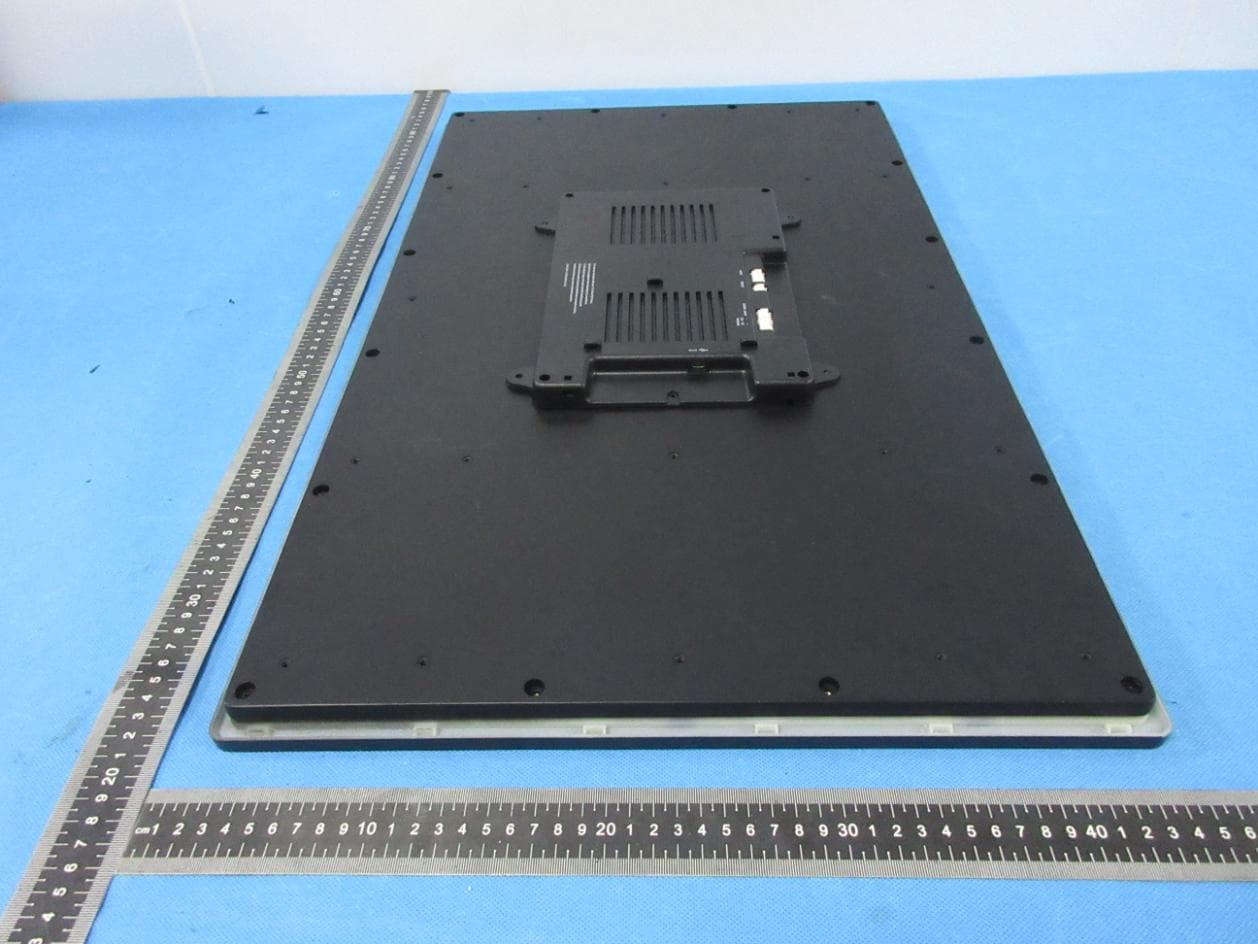
OMC436392E
Sep 26, 2022Tablet
Equipment Class
DSS - Part 15 Spread Spectrum Transmitter