ON5USBCUUSB Dongle Transceiver
CATEYE Co., Ltd.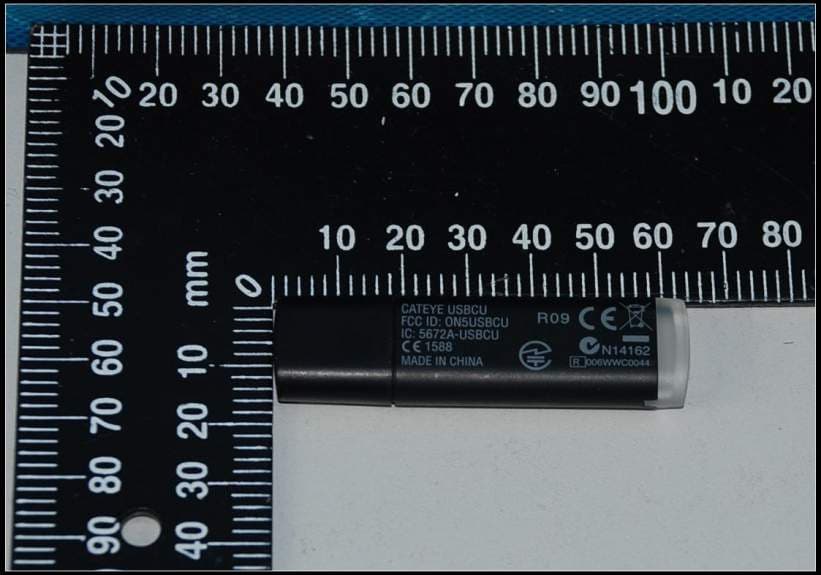
Click to zoom
Application Details
- Equipment Class
- JBP - Part 15 Class B Computing Device Peripheral
- Date of Grant
- May 19, 2011
- Application Purpose
- Original Equipment
- Date of Application
- May 17, 2011
- Equipment Note
- USB Dongle Transceiver
- Company
- CATEYE Co., Ltd.
- Country
- Japan
Documents & Files
Document Text
Text extracted from the exhibit documents filed with the FCC. Open a document above to read the original.
Users Manual
ENG-1 Continue Thank you for purchasing the CATEYE Q3a Multi-Sport Computer. The Q3a is a wristwatch heart rate monitor with additional cyclocomputer features to allow athletes to extensively organize and analyze their training data. 2.4 GHz-frequency digital wireless technology, the same technology used for everyday equipment such as wireless network is used for both the integrated cadence/speed sensor and the heart rate sensor. This technology practically eliminates all interference from external noise and cross-talk with other wireless users, providing you with stress-free riding. Read this instruction manual thoroughly and understand the functions of the wristwatch before using it. Keep this manual in a safe place for future reference. Important Always follow the instructions that are marked with “UÊ Warning!!!”. No part of this manual may be reproduced or transmitted without the prior written UÊ permission of CatEye Co., Ltd. The contents and illustrations in this manual are subject to change without notice.UÊ If you have any questions or concerns about this manual, please contact CatEye UÊ at www.cateye.com. Introduction ENG-2 Before use See this section for installation of the unit on the bicycle, use of the heart rate sensor, wristwatch set-up, and the basic operation of the product. Bicycle InstallationUÊ..........................................See page 10-12 Heart rate sensorUÊ.............................................See page 13 Wristwatch set-upUÊ...........................................See page 14-21 Basic wristwatch operationUÊ.............................See page 22-23 Clock mode (CLOCK) See this section to learn how to operate the Clock mode functions. Alarm clockUÊ.....................................................See page 24 Sports mode (SPORTS) See this section to learn how to operate the wristwatch functions. Display data in Sports modeUÊ...........................See page 28-29 Option mode (OPTION) See this section to learn how to operate the training functions frequently used in Sports mode (countdown and interval functions), and how to set the HR target zone. Training functionsUÊ...........................................See page 32-35 Setting the target heart rate zonesUÊ..................See page 37-38 Data mode (DATA) See this section to review and manage the recorded files. Recorded data review (File view)UÊ.....................See page 40-45 “File view” Download recorded data to PC (PC link)UÊ.........See page 45-47 “PC link” Setup mode (SETUP) See this section to change the wristwatch configuration. Changing the wristwatch configurationUÊ...........See page 49-60 About the CD-ROM supplied The CD-ROM supplied contains the following information. Quick start manual UÊ(PDF file) Installing the unit on the bicycle and setting up the wristwatch are described using video. Download software “e-Train Data™UÊ (Windows version)” This software is used to transfer the measurement data to your personal com- puter, and then use various functions on the PC, such as a graph display (The optional “USB communication kit” is required). Instruction manual UÊ(PDF file) This manual can be viewed in PDF file (7 languages). Use the CD-ROM in combination with this manual. About the manuals ENG-3 Continue Introduction .........................1 About the manuals.................2 Proper use of the CatEye Q3a ....5 Important............................6 Description of wristwatch and its parts..............................8 Wristwatch.................................8 Accessories................................8 Screen display .....................9 Bicycle Installation .............. 10 Mount the speed sensor and magnet.....................................10 Install the wristwatch onto the handlebar ...........................12 Heart rate sensor ................ 13 Before wearing the heart rate sensor......................................13 Wearing the heart rate sensor...13 Preparing the wristwatch ....... 14 Removing the insulation sheet...14 Restarting ................................14 Setting the clock/date ..............15 Switching to the Setup mode ...16 Tire circumference input ..........16 Selecting measurement unit ....18 Switching to the Sports mode...18 Operation test ..........................19 Formatting/Restarting operation..................................21 Basic operation of the wristwatch ........................ 22 Switching between modes .......22 Backlight ..................................23 Power-saving mode .................23 Transmission sleep mode ........23 Saving the power of the wristwatch ...............................23 Clock mode (CLOCK) ............ 24 Functions in Clock mode..........24 Display data in Clock mode......24 Alarm clock mode ....................24 Sports mode (SPORTS) ......... 25 Function in Sports mode..........25 Upper and middle display data...25 Lower display data ...................26 Starting/Stopping measurement ...........................26 Resetting the measurement data and saving the files ..........27 Display data in Sports mode ....28 Pace function ...........................30 Lap function.............................30 Training function......................32 Target heart rate zone ..............35 Option mode (OPTION).......... 36 Function in Option mode..........36 Setting the training function.....36 Setting the target heart rate zones .......................................37 Data mode (DATA) ............... 39 Function in Data mode .............39 File view ...................................40 PC link .....................................45 Past records.............................47 Setup mode (SETUP) ............ 49 Function in Setup mode ...........49 Setting the clock/date ..............50 Setting the alarm clock ............51 Setting the tire circumference...52 Contents ENG-4 Searching for sensor ID ...........53 Setting the measurement unit...55 Setting the record interval........56 Total trip dist…
Text truncated - open the document above for the full version.
External Photos
External Photos
Internal Photos
Internal Photos
Test Report
SGS-CSTC Standards Technical Services Co., Ltd. 198 Kezhu Road, Scientech Park, Guangzhou Economic & Technological Development District, Guangzhou, China 510663 Telephone: +86 (0) 20 82155555 Fax: +86 (0) 20 82075059 Email: [email protected] FEDERAL COMMUNICATIONS COMMISSION Registration number: 282399 Report No.: GZEM101000254602 Page: 1 of 21 FCC ID: ON5USBCU Authorized Signature: Strong Yao Manager The manufacturer should ensure that all products in series production are in conformity with the product sample detailed in this report. If the product in this report is used in any configuration other than that detailed in the report, the manufacturer must ensure the new system complies with all relevant standards. The report must not be used by the client to claim product certification, approval, or endorsement by NVLAP, NIST, or any agency of the federal government. All test results in this report can be traceable to National or International Standards. This document is issued by the Company subject to its General Conditions of Service printed overleaf, available on request or accessible at www.sgs.com/terms_and_conditions.htm and, for electronic format documents, subject to Terms and Conditions for Electronic Documents at www.sgs.com/terms_e-document.htm. Attention is drawn to the limitation of liability, indemnification and jurisdiction issues defined therein. Any holder of this document is advised that information contained hereon reflects the Company’s findings at the time of its intervention only and within the limits of Client’s instructions, if any. The Company’s sole responsibility is to its Client and this document does not exonerate parties to a transaction from exercising all their rights and obligations under the transaction documents. This document cannot be reproduced except in full, without prior written approval of the Company. Any unauthorized alteration, forgery or falsification of the content or appearance of this document is unlawful and offenders may be prosecuted to the fullest extent of the law. Unless otherwise stated the results shown in this test report refer only to the sample(s) tested and such sample(s) are retained for 90 days only 1 Cover Page TEST REPORT Application No.: GZEM1010002546RF Applicant: CATEYE Co., Ltd. Product Name: USB Dongle Transceiver Product Description: Wireless Transmission for Data Model No: USBCU FCC ID: ON5USBCU Trade Mark: CATEYE Standards: FCC PART 15 SUBPART B:2009 Date of Receipt: 2010-12-27 Date of Test: 2011-01-07 to 2011-01-09 Date of Issue: 2011-04-08 Test Result : Pass* * In the configuration tested, the EUT complied with the standards specified above. SGS-CSTC Standards Technical Services Co., Ltd. Report No.: GZEM101000254602 Page: 2 of 21 FCC ID: ON5USBCU This document is issued by the Company subject to its General Conditions of Service printed overleaf, available on request or accessible at www.sgs.com/terms_and_conditions.htm and, for electronic format documents, subject to Terms and Conditions for Electronic Documents at www.sgs.com/terms_e-document.htm. Attention is drawn to the limitation of liability, indemnification and jurisdiction issues defined therein. Any holder of this document is advised that information contained hereon reflects the Company’s findings at the time of its intervention only and within the limits of Client’s instructions, if any. The Company’s sole responsibility is to its Client and this document does not exonerate parties to a transaction from exercising all their rights and obligations under the transaction documents. This document cannot be reproduced except in full, without prior written approval of the Company. Any unauthorized alteration, forgery or falsification of the content or appearance of this document is unlawful and offenders may be prosecuted to the fullest extent of the law. Unless otherwise stated the results shown in this test report refer only to the sample(s) tested and such sample(s) are retained for 90 days only. 2 Version Revision Record Version Chapter Date Modifier Remark 00 2011-04-08 Original Authorized for issue by: 2011-01-07 to 2011-01-09 Tested By (Little Xiang) /Project Engineer Date 2011-02-25 Prepared By (Millie Li) /Clerk Date 2011-04-08 Checked By (Strong Yao) /Reviewer Date SGS-CSTC Standards Technical Services Co., Ltd. Report No.: GZEM101000254602 Page: 3 of 21 FCC ID: ON5USBCU This document is issued by the Company subject to its General Conditions of Service printed overleaf, available on request or accessible at www.sgs.com/terms_and_conditions.htm and, for electronic format documents, subject to Terms and Conditions for Electronic Documents at www.sgs.com/terms_e-document.htm. Attention is drawn to the limitation of liability, indemnification and jurisdiction issues defined therein. Any holder of this document is advised that information contained hereon reflects the Company’s findings at the time of its intervention only and within the limits of Client’s instructions, if any. The Company’s sole responsibility is to its Client and this document does not exonerate parties to a transaction from exercising all their rights and obligations under the transaction documents. This document cannot be reproduced except in full, without prior written approval of the Company. Any unauthorized alteration, forgery or falsification of the content or appearance of this document is unlawful and offenders may be prosecuted to the fullest extent of the law. Unless otherwise stated the results shown in this test report refer only to the sample(s) tested and such sample(s) are retained for 90 days only. 3 Test Summary Electromagnetic Interference (EMI) Test Test Requirement Test Method Class / Severity Result Conducted Emission (150 KHz to 30 MHz) FCC PART 15 SUBPART B:2009 ANSI C63.4:2009 Class B PASS Radiated Emission (30 MHz to 1 GHz) FCC PART 15 SUBPART B:2009 ANSI C63.4:2009 Class B PASS Radiated Emission above 1 GHz FCC PART 15 SUBPART B:2009 ANSI C63…
Text truncated - open the document above for the full version.
Test Setup Photos
Conducted Emissions Mains Terminals Test Setup Radiated Emissions, 30MHz to 1GHz Test Setup Radiated Emissions above 1 GHz Test Setup
Contact Information
Applicant
Koichi Tsuyama(President)
Test Firm
SGS-CSTC Standards Technical Services Co., LtdJerry Chan
Technical Specifications
| # | Rule Parts | Frequency Range | Power Output |
|---|---|---|---|
| 1 | 15B | - | - |
Other Applications from CATEYE Co., Ltd.

ON5-CCGPS100
Nov 09, 2022Air GPS with Bluetooth
Equipment Class
DTS - Digital Transmission System
ON5-HLNW100
Jul 21, 2020Sync Core
Equipment Class
DTS - Digital Transmission System
ON5-TLNW100K
Jul 20, 2020Sync Kinetic
Equipment Class
DTS - Digital Transmission System
ON5-SLNW100
Jul 20, 2020Sync Wearable
Equipment Class
DTS - Digital Transmission System
ON5-SPD30CDC30
May 13, 2020Magnet-less Speed & Cadence Sensors
Equipment Class
DTS - Digital Transmission System