OP5PL5569SKAA iPod Transmitter
Eleven Engineering Incorporated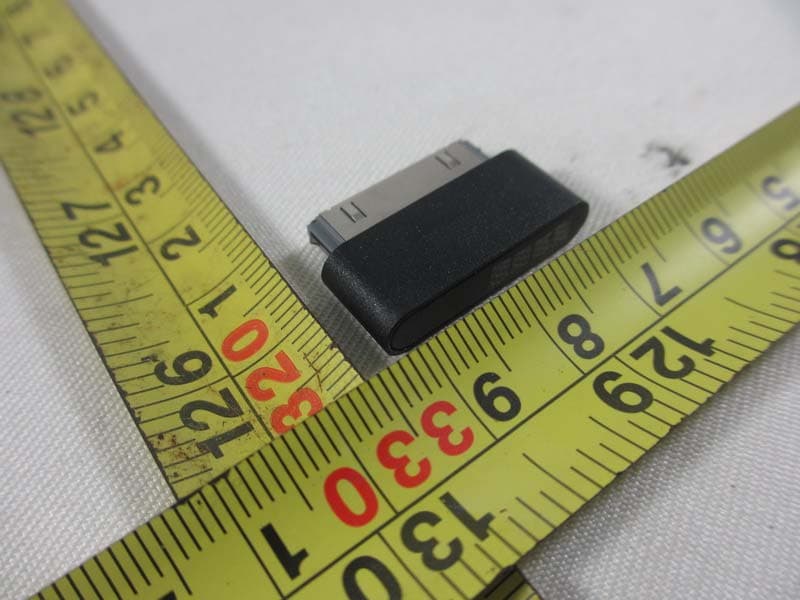
Click to zoom
Application Details
- Equipment Class
- DSS - Part 15 Spread Spectrum Transmitter
- Date of Grant
- Sep 30, 2013
- Application Purpose
- Original Equipment
- Date of Application
- Sep 25, 2013
- Equipment Note
- SKAA iPod Transmitter
- Frequency Range
- 2403.58500000 - 2477.31300000
- Country
- Canada
Documents & Files
Document Text
Text extracted from the exhibit documents filed with the FCC. Open a document above to read the original.
Users Manual
SKAA USER’S GUIDE (for SKAA OS v2.1) Each SKAA® receiver uses a Green List to keep track of your favorite transmitters. Using a favorite transmitter as well as hunting through your favorite transmitters is signaled by a Green LED. Your receiver can also explore to find new, unknown transmitters. Exploring is signaled by an Amber LED. If your product has two or more wireless receivers—for example, a left speaker and a right speaker—that’s called a Cluster and all of its pieces act as one. The SKAA Button on your receiver lets you control which transmitter you’re listening to (button with logo). Essentials CommandLED Meaning ClickFavorites Hunt for your favorite transmitters ... Click again to switch between hunting for all transmitters on your Green List and only the current one (dim) = Hunting (flash) = Next one (solid) = Bonded 2 ClicksExplore Hunt for new, unknown transmitters (not favorites) (dim) = Hunting (solid) = Bonded Hold (a few seconds) Add / Delete Manually add / delete the current transmitter to / from your Green List to = Added (flash) = Deleted -Auto Add SKAA adds the current Amber transmitter to your Green List if you listen to it for 30 minutes to = Added More Commands CommandLED Meaning 3 ClicksPlay / Pause Sends /command to the source device (example: computer or iPod ® ) or (1 flash) = command sent 4 ClicksSwing Mode Bond to any transmitter on your Green List (hint: have just one powered on) (dim) = Hunting (solid) = Bonded 6 ClicksClear the Green List Start over! (flash) = Green List cleared Hold during power on Make a Cluster of receivers: 1.Make sure the transmitter is powered off 2.Power on the Master receiver while holding down its SKAA Button—hold the button down until the Red LED begins to flash 3.With the remaining receivers within 3 meters of the Master receiver, power on the first one, wait for its Red LED to flash and then power on the second one. Continue until all of them are powered on. 4.Once all of the LEDs stop flashing (turn solid Red), power off all of the receivers (flash) = Master receiver has entered ‘Cluster Up’ mode (solid) = The Cluster has been successfully made QUESTIONS AND ANSWERS QuestionAnswer How does the Green List work? Every time you add a transmitter, it is automatically assigned the first open spot on the Green List—so if you already have two transmitters on your Green List, the next one you add will go in Green List spot #3. The receiver can hunt through the Green List much like a car radio hunts for radio stations when you press “seek”. If you see the Green LED flash, the receiver is automatically moving through your Green List, checking for each favorite transmitter as it goes. For example if you have 3 transmitters on your Green List, your receiver will hunt for them in order 1, 2 then 3, then back to 1 and so on (the Green LED will flash every time it advances from one to the next). The receiver looks for each transmitter for about 3 seconds and then moves on to the next one if it doesn’t find it. If it does find it, it stops there, bonds with it and starts playing its audio. If you don’t see the Green list flash, the receiver is just sitting, waiting for one particular favorite transmitter to show up. Click the SKAA button once to flip back and forth between these two modes (hunting through your whole Green List, and sitting waiting for one particular transmitter to show up). You can store up to 10 favorite transmitters on your Green List. How do I choose a specific transmitter? If you have a dim Green LED (you aren’t hearing any audio), click the SKAA button once. The Green LED will flash once every 3 seconds as the receiver moves through your Green List, stopping at each spot and hunting for the associated transmitter. Once it finds one, it will bond to it and play its audio. If that isn’t the transmitter you want, click the SKAA button once more. Repeat until you find the transmitter you want. How to I delete a transmitter from my Green List? Let’s start by saying that the 6-click command (delete everything and start over) is very handy. The author uses it. All the time. If however, you’d like to surgically remove just one transmitter from your Green List, read on. First you must get your receiver to sit on the proper spot on the Green List—the spot holding the offending transmitter. The easiest way to do this is to bond your receiver to the transmitter you want to delete (see How do I choose a specific transmitter? above). Next, hold the SKAA button down for a few seconds (until you see the Red LED flash to indicate the transmitter is gonzo). What is the Master receiver? In any Cluster, there is a single Master receiver, and all of the other receivers in the Cluster follow its behavior. The Master has a working SKAA Button and you can control the entire Cluster with that one button. Can any receiver become the Master of a Cluster? No. A receiver must have a physical SKAA Button in order to be made the Master of a Cluster. If a receiver has no SKAA Button it can only operate as a subordinate part of a Cluster—it cannot be the Master of that Cluster and it cannot operate independently. How do I “uncluster” several receivers? Do the Make a Cluster of receivers procedure once for each receiver, omitting step 3. This will give each of the receivers a functioning SKAA Button, and each of them will thereafter operate independently. What are some tips for making Clusters? Each step in the Make a Cluster of receivers procedure has a 10 second time limit. For example, when you see the Master’s LED start to flash, you have up to 10 seconds to power on the next receiver. When that receiver’s LED starts flashing, you have 10 more seconds to power on the next one, and so on. Why does only one of my SKAA Buttons work? If you’ve made a Cluster from several receivers, the first one powered on in the Make a Cluster of receivers procedure is the Master of the Cluster. Only the Master’s SKAA Button will be functional because a Cluster uses…
Text truncated - open the document above for the full version.
Cover Letter(s)
RF_160, Issue 02 Declaration of Authorization We Name: Eleven Engineering Inc. Address: 10150 - 100 Street, Suite 800, City: Edmonton Country: Canada Declare that: Name Representative of agent: Ms. Cathy Wang Agent Company name: Neutron Engineering, Inc. Address: No.3 Jinshagang 1 st Road, Shixia, Dalang Town City: Dong Guan Country: China is authorized to apply for Certification of the following product(s), including the signing of the 731 forms: Product description: SKAA iPod Transmitter Model: PL5557-S Trademark: SKAA; Izabella on our behalf. Date: 2013-9-20 City: Edmonton Name: Ryan Baron Function: Manager R&D, Asia Signature: .
Cover Letter(s)
FCC, Request for non-disclosure Date: 10-AUG-09 RF_501, Issue 5 Page 1 of 1 Company Name: Eleven Engineering Inc. Address: 10150 - 100 Street, Suite 800 City: Edmonton Country: Canada To: Telefication B.V., Dept. FCC TCB Edisonstraat 12A 6902 PK ZEVENAAR The Netherlands Subject: Request for confidentiality FCC ID: OP5PL5569 Reference number: Dear FCC TCB, 1. Long-Term Confidentiality Pursuant to 47 CFR Section 0.459(a) & (b), we hereby requests non-disclosure and confidential treatment of the following materials submitted in support of FCC certification application: Bill(s) of Material Block Diagrams Operational Description Schematic Diagrams Tune-up Procedure Above materials contain secrets, proprietary and technical information, which would customarily be guarded from competitors under 47 CFR, section 0.457(d)(2). Disclosure or publication or any portion of this company confidential material to other parties could cause substantial competitive harm and provide unjustified benefits for competitors. 2. Short-Term Confidentiality (STC) Pursuant to Public Notice DA 04-1705 of the Commission’s policy, in order to comply with the marketing regulations in 47 CFR §2.803 and the importation rules in 47 CFR §2.1204, a pplicant hereby requests Short-Term Confidential treatment of the following materials (note 1): Internal Photos User’s Manual Test Set-up Photos External Photos Justification: Planned Release Date STC: (notes 2, 3, 4, 5) Date: 2013-9-20 Name and signature of applicant: Ryan Baron Notes: 1) A document or type of document can only have ONE type of confidentiality! 2) Short-Term confidentiality is in principle for 45 days from date of grant; it can be extended max 3 times (total time 180 days max.)! 3) FCC must be informed when marketing begins earlier. 4) Release takes place automatically thus extension must be requested in time. Telefication does not remind you of this! 5) Request for extension or for release must be received by Telefication at least 7 days before date of actual marketing or before expiration of the STC period
Cover Letter(s)
CERTIFICATE OF COMPLIANCE Ref No.: NEI-FCCE&ICA-1-1308C255 Date of Issue: Sep. 29, 2013 Authorized under Declaration of Conformity according to 47 CFR, Part 2 and Part 15 of the FCC Rules. The product listed in follows was (were) tested in the Neutron EMC Laboratory to comply with the criteria limits Class B of conducted and radiated emissions of the Technical Standards FCC Part 15, Subpart B, established by the FCC, USA. Equipment SKAA iPod Transmitter Model Name PL5557-S Brand Name SKAA; Izabella Applicant Eleven Engineering Inc. Address 10150 - 100 Street, Suite 800 Edmonton, AB, Canada T5J 0P6 Canada Standard(s) FCC Part 15, Subpart B:2012 ANSI C63.4-2009 The test data, data evaluation, and equipment configuration contained in our test report (Ref No. NEI-FCCE&ICA-1-1308C255) were obtained utilizing the test procedures, test instruments, test sites that has been accredited by the Authority of TAF according to the ISO-17025 quality assessment standard and technical standard(s). The test data contained in the referenced test report relate only to the EUT sample and item(s) tested. Andy Chiu Authorized Signatory Neutron Engineering Inc. B1, No.37, Lane 365, Yang Guang St., NeiHu District 114., Taipei, Taiwan TEL:+886-2-2657-3299 FAX:+886-2-2657-3331
External Photos
Neutron Engineering Inc. Project No.: 1308C255 Page 2 of 6 Neutron Engineering Inc. Project No.: 1308C255 Page 3 of 6
ID Label/Location Info
Label and Label Location FCC ID and IC ID SKAA iPod Tx (Izabella) - PL5557-S Label: Label Location: SKAA iPod Tx Label Location Marking Specification: To be pad printed or silkscreened directly on to the plastic Ink color Pantone 421C Jason Gosior09/22/11 2v4 MarkII_IPHONE_TX_STICKER_V2_4 Mark 2.1 +0/-0.3 Marking Model: PL5557 SKAA.com IC: 3534A-PL5557 FCC ID: OP5PL5557 SKAA 10mm 26mm Model: PL5557-S SKAA.com IC: 3534A-PL5569 FCC ID: OP5PL5569
Internal Photos
Neutron Engineering Inc. Project No.: 1308C255 Page 4 of 6 Neutron Engineering Inc. Project No.: 1308C255 Page 5 of 6 Neutron Engineering Inc. Project No.: 1308C255 Page 6 of 6 \
RF Exposure Info
Neutron Engineering Inc. FCC RF EXPOSURE REPORT FCC ID: OP5PL5569 Project No. : 1308C255 Equipment : SKAA iPod Transmitter Model : PL5557-S Applicant : Eleven En gineering Inc. Address : 10150 - 100 Street, Suite 800 Edmonton, AB, Canada T5J 0P6 Canada According: : FCC Guidelines for Human Exposure IEEE C95.1 Neutron Engineering Inc. No.3, Jinshagang 1st Road, ShiXia, Dalang Town, Dong Guan, China. TEL : (0769) 8318-3000 FAX : (0769) 8319-6000 Neutron Engineering Inc. GENERAL CONCULUSION: Table for Filed Antenna: Ant. Brand Model Name Antenna Type Connector Gain (dBi) 1 N/A N/A Printed Antenna N/A 4.55 Maximum measured transmitter power: AVG Output Power(dBm) Out Power (mW) Limit (mW) 3.36 2.168 10 According to FCC KDB447498, Appendix A, SAR Test Exclusion Thresholds for 100 MHz – 6 GHz and ≤ 50 mm The maximum average power specification of this device is 3.36dBm (2.618mW), less than10mW at 5mm distance. Conclusion: No SAR evaluation required since transmitter power is below FCC threshold
Test Report
Neutron Engineering Inc. Report No.: NEI-FICP-1-1308C255 Page 1 of 72 FCC&IC Radio Test Report FCC ID: OP5PL5569 IC: 3534A-PL5569 This report concerns (check one): Original Grant Class II Change Issued Date : Sep. 09, 2013 Project No. : 1308C255 Equipment : SKAA iPod Transmitter Model Name : PL5557-S Applicant : Eleven Engineering Inc. Address : 10150 - 100 Street, Suite 800 Edmonton, AB, Canada T5J 0P6 Canada Tested by: Neutron Engineering Inc. EMC Laboratory Date of Receipt: Aug. 30, 2013 Date of Test: Aug. 30, 2013~ Sep. 06, 2013 Testing Engineer : ( David Mao) Technical Manager : (Leo Hung) Authorized Signatory: (Steven Lu) Neutron Engineering Inc. No.3,Jinshagang 1st Road, ShiXia, Dalang Town, Dong Guan, China. TEL: 0769-8318-3000 FAX: 0769-8319-6000 Neutron Engineering Inc. Report No.: NEI-FICP-1-1308C255 Page 2 of 72 Declaration Neutron represents to the client that testing is done in accordance with standard procedures as applicable and that test instruments used has been calibrated with the standards traceable to National Measurement Laboratory (NML) of CHINA, or National Institute of Standards and Technology (NIST) of U.S.A. Neutron's reports apply only to the specific samples tested under conditions. It is manufacture’s responsibility to ensure that additional production units of this model are manufactured with the identical electrical and mechanical components. Neutron shall have no liability for any declarations, inferences o r generalizations drawn by the client or others from Neutron issued reports. Neutron’s reports must not be used by the client to claim product endorsement by the authorities or any agency of the Government. This report is the confidential property of the client. As a mutual protection to the clients, the public and Neutron-self, extracts from the test report shall not be reproduced except in full with Neutron’s authorized written approval. Neutron’s laboratory quality assurance procedures are in compliance with the ISO Guide 17025 requirements, and accredited by the conformity assessment authorities listed in this test report. Limitation For the use of the authority's logo is limited unless the Test Standard(s)/Scope(s)/Item(s) mentioned in this test report is (are) included in the conformity assessment authorities acceptance respective. Neutron Engineering Inc. Report No.: NEI-FICP-1-1308C255 Page 3 of 72 Table of Contents Page 1 . CERTIFICATION 6 2 . SUMMARY OF TEST RESULTS 7 2.1 TEST FACILITY 8 2.2 MEASUREMENT UNCERTAINTY 8 3 . GENERAL INFORMATION 9 3.1 GENERAL DESCRIPTION OF EUT 9 3.2 DESCRIPTION OF TEST MODES 11 3.3 TABLE OF PARAMETERS OF TEXT SOFTWARE SETTING 11 3.4 BLOCK DIGRAM SHOWING THE CONFIGURATION OF SYSTEM TESTED 12 3.5 DESCRIPTION OF SUPPORT UNITS 13 4 . EMC EMISSION TEST 14 4.1 CONDUCTED EMISSION MEASUREMENT 14 4.1.1 POWER LINE CONDUCTED EMISSION LIMITS 14 4.1.2 MEASUREMENT INSTRUMENTS LIST AND SETTING 14 4.1.3 TEST PROCEDURE 15 4.1.4 DEVIATION FROM TEST STANDARD 15 4.1.5 TEST SETUP 15 4.1.6 EUT OPERATING CONDITIONS 15 4.1.7 TEST RESULTS 16 4.2 RADIATED EMISSION MEASUREMENT 19 4.2.1 RADIATED EMISSION LIMITS 19 4.2.2 MEASUREMENT INSTRUMENTS LIST ANS SETTING 20 4.2.3 TEST PROCEDURE 23 4.2.4 DEVIATION FROM TEST STANDARD 23 4.2.5 TEST SETUP 24 4.2.6 EUT OPERATING CONDITIONS 25 4.2.7 TEST RESULTS (BELOW 30MHZ) 26 4.2.8 TEST RESULTS (BETWEEN30 – 1000 MHZ) 27 4.2.9 TEST RESULTS (ABOVE 1000 MHZ) 34 5 . NUMBER OF HOPPING CHANNEL 46 5.1 APPLIED PROCEDURES / LIMIT 46 5.1.1 MEASUREMENT INSTRUMENTS LIST AND SETTING 46 5.1.2 TEST PROCEDURE 46 5.1.3 DEVIATION FROM STANDARD 46 5.1.4 TEST SETUP 46 5.1.5 EUT OPERATION CONDITIONS 46 5.1.6 TEST RESULTS 47 Neutron Engineering Inc. Report No.: NEI-FICP-1-1308C255 Page 4 of 72 Table of Contents Page 6 . AVERAGE TIME OF OCCUPANCY 48 6.1 APPLIED PROCEDURES / LIMIT 48 6.1.1 MEASUREMENT INSTRUMENTS LIST 48 6.1.2 TEST PROCEDURE 48 6.1.3. TEST SETUP LAYOUT 48 6.1.4. TEST DEVIATION 48 6.1.5. EUT OPERATION DURING TEST 48 6.1.6. TEST RESULTS 49 7 . HOPPING CHANNEL SEPARATION MEASUREMENT 51 7.1 APPLIED PROCEDURES / LIMIT 51 7.1.1 MEASUREMENT INSTRUMENTS LIST AND SETTING 51 7.1.2 TEST PROCEDURE 51 7.1.3 DEVIATION FROM STANDARD 51 7.1.4 TEST SETUP 51 7.1.5 EUT OPERATION CONDITIONS 51 7.1.6 TEST RESULTS 52 8 . BANDWIDTH TEST 54 8.1 APPLIED PROCEDURES / LIMIT 54 8.1.1 MEASUREMENT INSTRUMENTS LIST AND SETTING 54 8.1.2 TEST PROCEDURE 54 8.1.3 DEVIATION FROM STANDARD 54 8.1.4 TEST SETUP 54 8.1.5 EUT OPERATION CONDITIONS 54 8.1.6 TEST RESULTS 55 9 . PEAK OUTPUT POWER TEST 57 9.1 APPLIED PROCEDURES / LIMIT 57 9.1.1 MEASUREMENT INSTRUMENTS LIST AND SETTING 57 9.1.2 TEST PROCEDURE 57 9.1.3 DEVIATION FROM STANDARD 57 9.1.4 TEST SETUP 57 9.1.5 EUT OPERATION CONDITIONS 57 9.1.6 TEST RESULTS 58 10 . ANTENNA CONDUCTED SPURIOUS EMISSION 62 10.1 APPLIED PROCEDURES / LIMIT 62 10.1.1 MEASUREMENT INSTRUMENTS LIST AND SETTING 62 10.1.2 TEST PROCEDURE 62 10.1.3 DEVIATION FROM STANDARD 62 10.1.4 TEST SETUP 62 10.1.5 EUT OPERATION CONDITIONS 62 10.1.6 TEST RESULTS 63 Neutron Engineering Inc. Report No.: NEI-FICP-1-1308C255 Page 5 of 72 Table of Contents Page 11 . EUT PHOTOS 69 Neutron Engineering Inc. Report No.: NEI-FICP-1-1308C255 Page 6 of 72 1. CERTIFICATION Equipment : SKAA iPod Transmitter Brand Name : SKAA; Izabella Model Name : PL5557-S Applicant : Eleven Engineering Inc. Manufacturer : AML Industrial Electronic Ltd. Address : 10150 - 100 Street, Suite 800 Edmonton, AB, Canada T5J 0P6 Canada Factory : Eleven Engineering Inc. Address : 10150 - 100 Street, Suite 800 Edmonton, AB, Canada T5J 0P6 Canada Date of Test : Aug. 30, 2013~ Sep. 06, 2013 Test Item : ENGINEERING SAMPLE Standard(s) : FCC Part15, Subpart C(15.247) / ANSI C63.4 : 2009 FCC Public Notice DA 00-705, March 30, 2000. Canada RSS-210:2010 RSS-GEN Issue 3, Dec 2010 The above equipment has been tested and found compliance with the requirement of the relative standards by Neutron Engineering Inc. EMC Laboratory. The test data, data evaluation, and equipment configuration contai…
Text truncated - open the document above for the full version.
Test Setup Photos
Neutron Engineering Inc. Report No.: NEI-FICP-1-1308C255 Page 67 of 70 11. EUT PHOTOS Conducted Measurement Photos Neutron Engineering Inc. Report No.: NEI-FICP-1-1308C255 Page 68 of 70 Radiated Measurement Photos 9K~30MHz Neutron Engineering Inc. Report No.: NEI-FICP-1-1308C255 Page 69 of 70 Radiated Measurement Photos 30~1000MHz Neutron Engineering Inc. Report No.: NEI-FICP-1-1308C255 Page 70 of 70 Radiated Measurement Photos Above 1000MHz
Contact Information
Applicant
Michael Bujold(QA Lead)
Technical Contact
Neutron Engineering, Inc.Steven Lu
[email protected]86-769-83183000
No.3 Jinshagang 1st Rd, Shixia, Dalang · Dongguan City · China
Non-Technical Contact
Neutron Engineering, Inc.
[email protected]86-769-83183000
Test Firm
BTL Inc.Daisy Dai
Technical Specifications
| # | Rule Parts | Frequency Range | Power Output |
|---|---|---|---|
| 1 | 15C | 2.40 GHz - 2.48 GHz | 13.00 mW |
Other Applications from Eleven Engineering Incorporated
OP5PL5581
Jul 21, 20242.4G 2403.5-2477.3MHz, mode operation.
Equipment Class
DSS - Part 15 Spread Spectrum Transmitter
OP5PL5552
Mar 09, 20242.4G 2403.5-2477.3MHz, mode operation.
Equipment Class
DSS - Part 15 Spread Spectrum TransmitterOP5PL5580
Jan 16, 20242.4G 2403.5-2477.3MHz, mode operation.
Equipment Class
DSS - Part 15 Spread Spectrum Transmitter
OP5PL5571
Dec 03, 2015Talisa
Equipment Class
DSS - Part 15 Spread Spectrum Transmitter
OP5PL5559
Aug 05, 2014Gemma
Equipment Class
DSS - Part 15 Spread Spectrum Transmitter