P5T-BT2USBBluetooth USB Dongle
AmbiCom Holdings, Inc.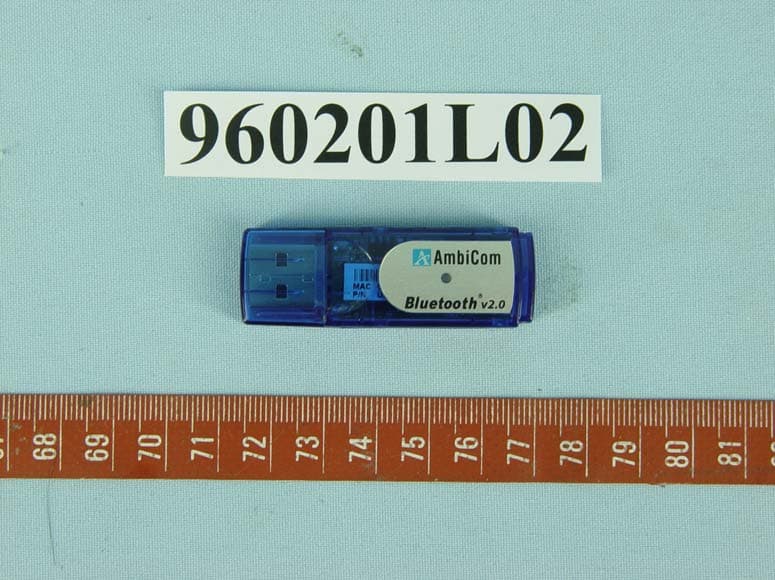
Click to zoom
Application Details
- Equipment Class
- DSS - Part 15 Spread Spectrum Transmitter
- Date of Grant
- Feb 08, 2007
- Application Purpose
- Original Equipment
- Date of Application
- Feb 08, 2007
- Equipment Note
- Bluetooth USB Dongle
- Frequency Range
- 2402.00000000 - 2480.00000000
- Company
- AmbiCom Holdings, Inc.
- Country
- United States
Documents & Files
Document Text
Text extracted from the exhibit documents filed with the FCC. Open a document above to read the original.
Users Manual
Quick Installation Guide Wireless Bluetooth USB Adapter 2 Do NOT Insert The USB Bluetooth Adapter Yet There are two ways to install the Bluetooth USB device. However, we highly recommend using the bundled Widcomm Bluetooth software for your complete Bluetooth solution. Choose one of the following options that best suit your device and requirement. (1) Microsoft Windows XP Solution (2) Bundled Widcomm Bluetooth Solution • Simple and fast installation. • Required Windows XP latest Service Pack 2 updates and connects to the Internet during installation. • Require “3 steps renaming” procedure before installing the software. • Follow steps below to perform the renaming. • Provide limited Bluetooth profiles support and configuration. • Provide extensive Bluetooth profiles support and configuration. • Limited compatible with Bluetooth USB device. Windows XP will install the generic Bluetooth driver if the Bluetooth USB adapter is one of the supported devices. • See page 5 for more detail. • Driver support all current BT2-USB and BT2000C- USB Bluetooth USB Adapter including class 1 and 2 model. • Follow Appendix A on page 5 • Follow Step A and B on page 3 and 4 3 [Step A. Renaming The Microsoft Generic Bluetooth Driver] • Click the Run function on the Start button. • Then type %windir%\inf and click OK. • Select Folder Options from the Tools menu. • Click on the View tab. • In the Advanced settings, change the Hidden files and folders setting to Show hidden files and folders. • Uncheck Hide extensions for known file types. • Click OK twice to return to the inf Windows. • Search for the Bth.inf file. • Right-click and rename it to Bth.infbak. • Reboot your computer. Continue on next page. 4 [Step B. Installing The Bundled Bluetooth Software] Do NOT Insert The USB Bluetooth Adapter Yet 1. Place the Setup CD into your CD-ROM drive. Setup should start automatically. If the setup does not start please go to Windows Explorer, locate the CD-ROM and double-click “Setup.exe”. 2. Click “Install Bluetooth Driver”, and then click “Next”. 3. Click “OK” if the “Driver Signature Notice” appears. 4. When the “Bluetooth device not found” window appears. Insert the USB Bluetooth adapter and click “OK”. Click “Finish” to complete the installation. If asked to restart the computer, click “Yes”. 5. Congratulation! You can double-click “My Bluetooth Places” to start using the device. 6. For discovering and pairing your Bluetooth devices to our Bluetooth USB device, please refer to your Bluetooth devices manual for proper procedures and Pass Code (Pin Code). 5 Appendix A. Using Microsoft Windows XP Service Pack 2 Generic Bluetooth Software Limitation: Not all AmbiCom Bluetooth USB adapters are Windows XP generic Bluetooth Driver compatible. Windows XP will detect and install the generic Bluetooth driver if the Bluetooth USB adapter is one of the supported devices. Under this method, you will NOT be required to install the Bluetooth software bundled with the product. If you have already installed the bundled software, please uninstall it now. Note: If you have followed Step A on page 3, make sure the bth.infbak file name is restored to its original name and also remove the installed Bluetooth software. Remember to reboot your computer before going to the next step. Simply insert the USB adapter into any available USB port and Windows should start to configure the system for you. 1. Insert the Bluetooth USB adapter into any available USB port on your computer. Windows will now install the generic Microsoft Bluetooth software for your new hardware. 2. Once the driver installation is completed. Your hardware is ready to use. 3. To add a Bluetooth device, simply double-click the Bluetooth icon from the system tray to open the Bluetooth Devices Window. Follow the Bluetooth wizard to complete the process. 4. Contact Microsoft Corporation for more information regarding Microsoft Bluetooth profile support. 5. For discovering and pairing your Bluetooth devices to our Bluetooth USB device, please refer to your Bluetooth devices manual for proper procedures and Pass Code (Pin Code). 6 Technical Support For the most updated tips and drivers, please visit www.ambicom.com/support Weekdays: 9:00a.m - 6:00p.m. (Monday – Friday. Except holidays) Phone: (408) 321 - 0822 Email: [email protected] Website: www.ambicom.com 7 Warranty 1 Year Limited Warranty AmbiCom, Inc. warrants its product to be free from defects in materials and workmanship, under normal use and service, for 1 year from the date of purchase from its Authorized Reseller with proof of purchase. This warranty gives you specific legal rights. You may also have other rights that vary from state to state. RMA number and Proof of Purchase are required for all warranty service. USA/Canada During the warranty period, AmbiCom, Inc. will, at its option, either repair or replace defective products with similar parts and products. Should the product be identified as defective, the end user is responsible for returning the product to the place of purchase 1 / manufacturer 2 and the cost of shipping and handling. Any replaced or repaired product has a ninety-day (90-day) warranty or the remainder of the initial warranty period, whichever is longer. Outside USA/Canada During the warranty period, AmbiCom, Inc. will, at its option, either repair or replace defective products with similar parts and products. Should the product be identified as defective, the end user is responsible for returning the product to the place of purchase 1 / manufacturer 2 and the cost of shipping and handling for sending and returning the product. Any replaced or repaired product has a ninety-day (90-day) warranty or the remainder of the initial warranty period, whichever is longer. AmbiCom, Inc. shall not be responsible for any software, firmware, information or memory data of customer contained in, stored on, or integrated with any products returned to AmbiCom, Inc. pursuant to any warranty. 1 if within sto…
Text truncated - open the document above for the full version.
Cover Letter(s)
AmbiCom, Inc 405 River Oaks Parkway, San Jose. CA 95134 USA Date: 2007/2/7 F C C I D : P 5 T - B T 2 U S B F e d e r a l C o m m u n i c a t i o n s C o m m i s s i o n Authorization and Evaluation Division C o n f i d e n t i a l i t y R e q u e s t Pursuant to Sections 0.457 and 0.459 of the Commission’s Rules, the Applicant hereby requests confidential treatment of information accompanying this Application as outlined below: Schematics Block Diagram The above materials contain trade secrets and proprietary information not customarily released to the public. The public disclosure of these matters might be harmful to the Applicant and provide unjustified benefits to its competitors. The Applicant understands that pursuant to Rule 0.457, disclosure of this Application and all accompanying documentation will not be made before the date of the Grant for this application. Sincerely yours, _____________________________ Vincent Kiong / Product Manager AmbiCom, Inc Tel: 408-321-0822 Fax: 408-321-0826 E-mail: [email protected] AmbiCom. Inc, 405 River Oaks Parkway. San Jose, CA 95134 USA. Phone: 1.408.321.0822 Fax: 1.408.321.0826 Website: www.ambicom.com. Email: [email protected] (c) 2005 AmbiCom, Inc. All rights reserved. AmbiCom logo and AmbiCom name, are registered trademarks of AmbiCom, Inc. All others' trademarks are the property of their respective owners.
Cover Letter(s)
AmbiCom, Inc 405 River Oaks Parkway, San Jose. CA 95134 USA Date: 2007/2/6 AGENCY AUTHORIZATION LETTER We, the undersigned AmbiCom, Inc hereby authorize Advance Data Technology Corp. (ADT) of Taiwan to act on our behalf in all matters relating to all processes required in FCC Part 15C and any communication needed with the national authority. Any and all acts carried out by ADT on our behalf shall have the same effects as acts of our own. If you have any questions regarding the authorization, please don’t hesitate to contact us. Thank you! Sincerely yours, _____________________________ Vincent Kiong / Product Manager AmbiCom, Inc Tel: 408-321-0822 Fax: 408-321-0826 E-mail: [email protected] AmbiCom. Inc, 405 River Oaks Parkway. San Jose, CA 95134 USA. Phone: 1.408.321.0822 Fax: 1.408.321.0826 Website: www.ambicom.com. Email: [email protected] (c) 2005 AmbiCom, Inc. All rights reserved. AmbiCom logo and AmbiCom name, are registered trademarks of AmbiCom, Inc. All others' trademarks are the property of their respective owners.
External Photos
Page 1 CONSTRUCTION PHOTOS OF EUT Page 2
ID Label/Location Info
FCC ID .: P5T-BT2USB Label Location
Internal Photos
Page 3 Page 4
Operational Description
FCC ID: P5T-BT2USB Report No.: RF941117L05D Reference No.: 960201L02 Operational Description The transmitter of the EUT (Bluetooth USB Dongle) is powered by 5Vdc from host equipment. The antenna is printed antenna without antenna connector. This device is a Frequency Hopping device with 79 hopping frequencies. For more detailed instruction, please take a look at the user’s manual.
RF Exposure Info
FCC ID: P5T-BT2USB Report No: SA941117L05D 1 Reference No.: 960201L02 RF EXPOSURE REPORT REPORT NO.: SA941117L05D MODEL NO.: BT2-USB ACCORDING: FCC Guidelines for Human Exposure IEEE C95.1 APPLICANT : AmbiCom, Inc ADDRESS : 405 River Oaks Parkway San Jose, CA 95134 USA ISSUED BY : Advance Data Technology Corporation LAB ADDRESS : No. 47, 14th Ling, Chia Pau Tsuen, Lin Kou Hsiang 244, Taipei Hsien, Taiwan, R.O.C. TEST LOCATION : No. 19, Hwa Ya 2nd Rd., Wen Hwa Tsuen, Kwei Shan Hsiang, Taoyuan Hsien 333, Taiwan, R.O.C. FCC ID: P5T-BT2USB Report No: SA941117L05D 2 Reference No.: 960201L02 No Evaluation Required if power is below this threshold: F(GHz) mW Low 2.402 High 2.480 24.58 Maximum measured transmitter power: Pout (dBm) Pout (mW) Conducted Power 3.79 2.393 EIRP Power 4.11 2.576 *Note: The antenna is printed antenna with 0.32dBi gain Threshold for no SAR evaluation is 24.58mW Transmitter power is 2.576mW Conclusion: No SAR evaluation required since Transmitter Pout is below FCC threshold
Test Report
Report No.: RF941117L05D 1 Report Format Version 2.0.5 Reference No.: 960201L02 FCC TEST REPORT REPORT NO.: RF941117L05D MODEL NO.: BT2-USB RECEIVED: Mar. 02, 2006 TESTED: Mar. 16 ~ Mar. 24, 2006 ISSUED: Feb. 05, 2007 APPLICANT: AmbiCom, Inc ADDRESS: 405 River Oaks Parkway San Jose, CA 95134 USA ISSUED BY: Advance Data Technology Corporation LAB ADDRESS: No. 47, 14 th Ling, Chia Pau Tsuen, Lin Kou Hsiang 244, Taipei Hsien, Taiwan, R.O.C. TEST LOCATION: No. 19, Hwa Ya 2 nd Rd., Wen Hwa Tsuen, Kwei Shan Hsiang, Taoyuan Hsien 333, Taiwan, R.O.C. This test report consists of 76 pages in total. It may be duplicated completely for legal use with the approval of the applicant. It should not be reproduced except in full, without the written approval of our laboratory. The client should not use it to claim product endorsement by CNLA, A2LA or any government agencies. The test results in the report only apply to the tested sample. NO. 2177-01 Report No.: RF941117L05D 2 Report Format Version 2.0.5 Reference No.: 960201L02 TABLE OF CONTENTS 1. CERTIFICATION................................................................. ............................4 2. SUMMARY OF TEST RESULTS.....................................................................5 2.1 MEASUREMENT UNCERTAINTY...............................................................................6 3. GENERAL INFORMATION................................................................. ............7 3.1 GENERAL DESCRIPTION OF EUT ............................................................................7 3.2 DESCRIPTION OF TEST MODES ..............................................................................8 3.2.1 CONFIGURATION OF SYSTEM UNDER TEST .........................................................9 3.2.2 TEST MODE APPLICABILITY AND TESTED CHANNEL DETAIL ............................10 3.2.3 GENERAL DESCRIPTION OF APPLIED STANDARDS ...........................................12 3.2.4 DESCRIPTION OF SUPPORT UNITS ......................................................................12 4. TEST TYPES AND RESULTS ......................................................................13 4.1 CONDUCTED EMISSION MEASUREMENT............................................................13 4.1.1 LIMITS OF CONDUCTED EMISSION MEASUREMENT..........................................13 4.1.2 TEST INSTRUMENTS ..............................................................................................13 4.1.3 TEST PROCEDURES ...............................................................................................14 4.1.4 DEVIATION FROM TEST STANDARD .....................................................................14 4.1.5 TEST SETUP ............................................................................................................15 4.1.6 EUT OPERATING CONDITIONS ..............................................................................15 4.1.7 TEST RESULTS ........................................................................................................16 4.2 RADIATED EMISSION MEASUREMENT .................................................................22 4.2.1 LIMITS OF RADIATED EMISSION MEASUREMENT...............................................22 4.2.2 TEST INSTRUMENTS...............................................................................................23 4.2.3 TEST PROCEDURES ...............................................................................................24 4.2.4 DEVIATION FROM TEST STANDARD .....................................................................24 4.2.5 TEST SETUP.............................................................................................................25 4.2.6 EUT OPERATING CONDITIONS ..............................................................................25 4.2.7 TEST RESULTS ........................................................................................................26 4.3 NUMBER OF HOPPING FREQUENCY USED.........................................................33 4.3.1 LIMIT OF HOPPING FREQUENCY USED................................................................33 4.3.2 TEST INSTRUMENTS...............................................................................................33 4.3.3 TEST PROCEDURES ...............................................................................................33 4.3.4 DEVIATION FROM TEST STANDARD .....................................................................34 4.3.5 TEST SETUP.............................................................................................................34 4.3.6 TEST RESULTS ........................................................................................................34 4.4 DWELL TIME ON EACH CHANNEL .........................................................................37 4.4.1 LIMIT OF DWELL TIME USED ..................................................................................37 4.4.2 TEST INSTRUMENTS...............................................................................................37 4.4.3 TEST PROCEDURES ...............................................................................................37 4.4.4 DEVIATION FROM TEST STANDARD .....................................................................37 4.4.5 TEST SETUP.............................................................................................................38 4.4.6 TEST RESULTS ........................................................................................................38 4.5 CHANNEL BANDWIDTH ..........................................................................................46 4.5.1 LIMITS OF CHANNEL BANDWIDTH ........................................................................46 4.5.2 TEST INSTRUMENTS...............................................................................................46 4.5.3 TEST PROCEDURE..............................…
Text truncated - open the document above for the full version.
Test Setup Photos
1 PHOTOGRAPHS OF THE TEST CONFIGURATION CONDUCTED EMISSION TEST 2 RADIATED EMISSION TEST
Contact Information
Applicant
Kenneth Cheng
Technical Contact
Advance Data Technology Corporation (Hwa Ya)Gary Chang
[email protected]886-3-3183232
No. 19, Hwa Ya 2nd Rd., Kwei Shan Hsiang · Taoyuan Hsien · Taiwan
Non-Technical Contact
Advance Data Technology CorporationEllis Wu
[email protected]886-3-3183232
Test Firm
Bureau Veritas CPS (H.K.) Ltd. Taoyuan BranchRichard Chen
Technical Specifications
| # | Rule Parts | Frequency Range | Power Output |
|---|---|---|---|
| 1 | 15C | 2.40 GHz - 2.48 GHz | 2.00 mW |
Other Applications from AmbiCom Holdings, Inc.
P5T-WL150NUSBX
Dec 30, 2009WIRELESS-N USB DONGLE
Equipment Class
DTS - Digital Transmission System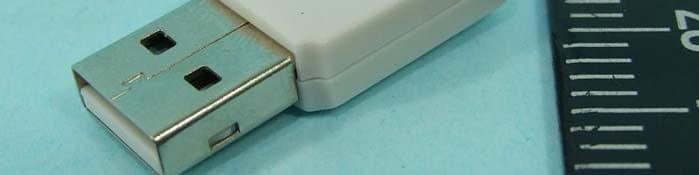
P5T-WL150NNUSB
Dec 16, 2009WIRELESS-N USB DONGLE
Equipment Class
DTS - Digital Transmission System
P5T-BTHS
Nov 12, 2006Wireless Skype Headset
Equipment Class
DSS - Part 15 Spread Spectrum Transmitter
P5T-BTHP
Jun 12, 2006Bluetooth Headset
Equipment Class
DSS - Part 15 Spread Spectrum Transmitter
P5TBT-PA
Sep 19, 2005BLUETOOTH PRINTER ADAPTER
Equipment Class
DSS - Part 15 Spread Spectrum Transmitter