P7L11774LOW-POWER TRANSMITTER
Digital Innovations L.L.C.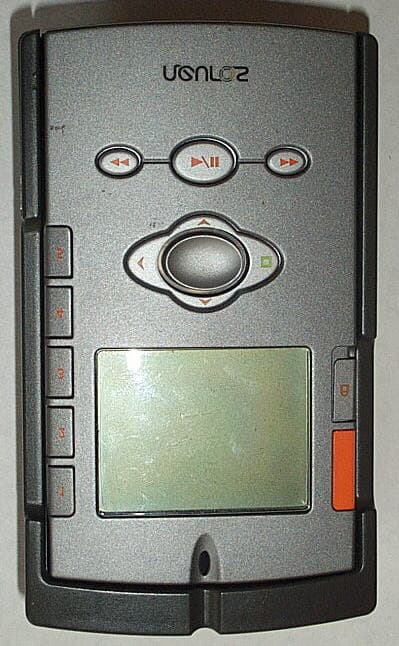
Click to zoom
Application Details
- Equipment Class
- DXX - Part 15 Low Power Communication Device Transmitter
- Date of Grant
- Jan 08, 2003
- Application Purpose
- Original Equipment
- Date of Application
- Jan 08, 2003
- Equipment Note
- LOW-POWER TRANSMITTER
- Frequency Range
- 90.10000000 - 104.90000000
- Company
- Digital Innovations L.L.C.
- Country
- United States
Documents & Files
Document Text
Text extracted from the exhibit documents filed with the FCC. Open a document above to read the original.
Users Manual
1 T able of Contents PA GE 0 T our of the Player PA GE 2 Neuros, Your Music Frequency PA GE 3 Quick Start Instructions PA GE 4 Pa ck age Contents PA GE 5 S ystem Requirements PA GE 5 R eleasing the Backpack PA GE 6 Neuros Synchronization Manager Application PA GE 7 Installation Instructions PA GE 8 Importing Music to the Neuros Sync Manager PA GE 10 Navigating Neuros PA GE 11 Managing, Playing and Exploring Audio PA GE 14 MyFi: Broadcast Neuros through any FM radio PA GE 16 Listening to the Neuros FM Radio PA GE 17 HiSi (Hear it! Save it!): Discover New Music on the Radio PA GE 20 Making R ecordings PA GE 22 PC Library PA GE 24 Se t tings PA GE 29 Firmware and Software Updates PA GE 30 T roubleshooting PA GE 31 Support Information PA GE 31 Important Safety Information PA GE 32 FCC Rules and Regulations PA GE 33 Wa r ranty PA GE 35 Index di100ll_Manual version_1223.qxd 12/23/02 4:23 PM Page 1 3 2 Quick Start Instructions1. Charge the battery. Connect the wall power adapter to the power connector on the bottom of your Neuros and begin charging battery. For best performance, charge battery for 8 hours at first use to give it a full charge. You can use the Neuros while it is charging. 2. P ow er On. Pr ess-and-hold the Play button to power on/off Neuros. 3. Install Neuros Synchronization (Sync) Manager application. Use the included CD to install the Neuros S ynchronization Manager application on your PC and set up user preferences. 4. Connect your Neuros. Y our Neuros must be connected to complete the PC application installation and to begin transferring music. Connect the supplied USB cable to your Neuros and to the USB port on your computer to begin synchronization. 5. Import music. With the Neuros Sync Manager application open, from the File menu use the “Search Computer for Music” function to import your music files into the Neuros Sync Manager. 6. S ynchronize. S elect the tracks you would like to transfer to the device and click the “Add to Neuros” icon and then click the synchronization icon on the Neuros Sync Manager. While synchroniza- tion is in process your Neuros is not operational. Once the “synchronization complete” message from the Neuros Sync manager and the “do not disconnect” message disappears from Neuros display, you may safely disconnect from the USB. 7. Enjoy your music anywhere! Plug in earphones to listen to your Neuros privately or broadcast your music through any FM radio. See p.14 for detailed information and instructions for Neuros MyFi. 8. Explore, expand and enhance the functionality of your Neuros. Go to www.NeurosAudio.com for the latest enhancements and upgrades. Neuros, Your Music FrequencyCongratulations, you have purchased the world’s first digital audio computer. Y our Neuros MP3 digital audio computer lets you listen, explore and enjoy music in ways not possible before. Experience these unique features: MyFi “My Frequency” : broadcast your digital music through any FM radio. S ee p.14 for detailed information. HiSi– “Hear It! Save It!” : identify new music with a click of the orange HiSi button. S ee p.17 for detailed information. Neuros Synchronization : Neuros’ software synchronizes your Neuros with automatic downloads from your PC Audio Library and Internet music services.Record to MP3 : create digital recordings in the MP3 file format from FM radio, built-in microphone, or audio input. Other important features include: large backlit display; digitally enhanced FM tuner, flexible design with removable backpack to accommodate new technology without having to buy an entire new unit;automatic software and firmware updates for new features and file formats. di100ll_Manual version_1223.qxd 12/23/02 4:23 PM Page 2 5 4 Pa ck age Contents Everything you need to get started! For additional accessories see Neuros Gear atwww.NeurosAudio.com.• Neuros MP3 digital audio computer, 128MB or Neuros HD 20GB • Neuros Earphones • W all Power Adapter • USB Cable • Belt Clip (Neuros 128MB only) • Car Power Adapter (Neuros HD 20GB only) • Neuros Synchronization Manager Application • Neuros User’s Guide Battery The rechargeable, non-replaceable batteries provide 10 hours of continuous playback. The batteries in the Neuros and Neuros HD do not suffer from the “memory effect” and actually benefit from the avoidance of full-discharge conditions, so feel free to keep the Neuros plugged in whenever convenient. Earphones W all Power Adapter USB Cable Belt Clip Car Power Adapter Minimum System Requirements• PC with 1 available USB port • P entium 233 MHz • 64 RAM • 1 60MB available hard disk space • Microsoft® Windows 98SE, Me, Windows 2000, Windows XP V iew detailed technical specifications at www.NeurosAudio.com/technical specifications Releasing the BackpackThe two-part design of the Neuros, main unit (silver) and backpack (black), allows for easy upgrades andnew technology adoption by developing new backpacks. Currently, the Neuros 128MB backpack can beswapped for the 20GB Hard Drive backpack for an instant upgrade from a Flash player to a hard drive.To release the main unit (silver) from the backpack (black), press and hold the backpack release lever (to the left of the power connector) with a finger from one hand. With the other hand, press down from the top of the main unit to remove the main unit.To re-insert the main unit, press it into the backpack leaving about 1/4'' of space from the top of the backpack. Once the main unit is level with the sides of the backpack (and the bottom of the device is also pressed against the backpack), slide it upwards until it clicks into place.Check your Neuros from the bottom to make sure that there is no space between the Neuros main unit and the backpack. di100ll_Manual version_1223.qxd 12/23/02 4:23 PM Page 4 7 6 Installation Instructions1. Install application by inserting the Neuros Synchronization Manager CD-ROM and follow the onscreen installation instructions. If installation screens do not automatically appear, view CD contents thr…
Text truncated - open the document above for the full version.
Attestation Statements
Authorized Agent: Radiometrics Midwest Corporation (815) 293-0772 – [email protected] Authorization Letter FCC ID: P7L-11774
Block Diagram
Authorized Agent: Radiometrics Midwest Corporation (815) 293-0772 – [email protected] Block Diagram Equipment Tested (Company, Model) FCC ID: Digital Innovations PL7-11774
Cover Letter(s)
Authorized Agent: Radiometrics Midwest Corporation (815) 293-0772 – [email protected] Confidentiality Letter FCC ID: P7L-11774
External Photos
Authorized Agent: Radiometrics Midwest Corporation (815) 293-0772 – [email protected] External EUT Photographs Equipment Tested (Company, Model) FCC ID: Digital Innovations PL7-11774 Front of EUT MP3 Module Bottom EUT Bottom Transformer Provided with EUT Ferrite provided with power supply Headphone and USB cable provided with EUT These cables cannot be used during FM transmit Mode They are locked out by software
ID Label/Location Info
Authorized Agent: Radiometrics Midwest Corporation (815) 293-0772 – [email protected] ID Label/Location Equipment Tested (Company, Model) FCC ID: Digital Innovations PL7-11774 FCC labels • Material is Thermal Transfer Polyester • Text is black on white background • Permanent PC/ABS Adhesive FCC Label Location • Size is 23.8 x 11.1 mm Note: Area above FCC ID will be filled in with Bar Codes. • Size is 20.76 x 10.24 mm
Internal Photos
Authorized Agent: Radiometrics Midwest Corporation (815) 293-0772 – [email protected] Internal EUT Photographs Equipment Tested (Company, Model) FCC ID: Digital Innovations PL7-11774 Processor and RF PCB Processor and RF PCB Daughter Board Component Side Daughter Board Foil Side Power Supply Board Power Supply Board PCBs Assembled Transformer Component side Transformer Foil Side Inside of case Inside of Power supply case
Operational Description
Radiometrics Midwest Corporation (815) 293-0772 – [email protected] Operational Description Equipment Tested (Company, Model) FCC ID: Digital Innovations PL7-11774 The Neuros Digital Audio computer is a next generation MP3 player. It plays standard MP3 files that are transferred from a computer using the Neuros Synchronization Manager software via a USB 1.1 interface. The unit has a digitally enhanced FM radio and the unit can record to MP3 format from an internal microphone, from FM radio, or from a line-in jack. The unit also has an FM transmitter that can broadcast MP3 audio files over a limited FM band of 90.1 – 104.9 MHz. The unit is an intentional radiator over a limited FM band of 90.1 – 104.9MHz at 200 kHz intervals. The unit uses FM modulation. The FM modulator will be prevented from working when the headphones or line input cable is inserted. The FM modulator will also be prevented from operating during USB communications. The FM modulator works when DC power is applied or when it is running standalone in battery mode. The standard Neuros is made up of three boards, which are enclosed in two separate housings. The Main player housing contains the main PCB board and the keyboard PCB. These PCBs contain the CPU, the FM tuner, the FM transmitter, and storage memory. The standard backpack housing contains the power regulators and the batteries The main player has a TI TMS320DA150 DSP as the core-processing unit of Neuros. This is intricately linked to a CPLD that contains proprietary code to assist the DSP in processing. The DSP has program flash, SRAM, and an EEPROM to store permanent information. The unit also has 128Mb of NAND Flash for audio storage and a 128x128 bit grayscale LCD Display. The clocks for all circuitry are generated off a 12MHz oscillator that primarily runs to both the CPLD and the DSP and then distributed on from there. The audio codec enables much of the functionality of our player. For MP3 files, the music is decoded in the DSP and then is formatted by the codec for output onto the headphones. The codec is also connected to line-in and the internal microphone for audio recording. The FM radio audio signal is also routed to the codec for transmission over the headphones or for audio recording. The FM receiver with digital tuner is on the separate keyboard PCB inside the main player housing. When there is nothing plugged into the USB, headphone, or line-in jacks, the audio codec then routes the audio out to the RF transmission circuitry. Using the frequency tuned by the FM receiver, the RF Block transmits the signal over the user-selected frequency from 90.1 - 104.9 MHz. This signal is then routed to an internal antenna in the housing. This antenna is a rectangular piece of tin-plated copper tape mounted on Poron double-sided foam tape. The dimensions are 38.20 mm by 11.43 mm and it is attached to a mounting hole on the main PCB by a 28 AWG wire. There is also a USB peripheral controller that handles the interface between the PC and the Neuros using USB 1.1. The standard backpack housing contains two rechargeable NiMH batteries to power the Neuros. The power regulators to provide the main power rails to the main player are also in the backpack, as well as the real time clock to provide accurate date and time function to the unit. The backpack also has a DC power jack that provides power to the battery charger circuitry that charges the batteries.
Parts List/Tune Up Info
DIGITAL INNOVATIONS - CONFIDENTIAL WOID Player Keypad - FM Tuner - AA102A1 Bill Of Materials October 28,2002 11:40:26 RS000B1 Revision: F1 Page1 ItemQuantityReferencePartDINUM ______________________________________________ ItemQtyReference Description P/N 21C19 0.7-20pF EF012A1 NOTES: DESC:TRIMMER CAPACITOR, SM, 0.7-20pF MFG:BC Components MFGPN:2807S1R020-NHD4TAA NOTES: DESC:TRIMMER CAPACITOR, SM, 0.7-20pF MFG:Sprague Goodman MFGPN:GSX366 PKG:TRIM20PF ------------------------------------------------------------------------------------------------------------------------------------------------------------ 32C21,C20 0.47uF, 0805, 25V, Y5V EF010A1 NOTES: DESC:CAP, 0805, 25V, 0.47uF, Y5V MFG:AVX MFGPN:08053G474ZAT2A NOTES: DESC:CAP, 0805, 25V, 0.47uF, Y5V MFG:Panasonic MFGPN:ECJ2YF1E474Z PKG:0805 ------------------------------------------------------------------------------------------------------------------------------------------------------------ 44C23,C26,C28,C31 1uF, 6.3V, 0603, X5R EF006A1 NOTES: DESC:CAP, 6.3V, 1uF, X5R MFG:muRata MFGPN:GRM188R60J105KA01d NOTES: DESC:CAP, 6.3V, 1uF, X5R MFG:Panasonic MFGPN:ECJ-1VB0J105K PKG:0603 ------------------------------------------------------------------------------------------------------------------------------------------------------------ 51C24 0.22uF, 0805, 25V, Y5V EF010A2 NOTES: DESC:CAP, 0805, 25V, 0.22uF, Y5V MFG:AVX MFGPN:08053G224ZAT2A NOTES: DESC:CAP, 0805, 25V, 0.22uF, Y5V MFG:Panasonic MFGPN:ECJ2VF1E224Z PKG:0805 ------------------------------------------------------------------------------------------------------------------------------------------------------------ 61C25 2.2uF, 0805, Y5V, 25V EF007A1 NOTES: DESC:CAP, CERAMIC, 10V, +80%, -20%, Y5V, 0805, 2.2uF MFG:muRata MFGPN:GRM21BF51A225ZA01l NOTES: DESC:CAP, CERAMIC, 10V, +80%, -20%, Y5V, 0805, 2.2uF MFG:BC Components MFGPN:0805F225J100BT PKG:0805 ------------------------------------------------------------------------------------------------------------------------------------------------------------ 74C27,C53,C57,C58 2200pF, 0603, C0G EF001B1 NOTES: DESC:CAPACITOR, CM, 50V, 10%, X7R, 0603, 2.2nF MFG:muRata MFGPN:GCM188R11H222KA01 NOTES: DESC:CAPACITOR, CM, 50V, 10%, X7R, 0603, 2.2nF MFG:Yageo America MFGPN:C0603KRX7R9BB222 PKG:0603 ------------------------------------------------------------------------------------------------------------------------------------------------------------ 81C32 100uF, 4V, Elect. EF004A1 NOTES: DESC:CAP, ELECTROLYTIC, 100uF, 20%, 4V MFG:Rubycon MFGPN:4.0RSV100M5.0X4.5 PKG:SMELECT5X4_5 ------------------------------------------------------------------------------------------------------------------------------------------------------------ 91C33 0.22uF, 0603, X7R, 10V EF021A1 NOTES: DESC:CAP, 10V, +/-10%, X7R, 0603, 0.22uF MFG:BC Components MFGPN:0603B224K100BT NOTES: DESC:CAP, 10V, +/-10%, X7R, 0603, 0.22uF MFG:Panasonic MFGPN:ECJ1VB1A224K PKG:0603 ------------------------------------------------------------------------------------------------------------------------------------------------------------ 102C55,C34 4.7uF, 6.3V, X5V EF025A1 NOTES: DESC:CAP, 6.3V, 4.7uF, CASE0805, X5R MFG:AVX MFGPN:08056D475KAT2A PKG:0805 ------------------------------------------------------------------------------------------------------------------------------------------------------------ 111C35 330pF, 0603, C0G EF000A7 NOTES: DESC:CAPACITOR, CM, 50V, 5%, COG, 0603, 330 pF MFG:AVX MFGPN:06035A331JAT2A NOTES: DESC:CAPACITOR, CM, 50V, 5%, COG, 0603, 330 pF MFG:Panasonic MFGPN:ECJ1VC1H331J PKG:0603 ------------------------------------------------------------------------------------------------------------------------------------------------------------ 121C50 22pF, 0603, NP0 EF015A3 NOTES: DESC:CAPACITOR, CM, 50V, 5% NPO, 0603, 22 pF MFG:AVX MFGPN:0603A220JAT2A NOTES: DESC:CAPACITOR, CM, 50V, 5% NPO, 0603, 22 pF MFG:Panasonic MFGPN:ECUV1H220JCV NOTES: DESC:CAPACITOR, CM, 50V, 5% NPO, 0603, 22 pF MFG:Yageo America MFGPN:0603CG220J9B200 PKG:0603 ------------------------------------------------------------------------------------------------------------------------------------------------------------ 131C54 100pF, 0603, NP0 EF015B1 NOTES: DESC:CAPACITOR, CM, 50V, 5% NPO, 0603, 100 pF MFG:AVX MFGPN:06035A101JAT2A NOTES: DESC:CAPACITOR, CM, 50V, 5% NPO, 0603, 100 pF MFG:Panasonic MFGPN:ECJ1VC1H101J NOTES: DESC:CAPACITOR, CM, 50V, 5% NPO, 0603, 100 pF MFG:Yageo America MFGPN:0603CG101J9B200 PKG:0603 ------------------------------------------------------------------------------------------------------------------------------------------------------------ 141C59 0.1uF, 0603, X7R EF001A2 NOTES: DESC:CAPACITOR, CM, 16V, 20%, X7R, 0603, 100 nF MFG:AVX MFGPN:0603YC104MAT2A NOTES: DESC:CAPACITOR, CM, 16V, 20%, X7R, 0603, 100 nF MFG:KEMET MFGPN:C0603C104K4RAC NOTES: DESC:CAPACITOR, CM, 16V, 20%, X7R, 0603, 100 nF MFG:Panasonic MFGPN:06032R104K7B20D PKG:0603 ------------------------------------------------------------------------------------------------------------------------------------------------------------ 152D3,D2 KV1471E EK004A1 NOTES: DESC:VARIABLE CAPACITANCE DIODE, CAPACITANCE RATIO 5.0, 1-4.5V, SINGLE MFG:Toko MFGPN:KV1471E PKG:URD ------------------------------------------------------------------------------------------------------------------------------------------------------------ 161J1 2X10 HEADER ED008A2 NOTES: DESC:SOCKET, 2X10, SM, LOW PROFILE MFG:Aromat MFGPN:AXK520145J NOTES: DESC:SOCKET, 2X10, SM, LOW PROFILE MFG:Aromat MFGPN:AXK520145P PKG:AXK2X10H ------------------------------------------------------------------------------------------------------------------------------------------------------------ 172K1,K2 SFECV10M7KA00-R0 EX002A1 NOTES: DESC:10.7 MHz IF FILTER MFG:muRata MFGPN:SFECV10M7KA00-R0 PKG:SFE ---------------------------------------------------------------------------------------------------------------------------------------------------…
Text truncated - open the document above for the full version.
Test Report
Radiometrics Midwest Corporation Page 1 of 18 Electromagnetic Compatibility Test Report Tests Performed on a Digital Innovations’ MP3 Player, Model Neuros Standard Radiometrics Document RP-4910 Product Detail: FCC ID: PL7-11774 Equipment type: Low Power Transmitter Test Standards: US CFR Title 47, Chapter I, FCC Part 15 Subpart C FCC Part 15 CFR Title 47: 2001 Industry Canada RSS-210, Issue 5 as required for Category I Equipment 6.2.2 (k) This report concerns: Original Grant for Certification FCC Part 15.239 Tests Performed For: Test Facility: Digital Innovations 7250 N. Cicero Avenue Lincolnwood, IL 60712 Radiometrics Midwest Corporation 12 East Devonwood Romeoville, IL 60446 Phone: (815) 293-0772 e-mail: [email protected] Test Date(s): (Month-Day-Year) December 9, 2002 Document RP-4910 Revisions: Rev. Issue Date Affected Pages Revised By Signature for Latest Revision 0 12/16/2002 1 12/19/2002 5 Joseph Strzelecki 2 12/30/2002 4 Joseph Strzelecki RADIOMETRICS MIDWEST CORPORATION - EMC Test Report Equipment Tested (Company, Model, Product Name): Document No.: Page: Digital Innovations, Neuros, MP3 Player RP-4910 Rev. 1 2 of 18 RADIOMETRICS MIDWEST CORPORATION - EMC Test Report Equipment Tested (Company, Model, Product Name): Document No.: Page: Digital Innovations, Neuros, MP3 Player RP-4910 Rev. 1 3 of 18 Table of Contents 1 ADMINISTRATIVE DATA........................................................................................................................4 2 TEST SUMMARY AND RESULTS.........................................................................................................4 3 EQUIPMENT UNDER TEST (EUT) DETAILS.......................................................................................4 3.1 EUT Description..............................................................................................................................4 3.1.1 FCC Section 15.203 Antenna Requirements...........................................................................4 3.2 Related Submittals..........................................................................................................................5 4 TESTED SYSTEM DETAILS.................................................................................................................5 4.1 Tested System Configuration..........................................................................................................5 4.2 Special Accessories........................................................................................................................5 4.3 Equipment Modifications..................................................................................................................5 4.4 Operating Modes.............................................................................................................................6 4.5 Justification of Tested Configuration...............................................................................................6 5 TEST SPECIFICATIONS AND RELATED DOCUMENTS....................................................................6 6 RADIOMETRICS’ TEST FACILITIES.....................................................................................................6 7 DEVIATIONS AND EXCLUSIONS FROM THE TEST SPECIFICATIONS............................................7 8 TEST PROCEDURES...........................................................................................................................7 8.1 Radiated RF Emissions Measurement Procedures.......................................................................7 8.1.1 Field Strength Calculation.........................................................................................................8 8.2 Conducted Emission Measurement Procedures............................................................................8 9 CERTIFICATION....................................................................................................................................9 10 TEST EQUIPMENT TABLE.................................................................................................................9 11 TEST SETUP DOCUMENTATION....................................................................................................10 12 OCCUPIED BANDWIDTH DATA.......................................................................................................11 13 DETAILED TEST RESULTS.............................................................................................................16 13.1 Radiated Emissions Test Results...............................................................................................16 13.2 Conducted Emission Test Results.............................................................................................18 Notice: This report must not be reproduced (except in full) without the written approval of Radiometrics Midwest Corporation. RADIOMETRICS MIDWEST CORPORATION - EMC Test Report Equipment Tested (Company, Model, Product Name): Document No.: Page: Digital Innovations, Neuros, MP3 Player RP-4910 Rev. 1 4 of 18 1 ADMINISTRATIVE DATA Equipment Under Test: A Digital Innovations, MP3 Player Model: Neuros Serial Number: AA000001J2 This will be referred to as the EUT in this Report Date EUT Received at Radiometrics: (Month-Day-Year) Test Date(s): (Month-Day-Year) 12/6/02 December 9, 2002 Test Report Written By: Test Witnessed By: Joseph Strzelecki Senior EMC Engineer Peter Shadix Digital Innovations Radiometrics’ Personnel Responsible for Test: Test Report Approved By Joseph Strzelecki Senior EMC Engineer NARTE EMC-000877-NE Chris W. Carlson Director of Engineering NARTE EMC-000921-NE 2 TEST SUMMARY AND RESULTS The EUT (Equipment Under Test) is an MP3 Player, Model Neuros, manufactured by Digital Innovations. The detailed test results are presented in a separate section. The following is a summary of the test results. Emissions Tests Results Environmental …
Text truncated - open the document above for the full version.
Test Setup Photos
Authorized Agent: Radiometrics Midwest Corporation (815) 293-0772 – [email protected] Test Setup Photographs Equipment Tested (Company, Model) FCC ID: Digital Innovations PL7-11774 Photograph of Radiated Emissions Test Setup Authorized Agent: Radiometrics Midwest Corporation (815) 293-0772 – [email protected] Photographs of Conducted Emissions Test Setup
Contact Information
Applicant
Paul R Holbrook(Vice President - New Product Development)
Technical Contact
RADIOMETRICS MIDWEST CORPJOSEPH STRZELECKI
[email protected]815-293-0772
12 EAST DEVONWOOD AVE · ROMEOVILLE, Illinois · United States
Non-Technical Contact
RADIOMETRICS MIDWEST CORPJOAN STRZELECKI
[email protected]815-293-0772
Test Firm
Radiometrics Midwest CorporationJoseph Strzelecki
815-293-0772Fax: 815-293-0820
Technical Specifications
| # | Rule Parts | Frequency Range | Power Output |
|---|---|---|---|
| 1 | 15C | 90.1 MHz - 104.9 MHz | - |
Other Applications from Digital Innovations L.L.C.

P7L-30101
Feb 03, 2003Tracking System
Equipment Class
DSC - Part 15 Security/Remote Control Transmitter