FCCID.CO- FCC ID Database
HomeCompaniesEquipment ClassesSearch

© 2026 FCC ID Database. All rights reserved.

AboutContactData sourced from FCC public records
  1. Home/
  2. EASTERN INFO-COM., INC/
  3. PGZIDRS-3000

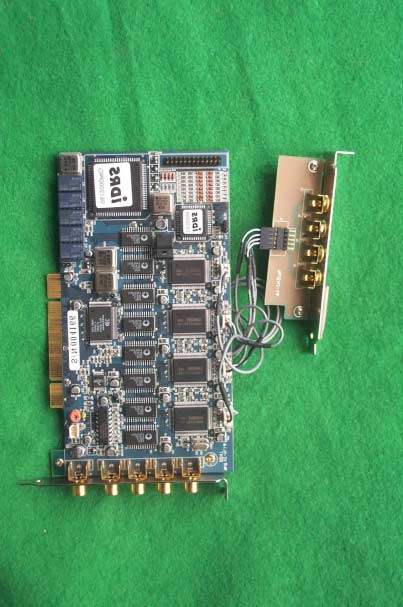
PGZIDRS-3000Video Capture Card

EASTERN INFO-COM., INC
Video Capture Card - FCC ID PGZIDRS-3000 - EASTERN INFO-COM., INC
Click to zoom

Application Details

Equipment Class
JBP - Part 15 Class B Computing Device Peripheral
Date of Grant
Jan 30, 2001
Application Purpose
Original Equipment
Date of Application
Jan 30, 2001
Equipment Note
Video Capture Card
Company
EASTERN INFO-COM., INC
Country
South Korea

Documents & Files

Select a file to view

Users Manual

↗

Block Diagram

↗

External Photos

↗

ID Label/Location Info

↗
↗

Internal Photos

↗

Test Report

↗

Test Setup Photos

↗

Document Text

Text extracted from the exhibit documents filed with the FCC. Open a document above to read the original.

Users Manual

- 1 - 1. Power On 1. To check your camera image, You should turn on cameras, monitor, sensor, etc, before you turn on iDRS-3000. 2. Turn on iDRS-3000. [POWER] lamp will light on, disk check(red LED) blinks then WINDOWS 98 starts. After booting main screen will appear as follows . 3. Main Screen 1) Activated icon will be turned green and show TIP of each icon, when mouse pointer get close to each icon. Inactivated icon will be turned yellow. 2) When consecutive recording, red lamp is displayed in OSD(Camera Name). 3) When motion recording, blue lamp is displayed in OSD(Camera Name). 4) When sensor recording, yellow lamp is displayed in OSD(Camera Name). 5) When [Record] lamp is on and off, it is consecutive recording, [Motion] lamp is on and off, it is motion recording, [Sensor] lamp is on and off, it is sensor recording. 6) Put your mouse pointer to image screen, click left button to enlarge corresponding screen. And click right button to extend to full screen. 7) Click right button in full screen mode to back to main screen. 8) [System Shutdown] If you click this icon, confirmation message will appear as follows. If you select [OK] system will be shut down and automatically power OFF. - 2 - Zooming In Zooming Out Focus gets further. Single-Screeen Rotational Display Quad(4)-screen Rotational All-Channel Display. 9) 10) [Motion Tracer] Enlarge a screen in which the motion is detected. 11) [Set up] Change iDRS-3000 set up configurations. (Refer to the ‘2. Set up Change’) 12) [Image search/Playback] Search recorded image. (Refer to the ‘3. See * 3. Image Search) 13) [Camera ON/OFF] Camera ON/OFF icon. When P/T control select camera as 13). If you click this icon power off th4e corresponding camera. 14) Camera Pan/Tilt Control Button. [◀ - left / ▶ - right / ▲ - up / ▼ - down] 15) [Zoom] Control motorized zoom lens. 16) [Focus] Control camera lens focus. 17) [Light ON/OFF] Control Lighting Equipment. 18) Clock : Indicate present time and date. 19) In case you need to shut down the system by force, push POWER button for 4-5 seconds. But shutting down by force may cause fatal damage to the system itself and data. Please always use [Shut Down] button. Focus gets closer. - 3 - 2. Set up change ( ) 1) [Camera set up] ▶ Put each camera name for OSD(On-Screen Display) zone. ▶ Set up each camera. ▶ If you click system will automatically detect connected camera. ▶ [TOTAL BOARD] : Show total number of iDRS-CARDs. ▶ [TOTAL SPEED] : Show maximum recording speed. Click to select camera to change camera name iDRS CARD number Input camera number - 4 - 2) [Schedule] ▶ Set up each group. Total 10 groups are available (programmable) - Select group. - Set the days of the week. - Connect cameras, motion detectors(software sensor), (external) sensor and D/O. ▶ If you want to record specific time, please designate [START TIME], [END TIME]. - 00:00 to 00:00 means whole day(24 hours) recording.] ▶ After designation, active corresponding group. ▶ Automatically connect Set up date, Camera, Sensor, D/O by click. It is not saved with disconnected camera, sensor, D/O, and also disconnected date.(click once again to disconnect.) 3) [Recording Speed] ▶Designate normal recording speed (Frame Rate). (Separate frame rate for each camera is available.) - 5 - ▶ Designate motion-detected recording Frame Rate. (Separate frame rate for each camera is available.) ▶When sensor recording designate camera FRAME. (Separate frame rate for each camera is available.) ▶[Switch Speed] : Adjust interval for rotational display model. ▶[Motion Delay] : Keep on recording after motion detection is finished, during indicated time. ▶[Sensor Delay] : Keep on recording after sensor detection is finished, during indicated time. ▶[Sensor Beep] : Activate BEEP sound on sensor detection. ▶[Proportion] : When activated, only 1, 4, 9, 16 divisions are available, to keep the horizontal and vertical ratio of each screen. ▶[Image Quality] : Adjust compression rate. At 100% quality, recorded image is clear and vivid but the size of a frame is bigger (15-20KB). At lower percentage (higher compression rate) image quality is relatively low but size of a frame is smaller (3-8KB). 34-50% is recommended. (4) [Motion] Motion Detector configuration ▶ Set up motion detection zone. It would be seen in red square(Maximum 10 areas per camera). ▶ If motion detector is connected in ‘Schedule’ menu but no detection zone is defined, system will recognize whole screen as a detection zone. ▶ When motion recording mode, detection BEEP sound can be activated/inactivated. ▶ Detected motion is seen in blue unit square, and indicating red ‘MOTION DETECTON’. ▶[SENSITIVITY] : Setting sensitivity of software motion detector At high sensitivity even the very trivial motion will detected. Adjust it to proper level.(30% - 40% is recommended) ▶ Delete all motion detection zone. - 6 - 3. Image Search( ) ( ) ( ) ( ) 5) [Password] 6) [Close Set up] : Back to main screen. 1) [ Camera(Channel) Number] : Select camera number to playback . ▶ Set up password, to prevent other person than operator from changing setup. ▶ If you set up new password click [APPLY] to use new password. ▶ Please do not forget password. (Set up change is impossible) - 7 - 2) [Date select] : Recorded date is checked with red mark automatically. Click date to search. ※ Previous Month - Next month If there is no recorded data in other month(s) month selection buttons are inactivated. 3) Playback Screen adjustment : Contrast of search screen. ( Level control ) : Brightness of search screen. ( Level control) 4) Other functions [Media information] Check available disk capacity and frame size. . [FDD backup] Save present screen in image file (JPG or BMP) to the floppy disk. ※In 1 FDD about 100 image cuts can be saved by JPG file or 30 cuts by BMP file High speed Playback Move back 1minute Play Stop Move forward 1minute Move back 1 cut Move forward 1 Cut To first cut of recorded screen To last cut of recorded screen Low level …

Text truncated - open the document above for the full version.

External Photos

SK TECH CO., LTD. Page 1 of 2 SKT SKTOS-01013 FCC ID : XXXIDRS-3000 External Photographs of EUT SK TECH CO., LTD. Page 2 of 2 SKT SKTOS-01013 FCC ID : XXXIDRS-3000

ID Label/Location Info

SK TECH CO., LTD. Page 1 of 1 SKT SKTOS-01013 FCC ID : XXXIDRS-3000 FCC ID Sample Label & Location Information LABELLING REQUIREMENTS PER ∫∫∫∫ ∫∫∫∫∫∫∫∫ ∫∫∫∫2.928 The Label shown shall be permanently affixed at a conspicuous location on the device and be readily visible to the user at the time of purchase. FCC ID : PGZIDRS-3000 This device complies with part 15 of the FCC Rules. Operation is subject to the following two conditions: (1) This device may not cause harmful interference, and (2) this device must accept any interference received, including interference that may cause undesired operation.

ID Label/Location Info

SK TECH CO., LTD. Page 1 of 1 SKT SKTOS-01013 FCC ID : XXXIDRS-3000 FCC ID Label Sample

Internal Photos

SK TECH CO., LTD. Page 1 of 1 SKT SKTOS-01013 FCC ID : XXXIDRS-3000 Internal Photographs of EUT

Test Report

SK TECH CO., LTD. Page 1 of 13 SKT SKTOS-01013 FCC ID : XXXIDRS-3000 Certificate of Compliance Test Report No.: SKTOS-01013 NVLAP CODE : 200220-0 Applicant: EASTERN INFO-COM,INC. Applicant Address: Nam Sung B/D, 101-7, Samsung-Dong, Kangnam-Gu, Seoul, Korea Product: VIDEO CAPTURE CARD FCC ID: PGZIDRS-3000 Model No.: iDRS-3000 Receipt No.: SKE20010112-034 Date of receipt: Jan. 12, 2001 Date of Issue: Jan. 29, 2001 Testing location: SK TECH CO., LTD. 820-2, Wolmoon-Ri, Wabu-Up, Namyangju-Si, Kyunggi-Do, Korea Test Standards: ANSI C63.4 / 1992 Rule Parts: FCC part 15 Subpart B Equipment Class : Class B Digital Device Peripheral Test Result: The above mentioned product has been tested and passed. Prepared by:Y.H. Kang Tested by:K.T.Lee/Engineer Approved by: J.Y.Hyun /Lab.Manager Signature Date Signature Date Signature Date Other Aspects : Abbreviations : · OK, Pass = passed · Fail = failed · N/A = not applicable ☞ ☞☞ ☞ •This test report is not permitted to copy partly without our permission. •This test result is dependent on only equipment to be used. •This test result is based on a single evaluation of one sample of the above mentioned. •This test report must not be used by the client to claim product endorsement by NVLAP or any agency of the U.S Government. • We certify that this test report has been based on the measurement standards that is traceable to the national or International standards. NVLAP Lab. Code: 200220-0 SK TECH CO., LTD. Page 2 of 13 SKT SKTOS-01013 FCC ID : XXXIDRS-3000 》》 》》》》 》》 Contents 《《 《《《《 《《 Contents 2 List of Tables 2 List of Figures 2 List of Photographs 2 1. General 3 2. Test Site 3 2.1 Location 3 2.2 List of Test and Measurement Instruments 4 2.3 Test Data 4 2.4 Test Environment 4 3. Description of the tested samples 5 3.1 Rating and Physical characteristics 5 3.2 Submitted documents 5 4. Measurement conditions 6 4.1 Modes of operation 6 4.2 List of Peripherals 6 4.3 Type of Used cables 7 4.4 Test Setup 7 4.5 Uncertainty 7 5. Emission Test 8 5.1 Conducted Emissions 8 5.2 Radiated Emissions 12 》 》》 》List of Tables Table 1 List of test and measurement equipment 4 Table 2 Test Data, Conducted Emissions 11 Table 3 Test Data, Radiated Emissions 13 》 》》 》List of Figures Figure 1 Spectral Diagram, LINE-PE 9 Figure 2 Spectral Diagram, Neutral-PE 10 SK TECH CO., LTD. Page 3 of 13 SKT SKTOS-01013 FCC ID : XXXIDRS-3000 1. General This equipment has been shown to be capable of compliance with the applicable technical standards and was tested in accordance with the measurement procedures as indicated in this report. We attest to the accuracy of data. All measurements reported herein were performed by SK Tech Co., Ltd. and were made under Chief Engineer’s supervision. We assume full responsibility for the completeness of these measurements and vouch for the qualifications of all persons taking them. 2. Test Site SK TECH Co., Ltd. 2.1 Location 820-2, Wolmoon Ri, Wabu-Up, Namyangju-Si, Kyunggi-Do, Korea The test site is in compliance with ANSI C63.4/1992 for measurement of radio interference. SK TECH CO., LTD. Page 4 of 13 SKT SKTOS-01013 FCC ID : XXXIDRS-3000 2.2 List of Test and Measurement Instruments Table 1 : List of Test and Measurement Equipment ! Conducted Emissions Kind of Equipment Type S/N Calibrated until Field Strength Meter ESHS 10 862970/019 04.2001 LISN KNW-407 M63284 07.2001 LISN ESH2-Z5 862060/029 06.2001 Conducted Cable N/A N/A 07.2001 ! Radiated Emissions Kind of Equipment Type S/N Calibrated until Field Strength Meter ESVS 10 825120/013 04.2001 Spectrum Analyzer R3361A 11730187 07.2001 Amplifier 8447F 3113A05153 05.2001 Log Periodic Antenna UHALP9107 91071238 04.2001 Biconical Antenna BBA9106 N/A 04.2001 Open Site Cable N/A N/A 07.2001 Antenna Mast 5907 N/A N/A Antenna & Turntable controller 5906 91X519 N/A Amp & Receiver connection cable N/A N/A 07.2001 Amp & Spectrum connection cable N/A N/A 07.2001 50Ω Switcher MP59B M93083 07.2001 2.3 Test Date Date of Application : Jan. 12, 2001 Date of Test : Jan. 26, 2001~ Jan. 27, 2001 2.4 Test Environment See each test item’s description. SK TECH CO., LTD. Page 5 of 13 SKT SKTOS-01013 FCC ID : XXXIDRS-3000 3. Description of the tested samples The EUT is Video capture card. 3.1 Rating and Physical Characteristics ● ●● ●Requirements of System • OS : Windows98, 98SE • Operating Circumstance -CPU : Pentium-II Celeron 600 MHz &above -RAM : 64MB & above -VGA : AGP 8MB & above -MAIN BOARD: Intel 440BX & above ● ●● ●NOT Requirements of System • Operating Circumstance -CPU : AMD Athlon (Not Tested) -RAM : <64MB -VGA : Riva TNT Series, i740 Voodoo Series -MAIN BOARD: SiS, Via Chipset 3.2 Submitted Documents N/A SK TECH CO., LTD. Page 6 of 13 SKT SKTOS-01013 FCC ID : XXXIDRS-3000 4. Measurement Conditions Testing Input Voltage : AC 120V, 60Hz 4.1 Modes of Operation The EUT was in the following operation mode during all testing; Connecting the CCD Camera (the TV Monitor) to camera (video) port of EUT and testing in mode of recording and monitoring conditions. 4.2 List of Peripherals Description Manufacturer Model Name Serial No. FCC ID Monitor Samsung SyncMaster750P PG17HS9U/ADC DoC Keyboard HP SK-2502C M0004103083 DoC Mouse Logitech M-S48 LZA93274466 DoC Camera 1 N/A DVCS201 MC02070007P N/A Camera 2 N/A DVCS201 MC02070006P N/A Camera 3 N/A DVCS201 MC02070005P N/A Camera 4 N/A DVCS201 MC02070004P N/A TV Monitor Samsung CT-14F1S N/A N/A Printer HP 2225C 3245S12493 DSI6XU2225 AC/DC Adapter(x4) N/A ACE0630 N/A N/A Personal Computer Mother board Micro-Star MS-6161 96K6262664G1144716 DoC Power supply HIPRO HP-235ATXA6 F3-9911252206 DoC FDD Drive Panasonic JU-257A604P 62638 DoC HDD Quantum Pro Drive LPS 9442203B DoC CD-ROM Drive LG GCD-R560B 6023002365 BEJGCD-R560B SK TECH CO., LTD. Page 7 of 13 SKT SKTOS-01013 FCC ID : XXXIDRS-3000 4.3 Type of Used Cables Description Length Type of shield Manufacturer Remark PC power cable 1.2m Non-Shield None Printer power cable 1.2m Non-Shield None Monitor power cable 1.2m Non-Shield None Vid…

Text truncated - open the document above for the full version.

Test Setup Photos

SK TECH CO., LTD. Page 1 of 2 SKT SKTOS-01013 FCC ID : XXXIDRS-3000 Test set up photos Photograph 1: Setup for Conducted Emissions SK TECH CO., LTD. Page 2 of 2 SKT SKTOS-01013 FCC ID : XXXIDRS-3000 Photograph 2: Setup for Radiated Emissions

Contact Information

Applicant

CHUNGSU LEE(General Manager)
[email protected]82-2-3446-3131Fax: 82-2-3446-3133

Test Firm

SK Tech Co., Ltd.Jae-Yeong Hyun
[email protected]82-346-576-2204Fax: 82-346-576-2205

Technical Specifications

#Rule PartsFrequency RangePower Output
115B--

Other Applications from EASTERN INFO-COM., INC
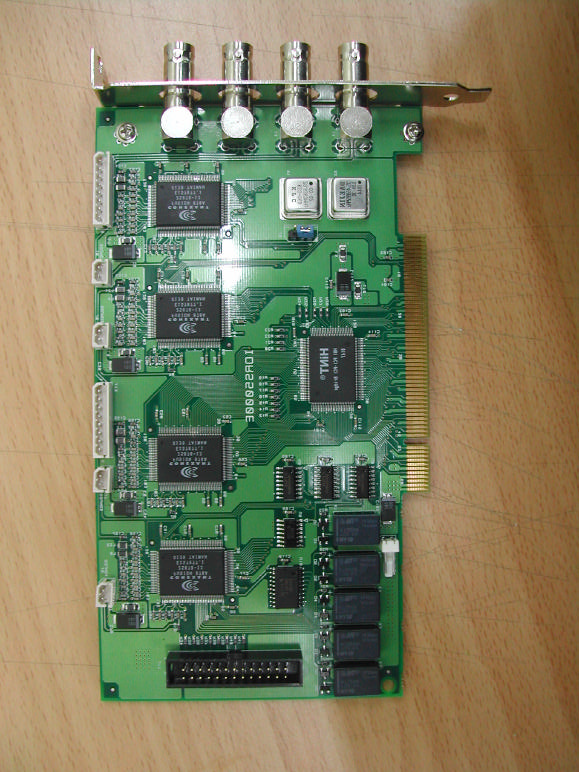
Video Capture Board - FCC ID PGZIDRS-5000 - EASTERN INFO-COM., INC
PGZIDRS-5000

Video Capture Board

Nov 07, 2002

Equipment Class

JBP - Part 15 Class B Computing Device Peripheral