PKRISGFW20005G CPE Wireless Solution
Inseego Corp.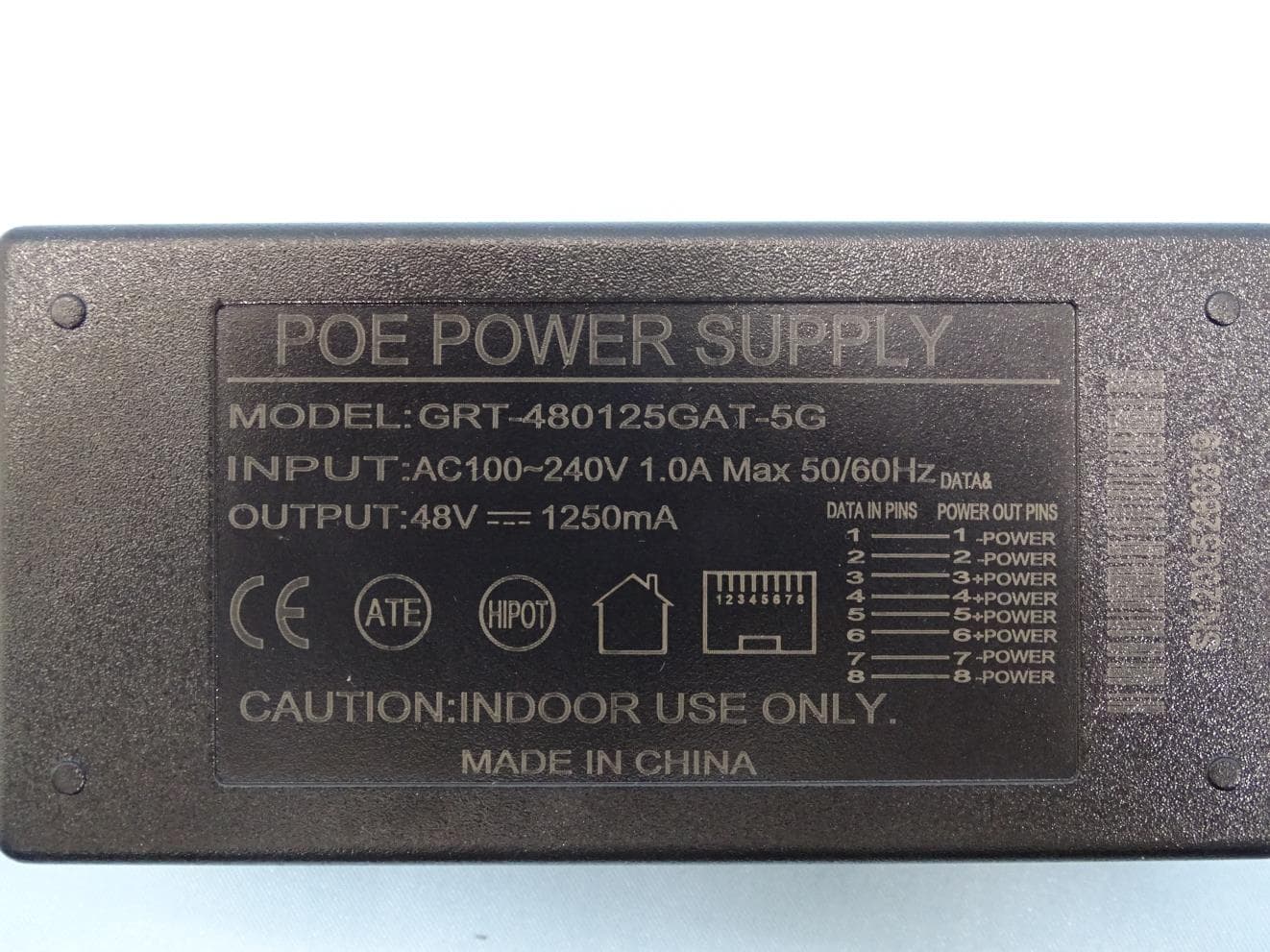
Click to zoom
Application Details
- Equipment Class
- CBD - Citizens Band Category A and B Devices
- Date of Grant
- Mar 11, 2021
- Application Purpose
- Original Equipment
- Date of Application
- Mar 11, 2021
- Equipment Note
- 5G CPE Wireless Solution
- Frequency Range
- 3552.50000000 - 3597.50000000
- Company
- Inseego Corp.
- Country
- United States
Documents & Files
Document Text
Text extracted from the exhibit documents filed with the FCC. Open a document above to read the original.
Users Manual
FW2000 5G CPE USER GUIDE 5G FW2000 CPE USER GUIDE 2 INSEEGO COPYRIGHT STATEMENT © 2020 Inseego Corp. All rights reserved. Complying with all copyright laws is the responsibility of the user. Without limiting the rights under copyright, no part of this document may be reproduced, stored in or introduced into a retrieval system, or transmitted in any form or by any means (electronic, mechanical, photocopying, recording or otherwise), or for any purpose without the expressed written permission of Inseego Corp. SOFTWARE LICENSE Proprietary Rights Provisions: Any software drivers provided with this product are copyrighted by Inseego Corp. and/or Inseego Corp.’s suppliers. Although copyrighted, the software drivers are unpublished and embody valuable trade secrets proprietary to Inseego Corp. and/or Inseego Corp. suppliers. The disassembly, decompilation, and/or Reverse Engineering of the software drivers for any purpose is strictly prohibited by international law. The copying of the software drivers, except for a reasonable number of back-up copies is strictly prohibited by international law. It is forbidden by international law to provide access to the software drivers to any person for any purpose other than processing the internal data for the intended use of the software drivers. U.S. Government Restricted Rights Clause: The software drivers are classified as “Commercial Computing device Software” and the U.S. Government is acquiring only “Restricted Rights” in the software drivers and their Documentation. U.S. Government Export Administration Act Compliance Clause: It is forbidden by US law to export, license or otherwise transfer the software drivers or Derivative Works to any country where such transfer is prohibited by the United States Export Administration Act, or any successor legislation, or in violation of the laws of any other country. TRADEMARKS AND SERVICE MARKS Inseego Corp. is a trademark of Inseego Corp., and the other trademarks, logos, and service marks (collectively the “Trademarks”) used in this user manual are the property of Inseego Corp. or their respective owners. Nothing contained in this user manual should be construed as granting by implication, estoppel, or otherwise, a license or right of use of Inseego Corp. or any other Trademark displayed in this user manual without the written permission of Inseego Corp. or its respective owners. MiFi® and the MiFi logo are registered trademarks of Inseego Corp. Microsoft and Windows are either registered trademarks or trademarks of Microsoft Corporation in the United States and/or other countries. Linux® is the registered trademark of Linus Torvalds in the U.S. and other countries. The names of actual companies and products mentioned in this user manual may be the trademarks of their respective owners. Document Number: 90029648 Rev 2 5G FW2000 CPE USER GUIDE 3 Contents Introduction and Getting Started ........................................................................................................................................ 4 Overview .................................................................................................................................................................................. 5 Key Features ..................................................................................................................................................................... 5 System Requirements ................................................................................................................................................... 5 Getting Started ...................................................................................................................................................................... 6 Admin User Interface................................................................................................................................................................ 7 Overview .................................................................................................................................................................................. 8 Home Page........................................................................................................................................................................ 8 Side Menu ......................................................................................................................................................................... 8 Getting Help ..................................................................................................................................................................... 8 Admin Password ................................................................................................................................................................... 9 Changing the Admin Password ................................................................................................................................. 9 Managing Data Usage ...................................................................................................................................................... 10 Data Usage Page ........................................................................................................................................................... 11 Managing Settings ............................................................................................................................................................. 12 Preferences Tab ............................................................................................................................................................. 12 Software Update Tab .................................................................................................................................................. 13 Backup and Restore Tab .......................................................…
Text truncated - open the document above for the full version.
Users Manual
5G Outdoor Modem FW2000e Installation Guide Inseego Wavemaker TM PRO Preparing to Install Tools and materials • Installation handle • Ladder • Installation PoE* cable (RJ45 fittings attached) • Smartphone/device for Inseego Mobile App • SIM card (4FF nano) • Phillips-head screwdriver • M6 4mm hex driver • Drill • 14mm socket wrench/driver • Needle nose pliers or tweezers • Permanent round Cat6A PoE cable • Ground wire • Two RJ45 connector fittings for PoE cable • Crimp tool to attach RJ45 fittings • Cat6A Ethernet cable • Sealing/weatherproofing material Your FW2000e comes in two packages: • Device, PoE injector, SIM tool • Mount, device elevation bracket, hardware *Power over Ethernet About the FW2000e Description The 5G Outdoor Modem FW2000e delivers high-speed data over both 5G and 4G LTE networks using a proprietary high-gain antenna array. The FW2000e connects to the optimal cellular network and provides data connectivity to the existing in-building network. Durability The FW2000e has an environmental rating of IP67 for water and dust ingress and can operate within a temperature range of -30°C to 70°C (-22 to 158°F). Pre-Installation 1. Unscrew the protective shield over the SIM slots using a Phillips-head screwdriver. 2. Use the included SIM tool to insert a Nano 4FF SIM card into the appropriate SIM slot. 3. Reattach the protective shield cover to a torque of 1.2 Nm (0.885 ft/lb). NOTE: This device supports only Nano SIM cards. 5. Unscrew the PoE gland cap and insert one end of the installation PoE cable. NOTE: This is for location survey purposes only. You will install the permanent PoE cable later. Set aside the bushing and cap. 6. Insert the other end of the cable into the PoE injector Data & Power Out port. Plug the PoE injector into an earthed AC outlet. Location Survey 1. Scan the QR code to download the Inseego Mobile App from Apple Store or Google Play Store, or visit https://inseego.com/inseego- connect-get-app to download the App. 2. Follow instructions within the Inseego Mobile App to connect to the FW2000e and perform a 5G site survey to identify the ideal location to install. 4. For ease of carrying during the location survey, attach the installation handle to the back of the device with a Phillips-head screwdriver. Rubber pin and gland bushing Gland cap assembly Installing the FW2000e Installing the PoE cable 1. Remove the installation PoE cable used for the location survey from the device using needle nose pliers or tweezers. 2. Remove the rubber pin from the PoE gland bushing and assemble the gland cap, putting the bushing inside the spacer and into the cap. 3. Thread the permanent PoE cable through the hole in the assembled PoE gland cap and attach a RJ45 connector to the cable. 4. Insert the connector into the FW2000e and screw on the gland cap. The cap will keep the PoE connection secure and watertight. M6 21mm bracket mount bolt and washer M5 10mm ground screw / washer 4. Mount the device to the device elevation bracket using a hex driver to tighten the bolts to 2.0 Nm. 3. Place the M6 external locking washers on the M6 21mm bracket mount bolts. Attaching the device to the device elevation bracket 1. Remove the installation handle from the device. 2. Attach a ground wire to the back of the device with the ground screw. Roof mount lag screw 1. Pre-drill holes in the surveyed location. 2. Attach the mount using a hex driver to tighten the lag screws. NOTE: Concrete anchors are provided if mounting to concrete or brick. Installing the mount The mount is adjustable and can be mounted on vertical, horizontal, and slanted exterior surfaces. The mount is attached using the four roof mount lag screw in the corners of the base. Securing the device elevation bracket to the mount 1. Attach the device elevation bracket to the mount and tighten the square neck bolts along the back to 2.0 Nm using a ratcheting socket wrench. 2. Ground the ground wire to an appropriate earth ground. Orienting the device 1. Run the PoE cable to the desired location of the PoE injector. 2. Attach a RJ45 connector fitting and insert the cable into the Data & Power Out port on the PoE power injector. 3. Take a racheting socket wrench and device/ smartphone with the Inseego Mobile App to the FW2000e location. 4. Use the Inseego Mobile App and the positioning bolts on the device elevation bracket and bottom of the mount to fine tune the horizontal and vertical angle of the FW2000e for the best signal. 5. Tighten the positioning bolts to 15.0 Nm. 6. Use sealing/weatherproofing material to seal any holes drilled in the structure to run the PoE cable. LED ColorOperationMeaning BlueSolid Blinking Strong 5G connection (3 – 5 bars) Weak 5G connection (1 – 2 bars) GreenSolid Blinking Strong 4G connection (3 – 5 bars) Weak 4G connection (1 – 2 bars) Yellow SolidSoftware update is in progress RedSolid Blinking Router is booting up No service, SIM error, or locked SIM card Testing the connection Checking the LED on the device The LED is located in the SIM compartment and is visible through the protective shield. Connecting a device You can connect any router or device with Ethernet capability and an Internet browser to the FW2000e. Connect an Ethernet cable from the Data In port on the PoE power injector to the connecting device. Monitoring and managing your FW2000e You can use multiple options to monitor and manage your 5G Outdoor Modem: –Inseego Mobile App - Use the same mobile app you used to install your FW2000e to perform basic device monitoring and management. –FW2000e Admin Web UI - Access the Web UI at http://192.168.1.1 for a full set of device management features. The initial sign in password is: “Fast5G! “. –Inseego Connect - Go to connect.inseego. com to sign up for a free Inseego Connect account, which provides the fullest experience for monitoring and managing FW2000 devices from anywhere in the world with access to a web browser. LED ColorOperationMeaning BlueSolid Blinking Strong 5G connectio…
Text truncated - open the document above for the full version.
Attestation Statements
Inseego Corp. 9710 Scranton Road Suite 200, San Diego CA 92121, USA Toll Free: 888.888.9231⬧ Main 858.812.3400 www.inseego.com Date: February 09, 2021 Federal Communications Commission Office of Engineering and Technology Laboratory Division 7435 Oakland Mills Rd Columbia MD 21046-1609 FCC ID: PKRISGFW2000 Attestation for FCC Part 15B Declaration of Conformity Please be notified that we, the undersigned, Inseego Corp. declares that the product, which bears the above FCC ID is compliant with the FCC Part 15B requirements for DoC. The DoC procedure shall be carried out prior to marketing the device in the US. Sincerely, __________________________ Djed Mouada Regulatory Engineer
Attestation Statements
Inseego Corp. 9710 Scranton Road Suite 200, San Diego CA 92121, USA Toll Free: 888.888.9231 Main 858.812.3400 www.inseego.com Date : February 25, 2021 Inseego Corp. 9710 Scranton Road Suite 200 San Diego CA, 92121 Attestation To whom it may concern, I, Djed Mouada, declare that the WLAN portion on the MD2000 module used in FW2000 ( FCCID: PKRISGFW2000 / IC : 3229A-FW2000) device is depopulated. Sincerely yours, Nam e: Djed Mouada Title: Regulatory Engineer
Cover Letter(s)
Inseego Corp. 9710 Scranton Road Suite 200, San Diego CA 92121, USA Toll Free: 888.888.9231 Main 858.812.3400 www.inseego.com Date: February 24, 2021 CBSD DECLARATION To whom it may concern, We, Inseego Corp. hereby declare the characteristics of power level operation, under any circumstances, the UUT (FCC ID PKRISGFW2000) can register (communicate) with the SAS irrespective of UUT’s power levels. However, it can only operate at one step level of the maximum EIRP as stated in the test report, after the first time being granted and authorized by SAS, it would cease transmission immediately at that channel of LTE Band 48 if there is any further request for lowering power level from SAS. Name: Djed Mouada Title: Regulatory Engineer
Cover Letter(s)
Inseego Corp. 9710 Scranton Road, Suite 200, San Diego, California, United States 92121 Tel: 858-812-3400 ; Fax: 858-812-3406 Date: March 8, 2021 Federal Communications Commission Office of Engineering and Technology Laboratory Division 7435 Oakland Mills Rd Columbia MD 21046-1609 Subject: Request for Confidentiality FCC ID: PKRISGFW2000 To Whom It May Concern, Pursuant to the provisions of Sections 0.457 and 0.459 of Commission’s rules (47CFR§§0.457, 0.459), we are requesting the Commission to withhold the following attachment(s) as confidential document from public disclosure indefinitely. Schematic Diagram Block Diagram Part List Operational Description Tune-up Procedure Above mentioned document contains detailed system and equipment description are considered as proprietary information in operation of the equipment. The public disclosure of above documents might be harmful to our company and would give competitor an unfair advantage in the market. In additional to above mentioned documents, pursuant to Public Notice DA 04-1705 of the Commission’ s policy, in order to comply with the marketing regulations in 47 CFT §2.803 and the importation rules in 47 CFR §2.1204, while ensuring that business sensitive information remains confidential until the actual marketing of newly authorized devices. We are requesting the commission to grant short-term confidentiality request on the following attachment(s) for 180 days after the grant as outlined in Public Notice DA 04-1705. External Photos Internal Photos Test Setup Photos User Manual It is our understanding that all measurement test reports, FCC ID label format and correspondent during certification review process cannot be granted as confidential documents and those information will be available for public review once the grant of equipment authorization is issued. Best Regards, Djed Mouada [email protected]
Cover Letter(s)
Inseego Corp. 9710 Scranton Road Suite 200, San Diego CA 92121, USA Toll Free: 888.888.9231 Main 858.812.3400 www.inseego.com Date: February 24, 2021 Sporton International Inc. No.52, Huaya 1st Rd., Guishan Dist., Taoyuan City 333, Taiwan (R.O.C.) Power of Attorney To whom it may concern, I hereby authorize Djed Mouada to sign all engineering attestations, cover letters and any other correspondence regarding the FCC/ISED submittal deliverables for the product bearing: FCC ID: PKRISGFW2000 IC: 3229A-FW2000 Sincerely yours, Name: Hadid Jones Title: Regulatory Manager
Cover Letter(s)
Inseego Corp. 9710 Scranton Road, Suite 200, San Diego, California, United States 92121 Tel: 858-812-3400 ; Fax: 858-812-3406 Date: March 10, 2021 To whom it may concern, Please be notified that I, Djed Mouada, have designated Jones Tsai in Sporton International Inc. as the person being responsible for this project and to sign the form 731 and other documentation. Any and all acts carried out by Jones Tsai in Sporton International Inc. on the matters of relating to all processes required in the FCC approval and any communication needed with the national authority, shall have the same legal authority as acts on our own behalf. We further certify that neither the applicant nor any party to this application, as defined in 47 CFR Ch. 1.2002 (b), is subject to a denial to Federal benefits, that include FCC benefits, pursuant to section 5301 of the Anti-Drug Abuse Act of 1998, 21 U.S.C. 862. This authorization is limited to the product of as following: FCC ID: PKRISGFW2000 If you have any acknowledgement and response, please send it to Sporton International Inc. directly. Sincerely yours, Djed Mouada [email protected]
External Photos
PHOTOGRAPHS OF EUT Report No.: EP082512 TEL : 886-3-327-3456 Page Number : 1 of 86 FAX : 886-3-328-4978 Issued Date : Feb. 17, 2021 Report Version : 01 1. External Photograph of EUT Brand Name: Inseego / Model Name: FW2000 / Marketing Name: FW2000,FW2000e PHOTOGRAPHS OF EUT Report No.: EP082512 TEL : 886-3-327-3456 Page Number : 2 of 86 FAX : 886-3-328-4978 Issued Date : Feb. 17, 2021 Report Version : 01 PHOTOGRAPHS OF EUT Report No.: EP082512 TEL : 886-3-327-3456 Page Number : 3 of 86 FAX : 886-3-328-4978 Issued Date : Feb. 17, 2021 Report Version : 01 PHOTOGRAPHS OF EUT Report No.: EP082512 TEL : 886-3-327-3456 Page Number : 4 of 86 FAX : 886-3-328-4978 Issued Date : Feb. 17, 2021 Report Version : 01 PHOTOGRAPHS OF EUT Report No.: EP082512 TEL : 886-3-327-3456 Page Number : 5 of 86 FAX : 886-3-328-4978 Issued Date : Feb. 17, 2021 Report Version : 01 PHOTOGRAPHS OF EUT Report No.: EP082512 TEL : 886-3-327-3456 Page Number : 6 of 86 FAX : 886-3-328-4978 Issued Date : Feb. 17, 2021 Report Version : 01 720510 PHOTOGRAPHS OF EUT Report No.: EP082512 TEL : 886-3-327-3456 Page Number : 7 of 86 FAX : 886-3-328-4978 Issued Date : Feb. 17, 2021 Report Version : 01 2. Photograph of Accessory Brand Name: Inseego / Model Name: FW2000 / Marketing Name: FW2000,FW2000e Specification of Accessory POE Adapter Brand Name Inseego Model Name GRT-480125GAT-5G Remark: For accessories equipped with this EUT, please refer to the following photos. PHOTOGRAPHS OF EUT Report No.: EP082512 TEL : 886-3-327-3456 Page Number : 8 of 86 FAX : 886-3-328-4978 Issued Date : Feb. 17, 2021 Report Version : 01 720510 PHOTOGRAPHS OF EUT Report No.: EP082512 TEL : 886-3-327-3456 Page Number : 9 of 86 FAX : 886-3-328-4978 Issued Date : Feb. 17, 2021 Report Version : 01 POE Adapter
ID Label/Location Info
Back of the device Label location
Internal Photos
PHOTOGRAPHS OF EUT Report No.: EP082512 TEL : 886-3-327-3456 Page Number : 10 of 86 FAX : 886-3-328-4978 Issued Date : Feb. 17, 2021 Report Version : 01 3. Internal Photograph of EUT Brand Name: Inseego / Model Name: FW2000 / Marketing Name: FW2000,FW2000e 720510 PHOTOGRAPHS OF EUT Report No.: EP082512 TEL : 886-3-327-3456 Page Number : 11 of 86 FAX : 886-3-328-4978 Issued Date : Feb. 17, 2021 Report Version : 01 PHOTOGRAPHS OF EUT Report No.: EP082512 TEL : 886-3-327-3456 Page Number : 12 of 86 FAX : 886-3-328-4978 Issued Date : Feb. 17, 2021 Report Version : 01 PHOTOGRAPHS OF EUT Report No.: EP082512 TEL : 886-3-327-3456 Page Number : 13 of 86 FAX : 886-3-328-4978 Issued Date : Feb. 17, 2021 Report Version : 01 PHOTOGRAPHS OF EUT Report No.: EP082512 TEL : 886-3-327-3456 Page Number : 14 of 86 FAX : 886-3-328-4978 Issued Date : Feb. 17, 2021 Report Version : 01 PHOTOGRAPHS OF EUT Report No.: EP082512 TEL : 886-3-327-3456 Page Number : 15 of 86 FAX : 886-3-328-4978 Issued Date : Feb. 17, 2021 Report Version : 01 PHOTOGRAPHS OF EUT Report No.: EP082512 TEL : 886-3-327-3456 Page Number : 16 of 86 FAX : 886-3-328-4978 Issued Date : Feb. 17, 2021 Report Version : 01 PHOTOGRAPHS OF EUT Report No.: EP082512 TEL : 886-3-327-3456 Page Number : 17 of 86 FAX : 886-3-328-4978 Issued Date : Feb. 17, 2021 Report Version : 01 PHOTOGRAPHS OF EUT Report No.: EP082512 TEL : 886-3-327-3456 Page Number : 18 of 86 FAX : 886-3-328-4978 Issued Date : Feb. 17, 2021 Report Version : 01 PHOTOGRAPHS OF EUT Report No.: EP082512 TEL : 886-3-327-3456 Page Number : 19 of 86 FAX : 886-3-328-4978 Issued Date : Feb. 17, 2021 Report Version : 01 PHOTOGRAPHS OF EUT Report No.: EP082512 TEL : 886-3-327-3456 Page Number : 20 of 86 FAX : 886-3-328-4978 Issued Date : Feb. 17, 2021 Report Version : 01 PHOTOGRAPHS OF EUT Report No.: EP082512 TEL : 886-3-327-3456 Page Number : 21 of 86 FAX : 886-3-328-4978 Issued Date : Feb. 17, 2021 Report Version : 01 PHOTOGRAPHS OF EUT Report No.: EP082512 TEL : 886-3-327-3456 Page Number : 22 of 86 FAX : 886-3-328-4978 Issued Date : Feb. 17, 2021 Report Version : 01 PHOTOGRAPHS OF EUT Report No.: EP082512 TEL : 886-3-327-3456 Page Number : 23 of 86 FAX : 886-3-328-4978 Issued Date : Feb. 17, 2021 Report Version : 01 PHOTOGRAPHS OF EUT Report No.: EP082512 TEL : 886-3-327-3456 Page Number : 24 of 86 FAX : 886-3-328-4978 Issued Date : Feb. 17, 2021 Report Version : 01 PHOTOGRAPHS OF EUT Report No.: EP082512 TEL : 886-3-327-3456 Page Number : 25 of 86 FAX : 886-3-328-4978 Issued Date : Feb. 17, 2021 Report Version : 01 PHOTOGRAPHS OF EUT Report No.: EP082512 TEL : 886-3-327-3456 Page Number : 26 of 86 FAX : 886-3-328-4978 Issued Date : Feb. 17, 2021 Report Version : 01 PHOTOGRAPHS OF EUT Report No.: EP082512 TEL : 886-3-327-3456 Page Number : 27 of 86 FAX : 886-3-328-4978 Issued Date : Feb. 17, 2021 Report Version : 01 PHOTOGRAPHS OF EUT Report No.: EP082512 TEL : 886-3-327-3456 Page Number : 28 of 86 FAX : 886-3-328-4978 Issued Date : Feb. 17, 2021 Report Version : 01 PHOTOGRAPHS OF EUT Report No.: EP082512 TEL : 886-3-327-3456 Page Number : 29 of 86 FAX : 886-3-328-4978 Issued Date : Feb. 17, 2021 Report Version : 01 PHOTOGRAPHS OF EUT Report No.: EP082512 TEL : 886-3-327-3456 Page Number : 30 of 86 FAX : 886-3-328-4978 Issued Date : Feb. 17, 2021 Report Version : 01 PHOTOGRAPHS OF EUT Report No.: EP082512 TEL : 886-3-327-3456 Page Number : 31 of 86 FAX : 886-3-328-4978 Issued Date : Feb. 17, 2021 Report Version : 01 PHOTOGRAPHS OF EUT Report No.: EP082512 TEL : 886-3-327-3456 Page Number : 32 of 86 FAX : 886-3-328-4978 Issued Date : Feb. 17, 2021 Report Version : 01 PHOTOGRAPHS OF EUT Report No.: EP082512 TEL : 886-3-327-3456 Page Number : 33 of 86 FAX : 886-3-328-4978 Issued Date : Feb. 17, 2021 Report Version : 01 PHOTOGRAPHS OF EUT Report No.: EP082512 TEL : 886-3-327-3456 Page Number : 34 of 86 FAX : 886-3-328-4978 Issued Date : Feb. 17, 2021 Report Version : 01 PHOTOGRAPHS OF EUT Report No.: EP082512 TEL : 886-3-327-3456 Page Number : 35 of 86 FAX : 886-3-328-4978 Issued Date : Feb. 17, 2021 Report Version : 01 PHOTOGRAPHS OF EUT Report No.: EP082512 TEL : 886-3-327-3456 Page Number : 36 of 86 FAX : 886-3-328-4978 Issued Date : Feb. 17, 2021 Report Version : 01
Internal Photos
PHOTOGRAPHS OF EUT Report No.: EP082512 TEL : 886-3-327-3456 Page Number : 37 of 86 FAX : 886-3-328-4978 Issued Date : Feb. 17, 2021 Report Version : 01 PHOTOGRAPHS OF EUT Report No.: EP082512 TEL : 886-3-327-3456 Page Number : 38 of 86 FAX : 886-3-328-4978 Issued Date : Feb. 17, 2021 Report Version : 01 PHOTOGRAPHS OF EUT Report No.: EP082512 TEL : 886-3-327-3456 Page Number : 39 of 86 FAX : 886-3-328-4978 Issued Date : Feb. 17, 2021 Report Version : 01 PHOTOGRAPHS OF EUT Report No.: EP082512 TEL : 886-3-327-3456 Page Number : 40 of 86 FAX : 886-3-328-4978 Issued Date : Feb. 17, 2021 Report Version : 01 PHOTOGRAPHS OF EUT Report No.: EP082512 TEL : 886-3-327-3456 Page Number : 41 of 86 FAX : 886-3-328-4978 Issued Date : Feb. 17, 2021 Report Version : 01 PHOTOGRAPHS OF EUT Report No.: EP082512 TEL : 886-3-327-3456 Page Number : 42 of 86 FAX : 886-3-328-4978 Issued Date : Feb. 17, 2021 Report Version : 01 PHOTOGRAPHS OF EUT Report No.: EP082512 TEL : 886-3-327-3456 Page Number : 43 of 86 FAX : 886-3-328-4978 Issued Date : Feb. 17, 2021 Report Version : 01 PHOTOGRAPHS OF EUT Report No.: EP082512 TEL : 886-3-327-3456 Page Number : 44 of 86 FAX : 886-3-328-4978 Issued Date : Feb. 17, 2021 Report Version : 01 PHOTOGRAPHS OF EUT Report No.: EP082512 TEL : 886-3-327-3456 Page Number : 45 of 86 FAX : 886-3-328-4978 Issued Date : Feb. 17, 2021 Report Version : 01 PHOTOGRAPHS OF EUT Report No.: EP082512 TEL : 886-3-327-3456 Page Number : 46 of 86 FAX : 886-3-328-4978 Issued Date : Feb. 17, 2021 Report Version : 01 PHOTOGRAPHS OF EUT Report No.: EP082512 TEL : 886-3-327-3456 Page Number : 47 of 86 FAX : 886-3-328-4978 Issued Date : Feb. 17, 2021 Report Version : 01 PHOTOGRAPHS OF EUT Report No.: EP082512 TEL : 886-3-327-3456 Page Number : 48 of 86 FAX : 886-3-328-4978 Issued Date : Feb. 17, 2021 Report Version : 01 PHOTOGRAPHS OF EUT Report No.: EP082512 TEL : 886-3-327-3456 Page Number : 49 of 86 FAX : 886-3-328-4978 Issued Date : Feb. 17, 2021 Report Version : 01 PHOTOGRAPHS OF EUT Report No.: EP082512 TEL : 886-3-327-3456 Page Number : 50 of 86 FAX : 886-3-328-4978 Issued Date : Feb. 17, 2021 Report Version : 01 PHOTOGRAPHS OF EUT Report No.: EP082512 TEL : 886-3-327-3456 Page Number : 51 of 86 FAX : 886-3-328-4978 Issued Date : Feb. 17, 2021 Report Version : 01 PHOTOGRAPHS OF EUT Report No.: EP082512 TEL : 886-3-327-3456 Page Number : 52 of 86 FAX : 886-3-328-4978 Issued Date : Feb. 17, 2021 Report Version : 01 PHOTOGRAPHS OF EUT Report No.: EP082512 TEL : 886-3-327-3456 Page Number : 53 of 86 FAX : 886-3-328-4978 Issued Date : Feb. 17, 2021 Report Version : 01 PHOTOGRAPHS OF EUT Report No.: EP082512 TEL : 886-3-327-3456 Page Number : 54 of 86 FAX : 886-3-328-4978 Issued Date : Feb. 17, 2021 Report Version : 01 PHOTOGRAPHS OF EUT Report No.: EP082512 TEL : 886-3-327-3456 Page Number : 55 of 86 FAX : 886-3-328-4978 Issued Date : Feb. 17, 2021 Report Version : 01 PHOTOGRAPHS OF EUT Report No.: EP082512 TEL : 886-3-327-3456 Page Number : 56 of 86 FAX : 886-3-328-4978 Issued Date : Feb. 17, 2021 Report Version : 01 PHOTOGRAPHS OF EUT Report No.: EP082512 TEL : 886-3-327-3456 Page Number : 57 of 86 FAX : 886-3-328-4978 Issued Date : Feb. 17, 2021 Report Version : 01 PHOTOGRAPHS OF EUT Report No.: EP082512 TEL : 886-3-327-3456 Page Number : 58 of 86 FAX : 886-3-328-4978 Issued Date : Feb. 17, 2021 Report Version : 01 PHOTOGRAPHS OF EUT Report No.: EP082512 TEL : 886-3-327-3456 Page Number : 59 of 86 FAX : 886-3-328-4978 Issued Date : Feb. 17, 2021 Report Version : 01 PHOTOGRAPHS OF EUT Report No.: EP082512 TEL : 886-3-327-3456 Page Number : 60 of 86 FAX : 886-3-328-4978 Issued Date : Feb. 17, 2021 Report Version : 01 PHOTOGRAPHS OF EUT Report No.: EP082512 TEL : 886-3-327-3456 Page Number : 61 of 86 FAX : 886-3-328-4978 Issued Date : Feb. 17, 2021 Report Version : 01 PHOTOGRAPHS OF EUT Report No.: EP082512 TEL : 886-3-327-3456 Page Number : 62 of 86 FAX : 886-3-328-4978 Issued Date : Feb. 17, 2021 Report Version : 01 PHOTOGRAPHS OF EUT Report No.: EP082512 TEL : 886-3-327-3456 Page Number : 63 of 86 FAX : 886-3-328-4978 Issued Date : Feb. 17, 2021 Report Version : 01 PHOTOGRAPHS OF EUT Report No.: EP082512 TEL : 886-3-327-3456 Page Number : 64 of 86 FAX : 886-3-328-4978 Issued Date : Feb. 17, 2021 Report Version : 01 PHOTOGRAPHS OF EUT Report No.: EP082512 TEL : 886-3-327-3456 Page Number : 65 of 86 FAX : 886-3-328-4978 Issued Date : Feb. 17, 2021 Report Version : 01
Internal Photos
PHOTOGRAPHS OF EUT Report No.: EP082512 TEL : 886-3-327-3456 Page Number : 66 of 86 FAX : 886-3-328-4978 Issued Date : Feb. 17, 2021 Report Version : 01 PHOTOGRAPHS OF EUT Report No.: EP082512 TEL : 886-3-327-3456 Page Number : 67 of 86 FAX : 886-3-328-4978 Issued Date : Feb. 17, 2021 Report Version : 01 PHOTOGRAPHS OF EUT Report No.: EP082512 TEL : 886-3-327-3456 Page Number : 68 of 86 FAX : 886-3-328-4978 Issued Date : Feb. 17, 2021 Report Version : 01 PHOTOGRAPHS OF EUT Report No.: EP082512 TEL : 886-3-327-3456 Page Number : 69 of 86 FAX : 886-3-328-4978 Issued Date : Feb. 17, 2021 Report Version : 01 PHOTOGRAPHS OF EUT Report No.: EP082512 TEL : 886-3-327-3456 Page Number : 70 of 86 FAX : 886-3-328-4978 Issued Date : Feb. 17, 2021 Report Version : 01 PHOTOGRAPHS OF EUT Report No.: EP082512 TEL : 886-3-327-3456 Page Number : 71 of 86 FAX : 886-3-328-4978 Issued Date : Feb. 17, 2021 Report Version : 01 PHOTOGRAPHS OF EUT Report No.: EP082512 TEL : 886-3-327-3456 Page Number : 72 of 86 FAX : 886-3-328-4978 Issued Date : Feb. 17, 2021 Report Version : 01 WWAN Antenna 0 PHOTOGRAPHS OF EUT Report No.: EP082512 TEL : 886-3-327-3456 Page Number : 73 of 86 FAX : 886-3-328-4978 Issued Date : Feb. 17, 2021 Report Version : 01 PHOTOGRAPHS OF EUT Report No.: EP082512 TEL : 886-3-327-3456 Page Number : 74 of 86 FAX : 886-3-328-4978 Issued Date : Feb. 17, 2021 Report Version : 01 WWAN Antenna 1 PHOTOGRAPHS OF EUT Report No.: EP082512 TEL : 886-3-327-3456 Page Number : 75 of 86 FAX : 886-3-328-4978 Issued Date : Feb. 17, 2021 Report Version : 01 PHOTOGRAPHS OF EUT Report No.: EP082512 TEL : 886-3-327-3456 Page Number : 76 of 86 FAX : 886-3-328-4978 Issued Date : Feb. 17, 2021 Report Version : 01 WWAN Antenna 2 PHOTOGRAPHS OF EUT Report No.: EP082512 TEL : 886-3-327-3456 Page Number : 77 of 86 FAX : 886-3-328-4978 Issued Date : Feb. 17, 2021 Report Version : 01 PHOTOGRAPHS OF EUT Report No.: EP082512 TEL : 886-3-327-3456 Page Number : 78 of 86 FAX : 886-3-328-4978 Issued Date : Feb. 17, 2021 Repo…
Text truncated - open the document above for the full version.
Contact Information
Applicant
Roman Olmos(Sr. Staff Regulatory Engineer)
Test Firm
Sporton International Inc.Alex Chen
Technical Specifications
| # | Rule Parts | Frequency Range | Power Output | Emission | Tolerance |
|---|---|---|---|---|---|
| 3 | 96 | 3.55 GHz - 3.60 GHz | 1.7061 W | 4M49W7D | 2.5 ppm |
Other Applications from Inseego Corp.
PKRISGM4330
Jun 18, 2026Wireless Portable Hotspot
Equipment Class
CBE - Citizens Band End User DevicesPKRISGM4010
Jan 30, 2026Wireless Hotspot
Equipment Class
JBP - Part 15 Class B Computing Device Peripheral
PKRISGM3000D
Dec 21, 2022Wireless Hotspot
Equipment Class
NII - Unlicensed National Information Infrastructure TXPKRISGM3100
Jul 24, 2022Wireless Hotspot
Equipment Class
5GM - Part 30 Mobile TransmitterPKRISGM3000A
Jul 24, 2022Wireless Hotspot
Equipment Class
DTS - Digital Transmission System