PKRNVWC201PCMCIA CDMA Card
Inseego Corp.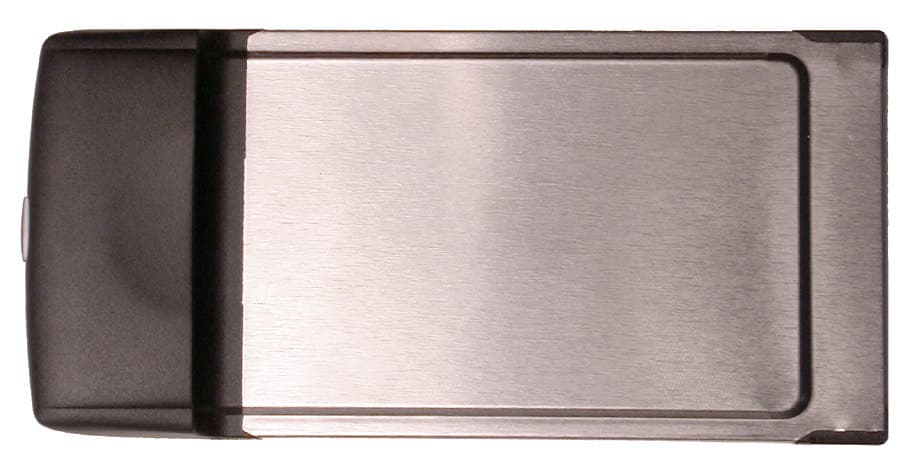
Click to zoom
Application Details
- Equipment Class
- PCB - PCS Licensed Transmitter
- Date of Grant
- Jun 12, 2002
- Application Purpose
- Original Equipment
- Date of Application
- Aug 15, 2001
- Equipment Note
- PCMCIA CDMA Card
- Frequency Range
- 1850.00000000 - 1910.00000000
- Company
- Inseego Corp.
- Country
- United States
Documents & Files
Document Text
Text extracted from the exhibit documents filed with the FCC. Open a document above to read the original.
Users Manual
Merlin for CDMA Modem Manager FCC ID: PKRNVWC201 Safety and Regulatory Notices This product is not to be used in any environment where radio frequency equipment is prohibited or restricted in its use. This includes aircraft/airports, hospitals, and other sensitive electronic areas. To ensure that your modem is deactivated you should remove it from your computer under the above conditions. REGULATORY NOTICES Federal Communications Commission Radio Frequency Interference Statement This equipment has been certified to comply within the limits of a class B digital device pursuant to part 15 of the FCC Rules. These limits are designed to provide reasonable protection against harmful interference in residential situations. This equipment generates, uses, and can radiate radio frequency energy, and, if not properly installed and used in accordance with the instructions, may cause harmful interference to radio or television reception, which can be determined by turning the equipment on and off. You are encouraged to try to correct the interference by one or more of the following measures: Reorient or relocate the receiving antenna of the television, radio or cordless telephone. Increase the separation between the equipment and the receiver. Connect the equipment to an outlet on a circuit different from that to which the receiver is connected. Consult the dealer or an experienced radio/television technician for additional suggestions. Technical Support If you have any questions or comments about your Merlin, please contact the Novatel Wireless Technical Support team at: WWW: www.novatelwireless.com/support/index.html E-mail: [email protected] Phone: 1-888-888-9231 Fax: 1-888-812-2888 3 Table of Contents REGULATORY NOTICES........................................................................2 Technical Support...................................................................................2 CDMA Modem Manager 4 Starting Modem Manager ................................................................................4 Closing Modem Manager.................................................................................4 Main Window Overview 5 Modem Menu............................................................................................6 Connections Command ......................................................................6 Configuration Command .....................................................................8 Properties Command ..........................................................................9 Activation Command.........................................................................10 Exit Command ..................................................................................11 Tools Menu.............................................................................................12 Clear Total Bytes Command.............................................................12 Detailed Status Report Command ....................................................13 Window Menu........................................................................................15 Always on Top Command.................................................................15 Hide Window Command ...................................................................16 Help Menu..............................................................................................17 CDMA Modem Manager Help Command .........................................17 Novatel Wireless Online Support Command ....................................17 About CDMA Modem Manager Command .......................................18 4 CDMA Modem Manager The Merlin for CDMA Modem Manager application provides the user with both control over the modem's operation, and feedback about the status of the modem. The Modem Manager will automatically detect if the modem is configured for service and will automatically launch the activation wizard upon initiation if the modem is not configured. Starting Modem Manager You can open the main window by double-clicking the Merlin for CDMA icon, located on the desktop, or by right-clicking on the system tray icon and selecting Open Wireless Web Modem Manager from the pop-up menu. See the figure below. Pop-Up Menu Closing Modem Manager To close the Modem Manager window, but maintain the networking session, click the "X", located in the upper-left corner of the Modem Manager main window. The Modem Manager window will then minimize to the tray icon shown below. System Tray Icon Remember: Closing the Modem Manager window will not disconnect the modem from the network. 5 Main Window Overview The Modem Manager main window consists of the following fields: Connection Status: • Time - this field indicates how long the modem has been connected to the network. • Bytes Transferred In - this field indicates the amount of data (bytes) the modem has received during the current network session. • Bytes Transferred Out - this field indicates the amount of data (bytes) the modem has sent during the current network session. • Connect/Disconnect button - this button allows you to Connect or Disconnect from the network, depending on the current state of the modem. If the modem is connected to the network, the Disconnect button will be available. If the modem is not connected to the network, the Connect button will be available. Signal Strength: • Signal Strength status bar - this status bar indicates the modem's signal strength. If an adequate signal strength is present, a number of the five bars will be shaded black. The value of each bar should be equivalent to the typical cell phone. If there is no service available, the field will be blank. • Sprint Icon - clicking on this icon will take you directly to Sprint's home page. • Novatel URL - clicking on www.novatelwireless.com will take you directly to the Sprint PCS web page. • Modem status bar - the status bar, located at the bottom of the Modem Manager window, will…
Text truncated - open the document above for the full version.
Users Manual
User’s Guide PCS Connection Card SM Table of Contents Welcome to Sprint . . . . . . . . . . . . . . . . . . . . . . . . . . . . . . . . . . . . . . . . . . . . . . . 1 Introduction to this User’s Guide . . . . . . . . . . . . . . . . . . . . . . . . . . . . . . . . . . 3 1. Getting Started With Your PCS Connection Card . . . . . . . . . . . . . . . . . 5 Your PCS Connection Card . . . . . . . . . . . . . . . . . . . . . . . . . . . . . . . . . . . . . . . . . . . . . . . . . . . 6 PCS Connection Card Components . . . . . . . . . . . . . . . . . . . . . . . . . . . . . . . . . . . . . . . . . . 6 Getting Started . . . . . . . . . . . . . . . . . . . . . . . . . . . . . . . . . . . . . . . . . . . . . . . . . . . . . . . . . . . . . 6 System Requirements . . . . . . . . . . . . . . . . . . . . . . . . . . . . . . . . . . . . . . . . . . . . . . . . . . . . . 7 Care and Maintenance . . . . . . . . . . . . . . . . . . . . . . . . . . . . . . . . . . . . . . . . . . . . . . . . . . . . 7 Managing Your PCS Account . . . . . . . . . . . . . . . . . . . . . . . . . . . . . . . . . . . . . . . . . . . . . . . 7 Installing the Wireless Connection Manager Software . . . . . . . . . . . . . . . . . . . . . . . . . . . . . 8 Inserting and Removing Your PCS Connection Card . . . . . . . . . . . . . . . . . . . . . . . . . . . . . 12 Activating Your PCS Connection Card . . . . . . . . . . . . . . . . . . . . . . . . . . . . . . . . . . . . . . . . . 13 2. The Wireless Connection Manager . . . . . . . . . . . . . . . . . . . . . . . . . . . 17 Wireless Connection Manager Main Window . . . . . . . . . . . . . . . . . . . . . . . . . . . . . . . . . . . 18 Controlling the Wireless Connection Manager . . . . . . . . . . . . . . . . . . . . . . . . . . . . . . . . . . 19 Connecting to the Network . . . . . . . . . . . . . . . . . . . . . . . . . . . . . . . . . . . . . . . . . . . . . . . . 19 Controlling Compression . . . . . . . . . . . . . . . . . . . . . . . . . . . . . . . . . . . . . . . . . . . . . . . . . 20 Disconnecting From the Network . . . . . . . . . . . . . . . . . . . . . . . . . . . . . . . . . . . . . . . . . . . 21 Quitting the Wireless Connection Manager Application . . . . . . . . . . . . . . . . . . . . . . . . . 21 Showing and Hiding the Wireless Connection Manager. . . . . . . . . . . . . . . . . . . . . . . . . 22 Total Bytes Fields . . . . . . . . . . . . . . . . . . . . . . . . . . . . . . . . . . . . . . . . . . . . . . . . . . . . . . . . 24 Locking and Unlocking Your PCS Connection Card. . . . . . . . . . . . . . . . . . . . . . . . . . . . 26 System Tray Icons . . . . . . . . . . . . . . . . . . . . . . . . . . . . . . . . . . . . . . . . . . . . . . . . . . . . . . . . . 28 Using the Text (SMS) Messaging Feature . . . . . . . . . . . . . . . . . . . . . . . . . . . . . . . . . . . . . . 29 Viewing a Text Message . . . . . . . . . . . . . . . . . . . . . . . . . . . . . . . . . . . . . . . . . . . . . . . . . . . 29 Sending a Text Message . . . . . . . . . . . . . . . . . . . . . . . . . . . . . . . . . . . . . . . . . . . . . . . . . . 30 Deleting a Text Message . . . . . . . . . . . . . . . . . . . . . . . . . . . . . . . . . . . . . . . . . . . . . . . . . . 31 Using the High-Speed RAS Option . . . . . . . . . . . . . . . . . . . . . . . . . . . . . . . . . . . . . . . . . . . . 31 PCS Card Configuration Window . . . . . . . . . . . . . . . . . . . . . . . . . . . . . . . . . . . . . . . . . . . . . 32 PCS Connection Card Configuration Settings . . . . . . . . . . . . . . . . . . . . . . . . . . . . . . . . . . . 33 Changing Your Roaming Settings . . . . . . . . . . . . . . . . . . . . . . . . . . . . . . . . . . . . . . . . . . 33 Changing Your Lock Code . . . . . . . . . . . . . . . . . . . . . . . . . . . . . . . . . . . . . . . . . . . . . . . . 35 PCS Card Properties Window . . . . . . . . . . . . . . . . . . . . . . . . . . . . . . . . . . . . . . . . . . . . . . . . 36 Detailed Status Report Window . . . . . . . . . . . . . . . . . . . . . . . . . . . . . . . . . . . . . . . . . . . . . . 37 About Wireless Connection Manager Window . . . . . . . . . . . . . . . . . . . . . . . . . . . . . . . . . . . 38 Updating the Wireless Connection Manager Software . . . . . . . . . . . . . . . . . . . . . . . . . . 39 3. PCS Vision . . . . . . . . . . . . . . . . . . . . . . . . . . . . . . . . . . . . . . . . . . . . . . . . . 41 Browsing the Web With Your PCS Connection Card . . . . . . . . . . . . . . . . . . . . . . . . . . . . . . 42 Launching the Web . . . . . . . . . . . . . . . . . . . . . . . . . . . . . . . . . . . . . . . . . . . . . . . . . . . . . . 42 Your User Name . . . . . . . . . . . . . . . . . . . . . . . . . . . . . . . . . . . . . . . . . . . . . . . . . . . . . . . . . 42 Messaging . . . . . . . . . . . . . . . . . . . . . . . . . . . . . . . . . . . . . . . . . . . . . . . . . . . . . . . . . . . . . . . 43 PCS Messages . . . . . . . . . . . . . . . . . . . . . . . . . . . . . . . . . . . . . . . . . . . . . . . . . . . . . . . . . . . . . 43 Signing Up for Web Updates . . . . . . . . . . . . . . . . . . . . . . . . . . . . . . . . . . . . . . . . . . . . . . . 43 Email . . . . . . . . . . . . . . . . . . . . . . . . . . . . . . . . . . . . . . . . . . . . . . . . . . . . . . . . . . . . . . . . . . . 44 Using PCS Email . . . . . . . . . . . . . . . . . . . . . . . . . . . . . . . . . . . . . . . . . . . . . . . . . . . . . . . . 44 Accessing PCS Email Messages . . . . . . . . . . . . . . . . . . . . . . . . . . . . . . . . . . . . . . . . . . . . . 44 Composing PCS Email Messages . . . . . . . . . . . . . . . . . . . . . . . . . . . . . . . . . . . . . . . . . . . 44 PCS Business Connection Personal Edition. . . . . . . . . . . . . . . . . . . . . . . . . . . . . . . . . . . . . 45 PCS Vision FAQs . . . . . . . . . . . . . . . . . . . . . . . . . . . . . . . . . . . . . . . . . . . . . . . . . . . . . . . . . . . 46 4. Troubleshooting Tips . . . . . . . …
Text truncated - open the document above for the full version.
Cover Letter(s)
M. Flom Associates, Inc. per: Morton Flom, P. Eng.
External Photos
C110 Type II PCMCIA Card C110 Type II PCMCIA Card – Bottom View, Enclosed C110 Type II PCMCIA Card – Top View, Enclosed
Internal Photos
C110 Type II PCMCIA Card – Bottom View C110 Type II PCMCIA Card – Bottom View
Internal Photos
NVW-C201 Internal Photographs
RF Exposure Info
FCC ID: PKRNVWC201 MFA p0180001, d0180040 Date of Report: Date of Submission: August 10, 2001 August 16, 2001 Federal Communications Commission Via: Electronic Filing Attention: Authorization & Evaluation Division Applicant: Novatel Wireless Inc. Equipment: NVW-C201 FCC ID: PKRNVWC201 FCC Rules: Radiofrequency Radiation Exposure Limits 47 CFR 1.1310 CALCULATED MPE - Mobiles x Fixed Based Station Gentlemen: On behalf of the Applicant, enclosed please find the Supplemental Test Data Report, the whole for Environmental Assessment (MPE) of the referenced equipment as shown. We trust the same is in order. Should you need any further information, kindly contact the writer who is authorized to act as agent. Sincerely yours, Morton Flom, P. Eng. enclosure(s) cc: Applicant MF/cvr FCC ID: PKRNVWC201 MFA p0180001, d0180040 ENVIRONMENTAL ASSESSMENT for MOBILES for FCC ID: FCC ID: PKRNVWC201 Model:NVW-C201 to FEDERAL COMMUNICATIONS COMMISSION 47 CFR 1.1310 (MPE) Radiofrequency Radiation Exposure Limits DATE OF REPORT: August 10, 2001 ON THE BEHALF OF THE APPLICANT: Novatel Wireless Inc. AT THE REQUEST OF: P.O. NWS04414 Applicant: Novatel Wireless Inc. 9360 Towne Centre Dr., Suite 110 San Diego, CA 92121 Attention of: Patrick O'Bright, CDMA Program Manager 888-888-9231; 858-320-8800; FAX:-2888 Email: [email protected] and/or John Ross 858-812-0614; FAX:-2888 Email: [email protected] SUPERVISED BY: Morton Flom, P. Eng. FCC ID: PKRNVWC201 MFA p0180001, d0180040 TABLE OF CONTENTS RULEDESCRIPTIONPAGE . Test Report 1 . Identification of the Equipment Under Test 2 . Standard Test Conditions and Engineering Practices 4 1.1310 Environmental Assessment 5 FCC ID: PKRNVWC201 MFA p0180001, d0180040 PAGE NO.1of5. Required information per ISO/IEC Guide 25-1990, paragraph 13.2: a) TEST REPORT (SUPPLEMENTAL) b) Laboratory: (FCC: 31040/SIT) (Canada: IC 2044) M. Flom Associates, Inc. 3356 N. San Marcos Place, Suite 107 Chandler, AZ 85225 c) Report Number: d0180031 d) Client: Novatel Wireless Inc. 9360 Towne Centre Dr., Suite 110 San Diego, CA 92121 e) Identification: NVW-C201 FCC ID: PKRNVWC201 Description: CDMA PCMCIA Card f) EUT Condition: Not required unless specified in individual tests. g) Report Date: August 10, 2001 EUT Received: August 1, 2001 h, j, k): As indicated in individual tests. i) Sampling method: No sampling procedure used. l) Uncertainty: In accordance with MFA internal quality manual. m) Supervised by: Morton Flom, P. Eng. n) Results: The results presented in this report relate only to the item tested. o) Reproduction: This report must not be reproduced, except in full, without written permission from this laboratory. FCC ID: PKRNVWC201 MFA p0180001, d0180040 PAGE NO.2of5. IDENTIFICATION OF THE EQUIPMENT UNDER TEST (EUT) NAME AND ADDRESS OF APPLICANT: Novatel Wireless Inc. 9360 Towne Centre Dr., Suite 110 San Diego, CA 92121 MANUFACTURER: Applicant FCC ID: PKRNVWC201 MODEL NO: NVW-C201 DESCRIPTION: CDMA PCMCIA Card TYPE OF EMISSION: 1M25F9W FREQUENCY RANGE, MHz: 1850 to 1910 POWER RATING, Watts: 0.30 EIRP Switchable Variable x N/A MODULATION: AMPS TDMA x CDMA OTHER ANTENNA: HELICAL MONOPOLE WHIP X INTEGRAL NOTE: For RF Safety test antenna gain taken at the upper range of expected gain (i.e. 0 dBd) and RF Power set to highest nominal power across all channels. FCC ID: PKRNVWC201 MFA p0180001, d0180040 PAGE NO.3of5. M. Flom Associates, Inc. is accredited by the American Association for Laboratory Association (A2LA) as shown in the scope below. "This laboratory is accredited by the American Association for Laboratory Accreditation (A2LA) and the results shown in this report have been determined in accordance with the laboratory's terms of accreditation unless stated otherwise in the report." Should this report contain any data for tests for which we are not accredited, or which have been undertaken by a subcontractor that is not A2LA accredited, such data would not covered by this laboratory's A2LA accreditation. FCC ID: PKRNVWC201 MFA p0180001, d0180040 PAGE NO.4of5. STANDARD TEST CONDITIONS and ENGINEERING PRACTICES Except as noted herein, the following conditions and procedures were observed during the testing: In accordance with ANSI C63.4-1992/2000, section 6.1.9, and unless otherwise indicated in the specific measurement results, the ambient temperature of the actual EUT was maintained within the range of 10°to 40°C (50°to 104°F) unless the particular equipment requirements specify testing over a different temperature range. Also, unless otherwise indicated, the humidity levels were in the range of 10% to 90% relative humidity. Prior to testing, the EUT was tuned up in accordance with the manufacturer's alignment procedures. All external gain controls were maintained at the position of maximum and/or optimum gain throughout the testing. Measurement results, unless otherwise noted, are worst case measurements. FCC ID: PKRNVWC201 MFA p0180001, d0180040 PAGE NO.5of5. MPE CALCULATION Frequency = 1850 – 1910 MHz Uncontrolled Exposure Limit = 1 mw/cm 2 Power, EIRP = 0.3 W Minimum Safe Distance = [0.3/(4πx 10)] 1/2 = 4.8 cm R.F. Exposure = 20 cm SUPERVISED BY: Morton Flom, P. Eng. FCC ID: PKRNVWC201 MFA p0180001, d0180040 (The following will be placed in the Instruction Manual) MANDATORY SAFETY INSTRUCTIONS TO INSTALLERS & USERS Use only manufacturer or dealer supplied antenna. Antenna Minimum Safe Distance: 20 cm . Antenna Gain: zero dBd referenced to a dipole. The Federal Communications Commission has adopted a safety standard for human exposure to RF (Radio Frequency) energy which is below the OSHA (Occupational Safety and Health Act) limits. Antenna Mounting:The antenna supplied by the manufacturer or radio dealer must not be mounted at a location such that during radio transmission, any person or persons can come closer than the above indicated minimum safe distance to the antenna i.e. 20 cm. To comply with current FCC RF Exposure limits, the antenna must be installed at or excee…
Text truncated - open the document above for the full version.
RF Exposure Info
CELLTECH RESEARCH INC. Test Report S/N: 081501-152PKR 1955 Moss Court, Kelowna Date(s) of Tests: August 20, 2001 B.C. Canada V1Y 9L3 FCC SAR Measurements _______________________________________________________________________________________________________________ © 2001 Celltech Research Inc. CERTIFICATE OF COMPLIANCE SAR EVALUATION This wireless mobile and/or portable device has been shown to be compliant for localized Specific Absorption Rate (SAR) for uncontrolled environment/general exposure limits specified in ANSI/IEEE Std. C95.1-1992 and has been tested in accordance with the measurement procedures specified in ANSI/IEEE Std. C95.3-1999. I attest to the accuracy of data. All measurements were performed by me or were made under my supervision and are correct to the best of my knowledge and belief. I assume full responsibility for the completeness of these measurements and vouch for the qualifications of all persons taking them. Celltech Research Inc. certifies that no party to this application has been denied FCC benefits pursuant to Section 5301 of the Anti-Drug Abuse Act of 1988, 21 U.S.C. 853(a). Shawn McMillen General Manager Celltech Research Inc. Test Lab: CELLTECH RESEARCH INC. Testing and Engineering Lab 1955 Moss Court Kelowna, B.C. Canada V1Y 9L3 Phone: 250 - 860-3130 Fax: 250 - 860-3110 Toll Free: 1-877-545-6287 e-mail: [email protected] web site: www.celltechlabs.com Applicant Information: NOVATEL WIRELESS INC. 9360 Towne Centre Dr., Suite 110 San Diego, CA 92121 FCC ID: PKRNVWC201 Model(s): NVW-C201 Equipment Type: PCS CDMA Wireless Modem Card (installed in PCMCIA Slot of Laptop PC) Equipment Classification: Licensed Base Station for Part 24 (PCB) Modulation: PCS CDMA Tx Frequency Range: 1850 - 1910 MHz Conducted Power Tested: 24.7 dBm (1851.25 MHz) 24.5 dBm (1880.00 MHz) 24.1 dBm (1908.75 MHz) FCC Rule Part(s): 15.247, 2.1093; ET Docket 96.326 IC Rule Part(s): RSS-102 Issue 1 CELLTECH RESEARCH INC. Test Report S/N: 081501-152PKR 1955 Moss Court, Kelowna Date(s) of Tests: August 20, 2001 B.C. Canada V1Y 9L3 FCC SAR Measurements _______________________________________________________________________________________________________________ © 2001 Celltech Research Inc. TABLE OF CONTENTS 1.0 INTRODUCTION.................................................................. 1 2.0 DESCRIPTION OF EUT.......................................................... 1 3.0 SAR MEASUREMENT SYSTEM ............................................. 2 4.0 MEASUREMENT SUMMARY.................................................. 3 5.0 DETAILS OF SAR EVALUATION............................................ 4 6.0 EVALUATION PROCEDURES................................................. 4 7.0 SYSTEM VALIDATION.......................................................... 5 8.0 SIMULATED EQUIVALENT TISSUES...................................... 5 9.0 TISSUE PARAMETERS......................................................... 5 10.0 SYSTEM SPECIFICATIONS.................................................... 6 11.0 PROBE SPECIFICATION....................................................... 7 12.0 GENERIC TWIN PHANTOM................................................... 7 13.0 DEVICE HOLDER................................................................. 7 14.0 TEST EQUIPMENT LIST........................................................ 8 15.0 MEASUREMENT UNCERTAINTIES........................................ 9 16.0 SAR LIMITS........................................................................ 10 17.0 REFERENCES...................................................................... 10 APPENDIX A - SAR MEASUREMENT DATA........................................ 11 APPENDIX B - DIPOLE VALIDATION................................................ 12 APPENDIX C - PROBE CALIBRATION............................................... 13 APPENDIX D - SAR TEST SETUP PHOTOGRAPHS............................... 14 CELLTECH RESEARCH INC. Test Report S/N: 081501-152PKR 1955 Moss Court, Kelowna Date(s) of Tests: August 20, 2001 B.C. Canada V1Y 9L3 FCC SAR Measurements _______________________________________________________________________________________________________________ © 2001 Celltech Research Inc. NOVATEL WIRELESS INC. FCC ID: PKRNVWC201 (1850-1910MHz) 1 PCS CDMA Wireless Modem Card for Laptop PC (Model: NVW-C201) 1.0 INTRODUCTION This measurement report shows compliance of the NOVATEL WIRELESS INC. PCS CDMA Wireless Modem Card FCC ID: PKRNVWC201 (installed in PCMCIA Slot of Laptop PC) with FCC Part 2.1093, ET Docket 96-326 Rules for mobile and portable devices. The test procedures, as described in American National Standards Institute C95.1-1992 (1), FCC OET Bulletin 65, Supplement C (Edition 01-01), and RSS-102 Issue 1 of Industry Canada were employed. A description of the product and operating configuration, detailed summary of the test results, methodology and procedures used in the evaluation, equipment used, and the various provisions of the rules are included within this test report. 2.0 DESCRIPTION of Equipment Under Test (EUT) EUT Type PCS CDMA Wireless Modem Card installed in PCMCIA Slot of Laptop PC Model No.(s) NVW-C201 Equipment Class Licensed Base Station for Part 24 (PCB) S/N No. Pre-production Modulation PCS CDMA RF Conducted Power Tested 24.7 dBm (1851.25MHz) 24.5 dBm (1880.00MHz) 24.1 dBm (1908.75MHz) FCC Rule Part(s) 2.1093; ET Docket 96.326 Antenna Type Internal Tx Frequency Range (MHz) 1851.25 - 1908.75 Power Supply From host PC Front of EUT Left Side of EUT Right Side of EUT Back of EUT EUT installed in Laptop PC CELLTECH RESEARCH INC. Test Report S/N: 081501-152PKR 1955 Moss Court, Kelowna Date(s) of Tests: August 20, 2001 B.C. Canada V1Y 9L3 FCC SAR Measurements _______________________________________________________________________________________________________________ © 2001 Celltech Research Inc. NOVATEL WIRELESS INC. FCC ID: PKRNVWC201 (1850-1910MHz) 2 PCS CDMA Wireless Modem Card for Laptop PC (Model: …
Text truncated - open the document above for the full version.
RF Exposure Info
Celltech Research Inc. 1955 Moss Court, Kelowna, B.C. Canada V1Y 9L3 Tel. 250-860-3130 • Fax. 250-860-3110 • e-mail: [email protected] www.celltechlabs.com May 23, 2002 Federal Communications Commission Equipment Approval Services 7435 Oakland Mills Road Columbia, MD 21046 Attn: Diane Poole SUBJECT: Novatel Wireless Inc. FCC ID: PKRNVWC201 731 Confirmation No.: EA102051 Request for Additional Information Dear Diane: On behalf of Novatel Wireless Inc. is our response to item 1 of your e-mail dated May 23, 2002 requesting additional information for the subject application. 1. The manufacturer’s specified probe conversion factors at 1800MHz are 5.78 for head and 5.36 for body. The manufacturer’s specified probe conversion factors at 1900MHz are 5.66 for head and 5.25 for body. A re-evaluation of the highest SAR value for the EUT using 1900MHz body probe conversion factor increased the measured SAR by approximately 10% from 1.05 w/kg to 1.16 w/kg (see attached SAR plot). The highest extrapolated SAR value due to phantom thickness increased from 1.18 w/kg to 1.32 w/kg. The manufacturer’s E-field probe conversion factors were determined as follows: a). In brain and muscle tissue between 750MHz and 1GHz, the conversion factor decreases approximately 1.3% per 100MHz frequency increase. b). In brain and muscle tissue between 1.6GHz and 2GHz, the conversion factor decreases approximately 1% per 100MHz frequency increase. If you have any further questions or comments concerning the above, please do not hesitate to contact me. Sincerely, Shawn McMillen General Manager Celltech Research Inc. Testing & Engineering Lab cc: Novatel Wireless Inc. Novatel Wireless Inc. FCC ID: PKRNVWC201 Generic Twin Phantom; Flat Section; Position: (90°,180°) Probe: ET3DV6 - SN1590; ConvF(5.25,5.25,5.25); Crest factor: 1.0 1900MHz Muscle: σ = 1.39 mho/m ε r = 54.6 ρ = 1.00 g/cm 3 Coarse: Dx = 15.0, Dy = 15.0, Dz = 10.0 Cube 5x5x7; Powerdrift: -0.07 dB SAR (1g): 1.16 mW/g, SAR (10g): 0.693 mW/g Body SAR at 1.5cm Separation Distance Novatel Model: NVW-C201 Wireless Modem Card PCS CDMA Mode Channel 0600 [1880.00 MHz] Conducted Power: 24.5 dBm Date Tested: August 20, 2001 SAR Tot [mW/g] 9.52E-2 2.86E-1 4.76E-1 6.66E-1 8.57E-1 1.05E+0 1.24E+0 Celltech Research Inc. Celltech Research Inc.
Contact Information
Applicant
Roman Olmos(Sr. Staff Regulatory Engineer)
Technical Contact
M. Flom Associates, IncMorton Flom
[email protected]480 926 3100
3356 N. San Marcos Pl., Suite 107 · Chandler, Arizona · United States
Non-Technical Contact
M. Flom Associates, Inc.Morton Flom
[email protected]480 926 3100
Test Firm
M. Flom Associates, Inc.Morton Flom
Technical Specifications
| # | Rule Parts | Frequency Range | Power Output | Emission | Tolerance |
|---|---|---|---|---|---|
| 1 | 24 | 1.85 GHz - 1.91 GHz | 300.00 mW | 1M25F9W | 2.5000000000 ppm |
Other Applications from Inseego Corp.
PKRISGM4330
Jun 18, 2026Wireless Portable Hotspot
Equipment Class
CBE - Citizens Band End User DevicesPKRISGM4010
Jan 30, 2026Wireless Hotspot
Equipment Class
JBP - Part 15 Class B Computing Device Peripheral
PKRISGM3000D
Dec 21, 2022Wireless Hotspot
Equipment Class
NII - Unlicensed National Information Infrastructure TXPKRISGM3100
Jul 24, 2022Wireless Hotspot
Equipment Class
5GM - Part 30 Mobile TransmitterPKRISGM3000A
Jul 24, 2022Wireless Hotspot
Equipment Class
DTS - Digital Transmission System