PN9TX-3Mini Book PC
Saint Song Corporation
Click to zoom
Application Details
- Equipment Class
- JBC - Part 15 Class B Computing Device/Personal Computer
- Date of Grant
- Jan 13, 2002
- Application Purpose
- Original Equipment
- Date of Application
- Jan 13, 2002
- Equipment Note
- Mini Book PC
- Company
- Saint Song Corporation
- Country
- Taiwan
Documents & Files
Document Text
Text extracted from the exhibit documents filed with the FCC. Open a document above to read the original.
Users Manual
1 User’s Guide Mini Book PC For Intel & Windows Compatible Operating Systems 23 Disclaimer The manufacturer shall not be liable for errors contained herein or for incidental consequential damages in connection with the furnishing, performance, or use of this material. This document contains proprietary information which is protected by copyright. All rights reserved. No part of this document may be photocopied, reproduced, or translated into another language without the prior written consent of the manufacturer. The manufacturer reserves the right to revise this publication and to make changes from time to time in the contents hereof without obligation to notify any person of such revision or changes. The manufacturer also reserves the right to change the specification without notice and may therefore not coincide with the contents of this document. The manufacturer assumes no responsibilities with regard to the performance or use of third party products. Trademarks Microsoft and MS-DOS is a registered trademark of Microsoft Corporation. Windows and Windows Sound System are trademarks of Microsoft Corporation. Intel and Intel Pentium III are registered trademarks of Intel Corporation. All other brands or product names mentioned in this manual are trademarks or registered trademarks of their respective companies. Document Version 1.0 Printed in Taiwan June 2001 FCC Notice This equipment generates and uses radio frequency and may cause interference to radio and television reception if not installed and used properly. This has been tested and found to comply with the limits of a Class B computing device in accordance with the specifications in Part 15 of FCC Rules. These specifications are designed to provide reasonable protection against such interference in a residential installation. However, there is no guarantee that interference will not occur in a particular installation. If this equipment does cause harmful interference to radio or television reception, which can be determined by turning the equipment off and on, the user is encouraged to try to correct the interference by one or more of the following measures: n Reorient or relocate the receiving antenna. n Increase the separation between the equipment and receiver. n Connect the equipment into an outlet on a circuit different from that to which the receiver is connected. n Consult the dealer or an experienced radio/TV technician for help. aThe use of shielded I/O cables is required when connecting this equipment to any and all optional peripheral or host devices. Failure to do so may violate FCC rules. Changes or modification not covered in this manual must be approved in writing by the manufacturer’s Regulatory Engineering department. Changes or modifications made without written approval may void the user’s authority to operate this equipment. Canadian Doc Notice Le present appareil numerique n’emet pas de bruits radioelectriques depassant les limites applicables aux appareils numeriques de la class B prescrites dans le Reqlement sur le brouilage radioelectrique edicte par le Ministere des Communications du Canada. 45 Welcome to Your User’s Guide Welcome to the Mini-Book PC User’s Guide. This manual covers everything you need to know in learning how to use your Mini Book personal computer. This manual also assumes that you know the basic concepts of DOS, Windows and the PC. Note that your computer comes in different configurations and options so some of the features mentioned in this manual might not be included or slightly different from the one you got. Contact your dealer for more information and latest update. What Does This Manual Covers? This manual covers the following information: Chapter 1Gives introduction on the features and parts of your computer. Chapter 2Provides instructions on how to prepare your computer for immediate use. Chapter 3Describes how to operate the built-in features of your computer. Chapter 4Illustrates how to connect external desktop devices to your computer. Chapter 5Explains how to use the System BIOS Setup program. Chapter 6Offers instructions on how to maintain and troubleshoot your computer. Telephone and modem information Some telephone companies require that you notify the local business office when you hook up a modem to their lines. The internal modem complies with part 68 of the FCC rules. 67 Accompanying Your Computer Congratulations for having purchased your new Mini-Book PC. You will start doing a lot of great and fun things with your computer. Along with your computer comes several items which you need to check inside the box. See photo below and compare: Figure 0-1 Standard Out-of-the-Box Computer Items Where to Find Additional Information To find additional information and technical support for your computer, please first contact your dealer. 89 Turning Off Your Computer / 32 Chapter 3 Learning the Basics / 33 Starting Your Operating System / 34 Using the External Floppy Disk Drive / 34 Working with the Built-in Hard Disk / 35 How to Access the CD-ROM Drive / 35 Using the Built-in Modem / 37 Using the Built-in LAN / 39 Chapter 4 Connecting to Other Devices / 40 Using a Serial Port / 41 Connecting to a Parallel Printer / 41 Connecting to Your TV / 42 Using the USB Devices / 43 Using the 1394 Devices / 45 Chapter 5 The BIOS Setup Program / 46 Entering the BIOS Setup Program / 47 Using the Standard CMOS Setup / 47 Using the Advanced CMOS Setup / 49 Using the Power Management Setup / 51 Using the PCI/Plug and Play Setup / 53 Using the Peripheral Setup / 55 Using the Auto-Detect Hard Disks / 56 Using the System Password / 56 Auto Configuration with Optimal Settings / 57 How to Exit the Setup Program / 57 How to Upgrade the BIOS / 57 Contents Welcome to Your User’s Guide / 5 What Does This Manual Covers? / 5 Where to Find Additional Information / 5 Accompanying Your Computer / 7 Chapter 1 Getting Acquainted / 11 Introduction / 12 Inside Features of the Computer / 12 Overall View of the Co…
Text truncated - open the document above for the full version.
Block Diagram
AA A A Title Page 370PGA Socket GTL Termination Clock Synthesizer82815System MemoryFWHSuper I/OSYS CONRST/PGK/B & MouseVGA Graphics Connectors DC/DC Voltage Regulators DC/DC PWM_ REG Pullup Resistors and Unused Gates Decoupling 1 2 , 3 4 56 ,7 , 89 12 , 13 141517 1819 20212223 242526 27,28 TX3 REV: 2.0 DATA CTRL ADDR Term VRM 8.5 ICH Keyboard Mouse Floppy Parallel SIO Clock Block Diagram SO- DIMM Modules USB Port 1 USB Port 2 Audio/Modem AMC'97 CTRL DATA ADDR IDE Primary IDE Secondary UltraDMA/100 USB PCI CNTRL PCI ADDR/DATA AC'97 Link FirmWare Hub LPC Bus GMCH AGPCONNECTOR Out DeviceDigital Video 370-Pin Socket Processor Serial 1 Serial 2 Infrared RS/232/422/485RS/232 SOLANO82801BA W83627AF 1610 ICH2 CD Connector 11 TV S-Video Out Encoder Audio CODEC 82562ET USB Port 3USB Port 4 1394 TV_OUT USB Connectors ATA100 IDE CONNECTOR 29 Cover Sheet & Block Diagram 3031 ADD_SCH_IO PWR/FNP CON1394 LAN 82562ET TI_TSB43LV22 Cover Sheet 2.0 S815 Custom 131 Thursday, November 22, 2001 TitleSize Document Number Rev Date: Sheet of
ID Label/Location Info
LABEL Format: This device complies with Part 15 of the FCC Rules Operation is subject to the following two conditions: (1) This device may not cause harmful interference, and (2) This device must accept any interference received, including interference that may cause undesired operation. FCC ID: PN9TX-3 Model No.: TX-3 LABEL Size: 45 X 20 mm LABEL Position: LABEL
Test Report
Test Report ------------------------------------------------------------------------------------------------------------------------------ 1/30 Report No.: S1115350 Training Research Co., Ltd., TEL: 886-2-26461146, Fax: 886-2-26461778 Report No. S1115350 FCC ID PN9TX-3 Specifications FCC Part 15.109(g), CISPR 22, Class B Test Method ANSI C63.4 1992 Applicant SAINT SONG CORP. Applicant 4F, No. 14, Lane 270, Sec. 3, Pei Shen Road address Shen Keng Hsiang, Taipei Hsien, Taiwan, R.O.C. 222 Items tested Mini Book PC Model No. TX-3 (Sample # S11349) Results Compliance (As detailed within this report) Date 10/11/2001 (month / day / year)(Sample received) 11/21/2001 (month / day / year)(Tested) Prepared by project engineer Authorized by V.General Manager (Jacob Lin) Issue date (month / day / year) Modifications None Tested by Training Research Co., Ltd. Office at 2, Lane 194, Huan-Ho Street, Hsichih, Taipei Hsien 221, Taiwan Open site at No. 15, Lane 530, Pa-Lian RD., Sec. 1, Hsichih City, Taipei Hsien, Taiwan, R.O.C. Conditions of issue : (1) This test report shall not be reproduced except in full, without written approval of TRC. And the test result contained within this report only relate to the sample submitted for testing. (2) This report must not be used by the client to claim product endorsement by NVLAP or any agency of U.S. Government. (3) This test report, measurements made by TRC are traceable to the NIST only Conducted and Radiated Method. NVLAP LAB CODE: 200174-0 Test Report ------------------------------------------------------------------------------------------------------------------------------ 2/30 Report No.: S1115350 Training Research Co., Ltd., TEL: 886-2-26461146, Fax: 886-2-26461778 Contents Chapter 1 Introduction Description of EUT ................................................................................................................ 3 Configuration of Test Setup .................................................................................................... 4 List of Support Equipment ...................................................................................................... 7 Chapter 2 Conducted Emission Test Test Condition and Setup ...................................................................................................... 10 Conducted Test Placement .................................................................................................... 11 Chapter 3 Radiated Emission Test Test Condition and Setup ...................................................................................................... 14 Radiated Test Placement .........................................................................................................15 Appendix A : Conducted test result................................................................................................................18 Appendix B : Radiated test result .................................................................................................................28 Test Report ------------------------------------------------------------------------------------------------------------------------------ 3/30 Report No.: S1115350 Training Research Co., Ltd., TEL: 886-2-26461146, Fax: 886-2-26461778 Chapter 1 Introduction Description of EUT: The EUT is similar to a CD player. It weighs only 1.9 pounds. You can take it easily with you to the places you might work with. Cappuccino GX1 includes all the standard I/O ports like parallel port for connecting printers, and 2 USB ports for other devices. This EUT included CPU Pentium III 650MHz, 64MB DRAM, 24X CD-ROM, 6GB HDD. I/O port: VGA port x 1, Serial port x 1, LPT port x 1, MODEM RJ-11 port x 1, USB port x 4, Phone jack x 1, MIC jack x 1, LAN port x 1, Mouse port x 1, Keyboard port x 1, S-Video Out jack x 1, Video Out jack x 1, IEEE-1394 port x 2. There are one CD-ROM (Quanta Storage Inc. SCR-242) and one Hard Disk (IBM, Travelstar, DJSA-205) also able to be used in this EUT. These two devices has been meet the requirements. ) Test method: Pretest was found that the emission of operating mode is worse than standby mode. So, The final test is made at the operating mode. Before test set the modem and LAN to transmit and receive data. For radiation pretest, there were three kinds displays applied as following: (A) VGA mode: uses three different resolutions: (1) 1600 x 1200, (2) 1024 x 768, (3) 800 x 600. The 1024 x 768 was the sorst case. (B) Video Out mode: use 800 x 600 resolution. (C) S-Video Out mode: use 800 x 600 resolution. This adaptor is a full range power voltage. After verifying the 110V and 230V, found that it is not much different during radiation test. But during the conduction test, there were 110V and 230V test data supplied. Each of the data was tested at three different resolutions as radiation. During testing, the EUT was operated at “transmitting” and “receiving” mode simultaneously. The test placement as the photographs showed is the worst case emission placed. (If the emission is close to the ambient, the resolution BW and view resolution will be reduced and the data will be recorded by detection of maximum hold peak mode.) The testing configuration of test setup is showing in the next page. Test Report ------------------------------------------------------------------------------------------------------------------------------ 4/30 Report No.: S1115350 Training Research Co., Ltd., TEL: 886-2-26461146, Fax: 886-2-26461778 Configuration of test setup (Test mode: VGA ) Connections: EUT: *Serial Port --- a mouse with 1.9m long, shielded and no ferrite bead data cable. *Monitor Port --- a monitor with 1.5m length data cable. *Keyboard Port --- a keyboard with 1.7m length data cable. *Mouse Port --- a mouse with 1.8m long of data cable. *Printer port --- a printer with 1.80m length data cable. *USB Port A --- a mouse with 1.5m long, shielded and no ferrite bead data cable. *USB Port B --- a mouse with 1.5…
Text truncated - open the document above for the full version.
Test Setup Photos
Test Report ------------------------------------------------------------------------------------------------------------------------------ 11/30 Report No.: S1115350 Training Research Co., Ltd., TEL: 886-2-26461146, Fax: 886-2-26461778 Conducted Test Placement: (Photographs)(Test mode: VGA) Test Report ------------------------------------------------------------------------------------------------------------------------------ 12/30 Report No.: S1115350 Training Research Co., Ltd., TEL: 886-2-26461146, Fax: 886-2-26461778 Conducted Test Placement: (Photographs)(Test mode: Video Out) Test Report ------------------------------------------------------------------------------------------------------------------------------ 13/30 Report No.: S1115350 Training Research Co., Ltd., TEL: 886-2-26461146, Fax: 886-2-26461778 Conducted Test Placement: (Photographs)(Test mode: S-Video Out)
Test Setup Photos
Test Report ------------------------------------------------------------------------------------------------------------------------------ 15/30 Report No.: S1115350 Training Research Co., Ltd., TEL: 886-2-26461146, Fax: 886-2-26461778 Radiated Test Placement: (Photographs)(Test mode: VGA) Test Report ------------------------------------------------------------------------------------------------------------------------------ 16/30 Report No.: S1115350 Training Research Co., Ltd., TEL: 886-2-26461146, Fax: 886-2-26461778 Radiated Test Placement: (Photographs)(Test mode: Video Out) Test Report ------------------------------------------------------------------------------------------------------------------------------ 17/30 Report No.: S1115350 Training Research Co., Ltd., TEL: 886-2-26461146, Fax: 886-2-26461778 Radiated Test Placement: (Photographs)(Test mode: S-Video Out)
Contact Information
Applicant
David Wang(Manager)
Test Firm
Training Research Co., Ltd.Jack Tsai
Technical Specifications
| # | Rule Parts | Frequency Range | Power Output |
|---|---|---|---|
| 1 | 15B | - | - |
Other Applications from Saint Song Corporation

PN9GX-1
Dec 04, 2001Personal Computer
Equipment Class
JBC - Part 15 Class B Computing Device/Personal Computer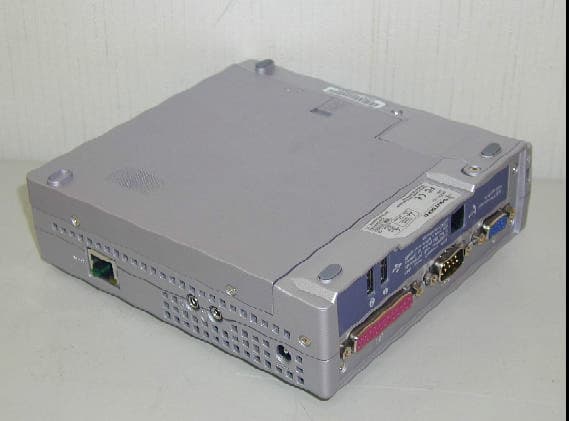
PN9CG-I
Jul 25, 2001Pocket PC
Equipment Class
JBC - Part 15 Class B Computing Device/Personal Computer