PP2010210WIRELESS OPTICAL MOUSE
Shenzhen Rapoo Technology Co., Ltd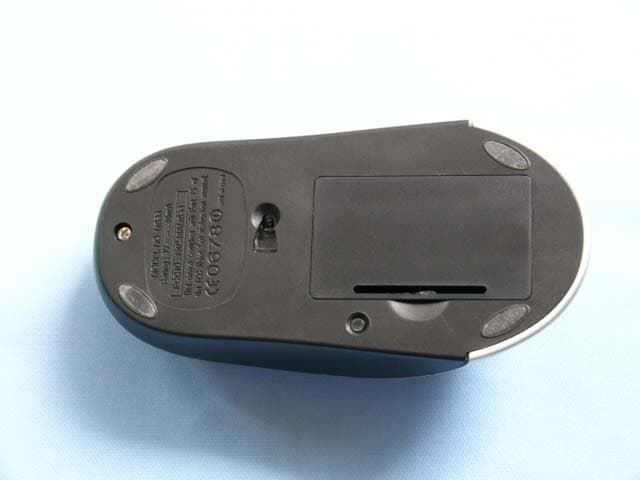
Click to zoom
Application Details
- Equipment Class
- DXX - Part 15 Low Power Communication Device Transmitter
- Date of Grant
- Jun 25, 2003
- Application Purpose
- Original Equipment
- Date of Application
- Jun 25, 2003
- Equipment Note
- WIRELESS OPTICAL MOUSE
- Frequency Range
- 26.96000000 - 27.28000000
- Country
- China
Documents & Files
Document Text
Text extracted from the exhibit documents filed with the FCC. Open a document above to read the original.
Users Manual
MLK-I-05-0*-0001 User’s Guide Rev.:1.0 热键科技(深圳)有限公司 MLK Industries (ShenZhen) Limited 第1页 共1页 制作:曹新伟 日期: 20030531 User’s Guide Of WCU90D Wireless Optical Mouse And Multimedia Keyboard COMBO Set (Primary) Note: This device complies with Part 15 of the FCC rules. Operation is subject to the following two conditions: (1) This device may not cause harmful interference, and (2) This device must accept any interference received, including interference that may cause undesired operation. Caution: The manufacturer is not responsible for any radio or TV interference caused by unauthorized modifications to this equipment. Such modifications could void the user authority to operate the equipment. REV : 1.00 Prepared by MLK Technologies Limited 28. May.2003 MLK-I-05-0*-0001 User’s Guide Rev.:1.0 热键科技(深圳)有限公司 MLK Industries (ShenZhen) Limited 第2页 共2页 制作:曹新伟 日期: 20030531 Information in this document is subject to change without notice and does net represent a commitment on the part of Creative Technology Ltd.No part of this manual may be reproduced or transmitted in any form or by any means,electronic or mecharical,including photocopying and recording,for any purpose without the written pemission of Creative Technology Ltd.The software decribed in this document is furmished under a license agreement and may be used or copied only in accordance whit the tems of the license agreement.It is against the law to copy the software on any other medium.except as specifically allowed in the license agreement,The licensee may make one copy of the software for backup purposes. Copyright © 2002 Creative Technology Ltd.All rights reserved. Version 1.0 May 2003 The Creative logo is a registered trademark of Creative Technology Ltd.in United States and other courtries. Microsoft MS-DOS,and Windows are registered trademarks of Microsoft Corporation.All rights reserved.All other logos ,brand or product names are trademarks or registered trademarks of their respective holders and are hereby recognized as such.All specifications are subject to change.Actual contents may differ slightly from those pictured. Contents Introduction Package Contents.......................................................................................................3 Minimum System Requirements..................................................................................................................3 1 About WCU90D Wireless Keyboard and Optical Mouse WCU90D Wireless Keyboard......................................................................................1-1 WCU90D Optical Mouse...........................................................................................1-3 WCU90D RF Receiver..............................................................................................1-4 2 Installing Hardware Step 1:Insert batteries into the WCU90D Optical Mouse.......................................................2-1 Step 2:Insert batteries into the WCU90D Wireless Keyboard..................................................2-2 Step 3:Connect the Creative RF receiver..........................................................................2-3 Step 4:Turning on the RF receiver..................................................................................2-4 Tips On Using Your Keyboard and Mouse........................................................................2-5 3 Installing Device Drivers Device Drivers Installation...........................................................................................3-1 MLK-I-05-0*-0001 User’s Guide Rev.:1.0 热键科技(深圳)有限公司 MLK Industries (ShenZhen) Limited 第3页 共3页 制作:曹新伟 日期: 20030531 Appendixes Technical Specifications WCU90D Optical Mouse.............................................................................................A-1 WCU90D Wireless Keyboard........................................................................................A-2 WCU90D RF receiver.................................................................................................A-3 Introduction Thank you purchasing the Creative Desktop Wireless,which consists of the Creative Wireless Keyboard,Creative Optical Mouse and the Creative RF Receiver.IT combines an innovative ergonomic design with all the features and convenience of wireless technology. The keyboard has advanced multimedia features that enable you to day play audio CDs,VCDs and DVDs files.You can use the keyboard’s hot keys to raise,lower or mute audio.Other hot keys lets you send e-mail,launch the Windows calculator and enable Power Saving mode.The mouse includes a Scroller that can be customized.You can assign functions such as quick scrolling and automatic launching to the mouse. Package Contents The following items are included in your package: □ WCU90D Wireless Keyboard □ WCU90D Optical Mouse □ WCU90D RF Receiver □ 4 × AA batteries(for the keyboard and mouse) □ Installation CD □ Quick Start leaflet Minimum System Requirements □ Genuine Intel® Pentium®266MHz,AMD®K6 300MHz or faster processor □ Intel,AMD or 100% compatible motherboard chipset □ Microsoft Windows 98,Windows 98 Second Edition(SE),Windows Millennium Edition(Me),Windows 2000 or Windows XP □ 64MB RAM (128MB highly recommended) □ 600MB of free hard disk space □ Available USB port or powered USB hub □ CD-ROM drive installed MLK-I-05-0*-0001 User’s Guide Rev.:1.0 热键科技(深圳)有限公司 MLK Industries (ShenZhen) Limited 第4页 共4页 制作:曹新伟 日期: 20030531 About WCU90D Wireless Keyboard and Optical Mouse The keyboard and its hot keys are shown in Figure 1 below: MLK-I-05-0*-0001 User’s Guide Rev.:1.0 热键科技(深圳)有限公司 MLK Industries (ShenZhen) Limited 第5页 共5页 制作:曹新伟 日期: 20030531 Button Function Button Function Play/Pause Plays or pause a CD/VCD/DVD Back Goes to the previous Mute Turns off/on the audio output Forward Goes to the next page in your Web page Stop Stops playing the CD/VCD/DVD Stop Loading Stops loading a Web page Previous Tack Goes to the previous track in a CD/VCD/DVD Refresh Reloads the current …
Text truncated - open the document above for the full version.
Block Diagram
Applicant : MLK Technologies Limited FCC ID : PP2010210
External Photos
FCC ID: PP2010210 (1) EUT top view (2) EUT bottom view
ID Label/Location Info
FCC ID: PP2010210 This device complies with Part 15 of the FCC Rules. Operation is subject to the following two conditions: (1) this device may not cause harmful interference, and (2) this device must accept any interference received, including interference that may cause undesired operation. EUT Bottom View/Proposed FCC Mark Location FCC ID: PP2010210
Internal Photos
FCC ID: PP2010210 (3) EUT inside whole view (4) Main board component side FCC ID: PP2010210 (5) Main board solder side FCC ID: PP2010210
Operational Description
FCC ID: PP2010210
Schematics
1 2 34 ABCD 4 3 2 1 D CBA Title Number Revision Size A4 Date: 31-May-2003 Sheet of File: D:\ \Sheet41.DDB Drawn By: 12345678 910111213141516 XY-LEDREFB OSC1 GNDGNDVDD OSC2 SCLKXAXBYBYAREFA R_BIN PD SDIO U1 ADNS 2030 VDD 1 PTB7 2 PTB6 3 PTA5 4 PTA4 5 PTB5 6 PTB4 7 PTA3/RST 8 PTA2/IRQ 9 PTB3 10 PTB2 11 PTA1/TCH1 12 PTA0/TCH0 13 PTB1 14 PTB0 15 VSS 16 U2 MC68HC908QY4 Q1 2N3904 Q2 2N3904 Q3 2N3904 R104.7K R71.5K C12102 C17 12P C1010P C1368P C1668P C11100P C9100P C14150P X2 13.5225MHZ C18102 C1 2.2UF/16V C2104 LED X1 18.43MHZ C4 4.7U/16V R1115K C6 104C5 10U/16V SW3 SW1SW2SW4 SCLK SDIO PD PD SCLK SDIO SW5 VDD RF_DATA RF_OFF VDD R810K R5 39K R927K L1 0.47UH R610R C15103 R410R RF_DATA RF_OFF VDD Vin 3 GND 1 Vout 2 U3 RT9261B-30CX 3V L2 100UH C21 104 C22 100U/16V D1 IN5819 C20 100U/16V C19104 VDD VDD C2356P R12100K Q5 MMBT3906 R1310K C3104 R110K R210K VDD C756P 6004 MLK0020 01 1 of 1
Test Report
FCC TEST REPORT UNDER FCC 15 Subpart C, Paragraph 15.227 PREPARED FOR: MLK Technologies Limited Block A1, 1 st Industrial Park, 3 rd Industrial Zone, Fenghuang Village, FuYong, BaoAn, Shenzhen, P.R.China. May 31, 2003 PREPARED BY: Shenzhen Academy of Metrology & Quality Inspection Longzhu Road, Nanshan FCC Registration Number: 97379 FCC ID: PP2010210 EUT: Wireless Optical Mouse Model: 010210(MLK); WCU90D(CREATIVE) Report Type: Original Report Test Engineer: Peter Lin Test Date: May 28, 2003 Review By: Apollo Liu MLK Technologies Limited. FCC ID: PP2010210 FCC ID Report Report #: KSZ2003052705J Page 2 of 22 TABLE OF CONTENTS 1. Summary of Test Results..................................................................................................................................................... 3 2. Test Statement ...................................................................................................................................................................... 4 2. 1 Test Statement................................................................................................................................................................. 4 2. 2 Departure From Document Policies, Procedure or Specifications, The Statement ......................................................... 4 3. EUT Modifications .............................................................................................................................................................. 5 4. Conducted Power Line Test ................................................................................................................................................ 6 4. 1 Test Equipment ............................................................................................................................................................... 6 4. 2 Test Procedure ................................................................................................................................................................ 6 4. 3 Test Setup ....................................................................................................................................................................... 6 4. 4 Configuration of The EUT.............................................................................................................................................. 7 4. 5 EUT Operating Condition............................................................................................................................................... 8 4. 6 Conducted Power Line Emission Limits......................................................................................................................... 8 4. 7 Conducted Power Line Test Result ................................................................................................................................. 9 5. RADIATED EMISSION TEST........................................................................................................................................ 10 5. 1 Test Equipment ............................................................................................................................................................. 10 5. 2 Test Procedure .............................................................................................................................................................. 10 5. 3 Radiated Test Setup ...................................................................................................................................................... 10 5. 4 Configuration of The EUT............................................................................................................................................ 11 5. 5 EUT Operating Condition............................................................................................................................................. 11 5. 6 Radiated Emission Limit .............................................................................................................................................. 11 5. 7 Radiated Emission Test Result...................................................................................................................................... 12 6. Band Edge .......................................................................................................................................................................... 14 6. 1 Test Equipment ............................................................................................................................................................. 14 6. 2 Test Procedure .............................................................................................................................................................. 14 6. 3 Radiated Test Setup ...................................................................................................................................................... 14 6. 4 Configuration of The EUT............................................................................................................................................ 15 6. 5 EUT Operating Condition............................................................................................................................................. 15 6. 6 Band Edge Limit........................................................................................................................................................... 15 6. 7 Band Edge Test Result .................................................................................................................................................. 15 7. PHOTOS OF TESTING.................................................................................................................................................... 16 7. 1 EUT Test Photographs .........................................................…
Text truncated - open the document above for the full version.
Test Setup Photos
FCC ID: PP2010210 Radiated emission test view
Contact Information
Applicant
Jerry Guo(Director of Research and Development Centre)
Test Firm
Shenzhen Academy of Metrology & Quality InspectionPeter Lin
Technical Specifications
| # | Rule Parts | Frequency Range | Power Output |
|---|---|---|---|
| 1 | 15C | 26.96 MHz - 27.28 MHz | - |
Other Applications from Shenzhen Rapoo Technology Co., Ltd
PP203060E
Jun 05, 2026Dongle
Equipment Class
DXX - Part 15 Low Power Communication Device TransmitterPP23303
Apr 10, 2026Multi-mode Wireless Mouse
Equipment Class
DTS - Digital Transmission SystemPP23544
Mar 12, 2026Wireless optical Mouse
Equipment Class
DXX - Part 15 Low Power Communication Device TransmitterPP23327
Feb 10, 2026Multi-mode Wireless Keyboard
Equipment Class
DXX - Part 15 Low Power Communication Device TransmitterPP23362
Feb 03, 2026Multi-mode Wireless Keyboard
Equipment Class
DTS - Digital Transmission System