PP2M5026WCWIRELESS OPTICAL MOUSE
Shenzhen Rapoo Technology Co., Ltd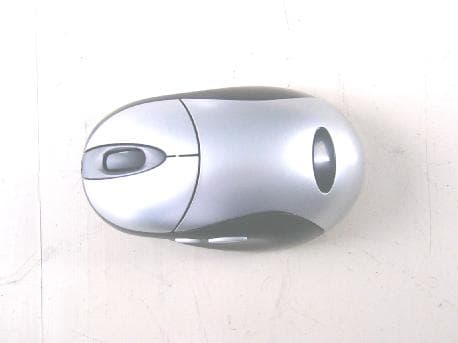
Click to zoom
Application Details
- Equipment Class
- DXX - Part 15 Low Power Communication Device Transmitter
- Date of Grant
- May 09, 2006
- Application Purpose
- Original Equipment
- Date of Application
- May 09, 2006
- Equipment Note
- WIRELESS OPTICAL MOUSE
- Frequency Range
- 27.04500000 - 27.19500000
- Country
- China
Documents & Files
Document Text
Text extracted from the exhibit documents filed with the FCC. Open a document above to read the original.
Users Manual
Installing the Batteries The Wireless mouse use two AAA NI-MH rechargeable batteries. Step 1. Open the battery compartment. Step 2. Insert the batteries as shown inside the battery compartment. Step 3. Replace the cover. Connecting the Receive USB Version The receiver is connected to your computer via a 1.5 meter USB cable. And it plug to USB port of your computer. USB Port USB port installation Connect the USB plug to USB port of your computer. CAUTION: Windows 98 or higher or Macintosh OS 8.6 or higher is required for USB port installation. Connect the receiver cable to the USB port on computer. For Windows, you may be prompted to insert the Windows software CD. Insert this software CD into the computer’s CD-ROM driver when asked To do so. Then follow the on-screen instructions. Indicators on Receiver There is two indicator on the Receiver. Connect:the indicator will flash when you press The connect button. When the receiver Successful change the IDS, the indicator will flash several fast. Charging: the indicator will light on in RED color when charging the battery in mouse, the indicator will turn off when the battery is full. Changing the channel and security ID Your mouse come with multi security ID, Which can let your Receiver listen to one mouse, Do following step to change channel and Security ID when you get undesired interference from another device used nearby. 1. Press the connect button on front of the receiver. 2. Press the connect button on the bottom of the mouse. NOTE: 1. The indication LED will light steadily when the synchronization linkage is completed. 2. You need to do above steps to re-connect the mouse each time you replace battery. Quick Start Guide For Wireless Rechargeable Mouse P/N:266-800F1-0000 Charge the Battery in Mouse Your mouse uses one AAA size Ni-MH rechargeable batteries. Before you use the mouse, you need to place the mouse on the stand to charge the batteries for 10 hours. This is very important to battery life. Please make Sure the charge indicator is light ON when you charge the mouse. When you feel your wireless mouse is not working smoothly, that means that the batteries need to recharged. Please put the mouse on the stand for charging, Normally it will take 8 hours to get the batteries fully charged. USB charge Version 1. Place the mouse on the stand and make sure the charging indicator Is light ON. CAUTION: Some computer will turn off the power of USB port when entering sleep mode. In this case, the battery inside the mouse can not be charged. So you are requested to keep your computer always ON when you charge the mouse. Software Installation The driver supports Win95, Win98, Win98 / SE, Win2000 and Win XP. The driver will install automatically if the auto-run is enable in your computer, otherwise, you can manually launch the installation by double clicking the file setup. exe in the CD-ROM. The setup applets icon of the mouse will appear on the windows taskbar after Successfully completing software installation. Mouse setup applet You can double click or right click the applet, and setup the functions of your preferred selection for mouse to enhance your device. Note: This device complies with Part 15 of the FCC rules. Operation is subject to the following two conditions: (1) This device may not cause harmful interference, and (2) This device must accept any interference received, including interference that may cause undesired operation. Caution: The manufacturer is not responsible for any radio or TV interference caused by unauthorized modifications to this equipment. Such modifications could void the user authority to operate the equipment.
Block Diagram
%PDF-1.2 %ÀÈÌÒ 1 0 obj << /Title (Û°—P¬†; ° í<ªO‘öÑ) /Author (ج—_«É) /Creator (é ̧žu¦Å £ ¿\rμ ÕîÅF ò±2õ ò ›‡G Ë) /Producer (é ̧žu¦Å £ ¿\rμ Õ«œ ́ð ùƒä ‚€I:õY\n|4 ä \n×±Äí.± à ë:æ) /CreationDate (ÝæÊ ÷ OLáI-lôWÀ ™ ³èl·) >> endobj 4 0 obj << /Filter /FlateDecode /Length 5 0 R >> stream × ua ̄hk®>~êýμ7‹qŽ...·Þ¿ Y†WÂÆ gYB 0– Æ*·Þ„ JkùkÍ5”z¥i ŽáÆÎ ƒ«× _þ: ̃"TŽ r/ ·z0®* Í>Öâ/§á¹H -² ̃...‹ x‰™Õ-þZ.ß V ?3á- ’v5äý ÓÝ É...Vç!{...È¿Õ!G ̃fÊhD(à8<c[XŸnÑŠÁ·V6–2N 8Gq< ‹Þðä$ÕJ ^ ÓePæÓ2 EÒ‡ü€× .üãdp› †$Wÿ2Ê =‡TúWâÙ ¿ô-ÃÃ(ŠF šÊ îB '®JTÂçÞ%Î:ïÛRi7DÑ è‘?Ä%·¥o• Ö «QM[ ̈sDÈVñÜʇéÿöd;vLr+h k>.‹Ä z?÷ù¢Ë« – qø Ô B Bìåú¥{}ÉŒï † àYZ Œc’b9[ Và âPØ Ü ÐÈendstream endobj 5 0 obj 339 endobj 6 0 obj << /Type /Page /Parent 3 0 R /MediaBox [0 0 595 842] /Resources << /ProcSet [/PDF/Text/ImageC/ImageI] /Font << /F1 31 0 R /F2 32 0 R >> /XObject << /im1 7 0 R /im2 11 0 R /im3 15 0 R /im4 19 0 R /im5 23 0 R /im6 27 0 R >> >> /Contents 4 0 R >> endobj 7 0 obj << /Type /XObject /Subtype /Image /Name /im1 /Width 1729 /Height 339 /BitsPerComponent 8 /ColorSpace [/Indexed /DeviceRGB 255 9 0 R] /Filter /FlateDecode /Length 8 0 R >> stream òˆE ÊÞ„Ï × ³P [Ã8ìW}*z-EÔ8ví ¿Û]*2ñÀ #Êd1JN Œ— ªÍ G„ôíŸy t"Ú_ªP á!RÂG#ŒÍWœ;Î ́‡ò"ÎG$Œ¼û†ò f'%ïÀJ T|<<j8PÈ+ -‹ P4 ô›û'a •!Á ̈- .ë ÊP ̃ÕÀ– ¶D)P Rlœ½žKÞKMÝ £!ƒ÷û.‚#v+_ ð%fùëDDVd Á ¶L ѧsòƒDŸñe¥Þ$½Q Ž#ôt†}Õ ¦ßàv!ÙfÆ¥Y- ¬ ÒŸ LÕ}©( ¾âØÑZEÀdPæ÷ ̃ dî”Ë$ õ‡Vãè†å ¡›Æ¤ ‰, Ö‹ « æ ?¢C©ì) ì’oG xÇÊ ìJ ̧òMϤ™cnJõ"U S¦ ²)+Ž ÕKMû»ŸURˆçorm\ øê ð CïsMý ^Ò%œàø„N¦ƒKO©ù†ð(lœŽ@ V,G è Ñ | d ̈ ļ+-gXþÛ ×- ª¾ Ѽ‰PY«t¥Ù¤Û¦xaGLl€É* ÚèÄÜ€ŽzTt Gn\ ̄rTaÓ;Îî‡áØÿò<]¾Xã7‰€T 2Ííá-™ *‰àÿÞ¥b»ÿÔ jb — [ÉŽT› ̄)- ̄p‰ØL =£ÿ²œ ̄Pî* μœR¤ ±›„„±—Ç<ù B- +{qA ®EŽhU ̄%d - vð Š<Zh‘6”ö Ólz Á[~ÿhÊGŒqNª xùà át-”ÁEÁ•Ã6±(67g- «SŶe4 „...êå-£ „ Òþ.ÜËËe ,±'ô ‰äª¦ ‹õ- tN\ ³K êƒ æ•kä ìå3 _;v\^(¼êuÔsÏ5' ̄?2Nâx@~E SÙà%³ùÜ=«"É ¼²ÏéBcÿa ¬,'ý×óoé6ä`Û-Þ¶Í À-Be ̧0ˆ5Ô ófoÕoÚš O ̃9 Íμ8©‚þ x) Œþü{Ì §ÿÐ ÝÃþj jYQäâ' ì.ðóy#ñ¢ %zAÁ è ̃ ³çL úŒØæÇ»¹èÚkʃÄxH$ 5 3] ̃ û” }=w ^À·tm Óë¥JÏ„ Q> û g d÷rÔ¡ ́í(iû ̧©—Rc ̧“ ³o Ù 33 ²Ì¹Ñ—›î' î 2ê÷ž• ¡ S™îPö” } ̃ËÛ.¿\ñM ìþåÚ7Ùó€ BJÉLŽE z †Lðß8ˆ< —K × §³az—Ó&¦mÕ °ÈÖ6ÿíq õÿ9c¼GïøíŸãЖ »4^ ̈(|Á Å1Dn ˆ... “§ !r{ëB É%¾)á n};HŽ†È+ ¡W7 Rö Š:MÔØ& PWp Ú:- 'Ä Ÿ`ØB¬êÑ«ýè],} ̄—û£þ¾P›šŒ‚Wï*Z²õœ¡`5P‡þU¼ ? ž£^A qyËNw[¡l Þëy²5ÞŽ@”üà1’‰ å³ PdZ w3áÆ. –çèÊInUT ð ý]Rìb„×i ã¤N²i ̃aæ?– BãKË ùÈ ¡SÛé+ ?êïôð9 V¦h% ̈³Ô¢GÖh\ Ef[wÐWtÖ¼SŸ 虇êè ú‘±Pªôo¦{#zt Ö³K ̄ÉšûÉ®î$ŸÏwÕýOiÚ¾Ž‰— *° Å•J«piM 9þ‰μtÍZ< dz¢¬^ T/ 6± ¾ ½ ?ž»ëÏ]Vœ¹ùÊüšžŽ9nTë$M ̃Ã;UÈGõ±öÇ ëî¬je‡l •k šžÊ%9Ò[ z„ÉÄ ) . ?4ÏÚhôœº« - sS§»F2Œ«Ä| ®öç +& u@2§ 'bá Ä`ÝV×Óyz zƒ÷ ôž³ ̈®¹ì 2·S Ùï»9'ºï ÎVdj¿É]ä•Fñg‡ ø/óÞÑ ì:€IFGiªD}ù 2=t™Ÿío¿ø ’WUÊ ÅüÙ ]‘½ P§Ï ®( 6± ½ƒç®Á:;‹å 3V»š2Œ¼U ”Êڬݷ2}>PŽ 'ª©x·ß¡€æ,]ó „~ ªÝd~I(îãÏ ̃×I]Éz5ŒÈ¹þ éeL¹ Â&-±® ù{%H ”. M<£0ó¥< ?YÀ_” Ã?±z wn ” % ̄ LãÎ3 Déh5j- ÇĈÿ,‚ÿ,¾Ã..FQGöš4ì[ ™¬áŒ ̄ÎPN\MÆ?x í‹@ ́ÍÝe\Õ.Ø– Ïæ9?ú£ ³¹-«Bé- ùœ K'I[ó’À+Òb@¶ f æ†... ýâVVüºíÚH[ ŠAÞß HÓμhá¤lcƒ øÕ ... ‰Æ"[ê ãb¦x‹ÓEíI^Oı[4!}¾ô “ Òx eÙO ltBGÖR¶^D¢%£ šz T ñ¡.ª,ôyR W êdD«z6nÛi~m WZ «« ̈¾Ÿëkª8ê®,⧠|Ö? ¡à þm«Å ¶wÓ¡ýxÙQ]ß ¼KŠâ²@!Õ éƒ ̃é«ö~\<°@öà ì R \ÄNì>©“í-1böe å± d àÒûZc½œÙ RTaih2 Ç9 FäÒLj±§jèÌEjÈMˇE^¢3:ÔïûÖnç% ÍÎ ““ ÑÍ ́8% Ò›ìÎ &aNÒ ñÃï· ¿U0hã ê‡Ë‰ ‰ùÑ’Q ‡."Þ\—SŠ0%ó~ » Yyïq9"¾A ê&...c<-Ÿ@SCxsTaÆéonì® - ( ÀÀã’ß’`ÐøÍYZÃ:) Æn½ U1»ÓÇ,È ́¹"î¶Ðâ ̄RJá €t ̃xyòÞ¹ ÁJ& °KüÔ · ‘àPߥ ÄC œE ‘ uÐê*6Ž:XTÄ%kÑœ Þìr å0`³/«`²²ìà×M¥Tù0óFà ÌNû— @ã =Rï`wm³μëC™’ ! `Š ³ ä¢èÅ á!U÷Àô§aÂÀ¬á½H‚§Ì%ŽI Ë Wû0-”D›’çhÁμ%sÅ C ·Nqq¹& Ž ̈!«² Ó o 0 z € £Šâõу>× šmØðO›‡Ä ́ý ÀšWã6ÚîY# ̈ =} Ì ́á...4ôc ú c'¬çÓ ë=–nl ̄Ö½M( bf˹’z5ÑÈ Ÿo ÜUÙöYæHYcŸƒ< + NçBÌñ μÖ?«¶> Ní-Çnûó»9 'ž÷V u r>,A h®* AáÅ3©* '\;ã £#:›ôQeÝZjÏ1õÓVI (“ ÍN |÷I û/ÔLÜÏUý ·ª:÷œKÏ!...®É¾¦Çû v‰...ÔŽ¤·d£Ú -ô©CI9”fã ý ̈ÑœýWõC¾$ ƒ —¤9Æù³IQÑëÁ;iÆ`dHN¡ ̄—N? ª³ÿê ̄ ¢ ãYB$jÊ\.P™FÕéò RºxM`çUì^z‹ÿè7‰ŸQc‘_4Hì ŠÃùÕ Ë·e65=¼yãÃM @Ÿîú±8 Hm sw½n Kü ÏÊs{a—ǦO °i3Wy 6'ž ‹—º#ï |C\ðŒ|T]‘A,)". ƒg 2`ð?v- ~Š_Ï–Ç ø ̧ÒçšÂŠ ÉSœ "Qt÷ê ^¢$ p æþ‘ Ú>òX Ë×Î4!@I ’ ”b % 5 ̈ÌdzÖ«ˆÿCQ ïÖÌ øïò)3 ½E}Ëü¬ K¥Ùùi ÉRZ_Ù ÚË)( - ~¢ABE5 ÖPºçäèš LUÛs®ùoë_ëÕÿeh«¶9wc5°S oa`ã£ÍÐl“ÊZÿmº‘U ŠÚŽ6cª¬½±ðïäõ|oþÁ¹É³òʶ }y9í¼à"Þ ã 0 ̈ÕýÖÚù.-Èv ªJmÿ K³§aéè¦Ë— JC ̃...G¶ò_ÀĪ9 ¹\‚ ZͲſ“q‡, È™žì yÈÑ NUGqé μ ¤” °Œ-.úIIÔ ̧âÕÁ÷¶Àªy ãá ( ` ̧ù‹}~ ‚4Þ\ÙA ̃—-^° ›ˆÊÁÎl$ Ò7¿Î– 6ä+ðx¿ ́SÉ(›¢Ó“ ?£ w‹Ò~ûuëòKM`õ N‰ÃÉÜμ쪑"Få„~‹]e ¿ Çdl ̧ T ¾ @V õ•¶4l<="œŠAUÛ¢s’dG¶ # @-ˆ#ÐÕÉ“³#úÇ ¦¾ò;Ö iA¿ù 1 Ϫôý-h5]# o”l»{ŸŸ Pcxw¡«lÐ-i«d½– Ï8H ~– ? ÄMÉ˦BWƒv! ‰· ÛÈ ^Ñ" ¬¦Ð¼¾U[,&åb.- i½½ í ImºƒN ®X’Íí™ôMÃÇ ê2Îpêà ̈FÁlkâcˆCŒ Ï 1 LÖx±‘Lô ½M ̧ß‘FÝ 4Þ'©î ¤Å2Ä&ébÑBƒ Ý^ >μ·Üû£ ̧ßFÄ ÍóqûÒn¡&‹äEæ²ð«‘ ;)õg|P=uš Ìð:ÆB4‹ ́CPcöU‹Ä5 ¥Ô‡f WÑ 4” ’¤^ê ́* MPc‡ õ°/p³H^y󱂧8 ½Ï" †NS `EBü6`*lKSƒ9R0QmÅÃû€-Hsç(nÏù- ê 'n® ò àC?L¹p &z=ÏTx2 ô`ë‚VEÓi_-ó” Š ¹<•Q\½ë‘æfSÜ÷:~•Óç à0 °:Kú1— < {± — 6Û²uOLíÄ~ \j¾ ̄Œ n‚ñÕÀ JÃß®œN‚ ØÏ̤sÎ "¥ó „3Ö ô 3î ÷Þ}^È”8ñÞR„ ́±U `jx Ax –ï{ ˆ.„+ idO©—æÊ% cNÚμ– Ø¤üü{¥#_$Å%R5&ããÄ Î•CÆö„ÀUá\E μÏšé %C“-†É‹hþ<t¼Óþk ¬ˆKÖ© 5‹4xסë£ø Š7“÷«Ñ ·]°÷Ð} œ‘ñU ¿Á h9 ›A 9 Q‰© 4€¥ÕŸ³ ÿ û X’È jÊÖ" ́‡éÄ ̧=Η æ6&“²†ˆÙiáP Œo•.ü ̃ñ7 T·V¶Ä ́Ü» ïÀüç+kRŽÂçëÞex2jþû:) Åïלªô—Õä ãÓ^º8._ìõfÏ ç ̃O{“ ¼$¼í2ûâx{SË3³AÃúüoÉ$?ÔÐa»8ˆK¬z;²™Šz§‡v & ¢ ÉH‹ * 3ãÃè¾Þ GUÁ– ¼€<9áÅ#'‚™Ù7éŸ ́$ü-cþô®(’Øl^FN ªþ ÒÊ3Ȧ®,¡$½^¾| 9ß =Î Àv'²Q óÒH‚¤ ’õBŽ€hßü‡©;†®½@ ‹ 5ÐåÛ Ïi Ù÷m3LP ¿ù*‡Ö-++( •ÉII–&ŒMû™ º! ̧O¬e_Qv; R¥u?=øF·ó‘ i’Œ `PÇ- ï€Àž› ̧μžôõz ¤P`Ò–Q“ ̧ YÿÀŒ ̈ ã )®OÍOμfky & y†½Í¹Ä)Y±¢#ÙÑÝ}E>ûìeï ‹¹§ ̈Z,€ ®ŠUri@+î‚”¹ ù ü‰È ¦ cÄ/pÕ] ¼¬—¡Ùmë&9KòÀÄ»G©þm– šqŒ 5y²ÚL GbjÚ @\ ‚ç{£Ñg±ìÝo ÿ@“ýä„Ó± óÅÁõ8A%“\ €g²&×- ¹ ®C,òîŽ Ä„ôÒCaUósIŸÆ ‹ ò “Šß S-Úý—|iø$Iùý™íFà) ?Ö )ײcl ̄_õ’l Šg» b xôI ФU~¶äMT ̄»×,Ü Ñ ê< Íí÷¿ 5 ̃xÖ‘¶ók4n Ë ìîlQ ̄Š/; 3æ LgUØ$žcËÄl™~ ̃ ̃²š‰ÓÊ›z? ̄Èì OvË ²t] "μ ̄ óC :TO™¢ «;Aw×2ùM°–ÙÈ(Š ̃haª°3ÿß Oļ‡ª ÛœŒª4EŠ ́óeæùÒÒ»QJ‹μAÉ£Ï Œ åùÿ N:D–Eª·té?øÙÂþ•$n ã ƒV1Uö–*“ „g9· £ ªe&<±»ÃÔ £Ï"¡— 8ÊuD ́1Óïóp?Ck 8/>Å æÇKûÔ$›Ý_2} ̧J hR»® |¤èÎnLaÖ/à 7ærâ R ®#7žÐ ¦Ðá]°oéE°ú€ 6È ̈Ð Ï+¦sYôE™ÆÀºš"J‘ Š› ¢ 3 p©ÚÆ؇p Ïœ|è . `\ ̧ãÉ ̈dˆ!L! – §f óàÛ ó ‰G‹C$§a õSÄq= RÙb NÏ«j6k*æg ŸÉ ̄z“ºó3Sî;q røšU\“ŒÉl Û È ½ÊÒø”æ#ÚåVÝË¢FŒó.- x=ݚةï½qøŒM,©§ßt @D%rE ±x_2DRÅJMeåd<¾|Æ—ÖR^ØÒ¬Ä ̄ºN º‰Ñ¶ÕÚ K. …
Text truncated - open the document above for the full version.
External Photos
Applicant: MLK Technologies Limited FCC ID: PP2M5026WC EUT top view EUT bottom view
ID Label/Location Info
Applicant: MLK Technologies Limited FCC ID: PP2M5026WC This device complies with Part 15 of the FCC Rules. Operation is subject to the following two conditions: (1) this device may not cause harmful interference, and (2) this device must accept any interference received, including interference that may cause undesired operation. Proposed Label Location on EUT EUT Bottom View/Proposed FCC ID Label Location FCC ID: PP2M5026WC
Internal Photos
Applicant: MLK Technologies Limited FCC ID: PP2M5026WC EUT inside whole view Main board component side Main board solder side
Operational Description
Applicant: MLK Technologies Limited FCC ID: PP2M5026WC Operational Description X2 the 27.045 and X3 the 27.195 crystal oscillator driver the base of U1 the final/buffer amplifier into the same base (U1) is the modulation provided by U1 , the output of U1 has the matching network consisting of C4,C6, C8 and the C6,C8 that limit the harmonic content and effect the proper coupling of the antenna to the output stage. Antenna ground and power source The antenna is extension, there is no external ground connection .the ground is only that of the printed circuit board. electric current is supplied by 2*AAA batteries.
Schematics
1 2 34 ABCD 4 3 2 1 D CBA Title Number Revision Size A4 Date: 22-Jul-2005 Sheet of File: D:\ \01041.ddb Drawn By: 123456789 1011121314 1516171819202122232425262728 OSC1VSSOSC2VDDRBUTMBUTLBUTRFOUTORFIN0ORFOTXDPDWAKE_AWAKE_B XIR Z1INZ2INSDIO SCLK P15P16 TXCBBBUTFBUT SVD_IN DCVR VL VL_NM U1 MA6223-S7K 12345678 910111213141516 XY-LEDREFB OSC1 GNDGNDVDD OSC2 SCLKXAXBYBYAREFA R_BIN PD SDIO U2 ADNS-2030 R110M X1 76.8KHZ X2 27.195MHZ X3 18.432MHZ C122PC222P SW1SW2SW3 C4100P L11.8UH C6100PC862P C90.1U C3 36P C143P C5 39P PD R12 15K R1130K D1IN5819 L2100UH C100.1U C15100U BT13V R5910K C110.1U C16100U R4 1.2M SDIOSCLK SW4 SCLK SDIO PD R615K VDD C190.1U C18 2.2U C130.1U LED1 VDD SW5 00 1 of 1 R101K 01035 TW O CHANNELS WIRELESS OPTICAL MOUSE X4 27.045M C1224P ANT :L= 275MM
Test Report
The test report consists 24 pages in total. It may be duplicated completely for legal use with the allowance of the applicant. It shall not be reproduced except in full, without the written approval of Ke Mei Ou Laboratory Corporation. The test result in the report only applied to the tested sample. FCC TEST REPORT Under FCC 15 Subpart C, Paragraph 15.227 Prepared For: MLK Technologies Limited Block A1, 1 st Industries Park, 3 rd Industries Zone, Fenghuang, FuYong, BaoAn, Shenzhen April 30, 2006 FCC ID: PP2M5026WC EUT: Wireless Optical Mouse Model: M5026WC Report Type: Original Report Test Engineer: Peter Lin Test Date: April 27, 2006 Review By: Apollo Liu / Manager Ke Mei Ou Laboratory Co., Ltd. 7A, Jiaxiangge, Jiahuixincheng, No.3027, Shennan Rd., Futian, Shenzhen, Guangdong, P.R.China. Zip Code: 518033 Tel: + 86 755 83642690 Fax: + 86 755 83297077 www.kmolab.com FEDERAL COMMUNICATIONS COMMISSION Registration Number: 125782 INDUSTRY CANADA Registration Number: IC4986 MLK Technologies Limited FCC ID: PP2M5026WC KMO FCC ID Report Report #: KSZ2006042701J Page 2 of 23 TABLE OF CONTENTS 1. General Information....................................................................................................................................................3 1. 1 Notes......................................................................................................................................................................3 1. 2 Testing Laboratory..................................................................................................................................................3 1. 3 Details of Applicant................................................................................................................................................3 1. 4 Application Details..................................................................................................................................................3 1. 5 Test Item.................................................................................................................................................................3 1. 6 Test Standards.........................................................................................................................................................3 2. Technical Test...............................................................................................................................................................4 2. 1 Summary of Test Results.........................................................................................................................................4 2. 2 Antenna Requirement..............................................................................................................................................4 3. EUT Modifications.......................................................................................................................................................4 4. Conducted Power Line Test.........................................................................................................................................5 4. 1 Test Equipment.......................................................................................................................................................5 4. 2 Test Procedure........................................................................................................................................................5 4. 3 Test Setup...............................................................................................................................................................5 4. 4 Configuration of The EUT.......................................................................................................................................6 4. 5 EUT Operating Condition........................................................................................................................................7 4. 6 Conducted Power Line Emission Limits..................................................................................................................7 4. 7 Conducted Power Line Test Result...........................................................................................................................7 5. Radiated Emission Test................................................................................................................................................9 5. 1 Test Equipment.......................................................................................................................................................9 5. 2 Test Procedure........................................................................................................................................................9 5. 3 Radiated Test Setup.................................................................................................................................................9 5. 4 Configuration of The EUT.....................................................................................................................................11 5. 5 EUT Operating Condition......................................................................................................................................11 5. 6 Radiated Emission Limit.......................................................................................................................................11 5. 7 Radiated Emission Test Result...............................................................................................................................12 6. Band Edge..................................................................................................................................................................13 6. 1 Test Equipment...................................................................................................................…
Text truncated - open the document above for the full version.
Test Setup Photos
Applicant: MLK Technologies Limited FCC ID: PP2M5026WC Radiated emission test view
Contact Information
Applicant
Jerry Guo(Director of Research and Development Centre)
Test Firm
Ke Mei Ou Laboratory Co., Ltd.Apollo Liu
Technical Specifications
| # | Rule Parts | Frequency Range | Power Output |
|---|---|---|---|
| 1 | 15C | 27.045 MHz - 27.195 MHz | - |
Other Applications from Shenzhen Rapoo Technology Co., Ltd
PP203060E
Jun 05, 2026Dongle
Equipment Class
DXX - Part 15 Low Power Communication Device TransmitterPP23303
Apr 10, 2026Multi-mode Wireless Mouse
Equipment Class
DTS - Digital Transmission SystemPP23544
Mar 12, 2026Wireless optical Mouse
Equipment Class
DXX - Part 15 Low Power Communication Device TransmitterPP23327
Feb 10, 2026Multi-mode Wireless Keyboard
Equipment Class
DXX - Part 15 Low Power Communication Device TransmitterPP23362
Feb 03, 2026Multi-mode Wireless Keyboard
Equipment Class
DTS - Digital Transmission System