PP2M6097GII2.4GHZ WIRELESS MEDIA REMOTE MOUSE
Shenzhen Rapoo Technology Co., Ltd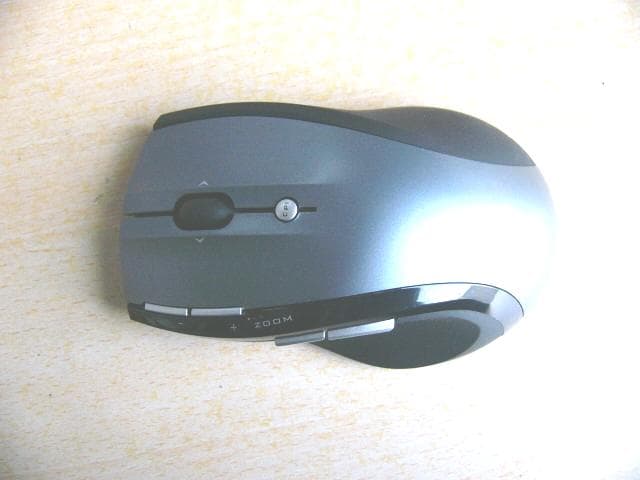
Click to zoom
Application Details
- Equipment Class
- DXX - Part 15 Low Power Communication Device Transmitter
- Date of Grant
- Dec 12, 2007
- Application Purpose
- Original Equipment
- Date of Application
- Dec 12, 2007
- Equipment Note
- 2.4GHZ WIRELESS MEDIA REMOTE MOUSE
- Frequency Range
- 2402.00000000 - 2480.00000000
- Country
- China
Documents & Files
Document Text
Text extracted from the exhibit documents filed with the FCC. Open a document above to read the original.
Users Manual
Mouse buttons functions under Media Remote mode Trouble Shooting 1. Check Micro receiver connection; try to inserting Micro Receiver to another USB port on your computer. 2. Connection between the mouse and the Micro Receiver. Re-insert the Micro Receiver. Take out the battery and reinstall it. P/N: 266-80971-0000 Installation 1. plug the Micro receiver into a USB port of your computer 2. Open the battery door and install battery, this mouse can operate with single battery, install two battery can double the use time. turn on the mouse, a RED battery icon on the left side of mouse will light On and flash 10s. 3. Install Software to take all advantage of your mouse. Insert the CD into your computer’s CD-ROM drive and follow on-screen instructions. ON/OFF the mouse 1. You can switch On or shut off the mouse by use the On/OFF switch on the bottom of the mouse 2. The Low battery indicator will flash 10s when the mouse is Quick Start Guide of 2.4GHz Wireless Media Remote Mouse 1 turned on. If the battery icon keep flash during your using. The battery need to be replaced. Mouse Functions Cursor Speed control Press the CPI button and you can toggle the CPI between 800 CPI and 1600 CPI (Laser Version, Optical is between 500 CPI and 1000 CPI) Scrolling Side-to-side You can scroll side-to-side by tilting the wheel left or right. This feature is especially useful in spread sheets or viewing large-size images. Zoom In and Zoom Out You can use the two extra button on left size of the mouse to zoom in and zoom out your document. To use this function, you need to install the CD Driver. Universal Back / Forward Use the back button to access previous page and use the forward button to access next page. Media Remote Control Mode Press the CPI button for over 3 seconds to enter Media Remote control Mode. the battery icon will fast flash 3 seconds when you successful change mouse mode. In Media Remote control mode. the mouse button and scroll will change to following function to let you remote control your PC’s media player Press the CPI button for over 3 seconds again and you will back to Normal Mode. 3
Users Manual
Note: This device complies with Part 15 of the FCC rules. Operation is subject to the following two conditions: (1) This device may not cause harmful interference, and (2) This device must accept any interference received, including interference that may cause undesired operation. Caution: The manufacturer is not responsible for any radio or TV interference caused by unauthorized modifications to this equipment. Such modifications could void the user authority to operate the equipment.
External Photos
EUT top view EUT bottom view
ID Label/Location Info
This device complies with Part 15 of the FCC Rules. Operation is subject to the following two conditions: (1) this device may not cause harmful interference, and (2) this device must accept any interference received, including interference that may cause undesired operation. Proposed Label Location on EUT EUT Bottom View/Proposed FCC ID Label Location FCC ID: PP2M6097GII
Internal Photos
EUT inside whole view Main & RF board component side Main & RF board solder side
Operational Description
circuit description: Y2 the 8M crystal oscillator driver the base of U6(MCU) the final/buffer,Y1 the 16M crystal oscillator driver the base of U1 the final/buffer. Ground and power source The ground is only that of the printed circuit board, no external ground connection. electric current is supplied by 1*AA batteries.
Schematics
2.sch-1 - Fri Nov 02 11:03:53 2007
Test Report
The test report consists 25 pages in total. It may be duplicated completely for legal use with the allowance of the applicant. It shall not be reproduced except in full, without the written approval of Ke Mei Ou Laboratory Corporation. The test result in the report only applied to the tested sample. FCC TEST REPORT Under FCC 15 Subpart C, Paragraph 15.249: 2004 Prepared For : MLK Technologies Limited Block A1, 1st Industrial Park, 3rd Industrial Zone, Fenghuang Village, Fuyong, Baoan, Shenzhen, China December 6, 2007 FCC ID: PP2M6097GII EUT: 2.4GHz Wireless Media Remote Mouse Model: M6097G Report Type: Original Report Test Engineer: Jacky Huang Test Date: November 23, 2007 Review By: Apollo Liu / Manager FEDERAL COMMUNICATIONS COMMISSION Registration Number: 125782 INDUSTRY CANADA Registration Number: IC4986 Ke Mei Ou Laboratory Co., Ltd. 7A, Jiaxiangge, Jiahuixincheng, No.3027, Shennan Rd., Futian, Shenzhen, Guangdong, P.R.China. Zip Code: 518033 Tel: + 86 755 83642690 Fax: + 86 755 83297077 www.kmolab.com MLK Technologies Limited FCC ID: PP2M6097GII KMO FCC ID Report Report #: KSZ2007111203J Page 2 of 25 TABLE OF CONTENTS 1. General Information....................................................................................................................................................3 1. 1 Notes......................................................................................................................................................................3 1. 2 Testing Laboratory..................................................................................................................................................3 1. 3 Details of Applicant................................................................................................................................................3 1. 4 Application Details..................................................................................................................................................3 1. 5 Test Item.................................................................................................................................................................3 1. 6 Test Standards.........................................................................................................................................................3 2. Technical Test...............................................................................................................................................................4 2. 1 Summary of Test Results.........................................................................................................................................4 3. EUT Modifications.......................................................................................................................................................4 4. Conducted Power Line Test.........................................................................................................................................5 4. 1 Test Equipment.......................................................................................................................................................5 4. 2 Test Procedure........................................................................................................................................................5 4. 3 Test Setup...............................................................................................................................................................5 4. 4 Configuration of the EUT........................................................................................................................................6 4. 5 EUT Operating Condition........................................................................................................................................7 4. 6 Conducted Power Line Emission Limits..................................................................................................................7 4. 7 Conducted Power Line Test Result...........................................................................................................................7 5. Radiated Emission Test................................................................................................................................................8 5. 1 Test Equipment.......................................................................................................................................................8 5. 2 Test Procedure........................................................................................................................................................8 5. 3 Radiated Test Setup.................................................................................................................................................8 5. 4 Configuration of the EUT........................................................................................................................................9 5. 5 EUT Operating Condition........................................................................................................................................9 5. 6 Radiated Emission Limit.........................................................................................................................................9 5. 7 Radiated Emission Test Result...............................................................................................................................10 6. Band Edge..................................................................................................................................................................12 6. 1 Test Equipment.....................................................................................................................................................12 6. 2 Test Procedure...................................................................…
Text truncated - open the document above for the full version.
Test Setup Photos
Radiated emission test view
Contact Information
Applicant
Jerry Guo(Director of Research and Development Centre)
Test Firm
SinTek Laboratory Co., Ltd.Eric Lin
Technical Specifications
| # | Rule Parts | Frequency Range | Power Output |
|---|---|---|---|
| 1 | 15C | 2.40 GHz - 2.48 GHz | - |
Other Applications from Shenzhen Rapoo Technology Co., Ltd
PP203060E
Jun 05, 2026Dongle
Equipment Class
DXX - Part 15 Low Power Communication Device TransmitterPP23303
Apr 10, 2026Multi-mode Wireless Mouse
Equipment Class
DTS - Digital Transmission SystemPP23544
Mar 12, 2026Wireless optical Mouse
Equipment Class
DXX - Part 15 Low Power Communication Device TransmitterPP23327
Feb 10, 2026Multi-mode Wireless Keyboard
Equipment Class
DXX - Part 15 Low Power Communication Device TransmitterPP23362
Feb 03, 2026Multi-mode Wireless Keyboard
Equipment Class
DTS - Digital Transmission System