PP2S700Bluetooth Stereo NFC Headset
Shenzhen Rapoo Technology Co., Ltd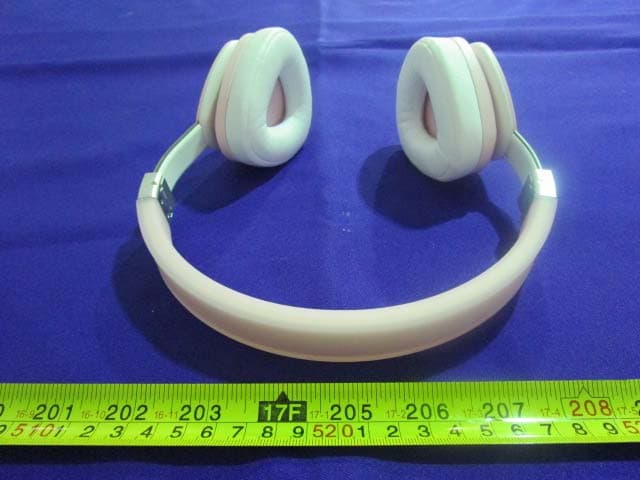
Click to zoom
Application Details
- Equipment Class
- DSS - Part 15 Spread Spectrum Transmitter
- Date of Grant
- Nov 13, 2014
- Application Purpose
- Original Equipment
- Date of Application
- Nov 13, 2014
- Equipment Note
- Bluetooth Stereo NFC Headset
- Frequency Range
- 2402.00000000 - 2480.00000000
- Country
- China
Documents & Files
Document Text
Text extracted from the exhibit documents filed with the FCC. Open a document above to read the original.
Users Manual
Painikkeet ja portit Pakkauksen sisältö Bluetooth-kuulokkeetUSB - 3,5 mm -latauskaapeli3,5 mm:n audiokaapeliPikaopasKantokotelo Päälle tai pois kytkeminen Käynnistä laite pitämällä virtakytkintä painettuna.Sammuta laite pitämällä virtapainiketta painettuna. Sisäinen mikrofoniAudiotulo ja latausportti Äänenvoimakkuus ylös -painike VirtapainikeBluetooth-painikeVirran merkkivaloBluetooth-merkkivalo Äänenvoimakkuus alas -painike 62 Kuulokemikrofoni siirtyy käynnistyksen jälkeen automaattisesti laiteparin muodostustilaan. Aktivoi laitteesi Bluetooth-ominaisuus ja hae kuulokemikrofonia. Syötä "0000", jos pyydetään antamaan salasana." Kytke kuulokemikrofoni päälle, aktivoi älypuhelimen tai muun laitteen NFC-asetukset, aseta laitteesi NFC-alue lähelle kuulokemikrofonin NFC-aluetta (etäisyys enintään 1 cm), kuulokemikrofoni muodostaa laitteeseen yhteyden automaattisesti.*Tämä menetelmä on käytössä vain laitteissa, joissa on NFC-tuki. Vihreä LED-valo vilkkuu 3 sekunnin väleinYhteys katkaistuPunainen LED-valo palaaLatautuuVihreä LED-valo palaaTäyteen ladattuPunainen LED-valo vilkkuuAkkuvirta vähissäSininen LED-valo vilkkuu 3 sekunnin väleinBluetooth-yhteys onnistui Bluetooth-yhteys Merkkivalot NFC-yhteys Virran merkkivaloBluetooth-merkkivalo 63 Liitä kuulokemikrofoni älypuhelimeen tai PC-tietokoneeseen 3,5 mm:n audiokaapelilla ja käynnistä soitin.Huomautus: Langallista ja Bluetooth-tilaa ei voi käyttää samanaikaisesti. Kun Bluetooth-yhteyden muodostaminen on onnistunut, liitä S700 toisen kuulokemikrofoniin 3,5 mm:n audioportin kautta. Kaksi kuulokemikrofonia voi toistaa musiikkia samanaikaisesti.Toista musiikkia tai keskeytä toisto painamalla lyhyesti Bluetooth-painiketta.Toista seuraava kappale kaksoisnapsauttamalla Äänenvoimakkuus ylös -painiketta. Toista edellinen kappale kaksoisnapsauttamalla Äänenvoimakkuus alas -painiketta. 1. Vastataksesi puheluun tai lopettaaksesi sen, paina lyhyesti Bluetooth-painiketta.2. Soittaaksesi uudelleen numeroon, kaksoisnapsauta Bluetooth-painiketta.3. Hylätäksesi saapuvan puhelun, pidä Bluetooth-painiketta painettuna.4. Pidä puhelun aikana Bluetooth-painiketta painettuna vaihtaaksesi matkapuhelimen ja kuulokemikrofonin välillä.5. Avataksesi älykkään puheäänitoiminnon, pidä Bluetooth-painiketta painettuna. (Käytettävissä vai laitteissa, joissa on älykäs puheäänitoiminto) Johdollinen yhteys MusiikkisoitinMusiikin jakaminen Liitä laite 1 ja laite 2 kuulokemikrofoniin Bluetooth-yhteydellä. Kuulokemikrofoni toimii normaalisti, kun yhteyden muodostaminen on onnistunut.Huomautus: Enintään kaksi laitetta voi liittää yhteen kuulokemikrofoniin samanaikaisesti.Monipisteyhteys Äänipuhelu 64 3.NFC-yhteyden mudostaminen ei onnistu· Varmista, että NFC on otettu käyttöön ja aktivoitu laitteessa.· Varmista, että laitteesi NFC-alueen ja kuulokemikrofonin NFC-alueen välinen etäisyys on enintään 1 cm.4.Äänenvoimakkuus laskee lyhyellä lähetysetäisyydellä· Bluetooth-lähetysetäisyys voi vaihdella todellisten käyttöolosuhteiden mukaan. Varmista, ettei laitteiden välissä ole mitään esteitä.· Siirrä muut päällä olevat langattomat laitteet etäälle audiolaitteesta. 1.Ääntä ei kuulu lainkaan· Varmista, että Bluetooth-yhteys on muodostettu.· Varmista, että kuulokkeet on ladattu· Tee kuulokemikrofonista oletusaudiolaite.· Käynnistä mediasoitin uudelleen2.Musiikkia ei kuulu, vaikka kuulokemikrofoni on yhdistetty kannettavaan.· Joissakin kannettavissa, joissa on Bluetooth-toiminto, toimivat normaalisti ohjaimen asentamisen jälkeen (katso lisätietoja kannettavan järjestelmän kuvauksesta). Liitä kuulokemikrofoni latauskaapelilla USB-laturiin, PC-tietokoneeseen tai muuhun laitteeseen, jossa on vakio DC 5 V USB-portti.Kytke kuulokemikrofoni päälle ja paina sitten lyhyesti virtapainiketta. Vihreä LED-valo vilkkuu kerran, kun akun varaustaso on korkea. Keltainen LED-valo vilkkuu kerran, kun akun varaustaso on keskitasoa. Punainen LED-valo vilkkuu kerran, kun akun varaustaso on matala. Vianetsintä Vianetsintä Lataaminen * Jos ongelma ei ratkea, ota yhteys asiakastukeen osoitteessa www.rapoo.com. Monipisteyhteys 65 Knapper og porte Emballageindhold Bluetooth hovedsætUSB til 3,5 mm opladerkabel3,5 mm lydkabelStartvejledningBæretaske Tænd og sluk For at tænde, skal du holde tænd/sluk-knappen nede.For at slukke, skal du holde tænd/sluk-knappen nede. Indbygget mikrofonLydindgang & opladningsport Lydstyrke ned-knap Tænd/sluk-knap Bluetooth-knapStrømindikatorBluetooth-indikatoren Lydstyrke op-knap 66 Headsettet går automatisk i parringstilstand, når det tændes. Slå Bluetooth-funktionen til på din enhed, og søg efter headsettet. Indtast "0000", hvis der kræves en adgangskode." Tænd for headsettet, slå NFC-indstillingerne til på din smartphone eller en anden enhed, placer din enheds NFC-zone tæt på headsettets NFC-zone (afstand inden for 1 cm), hvorefter headsettet automatisk opretter en forbindelse til din enhed.*Denne metode er kun på mulig med NFC-aktiverede enheder. Den grønne lysdiode blinkeren gang hver 3. sek.AfbrudtDen røde lysdiode lyserOpladerDen grønne lysdiode lyserFuldt opladetDen røde lysdiode blinkerLavt batteriniveauBlå lysdiode, der blinker en gang hver 3. sek.Bluetooth-forbindelsen er blevet oprettet Bluetooth Forbindelse Statusindikatorer NFC Forbindelse StrømindikatorBluetooth-indikatoren 67 Slut headsettet til en smartphone eller pc med et 3,5 mm lydkabel, og åbn afspilleren.Bemærk: Det er ikke muligt at bruge kabelfunktionen og Bluetooth på samme tid. Når du har oprettet en Bluetooth-forbindelsen, kan du forbinde din S700 til et andet headset via 3,5 mm stikket. De to headsets kan afspille musik samtidigt.Hvis du vil afspille/pause musik, skal du trykke på Bluetooth-knappen.Hvis du vil afspille den næste sang, skal du dobbeltklikke på lydstyrke-op knappen. Hvis du vil afspille den forrige sang, skal du dobbeltklikke på lydstyrke-ned knappen. 1. For at besvare/afslutte et opkald, skal du trykke på Bluetooth-knappen.2. For at ringe op til et nummer igen, skal du dobbeltklikke på Bluetooth-kn…
Text truncated - open the document above for the full version.
Users Manual
78 79 80 81 Charging and battery warningsTo avoid the risk of explosion, fire or leakage of toxic chemicals, please observe the following warnings:1. Do not dispose of the product or battery in fire, and do not expose it to temperatures above 100°C.2. Charge the battery according to the instructions printed on the quick start guide.3. Do not open, deform or mutilate the battery as it may contain corrosive materials which can cause damage to eyes or skin and may be toxic if swallowed.4. Do not charge the battery in extreme temperatures.5. Do not clean this product when charging. Before you clean it, please pull the plug. EN Safety instructionsDo not open or repair this device. Do not use the device in a damp environment. Clean the device with a dry cloth.CEThe device meets the essential requirements and other relevant provisions of the applicable European directives. The Declaration of Conformity is available at www.rapoo.com.WEEEDo not dispose of the device with household waste.WarrantyThe device is provided with two-year limited hardware warranty from the purchase day. Please see www.rapoo.com for more information.Copyright It is forbidden to reproduce any part of this quick start guide without the permission of Rapoo Technology Co., Ltd.If your problem is not solved, please contact the helpdesk at www.rapoo.com. Consignes de sécuritéNe pas ouvrir ou réparer cet appareil. Ne pas utiliser l'appareil dans un environnement humide. Nettoyer l'appareil avec un chiffon sec.CEL'appareil satisfait aux exigences essentielles et autres dispositions pertinentes des directives européennes applicables. La déclaration de conformité est disponible sur www.rapoo.com.DEEENe pas jeter l'appareil avec les ordures ménagères.GarantieL'appareil est fourni avec deux ans de garantie matérielle limitée à compter du jour d'achat. Merci de consulter www.rapoo.com pour plus d'informations.Droit réservés Il est interdit de reproduire une quelconque partie de ce guide de démarrage rapide sans la permission de Rapoo Technology Co., Ltd.Si votre problème n'est pas résolu, merci de contacter le helpdesk sur www.rapoo.com. SicherheitshinweiseVersuchen Sie niemals, das Gerät zu öffnen oder selbst zu reparieren. Nutzen Sie das Gerät nicht in feuchter Umgebung. Reinigen Sie das Gerät mit einem weichen, trockenen Tuch.CEDieses Gerät erfüllt essenzielle Anforderungen und weitere relevante Vorgaben der zutreffenden europäischen Direktiven. Eine Konformitätserklärung können Sie unter www.rapoo.com abrufen.WEEE-HinweiseEntsorgen Sie das Gerät nicht mit dem regulären Hausmüll.GarantieWir gewähren eine zweijährige, eingeschränkte Hardware-Garantie ab Kaufdatum. Weitere Informationen finden Sie hier: www.rapoo.com.Copyright Jegliche Reproduktion dieser Schnellstartanleitung (gänzlich oder teilweise) ohne Zustimmung der Rapoo Technology Co., Ltd. ist untersagt.Falls sich das Problem nicht lösen lassen sollte, wenden Sie sich bitte unter www.rapoo.com an den technischen Kundendienst. Lade- und AkkuwarnungenBitte beachten Sie zur Vermeidung von Explosions- und Brandgefahr sowie eines Auslaufens giftiger Chemikalien folgende Warnhinweise:1. Entsorgen Sie Produkt oder Akku nicht durch Verbrennen; Nicht Temperaturen über 100 °C aussetzen.2. Laden Sie den Akku entsprechend den Anweisungen in der Schnellstartanleitung auf.3. Öffnen, deformieren und beschädigen Sie den Akku nicht, da er korrosive Materialien beinhalten kann, die Augen- und Hautschäden verursachen und bei Verschlucken giftig sein können.4. Laden Sie den Akku nicht bei extremen Temperaturen auf.5. Reinigen Sie dieses Produkt nicht während des Aufladens. Bitte ziehen Sie vor der Reinigung den Stecker. DE Avertissements relatifs à la charge et à la batterie Pour éviter tout risque d'explosion, d'incendie ou de fuite de produits chimiques toxiques, veuillez respecter les consignes suivantes :1. Ne jetez pas le produit ni sa batterie dans le feu, et ne l'exposez pas à des températures supérieures à 100°C.2. Chargez la batterie selon les instructions indiquées dans le guide de démarrage rapide.3. Ne pas ouvrir, déformer ou endommager la batterie car il peut y avoir des matériaux corrosifs susceptibles d'altérer les yeux ou la peau et potentiellement toxiques en cas d'ingestion.4. Ne pas recharger la batterie à des températures extrêmes.5. Ne pas nettoyer cet appareil pendant qu'il est en train de se charger. Avant de le nettoyer, veuillez retirer la prise. FR 82 Carica e avvisi batteria Per evitare il rischio di esplosioni, incendi o perdite di sostanze chimiche tossiche, osservare le seguenti avvertenze:1. Non smaltire il prodotto o la batteria nel fuoco e non esporlo a temperature superiori a 100°C.2. Caricare la batteria osservando le istruzioni stampate sulla guida introduttiva.3. Non aprire, deformare o tagliare la batteria in quanto potrebbero essere presenti materiali corrosivi che possono causare danni agli occhi e all'epidermide e potrebbero essere tossici, se ingeriti.4. Non caricare la batteria a temperature estreme.5. Non pulire il prodotto durante la carica. Prima di pulirlo, tirare la spina. IT Carga de la batería y advertencias Para evitar el riesgo de una explosión, fuego o derrame de sustancias tóxicas, siga las siguientes advertencias:1. No se deshaga del producto o la batería arrojándolos al fuego y no los exponga a temperaturas superiores a 100ºC2. Cargue la batería siguiendo las instrucciones impresas en la guía de inicio rápido3. No abra, deforme o mutile la bater ía, pues puede contener materiales corrosivos que pueden causar daños en los ojos o la piel y pueden ser tóxicos si se ingieren.4. No cargue la batería en condiciones de temperaturas extremas.5. No limpie el producto mientras la batería se está cargando. Antes de limpiarlo, desenchúfelo. ES Opladen en batterij waarschuwingen Let op de volgende zaken om het risico van ontploffingen, brand of lekken van giftige chemicaliën te voorkomen:1. Gooi het product of de batterij niet in open vuur en stel het …
Text truncated - open the document above for the full version.
Cover Letter(s)
Shenzhen Rapoo Technology Co., Ltd. Add: 22, Jinxiu Road East, Pingshan District, Shenzhen, China Tel: +86-0755-28588666 Fax: +86-0755-28588555 FCC Confidential Authorization Date: 2014-9-25 FEDERAL COMMUNICATIONS COMMISSION Authorization and Evaluation Division 7435 Oakland Mills Road Columbia, MD 21046 Confidentiality Request regarding application for certification of FCC ID: PP2S700 Pursuant to Sections 0.457 and 0.459 of the Commission’s Rules, we hereby request confidential treatment of information accompanying this application as outlined below: Detailed Circuit Schematics of EUT--- (Long term) Block Diagram--- (Long term) Circuit Description--- (Long term) The above materials contain trade secrets and proprietary information not customarily released to the public. The public disclosure of these materials may be harmful to the applicant and provide unjustified benefits to its competitors. The applicant understands that pursuant to Section 0.457 of the Rules, disclosure of this application and all accompanying documentation will not be made before the date of the Grant for this application. Sincerely Yours, Signature: Charles Tsou Director of Research and Development Centre
External Photos
EXHIBIT B - EUT EXTERNAL PHOTOGRAPHS EUT – Top View EUT – Bottom View EUT – Side View EUT – Side View EUT – Side View EUT – Side View
ID Label/Location Info
EXHIBIT A - FCC ID LABELING AND LOCATION FCC ID Label Proposed FCC ID Label Location The label shown shall be permanently affixed at a conspicuous location on the device and be readily visible to the user at the time purchase (Labeling requirements per 2.925) Label Here
Internal Photos
EXHIBIT C - EUT INTERNAL PHOTOGRAPHS EUT – Uncover View 1 EUT –Uncover View 2 EUT – Main Board Top View EUT –Main Board Bottom View EUT –RF Chip View EUT – BT Antenna View EUT – Battery Top View EUT – Battery Bottom View EUT – NFC Uncover View EUT – NFC Board Top View EUT – NFC Board Bottom View
Test Setup Photos
EXHIBIT D - TEST SETUP PHOTOGRAPHS Conducted Emissions - Front View Conducted Emissions – Side View Radiated Emission Below 1GHz-View Radiated Emission Above 1GHz –View
Contact Information
Applicant
Jerry Guo(Director of Research and Development Centre)
Test Firm
Bay Area Compliance Laboratories Corp. (Dongguan)John Chan
[email protected]86-769-86858888
Technical Specifications
| # | Rule Parts | Frequency Range | Power Output |
|---|---|---|---|
| 1 | 15C | 2.40 GHz - 2.48 GHz | 3.00 mW |
Other Applications from Shenzhen Rapoo Technology Co., Ltd
PP203060E
Jun 05, 2026Dongle
Equipment Class
DXX - Part 15 Low Power Communication Device TransmitterPP23303
Apr 10, 2026Multi-mode Wireless Mouse
Equipment Class
DTS - Digital Transmission SystemPP23544
Mar 12, 2026Wireless optical Mouse
Equipment Class
DXX - Part 15 Low Power Communication Device TransmitterPP23327
Feb 10, 2026Multi-mode Wireless Keyboard
Equipment Class
DXX - Part 15 Low Power Communication Device TransmitterPP23362
Feb 03, 2026Multi-mode Wireless Keyboard
Equipment Class
DTS - Digital Transmission System