PP2S900Bluetooth Noise-Canceling NFC Headset
Shenzhen Rapoo Technology Co., Ltd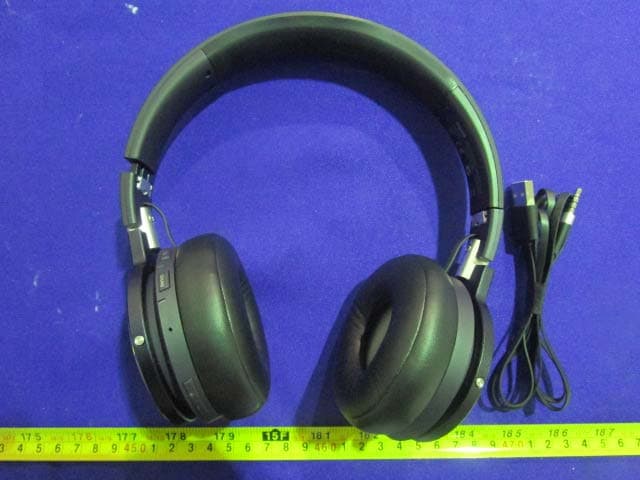
Click to zoom
Application Details
- Equipment Class
- DTS - Digital Transmission System
- Date of Grant
- Aug 24, 2015
- Application Purpose
- Original Equipment
- Date of Application
- Aug 24, 2015
- Equipment Note
- Bluetooth Noise-Canceling NFC Headset
- Frequency Range
- 2402.00000000 - 2480.00000000
- Country
- China
Documents & Files
Document Text
Text extracted from the exhibit documents filed with the FCC. Open a document above to read the original.
Users Manual
5606-02501-222 It is forbidden to reproduce any part of this quick start guide without the permission of Rapoo Technology Co., Ltd. Schnellstartanleitung Guide de démarrage rapide Quick Start Guide S900 Bluetooth NFC Headset mit Geräuschunterdrückung Casque Bluetooth NFC à Suppression de Bruit Bluetooth Noise-Canceling NFC Headset Ελληνική České Română Magyar Nyelv Български Език Suomi Dansk Polski العربةي עברית ············ ············ ············ ············ ············ ············ ············ ············ ············ ············ ············ ············ ············ ············ ············ ············ ············ ············ ············ ············ 42 46 50 54 58 62 66 70 77 81 English Deutsch Français Italiano Español Nederlands Português українська мова Русский Язык Norsk Nynorsk 2 6 10 14 18 22 26 30 34 38 Buttons and portsPackage Contents Bluetooth headset USB to 3.5mm charging cable 3.5mm audio cable with remote control and microphone Airplane audio adapter Quick start guide Travel bag Turn on/off To turn on, press and hold the power button; To turn off, press and hold the power button. Audio input & Charging port Volume up button Power button Mode selection Power indicator Mode switch button Volume down button Built-in microphone 2 The headset enters into pairing mode automatically after turnning it on. Activate the Bluetooth feature on your device, and scan and search for the headset. Enter "0000" if a password is required." Turn on the headset, activate the NFC settings on your smartphone or other device, place your device's NFC zone close to the headset’ s NFC zone (distance within 1 cm), the headset will automatically connect to your device. *This method is only available for NFC-enabled devices. The red LED will be on when charging. After it is fully charged, the green LED will be on. The b lue LED will blink when the Bluetooth connection is successful. The green LED will blink once every 2.5s when the Bluetooth connection has stopped. The green LED will be on when the headset enters into noise-canceling mode; The blue LED will be on when the headset enters into 3D sound effect mode; The purple LED will be on when the headset enters into noise-canceling & 3D sound effect mode; The LED will not be lit when the headset enters into common mode. Bluetooth ConnectionStatus LightsNFC Connection Power indicator Mode selection 3 Connect the headset to a smartphone or tablet using the 3.5 mm audio cable, and run the player. Press the power button shortly to switch to Bluetooth mode, and the headset will automatically connect to the last connected Bluetooth device. The audio cable with remote and micphone is compati- ble with many smartphones, tablets and other mobile devices. In wired mode, the headset and the connected device can be operrated by the buttons on the audio cable: To play/pause music, answer/end a call, press the center button shortly. To play/pause music, press the Bluetooth button shortly. 1. To answer/end a call, press the power button shortly; To reject an incoming call, press and hold the power button. 2. To redial a call, double click the power button. 3. During a call, press and hold the power button to switch between mobilephone and headset. Wired ConnectionMusic Player Connect device 1, device 2 to the headset according to the method of Bluetooth or NFC, The headset will work normally when connected successfully. Note: Up to two devices can be connected to one headset at the same time. Multipoint Connection Voice Call The headset offers four modes including noise-cancel- ing mode, 3D sound effect mode, noise-canceling & 3D sound effect mode and common mode. The headset is in the common mode when it is turned on. To change the mode, press the mode switch button shortly. Mode selection 4 3.NFC connection is unsuccessful · Make sure NFC is enabled on your device and has been activated. · Make sure the distance between your device's NFC zone and headset's NFC zone is within 1 cm. 4.Sound drops out within short transmitting distance · Bluetooth transmission distance may vary according to actual usage conditions, please make sure there are no big objects between them. · Move other working wireless devices away from the audio device. 1.No sound at all · Make sure the Bluetooth connection is successful. · Make sure you have charged the headset. · Set the headset as the default audio device. · Restart the media player. 2.I can not hear music or sound even though it is connected to the laptop. · Some laptops with Bluetooth function will work normally after installing the driver Please check the system description of laptop for more information. Use the charging cable to connect the headset to a USB Charger, PC or other device with standard DC 5V USB port. TroubleshootingTroubleshootingCharging * If your problem is not solved, please contact the helpdesk at www.rapoo.com. 5 Tasten und AnschlüssePackungsinhalt Bluetooth Headset USB/3,5 mm-Ladekabel 3,5-mm-Audiokabel mit Fernbedienung und Mikrofon Flugzeugaudioadapter Schnellstartanleitung Transporttasche Ein- und Ausschalten Halten Sie zum Einschalten die Ein-/Austaste gedrückt. Halten Sie zum Ausschalten die Ein-/Austaste gedrückt. Audioeingang und Ladeanschluss Lauter-Taste Ein-/Austaste Mode selection Betriebsanzeige Moduswechseltaste Leiser-Taste Integriertes Mikrofon 2 Das Headset ruft nach dem Einschalten automatisch den Kopplungsmodus auf. Aktivieren Sie die Bluetooth-Funktion an Ihrem Gerät und suchen Sie nach dem Headset. Geben Sie „0000 “, falls ein Kennwort erforderlich ist. Schalten Sie das Headset ein, aktivieren die NFC-Ein- stellungen an Ihrem Smartphone bzw. Gerät, platzieren die NFC-Zone Ihres Gerätes in der Nähe der NFC-Zone des Headsets (Abstand innerhalb 1 cm) und das Headset wird automatisch mit Ihrem Gerät verbunden. *Diese Methode funktioniert nur mit NFC-fähigen Geräten. Beim Aufladen leuchtet die rote LED. Nach vollständiger Aufladung leuchtet die grüne LED auf. Die blaue LED blink…
Text truncated - open the document above for the full version.
Cover Letter(s)
QA-FR-170-B Shenzhen Rapoo Technology Co., Ltd. Add: 22, Jinxiu Road East, Pingshan District, Shenzhen, China Tel: +86-0755-28588666 Fax: +86-0755-28588555 FCC Authorization Date: 2015-8-14 FEDERAL COMMUNICATIONS COMMISSION Authorization and Evaluation Division 7435 Oakland Mills Road Columbia, MD 21046 Subject: Agent Authorization To whom it may concern: We Shenzhen Rapoo Technology Co., Ltd. , the undersigned, Hereby authorizes Bay Area Compliance Laboratories Corporation to act on its behalf in all matters relating to application for Equipment authorization, including the signing of all documents relating to these matters. All acts carried out by Bay Area Compliance Laboratory Corporation on our behalf shall have the same effect as our own action. We, the undersigned, hereby certify that we are not subject to a denial of federal benefits, that includes FCC benefits, pursuant to Section 5301 of the Anti-Drug Abuse Act of 1988, 21 U.S.C. 862. This authorization is valid until further written notice from the applicant. Sincerely Yours, Client’s signature Charles Tsou Director of Research and Development Centre Tel: +86-0755-28588666 Add: 22,Jinxiu Road East,Pingshan District,Shenzhen,China
Cover Letter(s)
QA-FR-171-A Shenzhen Rapoo Technology Co., Ltd. Add: 22, Jinxiu Road East, Pingshan District, Shenzhen, China Tel: +86-0755-28588666 Fax: +86-0755-28588555 FCC Confidential Authorization Date: 2015-8-14 FEDERAL COMMUNICATIONS COMMISSION Authorization and Evaluation Division 7435 Oakland Mills Road Columbia, MD 21046 Subject: Confidentiality Request regarding application for certification of FCC ID: PP2S900 In accordance with Sections 0.457 and 0.459 of the Commission’s Rules, (Shenzhen Rapoo Technology Co., Ltd.) hereby requests long-term confidential treatment of information accompanying this application as outlined below: • Block Diagram • Schematics • Operation Description The above materials contain proprietary and confidential information not customarily released to the public. The public disclosure of these materials provides unjustified benefits to its competitors in the market. Sincerely, Client’s signature Charles Tsou Director of Research and Development Centre
External Photos
EXHIBIT B - EUT EXTERNAL PHOTOGRAPHS EUT – All View EUT – Top View EUT – Bottom View EUT – Side View EUT – Side View
ID Label/Location Info
EXHIBIT A - FCC ID LABELING AND LOCATION FCC ID Label Proposed FCC ID Label Location The label shown shall be permanently affixed at a conspicuous location on the device and be readily visible to the user at the time purchase (Labeling requirements per 2.925) Label Here
Internal Photos
EXHIBIT C - EUT INTERNAL PHOTOGRAPHS EUT –Uncover View EUT –Uncover View EUT –Main Board Top View EUT –Main Board Bottom View EUT –RF Chip View EUT –Antenna View EUT –NFC Uncover View EUT –NFC Board Top View EUT –NFC Board Bottom View EUT –Battery Top View EUT–Battery Bottom View
Test Report
Note: This test report is prepared for the customer shown above and for the device described herein. It may not be duplicated or used in part without prior written consent from Bay Area Compliance Laboratories Corp. (Dongguan). This report is valid only with a valid digital signature. The digital signature may be available only under the Adobe software above version 7.0. FCC PART 15.247 TEST REPORT For Shenzhen Rapoo Technology Co., Ltd. 22,Jinxiu Road East,Pingshan District,Shenzhen,China FCC ID: PP2S900 Report Type: Original Report Product Type: Bluetooth Noise-Canceling NFC Headset Test En gineer: Allen Qiao Re port Number: RDG150324004-00B Re port Date: 2015-08-20 Reviewed By: Sula Huang RF Leader Test Laboratory: Bay Area Compliance Laboratories Corp. (Dongguan) No.69 Pulongcun, Puxinhu Industrial Zone, Tangxia, Dongguan, Guangdong, China Tel: +86-769-86858888 Fax: +86-769-86858891 www.baclcorp.com.cn Bay Area Compliance Laboratories Corp. (Dongguan) Report No.: RDG150324004-00B FCC Part 15.247 Page 2 of 31 TABLE OF CONTENTS GENERAL INFORMATION ....................................................................................................................................... 4 PRODUCT DESCRIPTION FOR EQUIPMENT UNDER TEST (EUT) ..................................................................................... 4 OBJECTIVE ................................................................................................................................................................... 4 RELATED SUBMITTAL(S)/GRANT(S) ............................................................................................................................. 4 TEST METHODOLOGY .................................................................................................................................................. 4 TEST FACILITY ............................................................................................................................................................. 4 SYSTEM TEST CONFIGURATION .......................................................................................................................... 5 DESCRIPTION OF TEST CONFIGURATION ...................................................................................................................... 5 EQUIPMENT MODIFICATIONS ....................................................................................................................................... 5 EUT EXERCISE SOFTWARE .......................................................................................................................................... 5 SUPPORT EQUIPMENT LIST AND DETAILS .................................................................................................................... 5 EXTERNAL CABLE ........................................................................................................................................................ 5 BLOCK DIAGRAM OF TEST SETUP ................................................................................................................................ 6 SUMMARY OF TEST RESULTS ............................................................................................................................... 7 FCC §15.247 (i) & §1.1310 & §2.1093- RF EXPOSURE ............................................................................................... 8 APPLICABLE STANDARD .............................................................................................................................................. 8 FCC §15.203 - ANTENNA REQUIREMENT ............................................................................................................. 9 APPLICABLE STANDARD .............................................................................................................................................. 9 ANTENNA CONNECTOR CONSTRUCTION ...................................................................................................................... 9 FCC §15.207 (a) – AC LINE CONDUCTED EMISSIONS ..................................................................................... 10 APPLICABLE STANDARD ............................................................................................................................................ 10 MEASUREMENT UNCERTAINTY .................................................................................................................................. 10 EUT SETUP ................................................................................................................................................................ 10 EMI TEST RECEIVER SETUP ....................................................................................................................................... 11 TEST PROCEDURE ...................................................................................................................................................... 11 CORRECTED AMPLITUDE & MARGIN CALCULATION ................................................................................................. 11 TEST EQUIPMENT LIST AND DETAILS ......................................................................................................................... 12 TEST RESULTS SUMMARY .......................................................................................................................................... 12 TEST DATA ................................................................................................................................................................ 12 FCC §15.209, §15.205 & §15.247(d) - SPURIOUS EMISSIONS ............................................................................. 15 APPLICABLE STANDARD ............................................................................................................................................ 15 MEASUREMENT UNCERTAINTY .................…
Text truncated - open the document above for the full version.
Test Setup Photos
EXHIBIT D - TEST SETUP PHOTOGRAPHS Conducted Emissions - Front View Conducted Emissions – Side View Radiated Emission - Front View (Below 1GHz) Radiated Emission - Rear View (Below 1GHz) Radiated Emission - Front View (Above 1GHz) Radiated Emission - Rear View (Above 1GHz)
Contact Information
Applicant
Jerry Guo(Director of Research and Development Centre)
Test Firm
Bay Area Compliance Laboratories Corp. (Dongguan)John Chan
[email protected]86-769-86858888
Technical Specifications
| # | Rule Parts | Frequency Range | Power Output |
|---|---|---|---|
| 1 | 15C | 2.40 GHz - 2.48 GHz | 7.20 mW |
Other Applications from Shenzhen Rapoo Technology Co., Ltd
PP203060E
Jun 05, 2026Dongle
Equipment Class
DXX - Part 15 Low Power Communication Device TransmitterPP23303
Apr 10, 2026Multi-mode Wireless Mouse
Equipment Class
DTS - Digital Transmission SystemPP23544
Mar 12, 2026Wireless optical Mouse
Equipment Class
DXX - Part 15 Low Power Communication Device TransmitterPP23327
Feb 10, 2026Multi-mode Wireless Keyboard
Equipment Class
DXX - Part 15 Low Power Communication Device TransmitterPP23362
Feb 03, 2026Multi-mode Wireless Keyboard
Equipment Class
DTS - Digital Transmission System