Text extracted from the exhibit documents filed with the FCC. Open a document above to read the original.
Fitbug FB928 USER MANUAL EN INTRODUCTION Thank you for selecting the Fitbug FB928 pedometer. The FB928 is a sensor type pedometer that can detect steps in any dimension it is carried. It is equipped with clock, alarm, 14-day memory, step counter, distance counter and calorie counter functions. IMPORTANT Do not immerse the pedometer in water. CONTROL BUTTONS 1 2 3 1. SET: Enter Setting Mode; confirm and move to next setting option 2. DISP: Display calories burned and distance walked; increase values 3. MEM: Enter Memory Mode; decrease values LCD 110 11 12 13 2 3 4 7 8 9 6 5 14 15 18 17 19 hr 16 1. : Calories burned is displayed 2. : Beep tone is Off 3. : Battery power is low 4. Displays mode banners, number of steps, calorie reading or distance walked 5. : Alarm is On 6. : Exercise timer is displayed 7. : indicates how many days before (1-9) the displayed data was recorded 8. : Average active speed (previous minute). Provides a reference only and does not replace professional measuring equipment 9. / : 12 hour clock 10. : Distance walked is displayed 11. : Memory Mode is displayed 12. : Indicates there is a following page 13. : key press prompt: indicates which button to press 14. : Step counter is On 15. KCAL : Calorie unit 16. Kmi/hr : Walking speed 17. cmin : User’s stride length unit (Centimetres / Inches) 18. lbkg : Weight unit (Pounds / Kilograms) 19. Displays time or Setting Mode values GETTING STARTED ACTIVATE PEDOMETER (FIRST-TIME USE ONLY) Press and hold any key until the screen is activated. CARRYING THE PEDOMETER The FB928 can be carried on the waist, around the neck or in pockets and handbags by using the adjustable strap or detachable clip provided. SET TIME AND USER DATA To effectively use the pedometer for calculating calories burned (based on step count and user body weight) and distance walked (based on step count and length of user’s stride), you are advised to set the time and your user data in the Setting Mode. Refer to Setting Mode in this manual. IMPORTANT Remember to set the time and your user data after every battery replacement. BATTERY REPLACEMENT The pedometer uses a CR2032 3V battery, which has already been installed. Indicates battery power is low. To replace battery: 1. Use a small Phillips screwdriver to remove battery compartment lid. Once opened, please keep the screws in a safe place to avoid losing them. 2. Remove the old battery and insert the new one, matching the polarities. 3. Replace the lid by screwing it back into place using a Phillips screwdriver. NOTE When the battery compartment is opened or battery is replaced, all data in the pedometer will be reset. OPERATION MODES The FB928 has 3 modes of operation. The Main Mode is the default display mode, which displays the current step count and time. To enter other modes, press the buttons as shown below. MAIN MODE In the Main Mode, you can: • View the time and current step count (default), calories burned, exercise time, distance walked and walking speed. To view the current calorie burned and distance walked: Press DISP. The display sequence is: 1) current aerobic step count and aerobic exercise time 2) current calories burnt and total exercise time 3) current distance walked and active speed. SETTING MODE In the Setting Mode, you can set the stride length, stride extender ON/OFF, weight, time, alarm ON/OFF, beep ON/ OFF, beaconing ON/OFF, beaconing interval. 1. Press and hold SET to enter the Setting Mode. 2. Wait for the setting option to flash, then press the UP or DOWN to change values. You can press and hold these buttons to rapidly set the values. 3. To confirm and move to the next setting option press SET. The setting sequence is: stride length unit, stride length value, stride length extender On/Off, weight unit, weight value, 12/24 time format, time (hour and minute), alarm On/ Off, alarm time (hour and minute) (if alarm On is selected) and beep tone On/Off, beaconing On/Off, becoming interval value. REMARK Press any button to silence an activated alarm. If not deactivated, the alarm will be activated at the same time the following day. When the stride extender is turned on the device will adjust your stride length according to your steps per minute rate. When beaconing is turned on the device will attempt to transmit step data to a receiving station within range. You can set how often the device will do this. MEMORY MODE In the Memory Mode, you can view the records of your steps and calories burned for the past 14 days. To toggle through days: 1. Press MEM to enter the Memory Mode. 2. Press MEM or DISP to select which day to view. NOTE • When toggling between days, the record displayed will be of the same category (either step count or calorie burned). To toggle between type of data displayed (calories burned or step count): leave unit idle and wait for display to change. REMARK Toggle through all 14-day records to return to the Main Mode. To reset records: You cannot reset the records manually. The pedometer is designed to automatically reset the records. DATA TRANSFER To help users keep track of their results, the measurements recorded by the FB928 can be easily uploaded to the network for viewing and analysis. Automatic data transfer The FB928 will attempt to periodically send data every at a specified interval of time. Refer to Setting Mode in this user manual. n.b. the device will not notify you each time it automatically sends data. To manually send data: • Press and hold DISP. Continuous data transfer: • Press and hold SET and MEM To stop data transmission: • Press and hold DISP. “DONE” indicates a successful data transmission. “Error” indicates an unsuccessful data transmission. IMPORTANT Since there is a 14-day limit for memory, to prevent records being erased before being uploaded to the network users are reminded to send data every few days. SPECIFICATIONS Real time clock 12 / 24 format with hour / minute Step measurement range0 – 99,999 steps Distance measurement range 0 – 999…
Text truncated - open the document above for the full version.
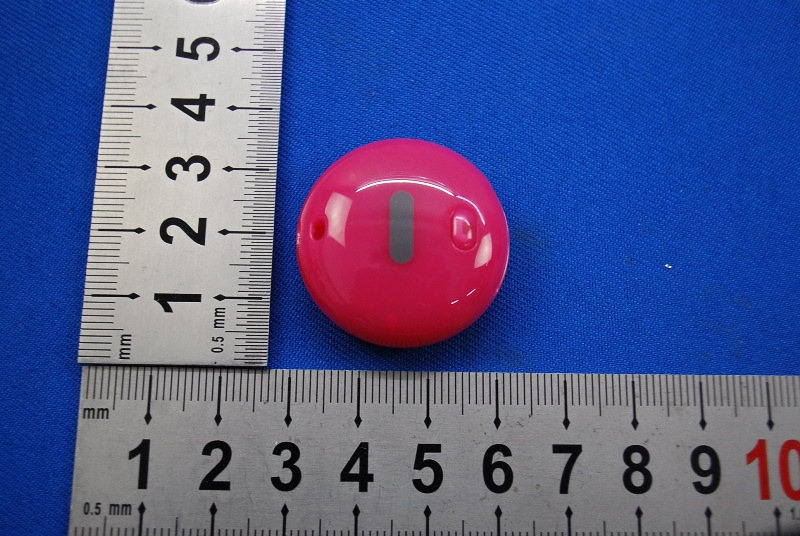
1 Photographs - EUT Constructional Details Test model No.: FB928
SGS-CSTC Standards Technical Services Ltd. No. 1 Workshop, M-10, Middle section, Science & Technology Park, Nanshan District, Shenzhen, Guangdong, China 518057 Telephone: +86 (0) 755 2601 2053 Fax: +86 (0) 755 2671 0594 Email: [email protected] Report No.: SZEM120900509401 Page: 1 of 41 Authorized Signature: Jack Zhang EMC Laboratory Manager The manufacturer should ensure that all products in series production are in conformity with the product sample detailed in this report. If the product in this report is used in any configuration other than that detailed in the report, the manufacturer must ensure the new system complies with all relevant standards. Any mention of SGS International Electrical Approvals or testing done by SGS International Electrical Approvals in connection with, distribution or use of the product described in this report must be approved by SGS International Electrical Approvals in writing. The report must not be used by the client to claim product certification, approval, or endorsement by NVLAP, NIST, or any agency of the federal government. All test results in this report can be traceable to National or International Standards. “This document is issued by the Company subject to its General Conditions of Service printed overleaf, available on request or accessible at www.sgs.com/terms_and_conditions.htm and, for electronic format documents, subject to Terms and Conditions for Electronic Documents at www.sgs.com/terms_e-document.htm . Attention is drawn to the limitation of liability, indemnification and jurisdiction issues defined therein. Any holder of this document is advised that information contained hereon reflects the Company’s findings at the time of its intervention only and within the limits of Client’s instructions, if any. The Company’s sole responsibility is to its Client and this document does not exonerate parties to a transaction from exercising all their rights and obligations under the transaction documents. This document cannot be reproduced except in full, without prior written approval of the Company. Any unauthorized alteration, forgery or falsification of the content or appearance of this document is unlawful and offenders may be prosecuted to the fullest extent of the law. Unless otherwise stated the results shown in this test report refer only to the sample(s) tested and such sample(s) are retained for 90 days only.” 1 Cover page FCC REPORT Application No: SZEM1209005094RF Applicant: Fitbug Limited Manufacturer: IDT Technology Limited Factory: IDT Technology Limited Product Name: Pedometer Model No.(EUT): FB928 FCC ID: PPB-FB928 Standards: 47 CFR Part 15, Subpart C (2011) Date of Receipt: 2012-09-10 Date of Test: 2012-09-18 to 2012-09-24 Date of Issue: 2012-9-27 Test Result: PASS * * In the configuration tested, the EUT complied with the standards specified above. SGS-CSTC Standards Technical Services Ltd. Report No.: SZEM120900509401 Page: 2 of 41 “This document is issued by the Company subject to its General Conditions of Service printed overleaf, available on request or accessible at www.sgs.com/terms_and_conditions.htm and, for electronic format documents, subject to Terms and Conditions for Electronic Documents at www.sgs.com/terms_e-document.htm . Attention is drawn to the limitation of liability, indemnification and jurisdiction issues defined therein. Any holder of this document is advised that information contained hereon reflects the Company’s findings at the time of its intervention only and within the limits of Client’s instructions, if any. The Company’s sole responsibility is to its Client and this document does not exonerate parties to a transaction from exercising all their rights and obligations under the transaction documents. This document cannot be reproduced except in full, without prior written approval of the Company. Any unauthorized alteration, forgery or falsification of the content or appearance of this document is unlawful and offenders may be prosecuted to the fullest extent of the law. Unless otherwise stated the results shown in this test report refer only to the sample(s) tested and such sample(s) are retained for 90 days only.” 2 Test Summary Test Item Test Requirement Test method Result Antenna Requirement 47 CFR Part 15, Subpart C Section 15.203/15.247 (c) KDB558074 D01 ANSI C63.10 2009 PASS Conducted Peak Output Power 47 CFR Part 15, Subpart C Section 15.247 (b)(3) KDB558074 D01 ANSI C63.10 2009 PASS 6dB Occupied Bandwidth 47 CFR Part 15, Subpart C Section 15.247 (a)(2) KDB558074 D01 ANSI C63.10 2009 PASS Power Spectral Density 47 CFR Part 15, Subpart C Section 15.247 (e) KDB558074 D01 ANSI C63.10 2009 PASS Pseudorandom Frequency Hopping Sequence 47 CFR Part 15, Subpart C Section 15.247(b)(4)&TCB Exclusion List (7 July 2002) ANSI C63.10 (2009) PASS Band-edge for RF Conducted Emissions 47 CFR Part 15, Subpart C Section 15.247(d) KDB558074 D01 ANSI C63.10 2009 PASS RF Conducted Spurious Emissions 47 CFR Part 15, Subpart C Section 15.247(d) KDB558074 D01 ANSI C63.10 2009 PASS Radiated Spurious Emissions 47 CFR Part 15, Subpart C Section 15.205/15.209 KDB558074 D01 ANSI C63.10 2009 PASS Band Edge (Radiated Emission) 47 CFR Part 15, Subpart C Section 15.205/15.209 KDB558074 D01 ANSI C63.10 2009 PASS SGS-CSTC Standards Technical Services Ltd. Report No.: SZEM120900509401 Page: 3 of 41 “This document is issued by the Company subject to its General Conditions of Service printed overleaf, available on request or accessible at www.sgs.com/terms_and_conditions.htm and, for electronic format documents, subject to Terms and Conditions for Electronic Documents at www.sgs.com/terms_e-document.htm . Attention is drawn to the limitation of liability, indemnification and jurisdiction issues defined therein. Any holder of this document is advised that information contained hereon reflects the Company’s findings at the time of its intervention only and within the limits of Client’s instructions, if any. The Company’s sole r…
Text truncated - open the document above for the full version.
1 Photographs - EUT Test Setup (Test model No.: FB928) 1.1 Radiated Emission
| # | Rule Parts | Frequency Range | Power Output |
|---|---|---|---|
| 1 | 15C | 2.40 GHz - 2.48 GHz | 810.00 µW |

Pedometer
Equipment Class
DTS - Digital Transmission System