PVG320120903Tablet PC
VIC LLC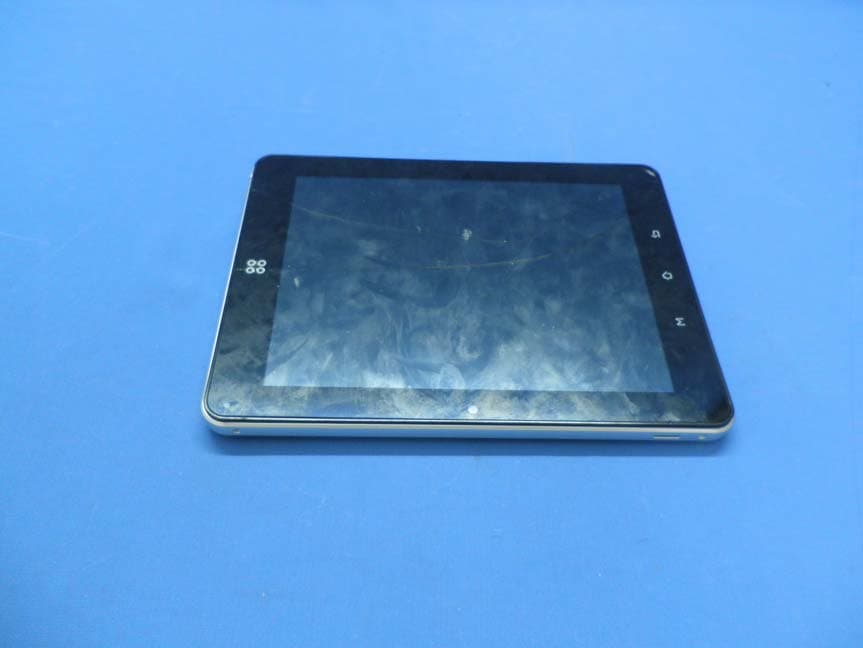
Click to zoom
Application Details
- Equipment Class
- DXT - Part 15 Low Power Transceiver, Rx Verified
- Date of Grant
- Nov 05, 2012
- Application Purpose
- Original Equipment
- Date of Application
- Nov 05, 2012
- Equipment Note
- Tablet PC
- Frequency Range
- 2402.00000000 - 2480.00000000
- Company
- VIC LLC
- Country
- United States
Documents & Files
Document Text
Text extracted from the exhibit documents filed with the FCC. Open a document above to read the original.
Users Manual
TEN3 Manual Attention: This handbook contains important security measures and the correct use of the product information, in order to avoid accidents. Pls make sure to reading the manual carefully before use the device. z Please don’t be in high temperature, moisture or very dust place z Please don’t be in high temperature, Especially in summer don't put the device in the car when Windows closed. z Avoid fall or Violent collision of the device, don’t make the TFT display screen were violent tremor, This could cause TFT display screen abnormal or damage. z Please choose the appropriate volume, Use headphones shoulds not be too big volume, If feel tinnitus, Lower the volume or stop using it z please charge In the following condition, A、 The battery power ICONS shows have no power B、 The system automatically shut off, startup after power off soon C、 Operation buttons no response z When the device in the format or ongoing upload and download file, please do n't suddenly disconnect, This could cause application error. z For those who because of damage to the product, repair, or other causes of erased the memory, The company shall not be liable for any responsibility, please follow the user manual for the standardized operation to use the device. z Don’t disassemble the product, don’t use alcohol、Thinner or benzene to scrubbing products z Don't use the device one of the place of prohibit to use electronic equipment in regional (such as the plane) z Please don't using the Tablet PC when you in driving or walking down the street, USB be used for data transmission and charging The company reserves the right to improve product, products specification and desi gn have any change, The information is subject to changes without prior notice. (This tablet is no waterproof function) 【Remark】All pictures in this manual is just for your reference. products specificati on and design have any change, The information is subject to changes without pri or notice. TEN3 Manual 1. appearance 2. First use 2.1 Battery management and charge Before first use, please set the device's battery is fully charged Just need to connect the USB interface, then you can charge The first two times charging please keep about 6 hours, after that you just need 4 hours to charge. 【Remark】: This tablet using Built-in type polymer battery, Charge must be to choose standard adaptor (Input: AC110~240V 50/60Hz Max:180MA.. Output: DC5.0~5.5V/2A), USB interface can charge, Choose USB interface to charger During the charging, the battery icon will scroll When finished charging, battery icon will become green and stop rolling In order to prolong the service life of the machine, suggest use out battery power before charge it 【Remark】: 1. If you long time don’t to use this Tablet, ,in order to avoid power consumption caused damage,pls charge/play the battery once a month. 2、After low battery shut down,connect USB,device will remind low battery,charging,need to wait some time until the battery is enough power to enter into main menu. 3. Device charging should be in standby status for reach normal charging time. Because with device and screen consumption,it may cause longer charging time. TEN3 Manual 2.2 Connection with PC Use USB cable to connect device to PC,device will pop up the USB connection window,click Turn on USB storage to connect to PC Into the load mode, you can copy, delete the file on thedevice and the file on the memory card. 3. Equipment operation interface 3.1 Main interface describe After startup will enter the main interface TEN3 Manual In the main interface, you can : Management main interface software ICONS: long press the icons 3 second, after t he icons will bigger, then you can drag anywhere in the interface. Delete icons: long press the icons 3 second, drag the icons to the Recycle Bin ico n, once it become red, Loosen your hand, after that you can delete icon You touch the screen keep a time, appear the dialog box”Add you Home screen” as shown below: TEN3 Manual 3.2 status bar describe z The status bar above of the screen The lower left corner is the return key, a key to return to the soft keys, menu key keyboard The lower right corner display the battery, battery charge icons, current time, T-Flash card, USB connection status and WIFI WIFI signal icon . 3.3 Use touch panel Device equipped with a 7 “ touch screen. Following the main touch screen area is described, and describes some of the tips for how to use the touch screen. No matter which interface you are on the screen, can go back to main screen through pressing the soft key . 【Attention】The main screen soft key functions as the machine back key In different applications, by tapping the back soft key , you can Return to the previous menu interface . In different applications, by tapping the menu key on the upper right corner of touch screen, the screen will appear the operation setting interface as follows, 【Remark】: The main screen soft key functions as the machine manu TEN3 Manual In the main interface, you can touch the icon to open the APPs In different browser(file, music, video, pictures), You shift and drag the scroll bar, so that the file list can up or down to roll. 4. Equipment basic set Setting: Click setting icons , enter setting interface TEN3 Manual 4.1 Silent mode,Volume, Touch tone ,Audible selection,Screen lock sounds, 4.2 Display Display settings you can set brightness, wallpaper, automatically rotate the screen, font size. TEN3 Manual 4.3 3G USB Dongle Your Device can connect to 3G networks. To connect 1. First turn off the WiFi 2.Touch settings, touch wireless &more&Mobile netwworks 3.To Data enabled and Data roaming checked. 。 4. SIM card into the 3G dongle, then use OTG cable to the USB interface of the MID 5. Such as the lower-right corner of the 3G icon you can use the 3G internet 4.4Bluetooth Bluetooth is a short distance (typically 10m) wireless communication technology to support data exchange between Bluetooth devices. The device has Bl…
Text truncated - open the document above for the full version.
Attestation Statements
VIC LLC 106A WEST SUMMIT HILL DRIVE, KNOXVILLE, TN 37902, USA Date:2012-10-12 To: Federal Communications Commission 7435 Oakland Mills Road Columbia, MD FCC ID: PVG320120903 To Whom It May Concern: This letter is to ascertain that VIC LLC. Product Tablet PC has been the units used for conducting FCC compliance testing, the DoC part will be tested by FCC recognized test lab. If you have any question or concerns, pls. contact us. Sincerely, Client’s signature : Client’s name / title STEVE SIOPSIS / PRESIDENT Contact information / 106A WEST SUMMIT HILL DRIVE, KNOXVILLE, TN 37902, USA
Cover Letter(s)
SCS-F18: Project and Product Certification Representative Authorization Letter Page 1 of 2 Rev 3.0 775 Montague Expressway Milpitas, CA 95035 Tel: 408-526-1188 Fax: 408-526-1088 Email: [email protected] Project and Product Certification Representative Authorization Letter Reason for Amendment (current / obsolete) Revision History Approved Date FromTo Initial Release (obsolete)1.01.0Nov-14-2006 Revised wording (obsolete)1.02.0Sept–25-2007 Updated company template (current)2.03.0Jan-31-2012 SCS-F18: Project and Product Certification Representative Authorization Letter Page 2 of 2 Rev 3.0 August 22, 2012 To: SIEMIC, INC. 775 Montague Expressway, Milpitas, CA 95035 USA Dear Sir/Madam, Re: Project and Product Certification Representative Authorization Letter We,_VICLLC hereby authorize SIEMIC, INC. to act as a Certification Body for certifying for the following project(s): Product description : Tablet PC model name : TEN3 FCC ID : PVG320120903 We affirm that between SIEMIC and __ VIC LLC __ , any difference in understanding, including test plan, measurement methods, applicable standards and relevant procedures and processes have been resolved prior to commencement of testing activities. Sincerely, Client’s signature Client’s name / title STEVE SIOPSIS / PRESIDENT Contact information / address 106A WEST SUMMIT HILL DRIVE, KNOXVILLE, TN 37902, USA 106A West Summit Hill Drive Knoxville, TN 37902 Phone: 865.524.8888 Fax: 865.524.0740 E-mail: [email protected] Web: www.vic.com
Cover Letter(s)
SCS-F19: Confidentiality Request LetterPage 1 of 2 Rev 3.0 775 Montague Expressway Milpitas, CA 95035 Tel: 408-526-1188 Fax: 408-526-1088 Email: [email protected] Confidentiality Request Letter Reason for Amendment (current / obsolete) Revision History Approved Date FromTo Initial Release (obsolete)1.01.0Nov-14-2006 Adding CFR 2.459 (obsolete)1.02.0August – 11 - 2008 Updated company template & Added text box (current) 2.03.0Jan-31-2012 SCS-F19: Confidentiality Request LetterPage 2 of 2 Rev 3.0 September 21, 2012 To: Federal Communications Commission Authorization and Evaluation Division 7435 Oakland Mills Road Columbia, MD Subject: Permanent Confidentiality Request for FCC ID: PVG320120903 We hereby request confidential treatment of information accompanying this application as outlined below: -BlockDiagram -Schematics -Operational Description The above materials contain trade secrets and proprietary information not customarily released to the public. The public disclosure of these materials may be harmful to the applicant and provide unjustified benefits to its competitors. The applicant understands that pursuant to Section 0.457 & 0.459 of the Rules, disclosure of this application and all accompanying documentation will not be made before the date of the Grant for this application. Sincerely, Client’s signature : Client’s name / title : STEVE SIOPSIS / PRESIDENT Contact information / address: 106A WESTSUMMIT HILL DRIVE, KNOXVILLE, TN 37902, USA 106A West Summit Hill Drive Knoxville, TN 37902 Phone: 865.524.8888 Fax: 865.524.0740 E-mail: [email protected] Web: www.vic.com
External Photos
EUT exterior photo
ID Label/Location Info
Proposed Label Location On EUT EUT Bottom View/Proposed FCC ID LABEL location
Internal Photos
EUT inside photo Antenna and Radio Module Note: Antenna cable 15cm Main PCB board photos
Test Report
FCC 47 CFR PART 15 SUBPART C TEST REPORT For VIC LLC Tablet PC Model: TEN 3 Trade Name:N/A FCC ID: PVG320120903 Report No. : ST1208002F Prepared for VIC LLC 106A WEST SUMMIT HILL DRVIE,KNOXVILLE,TN37902,USA Prepared by SINTEK LABORATORY CO., LTD. No. 7, XINSHIDAI INDUSTRIAL, GUANTIAN VILLAGE, SHIYAN TOWN, BAOAN DISTRICT, SHENZHEN, GUANGDONG, P.R.C. TEL: 86-755-27604866 FAX: 86-755-27608359 Note: This report shall not be reproduced except in full, without the written approval of Sintek Laboratory CO., Ltd. This document may be altered or revised by Sintek Laboratory Co., Ltd. personnel only, and shall be noted in the revision section of the document. Page 1 of 26 TABLE OF CONTENTS 1. TEST RESULT CERTIFICATION............................................................................................. 3 2. EUT DESCRIPTION.................................................................................................................... 4 3. TEST METHODOLOGY............................................................................................................. 5 3.1 EUT CONFIGURATION...................................................................................................................5 3.2 EUT EXERCISE...............................................................................................................................5 3.3 GENERAL TEST PROCEDURES........................................................................................................5 3.4 FCC PART 15.205 RESTRICTED BANDS OF OPERATIONS....................................................6 3.5 DESCRIPTION OF TEST MODES......................................................................................................7 4. INSTRUMENT CALIBRATION................................................................................................. 8 5. FACILITIES AND ACCREDITATIONS................................................................................... 9 5.1 FACILITIES....................................................................................................................................9 5.2 EQUIPMENT...................................................................................................................................9 5.3 LABORATORY ACCREDITATIONS AND LISTING.............................................................................9 6. SETUP OF EQUIPMENT UNDER TEST................................................................................ 10 6.1 SETUP CONFIGURATION OF EUT..................................................................................................10 6.2 SUPPORT EQUIPMENT..........................................................................................................10 7. FCC PART 15.249 REQUIREMENTS...................................................................................... 11 7.1 BAND EDGES MEASUREMENT...........................................................................................11 7.2 RADIATED EMISSIONS................................................................................................................14 7.3 POWER LINE CONDUCTED EMISSIONS.........................................................................................21 8. APPENDIX 1 PHOTOGRPHS OF TEST SETUP................................................................... 25 Page 2 1. TEST RESULT CERTIFICATION Applicant: VIC LLC Address : 106A West Summit Hill Drvie,Knoxville,Tn37902,USA Equipment Under Test: Tablet PC Trade Name: N/A Model: TEN 3 Date of Test: August 14-september27 , 2012 Date of issue: October 29, 2012 Report No. : ST1208002F FCC ID : PVG320120903 APPLICABLE STANDARDS STANDARD TEST RESULT FCC Part 15 Subpart C No non-compliance noted Summary of Measurement Test Item Test Requirement Standard Paragraph Result Band edge Requirement FCC PART15 15.209&15.249 Compliance Radiation Emission FCC PART15 15.209&15.249 Compliance Antenna Requirement FCC PART15 15.203 Compliance Power Line Conducted Emission FCC PART15 15.207 Not applicable We hereby certify that: The above equipment was tested by SINTEK LABORATORY CO., LTD. The test data, data evaluation, test procedures, and equipment configurations shown in this report were made in accordance with the procedures given in ANSI C63.4: 2003 and the energy emitted by the sample EUT tested as described in this report is in compliance with the requirements of FCC Rules Part 15.249 The test results of this report relate only to the tested sample identified in this report. Approved by: Reviewed by: Page 3 2. EUT DESCRIPTION Product Tablet PC Tr a de Name N/A Model Number TEN 3 Model Discrepancy N/A Power Supply DC 5.0V Frequency Range 2402-2480 MHz Number of Channels 40 Channels Antenna Specification The EUT’S antenna is integrated on the main PCB Antenna Requirement Requirement(s): 47 CFR §15.203 An intentional radiator shall be designed to ensure that no antenna other than that furnished by the responsible party shall be used with the device. Antenna requirement must meet at least one of the following: a) Antenna must be permanently attached to the device. b) Antenna must use a unique type of connector to attach to the device. c) Device must be professionally installed. Installer shall be responsible for ensuring that the correct antenna is employed with the device. The EUT’S antenna is fixed on the main PCB / Gain: 0.21dBi Note: This submittal(s) (test report) is intended for FCC ID: PVG320120903 filing to comply with Section 15.249 of the FCC Part 15, Subpart C Rules. Page 4 3. TEST METHODOLOGY The tests documented in this report were performed in accordance with ANSI C63.4 and FCC CFR 47 2.1046, 2.1047, 2.1049, 2.1051, 2.1053, 2.1055, 2.1057, and15.249 3.1 EUT CONFIGURATION The EUT configuration for testing is installed on RF field strength measurement to meet the Commissions requirement and operating in a manner that intends to maximize its emission characteristics in a continuous norm…
Text truncated - open the document above for the full version.
Test Setup Photos
Radiated Emission Set up Photos power line conducted emissions Set up Photos
Contact Information
Applicant
Steve Siopsis(President)
Test Firm
SinTek Laboratory Co., Ltd.Eric Lin
Technical Specifications
| # | Rule Parts | Frequency Range | Power Output |
|---|---|---|---|
| 1 | 15C | 2.40 GHz - 2.48 GHz | - |
Other Applications from VIC LLC
PVGVICDSMDSR497
Mar 18, 2013Tablet PC
Equipment Class
DTS - Digital Transmission System