PY71130601Licensed transmitter
Sony Corporation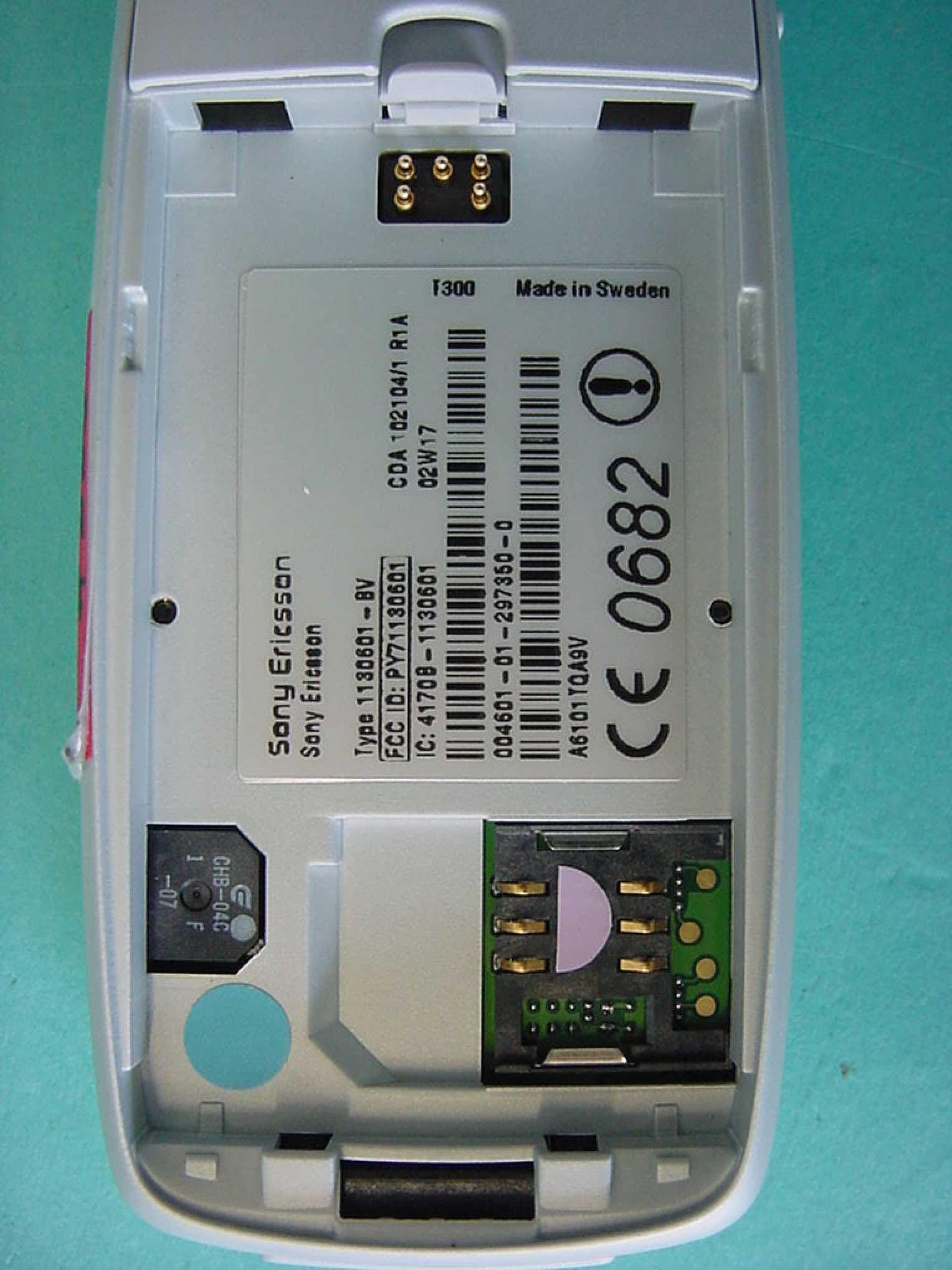
Click to zoom
Application Details
- Equipment Class
- PCE - PCS Licensed Transmitter held to ear
- Date of Grant
- Jul 14, 2002
- Application Purpose
- Original Equipment
- Date of Application
- Jul 14, 2002
- Equipment Note
- Licensed transmitter
- Frequency Range
- 1850.00000000 - 1910.00000000
- Company
- Sony Corporation
- Country
- Japan
Documents & Files
Document Text
Text extracted from the exhibit documents filed with the FCC. Open a document above to read the original.
Users Manual
3 ContentsGetting started 5Make and receive the first call.Getting to know your phone 8Key functions, quick keys, entering letters and characters.Personalizing your phone 18Choose ring signal, theme and other settings.Calling 27Use the phone book, call options.Setting up mobile Internet 42SetupWAPande-mail.Messaging 50Chat, e-mail, text and multimedia messages.Using mobile Internet 59WAP browser, bookmarks. More features 63Data, events, alarm clock, stopwatch, timer, games.Security 67SIM card lock, phone lock.Troubleshooting 69Why doesn’t the phone work the way I want?Additional information 71Sony Ericsson Consumer web site,safe and efficient use, warranty, declaration of conformity.Icons 81What do the icons mean?Index 85 4 Sony EricssonFirst edition (May 2002)This manual is published by Sony Ericsson MobileCommunications AB, without any warranty.Improvements and changes to this manualnecessitated by typographical errors, inaccuraciesof current information, or improvements toprograms and/or equipment, may be made by SonyEricsson Mobile Communications AB at any timeand without notice. Such changes will, however, beincorporated into new editions of this manual.All rights reserved.© Sony Ericsson Mobile Communications AB, 2002 Publication number: EN/LZT 108 5754 R1APlease note:Some of the services in this manual are notsupported by all networks. This also applies to the GSM International Emergency Number 112 . Please contact your network operator or serviceprovider if you are in doubt whether you can use aparticular service or not.Please read the Guidelines for safe and efficient use and the Limited warranty chapters before you use your mobile phone.T9™ Text Input is a registered trademark of TegicCommunications.T9™ Text Input is licensed under one or more ofthe following: U.S. Pat. Nos. 5,818,437, 5,953,541,5,187,480, 5,945,928, and 6,011,554; CanadianPat. No. 1,331,057, United Kingdom Pat. No.2238414B; Hong Kong Standard Pat. No.HK0940329; Republic of Singapore Pat. No.51383; Euro.Pat. No. 0 842 463(96927260.8) DE/DK, FI, FR, IT, NL, PT, ES, SE, GB; and additionalpatents are pending worldwide. Getting started 5 Getting startedAbout this user’s guideFor ease of reference, the “Getting to know yourphone” chapter gives a quick overview of the mainfunctions of the phone, shortcuts and generalinformation.More information and downloads are available atwww.SonyEricsson.com/ or wap.SonyEricsson.com/ . Available servicesSomeservicesandfunctionsdescribedinthisuser’sguide are network- or subscription-dependent. Becauseof this, all menus may not be available in your phone. This symbol indicates that a service or function is network or subscription-dependent. Please consult your network operator for more information about your subscription.The SIM cardWhen you register as a subscriber with a networkoperator, you get a SIM (Subscriber Identity Module)card. The SIM card contains a computer chip that keeps track of your phone number, the servicesincluded in your subscription, and your phone bookinformation, among other things.Tip: Check if your information is saved to the SIM card before you remove it from another phone. Forexample, phone book entries may be saved in thephone memory.AssemblyBefore you can use your phone you need to: • Insert the SIM card.• Attach and charge the battery. See “SIM card and battery information” on page 6.Note: Always turn off the phone and detach the charger before you insert or remove a SIM card. 6 Getting started SIM card and battery informationIt may take up to 30 minutes before an icon appears when charging. 1. Insert the SIM card. Make sure the SIM card is placedunder the silvery holders. 2. Place the battery on the back of the phone with theconnectors facing each other. 3. Place the back cover into the bottom of the phone andpush the top until it clicks into place. 4. Connect the charger to the phone at the flash symbol.The flash symbol on the charger plug must faceupwards. 5. Itmaytakeupto30minutesbeforethebatterycharging icon appears in the display. 6. Wait approximately 4 hours or until the icon indicatesthat the battery is fully charged. If you do not see thebattery icon after this time, press any key or thejoystick to activate the display. 7. Remove the charger by tilting the plug upwards.Note: You have to insert the SIM card and charge the battery before you can use the phone. Getting started 7 Making and receiving callsTo turn on the phone • Press and hold NO until you hear a tone. • Enter your PIN (Personal Identity Number), if you have one for your SIM card.Your PIN is provided by your network operator.If you make a mistake while entering your PIN, deletethe wrong number by pressing . If your PIN starts with the same digits as an emergency number, for example 112, the digits are not hidden with an * when you enter them. This is so thatyou can see and call an emergency number withoutentering a PIN. See “Emergency calls” on page 28 formore information.Note: IfyouenterthewrongPINthreetimesinarow, the SIM card is blocked and the message PIN blockedappears. To unblock it, you need to enter your PUK(Personal Unblocking Key). Your PUK is provided byyour network operator. To make and receive calls • Enter the area code and phone number, and press YES to make the call . •Press NO to end the call. • When the phone rings, press YES to answer the call. On/off My Network 12:18 Welcome PIN: 8 Getting to know your phone Getting to know your phoneKey functions Vo l u m ekey Increase/decrease the earpiecevolume during a call. Scrollthrough menus, lists and text.Enter the Status menu instandby. Slide twice to rejectan incoming call. Slide once toturn off the ring signal whenreceiving a call.Make and answer calls. Selecta menu, submenu or an option.Press for options, help.Press and hold for WAP. 1–9, 0 Enter digits, 0–9, and letters. Press and hold to enter the international prefix +.Move through menus usingshortcuts.Enter *. Shift between lower/upper case. Press the joystick u…
Text truncated - open the document above for the full version.
External Photos
CETECOM ICT Services GmbH Test report no.:4_0657-01-02/02Issue date: 2002-01-29Page 46 (56) Photographs of the equipment Photograph no.: 1 CETECOM ICT Services GmbH Test report no.:4_0657-01-02/02Issue date: 2002-01-29Page 47 (56) Photographs of the equipment Photograph no.: 2 CETECOM ICT Services GmbH Test report no.:4_0657-01-02/02Issue date: 2002-01-29Page 48 (56) Photographs of the equipment Photograph no.: 3 CETECOM ICT Services GmbH Test report no.:4_0657-01-02/02Issue date: 2002-01-29Page 49 (56) Photographs of the equipment Photograph no.: 4 CETECOM ICT Services GmbH Test report no.:4_0657-01-02/02Issue date: 2002-01-29Page 50 (56) Photographs of the equipment Photograph no.: 5
ID Label/Location Info
Limited Internal MARKING DRAWING 1 (3) Prepared (also subject responsible if other)No. LD/SEM/GUP/P Gunilla Novak151 86-SVV 107 88/1 Uen ApprovedCheckedDateRevReference LD/SEM/GUP/P (Gunilla Novak)2002-05-22PA4 Approved according to: 000 21 – LXE 107 42/1 Type 1130601-BV. Label The label used for marking is defined in the Manufacturing Specification on the SVF 930 327. Placing The label shall be placed on the back of the telephone according to the Assembly Drawing (151 88) for the KRH. Print layout Example on approved label layout Sony Ericsson TrademarkAdditional field Sony Ericsson Type number G H Y 1 Y 2 Y 3 field Country approval mark 1CDA number Country approval mark 2 Repair week Production week IMEI-numbers as barcode IMEI-numbers as characters Serial number as barcode Serial number as characters Approval marks (1, 2, 3) Definitions: SonyEricsson trademarkThe SonyEricsson trademark shall be according to the corporate standard 190 89- EN/LZT 108 5347. Additional fieldThe field shall be left blank unless otherwise stated in a separate 151 86 document for the SVV. Sony EricssonShall be printed: Sony Ericsson Type numberThe type number is 1130601-BV and shall be printed “Type 1130601-BV” G-fieldR-state identification of the CXC-module According to the Marking data 1/15186 for the SVV. H-fieldR-state identification of the hardware according to the Marking data 1/15186 for the SVV. Y 1 -fieldR-state identification of the KRH according to the Marking data 1/151 86 for the SVV. Y 2 -fieldROA structure identification according to the Marking data 1/151 86 for the SVV. Y 3 -fieldR-state identification of the ROA according to Model name Marking of origin ”DPY” number R-state Limited Internal MARKING DRAWING 2 (3) Prepared (also subject responsible if other)No. LD/SEM/GUP/P Gunilla Novak151 86-SVV 107 88/1 Uen ApprovedCheckedDateRevReference LD/SEM/GUP/P (Gunilla Novak)2002-05-22PA4 the Marking data 1/151 86 for the SVV. Country approval mark 1 Consist of text: FCC ID: PY71130601 Within a frame with height > 1,5 mm. CDA numberThe number of the CDA file loaded including the R-state of the file. Country approval mark 2 Consist of text: IC: 4170B-1130601 Repair weekThe field shall be left blank unless a repair centre repairs the unit. The repair week shall then be given as Rywwxx (R = repair, y = year, ww = week, xx = Revision eg. 1A) Production weekThe production week shall be given as yyWww (yy = year, ww = week) according to the ISO 8601 standard. IMEI number as bar codeSee below for definition of IMEI-number. The bar code shall only contain the digits of the IMEI number (no-). IMEI number as charactersThe IMEI number has format: TAC-FAC-SNR-CD TAC = will be defined at ETA SNR = A serial number 000000 to 999 999. CD = A check digit, from 0-9, calculated according to the Luhn formula (ISO/IEC 7812), GSM 02.16. Serial number as bar codeAccording to Ericsson corporate standard 102 01 - 109. Serial number as charactersAccording to Ericsson group standard 0012- 101. Ericsson group factory number system according the Ericsson corporate standard 1120-101 Factory codes: Linköping A61 Beijing CB5 Nanjing CB9 Shah Alam BD3 Hungary TZ4 Approval marks1. According to 1424 - SVF 930 52 2. The notified body number according to the TTE Annex III certificate for the production plant. If this is not available, use the notified body number from the type approval certificate (normally 0682). The print size (height) for the notified body number (e.g. 0682) and the corresponding approval marks shall be minimum 5 mm. This is a regulatory requirement. 3. According to 1424 - SVF 930 196 Model nameThe model name T300 Limited Internal MARKING DRAWING 3 (3) Prepared (also subject responsible if other)No. LD/SEM/GUP/P Gunilla Novak151 86-SVV 107 88/1 Uen ApprovedCheckedDateRevReference LD/SEM/GUP/P (Gunilla Novak)2002-05-22PA4 Marking of originThe field shall be left blank unless otherwise stated in a separate 2/151 86-SVV document. “DPY” numberThe DPY number for the product without DPY 101 e.g. if you are producing DPY 101 2554/1 the printing should be 2554/1. R-stateThe R-state for the DPY according to the 1095 for the DPY. Print regulations The printing shall be well readable and permanent. TypefaceOCR-B Type sizemin 1.1 mm Line spacingmin 1.5 mm Trademarkmin 2.25 mm Approval marksmin 5.0 mm
Internal Photos
CETECOM ICT Services GmbH Test report no.:4_0657-01-02/02Issue date: 2002-01-29Page 50 (56) Photographs of the equipment Photograph no.: 5 CETECOM ICT Services GmbH Test report no.:4_0657-01-02/02Issue date: 2002-01-29Page 51 (56) Photographs of the equipment Photograph no.: 6 CETECOM ICT Services GmbH Test report no.:4_0657-01-02/02Issue date: 2002-01-29Page 52 (56) Photographs of the equipment Photograph no.: 7 CETECOM ICT Services GmbH Test report no.:4_0657-01-02/02Issue date: 2002-01-29Page 53 (56) Photographs of the equipment Photograph no.: 8 CETECOM ICT Services GmbH Test report no.:4_0657-01-02/02Issue date: 2002-01-29Page 54 (56) Photographs of the equipment Photograph no.: 9 CETECOM ICT Services GmbH Test report no.:4_0657-01-02/02Issue date: 2002-01-29Page 55 (56) Photographs of the equipment Photograph no.: 10 CETECOM ICT Services GmbH Test report no.:4_0657-01-02/02Issue date: 2002-01-29Page 56 (56) Photographs of the equipment Photograph no.: 11
RF Exposure Info
SecurityClass REPORT 1 (19) Prepared (also subject responsible if other)No. Ramadan PlicanicGTX/FG 02:007 ApprovedCheckedDateRevReference Ramadan PlicanicRAPL020525AFile SAR Test Report: T300 (PY71130601) Date of test:May 22 and 23, 2002 Laboratory:Electromagnetic Near Field and Radio Frequency Dosimetry Lab Sonyericsson Mobile Communications AB Nya Vatentornet SE-221 82 LUND, Sweden Test Responsible:Ramadan Plicanic Senior Staff Engineer, Terminal Antennas [email protected] + 46 46 19 38 62 Statement of Compliance Sonyericsson Mobile Communications AB declares under its sole responsibility that the product Sonyericsson Type 1130601-BV (T300); FCC ID: PY71130601 to which this declaration relates, is in conformity with the appropriate RF exposure standards recommendations and guidelines. It also declares that the product was tested in accordance with the appropriate measurement standards, guidelines and recommended practices. Any deviations from these standards, guidelines and recommended practices are noted below: (None) © Sonyericsson Mobile Communications AB, 2002 This test report shall not be reproduced except in full, without written approval of the laboratory. The results and statements contained herein relate only to the items tested. The names of individuals involved may be mentioned only in connection with the statements or results from this report. Sonyericsson encourages all feedback, both positive and negative, on this report. SecurityClass REPORT 2 (19) Prepared (also subject responsible if other)No. Ramadan PlicanicGTX/FG 02:007 ApprovedCheckedDateRevReference Ramadan PlicanicRAPL020525AFile 1 Table of contents 2INTRODUCTION.................................................................................................................................................................................3 3DEVICE UNDER TEST......................................................................................................................................................................3 3.1ANTENNA DESCRIPTION......................................................................................................................................................................3 3.2DEVICE DESCRIPTION..........................................................................................................................................................................3 4TEST EQUIPMENT.............................................................................................................................................................................4 4.1DOSIMETRIC SYSTEM...........................................................................................................................................................................4 4.2ADDITIONAL EQUIPMENT....................................................................................................................................................................4 5ELECTRICAL PARAMETERS ON THE TISSUE SIMULATING LIQUID....................................................................4 6SYSTEM ACCURACY VERIFICATION.....................................................................................................................................5 7SAR MEASUREMENT UNCERTAINTY.....................................................................................................................................5 8TEST RESULTS....................................................................................................................................................................................6 9REFERENCES.......................................................................................................................................................................................7 10APPENDIX..............................................................................................................................................................................................8 10.1SAR DISTRIBUTION COMPARISON FOR SYSTEM ACCURACY VERIFICATION...........................................................................8 10.2SAR DISTRIBUTION PLOT............................................................................................................................................................12 10.3PHOTOGRAPHS OF THE DEVICE UNDER TEST.............................................................................................................................15 10.4DEVICE POSITION ON SAM TWINS PHANTOM..........................................................................................................................17 10.5PROBE CALIBRATION PARAMETERS............................................................................................................................................19 SecurityClass REPORT 3 (19) Prepared (also subject responsible if other)No. Ramadan PlicanicGTX/FG 02:007 ApprovedCheckedDateRevReference Ramadan PlicanicRAPL020525AFile 2 Introduction In this test report, compliance of the Sonyericsson T300 portable telephone with RF safety guidelines is demonstrated. The applicable RF safety guidelines and the SAR measurement specifications used for the test are described in the SAR Measurement Specifications of Wireless Handsets [1]. 3 Device Under Test 3.1 Antenna Description TypeInternal antenna LocationInside the back cover, near the top Max length38mm Dimensions Max width17mm ConfigurationPIFA 3.2 Device description Device modelT300 Serial numberA6101TQA85 ModeGSM 1900 Multiple Access SchemeTDMA Maximum Output Power Setting30.0dBm Factory Tolerance in Power Setting± 0.5dB Maximum Peak Output Power30.5dBm Crest Factor8 Transmitting Frequency Range1850 – 1910 MHz Prototype or Production UnitPrototype Device CategoryPortable RF exposure environmentGeneral population / uncontrolled SecurityClass REPORT 4 (19) Prepared (also subject responsible if other)No. Ramadan Plic…
Text truncated - open the document above for the full version.
Test Setup Photos
CETECOM ICT Services GmbH Test report no.:4_0657-01-02/02Issue date: 2002-01-29Page 44 (56) Test site RADIATED EMISSIONS CETECOM ICT Services GmbH Test report no.:4_0657-01-02/02Issue date: 2002-01-29Page 45 (56) Test site
Contact Information
Applicant
Mika Kaneko(Chief Regulatory Compliance Manager)
Technical Contact
Sony Ericsson Mobile Communications ABH�kan Sj�berg
[email protected]+4646193200
Nya Vattentornet · Lund · Sweden
Non-Technical Contact
Sony Ericsson Mobile Communications ABMats Hansson
Test Firm
CETECOM GmbHWolfgang Richter
Technical Specifications
| # | Rule Parts | Frequency Range | Power Output | Emission | Tolerance |
|---|---|---|---|---|---|
| 1 | 24E | 1.85 GHz - 1.91 GHz | 636.70 mW | 300KF2D | 2.5000000000 ppm |
Other Applications from Sony Corporation
PY7-75158T
Jul 16, 2026GSM/WCDMA/LTE Phone with BT, DTS/UNII a/b/g/n/ac/ax, NFC and GNSS
Equipment Class
NII - Unlicensed National Information Infrastructure TXPY7-52715J
Jul 16, 2026GSM/WCDMA/LTE Phone with BT, DTS/UNII a/b/g/n/ac/ax, NFC and GNSS
Equipment Class
DXX - Part 15 Low Power Communication Device TransmitterPY7-84526Y
Jul 16, 2026GSM/WCDMA/LTE Phone with BT, DTS/UNII a/b/g/n/ac/ax, NFC and GNSS
Equipment Class
PCE - PCS Licensed Transmitter held to earPY7-30515Z
Apr 13, 2026GSM/WCDMA/LTE/NR Phone with BT, DTS/UNII a/b/g/n/ac/ax/be, NFC, GNSS and WPT
Equipment Class
DXX - Part 15 Low Power Communication Device TransmitterPY7-73716J
Apr 11, 2024GSM/WCDMA/LTE Phone with BT, DTS/UNII a/b/g/n/ac, NFC and GNSS
Equipment Class
PCE - PCS Licensed Transmitter held to ear