PY7A1021041Licensed Transmitter
Sony Corporation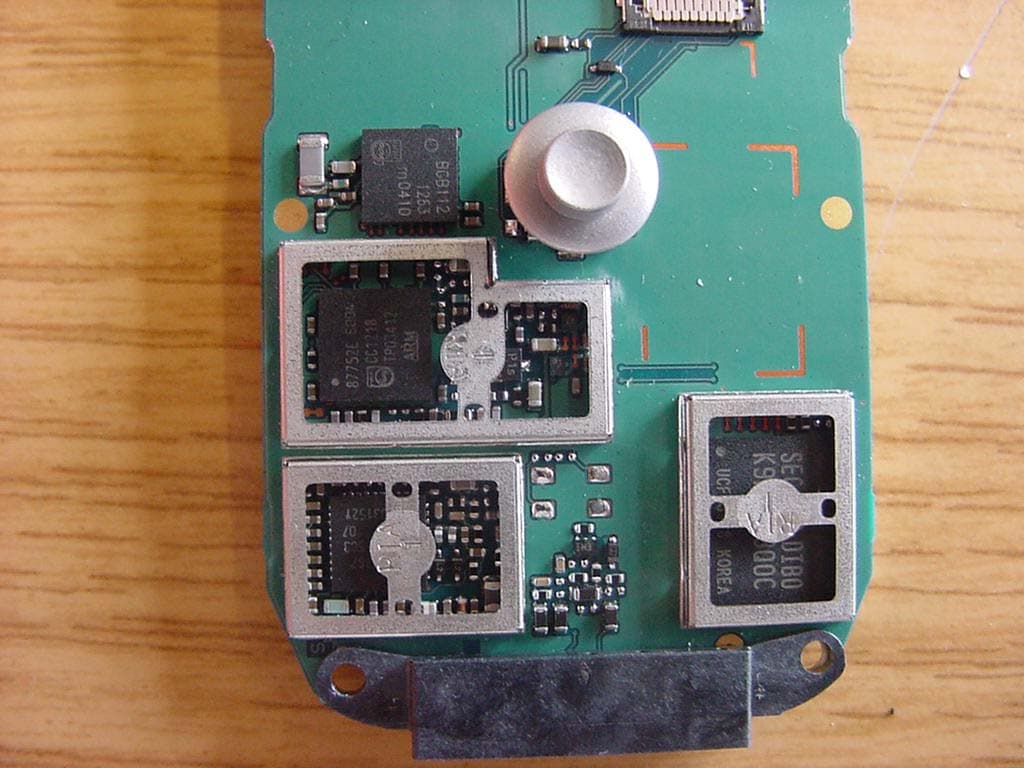
Click to zoom
Application Details
- Equipment Class
- DSS - Part 15 Spread Spectrum Transmitter
- Date of Grant
- May 12, 2004
- Application Purpose
- Original Equipment
- Date of Application
- May 12, 2004
- Equipment Note
- Licensed Transmitter
- Frequency Range
- 2402.00000000 - 2480.00000000
- Company
- Sony Corporation
- Country
- Japan
Documents & Files
Document Text
Text extracted from the exhibit documents filed with the FCC. Open a document above to read the original.
Users Manual
1 Contents ContentsGetting started . . . . . . . . . . . . . . . . . . 4Assembling the phone, SIM ca rd, battery, making a call. Getting to know your phone . . . . . . . . 8Phone overview, using the menus, entering letters, file manager.Calling . . . . . . . . . . . . . . . . . . . . . . . . 17 Calls, phonebook, voice control, call options. Messaging . . . . . . . . . . . . . . . . . . . . . 36Text messaging, picture me ssaging, email, My Friends, messaging glossary.Imaging . . . . . . . . . . . . . . . . . . . . . . . 51 Camera, video recorder, pictures, screen saver. Entertainment . . . . . . . . . . . . . . . . . . 57 Media player, sounds, themes, games. Connectivity . . . . . . . . . . . . . . . . . . . . 63 Internet and email se ttings, synchronizing, Bluetooth™ wireless technology, infrared.More features . . . . . . . . . . . . . . . . . . . 72 Time and date, alarm cl ock, calendar, tasks, SIM card lock, etc.Troubleshooting . . . . . . . . . . . . . . . . . 81 Why doesn’t the phone work the way I want? Additional information . . . . . . . . . . . . 84 Sony Ericsson Web site, safe and efficient use, warranty, declaration of conformity.Icons . . . . . . . . . . . . . . . . . . . . . . . . . . 91 Icon descriptions.Index . . . . . . . . . . . . . . . . . . . . . . . . . 93 K700UG-R1A-AE.book Page 1 Th ursday, April 15, 2004 12:32 PM 2 Sony EricssonGSM 900/1800/1900First edition (March 2004)This manual is published by Sony Ericsson Mobile Communications AB, without any warranty. Improvements and changes to this manual necessitated by typographical errors, inaccuracies of current information, or improve-ments to programs and/or equipment, may be made by Sony Ericsson Mobile Communications AB at any time and with out notice. Such changes will, however, be incorpor ated into new editions of this manual.All rights reserved.© Sony Ericsson Mobile Communications AB, 2004 Publication number: AE/LZT 108 6824 R1APlease note:Some of the services in this manual are not supported by all networks. This also applies to the GSM International Emergency Number 112 . Please contact your service provider if you are in doubt whether you can use a particular service or not.Please read the Guidelines for safe and efficient use and the Limited warranty chapters before you use your mobile phone. The Bluetooth word mark and logos are owned by the Bluetooth SIG, Inc. and any use of such marks by Sony Ericsson is under license.T9™ Text Input is a trademark or a registered trademark of Tegic Communications.T9™ Text Input is lic ensed under one or more of the following: U.S. Pat. Nos. 5,818,437, 5,953,541, 5,187,480, 5,945,928, and 6,011,554; Canadian Pat. No. 1,331,057; United Kingdom Pat. No. 2238414B; Hong Kong Standard Pat. No. HK0940329; Republic of Singapore Pat. No. 51383; Euro. Pat. No. 0 842 463 (96927260.8) DE/DK, FI, FR, IT, NL , PT, ES, SE, GB; and additional patents are pending worldwide.Java and all Java based trademarks and logos are trademarks or registered trademarks of Sun Microsystems, Inc. in the U.S. and other countries.End-user license agreement for Sun™ Java™ J2ME™.1 Restrictions: Software is confidential copyrighted information of Sun and ti tle to all copies is retained by Sun and/or its licensors. Customer shall not modify, decompile, disassemble, decrypt, extract, or otherwise reverse engineer Software. Software may not be leased, assigned, or sublicensed, in whole or in part. K700UG-R1A-AE.book Page 2 Th ursday, April 15, 2004 12:32 PM 3 2 Export Regulations: Software, including technical data, is subjec t to U.S. export control laws, including the U.S. Export Administration Act and its associated regulations, and may be subject to export or im port regulations in other countries. Customer agrees to comply strictly with all such regulations and acknowledges that it has the responsibility to obtain licenses to export, re-export, or import Software. Software may not be downloaded, or otherwise exported or re-exported (i ) into, or to a national or resident of, Cuba, Iraq, Iran, North Korea, Libya, Sudan, Syria (as such listing may be revised from time to ti me) or any country to which the U.S. has embargoed goods; or (ii) to anyone on the U.S. Treasury Department’s list of Specially Desi gnated Nations or the U.S. Commerce Department’s Table of Denial Orders. 3 Restricted Rights: Use, duplication or disclosure by the United States government is subject to the restrictions as set forth in the Rights in Technical Data and Computer Software Clauses in DFARS 252. 227-7013(c) (1) (ii) and FAR 52.227-19(c) (2) as applicable. Part of the software in th is product is copyright © SyncML initiative Ltd. (1999-2002). All rights reserved.Other product and company names mentioned herein may be the trademarks of their respective owners.Any rights not expressly granted herein are reserved. K700UG-R1A-AE.book Page 3 Th ursday, April 15, 2004 12:32 PM 4Getting started Getting startedAssembling the phone, SIM card, battery, making a call.More information and downloads are available at www.SonyEricsson.com.Instruction iconsThe following instruction icons appear in this user guide: AssemblyBefore you can use you r phone you need to: • Insert the SIM card.• Attach and charge the battery. SIM cardWhen you register as a s ubscriber with a service provider, you get a SIM (Subscriber Identity Module) card. The SIM card contains a computer chip that keeps track of your phone number, the services included in you r subscription, and your phonebook information, among other things. SIM card and battery informationAlways turn off the phone and detach the charger before you insert or remove a SIM card. } Use the selection keys or the navigation key to scroll and select. % 10 Navigating the menus . % See also page ...ImportantNoteContact your service provider for details. % 6 Available services . If you have been using a SIM card in another phone, make sure that your information is saved to the SIM card before you remove …
Text truncated - open the document above for the full version.
Users Manual
47 Messaging Receiving a messageWhen you receive a me ssage, a message alert sounds or an icon app ears in the status bar. Contact listYou can create nicknames for the contacts in your list that are connected to the My Friends server. You can also link a cont act to the phonebook and get access to all information saved in the phonebook.To enter a nickname1 } Messages } My Friends , and select a contact. 2 } More } Manage Contact } Edit Nickname . 3 Enter the nickname for that contact } Save . To link a contact to the phonebook1 } Messages } My Friends and select a contact. 2 } More } Manage Contact } Link to Contacts and select the contact in phonebook that you want to create a link to. StrangersA stranger is someone that is not in your list of contacts. An icon in dicates a message from a stranger. You can add th e stranger to your list of contacts, or you can bl ock the stranger. If you do not perform any action, the stranger disappears when you log out from the My Friends server.To add a stranger to the list of contacts} Messages } My Friends and select the stranger } More } Add As Contact . Blocking contacts and strangersYou can block a contact or stranger so that they cannot view your status or send you messages. To block or unblock a contact1 } Messages } My Friends and select a contact. 2 } More } Manage Contact . Select Block Contact or Unblock Contact . To block a stranger} Messages } My Friends and select the stranger } More } Block User . K700UG-R1A-AE.book Page 47 Th ursday, April 15, 2004 12:32 PM 48Messaging ChatroomA chatroom can be started by your service provider, by an individual My Frie nds user or by yourself. You can save chatrooms either by saving a chat invitation or by searching for a specific chatroom.To join a chatroomMessages } My Friends and select a chatroom } Join Chat . To receive a chat invitation1 When a message alert sounds and the message New chat invitation received. is displayed select View to view the invitation or Discard to discard the invitation. 2 If you have selected to view the invitation and want to join the chat } Join Chat . If you want to discard the invitation now } More } Discard Invitation . To save a chat invitationWhen you receive an invitation } View } More } Save Chatroom . To search for a chatroom1 } Messages } My Friends } More } Add chatroom } No . 2 Enter your search crite ria in one or several of the fields } Search . 3 When you have found the chatroom you want to save } Add . To start a chatroom1 } Messages } My Friends } More } Start chatroom. 2 Select contacts to invite to the chatroom from your list of contacts } Continue . 3 Enter a short invitation text to the chatroom } Continue } Send . Online contact alertYou can select to be notified when a contact comes online. The notification is indicated by an icon. When you log off or when the contact has come online, the notification is cleared.To set an online contact alert} Messages } My Friends and select a contact } More } Manage Contact } Alert Me . K700UG-R1A-AE.book Page 48 Th ursday, April 15, 2004 12:32 PM 49 Messaging Area informationArea information is a type of text message (for example, a local traffic report) that is sent to all subscribers within a certain network area. When you receive an ar ea information message, the message automatically appears on the screen. Press Save to save the message in your inbox, or Discard to delete the message. To turn area information on or off} Messages } Settings } Area Info } Reception . Cell informationThe cell information channel is used by some service providers to send messages about a certain network area to their subs cribers within that area. To turn on the cell information channel} Messages } Settings } Area Info } Cell Information . Messaging glossaryOptions and settings for text, picture and email messages are listed below:• Accept Messages – select which messages you want to accept and download. • Add Attachment – add, for example, pictures, sounds, themes, video c lips, business cards or recordings to a message. • Check Interval – select how often you want the phone to connect to your email server and check for incoming email messages. • Connect Using – select which data account to use when connecting to a specific email account. • Copy Outgoing – select if you want email messages sent from your phone also to be sent to an email address of y our choice. This way, your sent messages are c opied and can be saved for future reference. • Creation Mode – select settings for what to allow in picture messages. So me content in picture messages might be difficult for the recipient to view. • Delivery Report – request a status report to verify whether a message has been delivered. • Download – select whether to receive headers and text or headers onl y in email messages. Please consult your serv ice provider for more information about area information. K700UG-R1A-AE.book Page 49 Th ursday, April 15, 2004 12:32 PM 50Messaging • Incoming Port – if needed, change the number of the port used by the protocol you are using. • Incoming Server – enter the name or IP address of the service provid er for incoming email messages. For example, mail.server.com or 10.1.1.1. • Mailbox – enter a username for your email account. • Outgoing Port – if needed, change the number of the port used by the SMTP protocol. • Outgoing Server – enter the name or IP address of the SMTP server to be able to send email messages. • Password – enter a password for your email account. Your service provi der may alternatively request a password on connection. • Picture – add a picture, or replace with an alternative from the Pictures folder. • Preview – view the entire picture message before sending it. • Preview Page – view a specific page in the picture message without having to play the entire message • Protocol – select POP3 or IMAP4 . • Request Reply – include a repl y request if you want the recipient of your message to reply. • Saved in Drafts. – save the…
Text truncated - open the document above for the full version.
External Photos
SRD-Testreport CETECOM ICT Services GmbH Saarbruecken, Germany Test report No.: 2-3559-1-4_04 Date: 2004-4-6 Page 41 of 47 4 Photographs SRD-Testreport CETECOM ICT Services GmbH Saarbruecken, Germany Test report No.: 2-3559-1-4_04 Date: 2004-4-6 Page 42 of 47 (sample for radiated measurements) (sample for conducted measurements) SRD-Testreport CETECOM ICT Services GmbH Saarbruecken, Germany Test report No.: 2-3559-1-4_04 Date: 2004-4-6 Page 43 of 47 SRD-Testreport CETECOM ICT Services GmbH Saarbruecken, Germany Test report No.: 2-3559-1-4_04 Date: 2004-4-6 Page 44 of 47 SRD-Testreport CETECOM ICT Services GmbH Saarbruecken, Germany Test report No.: 2-3559-1-4_04 Date: 2004-4-6 Page 45 of 47 SRD-Testreport CETECOM ICT Services GmbH Saarbruecken, Germany Test report No.: 2-3559-1-4_04 Date: 2004-4-6 Page 46 of 47 SRD-Testreport CETECOM ICT Services GmbH Saarbruecken, Germany Test report No.: 2-3559-1-4_04 Date: 2004-4-6 Page 47 of 47
ID Label/Location Info
Company Internal MARKING DRAWING 1 (3) Prepared (also subject responsible if other) No. SEM/BGURDBB, Johan Sv‰rd 151 86ñSVV 107 122/1 Uen Approved Checked Date Rev Reference SEM/BGURDBB (Johan Sv‰rd) 2004-03-29 A 5 Approved according to 000 21ñLXE 107 42/1 K700i, KRH-label, SEM, Type: AAB 1021041-BV 1 General information The format of the label is based on a label SVF 930 1353. If applicable, or nothing else specified, Zebra printer Scaleable Smooth Font CG Triumvirate Bold Condensed is imposed. When needed, the text is adjusted to fit the label. All bar codes, when applicable, are according to Ericsson corporate standard 102 01ñ109 Uen. All bar codes shall fulfil minimum print quality C according to ANSI X3.182-1990 as stated in Ericsson corporate standard 102 01ñ1003 Uen. No bar codes are allowed to be closer to a label edge than 2 mm! (quiet zone). ì(x/y)î under each line number specifies the bottom / left alignment for text, graphics and bar codes, x is measured vertically, and y horizontally from the upper left corner of the label (landscape format), both in mm. When needed, the alignment is adjusted to fit the label. The label shall be placed on the back of the telephone according to the Assembly Drawing (151 88-) for the KRH. 2 Printing information Content Format Line 1a (17,0/1,0) Sony Ericsson stylized name. Graphics, height 1,4 mm. According to 190 89ñEN/LZT 108 5347 Line 1b (17,0/14,0) Model name, ìK700iî Text, height 1,2 mm. Line 1c (17,0/17,8) Country approval mark 2 ì IC: 4170B-A1021041î Text, height 1,2 mm. Line 2a (18,9/1,0) Type number of the phone (KRH), ìType: AAB-1021041-BVî. Text, height 1,2 mm. Line 2b (18,9/17,4) Country approval mark 1 ì FCC ID: PY7A1021041î Text, height 1,2 mm. Line 3 (21,9/1,0) Line 5a in bar code. As desired by supplier (e.g. only actual number). Bar code, height 2,5 mm. As desired by supplier (e.g. Code 128 symbology). Line 4a (23,5/1,0) Supplierís identification for trace- ability of the telephone, as desired by supplier (e.g. ìS/N: nnnÖ.î for serial number). Text, height 1,2 mm. Defined by supplier. Company Internal MARKING DRAWING 2 (3) Prepared (also subject responsible if other) No. SEM/BGURDBB, Johan Sv‰rd 151 86ñSVV 107 122/1 Uen Approved Checked Date Rev Reference SEM/BGURDBB (Johan Sv‰rd) 2004-03-29 A 5 Content Format Line 4b (23,5/12,5) Product number and R-state of the phoneís Configutration Data (CDA), ìCDA 000 0000/00 RRRî Text, height 1,2 mm. Line 4c (23,5/25,1) Location code of where the phone is flashed, if applicable, ìXXXî Text, height 1,2 mm. Line 5 (26,4/1,0) Line 7 in bar code (only actual number, without data identifier). Bar code, height 2,5 mm. Code 128 symbology, code C subset. If uneven number of digits, code B subset shall be used for the last digit. Line 6a (28,1/1,0) Actual electronic serial number (IMEI) of the phone (KRH), ì00000000-000000-0î Text, height 1,2 mm. In the format TAC-SNR-CD. TAC and SNR derived from the 3/151 86- document in the 1095- for the SVV. CD = check digit according to the Luhn formula (ISO/IEC 7812), GSM 02.16. Line 6b (28,1/14,7) ROA and R-state identification field, ìGHY 1 Y 2 Y 3 î Text, height 1,2 mm. According to the 3/151 86- document in the 1095- for the SVV. Line 6c (28,1/19,8) Product number and R-state of the DPY kit in which the phone is packed, if applicable. Printed without ìDPY 101î, ì0000/000 RRRî Text, height 1,2 mm. Line 7a (28,1/28,1) CE approval symbol. Graphics, height 5 mm. According to SVF 930 52. Rotated 90∞ counter clockwise. Line 7b (21,2/31,2) The Notified body number. ì0682î Text, height 3,0 mm. Rotated 90∞ counter clockwise. Line 8a (27,3/34,1) Production week, ìyyíWíwwî (yy = year, ww = week) Text, height 1,2 mm. Rotated 90∞ counter clockwise. Line 8b (22,4/34,0) Repair week, if applicable. ìRyíWíwwî (y = year, ww = week) Text, height 1,2 mm. Rotated 90∞ counter clockwise. Line 9 (28,4/36,1) Product number and R-state of the phone (KRH), ìKRH 000 0000/00 RRRî Text, height 1,2 mm. Rotated 90∞ counter clockwise. Line 10 (27,5/38,0) Marking of origin. The line shall be printed as stated in a separate 1/151 86- document in the 1095- for the SVV, if any. Text, height 1,2 mm. Rotated 90∞ counter clockwise. Company Internal MARKING DRAWING 3 (3) Prepared (also subject responsible if other) No. SEM/BGURDBB, Johan Sv‰rd 151 86ñSVV 107 122/1 Uen Approved Checked Date Rev Reference SEM/BGURDBB (Johan Sv‰rd) 2004-03-29 A 5 Content Format Line 11 (14,5/8,5) Additional marking. The field shall be left blank unless otherwise stated in a separate 2/151 86-document in the 1095- of the actual SVV. Rotated 90∞ counter clockwise. 3 Layout The conceptual picture (for Zebra 90XiII printer, or equivalent) should not be considered as specifications, but as an additional help for setting up the label. 3.1 Conceptual picture double underlined = major changes since last revision.
Internal Photos
SRD-Testreport CETECOM ICT Services GmbH Saarbruecken, Germany Test report No.: 2-3559-1-4_04 Date: 2004-4-6 Page 41 of 47 4 Photographs SRD-Testreport CETECOM ICT Services GmbH Saarbruecken, Germany Test report No.: 2-3559-1-4_04 Date: 2004-4-6 Page 42 of 47 (sample for radiated measurements) (sample for conducted measurements) SRD-Testreport CETECOM ICT Services GmbH Saarbruecken, Germany Test report No.: 2-3559-1-4_04 Date: 2004-4-6 Page 43 of 47 SRD-Testreport CETECOM ICT Services GmbH Saarbruecken, Germany Test report No.: 2-3559-1-4_04 Date: 2004-4-6 Page 44 of 47 SRD-Testreport CETECOM ICT Services GmbH Saarbruecken, Germany Test report No.: 2-3559-1-4_04 Date: 2004-4-6 Page 45 of 47 SRD-Testreport CETECOM ICT Services GmbH Saarbruecken, Germany Test report No.: 2-3559-1-4_04 Date: 2004-4-6 Page 46 of 47 SRD-Testreport CETECOM ICT Services GmbH Saarbruecken, Germany Test report No.: 2-3559-1-4_04 Date: 2004-4-6 Page 47 of 47
Test Report
O:\2_RSC\PROJEKTE\04\3559_1 SEM_AB-1021041-BV (K700i)\2-3559-1-4_04 K700 FCC part15 BT final.doc Recognized by the Federal Communications Commission Anechoic chamber registration no.: 90462 (FCC) Anechoic chamber registration no.: 3463 (IC) TCB ID: DE 0001 Accredited by the German Accreditation Council DAR–Registration Number TTI–P–G 081/94-DO Independent ETSI compliance test house ETSI Accredited Bluetooth™ Test Facility (BQTF) Test report no.: 2-3559-1-4_04 FCC Part 15.247 / CANADA RSS-210 FCC ID:PY7A10221041 / IC: 4170B-A1021041 Type AAB-1021041-BV CETECOM – ICT Services GmbH Untertürkheimerstr. 6-10 D-66117 Saarbrücken, Germany Telephone: + 49 (0) 681 / 598-0 Fax: + 49 (0) 681 / 9075 BLUETOOTH is a trademark owned by Bluetooth SIG, Inc. and licensed to Cetecom SRD-Testreport CETECOM ICT Services GmbH Saarbruecken, Germany Test report No.: 2-3559-1-4_04 Date: 2004-4-6 Page 2 of 47 Table of contents 1. ADMINISTRATIVE DATA ...................................................................................................................................... 3 1.1. ADMINISTRATIVE DATA OF THE TEST FACILITY..................................................................................................... 3 1.1.1 Identification of the testing laboratory ......................................................................................................... 3 1.1.2 Organizational items..................................................................................................................................... 3 1.1.3 Applicant ́s details ........................................................................................................................................ 4 1.2 ADMINISTRATIVE DATA OF MANUFACTURER / MEMBER........................................................................................ 4 1.3 DESCRIPTION OF THE EQUIPMENT UNDER TEST (EUT) .......................................................................................... 5 1.3.1 EUT: Type, S/N etc. ...................................................................................................................................... 5 1.3.2 If RF component testing only, describtion of additional used HW/SW ......................................................... 5 1.3.3 Additional EUT information ......................................................................................................................... 6 1.3.4 EUT operating modes ................................................................................................................................... 7 1.3.5 Extreme conditions testing values................................................................................................................. 7 2. TESTSTANDARD & SUMMARY LIST OF ALL PERFORMED TEST CASES .............................................. 8 3. RF MEASUREMENT TESTING ............................................................................................................................. 9 3.1 DESCRIPTION OF TEST SET-UP................................................................................................................................9 3.1.1 Radiated measurements ................................................................................................................................ 9 3.1.2 Conducted measurements ............................................................................................................................. 9 3.2 REFERENCED DOCUMENTS................................................................................................................................... 10 3.3 ADDITIONAL COMMENTS..................................................................................................................................... 10 3.4 ANTENNA GAIN................................................................................................................................................... 10 3.5 CARRIER FREQUENCY SEPARATION §15.247(A1)................................................................................................. 11 3.6 NUMBER OF HOPPING CHANNELS §15.247(A1) .................................................................................................... 12 3.7 TIME OF OCCUPANCY (DWELL TIME) §15.247(A1 III) .......................................................................................... 13 3.8 POWER SPECTRAL DENSITY (HYBRID SYSTEM IN INQUIRY MODE/PAGE SCAN) §15.247(D) ................................. 14 3.9 SPECTRUM BANDWIDTH OF A FHSS SYSTEM / 20DB BANDWITH §15.247(A1) ................................................... 15 3.10 MAXIMUM OUTPUT POWER (CONDUCTED) § 15.247 (B) (1) ................................................................................. 17 3.11 MAX. PEAK OUTPUT POWER (RADIATED) § 15.247 (B) (1).................................................................................... 19 3.12 BAND-EDGE COMPLIANCE OF CONDUCTED EMISSIONS §15.247 (C) ..................................................................... 20 3.13 BAND-EDGE COMPLIANCE OF RADIATED EMISSIONS §15.205 .............................................................................. 23 3.14 SPURIOUS EMISSIONS - CONDUCTED (TRANSMITTER) § 15.247 (C) (1) ................................................................ 26 3.15 SPURIOUS EMISSIONS - RADIATED (TRANSMITTER) § 15.247 (C) (1).................................................................... 28 3.16 SPURIOUS EMISSIONS - RADIATED (RECEIVER) § 15.109 ..................................................................................... 35 3.17 SPURIOUS EMISSIONS - RADIATED <30 MHZ § 15.109 ........................................................................................ 37 3.18 CONDUCTED EMISSIONS <30 MHZ § 15.107/207 ................................................................................................ 38 4 PHOTOGRAPHS ...................................................................…
Text truncated - open the document above for the full version.
Test Setup Photos
SRD-Testreport CETECOM ICT Services GmbH Saarbruecken, Germany Test report No.: 2-3559-1-4_04 Date: 2004-4-6 Page 41 of 47 4 Photographs SRD-Testreport CETECOM ICT Services GmbH Saarbruecken, Germany Test report No.: 2-3559-1-4_04 Date: 2004-4-6 Page 42 of 47 (sample for radiated measurements) (sample for conducted measurements) SRD-Testreport CETECOM ICT Services GmbH Saarbruecken, Germany Test report No.: 2-3559-1-4_04 Date: 2004-4-6 Page 43 of 47 SRD-Testreport CETECOM ICT Services GmbH Saarbruecken, Germany Test report No.: 2-3559-1-4_04 Date: 2004-4-6 Page 44 of 47 SRD-Testreport CETECOM ICT Services GmbH Saarbruecken, Germany Test report No.: 2-3559-1-4_04 Date: 2004-4-6 Page 45 of 47 SRD-Testreport CETECOM ICT Services GmbH Saarbruecken, Germany Test report No.: 2-3559-1-4_04 Date: 2004-4-6 Page 46 of 47 SRD-Testreport CETECOM ICT Services GmbH Saarbruecken, Germany Test report No.: 2-3559-1-4_04 Date: 2004-4-6 Page 47 of 47
Contact Information
Applicant
Mika Kaneko(Chief Regulatory Compliance Manager)
Technical Contact
Sony Ericsson Mobile Communications ABH�kan Sj�berg
[email protected]+46 46 193 000
Nya Vattentornet · Lund · Sweden
Test Firm
Cetecom ICT Services GmbHRalf Hoehn
Technical Specifications
| # | Rule Parts | Frequency Range | Power Output | Emission |
|---|---|---|---|---|
| 1 | 15C | 2.40 GHz - 2.48 GHz | 1.85 mW | 1M00FXD |
Other Applications from Sony Corporation
PY7-75158T
Jul 16, 2026GSM/WCDMA/LTE Phone with BT, DTS/UNII a/b/g/n/ac/ax, NFC and GNSS
Equipment Class
NII - Unlicensed National Information Infrastructure TXPY7-52715J
Jul 16, 2026GSM/WCDMA/LTE Phone with BT, DTS/UNII a/b/g/n/ac/ax, NFC and GNSS
Equipment Class
DXX - Part 15 Low Power Communication Device TransmitterPY7-84526Y
Jul 16, 2026GSM/WCDMA/LTE Phone with BT, DTS/UNII a/b/g/n/ac/ax, NFC and GNSS
Equipment Class
PCE - PCS Licensed Transmitter held to earPY7-30515Z
Apr 13, 2026GSM/WCDMA/LTE/NR Phone with BT, DTS/UNII a/b/g/n/ac/ax/be, NFC, GNSS and WPT
Equipment Class
DXX - Part 15 Low Power Communication Device TransmitterPY7-73716J
Apr 11, 2024GSM/WCDMA/LTE Phone with BT, DTS/UNII a/b/g/n/ac, NFC and GNSS
Equipment Class
PCE - PCS Licensed Transmitter held to ear