PY7A1022112Licensed transmitter
Sony Corporation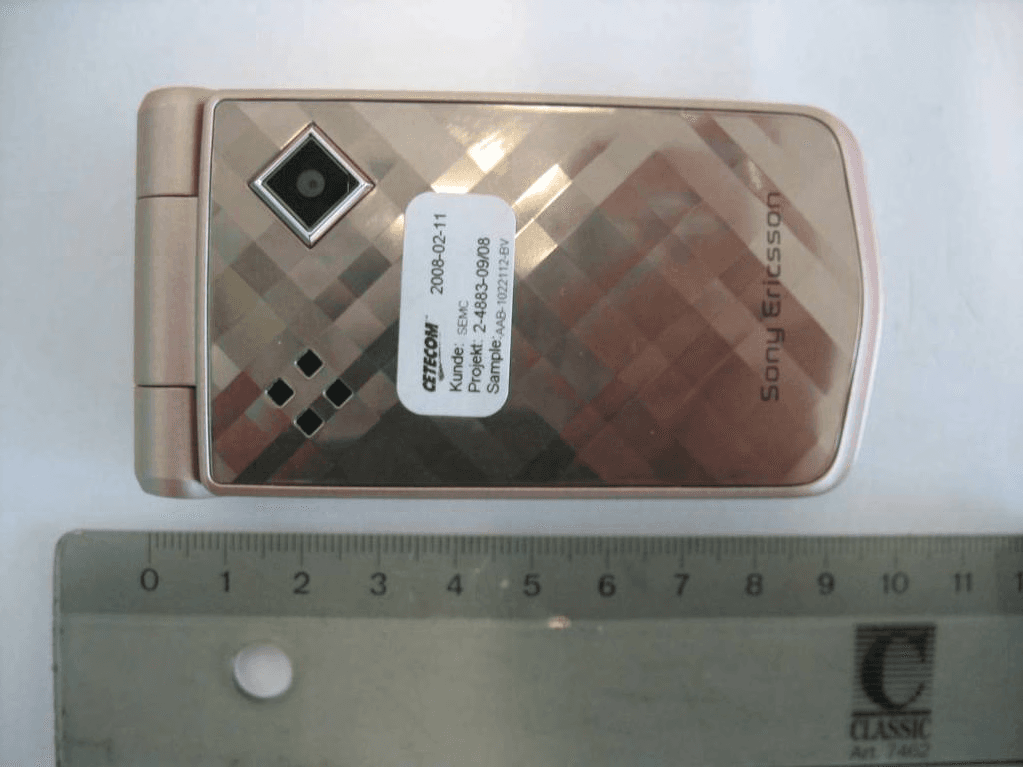
Click to zoom
Application Details
- Equipment Class
- PCE - PCS Licensed Transmitter held to ear
- Date of Grant
- Mar 16, 2008
- Application Purpose
- Original Equipment
- Date of Application
- Mar 16, 2008
- Equipment Note
- Licensed transmitter
- Frequency Range
- 1850.20000000 - 1909.80000000
- Company
- Sony Corporation
- Country
- Japan
Documents & Files
Document Text
Text extracted from the exhibit documents filed with the FCC. Open a document above to read the original.
Users Manual
Thank you for purchasing a Sony Ericsson Z555i. Discover gesture control. Show it off. For additional phone content, go to www.sonyericsson.com/fun. Register now to get a suite of tools, free online storage, special offers, news and competitions atwww.sonyericsson.com/myphone. For product support, go to www.sonyericsson.com/support. Accessories – More for your Phone These accessories can be purchased separately but may not be available in every market. To view the full range go to www.sonyericsson.com/accessories. Bluetooth™ Car Speakerphone HCB-105 A portable handsfree solution for use in the car Bluetooth Headset HBH-PV770 A lightweight headset with high performance Design Collection IDC-22 Phone case in soft leather with integrated mirror 1Contents Contents Getting Started ................... 5 Assembly ........................................ 5 Turning on the Phone ..................... 6 Making and Receiving Calls ........... 7 Help in your Phone ......................... 7 Charging the Battery ....................... 8 Phone Overview .............................. 9 Menu Overview ............................. 11 Navigation ..................................... 13 Shortcuts ...................................... 15 Activity Menu ................................ 15 File Manager ................................. 15 Phone Language ........................... 17 Entering Text ................................. 18 Calling ............................... 19 Making and Receiving Calls ......... 19 Emergency Calls ........................... 19 Contacts ....................................... 20 Groups .......................................... 22 Call List ......................................... 22 Speed Dial .................................... 23 Voicemail ...................................... 23 Forwarding Calls ........................... 23 More than One Call ....................... 24 Conference Calls .......................... 25 My Numbers ................................. 25 Accept Calls .................................. 25 Restricted Dialing ......................... 25 Fixed Dialing ................................. 26 Call Time and Cost ....................... 26 Business Cards ............................. 27 Messaging ........................ 27 Text Messages ............................. 27 Picture Messages ......................... 29 Templates ..................................... 30 Voice Messages ............................ 31 Email ............................................. 31 My Friends .................................... 34 Area and Cell Information ............. 35 Imaging ............................ 36 Camera ......................................... 36 Transferring Pictures .................... 37 Pictures ......................................... 37 2Contents Entertainment ................... 39 Stereo Portable Handsfree ........... 39 Transferring Music from a Computer ................................... 39 Radio ............................................ 40 PlayNow™ .................................... 40 Ringtones and Melodies ............... 41 MusicDJ™ .................................... 42 Sound Recorder ........................... 42 Video Player .................................. 42 Games .......................................... 43 Applications .................................. 43 Connectivity ...................... 44 Settings ......................................... 44 Using Internet ............................... 44 RSS Reader .................................. 46 Bluetooth™ Wireless Technology ................................... 46 Using the USB Cable .................... 49 PC Suite ........................................ 50 Synchronizing ............................... 50 Update Service ............................. 51 More Features .................. 52 Gesture Control ............................ 52 Alarms ........................................... 53 Calendar ....................................... 53 Tasks ............................................ 55 Notes ............................................ 55 Timer, Stopwatch and Calculator .............................. 56 Code Memo .................................. 56 Profiles .......................................... 57 Time and Date .............................. 58 Themes ......................................... 58 Locks ............................................ 58 IMEI Number ................................. 59 Troubleshooting ............... 60 Common Questions ...................... 60 Error Messages ............................. 61 Important Information ...... 63 Guidelines for Safe and Efficient Use .................................. 65 Limited Warranty .......................... 70 FCC Statement ............................. 72 Declaration of Conformity for Z555i ........................................ 72 Index ................................. 73 3 Sony Ericsson Z555i GSM 900/1800/1900 This User guide is published by Sony Ericsson Mobile Communications AB or its local affiliated company, without any warranty. Improvements and changes to this User guide necessitated by typographical errors, inaccuracies of current information, or improvements to programs and/or equipment, may be made by Sony Ericsson Mobile Communications AB or its local affiliated company at any time and without notice. Such changes will, however, be incorporated into new editions of this User guide. All rights reserved. ©Sony Ericsson Mobile Communications AB, 2007 Publication number: 1206-0508.1 Please note: Some of the services in this User guide are not supported by all networks. This also applies to the GSM International Emergency Number 112. Please contact your network operator or service provider if you are in doubt whether you can use a particular service or not. Please read the Guidelines for safe and efficient use and the Limited warranty chapters before you use your phone. Your phone…
Text truncated - open the document above for the full version.
Users Manual
14Getting Started Open the activity menu Press and hold down to call your voicemail service (if set) - Press and hold down a number key to reach a contact beginning with a specific letter - Press a number key and select Call to speed dial Press to turn off the ringtone when you receive a call. Press and hold down to set the phone to silent. The alarm signals even if your phone is set to silent Press to change letter case when writing a message. Press and hold down to toggle T9™ Text Input on and off when writing a message View status information in standby. Increase the volume during a call. Increase brightness when you use the camera. Press twice to reject a call Decrease the volume during a call. Decrease brightness when you use the camera 15Getting Started Shortcuts You can use keypad shortcuts to go directly to a menu. Menu numbering starts from the top left icon and moves across and then down row by row. To go directly to the seventh menu •From standby select Menu and press. To use navigation key shortcuts •From standby press , , or to go directly to a function. To edit a navigation key shortcut 1From standby select Menu >Settings > the General tab >Shortcuts. 2Scroll to an option and select Edit. 3Scroll to a menu option and select Shortcut. Activity Menu The activity menu gives you fast access to certain functions. To open the activity menu •Press . Activity menu tabs •New Events – view missed calls and new messages. These can also be set to appear as pop-up texts. •Running Apps – applications that are running in the background. •My Shortcuts – add your favorite functions to access them quickly. •Internet – your Internet bookmarks. To select pop-up texts •From standby select Menu >Settings > the General tab >New Events >Popup. File Manager You can use the file manager to handle items saved in the phone memory or on a memory card. Memory card Your phone supports Memory Stick Micro™ (M2™) memory card adding more storage space to your phone. It can also be used as a portable memory card with other compatible devices. You may have to purchase a memory card separately. 16Getting Started To insert a memory card 1Remove the battery cover. 2Insert the memory card with the gold-colored contacts facing down. To remove a memory card 1Press the edge to release and remove the memory card. 2Replace the battery cover. 17Getting Started To view memory card options 1From standby select Menu >File Manager > the On Memory Stick tab. 2Select More. Handling files You can move and copy files between your phone, a computer and a memory card. Files are saved on the memory card first and then in the phone memory. Unrecognized files are saved in the Other folder. You can create subfolders to move or copy files to. When you handle files, you can select more than one or all the files in a folder at the same time for all items except Games and Applications. If the memory is full, delete some content to create space. File manager tabs The file manager is divided into three tabs, and icons indicate where the files are saved. •All Files – all content in the phone memory and on a memory card. •On Memory Stick – all content on a memory card. •In Phone – all content in the phone memory. To view information about files 1From standby select Menu >File Manager. 2Scroll to a folder and select Open. 3Scroll to a file and select More >Information. To move a file in the file manager 1From standby select Menu >File Manager. 2Scroll to a folder and select Open. 3Scroll to a file and select More >Manage File >Move. 4Select an option. To select more than one file in a folder 1From standby select Menu >File Manager. 2Scroll to a folder and select Open. 3Select More > Mark >Mark Several. 4Select Mark to mark the files. To delete a file from the file manager 1From standby select Menu >File Manager. 2Find the file and press . Phone Language You can select a language to use in your phone. 18Getting Started To change the phone language 1From standby select Menu >Settings > the General tab >Language >Phone Language. 2Select an option. Entering Text You can use multitap text input or T9™ Text Input to enter text. The T9 Text Input method uses a built-in dictionary. To change text input method •When you enter text, press and hold down . To shift between capitals and lower- case letters •When you enter text, press . To enter numbers •When you enter text, press and hold down – . To enter periods and commas •When you enter text, press . To enter text using T9™ Text Input 1From standby select, for example, Menu >Messaging >Write New >Text Message. 2If is not displayed, press and hold down to change to T9 Text Input. 3Press each key only once, even if the letter you want is not the first letter on the key. For example, if you want to write the word “Jane”, press , , , . Write the whole word before looking at the suggestions. 4Use or to view suggestions. 5Press to accept a suggestion. To enter text using multitap 1From standby select, for example, Menu >Messaging >Write New >Text Message. 2If is displayed, press and hold down to change to multitap text input. 3Press – repeatedly until the desired letter appears. 4When a word is written, press to add a space. To add words to the built-in dictionary 1When you enter text using the T9 Text Input, select More >Spell Word. 2Write the word using multitap input and select Insert. 19Calling Calling Making and Receiving Calls You need to turn on your phone and be within range of a network. To make a call 1From standby enter a phone number (with international country code and area code, if applicable). 2Select Call. To make international calls 1From standby press and hold down until a “+” sign appears. 2Enter the country code, area code (without the first zero) and phone number. 3Select Call. To re-dial a number •When Retry? appears select Yes. To answer a call •Select Answer. To reject a call •Select Busy. To change the ear speaker volume during a call •Press or . To silence the microphone during a c…
Text truncated - open the document above for the full version.
External Photos
CETECOM ICT Services GmbH Annex to Test report no.: 2-4883-09-02/08 2008-02-19 Page 21 of 34 8 External Photogr aphs of the E UT Photo documentation Photo 5: Photo 2: CETECOM ICT Services GmbH Annex to Test report no.: 2-4883-09-02/08 2008-02-19 Page 22 of 34 Photo 3: Photo 4: CETECOM ICT Services GmbH Annex to Test report no.: 2-4883-09-02/08 2008-02-19 Page 23 of 34 Photo 5:
ID Label/Location Info
Company Internal MARKING DRAWINGLABEL CONTENT 1 (3) Prepared (also subject responsible if other) No. Leif Hedin (23056584) 1208-1325 Approved Checked Date Rev Reference Jonas 1 Lindgren (23054968) 2008-01-23 1 5State: Released Approved according to 000 21–LXE 107 42/1 Label Content Specification Z555 i_Label_Content_Made in 1 General information Core Unit label part no 1200-7792 Bar code • Standard: according to Ericsson corporate standard 102 01–109 Uen • Print quality: C, according to ANSI X3.182-1990 as stated in Ericsson corporate standard 102 01– 1003 Uen • Quiet zone: No bar codes are allowed to be closer to a label edge than 2 mm! Text If applicable, or nothing else specified, Zebra printer Scaleable Smooth Font CG Triumvirate Bold Condensed is imposed. When needed, the text is adjusted to fit the label. Coordinates “(x/y)” under each line number specifies the bottom / left alignment for text, graphics and bar codes, x is measured vertically, and y horizontally from the upper left corner of the label (landscape format), both in mm. When needed, the alignment is adjusted to fit the label. MLCI= Main Label Content Information-document. 2 Printing information Content Format Line 1a (2,5/1,0) Sony Ericsson stylized name. Graphics, height 1,5 mm. According to 1200-1925. Line 1b (2,5/18) Model Name “Z555 i” Text, height 1,2 mm. According to Chapter 1 in MLCI. Line 2a (4,5/1,0) TYPE:”AAB-1022112-BV” Text, height 1,2 mm. According to Chapter 1 in MLCI. Line 2b (4,5/15,5) HW & SW identification field, if applicable; “FG” Text, height 1,2 mm. According to Type-testing report under specifying document in product model. Line 2c (4,5/18,5) Location code of where the phone is flashed, if applicable, “FFF” Text, height 1,2 mm. Line 3a (6,5/1,0) FCC ID: “PY7A1022112” Text, height 1,2 mm. According to Chapter 1 in MLCI. Line 3b (6,5 /15,0) Production week (flash), “yy’W’ww” (yy = year, ww = week) Text, height 1,2 mm. Line 3c (6,5/24,0) CE approval symbol Graphics, height 5 mm. According to 1202-5482. Line 3d (6,5/32,0) The notified body number “0682” Text, height 1,2 mm. Line 4a (8,5/1,0) IC: “4170B-A1022112” Text, height 1,2 mm. According to Chapter 1 in MLCI. Line 4b (8,5/14,5) Product number without revision of the Sales Item in which the phone is packed, if applicable. “SI XXXX-XXXX” Text, height 1,2 mm. Company Internal MARKING DRAWINGLABEL CONTENT 2 (3) Prepared (also subject responsible if other) No. Leif Hedin (23056584) 1208-1325 Approved Checked Date Rev Reference Jonas 1 Lindgren (23054968) 2008-01-23 1 5State: Released Content Format Line 4c (8,5 /25,0) Repair week, if applicable. “Ry’W’ww” (y = year, ww = week) Text, height 1,2 mm. Line 5 (11,0/2,7) Line 6a in bar code. As desired by supplier (e.g. only actual number). Bar code, height 2,0 mm. As desired by supplier (e.g. Code 128 symbology). Line 6a (12,6/1,0) Supplier’s identification for trace-ability of the telephone, as desired by supplier (e.g. “S/N: nnn....” for serial number). Text, height 1,2 mm. Defined by supplier. Line 6b (13,0/13,0) Actual electronic serial number (IMEI) of the Mobile Phone, “00000000-000000-0” Text, height 1,2 mm. In the format TAC-SNR-CD. TAC and SNR derived from pos 500 in BOM. CD = check digit according to the Luhn formula (ISO/IEC 7812), GSM 02.16. Line 7 (15,2/2,7) Line 6b in bar code (only actual number, without data identifier). Bar code, height 2,0 mm. Code 128 symbology, code C subset. If uneven number of digits, code B subset shall be used for the last digit. Line 8 (17,6,0/1,0) Marking of origin: “Xxx”= actual country of production of the included telephone, in English. Text, height 1,2 mm. 3 Layout The conceptual picture (for Zebra 90XiII printer, or equivalent) should not be considered as specifications, but as an additional help for setting up the label. 3.1 Conceptual picture double underlined = major changes since last revision. Company Internal MARKING DRAWINGLABEL CONTENT 3 (3) Prepared (also subject responsible if other) No. Leif Hedin (23056584) 1208-1325 Approved Checked Date Rev Reference Jonas 1 Lindgren (23054968) 2008-01-23 1 5State: Released To find the label follow these steps: 1. Remove the cover on the rear side of the product. 2. Remove the battery. 3. The label is located behind the battery. Rear side of the phone Place for battery Label placement
Internal Photos
CETECOM ICT Services GmbH Annex to Test report no.: 2-4883-09-02/08 2008-02-19 Page 24 of 34 9 Internal Photogr aphs of the E UT Photo 6: Photo 2: CETECOM ICT Services GmbH Annex to Test report no.: 2-4883-09-02/08 2008-02-19 Page 25 of 34 Photo 3: Photo 4: CETECOM ICT Services GmbH Annex to Test report no.: 2-4883-09-02/08 2008-02-19 Page 26 of 34 Photo 5: Photo 6: CETECOM ICT Services GmbH Annex to Test report no.: 2-4883-09-02/08 2008-02-19 Page 27 of 34 Photo 7: Photo 8: CETECOM ICT Services GmbH Annex to Test report no.: 2-4883-09-02/08 2008-02-19 Page 28 of 34 Photo 9: Photo 70: CETECOM ICT Services GmbH Annex to Test report no.: 2-4883-09-02/08 2008-02-19 Page 29 of 34 Photo 81: Photo 92: CETECOM ICT Services GmbH Annex to Test report no.: 2-4883-09-02/08 2008-02-19 Page 30 of 34 Photo 103: Photo 114: CETECOM ICT Services GmbH Annex to Test report no.: 2-4883-09-02/08 2008-02-19 Page 31 of 34 Photo 125: Photo 136: CETECOM ICT Services GmbH Annex to Test report no.: 2-4883-09-02/08 2008-02-19 Page 32 of 34 Photo 147: Photo 158: CETECOM ICT Services GmbH Annex to Test report no.: 2-4883-09-02/08 2008-02-19 Page 33 of 34 Photo 169: Photo 20:
RF Exposure Info
Company Internal REPORT 1 (13) Prepared (also subject responsible if other) No. LD/SEMC/BGLIM Magnus Söderman BGLI08:074 Approved Checked Date Rev Reference LD/SEMC/BGLIMC Peter Lindeborg 080207 080206 A File Report issued by Accredited SAR Laboratory for PY7A1022112 (Z555i) Date of test: 30 th - 31 st of January, 2008 Laboratory: Sony Ericsson SAR Test Laboratory Sony Ericsson Mobile Communications AB Nya Vattentornet SE-221 82 LUND, Sweden Testing Engineer: Magnus Söderman [email protected] +46-46-2127229 Testing Approval: Peter Lindeborg [email protected] +46-46-2126180 Statement of Compliance Sony Ericsson Mobile Communications AB declares under its sole responsibility that the product Sony Ericsson Type AAB-1022112-BV; FCC ID PY7A1022112; IC 4170B-A1022112 to which this declaration relates, is in conformity with the appropriate RF exposure standards recommendations and guidelines. It also declares that the product was tested in accordance with the appropriate measurement standards, guidelines and recommended practices. Any deviations from these standards, guidelines and recommended practices are noted below: (None) This laboratory is accredited to ISO/IEC 17025 (SWEDAC accreditation no. 1847). Laboratories are accredited by the Swedish Board for Accreditation and Conformity Assessment (SWEDAC) under the terms of Swedish legislation. The accredited laboratory activities meet the requirements in SS-EN ISO/IEC 17025 (2005). This report may not be reproduced other than in full, except with the prior written approval of the issuing laboratory. The results and statements contained herein relate only to the items tested. The names of individuals involved may be mentioned only in connection with the statements or results from this report. Sony Ericsson encourages all feedback, both positive and negative, on this report. © Sony Ericsson Mobile Communication AB, 2008 Company Internal REPORT 2 (13) Prepared (also subject responsible if other) No. LD/SEMC/BGLIM Magnus Söderman BGLI08:074 Approved Checked Date Rev Reference LD/SEMC/BGLIMC Peter Lindeborg 080207 080206 A File Table of contents 1 INTRODUCTION..................................................................................................................................................................3 2 DEVICE UNDER TEST........................................................................................................................................................3 2.1 DEVICE DESCRIPTION.......................................................................................................................................................3 2.2 ANTENNA DESCRIPTION...................................................................................................................................................4 3 TEST EQUIPMENT ..............................................................................................................................................................5 3.1 DOSIMETRIC SYSTEM.......................................................................................................................................................5 3.2 ADDITIONAL EQUIPMENT.................................................................................................................................................5 4 ELECTRICAL PARAMETERS ON THE TISSUE SIMULATING LIQUID ..............................................................6 5 SYSTEM ACCURACY VERIFICATION..........................................................................................................................6 6 SAR MEASUREMENT UNCERTAINTY .........................................................................................................................7 7 TEST RESULTS ....................................................................................................................................................................8 8 REFERENCES .......................................................................................................................................................................9 9 APPENDIX ...........................................................................................................................................................................10 9.1 PHOTOGRAPHS OF THE DEVICE UNDER TEST..................................................................................................................10 9.2 DEVICE POSITION AT SAM TWIN PHANTOM.................................................................................................................11 9.3 ATTACHMENTS...............................................................................................................................................................13 Company Internal REPORT 3 (13) Prepared (also subject responsible if other) No. LD/SEMC/BGLIM Magnus Söderman BGLI08:074 Approved Checked Date Rev Reference LD/SEMC/BGLIMC Peter Lindeborg 080207 080206 A File 1 Introduction In this test report, compliance of the Sony Ericsson PY7A1022112 (Z555i) portable telephone with RF safety guidelines is demonstrated. The applicable RF safety guidelines and the SAR measurement specifications used for the test are described in the SAR Measurement Specifications of Wireless Handsets [1]. 2 Device Under Test 2.1 Device description Device model AAB-1022112-BV Market name Z555i Serial number (EUT #) CB510VWLWC (#10229) Mode GSM 1900 Crest factor 8.3 Multiple access scheme TDMA Channel No. 512 661 810 Maximum output power setting [dBm] 30.0 30.0 30.0 Factory tolerance in power setting ±0.5 dB Maximum peak output power [dBm] 30.5 30.5 30.5 Data mode GPRS Crest factor 4.15 Maximum output power setting [dBm] 30.0 30.0 30.0 Factory tolerance in power setting ±0.5 dB Maximum peak output power [dBm] 30.5 30.5 30.5 Data mode EDGE Crest factor 4.15 Maximum output power setting [dBm] 26.5 26.5 26.5 Factory tolerance in po…
Text truncated - open the document above for the full version.
Test Report
CETECOM ICT Services GmbH Untertürkheimer Straße 6-10 . D-66117 Saarbrücken Phone: +49 (0) 681-598-0 Fax:-9075 RSC-Laboratory 2008-03-13 Page 1 of 44 Accredited testing-laboratory DAR registration number: DAT-P-176/94-D1 Federal Motor Transport Authority (KBA) DAR registration number: KBA-P 00070-97 Recognized by the Federal Communications Commission Anechoic chamber registration no.: 90462 (FCC) Anechoic chamber registration no.: 3463A-1 (IC) Certification ID: DE 0001 Accreditation ID: DE 0002 Accredited Bluetooth ® Test Facility (BQTF) The Bluetooth word mark and logos are owned by the Bluetooth SIG, Inc. and any use of such marks by Cetecom ICT is under license Test report no. : 2-4883-09-02/08-A Type identification : AAB-1022112-BV Applicant : Sony Ericsson Mobile Communications AB FCC ID : PY7A1022112 IC Certification No : 4170B-A1022112 Test standards : 47 CFR Part 24 RSS - 133 Issue 3 CETECOM ICT Services GmbH Test report no.: 2-4883-09-02/08-A 2008-03-13 Page 2 of 44 Table of contents 1 G e n e r a l i n f o r m a t i o n . . . . . . . . . . . . . . . . . . . . . . . . . . . . . . . .. . . . . . . . . . . . . . . . . . . . . . . . . . . . . . . . . . . . . . . . . . . . . . . . . . .. . . . . . . . . . . . . . . . . 3 1.1 Notes ...................................................................................................................................................................3 1.2 Testing laboratory ...............................................................................................................................................4 1.3 Details of applicant .............................................................................................................................................4 1.4 Application details ..............................................................................................................................................4 2 T e s t s t a n d a r d / s : . . . . . . . . . . . . . . . . . . . . . . . . . . . . . . . . . . .. . . . . . . . . . . . . . . . . . . . . . . . . . . . . . . . . . . . . . . . . . . . . . . . . . .. . . . . . . . . . . . . . . . . . . . 5 3 T e c h n i c a l t e s t s . . . . . . . . . . . . . . . . . . . . . . . . . . . . . . . . . . . .. . . . . . . . . . . . . . . . . . . . . . . . . . . . . . . . . . . . . . . . . . . . . . . . . . .. . . . . . . . . . . . . . . . . . . . . 6 3.1 Details of manufacturer .......................................................................................................................................6 3.1.1 Test item......................................................................................................................................................6 3.2 Test Setup............................................................................................................................................................7 4 S t a t e m e n t o f C o m p l i a n c e . . . . . . . . . . . . . . . . . . . . . . . . . . . .. . . . . . . . . . . . . . . . . . . . . . . . . . . . . . . . . . . . . . . . . . . . . . . . . . .. . . . . . . . . . . . . . 8 4.1 Summary of Measurement Results......................................................................................................................8 4.1.1 PCS 1900.....................................................................................................................................................8 5 M e a s u r e m e n t s a n d r e s u l t s . . . . . . . . . . . . . . . . . . . . . . . . . . .. . . . . . . . . . . . . . . . . . . . . . . . . . . . . . . . . . . . . . . . . . . . . . . . . . .. . . . . . . . . . . . . 9 5.1 PART PCS 1900 .................................................................................................................................................9 5.1.1 RF Power Output.........................................................................................................................................9 5.1.2 Frequency Stability ...................................................................................................................................13 5.1.3 Radiated Emissions ...................................................................................................................................16 5.1.4 Receiver Radiated Emissions ....................................................................................................................24 5.1.5 Conducted Spurious Emissions .................................................................................................................28 5.1.6 Block Edge Compliance............................................................................................................................32 5.1.7 Occupied Bandwidth .................................................................................................................................35 6 T e s t e q u i p m e n t a n d a n c i l l a r i e s u s e d f o r t e s t s . . . . . .. . . . . . . . . . . . . . . . . . . . . . . . . . . . . . . . . . . . . . . . . . . . . . . . . . .. . . . 4 2 CETECOM ICT Services GmbH Test report no.: 2-4883-09-02/08-A 2008-03-13 Page 3 of 44 1 General infor mat ion 1 . 1 N o t e s The test results of this test report relate exclusively to the test item specified in 1.5. The CETECOM ICT Services GmbH does not assume responsibility for any conclusions and generalisations drawn from the test results with regard to other specimens or samples of the type of the equipment represented by the test item. The test report may only be reproduced or published in full. Reproduction or publication of extracts from the report requires the prior written approval of the CETECOM ICT Services GmbH. Test laboratory manager: 2008-03-13 Stefan Bös Date Name Signature Technical responsibility for area of testing: 2008-03-13 Detlev Gillmann Date Name Signature CETECOM ICT Services GmbH Test report no.: 2-488…
Text truncated - open the document above for the full version.
Test Report
CETECOM ICT Services GmbH Untertürkheimer Straße 6-10 . D-66117 Saarbrücken Phone: +49 (0) 681-598-0 Fax:-9075 RSC-La…
Text truncated - open the document above for the full version.
Contact Information
Applicant
Kazuyuki Hori(Senior EMC/RF Compliance Manager)
Technical Contact
Sony Ericsson Mobile Communications ABPeter Lindeborg
Nya Vattentornet · Lund · Sweden
Technical Specifications
| # | Rule Parts | Frequency Range | Power Output | Emission | Tolerance |
|---|---|---|---|---|---|
| 2 | 24E | 1.85 GHz - 1.91 GHz | 603.00 mW | 300KG7W | 0.008 ppm |
Other Applications from Sony Corporation
PY7-75158T
Jul 16, 2026GSM/WCDMA/LTE Phone with BT, DTS/UNII a/b/g/n/ac/ax, NFC and GNSS
Equipment Class
NII - Unlicensed National Information Infrastructure TXPY7-52715J
Jul 16, 2026GSM/WCDMA/LTE Phone with BT, DTS/UNII a/b/g/n/ac/ax, NFC and GNSS
Equipment Class
DXX - Part 15 Low Power Communication Device TransmitterPY7-84526Y
Jul 16, 2026GSM/WCDMA/LTE Phone with BT, DTS/UNII a/b/g/n/ac/ax, NFC and GNSS
Equipment Class
PCE - PCS Licensed Transmitter held to earPY7-30515Z
Apr 13, 2026GSM/WCDMA/LTE/NR Phone with BT, DTS/UNII a/b/g/n/ac/ax/be, NFC, GNSS and WPT
Equipment Class
DXX - Part 15 Low Power Communication Device TransmitterPY7-73716J
Apr 11, 2024GSM/WCDMA/LTE Phone with BT, DTS/UNII a/b/g/n/ac, NFC and GNSS
Equipment Class
PCE - PCS Licensed Transmitter held to ear