PY7A3880037GSM 850/900/1800/1900 GPRS / EDGE / UMTS FDD1&2&5 / HSPA mobile phone with Bluetooth, WLAN, GPS, FM receiver
Sony Corporation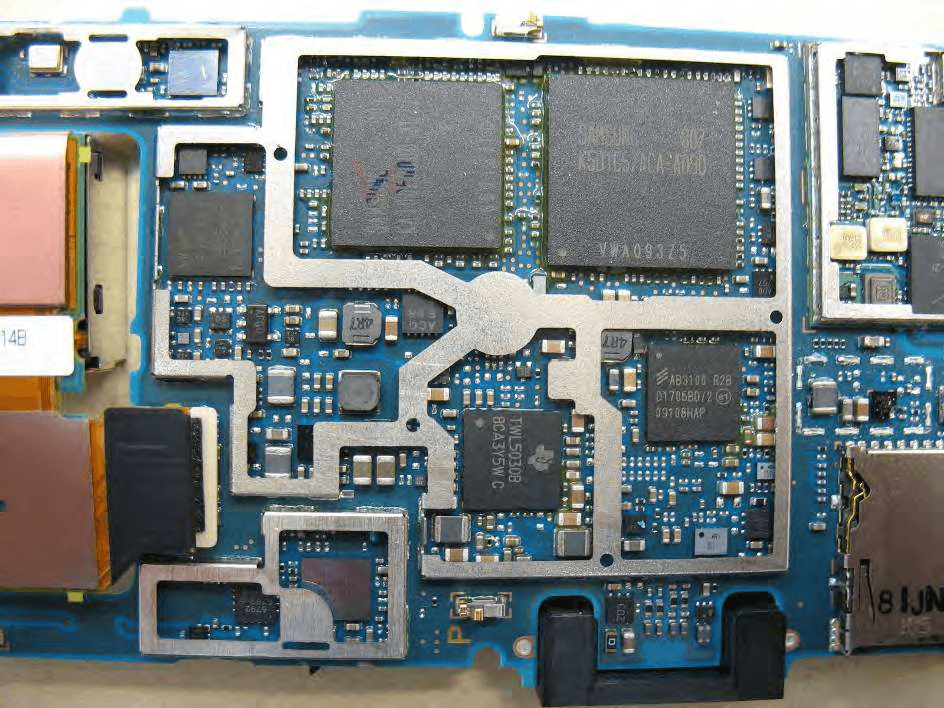
Click to zoom
Application Details
- Equipment Class
- JBP - Part 15 Class B Computing Device Peripheral
- Date of Grant
- Aug 20, 2009
- Application Purpose
- Original Equipment
- Date of Application
- Aug 20, 2009
- Equipment Note
- GSM 850/900/1800/1900 GPRS / EDGE / UMTS FDD1&2&5 / HSPA mobile phone with Bluetooth, WLAN, GPS, FM receiver
- Company
- Sony Corporation
- Country
- Japan
Documents & Files
Document Text
Text extracted from the exhibit documents filed with the FCC. Open a document above to read the original.
Users Manual
User guide Satio™ Experience more. Discover how. Please read the Important information before you use your mobile phone. Fill it with pop and let it rock. Share your life in pictures. Or why not go online for the latest updates? Your new phone is the key to a wider world. And it’s just around the corner. Get started with this User guide. And join us online to get the full picture. Music, games, apps, updates, downloads, support and more. All in one place: www.sonyericsson.com/Satio Don't forget to update your phone software. See Updating your phone on page 5. 2 Getting started Assembly Before you start using your phone, you need to insert a SIM (Subscriber Identity Module) card and the battery. To insert the SIM card 1 Remove the battery cover. 2 Pull out the SIM card holder. 3 Put the SIM card into its holder with the gold-coloured contacts facing down. 4 Push the holder back into place. 3 To insert the battery 1 Insert the battery with the label side up and the connectors facing each other. 2 Put the battery cover into place. Turning on the phone To turn on the phone 4 1 Press and hold down . 2 Enter your SIM card PIN, if requested, and select OK. 3 The first time you turn on the phone, follow the instructions to use the setup wizard for basic settings and useful tips. Help You can find Help on most applications in Organiser or you can access Help from within a specific application by selecting Options. To access the general Help in your phone • Select Menu > Organiser > Help. To view Help when you are in an application • Select Options > Help. Updating your phone You can view your phone software version, phone model name, or update your software from a server. To check for updates 1 Select Menu > Settings > Phone > Phone management > Device updates. 2 Select Options > Check for updates. 5 Phone overview 1On/off key 2 8 10 11 12 9 3 4 1 5 6 7 13 14 2Loud speaker 3Charging/message indicator 4Proximity sensor 5Ear speaker 6Video call camera 7Brightness sensor 8Keylock key 9Screen 10Connector for charger, handsfree and USB cable 11Memory card cover 12Call key 13Main menu key 14End key 6 15Main camera 17 20 21 24 23 18 19 22 25 15 16 16Xenon flash 17Volume, digital zoom keys 18LED light/AF assisting light 19Video recording indicator 20Camera brightness sensor 21Camera view key 22Camera mode key 23Camera lens cover 24Camera key 25Strap holder 7 Menu overview* Messaging Internet Camera Media Photo, Music, Video Contacts PlayNow™ Entertainment Radio, TrackID™, Chat, Record sound Location services Google maps, Location, Wisepilot Calendar Calls** Organiser File manager, My applications, Clock, RoadSync, Google, Search, Notes, Converter, Calculator, Adobe PDF, Quickoffice, Help Settings Personal Profiles, Themes, Standby Phone Date and time, Language, Display, Download settings, Sensor settings, Touch input, Accessories, Application sett., Phone mgmt. Application mgr Installed apps., Installation files, Install settings Calling Call, Speed dialling, Voicemail, Divert calls, Call barring Connectivity Network, Wi-Fi, Bluetooth, USB, Destinations, 8 Connection mgr, Data transfer, Remote drives, Video sharing, Admin. settings * Some menus are operator-, network- and subscription-dependent. ** You can use touch functionality to scroll between tabs in submenus. For more information, see Navigation on page 11. 9 Status icons Status icons appear at the top of the screen. You can tap status icons to view more information or change settings. Battery fully charged Network signal strength Messages in the outbox GSM available Missed call Handsfree connected Call diverted Text message received New email received Headphone inserted GPS connected Alarm activated Bluetooth™ connected Keylock activated USB data transferring Data synchronising Flight mode activated Secure Wi-Fi™ network connected Wi-Fi™ network connected 10 3G available HSDPA available EGPRS available Navigation You can move through menus with your fingertips or with a stylus. Tap or double-tap an item to select or open it. You can also switch between running applications. To access the main menu • Press the main menu key. To lock or unlock the phone • Slide the keylock key. To view running applications 1 Press and hold down the main menu key. 2 To switch to a running application, tap it. Leaving applications running in the background increases the demand on battery power and reduces the battery life. To end a function • In most cases, select Options > Exit. To delete items • In most applications, to delete items such as files, folders, messages, or media files, select an item, and then select Options > Delete. 11 Standby After you have turned on your phone and entered your PIN, the name of the network operator appears. This view is called standby. Your phone is now ready to use. To return to standby • Press and hold down the main menu key and select . To end the current application and return to standby, press . Default standby theme The default standby theme provides five different views: Favourites view Bookmarks view Idle view Photos view* Shortcuts view * The icon for Photos view changes based on the last photo you took. These five views are only available for the default standby theme. Idle view After you turn on your phone, you reach Idle view. You can access the standby music player and touchbar at the bottom of the display. The standby music player is activated when you play music in Media. The touchbar provides quick access to four applications: 12 Number entry – make calls Media – go to Media Messaging – send and receive messages Search – search the phone Favourites view The Favourites view provides quick access to your favourite contacts. To add contacts to Favourites 1 Tap . 2 Tap and select the contacts you wish to add. To call a favourite contact 1 Tap . 2 Tap a contact and select Call. Bookmarks view The Bookmarks view provides quick access to your favourite websites. You can add and remove bookmarks. You need the correct Internet…
Text truncated - open the document above for the full version.
Cover Letter(s)
Datum -Date Beteckning • Reference Sony Ericsson Var handlaggare, namn, tfn • Attending to this matter, name, telephone Ert datum -Your date Er beteckning . Your reference Confidentiality Request 2009-07-03 CCDA09:397 SEM/CCDALE Afrah Sadiq +46108012250 Receiver Federal Communications Commission Subject: Request for Confidentiality FCC 10: PY7A3880037 To Whom It May Concern: In accordance with §0.459 of CFR 47, Sony Ericsson Mobile Communications AS requests confidentiality for the below listed items for our mobile phone type AAD 3880037-BV, FCC 10: PY7A3880037: 1. Block Diagram 2. Schematic Diagram 3. Part List 4. OperationallTechnical Descriptions These items contain detailed system and equipment description and related information about the product which Sony Ericsson Mobile Communications AS considers to be proprietary, confidential and a custom design which otherwise would not be released to the general public. Since this design is a basis from which future technological products will evolve, Sony Ericsson Mobile Communications AS also feels that this information would be of benefit to its competitors, and that the disclosure of the information in these exhibits would give our competitors an unfair advantage in the market. Please contact the undersigned if there are any further questions or additional information needed in this matter. Best Regards, Afrah Sadiq Development Engineer - Global Type Approval Sony Ericsson Mobile Communications AS Sony Ericsson Mobile Communications AS Styrelsens sate: Lund Momsnr' v.A. T.No: SE556615665801 Registered office: Lund Organisationsnr' Reg No: 556615-6658 Postadress • Mail Bes6ksadress • Office address Telefon • Telephone Telefax • Telefax SE-221 88 Lund Nya Vattentornet Nat 046-19 40 00 Nat 046-1941 00 Sweden Lund Int +46 46 1940 00 ~t +4646194100
ID Label/Location Info
Company Internal MARKING DRAWING 1 (4) Prepared (also subject responsible if other) No. SEM/CCDGP, Delia Aulisio XXXX-XXXX Uen Approved Checked Date Rev Reference SEM/CCDGP, Delia Aulisio 2009-07-01 1 2 U1a, Mobile Phone label content, Made in... Type Number: AAD-3880037-BV FCC ID: PY7A3880037 Canada IC: 4170B-A3880037 1 General information The format of the label is based on a label 1207-8042. If applicable, or nothing else specified, Zebra printer Scaleable Smooth Font CG Triumvirate Bold Condensed is imposed. When needed, the text is adjusted to fit the label. All bar codes, when applicable, are according to Ericsson corporate standard 102 01–109 Uen. All bar codes shall fulfil minimum print quality C according to ANSI X3.182-1990 as stated in Ericsson corporate standard 102 01–1003 Uen. No bar codes are allowed to be closer to a label edge than 2 mm! (quiet zone). “(x/y)” under each line number specifies the bottom / left alignment for text, graphics and bar codes, x is measured vertically, and y horizontally from the upper left corner of the label (landscape format), both in mm. When needed, the alignment is adjusted to fit the label. 2 Printing information Content Format Line 1, a (18,3) SIM-card insert logo Graphics height 9,0mm According to 1227-4577 document, Line 2 a (20,2) Sony Ericsson stylized name. Graphics, height 1,4 mm. According to 1200-1925 Line2 b (20,16) Model Name “U1a” Text, height 1,2 mm. Line 3 (22,2) Product number of the Sales Item in which the phone is packed, if applicable. “SI XXXX-XXXX.RR” Text, height 1,2 mm. Line 4, a (24,2) Type number of the phone, “Type: AAD-3880037-BV”. Text, height 1,2 mm. Line 4, b (24,18) HW & SW identification field, if applicable; “FFGG” Text, height 1,2 mm. According to Type-testing report under Product Model Specifying Documents Company Internal MARKING DRAWING 2 (4) Prepared (also subject responsible if other) No. SEM/CCDGP, Delia Aulisio XXXX-XXXX Uen Approved Checked Date Rev Reference SEM/CCDGP, Delia Aulisio 2009-07-01 1 2 Content Format Line 4, c (24,22) Location code of where the phone is flashed, if applicable, “XXX” Text, height 1,2 mm. Line 5, a (26,2) “ FCC ID: PY7A3880037 ” Text, height 1,2 mm. Line 5,b (26,22) Production week (flash), “yy’W’ww” (yy = year, ww = week) Text, height 1,2 mm. Line 6, a (28,2) “ IC ID: 4170B-A3880037” Text, height 1,2 mm. Line 6. b (28,22) Repair week, if applicable. “Ry’W’ww” (y = year, ww = week) Text, height 1,2 mm. Line 7 (31.7,3.7) Line 6 in bar code, according to line 7a. As desired by supplier (e.g. only actual number). Bar code, height 2,0 mm. As desired by supplier (e.g. Code 128 symbology). Line 8, a (33.8,2) Supplier’s identification for trace- ability of the telephone, as desired by supplier (e.g. “S/N: nnn....” for serial number). Text, height 1,2 mm. Defined by supplier. Line 8, b (33.8,16) Actual electronic serial number (IMEI) of the Mobile Phone, “00000000-000000-0” Text, height 1,2 mm. In the format TAC-SNR-CD. TAC and SNR derived from pos 500 in BOM. CD = check digit according to the Luhn formula (ISO/IEC 7812), GSM 02.16. Line 9 (37, 3.7) Line 8 in bar code, according to line 7b (only actual number, without data identifier). Bar code, height 2,0 mm. Code 128 symbology, code C subset. If uneven number of digits, code B subset shall be used for the last digit. Line 10 (40,2) Marking of origin. “Made in Xxx”; “Xxx” = actual country of production of the included telephone, in English Text, height 1,2 mm. Line 11a (46,2) CE approval symbol Graphics, height 5 mm. According to 1210-0131. Line 11b (46,9) The notified body number “0682” Text, height 1,2 mm. Line 11c (46,13) “Alert Symbol” Graphics, height 5 mm According to 1001-5859 Line 11d (46,20) WEEE trashcan without bar symbol Graphics, min. height 5mm, according to 1202-5537. Company Internal MARKING DRAWING 3 (4) Prepared (also subject responsible if other) No. SEM/CCDGP, Delia Aulisio XXXX-XXXX Uen Approved Checked Date Rev Reference SEM/CCDGP, Delia Aulisio 2009-07-01 1 2 3 Layout The conceptual picture (for Zebra 90XiII printer, or equivalent) should not be considered as specifications, but as an additional help for setting up the label. 3.1 Conceptual picture double underlined = major changes since last revision. Company Internal MARKING DRAWING 4 (4) Prepared (also subject responsible if other) No. SEM/CCDGP, Delia Aulisio XXXX-XXXX Uen Approved Checked Date Rev Reference SEM/CCDGP, Delia Aulisio 2009-07-01 1 2 Label placement To find the label follow these steps: 1. Remove the cover on the rear side of the product. 2. Remove the battery. 3. The label is located behind the battery. Rear side of the phone Place for battery Label placement
Internal Photos
CETECOM ICT Services GmbH Annex to Test report no.: 1-1065-38-02/09 2009-07-06 Page 18 of 24 Photo 9: Photo 10: CETECOM ICT Services GmbH Annex to Test report no.: 1-1065-38-02/09 2009-07-06 Page 19 of 24 Photo 11: Photo 12: CETECOM ICT Services GmbH Annex to Test report no.: 1-1065-38-02/09 2009-07-06 Page 20 of 24 Photo 13: Photo 14: CETECOM ICT Services GmbH Annex to Test report no.: 1-1065-38-02/09 2009-07-06 Page 21 of 24 Photo 15: Photo 16: CETECOM ICT Services GmbH Annex to Test report no.: 1-1065-38-02/09 2009-07-06 Page 22 of 24 Photo 17: Photo 18: CETECOM ICT Services GmbH Annex to Test report no.: 1-1065-38-02/09 2009-07-06 Page 23 of 24 Photo 19: Photo 20: CETECOM ICT Services GmbH Annex to Test report no.: 1-1065-38-02/09 2009-07-06 Page 24 of 24 Photo 21: Photo 22:
Test Report
CETECOM ICT Services GmbH Untertürkheimer Straße 6-10 . D-66117 Saarbrücken Phone: +49 (0) 681-598-0 Fax: -9075 RSC-Laboratory 2009-07-06 Page 1 of 24 Accredited testing-laboratory DAR registration number: DAT-P-176/94-D1 Federal Motor Transport Authority (KBA) DAR registration number: KBA-P 00070-97 Recognized by the Federal Communications Commission Anechoic chamber registration no.: 90462 (FCC) Anechoic chamber registration no.: 3462C-1 (IC) Certification ID: DE 0001 Accreditation ID: DE 0002 Accredited Bluetooth ® Test Facility (BQTF) The Bluetooth word mark and logos are owned by the Bluetooth SIG, Inc. and any use of such marks by Cetecom ICT is under license Annex to Test report no. : 1-1065-38-02/09 Type identification : AAD-3880037-BV Applicant : Sony Ericsson Mobile Communications AB FCC ID : PY7A3880037 IC Certification No : 4170B-A3880037 Test standards : 47 CFR Part 15 RSS - 210 Issue 7 CETECOM ICT Services GmbH Annex to Test report no.: 1-1065-38-02/09 2009-07-06 Page 2 of 24 Table of contents 1 G e n e r a l i n f o r m a t i o n . . . . . . . . . . . . . . . . . . . . . . . . . . . . . . . .. . . . . . . . . . . . . . . . . . . . . . . . . . . . . . . . . . . . . . . . . . . . . . . . . . .. . . . . . . . . . . . . . . . . 3 1.1 Notes ...................................................................................................................................................................3 1.2 Testing laboratory ...............................................................................................................................................4 1.3 Details of applicant .............................................................................................................................................4 1.4 Application details ..............................................................................................................................................4 2 T e c h n i c a l t e s t s . . . . . . . . . . . . . . . . . . . . . . . . . . . . . . . . . . . .. . . . . . . . . . . . . . . . . . . . . . . . . . . . . . . . . . . . . . . . . . . . . . . . . . .. . . . . . . . . . . . . . . . . . . . . 5 2.1 Details of manufacturer .......................................................................................................................................5 2.2 Test item(s) and test configuration ......................................................................................................................5 3 S u m m a r y o f M e a s u r e m e n t R e s u l t s a n d l i s t o f a l l p e r fo r m e d t e s t c a s e s . . . . . . . . . . . . . . . . . . . . . . . . . . 6 4 M e a s u r e m e n t s a n d r e s u l t s . . . . . . . . . . . . . . . . . . . . . . . . . . .. . . . . . . . . . . . . . . . . . . . . . . . . . . . . . . . . . . . . . . . . . . . . . . . . . .. . . . . . . . . . . . . 7 5 A n n e x A : F C C P a r t 1 5 S u b p a r t B . . . . . . . . . . . . . . . . . . . . .. . . . . . . . . . . . . . . . . . . . . . . . . . . . . . . . . . . . . . . . . . . . . . . . . . .. . . . . . . . 8 5.1 Conducted Limits ................................................................................................................................................8 5.2 Unwanted emissions..........................................................................................................................................10 6 T e s t e q u i p m e n t a n d a n c i l l a r i e s u s e d f o r t e s t s . . . . . .. . . . . . . . . . . . . . . . . . . . . . . . . . . . . . . . . . . . . . . . . . . . . . . . . . .. . . . 1 2 7 P h o t o g r a p h s o f t h e T e s t S e t - u p . . . . . . . . . . . . . . . . . . . . .. . . . . . . . . . . . . . . . . . . . . . . . . . . . . . . . . . . . . . . . . . . . . . . . . . .. . . . . . . . . . 1 4 8 P h o t o g r a p h s o f t h e E U T . . . . . . . . . . . . . . . . . . . . . . . . . . . . .. . . . . . . . . . . . . . . . . . . . . . . . . . . . . . . . . . . . . . . . . . . . . . . . . . .. . . . . . . . . . . . 1 5 CETECOM ICT Services GmbH Annex to Test report no.: 1-1065-38-02/09 2009-07-06 Page 3 of 24 1 General infor mat ion 1 . 1 N o t e s The test results of this test report relate exclusively to the test item specified in 3.1.1. The CETECOM ICT Services GmbH does not assume responsibility for any conclusions and generalisations drawn from the test results with regard to other specimens or samples of the type of the equipment represented by the test item. The test report may only be reproduced or published in full. Reproduction or publication of extracts from the report requires the prior written approval of the CETECOM ICT Services GmbH. Test laboratory manager: 2009-07-06 Meheza K. Walla Date Name Signature 2009-07-06 Daniel K. Muyunga Date Name Signature Technical responsibility for area of testing: 2009-07-06 Stefan Boes Date Name Signature CETECOM ICT Services GmbH Annex to Test report no.: 1-1065-38-02/09 2009-07-06 Page 4 of 24 1 . 2 T e s t i n g l a b o r a t o r y CETECOM ICT Services GmbH Untertürkheimer Straße 6 - 10 66117 Saarbrücken Germany Phone: + 49 681 5 98 - 0 Fax: + 49 681 5 98 - 9075 e-mail: [email protected] Internet: http://www.cetecom-ict.de State of accreditation: Accredited by: The test laboratory (area of testing) is accredited according to DIN EN ISO/IEC 17025 DAR registration number: DAT-P-176/94-D1 Federal Motor Transport Authority (KBA) DAR registration number: KBA-P 00070-97 Testing location, if different from CETECOM ICT Services GmbH: Name : Street : Town : Country : Phone : Fax : 1 . 3 D e t a i l s o f a p p l i c a n t Name: Sony Ericsson Mobile Communications AB Street: Mobilvägen 10 Town: 22188 Lund Country: Sweden Telephone: +46-46-19-3000 Fax: +46-10-800-2441 Contact: Mr. Peter Lindeborg E-mail: [email protected] Telephone: +46-10-802-43 68 1 . 4 A p p l i c a t i o n d e t a i l s Date of receipt of order: 2009-06-17…
Text truncated - open the document above for the full version.
Test Setup Photos
CETECOM ICT Services GmbH Annex to Test report no.: 1-1065-38-02/09 2009-07-06 Page 14 of 24 7 Photographs of t he Test Set- up Photo 1: Photo 2:
Contact Information
Applicant
Kazuyuki Hori(Senior EMC/RF Compliance Manager)
Technical Contact
Sony Ericsson Mobile Communications ABPeter Lindeborg
Nya Vattentornet · Lund · Sweden
Test Firm
cetecom advanced GmbHGerald Schmidt
Technical Specifications
| # | Rule Parts | Frequency Range | Power Output |
|---|---|---|---|
| 1 | 15B | - | - |
Other Applications from Sony Corporation
PY7-75158T
Jul 16, 2026GSM/WCDMA/LTE Phone with BT, DTS/UNII a/b/g/n/ac/ax, NFC and GNSS
Equipment Class
NII - Unlicensed National Information Infrastructure TXPY7-52715J
Jul 16, 2026GSM/WCDMA/LTE Phone with BT, DTS/UNII a/b/g/n/ac/ax, NFC and GNSS
Equipment Class
DXX - Part 15 Low Power Communication Device TransmitterPY7-84526Y
Jul 16, 2026GSM/WCDMA/LTE Phone with BT, DTS/UNII a/b/g/n/ac/ax, NFC and GNSS
Equipment Class
PCE - PCS Licensed Transmitter held to earPY7-30515Z
Apr 13, 2026GSM/WCDMA/LTE/NR Phone with BT, DTS/UNII a/b/g/n/ac/ax/be, NFC, GNSS and WPT
Equipment Class
DXX - Part 15 Low Power Communication Device TransmitterPY7-73716J
Apr 11, 2024GSM/WCDMA/LTE Phone with BT, DTS/UNII a/b/g/n/ac, NFC and GNSS
Equipment Class
PCE - PCS Licensed Transmitter held to ear