PY7A3880053GSM 850/900/1800/1900 GPRS / EDGE / UMTS FDD1&2&5 HSDPA mobile phone with Bluetooth, FM receiver
Sony Corporation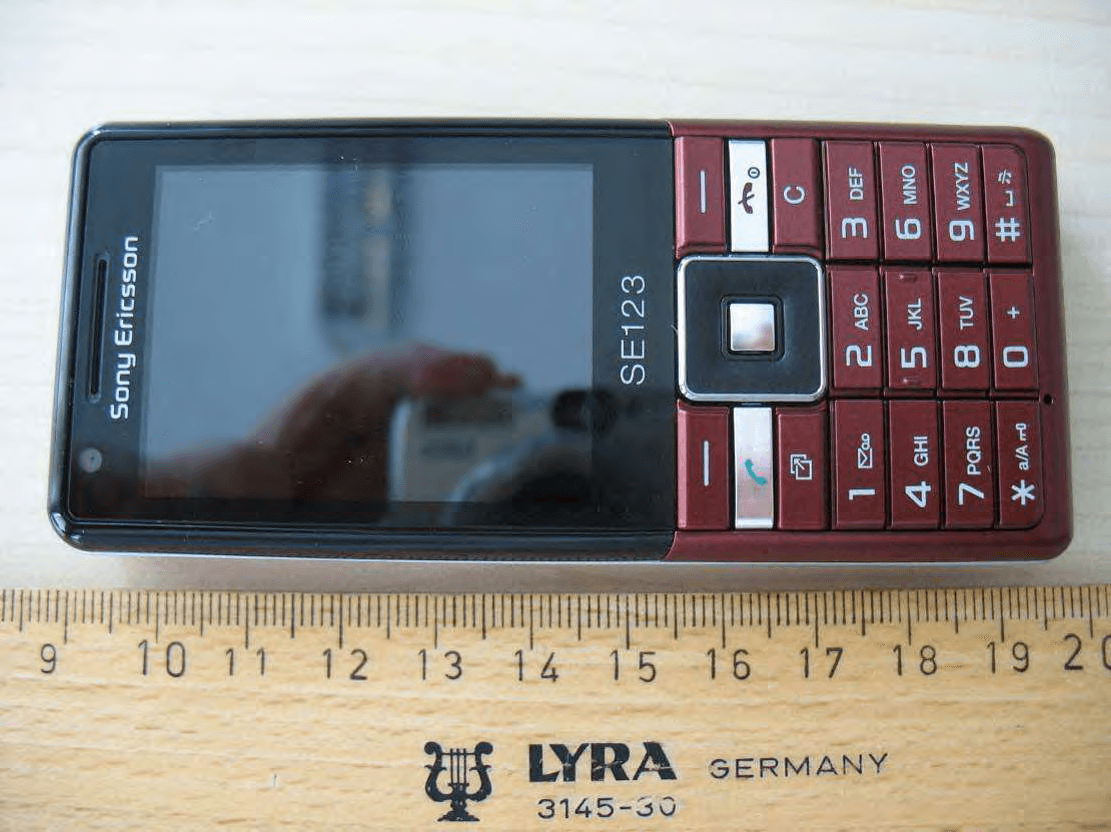
Click to zoom
Application Details
- Equipment Class
- JBP - Part 15 Class B Computing Device Peripheral
- Date of Grant
- Aug 20, 2009
- Application Purpose
- Original Equipment
- Date of Application
- Aug 20, 2009
- Equipment Note
- GSM 850/900/1800/1900 GPRS / EDGE / UMTS FDD1&2&5 HSDPA mobile phone with Bluetooth, FM receiver
- Company
- Sony Corporation
- Country
- Japan
Documents & Files
Document Text
Text extracted from the exhibit documents filed with the FCC. Open a document above to read the original.
Users Manual
User guide Naite Thank you for purchasing a Sony Ericsson Naite J105i/J105a. For additional phone content, go to www.sonyericsson.com/fun. Register now to get free online storage and special offers at www.sonyericsson.com/myphone. For an extended User guide and product support, go to www.sonyericsson.com/support Please read the Important information before you use your mobile phone. Instruction symbols These symbols may appear in the User guide: Note Tip Warning >Use a selection or navigation key to scroll and select. See Navigation on page 10. 2 Getting started Assembly Before you start using your phone, you need to insert a SIM card and the battery. To insert the SIM card 3 1 Remove the battery cover. 2 Slide the SIM card into its holder with the gold-coloured contacts facing down. To insert the battery 1 Insert the battery with the label side up and the connectors facing each other. 2 Attach the battery cover. 4 Turning on the phone To turn on the phone 1 Press and hold down . 2 Enter your SIM card PIN (Personal Identification Number), if requested, and select OK. 3 Select a language. 4 Follow the instructions that appear. If you want to correct a mistake when you enter your PIN, press . Help In addition to this User guide, an extended User guide, Feature guides and more information are available at www.sonyericsson.com/support. Help and information are also available in your phone. 5 To access the User guide • Select Menu > Settings > User help > User guide. To view tips and tricks • Select Menu > Settings > User help > Tips and tricks. To view information about functions • Scroll to a function and select Info, if available. In some cases, Info appears under Options. To view the phone status • Press the volume key. Phone, memory and battery information is shown. Charging the battery The phone battery is partly charged when you buy it. 6 To charge the battery 1 Connect the charger to the phone. It takes approximately 2.5 hours to fully charge the battery. Press a key to view the screen. 2 Remove the charger by tilting the plug upwards. You can use your phone while it is charging. You can charge the battery at any time and for more or less than 2.5 hours. You can interrupt the charging without damaging the battery. 7 Phone overview 1Ear speaker 3 6 5 2 1 8 7 4 9 10 2Video call camera 3Screen 4Selection keys 5Call key 6Connector for charger, handsfree and USB cable 7Activity menu key 8Navigation key 9End key, On/off key 10C key (Clear) 8 11Main camera 11 12 14 15 13 12Volume keys 13Memory card slot (under the cover) 14Loudspeaker 15Strap hole 9 Navigation To access the main menu • When Menu appears on the screen, press the centre selection key to select Menu. • If Menu does not appear on the screen, press , and then press the centre selection key to select Menu. To navigate the phone menus • Press the navigation key , , or to move through the menus. To end a function • Press . To return to standby • Press . 10 To delete items • Press to delete items such as numbers, letters, pictures and sounds. Shortcuts You can use keypad shortcuts to go directly to functions from standby. To use navigation key shortcuts • Press , , or to go directly to a function. To edit a navigation key shortcut 1 Select Menu > Settings > General > Shortcuts. 2 Scroll to an option and select Edit. 3 Scroll to a menu option and select Shortc.. Activity menu The activity menu gives you quick access to: • New events – missed calls and new messages. • Running apps – applications that are running in the background. • My shortcuts – add your favourite functions to access them quickly. • Internet – quick access to the Internet. To open the activity menu • Press . Memory card You may have to purchase a memory card separately. 11 Your phone supports a microSD™ memory card adding more storage space to your phone. It can also be used as a portable memory card with other compatible devices. You can move content between a memory card and the phone memory. See Handling content in the phone on page 22. To insert a memory card • Remove the battery cover and insert the memory card with the gold-coloured contacts facing down. 12 Entering text You can use multitap text input or T9™ Text Input to enter text. The T9 Text Input method uses a built-in dictionary. To change writing language • When you enter text, press and hold down . To change text input method • When you enter text, press and hold down . To shift between capitals and lower-case letters • When you enter text, press . To enter numbers • When you enter text, press and hold down – . To enter full stops and commas • When you enter text, press . To enter a symbol 1 When you enter text, select Options > Add symbol. 2 Scroll to a symbol and select Insert. To enter text using T9™ Text Input 1 Select, for example, Menu > Messaging > Write new > Message. 2 If is not displayed, press and hold down to change to T9 Text Input. 3 Press each key only once, even if the letter you want is not the first letter on the key. For example, to write the word “Jane”, press , , , . Write the whole word before looking at the suggestions. 4 Use or to view suggestions. 5 Press to accept a suggestion and add a space. 13 To enter text using multitap text input 1 Select, for example, Menu > Messaging > Write new > Message. 2 If is displayed, press and hold down to change to multitap text input. 3 Press – repeatedly until the desired letter appears. 4 When a word is written, press to add a space. To add words to the built-in dictionary 1 When you enter text using T9 Text Input, select Options > Spell word. 2 Write the word using multitap text input and select Insert. Calling Making and receiving calls You need to turn on your phone and be within range of a network. To make a call 1 Enter a phone number (with international country code and area code, if applicable). 2 Press . You can call numbers from your contacts and call list. See Contacts on page 16, and Call list on page 16. To end a call • Press . …
Text truncated - open the document above for the full version.
Cover Letter(s)
Datum' Dale Beteckning • Reference Sony Ericsson Var handlaggare, namn, tin • Attending to this matter, name, telephone Ert datum' Your date Er beteckning . Your reference Confidentiality Request 2009-07-09 CCDA09:416 SEM/CCMVALE Afrah Sadiq +46 1080 12250 Receiver Federal Communications Commission Subject: Request for Confidentiality FCC 10: PY7A3880053 To Whom It May Concern: In accordance with §0.459 of CFR 47, Sony Ericsson Mobile Communications AB requests confidentiality for the below listed items for our mobile phone type AAD 3880053-BV, FCC ID: PY7A3880053: 1. Block Diagram 2. Schematic Diagram 3. Part List 4. Operational/Technical Descriptions These items contain detailed system and equipment description and related information about the product which Sony Ericsson Mobile Communications AB considers to be proprietary, confidential and a custom design which otherwise would not be released to the general public. Since this design is a basis from which future technological products will evolve, Sony Ericsson Mobile Communications AB also feels that this information would be of benefit to its competitors, and that the disclosure of the information in these exhibits would give our competitors an unfair advantage in the market. Please contact the undersigned if there are any further questions or additional information needed in this matter. Best Regards, Afrah Sadiq Development Engineer - Global Type Approval Sony Ericsson Mobile Communications AB Sony Ericsson Mobile Communications AS Styrelsens sate: Lund Momsnr • II.A. T.No: SE556615665801 Registered office: Lund Organisationsnr' Reg No: 556615-6658 Postadress • Mail Besoksadress • Office address TeJefon • Telephone Telefax • Telefax SE-221 88 Lund Nya Vattentornet Nat 046-19 40 00 Nat 046-1941 00 Sweden Lund Int +4646194000 Int +46461941 00
Cover Letter(s)
Datum'Date Beteckning • Reference Sony Ericsson var handlaggare, namn, Hn • Attending to this matter, name, telephone Ert datum' Your date Er beteckning • Your reference Short Term Confidentiality Request 2009-07-30 CCDA09:447 SEM/CCMVALE Afrah Sadiq +46 10 80 12250 Receiver Federal Communications Commission Subject: Request for Temporary Confidentiality FCC 10: PY7A3880053 To Whom It May Concern: In accordance with §0.459 of CFR 47 and Public Notice OA 04-1705, Sony Ericsson Mobile Communications AB requests in addition to confidentiality request CCOA09:416 temporary confidentiality for 180 days of the below listed items for our mobile phone type AAO-3880053-BV, FCC 10: PY7A3880053 1. User Manual 2. Test set-up 3. External and Internal photos When the announcement of the product is done, the TCB will be notified to remove the Short Term Confidentiality. Please contact the undersigned if there are any further questions or additional information needed in this matter. Best Regards, ~----=~============== Afrah Sadiq Development Engineer - Global Type Approval Sony Ericsson Mobile Communications AB Sony Ericsson Mobile Communications AS Styrelsens sate: Lund Momsnr· II.A. T.No: SE556615665801 Registered office: Lund Organisationsnr· Reg No: 556615·6658 Postadress • Mail Besoksadress • Office address Telefon • Telephone Telefax • Te/efax SE-221 88 Lund Nya Vatlentornet Nat 046-194000 Nat 046-194100 Sweden Lund Int +46 46 19 40 00 Int +46461941 00
External Photos
CETECOM ICT Services GmbH Annex to Test report no.: 1-1065-43-02/09-A 2009-07-16 Page 17 of 22 8 Photographs of t he E UT Photo documentation Photo 4: CETECOM ICT Services GmbH Annex to Test report no.: 1-1065-43-02/09-A 2009-07-16 Page 18 of 22 Photo 5: Photo 6: CETECOM ICT Services GmbH Annex to Test report no.: 1-1065-43-02/09-A 2009-07-16 Page 19 of 22 Photo 7: Photo 8:
Internal Photos
CETECOM ICT Services GmbH Annex to Test report no.: 1-1065-43-02/09-A 2009-07-16 Page 20 of 22 Photo 9: Photo 10: CETECOM ICT Services GmbH Annex to Test report no.: 1-1065-43-02/09-A 2009-07-16 Page 21 of 22 Photo 11: Photo 12: CETECOM ICT Services GmbH Annex to Test report no.: 1-1065-43-02/09-A 2009-07-16 Page 22 of 22 Photo 13: Photo 14:
Test Report
CETECOM ICT Services GmbH Untertürkheimer Straße 6-10 . D-66117 Saarbrücken Phone: +49 (0) 681-598-0 Fax: -9075 RSC-Laboratory 2009-07-16 Page 1 of 22 Accredited testing-laboratory DAR registration number: DAT-P-176/94-D1 Federal Motor Transport Authority (KBA) DAR registration number: KBA-P 00070-97 Recognized by the Federal Communications Commission Anechoic chamber registration no.: 90462 (FCC) Anechoic chamber registration no.: 3462C-1 (IC) Certification ID: DE 0001 Accreditation ID: DE 0002 Accredited Bluetooth ® Test Facility (BQTF) The Bluetooth word mark and logos are owned by the Bluetooth SIG, Inc. and any use of such marks by Cetecom ICT is under license Annex to Test report no. : 1-1065-43-02/09-A Type identification : AAD-3880053-BV Applicant : Sony Ericsson Mobile Communications AB FCC ID : PY7A3880053 IC Certification No : 4170B-A3880053 Test standards : 47 CFR Part 15 ICES-003 Issue 4 CETECOM ICT Services GmbH Annex to Test report no.: 1-1065-43-02/09-A 2009-07-16 Page 2 of 22 Table of contents 1 G e n e r a l i n f o r m a t i o n . . . . . . . . . . . . . . . . . . . . . . . . . . . . . . . .. . . . . . . . . . . . . . . . . . . . . . . . . . . . . . . . . . . . . . . . . . . . . . . . . . .. . . . . . . . . . . . . . . . . 3 1.1 Notes ...................................................................................................................................................................3 1.2 Testing laboratory ...............................................................................................................................................4 1.3 Details of applicant .............................................................................................................................................4 1.4 Application details ..............................................................................................................................................4 2 T e c h n i c a l t e s t s . . . . . . . . . . . . . . . . . . . . . . . . . . . . . . . . . . . .. . . . . . . . . . . . . . . . . . . . . . . . . . . . . . . . . . . . . . . . . . . . . . . . . . .. . . . . . . . . . . . . . . . . . . . . 5 2.1 Details of manufacturer .......................................................................................................................................5 2.2 Test item(s) and test configuration ......................................................................................................................5 3 S u m m a r y o f M e a s u r e m e n t R e s u l t s a n d l i s t o f a l l p e r fo r m e d t e s t c a s e s . . . . . . . . . . . . . . . . . . . . . . . . . . 6 4 M e a s u r e m e n t s a n d r e s u l t s . . . . . . . . . . . . . . . . . . . . . . . . . . .. . . . . . . . . . . . . . . . . . . . . . . . . . . . . . . . . . . . . . . . . . . . . . . . . . .. . . . . . . . . . . . . 7 5 A n n e x A : F C C P a r t 1 5 S u b p a r t B . . . . . . . . . . . . . . . . . . . . .. . . . . . . . . . . . . . . . . . . . . . . . . . . . . . . . . . . . . . . . . . . . . . . . . . .. . . . . . . . 8 5.1 Conducted Limits ................................................................................................................................................8 5.2 Unwanted emissions..........................................................................................................................................10 6 T e s t e q u i p m e n t a n d a n c i l l a r i e s u s e d f o r t e s t s . . . . . .. . . . . . . . . . . . . . . . . . . . . . . . . . . . . . . . . . . . . . . . . . . . . . . . . . .. . . . 1 3 7 P h o t o g r a p h s o f t h e T e s t S e t - u p . . . . . . . . . . . . . . . . . . . . .. . . . . . . . . . . . . . . . . . . . . . . . . . . . . . . . . . . . . . . . . . . . . . . . . . .. . . . . . . . . . 1 5 8 P h o t o g r a p h s o f t h e E U T . . . . . . . . . . . . . . . . . . . . . . . . . . . . .. . . . . . . . . . . . . . . . . . . . . . . . . . . . . . . . . . . . . . . . . . . . . . . . . . .. . . . . . . . . . . . 1 7 CETECOM ICT Services GmbH Annex to Test report no.: 1-1065-43-02/09-A 2009-07-16 Page 3 of 22 1 General infor mat ion 1 . 1 N o t e s The test results of this test report relate exclusively to the test item specified in 3.1.1. The CETECOM ICT Services GmbH does not assume responsibility for any conclusions and generalisations drawn from the test results with regard to other specimens or samples of the type of the equipment represented by the test item. The test report may only be reproduced or published in full. Reproduction or publication of extracts from the report requires the prior written approval of the CETECOM ICT Services GmbH. Test laboratory manager: 2009-07-14 Jakob Reschke Date Name Signature Technical responsibility for area of testing: 2009-07-14 Michael Berg Date Name Signature CETECOM ICT Services GmbH Annex to Test report no.: 1-1065-43-02/09-A 2009-07-16 Page 4 of 22 1 . 2 T e s t i n g l a b o r a t o r y CETECOM ICT Services GmbH Untertürkheimer Straße 6 - 10 66117 Saarbrücken Germany Phone: + 49 681 5 98 - 0 Fax: + 49 681 5 98 - 9075 e-mail: [email protected] Internet: http://www.cetecom-ict.de State of accreditation: Accredited by: The test laboratory (area of testing) is accredited according to DIN EN ISO/IEC 17025 DAR registration number: DAT-P-176/94-D1 Federal Motor Transport Authority (KBA) DAR registration number: KBA-P 00070-97 Testing location, if different from CETECOM ICT Services GmbH: Name : Street : Town : Country : Phone : Fax : 1 . 3 D e t a i l s o f a p p l i c a n t Name: Sony Ericsson Mobile Communications AB Street: Mobilvägen 10 Town: 22188 Lund Country: Sweden Telephone: +46-46-19-3000 Fax: +46-10-800-2441 Contact: Peter Lindeborg E-mail: [email protected] Telephone: +46-10-802-43 68 1 . 4 A p p l i c a t i o n d e t a i l s Date of receipt of order: 2009-07-06 Date of receipt of test item: 2009-07-10 Date …
Text truncated - open the document above for the full version.
Test Setup Photos
CETECOM ICT Services GmbH Annex to Test report no.: 1-1065-43-02/09-A 2009-07-16 Page 15 of 22 7 Photographs of t he Test Set- up Photo documentation Photo 1: CETECOM ICT Services GmbH Annex to Test report no.: 1-1065-43-02/09-A 2009-07-16 Page 16 of 22 Photo 2: Photo 3:
Contact Information
Applicant
Kazuyuki Hori(Senior EMC/RF Compliance Manager)
Technical Contact
Sony Ericsson Mobile Communications ABPeter Lindeborg
Nya Vattentornet · Lund · Sweden
Test Firm
cetecom advanced GmbHGerald Schmidt
Technical Specifications
| # | Rule Parts | Frequency Range | Power Output |
|---|---|---|---|
| 1 | 15B | - | - |
Other Applications from Sony Corporation
PY7-75158T
Jul 16, 2026GSM/WCDMA/LTE Phone with BT, DTS/UNII a/b/g/n/ac/ax, NFC and GNSS
Equipment Class
NII - Unlicensed National Information Infrastructure TXPY7-52715J
Jul 16, 2026GSM/WCDMA/LTE Phone with BT, DTS/UNII a/b/g/n/ac/ax, NFC and GNSS
Equipment Class
DXX - Part 15 Low Power Communication Device TransmitterPY7-84526Y
Jul 16, 2026GSM/WCDMA/LTE Phone with BT, DTS/UNII a/b/g/n/ac/ax, NFC and GNSS
Equipment Class
PCE - PCS Licensed Transmitter held to earPY7-30515Z
Apr 13, 2026GSM/WCDMA/LTE/NR Phone with BT, DTS/UNII a/b/g/n/ac/ax/be, NFC, GNSS and WPT
Equipment Class
DXX - Part 15 Low Power Communication Device TransmitterPY7-73716J
Apr 11, 2024GSM/WCDMA/LTE Phone with BT, DTS/UNII a/b/g/n/ac, NFC and GNSS
Equipment Class
PCE - PCS Licensed Transmitter held to ear