PY7DGA-1001Bluetooth Toy Car
Sony Corporation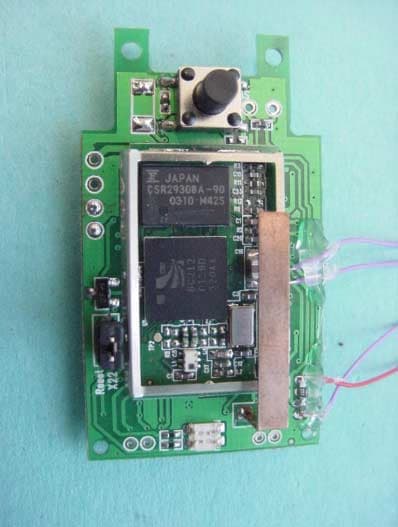
Click to zoom
Application Details
- Equipment Class
- DSS - Part 15 Spread Spectrum Transmitter
- Date of Grant
- Sep 25, 2003
- Application Purpose
- Original Equipment
- Date of Application
- Sep 25, 2003
- Equipment Note
- Bluetooth Toy Car
- Frequency Range
- 2402.00000000 - 2480.00000000
- Company
- Sony Corporation
- Country
- Japan
Documents & Files
Document Text
Text extracted from the exhibit documents filed with the FCC. Open a document above to read the original.
Users Manual
Fig. 6 Fig. 5 Fig. 4 Fig. 2 Fig.3 Fig. 1 ENGLISH Charging the car Before you can operate CAR 100 you need to charge the car. The car has a built-in rechargable battery. Attach the car to the phone (Fig.1). You can charge for up to 60 minutes. Adding the car to your phone When you use CAR 100 for the first time, you need to add it to the list of devices in your Bluetooth™ phone. This procedure may also be called pairing. Press and hold the button on the car (Fig.3) until the indicator light flashes red and green. Make sure the car and the phone are within 1 m (3 ft) of each other. Prepare your phone according to the phone’s user documentation on adding a Bluetooth device. The car passkey is 0000. When pairing is completed, the car indicator light flashes green or red. Driving the car Detach the car from the phone (Fig. 2); if already detached, press the button on the car (Fig.3). ‘Bluetooth car Speed=2’ appears in the display. Use the keys of the phone to control the car (see Fig. 4,5, and 6). Tip Press , or to change the speed of the car. Tip You can also use the volume keys and the joystick to control the car. Turning off the car Press and hold the button on the car until the indicator light stops flashing. Tip To reset settings in the car, press and hold the button on the car for more than 30 seconds while the car is being charged. This also clears current pairing. Note Static electricity or the fact that the car is out of range, may cause the Bluetooth link to disappear. forwardleftright backward DEUTSCH Laden des Autos Bevor Sie das CAR 100 benutzen können, müssen Sie das Auto laden. Das Auto enthält einen Akku. Verbinden Sie das Auto mit dem Telefon (Abbildung 1). Sie können das Auto bis zu 60 Minuten laden. Koppeln des Autos mit dem Telefon Bevor Sie das CAR 100 erstmals benutzen, müssen Sie es der Geräteliste im Bluetooth™ Telefon hinzufügen. Dieser Vorgang wird auch als „Koppeln“ der Geräte bezeichnet. Drücken und halten Sie die Taste am Auto (Abbildung 3), bis die Leuchte rot und grün blinkt. Auto und Telefon müssen sich in einer Entfernung von maximal 1 m befinden. Bereiten Sie das Telefon nach Maßgabe der zugehörigen Bedienungsanleitung auf das Hinzufügen eines Bluetooth Geräts vor. Die Kennung des Autos lautet 0000. Nach Abschluss der Koppelung blinkt die Leuchte am Auto grün oder rot. Fahren des Autos Trennen Sie das Auto vom Telefon (Abbildung 2). Wurde das Auto bereits vom Telefon getrennt, drücken Sie die Taste am Auto (Abbildung 3). Auf dem Display wird „Bluetooth car Speed=2“ angezeigt. Steuern Sie das Auto mit den Tasten des Telefons (siehe Abbildungen 4, 5 und 6). Tipp Drücken Sie , oder , um die Geschwindigkeit des Autos zu ändern. Tipp Sie können das Auto auch mit den Lautstärketasten und dem Joystick lenken. Ausschalten des Autos Drücken und halten Sie die Taste am Auto, bis die Leuchte nicht mehr blinkt. Tipp Wollen Sie die Einstellungen im Auto zurücksetzen, drücken und halten Sie die Taste am Auto für mehr als 30 Sekunden, während es geladen wird. Dadurch wird auch die Koppelung gelöscht. Hinweis: Durch statische Elektrizität oder die Tatsache, dass sich das Auto außerhalb der Reichweite befindet, kann die Bluetooth-Verbindung abreißen. VorwärtsLinksRechts Rückwärts FRANCAIS Chargement de la voiture Vous devez charger CAR 100 avant de l'utiliser. La voiture dispose d'une batterie rechargeable intégrée. Connectez la voiture au téléphone (Fig. 1). Vous pouvez la charger pendant 60 minutes maximum. Ajout de la voiture au téléphone Lorsque vous utilisez CAR 100 pour la première fois, vous devez l'ajouter à la liste des périphériques sur votre téléphone doté de la technologie Bluetooth™. Cette procédure peut également être appelée jumelage. Appuyez sur le bouton de la voiture (Fig. 3) et maintenez-le enfoncé jusqu'à ce que l'indicateur clignote rouge et vert. Assurez-vous que la voiture et le téléphone se trouvent à 1 m au maximum l'un de l'autre. Préparez le téléphone conformément à sa documentation pour l'ajout d'un périphérique Bluetooth. La clé d'authentification de la voiture est 0000. Lorsque le jumelage est terminé, l'indicateur de la voiture clignote vert ou rouge. Conduite de la voiture Déconnectez la voiture du téléphone (Fig. 2) ; si elle est déjà déconnectée, appuyez sur le bouton de la voiture (Fig. 3). « Bluetooth car Speed=2 » s'affiche à l'écran. Utilisez les touches du téléphone pour contrôler la voiture (voir Fig. 4, 5 et 6). Astuce Appuyez sur , ou pour modifier la vitesse de la voiture. Astuce Vous pouvez également utiliser les touches du volume et la manette de jeu pour contrôler la voiture. Arrêt de la voiture Appuyez sur le bouton de la voiture et maintenez-le enfoncé jusqu'à ce que l'indicateur arrête de clignoter. Astuce Pour réinitialiser les paramètres de la voiture, appuyez sur le bouton de la voiture et maintenez-le enfoncé plus de 30 secondes au cours du chargement de la voiture. Ceci efface également le jumelage actuel. Remarque: En présence d'électricité statique ou si la voiture est hors de portée, le lien Bluetooth risque de disparaître. Marche Tourner à Tourner à Marche ESPAÑOL ¿Cómo cargar el teléfono? Antes de poder utilizar el coche CAR 100, tiene que cargar su batería. El coche lleva incorporada una batería recargable. Conecte el coche al teléfono (fig. 1). Puede cargarlo durante 60 minutos. ¿Cómo añadir el coche a la lista de dispositivos del teléfono? La primera vez que utilice CAR 100 tendrá que añadirlo a la lista de dispositivos de su teléfono Bluetooth™. Este procedimiento también se conoce como enlace o asociación. Mantenga pulsado el botón del coche (fig. 3) hasta que el indicador parpadee en rojo y verde. Asegúrese de que el coche y el teléfono están a una distancia no superior a 1 metro (3 pies) el uno del otro. Prepare su teléfono siguiendo la documentación para el usuario, proporcionada con este, sobre cómo añadir dispositivos Bluetooth. La clave maestra es 0000. Una vez que ha finalizado el proceso de enlace, el ind…
Text truncated - open the document above for the full version.
Cover Letter(s)
Confidentiality Request .Datum. Date Beteckning. Reference GUG/NO3:268 Er beteckning. Your reference 2003-08-15 Ert datum' Your date Vår handläggare, namn, tfn .Attending to this mattet; name, tefephone LD/SEM/GUG/NB Håkan Sjöberg +4646 193559 Receiver Federal Communications Commision Confidentiality Request Sony Ericsson Mobile Communications AB hereby requests that the FCC application materials Iisted below for Sony Ericsson mobile phone type DGA-OOO1001 (FCC ID: PY7DGA-1001) shall be treated as confidential and withheld from public inspection. Electrical diagrams Component listings T echnical descriptions Block diagrams This material contains information relating to circuit function and complexity that could be of benefit to competitors. The material contains secrets and confidential information that Sony Ericsson does not customarily release to the public and which is otherwise not generally available to the public. Please contact the undersigned if there are any further questions or additional information needed in this matter. Bo Johansson Type Approval Manager Sony Ericsson Mobile Communications AB Nya Vattentornet 221 88 Lund Sweden Telephone: +4646 193242 E-mail: [email protected] Sony Ericsson Mobile Communications AB Momsnr .~A. 7:No: SE556615665801 Organisationsnr. Reg No: 556615-6658 Telefax. Telefax Nat 046-1941 00 Int +46461941 00 Styrelsens säte: Lund Registered office: Lund Telefon' Te/ephone Nat 046-194000 Int +4646194000 Besöksadress' Office address Nya Vattentornet Lund Postadress. Mail SE-221 88 Lund Sweden
ID Label/Location Info
Company Internal APPLICATION INFO. 1 (1) Prepared (also subject responsible if other) No. LD/SEM/GUG/NB Håkan Sjöberg +46 46 193559 Approved Checked Date Rev Reference 2003-09-17 B Application: PY7DGA-1001 Label information
Internal Photos
CETECOM ICT Services GmbH Test Report No.: 2_3378-01-02/03Issue Date: 2003-09-04Page 62 (65) PHOTOGRAPH OF THE EQUIPMENT CETECOM ICT Services GmbH Test Report No.: 2_3378-01-02/03Issue Date: 2003-09-04Page 63 (65) PHOTOGRAPH OF THE EQUIPMENT CETECOM ICT Services GmbH Test Report No.: 2_3378-01-02/03Issue Date: 2003-09-04Page 64 (65) PHOTOGRAPH OF THE EQUIPMENT CETECOM ICT Services GmbH Test Report No.: 2_3378-01-02/03Issue Date: 2003-09-04Page 65 (65) PHOTOGRAPH OF THE EQUIPMENT
Test Report
CETECOM ICT Services GmbH Radio Satellite Communication Untertürkheimer Straße 6-10 . D-66117 SaarbrückenTelephon: +49 (0)681 598-0Telefax: -9075 RSC14issue test report consist of 65 PagesPage 1 (65) Recognized by the Federal Communications Commission FCC–Identification Number: 90462 TCB ID: DE 0001 Accredited by the German Accreditation Council DAR–Registration Number TTI–P–G 166/98 Independent ETSI compliance test house ETSI Accredited Bluetooth™ Test Facility (BQTF) Test Report No.: 2_3378-01-02/03 FCC Part 15.247 / CANADA RSS-210 DGA-0001001 FCC ID: PY7GDA-1001 IC: 4170B-DGA-1001 CETECOM – ICT Services GmbH Untertürkheimerstr. 6-10 66117 Saarbrücken, Germany Telephone: + 49 (0) 681 / 598-0 Fax: + 49 (0) 681 / 589-9075 BLUETOOTH is a trademark owned by Bluetooth SIG, Inc. and licensed to CETECOM CETECOM ICT Services GmbH Test Report No.: 2_3378-01-02/03Issue Date: 2003-09-04 Page 2 (65) Table of Contents 1 General Information 1.1 Notes 1.2 Testing Laboratory 1.3 Details of Applicant 1.4 Application Details 1.5 Test Item 1.6 Test Specifications 2 Technical Test 2.1 Summary of Test Results 2.2 Test Report CETECOM ICT Services GmbH Test Report No.: 2_3378-01-02/03Issue Date: 2003-09-04 Page 3 (65) 1 General Information 1.1 Notes The test results of this test report relate exclusively to the test item specified in 1.5. The CETECOM ICT Services GmbH does not assume responsibility for any conclusions and generalisations drawn from the test results with regard to other specimens or samples of the type of the equipment represented by the test item. The test report may only be reproduced or published in full. Reproduction or publication of extracts from the report requires the prior written approval of the CETECOM ICT Services GmbH. Test Laboratory Manager: 2003-09-05RSC8411Berg M. DateSectionNameSignature Technical Responsibility for Area of Testing: 2003-09-05RSC8412Hausknecht D. DateSectionNameSignature CETECOM ICT Services GmbH Test Report No.: 2_3378-01-02/03Issue Date: 2003-09-04 Page 4 (65) 1.2 Testing Laboratory CETECOM ICT Services GmbH Untertürkheimer Straße 6 - 10 66117 Saarbrücken Germany Telephone: + 49 681 598 - 0 Telefax : + 49 681 598 - 9075 E-mail: [email protected] Internet: www.cetecom-ict.de Accredited testing laboratory The Test laboratory (area of testing) is accredited according to DIN EN ISO/IEC 17025. DAR-registration number : TTI-P-G 166/98-30 Accredited Bluetooth™ Test Facility (BQTF) BLUETOOTH is a trademark owned by Bluetooth SIG, Inc. and licensed to CETECOM 1.3Details of Applicant Name : Sony Ericsson Mobile Communication AB Street : Nya Vattentornet City : 22188 Lund Country : Sweden Telephone : +46-46-193-242 Telefax : +46-46-193-295 Contact : Mr. Bo Johansson Telephone : +46-46-193-242 1.4 Application Details Date of receipt of application : 2003-08-28 Date of receipt of test item : 2003-08-28 Date of test : 2003-09-04 CETECOM ICT Services GmbH Test Report No.: 2_3378-01-02/03Issue Date: 2003-09-04 Page 5 (65) 1.5 Test Item Type of equipment : Bluetooth ® controlled Mini car (toy) Type designation: DGA-0001001 (Model: Car-100) Manufacturer: Applicant Street: City: Country: Serial number: -.- FCC – ID: PY7GDA-1001 IC : 4170B-DGA-1001 Hardware: FP1 Software : P1C Additional information : Frequency: 2402 – 2480 MHz Type of modulation: 1M00FXD / 79M8FXD (FHSS) Number of channels : 79 Antenna: integral antenna Power supply: NiMH rechargeable battery 1.2V 160 mAh Output power: EIRP: 0.2 mW (worst case); conducted : 0.71 mW Field strength: max. 85.54 dBμV/m in 3m Occupied bandwidth: 890 kHz Transmitter spurious : 108.4 μV/m in 3m ; conducted : -41.02 dBm Receiver spurious. -.- Temperature range: -30°C - +60°C DECLARATION OF COMPLIANCE: I declare that the testing was performed or supervised by me; that the test measurements were made in accordance with the above-mentioned Industry Canada standard(s); and that the equipment identified in this application has been subjected to all the applicable test conditions specified in the Industry Canada standards and all of the requirements of the standard have been met. Signature: _______________________________________________ Date: ___2003-05-09 Michael Berg ; Test management NAME AND TITLE (Please print or type): 1.6 Test Specifications: FCC Part 15 §15.247 (March 13. 2003) CANADA RSS-210 (Issue 5) 2 Technical Test CETECOM ICT Services GmbH Test Report No.: 2_3378-01-02/03Issue Date: 2003-09-04 Page 6 (65) 2.1Summary of Test Results The radiated measurements are performed in vertical and horizontal plane in the frequency range from 9 kHz to 25 GHz in semi-anechoic chambers. The EUT is positioned on a non- conductive support with a height of 0.80 m above a conductive ground plane that covers the whole chamber. The receiving antennas are conform with specifications ANSI C63.2-1987 clause 15 and ANSI C63.4-1992 clause 4.1.5. These antennas can be moved over the height range between 1.0 m and 4.0 m in order to search for maximum field strength emitted from EUT. The measurement distances between EUT and receiving antennas are indicated in the test setups for the various frequency ranges. For each measurement, the EUT is rotated in all three axes until the maximum field strength is received. The wanted and unwanted emissions are received by spectrum analysers where the detector modes and resolution bandwidths over various frequency ranges are set according to requirement ANSI C63-4-1992 clause 4.2. Antennas are conform with ANSI C63.2-1996 item 15. 150 kHz - 30 MHz: Quasi Peak measurement, 9kHz Bandwidth, passive loop antenna. 30 MHz - 200 MHz: Quasi Peak measurement, 120KHz Bandwidth, biconical antenna 200MHz - 1GHz: Quasi Peak measurement, 120KHz Bandwidth, log periodic antenna 1GHz: Average, RBW 1MHz, VBW 10 MHz, waveguide horn All measurements are done in accordance with the Filing and Measurement Guidelimes for Frequency Hopping Spread Spectrum Systems DA 00-705 and Appendix A “BLUETOOTH APPROVALS” The product fullfills also…
Text truncated - open the document above for the full version.
Test Setup Photos
CETECOM ICT Services GmbH Test Report No.: 2_3378-01-02/03Issue Date: 2003-09-04Page 58 (65) Test setup Radiated Emissions CETECOM ICT Services GmbH Test Report No.: 2_3378-01-02/03Issue Date: 2003-09-04Page 59 (65) PHOTOGRAPH OF THE EQUIPMENT
Contact Information
Applicant
Mika Kaneko(Chief Regulatory Compliance Manager)
Technical Contact
Sony Ericsson Mobile Communications ABH�kan Sj�berg
[email protected]+46 46 193 000
Nya Vattentornet · Lund · Sweden
Test Firm
Cetecom ICT Services GmbHRalf Hoehn
Technical Specifications
| # | Rule Parts | Frequency Range | Power Output | Emission |
|---|---|---|---|---|
| 1 | 15C | 2.40 GHz - 2.48 GHz | 700.00 µW | 1M00FXD |
Other Applications from Sony Corporation
PY7-75158T
Jul 16, 2026GSM/WCDMA/LTE Phone with BT, DTS/UNII a/b/g/n/ac/ax, NFC and GNSS
Equipment Class
NII - Unlicensed National Information Infrastructure TXPY7-52715J
Jul 16, 2026GSM/WCDMA/LTE Phone with BT, DTS/UNII a/b/g/n/ac/ax, NFC and GNSS
Equipment Class
DXX - Part 15 Low Power Communication Device TransmitterPY7-84526Y
Jul 16, 2026GSM/WCDMA/LTE Phone with BT, DTS/UNII a/b/g/n/ac/ax, NFC and GNSS
Equipment Class
PCE - PCS Licensed Transmitter held to earPY7-30515Z
Apr 13, 2026GSM/WCDMA/LTE/NR Phone with BT, DTS/UNII a/b/g/n/ac/ax/be, NFC, GNSS and WPT
Equipment Class
DXX - Part 15 Low Power Communication Device TransmitterPY7-73716J
Apr 11, 2024GSM/WCDMA/LTE Phone with BT, DTS/UNII a/b/g/n/ac, NFC and GNSS
Equipment Class
PCE - PCS Licensed Transmitter held to ear