PY7F3022018Licensed transmitter
Sony Corporation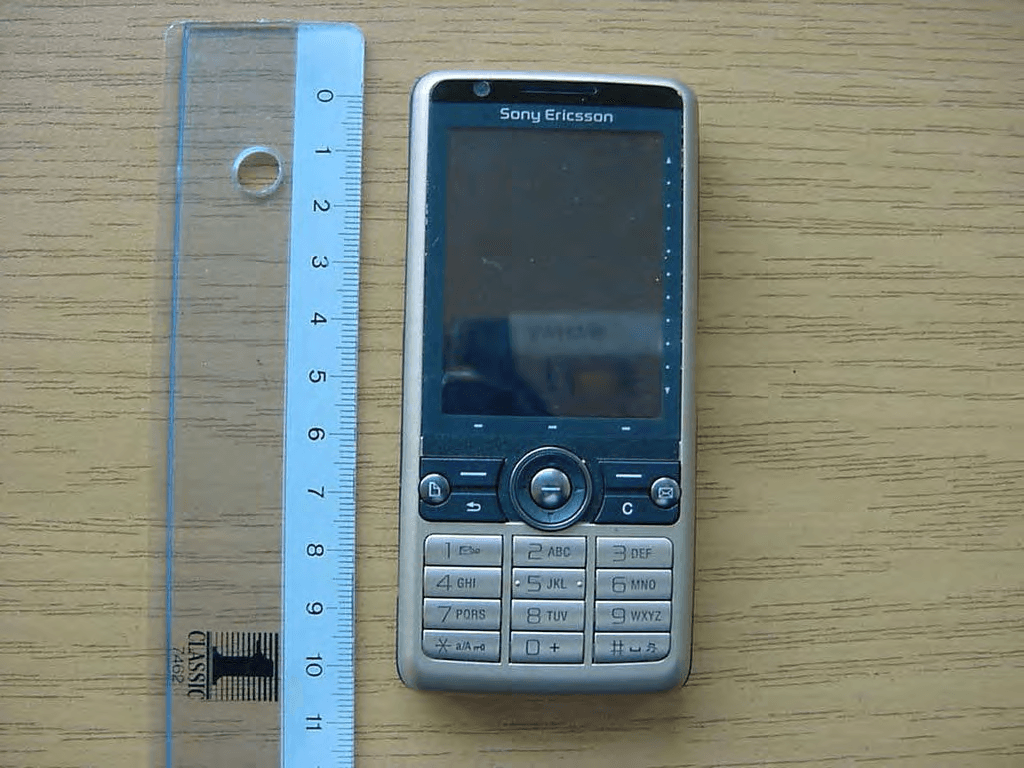
Click to zoom
Application Details
- Equipment Class
- PCE - PCS Licensed Transmitter held to ear
- Date of Grant
- Apr 10, 2008
- Application Purpose
- Original Equipment
- Date of Application
- Apr 10, 2008
- Equipment Note
- Licensed transmitter
- Frequency Range
- 1850.20000000 - 1909.80000000
- Company
- Sony Corporation
- Country
- Japan
Documents & Files
Document Text
Text extracted from the exhibit documents filed with the FCC. Open a document above to read the original.
Users Manual
Thank you for purchasing a Sony Ericsson G700. For additional phone content, go to www.sonyericsson.com/fun. Register now to get free online storage and special offers at www.sonyericsson.com/myphone. For product support, go to www.sonyericsson.com/support. Accessories – More for your phone These accessories can be purchased separately but may not be available in every market. To view the full range, go to www.sonyericsson.com/accessories. Bluetooth™ Headset HBH-PV703 Go wireless with a powerful headset GPS Enabler HGE-100 Get more from your phone - add GPS technology. Know where you are, where you're going and how to get there. Bluetooth™ Car Speakerphone HCB-150 High performance car handsfree with text to speech for convenient calls on the road 1Contents Contents Getting started ................... 5 Welcome .................................. 5 Instruction symbols .................. 5 Additional help ......................... 5 Package ................................... 6 Overview .................................. 7 Before using your phone .......... 9 First time start-up .................. 11 Getting to know the phone ... 13 Turning the phone on and off 13 The screen ............................. 13 Navigation .............................. 14 Finding the applications ......... 14 Using the applications ........... 15 Task manager ........................ 15 Connecting accessories ......... 16 Updating software ................. 16 Main menu overview* ............. 17 ............................................... 17 ............................................... 17 Status bar ............................... 18 Importing contact entries ....... 19 Sound ..................................... 19 Memory card .......................... 19 Notes ...................................... 20 Torch ...................................... 21 Text entry ............................... 21 Calling .............................. 25 Networks ................................ 25 Making a call .......................... 25 Receiving a call ...................... 26 Handling two or more calls .... 26 Video calls .............................. 27 Call log ................................... 28 Handsfree .............................. 28 More features ......................... 28 Using contacts ....................... 29 Creating contacts .................. 29 Editing contacts ..................... 30 Managing contacts ................ 30 Internet ............................. 32 Internet browser ..................... 32 RSS feeds .............................. 33 Blog ........................................ 33 2Contents Messaging ........................ 34 Before you use Messaging .... 34 Shortcut to Messaging ........... 34 Messages ............................... 34 Folders ................................... 34 SMS ....................................... 35 MMS ....................................... 35 Email ...................................... 37 More about Messaging .......... 38 Media ................................ 41 Transferring media files .......... 41 Updating media files .............. 41 Photos and pictures ............... 41 Music and audio tracks .......... 43 Video ...................................... 44 Camera ............................. 45 Taking pictures and video clips . 45 Changing the camera settings 46 Viewer .................................... 47 Entertainment ................... 48 PlayNow™ ............................. 48 FM radio ................................. 48 TrackID™ ............................... 50 Connectivity ..................... 51 PC Suite ................................. 51 USB connection ..................... 51 Synchronization ..................... 52 Bluetooth connection ............. 53 Connections manager ............ 53 Wap push ............................... 53 Certificate manager and Java cer- tificates ................................... 53 More features ................... 55 Managing files and applications 55 Master reset ........................... 56 Power save ............................ 56 Screen saver .......................... 57 Important information ...... 58 FCC Statement ...................... 66 Declaration of Conformity for G700 ...................................... 67 Index ................................. 68 Sony Ericsson G700 UMTS 2100 GSM 900/1800/1900 This User guide is published by Sony Ericsson Mobile Communications AB or its local affiliated company, without any warranty. Improvements and changes to this User guide necessitated by 3Contents typographical errors, inaccuracies of current information, or improvements to programs and/or equipment, may be made by Sony Ericsson Mobile Communications AB or its local affiliated company at any time and without notice. Such changes will, however, be incorporated into new editions of this User guide. All rights reserved. ©Sony Ericsson Mobile Communications AB, 2008 Publication number: 1209-0959.1 Please note: Some of the services in this User guide are not supported by all networks. This also applies to the GSM International Emergency Number 112. Please contact your network operator or service provider if you are in doubt whether you can use a particular service. Please read the Guidelines for safe and efficient use and the Limited warranty chapters before you use your mobile phone. Your mobile phone has the capability to download, store and forward additional content, for example, ringtones. The use of such content may be restricted or prohibited by rights of third parties, including but not limited to restriction under applicable copyright laws. You, and not Sony Ericsson, are entirely responsible for additional content that you download to or forward from your mobile phone. Prior to your use of any additional content, please verify that your intended use is properly licensed or is otherwise authorized. Sony Ericsson does not guarantee the accuracy, integrity or quality …
Text truncated - open the document above for the full version.
Users Manual
15Getting to know the phone To use panels •Use and to scroll through the panels. Press to select a panel. To add additional panels 1From Standby select More > Settings. 2Mark the panels you want and select Save. Main menu All applications in your phone can be found in Main menu. To access Main menu •From Standby select or Menu depending on what Standby application is active. To change the view of Main menu 1From Standby select Main menu. 2Select More. 3Select an option. Using the applications To start an application •Select the application. To close an application •Press and hold down . To switch to another application •Switch to another application using Task manager. For more information see Task manager on page 15. Task manager Task manager helps you switch between applications. Leaving an application via Task manager rather than closing it, lets you return to the the application in the state that you left it. This is useful, for example, when cutting and pasting text from one application to another. To switch to another application 1Select in the status. 2Scroll to the wanted application and select Switch. To end an application 1Select in the status. 2Scroll to the wanted application and select End. 16Getting to know the phone Connecting accessories To connect an accessory •Connect the accessory to the side of your phone. Updating software When an improved software version for your phone is available, you can update the phone using the Sony Ericsson update Service on www.sonyericsson.com/support. Tilt the plug upwards when you disconnect the accessory. 17Getting to know the phone Main menu overview* OrganizerInternetEntertainment File manager, Tasks, Notes, Quickoffice™, Time & alarms, Torch, Calculator, Converter and more Internet browserCamera, Music applications, TrackID™, RSS feeds, radio, games, and more CalendarMessagingMedia Touch calendarMessaging application Media application, where you can handle all your media files, such as music, videos, and more CallsContactsSettings Call logYour contactsEmail wizard and various settings * Some menus are operator-, network-, and subscription-dependent. 18Getting to know the phone Status bar Status bar icons You can select an icon to get more information or to start an application. Below is a short description of the most common icons appearing in the status bar. Status bar menu You can use the status bar menu to quickly access extra settings: •New call, SMS, MMS and more. •Connections. •Volume, time and keylock. Icon Function 3G available Battery strength Bluetooth headset connected Bluetooth activated Current line selection (Alternative Line Service available on the SIM card) All calls diverted Email message received Flight mode Internet connection activated (flashes when data is transferred) Keylock activated Missed incoming call Picture message received Muted microphone Predictive text activated Ring volume set to zero Signal strength in phone mode Silent mode Text message received Speakerphone activated Status bar menu Task manager Voicemail received
Users Manual
19Getting to know the phone To access the status bar menu •Select in the status bar. Importing contact entries You can import contact information by: •Copying contacts stored on your SIM card. •Transferring contacts from a computer application using the synchronize function. •Transferring contacts from another phone using Bluetooth™ wireless technology. Sound To set the ear speaker volume during a phone call •Press the volume up and volume down keys. To set the volume for multimedia, alarm, ringtones and message alerts 1Select > Volume. 2Select the corresponding slider. 3Adjust the volume using the stylus. To set the phone to silent 1Select > Volume. 2Mark the Silent mode check box. Transfer sound During an ongoing call or when listening to music, you can transfer the sound to a connected accessory such as a Bluetooth headset. To transfer sound 1Select > Volume. 2Select More > Transfer sound. Memory card The phone has a slot for Memory Stick Micro™ (M2™) memory cards next to the connector. The phone supports up to 8GB memory cards. This memory behaves like a normal disk drive. You can access it as a USB mass storage device from a PC, to transfer files quickly. From Standby you can press and hold down to switch silent mode on or off. 20Getting to know the phone To insert the memory card •Insert the memory card into the slot. To remove the memory card •Press the edge of the memory card and then release it. Notes You can take notes by entering text or draw sketches, and set reminders for important events. To create a new note 1Press and select New. 2Use the toolbar to create your note. 3Select File to classify your note. Notes toolbar icons To edit a note 1Press and select a note. 2Edit the text by switching to text mode. 3Edit the sketch by switching to scribble mode. Select to use the stylus as an eraser. Do not remove the memory card during file transfer. Scribble mode selected. Select to switch to text mode Text mode selected. Select to switch to scribble mode Use the stylus as an eraser for sketches Select a background colour Set a reminder 21Getting to know the phone Managing your notes You can classify your notes, show them in a grid or a list, or synchronize them with a remote server. To change notes view 1Press and select More > Settings. 2Select an option. To view different notes folders 1Press and select More > View folder. 2Select an option. To search for notes 1Press and select More > Find. 2Enter the search phrase and select Find. To synchronize your notes •Select More > Notes manager > Synchronize. Torch To start the Torch application •From Standby select Main menu > Organizer > Torch > On. Text entry Text can be entered in four different ways: •Keypad prediction – keypad based prediction input. is displayed in the status bar. •Handwriting recognition – use the stylus to write characters directly on the screen. is displayed in the status bar. •On-screen keyboard – launch by selecting from the status bar. •Multitap – standard Multitap keypad input. Multitap is not possible when keypad prediction is active. Only the text part of your notes will be synchronized. You need a remote synchronization account first. For more information, see the Web guide, Synchronizing data remotely. The Torch will be lit until you manually stop from within the application or from Task manager. Choosing a new language in the phone will also automatically change the behaviour of the keyboard to that language. 22Getting to know the phone Editing text The text editing options are accessed by selecting More when you are in text entry mode. To highlight the text with the stylus •Hold the stylus at the end of the text for a short while then drag the stylus across the text. Keypad prediction Keypad prediction allows words to be entered by a single press of a key to input any of the letters associated with that key. A word is suggested where you are writing, additional suggestions are presented in a list. To activate keypad prediction •Press and hold down . To activate word suggestion 1From text entry mode select More > Text options. 2Select Word suggestions. To enter the word “Large” using keypad prediction 1Press . 2Scroll to the L character in the list. 3Press . 4Scroll to the predicted word Large in the list. 5Select the word by pressing on the 5-way navigation key. Handwriting recognition Handwriting recognition translates stylus gestures written directly on the screen into letters, numbers or other characters, and displays these characters as text. Handwriting recognition is only active in places where text can be entered. To activate handwriting recognition •Press and hold down . Text must be highlighted to get access to copy or cut functions. Word suggestion must be activated to get word suggestions in the list. 23Getting to know the phone To write letters •Write lower case letters below the arrow and upper case letters in line with the arrow. To write accented letters 1Write the basic letter. 2Write the accent above the arrow to form the accented letter. To write numbers •Write numbers above the arrow. Text options Text options are accessed by selecting More > Text options when in text entry mode. To add a symbol 1Select Add symbol to launch the symbols and punctuation marks table. Start each stroke at the dotted end. a b c d e f g h k l m n o p q r s t u v y z w x 1 2 i j 1 1 1 1 1 1 2 1 2 2 2 2 2 2 , . ? ! & @ " ' S 0 1 3 4 5 6 7 8 9 , . + * / \ ( ) = 2 24Getting to know the phone 2Select the symbol you want to add. To add words to My words dictionary 1Select My words. 2Select Add. 3Write the new word and select Done. 4Select Save. To change 1st and 2nd dictionary languages for text prediction 1Select More > Text options and mark the Predictive text check box. 2Select 1st language or 2nd language. 3Select a language from the list. 4Select Save. To activate Auto capitalization •Mark the Auto capitalization check box. To access the on-board help 1From Standby select Main menu > More > Help. 2Select …
Text truncated - open the document above for the full version.
Attestation Statements
1(1) Document number Revision BGLI08:300. A Prepared by Date SEM/BGLVN Lennart Skoglund 2008-04-07 Contents responsible if other than preparer Remarks Approved by ApprovedBy Reference Receiver: Federal Communication Commission. Industry Canada. Statement of no WLAN. Sony Ericsson Mobile Communications AB herby declares that our: Mobile phone FAD-3022018-BV, with FCC id: PY7F3022018, Canada id: 4170B- F3022018, Marketing name: G700, have no built-in WLAN. Due to reuse of same parts from other Sony Ericsson phones the name WLAN can be found in the schematics. Best Regards Lennart Skoglund Type Approval department
Cover Letter(s)
Confidentiality Request 2008-02-25 BGLI08:136 SEM/BGLIK Lennart Skoglund +46 8 7572533 Receiver Federal Communications Commission Subject: Request for Confidentiality FCC ID: PY7F3022018 To Whom It May Concern: In accordance with §0.459 of CFR 47, Sony Ericsson Mobile Communications AB requests confidentiality for the below listed items for our Mobile Phone type FAD-3022018-BV, FCC ID: PY7F3022018: 1. Block Diagram 2. Schematic Diagram 3. Part List 4. Operational/Technical Descriptions These items contain detailed system and equipment description and related information about the product which Sony Ericsson Mobile Communications AB considers to be proprietary, confidential and a custom design which otherwise would not be released to the general public. Since this design is a basis from which future technological products will evolve, Sony Ericsson Mobile Communications AB also feels that this information would be of benefit to its competitors, and that the disclosure of the information in these exhibits would give our competitors an unfair advantage in the market. Please contact the undersigned if there are any further questions or additional information needed in this matter. Best Regards, ______________________ Lennart Skoglund Type Approval and verification Sony Ericsson Mobile Communications AB
External Photos
CETECOM ICT Services GmbH Annex to Test report no.: 2-4883-06-02/08 2008-02-25 Page 21 of 28 8 Photographs of t he E UT Photo No.: 01 Photo No.: 02 CETECOM ICT Services GmbH Annex to Test report no.: 2-4883-06-02/08 2008-02-25 Page 22 of 28 Photo No.: 03 Photo No.: 04 CETECOM ICT Services GmbH Annex to Test report no.: 2-4883-06-02/08 2008-02-25 Page 23 of 28 Photo No.: 05 Photo No.: 06
ID Label/Location Info
Company Internal MARKING DRAWING 1 (2) Prepared (also subject responsible if other) No. SEM/GODD Marie Druvefors Approved Checked Date Rev Reference SEM/GODD Marie Druvefors 2008-02-18 PA1 4 Mobile Phone label content, FAD-3022018-BV, Made in... 1 General information Core Unit label part no 1206-6118 Bar code • Standard: according to Ericsson corporate standard 102 01–109 Uen • Print quality: C, according to ANSI X3.182-1990 as stated in Ericsson corporate standard 102 01– 1003 Uen • Quiet zone: No bar codes are allowed to be closer to a label edge than 2 mm! Text If applicable, or nothing else specified, Zebra printer Scaleable Smooth Font CG Triumvirate Bold Condensed is imposed. When needed, the text is adjusted to fit the label. Coordinates “(x/y)” under each line number specifies the bottom / left alignment for text, graphics and bar codes, x is measured vertically, and y horizontally from the upper left corner of the label (landscape format), both in mm. When needed, the alignment is adjusted to fit the label. MLCI= Main Label Content Information-document 2 Printing information Content Format Line 1 (2,5/19,0) Sony Ericsson stylized name. Graphics, height 1,5 mm. According to 1200-1925. Line 2a (4,5/19,0) Model Name “X000x” Text, height 1,2 mm. According to Chapter 1 in MLCI. Line 2b (4,5/26,5) Production week (flash), “yy’W’ww” (yy = year, ww = week) Text, height 1,2 mm. Line 3 (6,5/19,0) Product number without revision of the Sales Item in which the phone is packed, if applicable. “SI: XXXX-XXXX” Text, height 1,2 mm. Line 4 (8,5/19,0) Marking of origin: The line shall be printed as stated in chapter 3 in this document. Text, height 1,2 mm. Line 5a (10,5/1,0) “TYPE: FAD-3022018-BV” Text, height 1,2 mm. According to Chapter 1 in MLCI. Line 5b (10,5/21,0) PBA and R-state identification field, “G 1 G 2 G 3 HY 1 Y 2 Y 3 ” Text, height 1,2 mm. According to Type-testing report in the Product Model’s Specifying Documents. Line 5c (10,5/31,5) Location code of where the phone is flashed, if applicable, “FFF” Text, height 1,2 mm. Line 6a (12,5/1,0) “IC:4170B-F3022018” Text, height 1,2 mm. According to Chapter 1 in MLCI. Line 6b (12,5/17,5) “FCC ID: PY7F3022018” Text, height 1,2 mm. According to Chapter 1 in MLCI. Line 7 (14,3/2,0) Line 8a in bar code. As desired by supplier (e.g. only actual number). Bar code, height 2,0 mm. As desired by supplier (e.g. Code 128 symbology). Line 8a (16,3/1,0) Supplier’s identification for trace-ability of the telephone, as desired by supplier (e.g. “S/N: nnn....” for serial number). Text, height 1,2 mm. Defined by supplier. Line 8b (16,3/20,0) Actual electronic serial number (IMEI) of the Mobile Phone, “00000000-000000-0” Text, height 1,2 mm. In the format TAC-SNR-CD. TAC and SNR derived from pos 500 in BOM. CD = check digit according to the Luhn formula (ISO/IEC 7812), GSM 02.16. Company Internal MARKING DRAWING 2 (2) Prepared (also subject responsible if other) No. SEM/GODD Marie Druvefors Approved Checked Date Rev Reference SEM/GODD Marie Druvefors 2008-02-18 PA1 4 Content Format Line 9a (18,2/2,0) Line 8b in bar code (only actual number, without data identifier). Bar code, height 2,0 mm. Code 128 symbology, code C subset. If uneven number of digits, code B subset shall be used for the last digit. Line 9b (18,2/29,0) Repair week, if applicable. “Ry’W’ww” (y = year, ww = week) Text, height 1,2 mm. Line 10a (29,0/1,0) CE approval symbol Graphics, height 5 mm. According to 1202-5482. Line 10b (29,0/10,0) The notified body number “0682”, rotated 90° counter clockwise. Text, height 1,2 mm. Line 10c (29,0/10,0) Alert symbol, if applicable, check MLCI Graphics, height 5 mm According to Chapter 1 in MLCI Line 10d (29,0/32,5) SIM symbol Graphics, height 5 mm. According to Chapter 1 in MLCI. 3 Marking of origin 3.1 Content “Made in Xxxxx” “Xxxxx”= actual country of production of the included telephone, in English. 4 Layout The conceptual picture (for Zebra 90XiII printer, or equivalent) should not be considered as specifications, but as an additional help for setting up the label. 4.1 Conceptual picture Scale 2:1 Position of label The view below is taken from the back side of the mobile telephone. The label is located below the battery lid. Mobile phone label
Internal Photos
CETECOM ICT Services GmbH Annex to Test report no.: 2-4883-06-02/08 2008-02-25 Page 24 of 28 Photo No.: 07 Photo No.: 08 CETECOM ICT Services GmbH Annex to Test report no.: 2-4883-06-02/08 2008-02-25 Page 25 of 28 Photo No.: 09 Photo No.: 10 CETECOM ICT Services GmbH Annex to Test report no.: 2-4883-06-02/08 2008-02-25 Page 26 of 28 Photo No.: 11 Photo No.: 12 CETECOM ICT Services GmbH Annex to Test report no.: 2-4883-06-02/08 2008-02-25 Page 27 of 28 Photo No.: 13 Photo No.: 14 CETECOM ICT Services GmbH Annex to Test report no.: 2-4883-06-02/08 2008-02-25 Page 28 of 28 Photo No.: 15
RF Exposure Info
1 (25) EAB-08:012564 Uen, Rev A, 2008-02-22 Laboratories are accredited by the Swedish Board for Accreditation and Conformity Assessment (SWEDAC) under the terms of Swedish legislation. The accredited laboratory activities meet the requirements in SS-EN ISO/IEC 17025:2000. This report shall not be reproduced except in full, without written approval of the laboratory. © Telefonaktiebolaget LM Ericsson AB Report issued by an Accredited Laboratory Rapport utfärdad av ett ackrediterat laboratorium This laboratory is accredited to SS-EN ISO/IEC 17025 (SWEDAC accreditation no. 1761). SAR Test Report, FCC ID: PY7F3022018 Document number: EAB-08:012564 Uen Rev A Date of report: 2008-02-22 Testing laboratory: Ericsson EMF Research Laboratory Ericsson AB SE-164 80 Stockholm Sweden Company/Client: Lars Melin Sony Ericsson Mobile Communications AB Box 64 SE-164 94 Stockholm Sweden Test performed by: Martin Siegbahn Björn Hansson Sonja Hiltunen Daniel Göker Date of tests: January 30 – February 21 2008 Manufacturer and market name(s) of device: Sony Ericsson Mobile Communications AB, G700 Testing has been performed in accordance with: IEEE Std 1528, IEC 62209-1, FCC OET Bulletin 65 Supplement C Test results: The tested device complies with the requirements in respect of all parameters subject to the test. Additional information: Signature: Responsible test engineer _______________________ Björn Hansson Research Engineer [email protected] Tel: +46 8 4042202 Quality manager _______________________ Christer Törnevik Director, EMF Health and Safety [email protected] Tel: +46 8 7641235 2 (25) EAB-08:012564 Uen, Rev A, 2008-02-22 Table of Contents Table of Contents .................................................................................................................................... 2 1 Summary of SAR Test Report .......................................................................................................... 3 1.1 Equipment under test (EUT)................................................................................................... 3 1.2 Results ................................................................................................................................... 3 2 General information.......................................................................................................................... 4 3 Equipment under test ....................................................................................................................... 4 4 Test equipment ................................................................................................................................ 5 4.1 Dosimetric system.................................................................................................................. 5 4.2 Additional equipment.............................................................................................................. 5 5 Electrical parameters of the tissue simulating liquids ....................................................................... 6 6 SAR system performance check ...................................................................................................... 7 7 Uncertainty evaluation of SAR measurement system DASY4 according to IEC 62209-1 [1] and IEEE 1528 [2] ................................................................................................................................... 8 8 Test results ...................................................................................................................................... 9 8.1 Results for the GSM1900 mode (head) ................................................................................ 10 8.2 Results for the GSM1900 mode (body) ................................................................................ 10 8.3 Results for the GPRS(2Tx)1900 mode (body)...................................................................... 11 9 Conclusion ..................................................................................................................................... 12 10 References..................................................................................................................................... 12 11 Revision History ............................................................................................................................. 12 APPENDIX A: Photographs of the EUT ................................................................................................. 13 APPENDIX B: Photographs of the EUT when positioned for SAR measurements................................. 14 APPENDIX C: SAR distribution plots for the system performance checks ............................................. 16 APPENDIX D: SAR distribution plots ..................................................................................................... 19 APPENDIX E: Probe calibration parameters for ES3DV3, S/N: 3113 .................................................... 25 3 (25) EAB-08:012564 Uen, Rev A, 2008-02-22 1 Summary of SAR Test Report 1 1.1 Equipment under test (EUT) Serial Number CB5A0M9U94 Type Number FAD-3022018-BV Device ID FCC ID: PY7F3022018 IC: 4170B-F3022018 Accessories used in testing Handsfree HPM-62, Bluetooth handsfree HBH-20 Battery BST-33 Hardware status Pre-production AP1.1b Notes - Frequency Band [MHz] 850 900 1800 1900 2100 2450 Modes GSM GPRS WCDMA GSM GPRS GSM GPRS GSM GPRS WCDMA WCDMA WLAN Supported ; ; ; ; Covered by report ; Data and connectivity GPRS class 10, GPRS capability class B, Bluetooth class 1 Exposure environment General public 1.2 Results The maximum SAR values are given in the table below. The device conforms to the requirements of the relevant standards when the maximum SAR value is less than or equal to the limit. Results applicable to the 1g SAR limit of 1.6 W/kg: Mode Channel/ Frequency (MHz) Position Max SAR1g for single mode ope…
Text truncated - open the document above for the full version.
RF Exposure Info
Certificate of Conformity 2008-03-28 BGLI08:255 SEM/BGLIK Lennart Skoglund +46 8 7572533 Receiver Federal Communications Commission Subject: FCC ID: PY7F3022018 Statement of Antenna separation. For the Sony Ericssons product: FAD-3022018-BV, FCC id: PY7F3022018. The closest distance between the GSM/WCDMA antenna and the Bluetooth antenna is 7.2 cm Best Regards, ______________________ Lennart Skoglund Type Approval and verification Sony Ericsson Mobile Communications AB
Test Report
CETECOM ICT Services GmbH Untertürkheimer Straße 6-10 . D-66117 Saarbrücken Phone: +49 (0) 681-598-0 Fax:-9075 RSC-Laboratory 2008-02-21 Page 1 of 42 Accredited testing-laboratory DAR registration number: DAT-P-176/94-D1 Federal Motor Transport Authority (KBA) DAR registration number: KBA-P 00070-97 Recognized by the Federal Communications Commission Anechoic chamber registration no.: 90462 (FCC) Anechoic chamber registration no.: 3463A-1 (IC) Certification ID: DE 0001 Accreditation ID: DE 0002 Accredited Bluetooth ® Test Facility (BQTF) The Bluetooth word mark and logos are owned by the Bluetooth SIG, Inc. and any use of such marks by Cetecom ICT is under license Test report no. : 2-4883-06-02/08 Type identification : FAD-3022018-BV Applicant : Sony Ericsson Mobile Communications AB FCC ID : PY7F3022018 IC Certification No : 4170B-F3022018 Test standards : 47 CFR Part 24 RSS - 133 Issue 3 CETECOM ICT Services GmbH Test report no.: 2-4883-06-02/08 2008-02-21 Page 2 of 42 Table of contents 1 G e n e r a l i n f o r m a t i o n . . . . . . . . . . . . . . . . . . . . . . . . . . . . . . . .. . . . . . . . . . . . . . . . . . . . . . . . . . . . . . . . . . . . . . . . . . . . . . . . . . .. . . . . . . . . . . . . . . . . 3 1.1 Notes ......................................…
Text truncated - open the document above for the full version.
Contact Information
Applicant
Kazuyuki Hori(Senior EMC/RF Compliance Manager)
Technical Contact
Sony Ericsson Mobile Communications ABLennart Skoglund
Torshamnsgatan 27 · Kista · Sweden
Technical Specifications
| # | Rule Parts | Frequency Range | Power Output | Emission | Tolerance |
|---|---|---|---|---|---|
| 1 | 24E | 1.85 GHz - 1.91 GHz | 1.122 W | 300KGXW | 0.0426000000 ppm |
Other Applications from Sony Corporation
PY7-75158T
Jul 16, 2026GSM/WCDMA/LTE Phone with BT, DTS/UNII a/b/g/n/ac/ax, NFC and GNSS
Equipment Class
NII - Unlicensed National Information Infrastructure TXPY7-52715J
Jul 16, 2026GSM/WCDMA/LTE Phone with BT, DTS/UNII a/b/g/n/ac/ax, NFC and GNSS
Equipment Class
DXX - Part 15 Low Power Communication Device TransmitterPY7-84526Y
Jul 16, 2026GSM/WCDMA/LTE Phone with BT, DTS/UNII a/b/g/n/ac/ax, NFC and GNSS
Equipment Class
PCE - PCS Licensed Transmitter held to earPY7-30515Z
Apr 13, 2026GSM/WCDMA/LTE/NR Phone with BT, DTS/UNII a/b/g/n/ac/ax/be, NFC, GNSS and WPT
Equipment Class
DXX - Part 15 Low Power Communication Device TransmitterPY7-73716J
Apr 11, 2024GSM/WCDMA/LTE Phone with BT, DTS/UNII a/b/g/n/ac, NFC and GNSS
Equipment Class
PCE - PCS Licensed Transmitter held to ear