PY7F3022019Licensed transmitter
Sony Corporation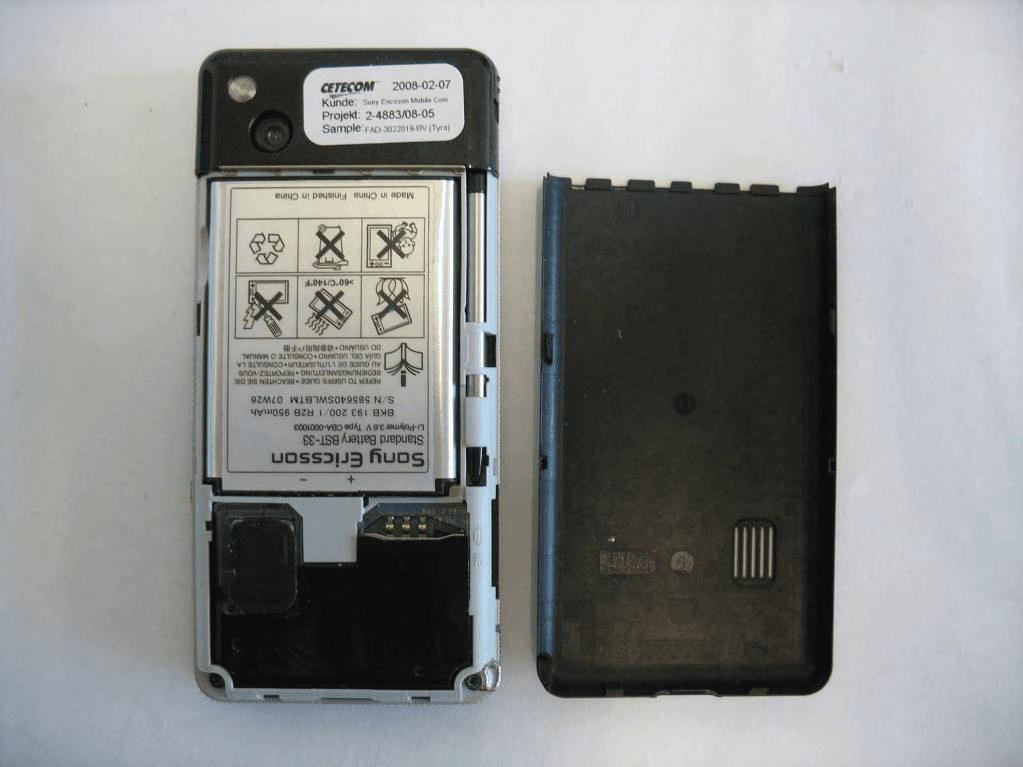
Click to zoom
Application Details
- Equipment Class
- DTS - Digital Transmission System
- Date of Grant
- Apr 08, 2008
- Application Purpose
- Original Equipment
- Date of Application
- Feb 21, 2008
- Equipment Note
- Licensed transmitter
- Frequency Range
- 2412.00000000 - 2462.00000000
- Company
- Sony Corporation
- Country
- Japan
Documents & Files
Document Text
Text extracted from the exhibit documents filed with the FCC. Open a document above to read the original.
Users Manual
Congratulations on your purchase of the Sony Ericsson ????i. Store hours of music and enjoy touchscreen Walkman® music player operation. For additional phone content, go to www.sonyericsson.com/fun. Register now to get a suite of tools, free online storage, special offers, news and competitions at www.sonyericsson.com/myphone. For product support, go to www.sonyericsson.com/support. Accessories – More for your phone These accessories can be purchased separately but may not be available in every market. To view the full range go to www.sonyericsson.com/accessories. Music Desk Stand MDS-65 Enjoy your phone-based music at home, on holiday or in the office with a portable stereo Stereo Portable Handsfree HPM-90 A handsfree solution with bright display – see who is calling and what song is playing Bluetooth™ Music Receiver MBR-100 Stream music from your phone to your hi-fi for outstanding sound quality 1Contents Contents Getting started ................... 3 Getting to know the phone ... 10 Calling ............................... 21 Internet .............................. 27 Messaging ........................ 29 Media ................................ 35 Camera ............................. 39 Entertainment ................... 42 Connectivity ...................... 45 More features ................... 49 Important information ...... 52 Index ................................. 61 Sony Ericsson G900 UMTS 2100 GSM 900/1800/1900 This User guide is published by Sony Ericsson Mobile Communications AB or its local affiliated company, without any warranty. Improvements and changes to this User guide necessitated by typographical errors, inaccuracies of current information, or improvements to programs and/or equipment, may be made by Sony Ericsson Mobile Communications AB or its local affiliated company at any time and without notice. Such changes will, however, be incorporated into new editions of this User guide. All rights reserved. ©Sony Ericsson Mobile Communications AB, 2008 Publication number: 1207-9851 Please note: Some of the services in this User guide are not supported by all networks. This also applies to the GSM International Emergency Number 112. Please contact your network operator or service provider if you are in doubt whether you can use a particular service. Please read the Guidelines for safe and efficient use and the Limited warranty chapters before you use your mobile phone. Your mobile phone has the capability to download, store and forward additional content, for example, ringtones. The use of such content may be restricted or prohibited by rights of third parties, including but not limited to restriction under applicable copyright laws. You, and not Sony Ericsson, are entirely responsible for additional content that you download to or forward from your mobile phone. Prior to your use of any additional content, please verify that your intended use is properly licensed or is otherwise authorized. Sony Ericsson does not guarantee the accuracy, integrity or quality of any additional content or any other third party content. Under no circumstances will Sony Ericsson be liable in any way for your 2Contents improper use of additional content or other third party content. PlayNow, TrackID and MusicDJ are trademarks or registered trademarks of Sony Ericsson Mobile Communications AB. TrackID™ is powered by Gracenote Mobile MusicID™. Gracenote and Gracenote Mobile MusicID are trademarks or registered trademarks of Gracenote, Inc. Sony, the WALKMAN logo and symbol are trademarks or registered trademarks of Sony Corporation. Ericsson is a trademark or registered trademark of Telefonaktiebolaget LM Ericsson. Bluetooth is a trademark or registered trademark of Bluetooth SIG Inc. Real is a trademark or a registered trademark of RealNetworks, Inc. Copyright 1995-2008, RealNetworks, Inc. All rights reserved. Adobe and Acrobat are trademarks or registered trademarks of Adobe Systems Incorporated in the United States and/or other countries. Microsoft, Microsoft Excel, Microsoft Word, Microsoft PowerPoint, Microsoft Outlook and Windows are either registered trademarks or trademarks of Microsoft Corporation in the United States and/or other countries. Java and all Java based trademarks and logos are trademarks or registered trademarks of Sun Microsystems, Inc. in the U.S. and other countries. End-user license agreement for Sun™ Java™ J2ME™. Restrictions: 1 Software is confidential copyrighted information of Sun and title to all copies is retained by Sun and/or its licensors. Customer shall not modify, decompile, disassemble, decrypt, extract, or otherwise reverse engineer Software. Software may not be leased, assigned, or sublicensed, in whole or in part. 2 Export Regulations: Software, including technical data, is subject to U.S. export control laws, including the U.S. Export Administration Act and its associated regulations, and may be subject to export or import regulations in other countries. Customers agree to comply strictly with all such regulations and acknowledges that it has the responsibility to obtain licenses to export, re- export, or import Software. Software may not be downloaded, or otherwise exported or re-exported (i) into, or to a national or resident of, Cuba, Iraq, Iran, North Korea, Libya, Sudan, Syria (as such listing may be revised from time to time) or any country to which the U.S. has embargoed goods; or (ii) to anyone on the U.S. Treasury Department's list of Specially Designated Nations or the U.S. Commerce Department's Table of Denial Orders. 3 Restricted Rights: Use, duplication or disclosure by the United States government is subject to the restrictions as set forth in the Rights in Technical Data and Computer Software Clauses in DFARS 252.227-7013(c) (1) (ii) and FAR 52.227-19(c) (2) as applicable. Other product and company names mentioned herein may be the trademarks of their respective owners. Any rights not expressly granted herein are reserved. All illustrations ar…
Text truncated - open the document above for the full version.
Users Manual
8Getting started 3Insert the battery. To charge the battery 1Connect the charger to the mains 2Connect the charger to the phone. To disconnect the charger •Remove the charger by tilting the plug upwards. IMEI number IMEI (International Mobile Equipment Identifier) is a 15-digit number. Your operator can use the IMEI number to enable a complete barring of your phone if it is stolen. The number is printed underneath the battery compartment. You can also view the number on the phone display. To view the IMEI number in your phone •From Standby enter *#06#. 9Getting started First time start-up To turn on the phone 1Press and hold down the On/off button. 2Select Phone on. 3Select a language. 4Enter your PIN, if requested. 5Select Done. Keylock Your phone has a dedicated Lock key making it easy to lock and unlock the keypad on your phone. The automatic keylock on your phone is turned on as default. To turn off automatic keylock 1From Standby select Main menu > Settings > Security > Locks. 2Unmark the Automatic keylock check box. To lock and unlock the keypad using the Lock key •Press and hold the Lock key . Wizards There are three wizards available to help you set up your phone. The Setup wizard, the Internet wizard and the Email wizard. The Setup wizard and the Internet wizard are launched the first time you start the phone. The Email wizard is launched when first launching Email accounts. It is possible to launch all wizards from the Main menu at any time. For more information about the wizards see the Web guide. Before you can use your phone you need to insert the SIM card, and insert and charge the battery. If you make a mistake when you enter your PIN code, you can delete the number by pressing . If you enter the wrong PIN code three times in a row, the SIM card is blocked. To unblock it, you need to enter the PUK code supplied with your SIM card. 10Getting to know the phone Getting to know the phone Turning the phone on and off Your phone has two modes of operation: •Phone on – full functionality. •Flight mode – limited functionality with network and radio functions switched off. You can use flight mode where mobile phones are prohibited, such as in hospitals and aircrafts. To turn on the phone in phone mode 1Press and hold down the On/off button. 2Select Phone On. To turn on the phone in flight mode 1Press and hold down the On/off button. 2Select Flight mode. To turn off the phone 1Press and hold down the On/off button. 2Select Power Off. The screen The screen is touch-sensitive. You can use the stylus or your fingertips to select items. 1Status bar menu 2Status bar with status icons 3Panels 4Touch options bar MenuCallsMore 11:21 04-01-08 1 2 3 4 11Getting to know the phone Navigation There are several ways to navigate menus and select items in your phone. You can use the 5-way navigation key, back button, stylus, keyboard navigation keys, touch options or your fingertips. 5-way navigation The navigation key consists of a ring and a center key. The ring is used for going up and down , left and right . The center key is used for selection. Back button You can press to return to the previous screen or menu. You can press and hold down to return to Standby. Stylus Use the stylus to select items on the screen and to navigate menus or to pan multimedia pictures. Finding the applications Standby Standby is displayed whenever you turn on your phone. To change view in Standby 1Select Main menu > Settings > Display > Standby application. 2Select: •Business to show the Today view. •None to show an enlarged clock. •Default to show the panels. Main menu All applications in your phone can be found in Main menu. To access Main menu •From Standby select or Menu depending on what Standby application is active. To change the view of Main menu 1From Standby select Main menu. 2Select More. 3Select View as grid or View as list. Using the applications To start an application •Select the application. 12Getting to know the phone To close an application •Press and hold down . To leave an application without closing it •Switch to another application using Task manager. See Task manager on page 12. Task manager Task manager helps you switch between applications. Leaving an application via Task manager rather than closing it, lets you return to the the application in the state that you left it. This is useful, for example, when cutting and pasting text from one application to another. To switch to another application 1Tap in the status bar or select More > Task manager. 2Select the wanted application and select Switch. Connecting accessories To connect an accessory •Connect the accessory to the side of your phone. Updating software When an improved software version for your phone is available, you can update the phone using the Sony Ericsson Update Service on www.sonyericsson.com/support. The Web page has further instructions on how to perform an update. Tilt the plug upwards when you disconnect the accessory. 13Getting to know the phone Main menu overview* OrganizerInternetEntertainment File manager Calendar Time & alarms Tasks Notes Quickoffice Pdf+ Speed dial Video calls Converter Remote sync Timer Stopwatch Calculator Torch Business card scanner Connections mgr RSS feeds More applications Interactive Radio PlayNow™ MusicDJ™ Track ID™ & Sound Recorder Sudoku Demo CameraMessagingMedia CallsContactsSettings Sounds & alerts General Display Calls Connectivity Messaging Security * Some menus are operator-, network-, and subscription-dependent. 14Getting to know the phone Status bar Status bar icons You can select an icon to get more information or to start an application. Below is a short description of the most common icons appearing in the status bar. Status bar menu You can use the status bar menu to quickly access extra settings: •New call, SMS, MMS and more •Connections •Volume, Time and key lock IconFunction 3G Available Battery strength Bluetooth headset connected Bluetooth activated Current line selection (A…
Text truncated - open the document above for the full version.
Cover Letter(s)
Confidentiality Request 2008-02-07 BGLI08:087 SEM/BGLIK Lennart Skoglund +46 8 7572533 Receiver Federal Communications Commission Subject: Request for Confidentiality FCC ID: PY7F3022019 To Whom It May Concern: In accordance with §0.459 of CFR 47, Sony Ericsson Mobile Communications AB requests confidentiality for the below listed items for our Mobile Phone type FAD-3022019-BV, FCC ID: PY7F3022019: 1. Block Diagram 2. Schematic Diagram 3. Part List 4. Operational/Technical Descriptions These items contain detailed system and equipment description and related information about the product which Sony Ericsson Mobile Communications AB considers to be proprietary, confidential and a custom design which otherwise would not be released to the general public. Since this design is a basis from which future technological products will evolve, Sony Ericsson Mobile Communications AB also feels that this information would be of benefit to its competitors, and that the disclosure of the information in these exhibits would give our competitors an unfair advantage in the market. Please contact the undersigned if there are any further questions or additional information needed in this matter. Best Regards, ______________________ Lennart Skoglund Type Approval and verification Sony Ericsson Mobile Communications AB
Cover Letter(s)
Document number BGLI08:090 Prepared by Date BGGINK Lennart Skoglund 2008-02-07 Contents responsible if other than preparer Remarks Approved by Reference POWER OF ATTORNEY To whom it may concern: The following organisation is granted authority to act on Sony Ericsson Mobile Communications AB’s behalf, to file technical reports, measurements and forms for Sony Ericsson Mobile Communication mobile phone FAD-3022019-BV with the FCC ID: PY7F3022019 as it applies for a new equipment grant. CETECOM GmbH We certify that we are not subject to a denial of Federal benefits, that include FCC benefits, pursuant to Section 5301 of the Anti-Drug Abuse Act of 1988, 21 U.S.C. § 862 because of a conviction for possession or distribution of a controlled substance. Further, no party as defined in 47CFR 1.2002(b), to the application is subject to denial of federal benefits, that includes FCC benefits. Sincerely Lennart Skoglund
External Photos
CETECOM ICT Services GmbH Test report no.: 2-4883-05-04/08-A 2008-02-15 Page 62 of 72 8 Photographs of t he E UT Photo 1: Photo 2: CETECOM ICT Services GmbH Test report no.: 2-4883-05-04/08-A 2008-02-15 Page 63 of 72 Photo 3: Photo 4:
ID Label/Location Info
Company Internal MARKING DRAWING 1 (2) Prepared (also subject responsible if other) No. SEM/GODD Marie Druvefors Approved Checked Date Rev Reference SEM/GODD Marie Druvefors 2008-02-18 PA1 3 Mobile Phone label content, FAD-3022019-BV, Made in... 1 General information Core Unit label part no 1206-6118 Bar code • Standard: according to Ericsson corporate standard 102 01–109 Uen • Print quality: C, according to ANSI X3.182-1990 as stated in Ericsson corporate standard 102 01– 1003 Uen • Quiet zone: No bar codes are allowed to be closer to a label edge than 2 mm! Text If applicable, or nothing else specified, Zebra printer Scaleable Smooth Font CG Triumvirate Bold Condensed is imposed. When needed, the text is adjusted to fit the label. Coordinates “(x/y)” under each line number specifies the bottom / left alignment for text, graphics and bar codes, x is measured vertically, and y horizontally from the upper left corner of the label (landscape format), both in mm. When needed, the alignment is adjusted to fit the label. MLCI= Main Label Content Information-document 2 Printing information Content Format Line 1 (2,5/19,0) Sony Ericsson stylized name. Graphics, height 1,5 mm. According to 1200-1925. Line 2a (4,5/19,0) Model Name “X000x” Text, height 1,2 mm. According to Chapter 1 in MLCI. Line 2b (4,5/26,5) Production week (flash), “yy’W’ww” (yy = year, ww = week) Text, height 1,2 mm. Line 3 (6,5/19,0) Product number without revision of the Sales Item in which the phone is packed, if applicable. “SI: XXXX-XXXX” Text, height 1,2 mm. Line 4 (8,5/19,0) Marking of origin: The line shall be printed as stated in chapter 3 in this document. Text, height 1,2 mm. Line 5a (10,5/1,0) “TYPE: FAD-3022019-BV” Text, height 1,2 mm. According to Chapter 1 in MLCI. Line 5b (10,5/21,0) PBA and R-state identification field, “G 1 G 2 G 3 HY 1 Y 2 Y 3 ” Text, height 1,2 mm. According to Type-testing report in the Product Model’s Specifying Documents. Line 5c (10,5/31,5) Location code of where the phone is flashed, if applicable, “FFF” Text, height 1,2 mm. Line 6a (12,5/1,0) “IC:4170B-F3022019” Text, height 1,2 mm. According to Chapter 1 in MLCI. Line 6b (12,5/17,5) “FCC ID: PY7F3022019” Text, height 1,2 mm. According to Chapter 1 in MLCI. Line 7 (14,3/2,0) Line 8a in bar code. As desired by supplier (e.g. only actual number). Bar code, height 2,0 mm. As desired by supplier (e.g. Code 128 symbology). Line 8a (16,3/1,0) Supplier’s identification for trace-ability of the telephone, as desired by supplier (e.g. “S/N: nnn....” for serial number). Text, height 1,2 mm. Defined by supplier. Line 8b (16,3/20,0) Actual electronic serial number (IMEI) of the Mobile Phone, “00000000-000000-0” Text, height 1,2 mm. In the format TAC-SNR-CD. TAC and SNR derived from pos 500 in BOM. CD = check digit according to the Luhn formula (ISO/IEC 7812), GSM 02.16. Company Internal MARKING DRAWING 2 (2) Prepared (also subject responsible if other) No. SEM/GODD Marie Druvefors Approved Checked Date Rev Reference SEM/GODD Marie Druvefors 2008-02-18 PA1 3 Content Format Line 9a (18,2/2,0) Line 8b in bar code (only actual number, without data identifier). Bar code, height 2,0 mm. Code 128 symbology, code C subset. If uneven number of digits, code B subset shall be used for the last digit. Line 9b (18,2/29,0) Repair week, if applicable. “Ry’W’ww” (y = year, ww = week) Text, height 1,2 mm. Line 10a (29,0/1,0) CE approval symbol Graphics, height 5 mm. According to 1202-5482. Line 10b (29,0/10,0) The notified body number “0682”, rotated 90° counter clockwise. Text, height 1,2 mm. Line 10c (29,0/10,0) Alert symbol, if applicable, check MLCI Graphics, height 5 mm According to Chapter 1 in MLCI Line 10d (29,0/32,5) SIM symbol Graphics, height 5 mm. According to Chapter 1 in MLCI. 3 Marking of origin 3.1 Content “Made in Xxxxx” “Xxxxx”= actual country of production of the included telephone, in English. 4 Layout The conceptual picture (for Zebra 90XiII printer, or equivalent) should not be considered as specifications, but as an additional help for setting up the label. 4.1 Conceptual picture Scale 2:1 Position of label The view below is taken from the back side of the mobile telephone. The label is located below the battery lid. Mobile phone label
Internal Photos
CETECOM ICT Services GmbH Test report no.: 2-4883-05-04/08-A 2008-02-15 Page 64 of 72 Photo 5: Photo 6: CETECOM ICT Services GmbH Test report no.: 2-4883-05-04/08-A 2008-02-15 Page 65 of 72 Photo 7: Photo 8: CETECOM ICT Services GmbH Test report no.: 2-4883-05-04/08-A 2008-02-15 Page 66 of 72 Photo 9: Photo 10: CETECOM ICT Services GmbH Test report no.: 2-4883-05-04/08-A 2008-02-15 Page 67 of 72 Photo 11: Photo 12: CETECOM ICT Services GmbH Test report no.: 2-4883-05-04/08-A 2008-02-15 Page 68 of 72 Photo 13: Photo 14: CETECOM ICT Services GmbH Test report no.: 2-4883-05-04/08-A 2008-02-15 Page 69 of 72 Photo 15: Photo 16: CETECOM ICT Services GmbH Test report no.: 2-4883-05-04/08-A 2008-02-15 Page 70 of 72 Photo 17: Photo 18: CETECOM ICT Services GmbH Test report no.: 2-4883-05-04/08-A 2008-02-15 Page 71 of 72 Photo 19: Photo 20: CETECOM ICT Services GmbH Test report no.: 2-4883-05-04/08-A 2008-02-15 Page 72 of 72 Photo 21: Photo 22:
RF Exposure Info
1 (35) EAB-08:010907 Uen, Rev B, 2008-02-13 Laboratories are accredited by the Swedish Board for Accreditation and Conformity Assessment (SWEDAC) under the terms of Swedish legislation. The accredited laboratory activities meet the requirements in SS-EN ISO/IEC 17025:2005. This report shall not be reproduced except in full, without written approval of the laboratory. © Telefonaktiebolaget LM Ericsson AB Report issued by an Accredited Laboratory Rapport utfärdad av ett ackrediterat laboratorium This laboratory is accredited to SS-EN ISO/IEC 17025 (SWEDAC accreditation no. 1761). SAR Test Report, FCC ID: PY7F3022019 Document number: EAB-08:010907 Uen Rev B Date of report: 2008-02-13 Testing laboratory: Ericsson EMF Research Laboratory Ericsson AB SE-164 80 Stockholm Sweden Company/Client: Lars Melin Sony Ericsson Mobile Communications AB Box 64 SE-164 94 Stockholm Sweden Test performed by: Martin Siegbahn Björn Hansson Sonja Hiltunen Daniel Göker Date of tests: January 27 – February 4 2008 Manufacturer and market name(s) of device: Sony Ericsson Mobile Communications AB, G900 Testing has been performed in accordance with: IEEE Std 1528, IEC 62209-1, FCC OET Bulletin 65 Supplement C Test results: The tested device complies with the requirements in respect of all parameters subject to the test. Additional information: Signature: Responsible test engineer _______________________ Martin Siegbahn Senior Research Engineer [email protected] Tel: +46 8 7570811 Quality manager _______________________ Christer Törnevik Director, EMF Health and Safety [email protected] Tel: +46 8 7641235 2 (35) EAB-08:010907 Uen, Rev B, 2008-02-13 Table of Contents Table of Contents .................................................................................................................................... 2 1 Summary of SAR Test Report .......................................................................................................... 3 1.1 Equipment under test (EUT)................................................................................................... 3 1.2 Results ................................................................................................................................... 3 2 General information.......................................................................................................................... 4 3 Equipment under test ....................................................................................................................... 4 4 Test equipment ................................................................................................................................ 6 4.1 Dosimetric system.................................................................................................................. 6 4.2 Additional equipment.............................................................................................................. 6 5 Electrical parameters of the tissue simulating liquids ....................................................................... 7 6 SAR system performance check ...................................................................................................... 8 7 Uncertainty evaluation of SAR measurement system DASY4 according to IEC 62209-1 [1] and IEEE 1528 [2] ................................................................................................................................... 9 8 Test results .................................................................................................................................... 10 8.1 Results for the GSM1900 mode (head) ................................................................................ 11 8.2 Results for the GSM1900 mode (body) ................................................................................ 11 8.3 Results for the GPRS(2Tx)1900 mode (body)...................................................................... 12 8.4 Results for the WLAN 802.11b mode (head)........................................................................ 13 8.5 Results for the WLAN 802.11b mode (body) ........................................................................ 13 8.6 Multi-mode maximum SAR................................................................................................... 14 9 Conclusion ..................................................................................................................................... 15 10 References..................................................................................................................................... 15 11 Revision History ............................................................................................................................. 15 APPENDIX A: Photographs of the EUT ................................................................................................. 16 APPENDIX B: Photographs of the EUT when positioned for SAR measurements................................. 17 APPENDIX C: SAR distribution plots for the system performance checks ............................................. 19 APPENDIX D: SAR distribution plots ..................................................................................................... 23 APPENDIX E: Probe calibration parameters for ES3DV3, S/N: 3113 .................................................... 34 APPENDIX F: Probe calibration parameters for ET3DV6, S/N: 1394 .................................................... 35 3 (35) EAB-08:010907 Uen, Rev B, 2008-02-13 1 Summary of SAR Test Report 1 1.1 Equipment under test (EUT) Serial Number CB5A0M8YY4 (Used for GSM/GPRS testing) CB5A0M8JM4 (Used for WLAN testing) Type Number FAD-3022019-BV Device ID FCC ID: PY7F3022019 IC: 4170B-F3022019 Accessories used in testing Handsfree HPM-62, Bluetooth handsfree HBH-20 Battery BST-33 Hardware status Pre-production AP1.1b Notes - Frequency Band [MHz] 850 900 1800 1900 2100…
Text truncated - open the document above for the full version.
RF Exposure Info
1 (35) EAB-08:010907 Uen, Rev D, 2008-03-04 Laboratories are accredited by the Swedish Board for Accreditation and Conformity Assessment (SWEDAC) under the terms of Swedish legislation. The accredited laboratory activities meet the requirements in SS-EN ISO/IEC 17025:2005. This report shall not be reproduced except in full, without written approval of the laboratory. Report issued by an Accredited Laboratory Rapport utfärdad av ett ackrediterat laboratorium This laboratory is accredited to SS-EN ISO/IEC 17025 (SWEDAC accreditation no. 1761). SAR Test Report, FCC ID: PY7F3022019 Document number: EAB-08:010907 Uen Rev D Date of report: 2008-03-04 Testing laboratory: Ericsson EMF Research Laboratory Ericsson AB SE-164 80 Stockholm Sweden Company/Client: Lars Melin Sony Ericsson Mobile Communications AB Box 64 SE-164 94 Stockholm Sweden Test performed by: Martin Siegbahn Björn Hansson Sonja Hiltunen Daniel Göker Date of tests: January 27 – February 4 2008 Manufacturer and market name(s) of device: Sony Ericsson Mobile Communications AB, G900 Testing has been performed in accordance with: IEEE Std 1528, IEC 62209-1, FCC OET Bulletin 65 Supplement C Test results: The tested device complies with the requirements in respect of all parameters subject to the test. Additional information: Signature: Responsible test engineer _______________________ Martin Siegbahn Senior Research Engineer [email protected] Tel: +46 8 7570811 Quality manager _______________________ Christer Törnevik Director, EMF Health and Safety [email protected] Tel: +46 8 7641235 © Telefonaktiebolaget LM Ericsson AB 2 (35) EAB-08:010907 Uen, Rev D, 2008-03-04 Table of Contents Table of Contents ....................................................................................................................................... 2 1 Summary of SAR Test Report ............................................................................................................ 3 1.1 Equipment under test (EUT).....................................................................................................3 1.2 Results...................................................................................................................................... 3 2 General information ............................................................................................................................ 4 3 Equipment under test.......................................................................................................................... 4 4 Test equipment ................................................................................................................................... 6 4.1 Dosimetric system .................................................................................................................... 6 4.2 Additional equipment ................................................................................................................ 6 5 Electrical parameters of the tissue simulating liquids.........................................................................7 6 SAR system performance check ........................................................................................................ 8 7 Uncertainty evaluation of SAR measurement system DASY4 according to IEC 62209-1 [1] and IEEE 1528 [2]...................................................................................................................................... 9 8 Test results ....................................................................................................................................... 10 8.1 Results for the GSM1900 mode (head) ................................................................................. 11 8.2 Results for the GSM1900 mode (body).................................................................................. 11 8.3 Results for the GPRS(2TS)1900 mode (body)....................................................................... 12 8.4 Results for the WLAN 802.11b mode (head) ......................................................................... 13 8.5 Results for the WLAN 802.11b mode (body) ......................................................................... 13 8.6 Multi-mode maximum SAR......................…
Text truncated - open the document above for the full version.
Contact Information
Applicant
Kazuyuki Hori(Senior EMC/RF Compliance Manager)
Technical Contact
Non-Technical Contact
Sony Ericsson Mobile Communications ABLennart Skoglund
[email protected]+46 (8) 757 25 33
Test Firm
cetecom advanced GmbHGerald Schmidt
Technical Specifications
| # | Rule Parts | Frequency Range | Power Output |
|---|---|---|---|
| 1 | 15C | 2.41 GHz - 2.46 GHz | 114.00 mW |
Other Applications from Sony Corporation
PY7-75158T
Jul 16, 2026GSM/WCDMA/LTE Phone with BT, DTS/UNII a/b/g/n/ac/ax, NFC and GNSS
Equipment Class
NII - Unlicensed National Information Infrastructure TXPY7-52715J
Jul 16, 2026GSM/WCDMA/LTE Phone with BT, DTS/UNII a/b/g/n/ac/ax, NFC and GNSS
Equipment Class
DXX - Part 15 Low Power Communication Device TransmitterPY7-84526Y
Jul 16, 2026GSM/WCDMA/LTE Phone with BT, DTS/UNII a/b/g/n/ac/ax, NFC and GNSS
Equipment Class
PCE - PCS Licensed Transmitter held to earPY7-30515Z
Apr 13, 2026GSM/WCDMA/LTE/NR Phone with BT, DTS/UNII a/b/g/n/ac/ax/be, NFC, GNSS and WPT
Equipment Class
DXX - Part 15 Low Power Communication Device TransmitterPY7-73716J
Apr 11, 2024GSM/WCDMA/LTE Phone with BT, DTS/UNII a/b/g/n/ac, NFC and GNSS
Equipment Class
PCE - PCS Licensed Transmitter held to ear