Q2YBLASTMobile Phone
p.Lachman (HK) ltd
Click to zoom
Application Details
- Equipment Class
- DSS - Part 15 Spread Spectrum Transmitter
- Date of Grant
- Jul 25, 2013
- Application Purpose
- Original Equipment
- Date of Application
- Jul 25, 2013
- Equipment Note
- Mobile Phone
- Frequency Range
- 2402.00000000 - 2480.00000000
- Company
- p.Lachman (HK) ltd
- Country
- Hong Kong
Documents & Files
Document Text
Text extracted from the exhibit documents filed with the FCC. Open a document above to read the original.
Users Manual
Mobile Phone Brand Name:GIGO Model Name: BLAST FCC ID: Q2YBLAST 2 CONTENT 1.WARNINGS ....................................................................... - 1 - 2.GETTING STARTED ........................................................ - 2 - 3.YOUR PHONE .................................................................. - 3 - 4.FUNCTION MENU ........................................................... - 3 - 4.1. MESSAGE ...................................................................... - 4 - 4.2.CONTACTS..................................................................... - 3 - 4.3. CALL LOGS .................................................................. - 4 - 4.4.MULTIMEDIA ................................................................ - 4 - 4.5. SETTINGS ..................................................................... - 6 - 4.6. TOOLS ............................................................................ - 7 - 5. CARE AND MAINTENANCE ......................................... - 7 - 6. TECHNICAL INFORMATION ....................................... - 9 - - 1 - 1.Warnings Not following these simple guidelines may be dangerous or illegal. Read the complete user guide for further information. TURN ON SAFELY Do not turn on the phone when wireless phone is prohibited or when it may cause interference or danger. ROAD SAFETY Obey all road safety laws. Always use both of your hands to operate the vehicle while driving. INTERFERENCE All wireless phones may be sensitive to interference, which may affect performance. TURN OFF IN HOSPITALS Follow all restrictions. Turn off the phone near medical equipment. TURN OFF ON AIRCRAFTS Follow all restrictions. Wireless devices can cause interference on aircrafts. TURN OFF WHEN REFUELING Do not use the phone at/near refueling stations. Do not use near fuel or chemicals. USE SENSIBLY Only qualified personnel may install or repair this product. ENHANCEMENTS AND BATTERIES Use only appropriate enhancements and batteries. Do not connect incompatible products. WATER-RESISTANCE Your phone is not water-resistant. Keep it dry. BACKUP COPIES Remember to make back-up copies or keep a written record of all important information stored in your phone. - 2 - CONNECTING TO OTHER DEVICES When connecting to any external device, read its user guide for detailed safety instructions. Do not connect with incompatible products. 2.Getting Started 2.1 SIM Card Installation When you subscribe to a cellular network, you will receive a plug-in SIM card complete with your subscription details, such as your PIN, and available optional services. Caution: Do not bend or scratch your SIM card. Avoid exposing your SIM card to static electricity, water, or dirt. Tips:Face the gold color contact point of SIM card towards the cell phone and push the SIM card into the slot. 2.2 Battery Installation Caution: Install according to the illustration above to avoid breaking the battery connectors. 2.3 Charging the Battery Insert the charger; the flash symbol on the charger plug must face upwards. Connect the charger to a standard wall outlet and the battery power icon in the up-right corner of the screen will start scrolling. When the battery bar stops scrolling, the battery charge is complete. Press the two sides of the charger plug and disconnect the charger from the phone. 2.4 T-flash Card Insert the T-Flash card into phone. This will expand the Flash memory of the phone. Tap Multimedia menu, you can browse MP3, MP4, picture, etc. 2.5 USB Cable You can transfer and store files, such as MP3, MP4 and - 3 - pictures from PC, through USB cable, to the U-disk in phone or identified SD card that is inserted. 3.Your Phone 3.1Key function 1.Right key: Move the cursor with the direction of right. 2.Left key: Move the cursor with the direction of left. 3. Send key: To dial and pickup calls; on standby mode, to see the record of all calls made. 4. End key: To end a call or reject incoming calls. Under most circumstances pressing this key will put the mobile phone into standby mode. Hold down this key to power On/Off. 5.Number keys: To enter numbers and letters; the number keys from 2-9 can be set for one-key dialling. 6. * key: cycle according to * keys to switch and input *, +, P, W, display symbols list in edit mode; 7. # key: long press # key scene mode switch 4.Function menu 4.1.Message After entering Messages, in: Templates, Voice Mail Server, Broadcast Message, SMS Settings, and Message capacity. 4.1.1. Write Message Text message - 4 - This function can begin a new SMS. After completing the SMS, press left soft key to access to options. 4.1.2 Inbox To check received messages in inbox. 4.1.3 Outbox Checks the information of unsuccessfully sent message in outbox . 4.1.4 Drafts You can save unsent and edit incomplete messages in drafts box. 4.1.5 Sentbox Check the sent messages in sent box. 4.1.6 Templates 5 a template for choice 4.2. Contacts You can store contacts' personal information and numbers while also search for previously stored contacts. Press left soft key to access Options. 4.3. Call Log In the call history menu, you can check dialed calls, received calls, missed calls, rejected calls, delete all, call timers, call cost. 4.4.Multimedia 4.4.1 Image Enter the “Image ” submenu. 4.4.2 Camera Press left soft key or OK key to select the function. The photo - 5 - can be previewed in the screen; press OK key to shoot and right soft key to back, left soft key to access Options. Use navigation keys, you can choose and enter the functions list on screen. 4.4.3 DV In the video recorder interface, press left soft key to access Options. Use navigation keys, you can choose and enter the functions list on screen. 4.4.4 Audio This function menu is used to store and play the multimedia file. Press the left soft key or OK key to enter and use the Navigation keys, OK key, or Music Control Keys to operate. Press up key and down key to adjust volume. Press left soft key to access Options. 4.4.5 …
Text truncated - open the document above for the full version.
Cover Letter(s)
Jul. 18, 2013 Federal Communication Commission Authorization and Evaluation Division FCC ID: Q2YBLAST Re: Confidentiality Request Pursuant to Sections 0.457 and 0.459 of the Commission’s Rules, the applicant hereby requests confidential treatment of information applied this application as outlined below: 1: Block Diagram 2: Circuit Diagram 3: Operational Description 4: Parts List 5: Tune Up Procedure The above materials contain trade secrets and proprietary information not customarily released to the public. The public disclosure of these matters might be harmful to the applicant and provide unjustified benefits to its competitors. The Applicant understands that pursuant to Rules 0.457, disclosure of this Application and all accompanying documentation will not be made before the date of the Grant for this application. Sincerely, P.Lachman (HK) Ltd. Contact person: Bhavish Lachman Title: Manager
Cover Letter(s)
P.Lachman (HK) Ltd. No.30 Man Yue Street, Summit Building, 9 th Floor, Unit G&H, Hunghom Kowloon, Hong Kong Date: July 18, 2013 Statement We, P.Lachman (HK) Ltd. states that our device, FCC ID: Q2YBLAST, has no space to put the label except the battery compartment of this device. It is visible to the users as they purchase the products and install the battery. Regards Company: P.Lachman (HK) Ltd. Contact Person: Bhavish Lachman Title: Manager
External Photos
External Photos TOTAL VIEW OF EUT TOP VIEW OF EUT BOTTOM VIEW OF EUT FRONT VIEW OF EUT BACK VIEW OF EUT LEFT VIEW OF EUT RIGHT VIEW OF EUT
ID Label/Location Info
FCC ID Label Location Mobile Phone Model: BLAST Trade Name: GIGO FCC ID:Q2YBLAST
Internal Photos
Internal Photos OPEN VIEW OF EUT‐1 OPEN VIEW OF EUT‐2 BT Antenna OPEN VIEW OF EUT‐3 INTERNAL VIEW OF EUT‐1 GSM Antenna INTERNAL VIEW OF EUT‐2
Test Report
Report No.: AGC00069130702FE03 Page 1 of 53 FCC Test Report Report No.: AGC00069130702FE03 FCC ID : Q2YBLAST APPLICATION PURPOSE : Original Equipment PRODUCT DESIGNATION : Mobile Phone BRAND NAME : GIGO MODEL NAME : BLAST CLIENT : P.Lachman (HK) Ltd. DATE OF ISSUE : July 15,2013 STANDARD(S) : FCC Part 15 Rules REPORT VERSION : V1.0 Attestation of Global Compliance (Shenzhen) Co., Ltd CAUTION: This report shall not be reproduced except in full without the written permission of the test laboratory and shall not be quoted out of context. Report No.: AGC00069130702FE03 Page 2 of 53 Report Revise Record Report Version Revise Time Issued Date Valid Version Notes V1.0 / July 15,2013 Valid Original Report Report No.: AGC00069130702FE03 Page 3 of 53 TABLE OF CONTENTS 1. VERIFICATION OF CONFORMITY ...................................................................................... 5 2. GENERAL INFORMATION .................................................................................................. 6 2.1. PRODUCT DESCRIPTION ........................................................................................................ 6 2.2. TABLE OF CARRIER FREQUENCYS ....................................................................................... 6 2.3. RECEIVER INPUT BANDWIDTH ............................................................................................... 7 2.4. EXAMPLE OF A HOPPING SEQUENCY IN DATA MODE ......................................................... 7 2.5. EQUALLY AVERAGE USE OF FREQUENCIES AND BEHAVIOUR ........................................... 7 2.6. RELATED SUBMITTAL(S) / GRANT (S) .................................................................................... 8 2.7. TEST METHODOLOGY ............................................................................................................. 8 2.8. SPECIAL ACCESSORIES ......................................................................................................... 8 2.9. EQUIPMENT MODIFICATIONS ................................................................................................. 8 3. MEASUREMENT UNCERTAINTY........................................................................................ 9 4. DESCRIPTION OF TEST MODES........................................................................................ 9 5. SYSTEM TEST CONFIGURATION .................................................................................... 10 5.1. CONFIGURATION OF EUT SYSTEM ...................................................................................... 10 5.2. EQUIPMENT USED IN EUT SYSTEM ..................................................................................... 10 5.3. SUMMARY OF TEST RESULTS .............................................................................................. 10 6. TEST FACILITY .................................................................................................................. 11 7. PEAK OUTPUT POWER .................................................................................................... 12 7.1. MEASUREMENT PROCEDURE .............................................................................................. 12 7.2. TEST SET-UP (BLOCK DIAGRAM OF CONFIGURATION) ..................................................... 12 7.3. LIMITS AND MEASUREMENT RESULT .................................................................................. 13 8. 20DB BANDWIDTH ............................................................................................................ 14 8.1. MEASUREMENT PROCEDURE .............................................................................................. 14 8.2. TEST SET-UP (BLOCK DIAGRAM OF CONFIGURATION) ..................................................... 14 8.3. LIMITS AND MEASUREMENT RESULTS ................................................................................ 14 9. CONDUCTED SPURIOUS EMISSION ............................................................................... 21 9.1. MEASUREMENT PROCEDURE .............................................................................................. 21 9.2. TEST SET-UP (BLOCK DIAGRAM OF CONFIGURATION) ..................................................... 21 9.3. MEASUREMENT EQUIPMENT USED..................................................................................... 21 9.4. LIMITS AND MEASUREMENT RESULT .................................................................................. 21 10. RADIATED EMISSION ..................................................................................................... 25 10.1. MEASUREMENT PROCEDURE ............................................................................................ 25 10.2. TEST SETUP ......................................................................................................................... 27 Report No.: AGC00069130702FE03 Page 4 of 53 10.3. TEST RESULT ....................................................................................................................... 28 11. BAND EDGE EMISSION .................................................................................................. 32 11.1. MEASUREMENT PROCEDURE ............................................................................................ 32 11.2. TEST SET-UP ........................................................................................................................ 32 11.3. TEST RESULT ....................................................................................................................... 33 12. NUMBER OF HOPPING FREQUENCY ............................................................................ 37 12.1. MEASUREMENT PROCEDURE ............................................................................................ 37 12.2. TEST SETUP (BLOCK DIAGRAM OF CONFIGURATION) .................................................... 37 12.3. MEASUREMEN…
Text truncated - open the document above for the full version.
Test Setup Photos
Te s t Setup Photos CONDUCTED EMISSION RADIATED SPURIOUS EMISSION
Contact Information
Applicant
Bhavish Lachman(Manger)
Test Firm
Attestation of Global Compliance Shenzhen Co. Ltd.Forrest Lei
Technical Specifications
| # | Rule Parts | Frequency Range | Power Output |
|---|---|---|---|
| 1 | 15C | 2.40 GHz - 2.48 GHz | 3.00 mW |
Other Applications from p.Lachman (HK) ltd

Q2YF33
Aug 05, 2013Mobile Phone
Equipment Class
PCE - PCS Licensed Transmitter held to ear
Q2YSPARX
Jul 25, 2013Mobile Phone
Equipment Class
PCE - PCS Licensed Transmitter held to ear
Q2YFIESTA
Jul 22, 2013Mobile Phone
Equipment Class
PCE - PCS Licensed Transmitter held to ear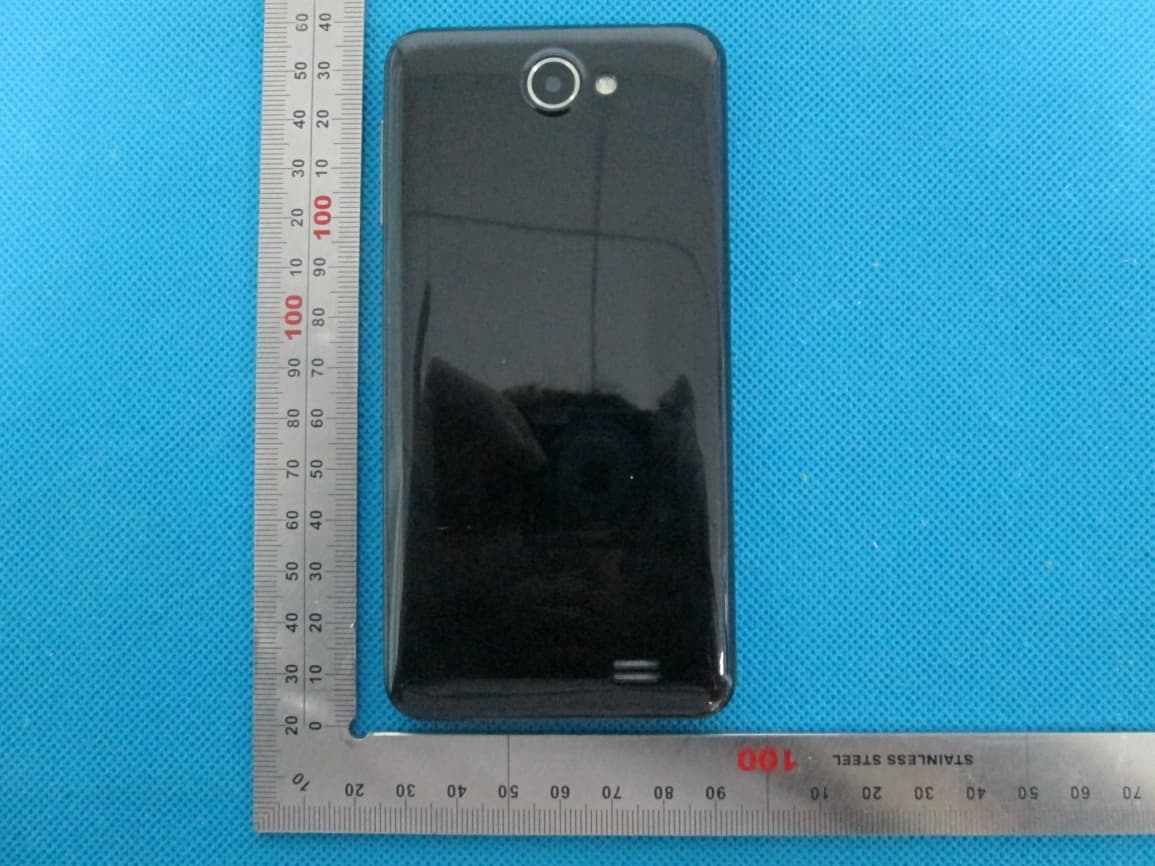
Q2YMAMBA
Jul 21, 2013Mobile Phone
Equipment Class
DSS - Part 15 Spread Spectrum Transmitter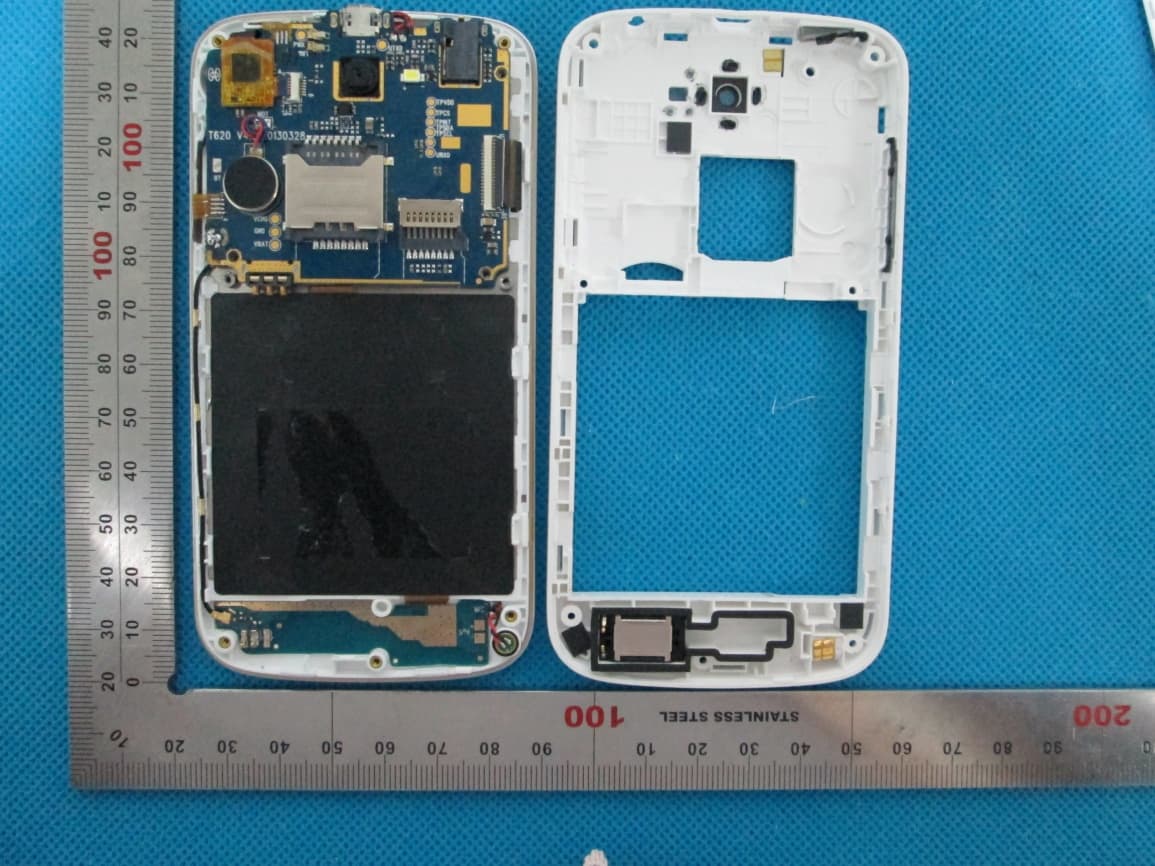
Q2YFIERO
Jul 21, 2013Mobile Phone
Equipment Class
PCE - PCS Licensed Transmitter held to ear