Q2YMAMBAMobile Phone
p.Lachman (HK) ltd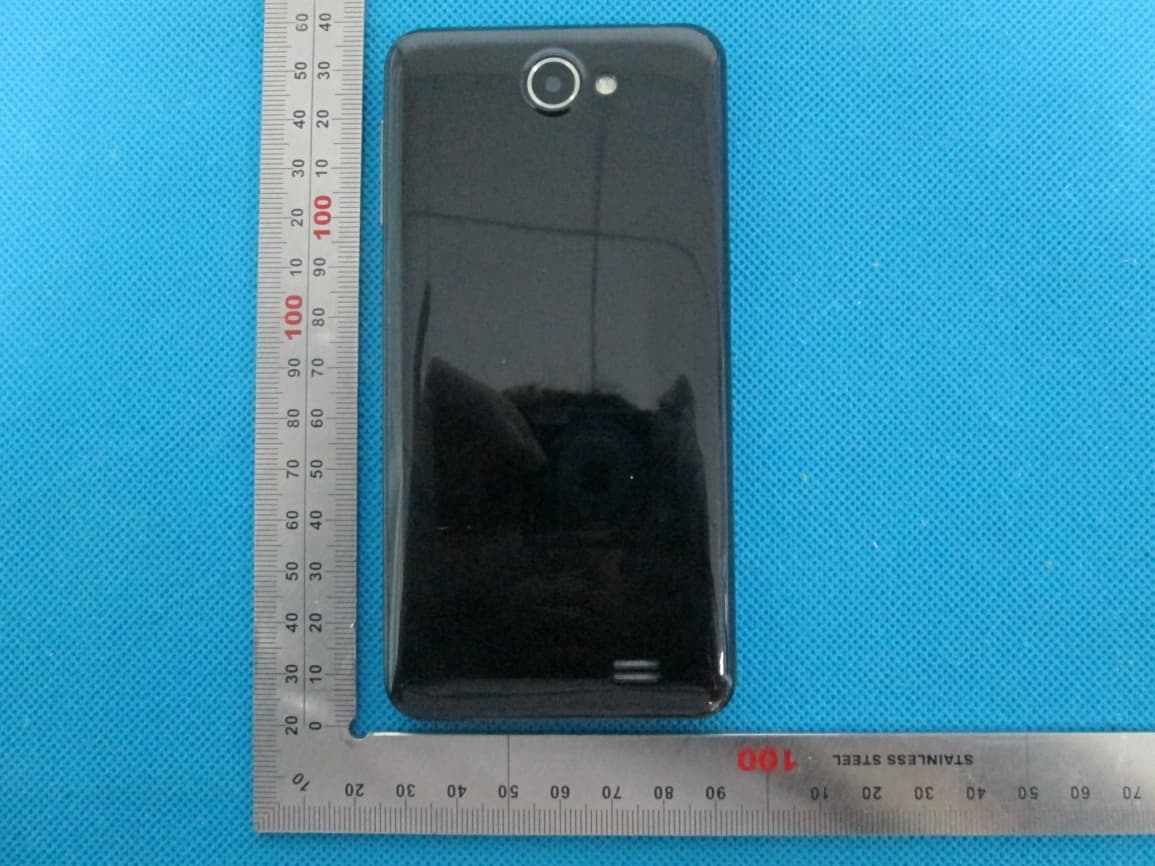
Click to zoom
Application Details
- Equipment Class
- DSS - Part 15 Spread Spectrum Transmitter
- Date of Grant
- Jul 21, 2013
- Application Purpose
- Original Equipment
- Date of Application
- Jul 21, 2013
- Equipment Note
- Mobile Phone
- Frequency Range
- 2402.00000000 - 2480.00000000
- Company
- p.Lachman (HK) ltd
- Country
- Hong Kong
Documents & Files
Document Text
Text extracted from the exhibit documents filed with the FCC. Open a document above to read the original.
Users Manual
Mobile Phone Brand Name: GIGO Model Name: MAMBA FCC ID: Q2YMAMBA - - 2 Declaration Please read the user’s manual so as to keep your mobile phone in the best condition. The manual has been verified and reviewed to guarantee the accuracy. Instructions and descriptions contained herein are accurate at the time of publication. However, mobile phones developed afterwards and the contents of their manual are subject to modification without further notification. Our company reserves the rights in relation to the manual. - - 3 CONTENT Warnings ........................................................................................................................................... 4 Overview ........................................................................................................................................... 6 1. Set-up ............................................................................................................................................ 6 2. Your Mobile Phone ....................................................................................................................... 7 3. Original accessories .................................................................................................................... 16 5. Maintenance and servicing .......................................................................................................... 18 6. Important safety instructions ....................................................................................................... 19 - - 4 Warnings Please read the following brief rules. Failure to obey those rules may cause danger or violation of any law. This User Manual provides more details on safety precautions. Safe switch-on Do not switch on your mobile phone where the use of mobile phone is forbidden or may cause interference or danger. Traffic safety is top priority Please respect all local applicable laws and regulations. Try best to drive with both hands. Traffic safety always comes first in driving. Interference All mobile phones are subject to interference, which adversely affects communication performance. Switch off in hospital Please follow any relevant restrictions. Switch off your mobile phone in medical service. Switch off on aircraft Please respect any relevant restrictions. The use of mobile phone interferes with aircraft operation. Switch off at gas station Do not use mobile phone in gas station. Switch it off near fuel or chemical product. Switch off near blasting site Please obey any relevant restrictions. Do not use your mobile phone where blasting operation occurs. Rational use of Such as described in the product documentation, and can only use the equipment in normal position. Unless absolutely necessary, do not touch the antenna area. Use qualified repair service Your mobile phone may be installed or repaired by qualified maintenance personnel only. Accessories and batteries Only authorized accessories and batteries can be used. Do not connect your mobile phone to any incompatible product. Waterproofness Your mobile phone is not waterproof, so please keep it dry. - - 5 Data backup Do remember to make a backup of all important information stored in your mobile phone or keep a written record. Connect to other mobile phones Before connecting to another mobile phone, read the phone’s user manual to get detailed safety instructions. Do not connect your mobile phone to any incompatible product. Emergency call Make sure your phone is within network service and its call function is already activated. Dial the required emergency call number and press the Send key. Offer the information of your location. About your mobile phone Please abide by the laws and regulations and respect the local customs as well as others' privacies and legal rights and interests (including the copyrights) when using different functions of the mobile. Network service You should apply to the wireless service provider for opening of necessary services in order to use the phone function of the equipment. Many functions of the equipment require support of special network functions. The functions may not apply to all networks. As for other networks, you may have to reach necessary agreements with the wireless service provider before using the network services. You service provider will provide necessary descriptions and interpret the charging standard to you. Certain restrictions may be formulated by some networks, which will affect the mode that you use the network service. For example, in certain networks, not all the characters and services in relation to language are supported. You service provider may require forbidding to use or turning off part of the functions. Then these functions will not be shown in the equipment function list. Your equipment may also be provided with some special configurations, such as name of the function list, sequence of the function list and change of icons. For more information, please refer to your service provider. - - 6 Overview 1. Set-up Inserting T card and SIM card Ensure to turn off the equipment and disconnect with the charger before taking out the battery. Ask your SIM card dealer whether he has provided SIM card service and the method of usage who may be service provider or other dealers. SIM card and its contacts are vulnerable to scratch or bending. Attention shall be attached when use, insert or take out the card. Inserting/taking out T-FLASH CARD Only use approved and compatible T-FLASH card applicable to the mobile phone. Approved memory card trade standard is applied; however, certain bands may not be completely compatible with the mobile phone. Using incompatible memory card may damage not only the card and the mobile, but also the data stored in the card. 1. Insert SD flash card to card slot 2. Take out SD flash card: open the back cover, remove battery can pull out the SD flash card Charging the battery Check the model number of the charger b…
Text truncated - open the document above for the full version.
Cover Letter(s)
Jul. 06, 2013 Federal Communication Commission Authorization and Evaluation Division FCC ID: Q2YMAMBA Re: Confidentiality Request Pursuant to Sections 0.457 and 0.459 of the Commission’s Rules, the applicant hereby requests confidential treatment of information applied this application as outlined below: 1: Block Diagram 2: Circuit Diagram 3: Operational Description 4: Parts List 5: Tune Up Procedure The above materials contain trade secrets and proprietary information not customarily released to the public. The public disclosure of these matters might be harmful to the applicant and provide unjustified benefits to its competitors. The Applicant understands that pursuant to Rules 0.457, disclosure of this Application and all accompanying documentation will not be made before the date of the Grant for this application. Sincerely, P.Lachman (HK) Ltd. Contact person: Bhavish Lachman Title: Manager
Cover Letter(s)
P.Lachman (HK) Ltd. No.30 Man Yue Street, Summit Building, 9 th Floor, Unit G&H, Hunghom Kowloon, Hong Kong Date: July 06, 2013 Statement We, P.Lachman (HK) Ltd. states that our device, FCC ID: Q2YMAMBA, has no space to put the label except the battery compartment of this device. It is visible to the users as they purchase the products and install the battery. Regards Company: P.Lachman (HK) Ltd. Contact Person: Bhavish Lachman Title: Manager
External Photos
External Photos TOTAL VIEW OF EUT TOP VIEW OF EUT BOTTOM VIEW OF EUT FRONT VIEW OF EUT BACK VIEW OF EUT LEFT VIEW OF EUT RIGHT VIEW OF EUT
ID Label/Location Info
FCC ID Label Location Mobile Phone Model: MAMBA Trade Name: GIGO FCC ID: Q2YMAMBA
Internal Photos
Internal Photos OPEN VIEW OF EUT-1 BT&WIFI Antenna GSM Antenna OPEN VIEW OF EUT-2 OPEN VIEW OF EUT-3 INTERNAL VIEW OF EUT-1 INTERNAL VIEW OF EUT-2
Test Report
Report No.: AGC00069130605FE03 Page 1 of 53 FCC Test Report Report No.: AGC00069130605FE03 FCC ID : Q2YMAMBA APPLICATION PURPOSE : Original Equipment PRODUCT DESIGNATION : Mobile Phone BRAND NAME : GIGO MODEL NAME : MAMBA CLIENT : P.Lachman (HK) Ltd. DATE OF ISSUE : July 05,2013 STANDARD(S) : FCC Part 15 Rules REPORT VERSION : V1.0 Attestation of Global Compliance (Shenzhen) Co., Ltd CAUTION: This report shall not be reproduced except in full without the written permission of the test laboratory and shall not be quoted out of context. Report No.: AGC00069130605FE03 Page 2 of 53 Report Revise Record Report Version Revise Time Issued Date Valid Version Notes V1.0 / July 05,2013 Valid Original Report Report No.: AGC00069130605FE03 Page 3 of 53 TABLE OF CONTENTS 1. VERIFICATION OF CONFORMITY ...................................................................................... 5 2. GENERAL INFORMATION .................................................................................................. 6 2.1. PRODUCT DESCRIPTION ........................................................................................................ 6 2.2. TABLE OF CARRIER FREQUENCYS ....................................................................................... 6 2.3. RECEIVER INPUT BANDWIDTH ............................................................................................... 7 2.4. EXAMPLE OF A HOPPING SEQUENCY IN DATA MODE ......................................................... 7 2.5. EQUALLY AVERAGE USE OF FREQUENCIES AND BEHAVIOUR ........................................... 7 2.6. RELATED SUBMITTAL(S) / GRANT (S) .................................................................................... 8 2.7. TEST METHODOLOGY ............................................................................................................. 8 2.8. SPECIAL ACCESSORIES ......................................................................................................... 8 2.9. EQUIPMENT MODIFICATIONS ................................................................................................. 8 3. MEASUREMENT UNCERTAINTY........................................................................................ 9 4. DESCRIPTION OF TEST MODES........................................................................................ 9 5. SYSTEM TEST CONFIGURATION .................................................................................... 10 5.1. CONFIGURATION OF EUT SYSTEM ...................................................................................... 10 5.2. EQUIPMENT USED IN EUT SYSTEM ..................................................................................... 10 5.3. SUMMARY OF TEST RESULTS .............................................................................................. 10 6. TEST FACILITY .................................................................................................................. 11 7. PEAK OUTPUT POWER .................................................................................................... 12 7.1. MEASUREMENT PROCEDURE .............................................................................................. 12 7.2. TEST SET-UP (BLOCK DIAGRAM OF CONFIGURATION) ..................................................... 12 7.3. LIMITS AND MEASUREMENT RESULT .................................................................................. 13 8. 20DB BANDWIDTH ............................................................................................................ 14 8.1. MEASUREMENT PROCEDURE .............................................................................................. 14 8.2. TEST SET-UP (BLOCK DIAGRAM OF CONFIGURATION) ..................................................... 14 8.3. LIMITS AND MEASUREMENT RESULTS ................................................................................ 14 9. CONDUCTED SPURIOUS EMISSION ............................................................................... 21 9.1. MEASUREMENT PROCEDURE .............................................................................................. 21 9.2. TEST SET-UP (BLOCK DIAGRAM OF CONFIGURATION) ..................................................... 21 9.3. MEASUREMENT EQUIPMENT USED..................................................................................... 21 9.4. LIMITS AND MEASUREMENT RESULT .................................................................................. 21 10. RADIATED EMISSION ..................................................................................................... 25 10.1. MEASUREMENT PROCEDURE ............................................................................................ 25 10.2. TEST SETUP ......................................................................................................................... 27 Report No.: AGC00069130605FE03 Page 4 of 53 10.3. TEST RESULT ....................................................................................................................... 28 11. BAND EDGE EMISSION .................................................................................................. 32 11.1. MEASUREMENT PROCEDURE ............................................................................................ 32 11.2. TEST SET-UP ........................................................................................................................ 32 11.3. TEST RESULT ....................................................................................................................... 33 12. NUMBER OF HOPPING FREQUENCY ............................................................................ 37 12.1. MEASUREMENT PROCEDURE ............................................................................................ 37 12.2. TEST SETUP (BLOCK DIAGRAM OF CONFIGURATION) .................................................... 37 12.3. MEASUREMEN…
Text truncated - open the document above for the full version.
Test Setup Photos
Test Setup Photos CONDUCTED EMISSION RADIATED SPURIOUS EMISSION
Contact Information
Applicant
Bhavish Lachman(Manger)
Test Firm
Attestation of Global Compliance Shenzhen Co. Ltd.Forrest Lei
Technical Specifications
| # | Rule Parts | Frequency Range | Power Output |
|---|---|---|---|
| 1 | 15C | 2.40 GHz - 2.48 GHz | 3.00 mW |
Other Applications from p.Lachman (HK) ltd

Q2YF33
Aug 05, 2013Mobile Phone
Equipment Class
PCE - PCS Licensed Transmitter held to ear
Q2YSPARX
Jul 25, 2013Mobile Phone
Equipment Class
PCE - PCS Licensed Transmitter held to ear
Q2YBLAST
Jul 25, 2013Mobile Phone
Equipment Class
DSS - Part 15 Spread Spectrum Transmitter
Q2YFIESTA
Jul 22, 2013Mobile Phone
Equipment Class
PCE - PCS Licensed Transmitter held to ear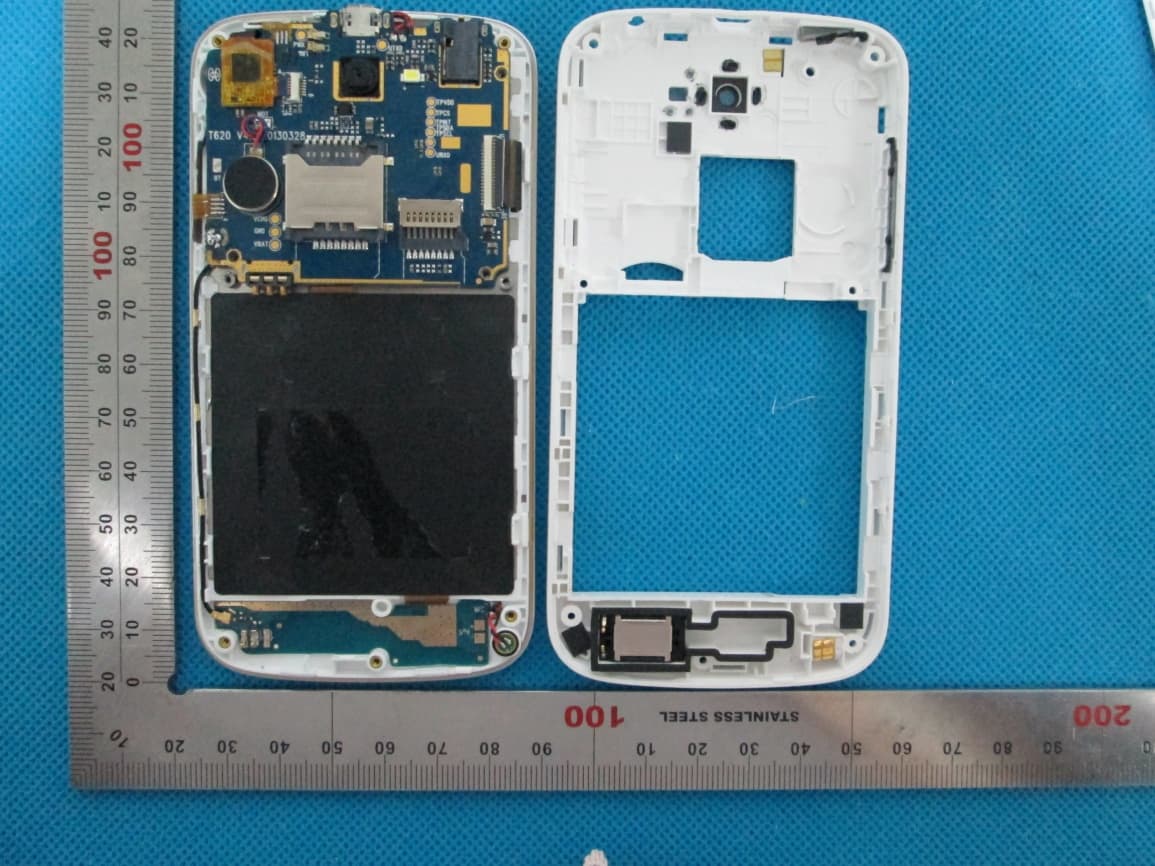
Q2YFIERO
Jul 21, 2013Mobile Phone
Equipment Class
PCE - PCS Licensed Transmitter held to ear