QDMAK120Portable Music Player
DREAMUS COMPANY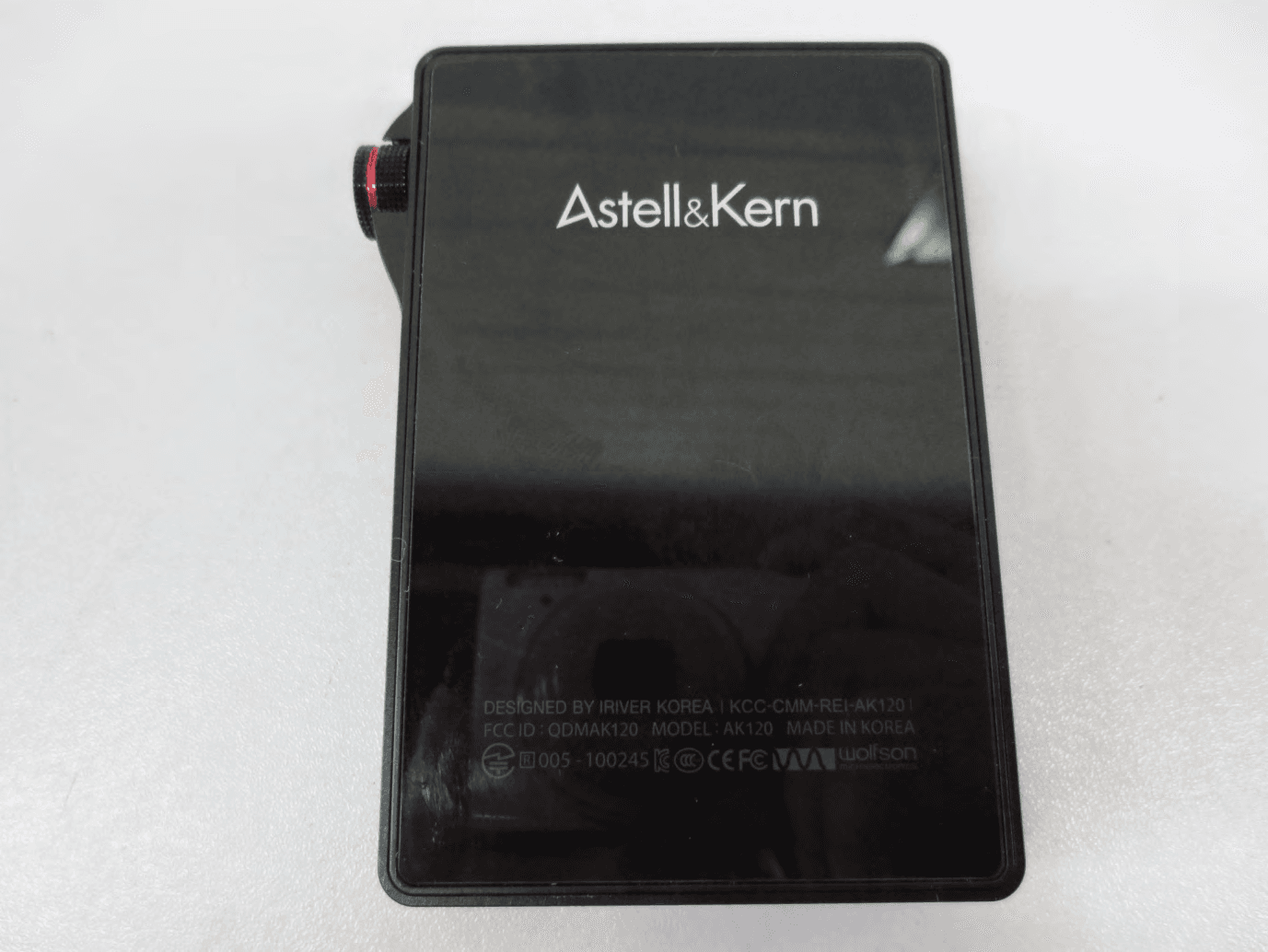
Click to zoom
Application Details
- Equipment Class
- DSS - Part 15 Spread Spectrum Transmitter
- Date of Grant
- May 10, 2013
- Application Purpose
- Original Equipment
- Date of Application
- May 10, 2013
- Equipment Note
- Portable Music Player
- Frequency Range
- 2402.00000000 - 2480.00000000
- Company
- DREAMUS COMPANY
- Country
- South Korea
Documents & Files
Document Text
Text extracted from the exhibit documents filed with the FCC. Open a document above to read the original.
Users Manual
INSTRUCTION BOOK User Guide 02 02 04 05 09 13 13 15 17 19 20 21 22 22 23 24 Components Names of parts Power source management Connecting Installing iriver plus4 Getting Started _01 Basic operations Listening to music Using Bluetooth Settings Using _02 Safety Problem-solving Copyright Certification Registered trademarks Escape clause Other information _03 CONTENTS User Guide AK120 Quick start guide & product warranty Pouch Pouch: Protects the device. Micro USB cable: Connects the product to the computer and for charging the battery. Quick start guide: It describes the basic method of using the product. Product warranty: Please keep the product warranty in a safe place in the event your iriver device needs servicing. Manual: Please read the manual (pdf file) saved as a PDF file in the product before use. Components may be changed without notice to improve the performance or quality of the product. Components Product appearance, printed and engraved information may vary depending on the model. Names of parts Micro USB cable Earphone / OPTICAL OUT terminal Power Micro SD card slot OPTICAL IN terminalMicro USB terminal Getting Started 02 Next/ Fastforward Playback/ Pause Previous/ Rewind Volume Touch LCD Earphone / OPTICAL OUT terminal: Connect the earphone and output sound through the earphone. Use an optical cable to play music stored in the product on an external device capable of SPDIF-IN. Power: Short - Turn on and off the screen. Long - Turn on and off the product. OPTICAL IN terminal: Use an optical cable to play music stored in an external device capable of SPDIF-OUT on the product. Micro SD card slot: Insert a Micro SD card into the product to see its stored files. Micro USB terminal: Connect the product to the computer or charge it. Previous/Rewind: Short - Replay previous music. Long - Rewind. Play/Pause: Short - Play/pause. Long - Display the playback screen. Next/Fast forward: Short - Play the next music. Long - Fast forward. Volume: Turn the wheel to adjust the volume of the sound. Touch LCD: Display the screen, and touch the screen to start. Getting Started 03 User Guide User Guide This product has the automatic power saving function to prevent battery consumption. If there is no key operation within the prescribed period [ - Power Settings - Automatic Turn Off], the iriver device will be automati- cally turned offf. (See page 18) This product has the automatic screen off function to prevent battery consumption. According to the [ - Power Settings - Turn Off the Screen] setting, the screen will be automatically turned off if there is no key operation within the prescribed period. (See page 18) When using the reset function, the current time and memory data will not be deleted. Do not use the reset function while the product is in use. Doing so may seriously damage the memory. Turn on/off the screen 1. When on standby, press and hold the [ ] key to turn off. 2. Press the [ ] key once briefly to turn on the screen. Using the reset function 1. If the product should stop unexpectedly during operation and the keys no longer function normally, press the [ ] key and [ ] key simultaneously more than 7 seconds to reset the product. Turn on/off 1. Press and hold the [ ] key to turn on. 2. When on standby, Press and hold the [ ] key to turn off. Power source manage- ment Getting Started 04 Getting Started 05 Connecting Connecting the earphone 1. Connect the earphone to the earphone terminal of the product. Connecting to a computer 1. Turn on the product and computer. 2. When using a Micro USB cable to connect the product and the computer, the connection mode selection window will be displayed on the screen. - Charging & playing: The iriver device can function normally while being recharged. User Guide Use only the Micro USB cable provided with the product to ensure safe operation. Check that it is connected to a high-power USB 2.0 port. Connecting to a low-power USB port (some keyboards, USB hubs without their own power supply, etc.), may prevent normal charging. Once the computer goes into standby mode, the iriver device may not be charged. The charging time is about ? hours and ?? minutes. (Fully discharged, with power off) Charge the product while it is turned off. When charging during operation, the full charge display may not be shown. Using the product during charging may require additional time for a full charge or the battery may not fully recharge. Charge and keep the product at room temperature. Exposure to excessive heat or cold may adversely affect charging performance. Battery performance may decline with age and number of recharges. Charging 1. Turn on the computer. 2. Using a Micro USB cable to connect the product to the computer automatically recharges the built-in battery. User Guide Disconnecting from a computer 1. Click the icon displayed in the task bar of the computer screen to safely remove it. 2. Click [OK] to ensure the iriver device can be safely removed. An icon may be hidden in the task bar depending on the operating system like Windows XP. Click the icon to display it on the screen. When using application programs like Windows Explorer or Windows Media Player, it may be unsafe to remove the iriver device. Safely remove it after exiting all application programs. Only remove the iriver device after exiting all application programs. Failure to do so may result in loss of stored data. Connect the computer and the iriver device when all functions are stopped. Use only the Micro USB cable provided with the product to ensure safe operation. Connect the computer and the Micro USB cable only after all functions have been stopped. Check that it is connected to a high-power USB 2.0 port. Connecting to a keyboard or a USB hub without its own power supply may prevent normal operation. Only FAT32 file system is supported so format the iriver device accordingly. Getting Started 06 - Connect a removable disk: It can transmit data while connected to a computer. Getting Started …
Text truncated - open the document above for the full version.
Users Manual
FCC ID: QDMAK120 FCC INFORMATION (additional): Note: This equipment has been tested and found to comply with the limits for a Class B digital device, pursuant to part 15 of the FCC Rules. These limits are designed to provide reasonable protection against harmful interference in a residential installation. This equipment generates, uses and can radiate radio frequency energy and, if not installed and used in accordance with the instructions, may cause harmful interference to radio communications. However, there is no guarantee that interference will not occur in a particular installation. If this equipment does cause harmful interference to radio or television reception, which can be determined by turning the equipment off and on, the user is encouraged to try to correct the interference by one or more of the following measures: —Reorient or relocate the receiving antenna. —Increase the separation between the equipment and receiver. —Connect the equipment into an outlet on a circuit different from that to which the receiver is connected. —Consult the dealer or an experienced radio/TV technician for help. Caution: Any changes or modifications not expressly approved by the party responsible for compliance could void the user's authority to operate this equipment.
Cover Letter(s)
FCC Confidentiality Request Number: CF303 Version: V05 Date: 21-05-2012 (Permanent or also called long term confidentiality is the normal method to keep certain docuements confidential, and may apply to schematics, block diagrams, operational description and bill of materials.) To: Federal Communications Commission Equipment Authorization Branch 7435 Oakland Mills Road Columbia, MD 21046 Pursuant to 47 CFR Section 0.459(a) & (b), we, (the applicant / grantee) Company name IRIVER LIMITED. Address Iriverhouse, 902-5, Bangbae-dong, Seocho-gu, City Seoul Country Republic of Korea request for this certification filing under: Grantee Code Product Number FCC ID: QDM AK120 to maintain permanent confidentiality for the following documents submitted within this application: (please cross what is applicable, or add other documents, provide the file name and description) 1. Schematics 2. Parts List 3. Block Diagram Above materials crossed contain secrets, proprietary and technical information, which would customarily be guarded from competitors under 47 CFR, section 0.457(d)(2). Disclosure or publication or any portion of this company confidential material to other parties could cause substantial competitive harm and provide unjustified benefits for competitors. We understand that pursuant to 47 CFR section 0.457(d)(1)(ii) disclosure of the applicant and all accompanying documentation will not be made before the date of the grant. The documents indicated as confidential above, are not publicly available elsewhere. Attestation: City and Country: Date: Name of client: (this must be a person) Function: Signature: (or official company stamp) Seoul, Korea 2012-04-26 Woo-Suk, Kim Manager
Cover Letter(s)
FCC Short Term Confidentiality Request Number: CF313 Version: V01 Date: 21-05-2012 (With Short term confidentiality, a period of max. 180 days on certain additional exhibits are possible, such as internal/external photos, user manual can test setup photosbet. After expiration of the confidentiality period, these additional exhibits for short term confidentiality become visible in the FCC database for the internet public.) To: Federal Communications Commission Equipment Authorization Branch 7435 Oakland Mills Road Columbia, MD 21046 Pursuant to 47 CFR Section 0.459(a) & (b), we, (the applicant / grantee) Company name IRIVER LIMITED. Address Iriverhouse, 902-5, Bangbae-dong, Seocho-gu, City Seoul Country Republic of Korea request for this certification filing under: Grantee Code Product Number FCC ID: QDM AK120 to maintain short term confidentiality for a period of 180 days for the following documents submitted within this application: (please cross what is applicable, or add other documents, provide the file name and description) 1. Internal Photos, Ex ternal Photos 2. Test Setup Photo Above materials crossed contain secrets, proprietary and technical information, which would customarily be guarded from competitors under 47 CFR, section 0.457(d)(2). Disclosure or publication or any portion of this company confidential material to other parties could cause substantial competitive harm and provide unjustified benefits for competitors. We understand that pursuant to 47 CFR section 0.457(d)(1)(ii) disclosure of the applicant and all accompanying documentation will not be made before the date of the grant. The documents indicated as confidential above, are not publicly available elsewhere. Attestation: City and Country: Date: Name of client: (this must be a person) Function: Signature: (or official company stamp) Seoul, Korea 2013-04-26 Woo-Suk, Kim Manager Test Setup Photo, U ser ManualTest Setup Photo, U ser Manual
ID Label/Location Info
Label and Label Location located at the backside of the device: FCC ID: QDMAK120 This device complies with Part 15 of the FCC Rules. Operation is subject to the following two conditions: 1. This device may not cause harmful interference, and 2. This device must accept any interference received, including interference that may cause undesired operation.
Operational Description
Slot 1 (bottom) Slot1Slot2 Slot 2 (above) ENGLISH 1. Turn on the product and computer, and use the Micro USB cable to connect the product to a computer. 1. Run the iriver plus 4 installation program stored on the internal memory, the program installation instruction dialog will be displayed. 2. Follow the instructions to install the program. Connecting to a computer 1. The built-in battery will charge automatically when connected to computer. Charging 1. Press and hold the [ ] key to turn on. 2. When stand by, Press and hold the [ ] key to turn off. Turn on/off Installing iriver plus 4 1. Select Music Search Method from the home screen to display the music list. 2. Select the song you desire to play from the list. Listening to music Names of parts AK120 QUICK START GUIDE The user manual is stored in the device as a PDF file. (You can also download the user manual from iriver.com.) Power Micro USB terminal OPTICAL IN terminal Play/Pause Next/ Fast forward Previous/ Rewind Volume Touch LCD Earphone / OPTICAL OUT terminal Micro SD card slot Micro SD card slot 슬롯1 (아래) 슬롯1슬롯2 슬롯2 (위) KOREAN 1. 제품과 컴퓨터의 전원을 켠 후, 제공된 Micro USB 케이블을 이용하여 제품과 컴퓨터를 연결합니다. 1. 제품의 내장 메모리에 저장되어 있는 iriver plus 4 설치 프로그램을 실행하면 프로그램 설치 안내화면이 나타납니다. 2. 프로그램의 안내에 따라 설치를 완료합니다. 컴퓨터와 연결하기 1. 컴퓨터와 연결하면 자동으로 내장 배터리가 충전됩니다. 충전하기 1. 제품의 [ ]키를 길게 누르면 전원이 켜집니다. 2. 제품이 켜진상태에서 제품의 [ ]키를 길게 누르면 전원이 꺼집니다. 전원 켜기/끄기 iriver plus 4 설치하기 1. 홈 화면에서 음악 검색 방식을 선택하면 음악목록이 표시됩니다. 2. 음악목록에서 재생할 음악을 누르면 음악이 재생됩니다. 음악 듣기 각 부의 명칭 AK120 QUICK START GUIDE 사용자 설명서는 PDF 파일로 제품에 저장되어 있습니다. (사용자 설명서는 iriver.co.kr에서 다운 받을 수 있습니다.) 전원 Micro USB 단자 OPTICAL IN 단자 Micro SD 카드 슬롯 재생/일시정지 다음곡/빨리감기 이전곡/되감기 볼륨 터치 LCD 이어폰 / OPTICAL OUT 단자 Micro SD 카드 슬롯
RF Exposure Info
FCC RF Exposure FCC ID: QDMAK120 Frequency: 2402-2480 MHz (79 channels) Modulation: FHSS (GFSK) Mid-Channel: 2.441 GHz (channel 39) Mid-Channel Average Power, Conducted: 5.3 dBm == 3.4 mW Antenna Gain: G = 2.4 dBi Peak, Radiated = 5.3 dBm + 2.4 dBi = 7.7 dBm = 5.9 mW SAR Test Exclusion Thresholds specified in KDB447498 Appendix A: Evaluation: The Calculated Radiated Average output power is taken as worst case, and this emission level are far under the maximum allowed emission level at even the closest distance for 2.4G device specified in this table. Conclusion: The emitted power appears to be below the required limit, so PASS.
Test Report
IST Co., Ltd. TEST REPORT NO. : 13-IST-0273 1 of 31 IST(02) 029 A4 모(101025) Declaration of Compliance CFR 47 Part 15 Subpart B Test Report File No. 13-IST-0273 ■ Basic □ Alternate Date of Receipt March 20, 2013 Begin of test date April 5, 2013 Date of Issue April 27, 2013 End of test date April 9, 2013 Kind of Product Portable Music Player Basic Model(s) AK120 FCCID QDM AK120 Applicant IRIVER LIMITED. Address iriverhouse, 902-5, Bangbae-dong, Seocho-gu, Seoul, Korea Manufacturer IRIVER LIMITED. Address iriverhouse, 902-5, Bangbae-dong, Seocho-gu, Seoul, Korea Standard Section 15.107, Section 15.109 [Class B Equipment] Test Result ■ Positive Negative Tested By Reviewed By B.O. KO.S.J.CHO Comment(s) - Investigations requested : Measurement to the relevant clauses of FCC rules and regulations Part 15 Subpart B – Unintentional Radiators, Class B. - The test report with appendix consists of 17 pages. - The test result only responds to the tested sample. - It is not allowed to copy this report even partly without the allowance of IST EMC Laboratory. - This equipment as for has been shown to be capable of continued compliance with the applicable technical standards as indicated in the measurement report and was tested in accordance with the measurement procedures specified in ANSI C63.4 IST Co., Ltd. TEST REPORT NO. : 13-IST-0273 2 of 31 IST(02) 029 A4 모(101025) TABLE OF CONTENTS Table of contents 2 Information of test laboratory, Measurement Uncertainty, 3 Product information 3~4 Descriptions of test 5~6 Conducted Emission 5 Radiated Emission 6 Equipment Under Test 7~8 Summary 9 Sample Calculation 10 ■ Test Conditions and Data – Emissions ◆ Conducted Emissions 0.15 MHz - 30 MHz Applicable Test Conditions / Data and Plots 11~15 ◆ Radiated Emissions(Limits Below 1 GHz) 30 MHz - 1 GHz Applicable Test Conditions / Data and plots 16~17 ◆ Radiated Emissions(Limits Above 1 GHz) Above 1GHz Applicable Test Conditions / Data and plots 18~23 ◆ The Photos of Test Setup 24~31 IST Co., Ltd. TEST REPORT NO. : 13-IST-0273 3 of 31 IST(02) 029 A4 모(101025) INFORMATIONS OF TEST LABORATORY EMC LABORATORY of IST Co., Ltd. 400-19, Singal-dong, Giheung-gu, Yongin-si, Kyonggi-Do, 446-599, Korea TEL : +82 31 326 6700 FAX : +82 31 326 6797 KOLAS Testing No. : KT118 RRA & FCC(DoC) Designation No. : KR0018 FCC Registration No. : 400603 VCCI Member No. : 1739 Measurement Uncertainty Conducted Emissions U = 2.98 [dB] (Confidence level approximately 95 %, k = 2) Radiated Emissions (Antenna - Horizontal) U = 3.83 [dB] (Confidence level approximately 95 %, k = 2 ) Radiated Emissions (Antenna - Verical) U = 4.50 [dB] (Confidence level approximately95 %, k = 2 ) PRODUCT INFORMATION Portable Music Player General Specifications Product Color Black Dimensions 59.2 * 89 * 14.4 Weight 143g Operational Temperature -5°C ~ 40°C Connection Type USB 2.0 High Speed Language Support UTF-8 Storage type moviNAND External Storage type Micro SD x 2ea (SDHC max 32GB X 2) Menu Language <English/ Korean> UI structure Power(LCD Off),REW(pervious song), Play(pause), FF(next song), Volume Wheel(+/-) Continuous Playback Time AUDIO: Min 20Hrs (128kbps, MP3, Vol 44, LCD Off) Min 15Hrs (16bit/44.1KHz , FLAC, Vol 44, LCD Off) File storage capacity eMMC Equalizer Equalizer (10 Band) Audio Line In/Out Optical I/O & Headphone Out (3.5mm) PC Application Iriver Plus4 IST Co., Ltd. TEST REPORT NO. : 13-IST-0273 4 of 31 IST(02) 029 A4 모(101025) Supported O/S Windows 2K / Windows XP / Windows Vista 32bit / Windows 7 / Windows 8 Platform CPU Telechips TCC 9201 OS Linux + Flow 1.2 Font Window Font; True type (IRIVER_Gothic.ttf ), (TBD) SDRAM Support Window Font (ttf. Text) 128MB Display Type 2.4” 1600M Resolution 320 X 240 Color Depth 16M color(RGB 888) Battery 2000mAh Li-Polymer, micro USB Charge (460mA) Charging Time 5H 30M Feature Specifications Audio Frequency Range 20Hz~20KHz Headphone Output Power L: 1.5VRMS + R: 1.5VRMS (Condition No Load) Vol MAX 152 Grade(0~75) S/N Ratio 103dB @ 1KHz, No Laod Frequency Characteristics ±0.1dB (Condition : 20Hz~20KHz) No. Channels STEREO Codec supported Decoder : WAV, FLAC, WMA, MP3, OGG,APE Bit Rate 44.1kHz, 48kHz, 96kHz, 192kHz (16/24bit per sample) Tag ID3 V1 Tag, ID3 V2 2.0, ID3 V2 3.0 Bluetooth Bluetooth Version v 3.0 Profile A2DP, HFP Frequency Range 2400~2483.5MHz(2402~2480MHz) CH 79EA - EMC suppression device is not used during the test . - Please refer to user’s manual. IST Co., Ltd. TEST REPORT NO. : 13-IST-0273 5 of 31 IST(02) 029 A4 모(101025) < Concept Drawing > 215 >150 >40 80 Receiver EUT LISN 80 80 80 40 80 Measuring apparatus Mains Filter Mains Equipment under test Coaxial cable Artificial mains network Screened room Non-metallic support 80 DESCRIPTIONS OF TEST Conducted Emissions: The measurement were performed over the frequency range of 0.15 MHz to 30 MHz using a 50 Ω /50uH LISN as the input transducer to a Spectrum Analyzer or a Field Intensity Meter. The measurements were made with the detector set for "Peak" amplitude within a bandwidth of 10KHz or for "quasi-peak" & “Average” within a bandwidth of 9 KHz. - Procedure of Test The line-conducted facility is located inside a shielded room No.1. A 1 m X 1.5 m wooden table 80 cm height is placed 40 cm away from the vertical wall and 1.5 m away from the other wall of the shielded room. The R/S ESH3-Z5 and Hyup-Rip KNW-407 LISN are bonded to bottom of the shielded room. The EUT is located on the wooden table with distance more than 80 cm from the LISN and powered from the Hyup-Rip LISN. The peripheral equipment is powered from the other LISN. Power to the LISNs are filtered by a noise cut power line filters. All electrical cables are shielded by braided tinned steel tubing with inner 1.2 cm. If the EUT is a DC-powered device, power will be derived from the source power supply it normally will be powered from and this supply lines will be connected to the Hyup-Rip LISN. All interconnected cables more than 1 m were shortened by non-inductive bundling to …
Text truncated - open the document above for the full version.
Test Report
IST Co., Ltd EMC LABORATORY TEST REPORT NO. : 13-IST-0272 1 of 33 CERTIFICATION TEST REPORT FCC CFR47 Part 15 Subpart C Test Report File No. 13-IST-0272 ■ Basic □ Alternate Date of Receipt March 20, 2013 Begin of test date April 1, 2013 Date of Issue April 27, 2013 End of test date April 4, 2013 Kind of Product Portable Music Player Model(s) AK120 FCC ID QDMAK120 Applicant IRIVER LIMITED. Address iriverhouse, 902-5, Bangbae-dong, Seocho-gu, Seoul, Korea Manufacturer IRIVER LIMITED. Address iriverhouse, 902-5, Bangbae-dong, Seocho-gu, Seoul, Korea Test Result ■ Positive □ Negative Tested By Reviewed By B.O. KO. S.J.CHO Comment(s) - Investigations requested : Measurement to the relevant clauses of FCC rules and regulations Part 15 Subpart C. - The test report is consists of 33 pages. - The test result only responds to the tested sample. - It is not allowed to copy this report even partly without the allowance of IST Co., Ltd. - This equipment as for has been shown to be capable of continued compliance with the applicable technical standards as indicated in the measurement report and was tested in accordance with the measurement procedures specified in ANSI C63.4 I assume full responsibility for accuracy and completeness of these data. IST Co., Ltd EMC LABORATORY TEST REPORT NO. : 13-IST-0272 2 of 33 TABLE OF CONTENTS Table of contents 2 Information of test laboratory, Product information 3~4 Measurement Uncertainty, Summary 5 Descriptions of Test 6 - Conducted Emission * EUT operates battery DC 3.7 V, refer CE(Other modes) to part 15 B report. - - Radiated Emission 6~13 - Radiated Emission, 9KHz to 30MHz(Magnetic Field Test) 8 - Peak power output 14~16 - Conducted Spurious Emission & Band edge 17~21 - Frequency Separation & Occupied Bandwidth/20dB Bandwidth 22~28 - Number of hopping frequency 29~30 - Time of occupancy(Dwell time) 31~32 - Antenna requirements 33 Note: IST Co., Ltd EMC LABORATORY TEST REPORT NO. : 13-IST-0272 3 of 33 INFORMATIONS OF TEST LABORATORY EMC LABORATORY of IST Co., Ltd. 400-19, Singal-dong, Giheung-gu, Yongin-si, Gyeonggi-Do, 446-599, Korea TEL: +82 31 326 6700 FAX: +82 31 326 6797 PRODUCT INFORMATION Portable Music Player General Specifications Product Color Black Dimensions 59.2 * 89 * 14.4 Weight 143g Operational Temperature -5°C ~ 40°C Connection Type USB 2.0 High Speed Language Support UTF-8 Storage type moviNAND External Storage type Micro SD x 2ea (SDHC max 32GB X 2) Menu Language <English/ Korean> UI structure Power(LCD Off),REW(pervious song), Play(pause), FF(next song), Volume Wheel(+/-) Continuous Playback Time AUDIO: Min 20Hrs (128kbps, MP3, Vol 44, LCD Off) Min 15Hrs (16bit/44.1KHz , FLAC, Vol 44, LCD Off) File storage capacity eMMC Equalizer Equalizer (10 Band) Audio Line In/Out Optical I/O & Headphone Out (3.5mm) PC Application Iriver Plus4 Supported O/S Windows 2K / Windows XP / Windows Vista 32bit / Windows 7 / Windows 8 Platform CPU Telechips TCC 9201 OS Linux + Flow 1.2 Font Window Font; True type (IRIVER_Gothic.ttf ), (TBD) SDRAM Support Window Font (ttf. Text) 128MB Display Type 2.4” 1600M Resolution 320 X 240 Color Depth 16M color(RGB 888) Battery 2000mAh Li-Polymer, micro USB Charge (460mA) Charging Time 5H 30M Feature Specifications Audio Frequency Range 20Hz~20KHz VCCI Registration No. : 1739 FCC Registration No. : 400603 KCC Registration No. : KR0018 KOLAS Registration No. : KT118 IST Co., Ltd EMC LABORATORY TEST REPORT NO. : 13-IST-0272 4 of 33 Headphone Output Power L: 1.5VRMS + R: 1.5VRMS (Condition No Load) Vol MAX 152 Grade(0~75) S/N Ratio 103dB @ 1KHz, No Laod Frequency Characteristics ±0.1dB (Condition : 20Hz~20KHz) No. Channels STEREO Codec supported Decoder : WAV, FLAC, WMA, MP3, OGG,APE Bit Rate 44.1kHz, 48kHz, 96kHz, 192kHz (16/24bit per sample) Tag ID3 V1 Tag, ID3 V2 2.0, ID3 V2 3.0 Bluetooth Bluetooth Version v 3.0 Profile A2DP, HFP Frequency Range 2400~2483.5MHz(2402~2480MHz) CH 79EA Test Mode : Mode 1: Transmit(DH5) Mode 2: Transmit(3DH5) 1. DH5 is for GFSK modulation, and 3DH5 is for 8DPSK 2. Regards to the frequency band operation; the highest that was included the lowest, middle and highest frequency of channel were selected to perform the test, and then shown on this report. - Please refer to user’s manual. IST Co., Ltd EMC LABORATORY TEST REPORT NO. : 13-IST-0272 5 of 33 Measurement Uncertainty Conducted Emissions U = 2.98 [dB] (Confidence level approximately 95 %, k = 2) Radiated Emissions (Antenna - Horizontal) U = 3.83 [dB] (Confidence level approximately 95 %, k = 2 ) Radiated Emissions (Antenna - Verical) U = 4.50 [dB] (Confidence level approximately 95 %, k = 2 ) SUMMARY Bluetooth Mode(2402MHz ~2480MHz) Applied Standard : FCC CRF Part 15 Subpart C Description of Test FCC Rule Parts Results Carrier Frequency Separation 15.247(a)(1) Compliant 20 dB Bandwidth 15.247(a)(1)(ii) or (iii) Compliant Time of Occupancy 15.247(a)(1)(ii) or (iii) Compliant Number of Hopping Frequencies 15.247(a)(1)(ii) or (iii) Compliant Conducted Maximum Peak Output Power 15.247(b)(1) Compliant Spurious RF Conducted Emission 15.247(d) Compliant Spurious Radiated Emission 15.247(d), 15.209 Compliant Receiver Spurious Emission Compliant Out-of- Band Emission 15.247(d) Compliant Occupied Bandwidth Compliant IST Co., Ltd EMC LABORATORY TEST REPORT NO. : 13-IST-0272 6 of 33 Descriptions of Test Radiated Emissions: The measurement was performed over the frequency range of 30MHz to 1GHz using antenna as the input transducer to a Spectrum analyzer or a Field Intensity Meter. The measurement was made with the detector set for "quasi-peak" within a bandwidth of 120kHz. Procedure of Test Preliminary measurements were made at 3 meter using bi-log antennas, and spectrum analyzer to determine the frequency producing the max. emission in anechoic chamber. Appropriate precaution was taken to ensure that all emission from the EUT were maximized and investigated. The system configuration, mode of operation, turn-table azimuth and height with respect to the an…
Text truncated - open the document above for the full version.
Contact Information
Applicant
HONGGYU LEE(Manager)
Technical Contact
Test Firm
IST Co., LtdCho Sung Jung
Technical Specifications
| # | Rule Parts | Frequency Range | Power Output |
|---|---|---|---|
| 1 | 15C | 2.40 GHz - 2.48 GHz | 6.00 mW |
Other Applications from DREAMUS COMPANY
QDMPPF43
Aug 28, 2024SP3000M
Equipment Class
NII - Unlicensed National Information Infrastructure TXQDMPPM45
Oct 17, 2023KANN ULTRA
Equipment Class
NII - Unlicensed National Information Infrastructure TX
QDMPPR51
May 07, 2023SE300
Equipment Class
NII - Unlicensed National Information Infrastructure TX
QDMPSP22
May 04, 2023UW100 MK II
Equipment Class
DSS - Part 15 Spread Spectrum Transmitter
QDM-HERO-OLS01
Jan 16, 2023LIM YOUNG WOONG OFFICIAL LIGHT STICK
Equipment Class
DTS - Digital Transmission System