QDMIFP399TMP3 Player
DREAMUS COMPANY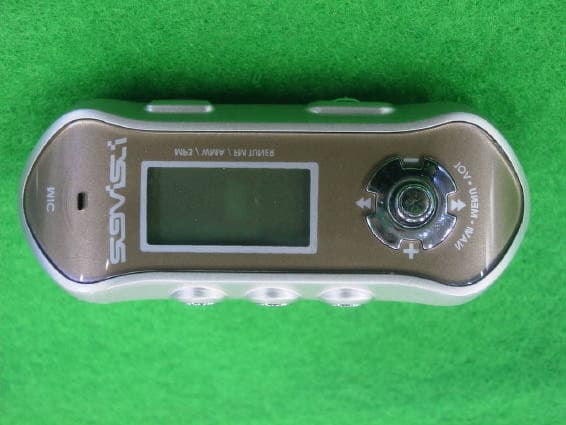
Click to zoom
Application Details
- Equipment Class
- JBP - Part 15 Class B Computing Device Peripheral
- Date of Grant
- Mar 18, 2003
- Application Purpose
- Original Equipment
- Date of Application
- Mar 18, 2003
- Equipment Note
- MP3 Player
- Company
- DREAMUS COMPANY
- Country
- South Korea
Documents & Files
Document Text
Text extracted from the exhibit documents filed with the FCC. Open a document above to read the original.
Users Manual
2 3 URL : http://www.iRiver.comProvides information on our company, products, and email addresses for support. Unique feature of “Firmware (system software) Upgrade” is available for download on our site. The Firmware provides new features as well asenhancements to current features. New CODECS that will be introduced inthe future will be supported via Firmware Upgrade. Provides FAQ as well as a User’s Forum.Register your iRiver product online so that our Customer Service is able to provide support as efficiently as possible. iRiver Limited does not assume any responsibility for errors or omissions in this document or make any commitment to update the information containedherein.iRiver is a registered trademark of iRiver Limited in the Republic of Korea and/or other countries and is used under license. Microsoft Windows Media and theWindows Logo are trademarks or registered trademarks of MicrosoftCorporation in the United States and /or other countries.All other brand and product names are trademarks of their respectivecompanies or organization. All other product names may be trademarks of thecompanies wit hw hic ht hey are associated. 1999-2003 iRiver Limited. All right reserved. Unique DesignMulti-Codec Player : Supports MP3, WMA, ASF formats. Firmware Upgrade : Provides the latest updated features via firmware upgrade.Player features suc has add on, modification, and continuous improvement ofplayer are always provided. Graphic LCD supporting Multiple Languages : iFP-300 Series comes with graphic LCD which can support multiple languages FM Function You can easily listen to FM stations and set your favorite stations by using AutoPreset and Frequency Memory functions. 6 Preset EQ : Normal, Rock, Jazz, Classic, U Bass, Metal 5 Band User EQGUI(Graphic User Interface) MENU SUPPORTINGEasy NavigationSupport MP3 Direct Encoding: 8KHz ~ 44.1KHz, 8Kbps ~ 320Kbps 4 5 FRONT VIEWSIDE VIEW 1 INTRODUCING TO THE IRIVER WEBSITES.....................................................................UNIQUE FEATURE.............................................................................................................CONTENTS....................................................................................................................... .. 1. LOCATING THE CONTROLSFRONT VIEW, SIDE VIEW 1...............................................................................................SIDE VIEW 2...................................................................................................................... .. LCD WINDOW.....................................................................................................................2. BASIC OPERATIONBASIC OPERATION............................................................................................................INSTALLING SOFTWARE ON THE PC..............................................................................BASIC OPERATION EXPLANATION..................................................................................PLAYER & FILE TRANSFERING........................................................................................HANDLING FOLDER S& FILE S..........................................................................................ADDITIONAL FUNCTIONS..................................................................................................LISTENING TO MUSIC.......................................................................................................OPERATING THE FM TUNER............................................................................................RECORDING FM.................................................................................................................RECORDING VOICE...........................................................................................................RECORDING EXTERNAL EQUIPMENT3. USEFUL FEATURESNAVIGATION(SEARCHING)...............................................................................................MNAVIGATION(MODE).......................................................................................................PROGRAM MODE...............................................................................................................EQ MODE......................................................................................................................... ... MENU........................................................................................................................... ........ 4. ADDITIONAL INFORMATIONPOWER SUPPLY................................................................................................................TROUBLE SHOOTING........................................................................................................PRECAUTIONS...................................................................................................................ACCESSORIES...................................................................................................................SPECIFICATIONS............................................................................................................... Neck Strap MIC LCD Window Volume + Volume - STEREO Power ON/OFF / (Play/Stop) MEMORY/EQ A-B Mode/REC 6 7 SIDE VIEW 2 LCD Window THE ORDER OF SONGS BIT RATE PLAY TIME PLAYBACK MODE BATTERY INDICATOR VOLUME EQUALIZER WAVEFORM FOLDER NAME SAMPLING RATE PROGRAM FILE FORMAT ARTIST/TITLE NAME HOLD USB Connection Port Hold Earphone Battery Compartment 8 9 When using Navigation Click 1. LCD window.2. To select the previous music for MP3 or station for FM. 3. To increase volume4. To select the next music for MP3 or station for FM. 5. To decrease volume6. To select NAVI/MENU function.7. To start or stop playback for MP3, to select mode for FM or turn off. 8. To select EQ mode, A-B repeat or memory stations for FMautomatically. EQ:NORMAL ROCK JAZZ CLASSIC UBASS METAL USER EQ 9. To select function, playback mode, or record…
Text truncated - open the document above for the full version.
Test Report
EMI COMPLIANCE REPORT Emission of electromagnetic disturbance Test Report No. : ERI-FCC03-0013 Equipment : MP3 Player FCC ID : QDMIFP399T Name of basic model : iFP-399T Family model : iFP-399, iFP-395T, iFP-395, iFP-390T, iFP-390, iFP-380T, iFP-380, iFP-340T, iFP-340 Manufacturer : iRiver CO., LTD. Applicant : H.J. Mun Tested date : 2003. 2. 24 - 2. 25 Issued date : 2003. 2. 26 Test results : PASS Test Standards : FCC Part 15 Subpart B (Class B) Test Procedure and Items : - AC Power line Conducted emissions measurement : ANSI C63.4-1992 - Radiated emissions measurement : ANSI C63.4-1992 Tested by: GWEON, HUR Approved by: UK-CHO, RIM The results in this report apply only to the sample tested. This test report shall not be reproduced except in full, without the written approval of ERI Laboratory. ERIELECTROMAGNETIC RESEARCH INSTITUTE CONTENTS 1. CLIENT INFORMATION............................................................................................... 3 2. LABORATORY INFORMATION................................................................................... 3 3. EQUIPMENT UNDER TEST INFORMATION(EUT) ................................................ 3 3.1 Identification of the EUT.................................................................................... 3 3.2 Additional information about the EUT............................................................. 4 3.3 Peripheral equipment...................................................................................... 4 4. CONTINUOUS DISTURBANCE VOLTAGE, MAIN TERMINAL............................... 5 4.1 Operating environment....................................................................................... 5 4.2 Test set-up and test procedures....................................................................... 5 4.3 Test instrument..................................................................................................... 5 4.4 Test results............................................................................................................ 6 5. RADIATED DISTURBANCE : 30MHz – 1000MHz ............................................... 8 5.1 Operating environment....................................................................................... 8 5.2 Test set-up ............................................................................................................. 8 5.3 Test conditions...................................................................................................... 8 5.4 Test instrument..................................................................................................... 8 5.5 Test results(Download mode)........................................................................... 9 5.6 Test results(Recording mode)........................................................................... 9 5.7 Test results(FM tuner)............................................................................................ 10 ERIELECTROMAGNETIC RESEARCH INSTITUTE 1. CLIENT INFORMATION The EUT has been tested by request of : Company : iRiver CO., LTD. Address : 8F Posgen VentureTower, 1586-7 Seocho-dong, Seocho-gu, Seoul, Korea Name of contact : Gi-Yeon, Lee Telephone : +82-2-3019-1723 Facsimile : +82-2-3019-1746 2. LABORATORY INFORMATION The 10m semi-anechoic chamber and/or EMC facilities are used for these testing. These facilities were accredited by KOLAS, EK, MIC of Korea and FCC of USA. Address ELECTROMAGNETIC RESEARCH INSTITUTE. 66-6, JEIL-RI, YANGJI-MYUN, YOUNGIN-CITY, KYUNGGI-DO, KOREA Telephone No. : +82-31-336-1186~7 Facsimile No. : +82-31-336-1184 Registered No. KOLAS : 111 EK : J MIC : KR0030 FCC Filing No. : 302567 3. EQUIPMENT UNDER TEST INFORMATION(EUT) 3.1 Identification of the EUT Type of equipment : MP3 Player Model name : iFP-399T Brand name : N/A Manufacturer : AV CHASEWAY MFG.FTY. Address : Langang Village, Chongguang Town, Baoan District, Shenzhen City, Guangdong, China Telephone : +86-755-708-4671 Facsimile : +86-755-708-5490 Country of origin : CHINA Rating : DC 1.5V ERIELECTROMAGNETIC RESEARCH INSTITUTE 3.2 Additional information about the EUT Class B, Family Models List: Basic Model Variant Model Differential point Remark iFP-399 Flash memory 1GB iFP-395T Flash memory 512MB iFP-395 Flash memory 512MB iFP-390T Flash memory 256MB iFP-390 Flash memory 256MB iFP-380T Flash memory 128MB iFP-380 Flash memory 128MB iFP-340T Flash memory 64MB iFP-399T (1GB) iFP-340 Flash memory 64MB 3.3 Peripheral equipment Defined as equipment needed for correct operation of the EUT. Description Model No. Serial No. Manufacture NOTE PC E-6585 144IM85031902 Fujitsu LTD. AC/DC ADAPTOR SEA60N2 01261909B SANKEN Electric Co., Ltd. PRINTER C6427A CN13V1B1SZ HP KEYBOARD SDM4510UH 4M020619 Samsung electronics Co., Ltd. MOUSE MOSXUB N/A N/A EARPHONE N/A N/A N/A ERIELECTROMAGNETIC RESEARCH INSTITUTE 4. CONTINUOUS DISTURBANCE VOLTAGE, MAIN TERMINAL : Frequency range 0.15 MHz to 30 MHz 4.1 Operating environment Temperature : 22.0 Relative Humidity : 30.0 % 4.2 Test set-up and test procedures The mains terminal disturbance voltage was measured with the equipment under test(EUT) in a shield room. The EUT was connected to an artificial mains network(LISN) placed on the floor. The EUT was placed on non-metallic table 0.4m above the metallic, grounded floor. The distance to other metallic surface was at least 0.8m. Amplitude measurements were performed with a quasi-peak detector and an average detector. Operation condition : Play and data download mode 4.3 Test instrument Instrument Model No. Serial No. Makers Next cal.date Used Test receiver ESCS30 100022 R&S 2003. 3. 25 ESH3-Z5 827246/008 R&S 2003. 3. 12 L.I.S.N. ESH3-Z5 831887/018 R&S 2003. 3. 12 Shield room 8 6 3.3m/H - - - EUT NOTE PC AC/DC adaptor LISN PRINTER LISN Keyboard MOUSE Earphone Speaker ERIELECTROMAGNETIC RESEARCH INSTITUTE 4.4 Test results Date of test : Feb 24, 2003. An overview sweep performed with peak detector & average detec…
Text truncated - open the document above for the full version.
Contact Information
Applicant
HONGGYU LEE(Manager)
Test Firm
EMC Compliance LTDMin Seok Chung
Technical Specifications
| # | Rule Parts | Frequency Range | Power Output |
|---|---|---|---|
| 1 | 15B | - | - |
Other Applications from DREAMUS COMPANY
QDMPPF43
Aug 28, 2024SP3000M
Equipment Class
NII - Unlicensed National Information Infrastructure TXQDMPPM45
Oct 17, 2023KANN ULTRA
Equipment Class
NII - Unlicensed National Information Infrastructure TX
QDMPPR51
May 07, 2023SE300
Equipment Class
NII - Unlicensed National Information Infrastructure TX
QDMPSP22
May 04, 2023UW100 MK II
Equipment Class
DSS - Part 15 Spread Spectrum Transmitter
QDM-HERO-OLS01
Jan 16, 2023LIM YOUNG WOONG OFFICIAL LIGHT STICK
Equipment Class
DTS - Digital Transmission System