QDMIHP100MP3 Player
DREAMUS COMPANY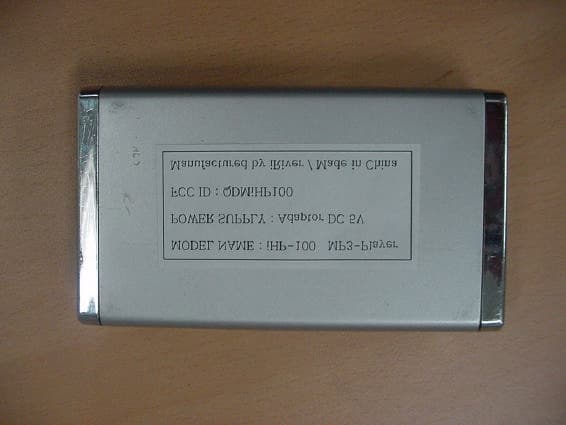
Click to zoom
Application Details
- Equipment Class
- JBP - Part 15 Class B Computing Device Peripheral
- Date of Grant
- Apr 24, 2003
- Application Purpose
- Original Equipment
- Date of Application
- Apr 24, 2003
- Equipment Note
- MP3 Player
- Company
- DREAMUS COMPANY
- Country
- South Korea
Documents & Files
Document Text
Text extracted from the exhibit documents filed with the FCC. Open a document above to read the original.
Users Manual
Model iMP-350 ModeliHP-100 InstructionManual PORTABLESTORAGEDEVICE & MULTI-CODECJUKEBOX ModeliHP-100 Thank you for your purchase. Please read this manual carefully before using your new player. http://www.iRiver.com THI SDEVICE COMPLIE SWITH PART 15 OF THE FCC RULE S.OPERATION I S SUBJECT TO THE FOLLOWING TWO CONDITION S:(1) THI SDEVICE SMAY NOT CAU SE HARMFUL INTERFERENCE, AND(2) THI SDEVICE MU ST ACCEPT ANY INTERFERENCE, RECEIVED, INCLUDING INTERFERENCE THAT MAY CAUSE UNDESIREDOPERATION. Note : This equipment has been tested and found to comply with the limits for a Class B digital device, pursuant to part 15 of the FCC Rules. Theselimits are designed to provide reasonable protection against harmfulinterference in a residential installation.This equipment generates, uses and can radiate radio frequency energyand, if not installed and used in accordance with the instructions, maycause harmful interference to radio communications. However, there isno guarantee that interference will not occur in a particular installation.If this equipment does cause harmful interference to radio or televisionreception, which can be determined by turning the equipment off andon, the user is encouraged to try to correct the interference by one ormore of the following measures : - Reorient or relocate the receiving antenna.- Increase the separation between the equipment and receiver.- Connect the equipment into an outlet on a circuit different from that to which the receiver is connected. - Consult the dealer or an experienced radio/TV technician for help.NOTE : THE MANUFACTURER IS NOT RESPONSIBLE FOR ANY RADIO OR TV INTERFERENCE CAUSED BY UNAUTHORIZEDMODIFICATION STO THI SEQUIPMENT. SUCH MODIFICATION SCOULD VOID THE USER'S AUTHORITY TO OPERATE THEEQUIPMENT. 1 Portable Storage Device IHP-100 can be used as the storage device with 10GB capacity. USB 2.0 is supported IHP-100 is the storage supporting USB 2.0 Interface which maximumtransfering speed is 480 MBit/Sec. Multi-Codec Player Supports MP3, WMA and ASF WAV format as multi-Codec player.WAV file only support 44.1KHz / 16 Bit. Firmware Upgrade Provides the latest updated features via firmware upgrade.New formats such as OGG, AAC, MP3 Pro and etc can be supported in thefuture with a simple upgrade method. Player features such as add on,modification, and continuous improvement of the player are always provided. Graphic LCD supporting Multiple Languages A total of 38 languages of 37 countries are supported. FM Tuner Auto scanning and frequency memory function make it easy for you to enjoylistening to the FM Radio. This player supports 6 Equalizer Patterns. Normal, Rock, Jazz, Classic, Ultra Bass, User EQ Easy Navigation The simple navigation with tree configulation makes it easy to find orsave any song. Total 1000 folders and 5000 tracks within the player can be recognized.Graphic User Interface Menu SupportFM recording, Voice recording and recording(Line-In/Optical In) from an external audio equipment is supported.When voice recording, recording level is automatically controlled at voicerecording mode. Line-Out / Optical-Out function is supported iRiver Limited does not assume any responsibility for errors or omissions in this document or make any commitment to update the information containedherein. iRiver is a registered trademark of iRiver Limited in the Republic ofKorea and/or other countries and is used under license.All other brand and product names are trademarks of their respectivecompanies or organization.All other product names may be trademarks of the companies with whichthey are associated. 1999~2003 iRiver Limited, All right reserved Microsoft Windows Media and the Windows logo are trademarks or registered trademarks of Microsoft Corporation in the United States and /or other countries. URL : http://www.iRiver.comProvides information on our company, products, and email addresses for support. Unique feature of "Firmware (system software) Upgrade" is available for download on our site. The Firmware Upgrade provides new features as well asenhancements to current features. Register your iRiver product online so that our Customer Service is enabled to provide support as efficiently as possible. Contents described in this manual may be changed to improve or any specification without notice. 2 3 (Stop)/ Power OFF A-B(Interval Repeat) /MODE Power ON/ /FM HDD(Play / Pause) Rec Button Mic LCD Window Charge Operating Indicator HDD Operating Indicator FRONT VIEW SIDE VIEW HOLD Jog Handle for MultiFunction Control 4 5 1. Locating the Controls Front View, Side View.......................................................Up/ Down Side, LCD Window...........................................Remote Control................................................................. 2. Getting started Using AC POWER ADAPTER..........................................Software Installation..........................................................Connecting the iHP-100 to the Host PC...........................Installing the iHP-100 Device Driver.................................Using as a Portable Storage.............................................Disconnecting the iHP-100 to the Host PC.......................Listening to Music.............................................................Basic Operation................................................................ 3. Useful Features Navigation Mode / Menu / Mode.......................................Playback Mode.................................................................Navigation.........................................................................Upgrading DB...................................................................Adding DB.........................................................................Operating the FM Tuner....................................................Recording..........................................................................Playback Mode..................................................…
Text truncated - open the document above for the full version.
Users Manual
Push or and select thedesired channels. Select CH02 Save complete again will exit the memory functionwithout saving. Select the channel by pushing the or switch to the left or the right. Up to 20 channels can be memorized. Note : Auto memory may not work within weak transmission areas. Press and hold the A-B/MODE button. Press the NAVI/MENU button to cancel PRESET. Auto memory function :Automatically select channels and save them in sequential order. While playing Audio File, Press and hold the PLAY/PAUSE button. The FM function picture displays on the LCD. Push the or button to select FM frequency. Press the STEREO/PLAY/PAUSE button to select Stereo/Mono. To change frequency, push the or switch to the left or the right. Auto Scan function: To select a memorized channel, press the NAVI/MENU buttonto cancel Preset function and find the channel by pushing the or switch to the left or the right. (ex : 87.5 87.6) or or OPERATING THE FM TUNER Selecting Frequency Auto Memory Function (Save channels automatically) Memory Function (Save channels manually) PRESET Mode : To select a channel saved in memory, press the Navi/Menu buttonand find the channel by pushing the or switch to the left or the right. 26 27 Select the channel to be deleted at preset mode.Press and hold the memory button. - The next channel will appear when channel deletion is completed. Push the MEMORY button if you want to delete the next channel also. FM Tuner reception may vary in different areas.While in Preset mode, auto scan and auto memory functions are not available. When the player does not have any preset channels, EMPTY will be blinking at preset mode. Memory delete function (Delete saved channels) Connect the stereo cable between LINEIN jack of the player and LINE OUT jackor Headphone jack of an external audioequipment. Connecting the player to an external audio equipment Press the REC button to activate recording standby mode. LINE IN 5509MB FREE LINE IN 5509MB FREE If you press the REC button while receiving FM, FM recording starts without recording standby mode. Press A-B/MODE button or push the REC switch toward SOURCE/TYPEto select the source to record -Torecordvoice:MICROPHONE- To record from an external audio equipment with digital optical signal : OPTICAL - To record from an external audio equipment with analogue signal : LINE-IN An external audio equipmenthas the Optical Out jack,connect the Optical cablebetween Optical In jack of theplayer and Optical Out jack of anexternal audio equipment. Itpossess both Line In/Out jackand Optical In/Out. 28 29 LINE IN 5509MB FREE Push the MENU/NAVI handle toward or , or push the REC button of remote control toward BITRATE to select BITRATE TYPE to set recordingquality. LINE IN 5509MB FREE Push the REC button to start recording.When recording from an external audio equipment, start playback of itfirst. LINE IN 5509MB FREE AUDIO000.MP3 RECORDING 01:10 During FM recording, press (STOP/PWR OFF) to stop FM recording and changed to FM receiving status automatically. Press the REC button to pause recording. And press the REC button again to restart FM recording. LINE IN 5509MB FREE AUDIO000.MP3 RECORDING 01:10 LINE IN 5509MB FREE AUDIO000.MP3 Volume is not controlled during recording. NOTE Push the MENU/NAVI handle toward or , or push the REC button of remote control toward SOURCE/TYPE to select FILE TYPE to save. While recording, press (STOP/PWR OFF) to stop recording and go recording standby mode. Press the REC button again to record a fileas new name at recording standby mode. 30 31 At recording standby mode, press and hold button to go previous mode. LINE IN 5509MB FREE If you press the REC button during receiving FM, FM recording is immediately started without any operation The recorded files is saved as below path according to the recording source. - Line In : ROOT\RECORD\AUDIO\AUDIOXXX.MP3(WAV)- Mic In : ROOT\RECORD\VOICE\VOICEXXX.MP3(WAV)- Tuner : ROOT\RECORD\TUNER\TUNERXXX.MP3(WAV) Recording is automatically stopped at the condition as below. - the player’s memory is full- the size of the recorded file is larger than 195MB.- the recorded time is longer than 5 hours. When A-B/MODE button is pushed, iconin the playback modeindicator is changed. REPEAT Play a single track repeatedly. Press or to play the previous or next music.Play all tracks in the folder and stop.Play all tracks in the folder repeatedly.Play all tracks in the player repeatedly. Randomly play all tracks in the player and stop.Play a single track repeatedly. Press or to play the music randomly.Randomly play all tracks in the folder and stop. Press or to play the music in the folder randomly.Randomly play all tracks in the folder repeatedly.Randomly play all tracks in the player repeatedly. INTRO : Plays the beginning 10 seconds of each track in sequential order. INTRO HIGHLIGHT : Plays 10 seconds from 1 minute into each track in sequential order. You can set this function in the MENU function. SHUFFLEINTRO You can enjoy various ways of playing by using playback mode.Please refer to the function controls (Refer to page 22 for details) for user-defined configurations. 32 33 You can set the EQ function by using Function Menu. Refertopage43. EQ 34 35 Function Control is subject to change with different firmware versions. Users can configure their own settings. MAIN MENU SUB MENU Press and hold the NAVI/MENU button to display the menu system.It is composed of 7 main menus with sub-menus. Beep VolumeResumeFade InLanguageTuner RegionLoad DefaultFirmware UpgradeDB Scan When you select a sub menu, you can set your preference to be displayed. Back Light (Battery)Back Light (Adapter)Lcd Contrast(Main)Lcd Contrast(Remote)Tag InformationTime Sleep TimerStop Power Off Scan SpeedScroll TypeOptical Out RepeatShuffleIntro Sound BalanceEQBass BoostTreble Boost General Control Mode Sound Timer Display Record TypeBitrateAGC Record ConfigurationMenu Operation Scroll between Menu Press and hold the NAVI/MENU button todisplay t…
Text truncated - open the document above for the full version.
Test Report
EMI TEST REPORT Emission of electromagnetic disturbance Test Report No. : ERI-FCC03-0020 Equipment : MP3 Player Name of basic model : iHP-100 Family model : iHP-150, iHP-200, iHP-250 Manufacturer : iRiver CO., LTD. Applicant : H.J. Mun Tested date : 2003. 4. 8 - 4. 16 Issued date : 2003. 4. 16 Test results : PASS Test Standards : FCC Part 15 Subpart B (Class B) Test Procedure and Items : - AC Power line Conducted emissions measurement : ANSI C63.4-1992 - Radiated emissions measurement : ANSI C63.4-1992 Tested by: GWEON, HUR Approved by: UK-CHO, RIM The results in this report apply only to the sample tested. This test report shall not be reproduced except in full, without the written approval of ERI Laboratory. ERIELECTROMAGNETIC RESEARCH INSTITUTE CONTENTS 1. CLIENT INFORMATION............................................................................................... 3 2. LABORATORY INFORMATION................................................................................... 3 3. EQUIPMENT UNDER TEST INFORMATION(EUT) ................................................ 3 3.1 Identification of the EUT.................................................................................... 3 3.2 Additional information about the EUT............................................................. 4 3.3 Peripheral equipment...................................................................................... 4 4. CONTINUOUS DISTURBANCE VOLTAGE, MAIN TERMINAL............................... 5 4.1 Operating environment....................................................................................... 5 4.2 Test set-up and test procedures....................................................................... 5 4.3 Test instrument..................................................................................................... 5 4.4 Test results<Play mode>.................................................................................... 6 4.5 Test results(FM tuner>.......................................................................................... 8 5. RADIATED DISTURBANCE : 30MHz – 1000MHz ............................................... 10 5.1 Operating environment....................................................................................... 10 5.2 Test set-up ............................................................................................................. 10 5.3 Test conditions...................................................................................................... 10 5.4 Test instrument..................................................................................................... 10 5.5 Test results(Download mode)........................................................................... 11 5.6 Test results(Play mode)....................................................................................... 11 5.7 Test results(FM tuner)............................................................................................ 12 ERIELECTROMAGNETIC RESEARCH INSTITUTE 1. CLIENT INFORMATION The EUT has been tested by request of : Company : iRiver CO., LTD. Address : 8F Posgen VentureTower, 1586-7 Seocho-dong, Seocho-gu, Seoul, Korea Name of contact : Gi-Yeon, Lee Telephone : +82-2-3019-1723 Facsimile : +82-2-3019-1746 2. LABORATORY INFORMATION The 10m semi-anechoic chamber and/or EMC facilities are used for these testing. These facilities were accredited by KOLAS, EK, MIC of Korea and FCC of USA. Address ELECTROMAGNETIC RESEARCH INSTITUTE. 66-6, JEIL-RI, YANGJI-MYUN, YOUNGIN-CITY, KYUNGGI-DO, KOREA Telephone No. : +82-31-336-1186~7 Facsimile No. : +82-31-336-1184 Registered No. KOLAS : 111 EK : J MIC : KR0030 FCC Filing No. : 302567 3. EQUIPMENT UNDER TEST INFORMATION(EUT) 3.1 Identification of the EUT Type of equipment : MP3 Player Model name : iHP-100 Brand name : N/A Manufacturer : AV CHASEWAY MFG.FTY. Address : Langang Village, Chongguang Town, Baoan District, Shenzhen City, Guangdong, China Telephone : +86-755-708-4671 Facsimile : +86-755-708-5490 Country of origin : CHINA Rating : DC 5V ERIELECTROMAGNETIC RESEARCH INSTITUTE 3.2 Additional information about the EUT Class B, Family Models List: Basic Model Variant Model Differential point Remark iHP-150 Model name - iHP-200 Model name - iHP-100 iHP-250 Model name - 3.3 Peripheral equipment Defined as equipment needed for correct operation of the EUT. Description Model No. Serial No. Manufacture NOTE PC CP149702-01 R3100684 Fujitsu limited. AC/DC adaptor SEB80N2-16 03211289B Sanken electronic Co., Ltd. FDD FPCFDD12 B1131NI0106 - AC/DC adaptor RHC-050200-L - - Monitor S7E P181H80R907989 - Printer HP930C CN17D1BOS9 - ERIELECTROMAGNETIC RESEARCH INSTITUTE 4. CONTINUOUS DISTURBANCE VOLTAGE, MAIN TERMINAL : Frequency range 0.15 MHz to 30 MHz 4.1 Operating environment Temperature : 22.0 Relative Humidity : 30.0 % 4.2 Test set-up and test procedures The mains terminal disturbance voltage was measured with the equipment under test(EUT) in a shield room. The EUT was connected to an artificial mains network(LISN) placed on the floor. The EUT was placed on non-metallic table 0.4m above the metallic, grounded floor. The distance to other metallic surface was at least 0.8m. Amplitude measurements were performed with a quasi-peak detector and an average detector. Operation condition : Play and download mode 4.3 Test instrument Instrument Model No. Serial No. Makers Next cal.date Used Test receiver ESCS30 100021 R&S 2004. 1. 24 ESH3-Z5 827246/008 R&S 2004. 3. 19 L.I.S.N. ESH3-Z5 831887/018 R&S 2004. 3. 19 Shield room 8 6 3.3m/H - - - LISN LISN EUT FDD Note pc AC/DC adaptor controller earphone Monitor AC/DC adaptor ERIELECTROMAGNETIC RESEARCH INSTITUTE 4.4 Test results<Play mode> Date of test : Apr 8, 2003. An overview sweep performed with peak detector & average detector are included in the report as test reports. Frequency Tested LISN Meter Range Freq. Reading Limits Margin QP AV QP AV QP AV [MHz] [MHz] [dBuV] [dB…
Text truncated - open the document above for the full version.
Contact Information
Applicant
HONGGYU LEE(Manager)
Test Firm
EMC Compliance LTDMin Seok Chung
Technical Specifications
| # | Rule Parts | Frequency Range | Power Output |
|---|---|---|---|
| 1 | 15B | - | - |
Other Applications from DREAMUS COMPANY
QDMPPF43
Aug 28, 2024SP3000M
Equipment Class
NII - Unlicensed National Information Infrastructure TXQDMPPM45
Oct 17, 2023KANN ULTRA
Equipment Class
NII - Unlicensed National Information Infrastructure TX
QDMPPR51
May 07, 2023SE300
Equipment Class
NII - Unlicensed National Information Infrastructure TX
QDMPSP22
May 04, 2023UW100 MK II
Equipment Class
DSS - Part 15 Spread Spectrum Transmitter
QDM-HERO-OLS01
Jan 16, 2023LIM YOUNG WOONG OFFICIAL LIGHT STICK
Equipment Class
DTS - Digital Transmission System