R2GL5ABluetooth headset
Lezun Limited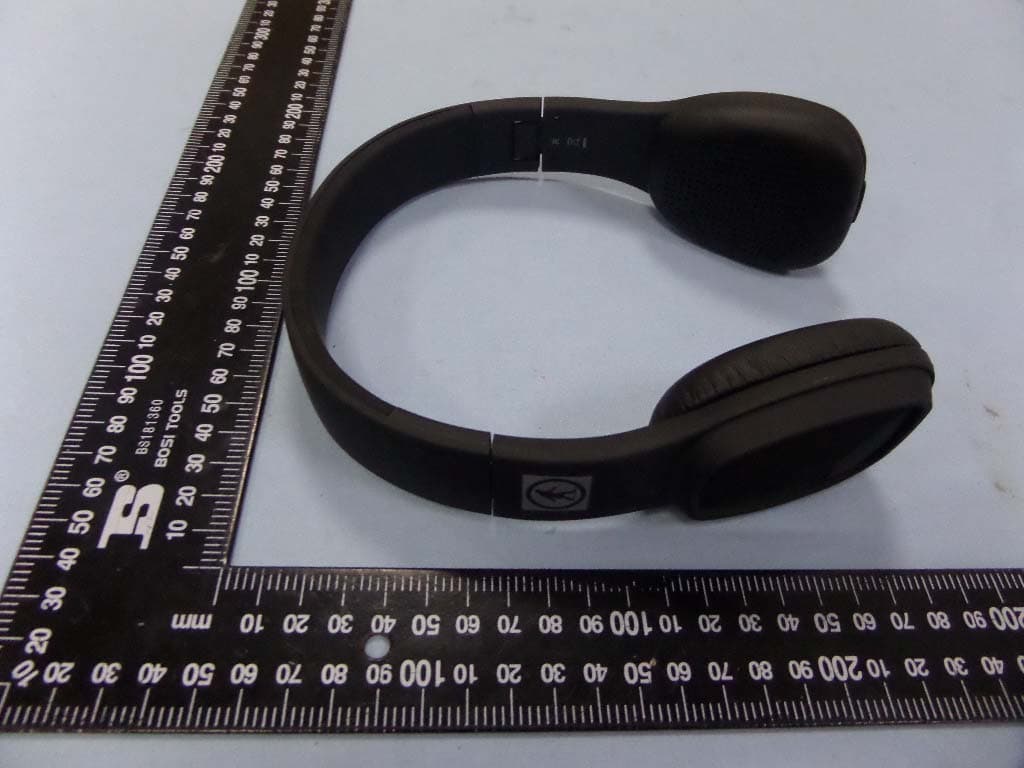
Click to zoom
Application Details
- Equipment Class
- DSS - Part 15 Spread Spectrum Transmitter
- Date of Grant
- Jul 14, 2015
- Application Purpose
- Original Equipment
- Date of Application
- Jul 14, 2015
- Equipment Note
- Bluetooth headset
- Frequency Range
- 2402.00000000 - 2480.00000000
- Company
- Lezun Limited
- Country
- China
Documents & Files
Document Text
Text extracted from the exhibit documents filed with the FCC. Open a document above to read the original.
Users Manual
We, Lezun, declare under our sole responsibility, that the product Lezun L5A, confirms with the provisions of the following Directives: 1999/5/EC; 2004/108/EC and 2006/95/EC. The crossed-out wheelie bin symbol means that the product must be disposed of separately in the European Union. These products must not be disposed of with unsorted household waste. FCC ID: R2GL5A To locate the FCC and IC identification numbers, please look on the underside of the Lezun L5A. Model number L5A Battery Before you use it for the first time, the L5A must be fully charged. To do this, connect L5A to your computer via the USB to micro- USB cable. The indicator on the side of the right ear cup illuminates with a red light to show that the device is charging. Once charging is complete, the indicator light turns off (1). When the battery is flat, you can still use the L5A to listen to music if your audio player is connected to the headset via the Jack to Jack cable. Conversely, the telephone and Bluetooth music transfer functions and touch sensitive panel are not available (2). Switching the L5A on/off Press the button (1) to switch the product on/off. Wearing the headset Adjust the band without forcing it, so that the headphones will fit comfortably over your ears, then put the headset on, using the letters (L) and (R) to help you distinguish left and right. Bluetooth Connection Before L5A can be used with your telephone or Bluetooth audio player, the two devices must be paired(3) . Once the two devices have detected each other, it is no longer necessary to pair each time. 1. From your telephone or Bluetooth audio player, start a search for Bluetooth peripherals. 2. Select “L5A” Once your telephone is paired with the L5A, the two devices will connect to each other automatically each time that the L5A is switched on. It is not possible to simultaneously connect several devices to L5A. All Bluetooth Audio device Listening to music at high volumes for long periods can lead to hearing problems. We do not recommend using these headphones at maximum volume, particularly for long periods of time. To protect your hearing, turn down the volume of your music player before connecting your headphones. After putting on the headphones, gradually turn up the volume until you reach a suitable level. Sound levels are measured in decibels (dB). Exposure to sound 85 dB or above may result in gradual loss of hearing. Monitor your use. Hearing loss depends on the intensity of the sound and the duration. The higher the volume, the less your exposure capacity will last. The lower the volume, the longer your exposure period can be. Be responsible: pay attention to your environment (acoustic) when you are wearing your headphones and listening to music or the radio. Avoid hazardous behavior that may cause an accident for you or somebody else (pedestrians, motorcyclists, drivers, cyclists) or cause damage to property when you are wearing your headphones. Lezun would like to inform you that the use of stereo headphones is strictly forbidden when driving a motor vehicle. Lezun also recommends not listening to music or the radio through your headphones when riding a bicycle, a scooter or any other means of transport for which it is not compulsory to wear a helmet. Lezun can not accept any responsibility if you choose to ignore these warnings. Warning Volume/Using during a call (4) To increase the volume, Press the up button. To decrease the volume, press the down button. Next/Previous (5) If your audio player is connected to the L5A via Bluetooth: To return to the previous track, press the leftward button. To move to the next track, press the rightward button. Pause/Play Press the power button to pause and play music. Double click in touch area is also to pause and play music. Telephone Press the power button to answer the phone call. Press the power button again to end the phone call. Press the power button twice to call the last number in your phone call records. Note: The touch sensitive panel is located on the right speaker. Connect the L5A to the audio source. 1. Connect the Jack to Jack cable supplied to the L5A’s right headphone and connect the other end to your audio player. 2. If your telephone/Bluetooth audio player supports Bluetooth A2DP, you can also send music to your L5A via Bluetooth. Music ® ® ® ® Mac, iPad, iPhone, iPod are trademarks of Apple Inc., registered in the U.S. and other countries. ® BlackBerry is a registered trademark of Research in Motion Limited. Samsung is a registered trademark of Samsung Electronics Co., Ltd. TM Android is a trademark of Google Inc. ® Windows is a registered trademark of Microsoft corporation in the United States and other countries. ® The Bluetooth word mark and logo are registered trademarks and are owned by the Bluetooth SIG, Inc. All other registered and unregistered are the property of their respective owers. FCC Statement This equipment has been tested and found to comply with the limits for a Class C digital device, pursuant to Part 15 of the FCC Rules. These limits are designed to provide reasonable protection against harmful interference in a residential installation. This equipment generates uses and can radiate radio frequency energy and, if not installed and used in accordance with the instructions, may cause harmful interference to radio communications. However, there is no guarantee that interference will not occur in a particular installation. If this equipment does cause harmful interference to radio or television reception, which can be determined by turning the equipment off and on, the user is encouraged to try to correct the interference by one of the following measures: • Reorient or relocate the receiving antenna. • Increase the separation between the equipment and receiver. • Connect the equipment into an outlet on a circuit different from that to which the receiver is connected. • Consult the dealer or an experienced radio/TV technician for help. FCC NOTICE This…
Text truncated - open the document above for the full version.
External Photos
Lezun Limited Model: L5A REPORT NO.: STR15078062I FCC PART 15.247 EXHIBIT 2 - EUT EXTERNAL PHOTOGRAPHS EUT View 1 EUT View 2 Lezun Limited Model: L5A REPORT NO.: STR15078062I FCC PART 15.247 EUT View 3 EUT View 4 Lezun Limited Model: L5A REPORT NO.: STR15078062I FCC PART 15.247 EUT View 5
ID Label/Location Info
Lezun Limited Model: L5A REPORT NO.: STR15078062I FCC PART 15.247 EXHIBIT 1 - PRODUCT LABELING Proposed FCC ID Label Format Specifications: Text is Black in color and justified. Labels are printed in indelible ink on permanent adhesive silk-screened onto the EUT or shall be affixed at a conspicuous location on the EUT. Proposed Label Location on EUT FCC ID Label Location
Internal Photos
Lezun Limited Model: L5A REPORT NO.: STR15078062I FCC PART 15.247 EXHIBIT 3 - EUT INTERNAL PHOTOGRAPHS EUT Housing and Board View 1 Solder Board-Component View 1 Lezun Limited Model: L5A REPORT NO.: STR15078062I FCC PART 15.247 Solder Board-Component View 2 Solder Board-Component View 3 Lezun Limited Model: L5A REPORT NO.: STR15078062I FCC PART 15.247 Solder Board-Component View 4 Solder Board-Component View 5 Lezun Limited Model: L5A REPORT NO.: STR15078062I FCC PART 15.247 Solder Board-Component View 6
RF Exposure Info
RF Exposure Requirements Product Description: Bluetooth headset Model No.: L5A FCC ID: R2GL5A According to the KDB 447498 D01 V05r02, the following RF exposure evaluation shall to demonstrate RF exposure compliance. Bluetooth Tx frequency range: 2402~2480MHz Device category: Portable device (Distance: 5mm) Maximum Conducted Output Power: 0.629dBm Maximum Output Power: 1.1558mW Limit: 10mW Source-based time-averaged EIRP output power is 1.1558mW < 10mW So the transmitter complies with the RF exposure requirements and the SAR is not required.
Test Report
Lezun Limited Model: L5A REPORT NO.: STR15078062I PAGE 1 OF 54 FCC PART 15.247 FCC Part 15C Measurement and Test Report For Lezun Limited 3F, Block 1C, Huiye technology park, Guanguang Road Shenzhen FCC ID: R2GL5A FCC Rule(s): FCC Part 15.247 Product Description: Bluetooth headset Tested Model: L5A Report No.: STR15078062I Tested Date: 2015-07-04 to 2015-07-13 Issued Date: 2015-07-13 Tested By: Mark Chen / Engineer Reviewed By: Lahm Peng / EMC Manager Approved & Authorized By: Jandy so / PSQ Manager Prepared By: Shenzhen SEM.Test Technology Co., Ltd. 1/F, Building A, Hongwei Industrial Park, Liuxian 2nd Road, Bao'an District, Shenzhen, P.R.C.(518101) Tel.: +86-755-33663308 Fax.: +86-755-33663309 Website: www.semtest.com.cn Note: This test report is limited to the above client company and the product model only. It may not be duplicated without prior permitted by Shenzhen SEM.Test Technology Co., Ltd. Lezun Limited Model: L5A REPORT NO.: STR15078062I PAGE 2 OF 54 FCC PART 15.247 TABLE OF CONTENTS 1. GENERAL INFORMATION ................................................................................................................................... 4 1.1 PRODUCT DESCRIPTION FOR EQUIPMENT UNDER TEST (EUT) ............................................................................... 4 1.2 TEST STANDARDS ................................................................................................................................................... 5 1.3 TEST METHODOLOGY ............................................................................................................................................. 5 1.4 TEST FACILITY ....................................................................................................................................................... 5 1.5 EUT SETUP AND TEST MODE ................................................................................................................................. 6 2. SUMMARY OF TEST RESULTS ........................................................................................................................... 7 3. RF EXPOSURE ......................................................................................................................................................... 8 3.1 STANDARD APPLICABLE ......................................................................................................................................... 8 3.2 TEST RESULT.......................................................................................................................................................... 8 4. ANTENNA REQUIREMENT .................................................................................................................................. 9 4.1 STANDARD APPLICABLE ......................................................................................................................................... 9 4.2 EVALUATION INFORMATION .................................................................................................................................. 9 5. FREQUENCY HOPPING SYSTEM REQUIREMENTS ................................................................................... 10 5.1 STANDARD APPLICABLE ....................................................................................................................................... 10 5.2 FREQUENCY HOPPING SYSTEM............................................................................................................................. 10 5.3 EUT PSEUDORANDOM FREQUENCY HOPPING SEQUENCE .................................................................................... 11 6. QUANTITY OF HOPPING CHANNELS AND CHANNEL SEPARATION ................................................... 12 6.1 STANDARD APPLICABLE ....................................................................................................................................... 12 6.2 TEST EQUIPMENT LIST AND DETAILS ................................................................................................................... 12 6.3 TEST PROCEDURE ................................................................................................................................................. 12 6.4 ENVIRONMENTAL CONDITIONS ............................................................................................................................ 12 6.5 SUMMARY OF TEST RESULTS/PLOTS .................................................................................................................... 13 7. DWELL TIME OF HOPPING CHANNEL .......................................................................................................... 17 7.1 STANDARD APPLICABLE ....................................................................................................................................... 17 7.2 TEST EQUIPMENT LIST AND DETAILS ................................................................................................................... 17 7.3 TEST PROCEDURE ................................................................................................................................................. 17 7.4 ENVIRONMENTAL CONDITIONS ............................................................................................................................ 17 7.5 SUMMARY OF TEST RESULTS/PLOTS .................................................................................................................... 18 8. 20DB BANDWIDTH ............................................................................................................................................... 28 8.1 STANDARD APPLICABLE ....................................................................................................................................... 28 8.2 TEST EQUIPMENT LIST AND DETAILS ..............................................................................................…
Text truncated - open the document above for the full version.
Test Setup Photos
Lezun Limited Model: L5A REPORT NO.: STR15078062I FCC PART 15.247 EXHIBIT 4 - TEST SETUP PHOTOGRAPHS Conducted Emission Test Setup Radiation Emission Test Setup Lezun Limited Model: L5A REPORT NO.: STR15078062I FCC PART 15.247 Radiation Emission Test Setup (30MHz to 1GHz) Radiation Emission Test Setup (Blow 30MHz) Lezun Limited Model: L5A REPORT NO.: STR15078062I FCC PART 15.247 Radiation Emission Test Setup (Above 1GHz)
Contact Information
Applicant
David Tan(General Manager)
Test Firm
Shenzhen SEM.Test Technology Co., Ltd.Jandy So
Technical Specifications
| # | Rule Parts | Frequency Range | Power Output |
|---|---|---|---|
| 1 | 15C | 2.40 GHz - 2.48 GHz | 1.10 mW |
Other Applications from Lezun Limited
R2GL6
Mar 26, 2015Bluetooth headset
Equipment Class
DSS - Part 15 Spread Spectrum Transmitter
R2GLZ380B
Mar 04, 2015Bluetooth headset
Equipment Class
DSS - Part 15 Spread Spectrum Transmitter
R2GL5
Feb 10, 2015Bluetooth headset
Equipment Class
DSS - Part 15 Spread Spectrum Transmitter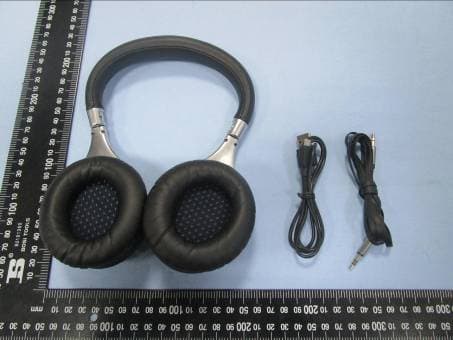
R2GL3
Jan 06, 2015Bluetooth headset
Equipment Class
DTS - Digital Transmission SystemR2GLZQ006
Jun 17, 2013Bluetooth Headphone
Equipment Class
DXX - Part 15 Low Power Communication Device Transmitter