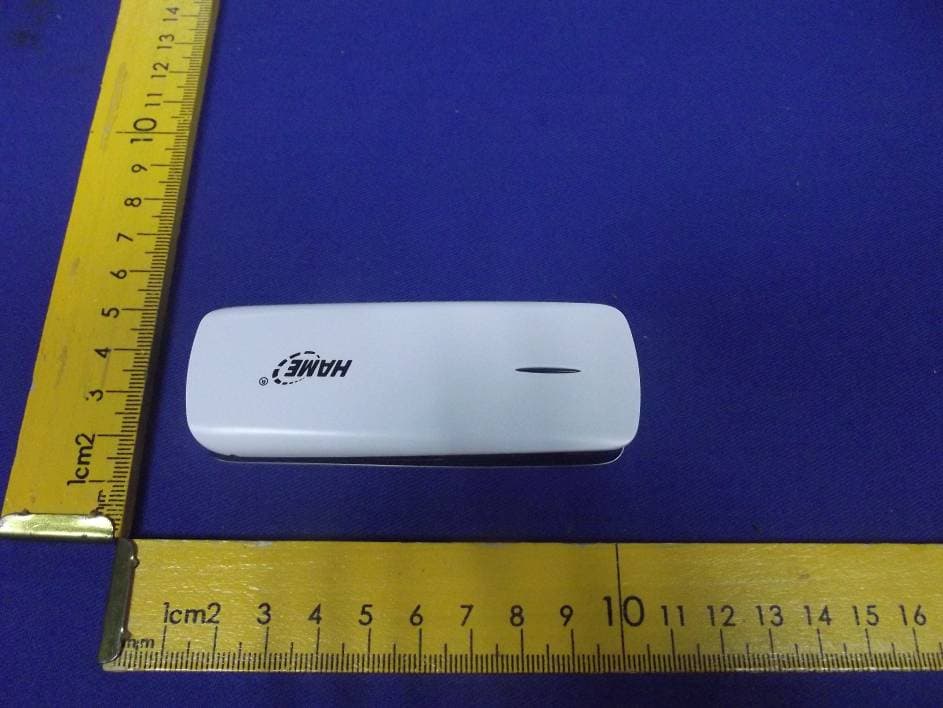
R7F-S3Wi-Fi Disk
Hame Technology Co., Limited
Click to zoom
Application Details
- Equipment Class
- DTS - Digital Transmission System
- Date of Grant
- Mar 07, 2013
- Application Purpose
- Original Equipment
- Date of Application
- Mar 07, 2013
- Equipment Note
- Wi-Fi Disk
- Frequency Range
- 2422.00000000 - 2452.00000000
- Company
- Hame Technology Co., Limited
- Country
- China
Documents & Files
Document Text
Text extracted from the exhibit documents filed with the FCC. Open a document above to read the original.
Users Manual
Table of Contents 1. Package list .................................................................................................................................. 2 2. Hardware Interface....................................................................................................................... 2 3. LED Indicator Description ........................................................................................................... 2 4. How to connect the device to user Wi-Fi devices (IOS system e.g.) ........................................... 3 5. Copy Files .................................................................................................................................... 3 5.1 Connect to computer through USB cable to establish removable disk .............................. 3 5.2 Connect wireless network to the computer to build wireless disk ..................................... 4 6. Wireless Sharing .......................................................................................................................... 5 6.1 Play file on management interface ..................................................................................... 5 6.2 IOS and Android Client: HameCloud ................................................................................ 6 7. Wi-Fi Hotspot/ Repeater Setting .................................................................................................. 7 7.1 Setting on management interface ....................................................................................... 7 7.2 IOS and Android Client Setting: HameCloud .................................................................... 9 8. Modify Wi-Fi password ............................................................................................................. 10 9. FAQ.............................................................................................................................................11 1. Package list SPR-S3 device User manual Warranty card Micro USB data cable 2. Hardware Interface Function description of hardware interface: Hardware Interface Mark Function Description Switch Button Push up to turn on; push down to turn off. Charging Interface To connect power adapter to charge the device. RESET R Under turn-on status, press and hold “R” for 5 – 10 seconds, if the Wi-Fi indicator is flashing in purple, Reset is activated. SD Card Slot SD Insert SD card. 3. LED Indicator Description Indicator light Status Description Red The device is turned on, the programs are running; or wireless connection fails. Wi-Fi Blue The device is turned on, and wireless connection is available. Purple Wi-Fi repeater succeeds, and Internet is accessible. Off No SD card. SD Blue SD card is inserted Blue High power Battery power Red Low power Blue-purple Charging Charging Blue Fully charged 4. How to connect the device to user Wi-Fi devices (IOS system e.g.) 1、 Push up the switch button of the device to start. 2、 Select the device’s wireless network (HAME_S3_xxxx) on Wi-Fi page. 3、 If “ ”is displayed in front of HAME_S3, it indicates that the user Wi-Fi device has connected to the Wi-Fi network of the device successfully. 5. Copy Files 5.1 Connect to computer through USB cable to establish removable disk 1、 Insert SD card into the device when the device is under turn off status. 2、 Connect the device to the USB interface of computer via data cable. 3、 The computer can detect SD card and display it as “Removable Disk” on “My Computer”. 4、 Click “Removable Disk” to show all the documents in the disk, and now you can copy, delete or view relevant files. 5.2 Connect wireless network to the computer to build wireless disk 1、 Turn on the device and connect computer to the device via Wi-Fi. Input http://192.168.169.1 into browser to enter the management page. 2、 Client icon at the left bottom corner of the page to download Window Client. 3、 Click “Run” button to install it, and then a network drive icon , which is the wireless disk of SD card, will appear in “My Computer”. Double click the icon to enter disk management interface. All documents in SD card are stored in sda1 folder. 4、 Click and enter sda1 folder to browse, edit, add or delete file in SD card. The operation step is same with removable disk. 6. Wireless Sharing The device supports standard DLNA protocol. All software players and hardware players complying with DLNA standards can access photo, music, video and document in storage device. The device can support 5 connectors simultaneously. 6.1 Play file on management interface 1、 Insert SD card into SD card slot and push up the switch button of the device to turn on it. 2、 Connect internet device to the device through Wi-Fi and input http://192.168.169.1 into the browser of the internet device to enter setting page. 3、 Click icon button on the left: music, video, picture, document or folder, and then click sda1 button to select corresponding document to play. Click folder icon to display all types of documents in SD card. (Browser defaults to use QuickTime player. If some music or video fail to be played, please install corresponding format of plug-in unit or player.) 6.2 IOS and Android Client: HameCloud 1、 Turn on the device and connect mobile phone or tablet PC to it via Wi-Fi. Input http://192.168.169.1 into default browser to enter the management page. 2、 Click multimedia client icon in the left bottom corner, download and install the software. Icon of Apple client is while icon of Android client is. 3、 Find “HameCloud” in application program of mobile phone and click it to enter client interface. 4、 Click icons of picture, video and music to display document list of corresponding types in SD card and then select any document to browse or play. Click document icon and it will display all types of documents in SD card. If some music or video fail to be played, please download and install player supporting such format. (For Android: QvodPlay…
Text truncated - open the document above for the full version.
Attestation Statements
Ersteller: D. Brandhorst Revision: 00 Erstelldatum: 21.06.07 Datum: 00.00.00 Seite 1 von 1 Hame Technology Co., Limited Date: 2/22/2013 Subject: Ad Hoc Mode Function Declaration FCC ID: R7F-S3 To Whom it may concern, This device is acting as slave and operating in 2412-2462MHz band. Ad Hoc function is supported but not able to operate on non-US frequencies. Please contact the one signed below or the authorized agent for this filing. Thank you. Regards, Signatory (YOUR CONTACT DETAILS) Name : Gu xiao zhen Position : Certification Commissioner Company: Hame Technology Co., Limited Adress : 4F, Plant 1st, Huahan Industrial Park, Jinniu West Rd., Pingshan New District, Tel. : +86-755-26017337 Fax : +86-755-26017340 Email : [email protected]
Cover Letter(s)
Ersteller: D. Brandhorst Revision: 00 Erstelldatum: 07.03.2008 Datum: 00.00.00 Seite 1 von 1 Hame Technology Co., Limited Date: 2/22/2013 FCC ID: R7F-S3 Subject: Attestation Letter “Declaration of Conformity” Dear Sirs, Our products with the above FCC ID are defined as composite device. The transmitter is authorized under the “Certification” procedure. The device is also defined as “PC Periphery” acc to §15.101 Equipment authorization of unintentional radiators, where we hereby declare, that we apply and follow the “Declaration of Conformity” procedure. If you have any questions, please feel free to contact me at the address shown below. Yours sincerely, Signatory Name : Gu xiao zhen Position : Certification Commissioner Company: Hame Technology Co., Limited Adress : 4F, Plant 1st, Huahan Industrial Park, Jinniu West Rd., Pingshan New District, Tel. : +86-755-26017337 Fax : +86-755-26017340 Email : [email protected]
Cover Letter(s)
Hame Technology Co., Limited Date: 22.02.2013 Authority to Act as an Agent We declare that the following representative (agent) Name Mark Zhu Position Manager Company Name Shenzhen Certification Technology Service Co., Ltd. Address 2F, Building B, East Area of Nanchang Second Industrial Zone, Gushu 2 nd Road, Bao’an District, Shenzhen 518126, P.R. China Tel / Fax 0755-86375541/0755-26736857 Email [email protected] to act on our behalf on all matters concerning the application and documents submitted to PHOENIX TEST-LAB for product certification below Product Name Wi-Fi Disk Model Name S3, C1, SD1, Z1 Brand Name Yours sincerely, Signatory Name Gu xiao zhen Position Certification Commissioner Company Name Hame Technology Co., Limited Address 4F, Plant 1st, Huahan Industrial Park, Jinniu West Rd., Pingshan New District, Tel +86-755-26017337 Fax +86-755-26017340 Email [email protected] In case of FCC, we certify that we are not subject to a denial of Federal benefits, that include FCC benefits, pursuant to Section 5301 of the Anti-Drug Abuse Act of 1988, 21 U.S.C. §862 because of a conviction for possession or distribution of a controlled substance.
Cover Letter(s)
Hame Technology Co., Limited Federal Communications Commission Equipment Authorization Branch 7435 Oakland Mills Road Columbia, MD 21046 Request for Confidentiality Company name: Hame Technology Co., Limited FCC ID : R7F-S3 FCC Part 15 Certification Gentlemen, Pursuant to 47 CFR 0.457(d)(1)(ii) and 0.459 we hereby requests permanent confidentiality of the following documents for the subject application: Exhibit Type Description ☒ Schematics All circuitry of devices and component values ☒ Block Diagrams Details of device showing the frequency of all oscillators ☒ Operational Description Description of the circuit functions Note: Exhibit types that are commonly held confidential are: (1) Schematics, (2) Block Diagrams, (3) Bill Of Materials, (4) Operational Descriptions. Any exhibit NOT granted confidentiality is viewable on the FCC website as soon as a grant is issued. These documents contain detailed system and equipment description and related information about the product which we considers to be proprietary, confidential and a custom design and otherwise would not release to the general public. Since the design is a basis from which future technological products will evolve, we consider that this information would be of benefit to its competitors and that the disclosure of the information in these documents would give competitors an unfair advantage in the market. Yours sincerely, Signatory Name Gu xiao zhen Position Certification Commissioner Company Name Hame Technology Co., Limited Address 4F, Plant 1st, Huahan Industrial Park, Jinniu West Rd., Pingshan New District, Tel +86-755-26017337 Fax +86-755-26017340 Email [email protected]
ID Label/Location Info
30mm 16mm Company: Hame Technology Co., Limited Name: Wi-Fi Disk Model Number: S3 FCC ID: R7F-S3 This device complies with Part 15 of the FCC Rules. Operation is subject to the following two conditions: (1) this device may not cause harmful interference, and (2) this device must accept any interference received, including interference that may cause undesired operation.
ID Label/Location Info
Label location
Internal Photos
ANTENNA
Parts List/Tune Up Info
Letter of Certification This is to formally certify that: The tune up procedures of Wi-Fi Disk, S3, C1, SD1, Z1 is not open to end user. The end user is not allowed to perform final tune. All the power and frequency set up were finished at the manufacturer stage. Rated Peak RF power output: IEEE802.11 b, 8dbm±2 IEEE802.11 g, 8dbm±2 IEEE802.11 n/HT20. 8dbm±2 IEEE802.11 n/HT40. 8dbm±2 Rated AV RF power output: IEEE802.11 b, 7dbm±2 IEEE802.11 g, 7dbm±2 IEEE802.11 n/HT20. 7dbm±2 IEEE802.11 n/HT40. 7dbm±2 Then these appropriate gain settings are stored in each product individually. The user has no possibility to change these settings later on, and during manufacturing each product will be individual calibrated. Yours sincerely, Signature Name: Gu xiao zhen Title: Certification Commissioner Telephone: +86-755-26017337 Email: [email protected] Date: January 25, 2013 Applicant:Hame Technology Co., Limited Address : 4F, Plant 1st, Huahan Industrial Park, Jinniu West Rd., Pingshan New District, Shenzhen, China.
RF Exposure Info
RF EXPOSURE STATEMENT FCC ID: R7F-S3 According to KDB447498, systems operating under the provisions of this section shall be operated in a manner that ensures that the public is not exposed to radio frequency energy level in excess of the Commission’s guidelines. According to KDB447498, no SAR required if power is lower than the flowing threshold: Frequency Rang Low Frequency (MHz) High Frequency (MHz) Center Frequency (MHz) SAR Limitation 2412 2462 2437 10 Peak and average measured transmitter power of this device is: Mode CH PK Output power(mW) AV Output power(mW) Antenna Gain(dBi) PK EIRP(mW) AV EIRP(mW) CH1 6.75 5.28 1 8.49 6.65 CH6 7.57 6.27 1 9.53 7.89 11b CH11 6.10 5.55 1 7.67 6.98 CH1 6.32 4.99 1 7.96 6.28 CH6 6.46 5.93 1 8.13 7.46 11g CH11 6.76 4.97 1 8.51 6.25 CH1 7.24 5.05 1 9.12 6.35 CH6 6.67 5.53 1 8.39 6.97 11n/HT20 CH11 6.31 5.08 1 7.94 6.40 CH3 6.18 5.32 1 7.78 6.70 CH6 5.98 5.85 1 7.53 7.33 11n/HT40 CH9 5.82 5.04 1 7.33 6.34 Threshold at which no SAR required is 10 mW. Maximum Tx Peak power is 9.53 mW EIRP. Maximum Tx Avg power is 7.89 mW EIRP. Conclusion: No SAR is required. FOR tune up Max EIRP; Mode Tune up PK Output power(mW) Tune up AV Output power(mW) 11b 10 7.94 11g 10 7.94 11n/HT20 10 7.94 11n/HT40 10 7.94 Maximum Tx peak power is 10 mW EIRP. Maximum Tx Avg power is 7.94 mW EIRP. Threshold at which no SAR required is 10 mW Conclusion: No SAR is required.
Test Report
Shenzhen Certification Technology Service Co., Ltd 2F, Building B, East Area of Nanchang Second Industrial Zone, Gushu 2nd Road, Bao'an District, Shenzhen 518126, P.R. China. FCC ID: R7F-S3 Page 1 of 90 TEST REPORT FCC ID: R7F-S3 Applicant : Hame Technology Co., Limited Address : 4F, Plant 1st, Huahan Industrial Park, Jinniu West Rd., Pingshan New District, Shenzhen, China. Equipment under Test (EUT): Name : Wi-Fi Disk Model : S3, C1, SD1, Z1 Standards : FCC PART 15, SUBPART C : 2011 (Section 15.247) Report No. : STI130106008 Date of Test : January 10-March 07, 2013 Date of Issue : March 07, 2013 Test Result : PASS * * In the configuration tested, the EUT complied with the standards specified above Authorized Signature (Mark Zhu) General Manager The manufacture should ensure that all the products in series production are in conformity with the product sample detailed in this report. If the product in this report is used in any configuration other than that detailed in the report, the manufacturer must ensure the new system complies with all relevant standards. Any mention of Shenzhen Certification Technology Service Co., Ltd. Or test done by Shenzhen Certification Technology Service Co., Ltd. Approvals in connection with, distribution or use of the product described in this report must be approved by Shenzhen Certification Technology Service Co., Ltd. Approvals in writing. Report No.: STI130106008 FCC ID: R7F-S3 Page 2 of 90 TABLE OF CONTENT Description Page 1 General Information----------------------------------------------------------------------------------- 3 1.1 Description of Device (EUT)---------------------------------------------------------------------3 1.2 Description of Test Facility -----------------------------------------------------------------------4 2 EMC Equipment List ---------------------------------------------------------------------------------- 4 3 Test Procedure ----------------------------------------------------------------------------------------- 5 4 Summary of Measurement ------------------------------------------------------------------------- 6 4.1 Summary of test result ----------------------------------------------------------------------------6 4.2 Test connection -------------------------------------------------------------------------------------6 4.3 Assistant equipment used for test ----------------------------------------------------------------6 4.4 Test mode -------------------------------------------------------------------------------------------7 5 Spurious Emission ----------------------------------------------------------------------------------- 8 5.1 Radiation Emission --------------------------------------------------------------------------------8 6 POWER LINE CONDUCTED EMISSION ------------------------------------------------------- 25 6.1 Conducted Emission Limits(15.207) ---------------------------------------------------------- 25 6.2 Test Setup ----------------------------------------------------------------------------------------- 25 6.3 Test Procedure------------------------------------------------------------------------------------ 26 6.4 Test Results --------------------------------------------------------------------------------------- 26 7 Conducted Maximum Output Power ----------------------------------------------------------- 29 7.1 Test limit ------------------------------------------------------------------------------------------ 29 7.2 Test Procedure------------------------------------------------------------------------------------ 29 7.3 Test Setup ----------------------------------------------------------------------------------------- 29 7.4 Test Results --------------------------------------------------------------------------------------- 29 8 PEAK POWER SPECTRAL DENSITY ---------------------------------------------------------- 49 8.1 Test limit ------------------------------------------------------------------------------------------ 49 8.2 Method of measurement ------------------------------------------------------------------------ 49 8.3 Test Setup ----------------------------------------------------------------------------------------- 49 8.4 Test Results --------------------------------------------------------------------------------------- 50 9 6dB Bandwidth---------------------------------------------------------------------------------------- 57 9.1 Test limit ------------------------------------------------------------------------------------------ 57 9.2 Method of measurement ------------------------------------------------------------------------ 57 9.3 Test Setup ----------------------------------------------------------------------------------------- 57 9.4 Test Results --------------------------------------------------------------------------------------- 57 10 Band Edge Check------------------------------------------------------------------------------------ 65 10.1 Test limit ------------------------------------------------------------------------------------------ 65 10.2 Test Procedure------------------------------------------------------------------------------------ 65 10.3 Test Setup ----------------------------------------------------------------------------------------- 65 10.4 Test Result ---------------------------------------------------------------------------------------- 65 11 Antenna Requirement ------------------------------------------------------------------------------ 82 11.1 Standard Requirement --------------------------------------------------------------------------- 82 11.2 Antenna Connected Construction-------------------------------------------------------------- 82 11.3 Result ---------------------------------------------------------------------------------------------- 82 12 Photographs of Test Setup ----------------------------------------------------------------------- 83 13 Photographs of EUT------------------------------------------------------------------------…
Text truncated - open the document above for the full version.
Test Setup Photos
Conducted Emission Test Setup Radiated Emission Test Setup in Chamber
Contact Information
Applicant
Xiaozhen Gu(Certification Commissioner)
Test Firm
Shenzhen Certification Technology Service Co., LtdMark Zhu
Technical Specifications
| # | Rule Parts | Frequency Range | Power Output |
|---|---|---|---|
| 2 | 15C | 2.42 GHz - 2.45 GHz | 6.20 mW |
Other Applications from Hame Technology Co., Limited
R7FA1
Mar 05, 2013Wireless Router
Equipment Class
JBP - Part 15 Class B Computing Device Peripheral