R7FA1Wireless Router
Hame Technology Co., Limited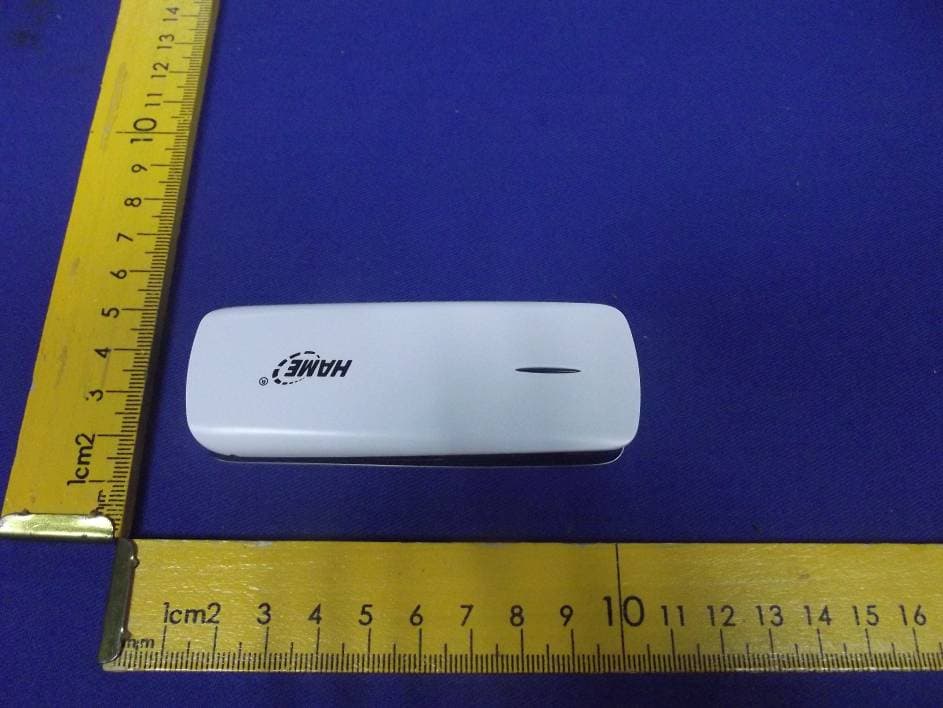
Click to zoom
Application Details
- Equipment Class
- JBP - Part 15 Class B Computing Device Peripheral
- Date of Grant
- Mar 05, 2013
- Application Purpose
- Original Equipment
- Date of Application
- Mar 05, 2013
- Equipment Note
- Wireless Router
- Company
- Hame Technology Co., Limited
- Country
- China
Documents & Files
Document Text
Text extracted from the exhibit documents filed with the FCC. Open a document above to read the original.
Users Manual
1. Router Power Source & Supply There are only two (2) sources of power for MPR‐A1 Router: *Via Battery. *Via External Power. Note: Usually, the battery can last for approximately 4hours of usage per full charge. 1.1 Charge battery There are several ways to charge the battery of MPR‐A1 Router's battery: *Via PC/Notebook USB port. *Via Power adaptor(5V 1.2A). *Via General mobile phone charger. *Via car adaptor. Steps to charge the battery as below: step1 : Turn off the MPR‐A1 Router. step 2: Connect Mini 5pin of the USB Char g e Cable to MPR‐A1 Router's DC power Micro USB port. step 3: Connect the other end of the USB Charge Cable to either PC/Notebook USB port, or to the Power adaptor USB port, Mobile phone charger car adaptor. Note: 1.While charging, the MPR‐A1 Router's B attery Ligh t is in blue. 2.When full charged, the MPR‐A1 Router's Battery Light in no light. 3.We strongly recommended to charge the battery using DC adaptor, and it will take approximately 3 hours to complete the charging. 1.2 Provide power source to Gadget: The MPR‐A1 Router's USB port is also able to pr o vide power source to charge battery of a gadget. Steps to charge battery as below(illustrated with iPhone): step 1: Connect iPhone and MPR‐A1 Router's USB port by 30pin connector. step 2: Turn the power switch of the MPR‐A1 Router to C. (This step is optional, sug g est to implement it to save battery capacity when you no need router function). Note: When MPR‐A1 Router's Power Switch turn to C, the MPR‐A1 Router will be Power‐off and charging the smartphone is begun. When the MPR‐A1 Router's Power Switch turn to on, the MPR‐A1 Router will be Power‐On and the charging of smartphone will also be begun. 2. Pa c kage Contents *1x MPR‐A1 *1x Micro USB Charging Cable *1x Quick Installation Guide/ Warranty Card Note: 1.The illustrations in this document may appear different from your model. 2.If any of above items is not packed in your package when open, please consult your reseller immediately. 3.Using a power supply with a differ ent voltage rating will cause damage and void the warranty for this product. 3. Overview 4. Computer Setting Establish Network Connection Step 1:Open computer's wireless network connection, set the computer to “automatically obtain IP address” and “automatically obtain DNS server address”. (Picture 1 & 2). Step 2:Make sure your PC have WIFI function and WIFI status in “ON” condition. When WIFI connected, click “Re fresh net work list”, select the router`s wireless network name in the “Wireless Network Connection” page (wireless network name(SSID): HAME_A1_XXXX),make sure WIFI connected and internet access. Then means you can use internet. Please see picture 3 & 4. Note1: If your Computer or device doesn’t have the WIFI function. Pl ease use RJ45 cable to connect your WIFI device or PC with 3G Router through LAN port. Note2: If can’t surf the internet successfully, then need go to step 3. Step 3: Open the web browser and input IP address 192.168.169.1, Press Enter (Picture 5). Input password "hame", if you want change password#1. #1: MPR‐A1 Router login credential is recommended to change to user preferable password, if lost password, please press Router?s Reset button more than 5 seconds to load Factory Default Settings. The password will be back to “hame”. 5. Hardware Installation,Please make sur e the MPR‐A1 power switch in "R" MPR ‐A1 Router is designed with various methods of connections to the Internet(either way hardware installation will be different), including: 1. Connect via 3G USB Modem Before you begin, please make sure you have below items prepared: 1.MPR‐A1 Router. 2.3G USB Modem (compatible#2 with MPR‐A1 Router). 3.3G SIM Card (with data plan and valid login credential ready). Hardware Installation Steps: step 1. Insert the 3G SIM Card into 3G USB Modem. step 2. Insert the 3G USB Modem to the MPR‐A1's USB port . ste p 3. Tu rn on the power of MPR‐A1 Router. step 4. Make the computer connect the WIFI SSID of MPR‐A1(see 4.Computer Setting). step 5.Then you could surf. If you could not surf ,Pls do following operations step 1. Open a br owser and enter http://192.168.169.1 at address bar. step 2. Enter login credential with password as "hame". step 3. Click Internet > WAN Network. Make sure that the 3G mode is being selected in WAN Connection Type >Select Auto APN > Apply#3. #2: For 3G USB Modem which is incompa tible with the MPR ‐A1, please contact us immediately. #3: If you get the APN, Dial No., username, password from operator, you can also input it manually. 2: Connect via iPhone Before you begin, please make sure you have below items prepared: 1. MPR‐A1 Router. 2. iPhone#4(with 3G Internet connectivity re a dy). 3. iPhone 30Pin connector (for connection between iPhone and MPR‐A1 Router). Hardware Installation Steps: step 1: Connect iPhone and MPR‐A1 Router's USB port by 30pin connector. step 2: Turn on iPhone Personal Hotsport from Settings > General >Personal Hotspot#4(please select to turn on USB only when prompted in the iPhone). step 3: Turn on the power of MPR‐A1 Router. #4:Only applicable to iPhone 3G/3Gs or below, and firmware must below iOS5 (not including iOS5). iPhone 4 and abo ve is eligible in pr oviding Hotspot solely. 3.Connect via ADSL Modem Before you begin, please make sure you have below items prepared: 1.MPR‐A1 Router. 2.ADSL Modem with Telephone line connected at RJ11. 3.RJ45 Cable (use existing RJ45 cable from modem). Installation Steps: step 1. Connect the LAN port of ADSL Modem and WAN/LAN port of MPR‐A1 Router by RJ45 cable . step 2. Turn on the power of both ADSL Modem and MPR‐A1 Router. step 3. Make the computer connect the WIFI SSID of MPR‐A1(see 4.Computer Setting). Step 4. Open a br owser, login with pass word "hame", then input relevant ADSL login credential#5 (ID and Password) in the pop up menu. Press OK. step 5. Then you could surf. If you could not surf ,Pls do following operations: step 1. Open a browser and enter http://192.168.169.1 at ad…
Text truncated - open the document above for the full version.
Cover Letter(s)
SCS-F18: Project and Product Certification Representative Authorization Letter Page 1 of 2 Rev 3.0 775 Montague Expressway Milpitas, CA 95035 Tel: 408-526-1188 Fax: 408-526-1088 Email: [email protected] Project and Product Certification Representative Authorization Letter Revision History Reason for Amendment (current / obsolete) From To Approved Date Initial Release (obsolete) 1.0 1.0 Nov-14-2006 Revised wording (obsolete) 1.0 2.0 Sept–25-2007 Updated company template (current) 2.0 3.0 Jan-31-2012 SCS-F18: Project and Product Certification Representative Authorization Letter Page 2 of 2 Rev 3.0 Hame Technology Co., Limited 2012-12-12 To: SIEMIC, INC. 775 Montague Expressway, Milpitas, CA 95035 USA Dear Sir/Madam, Re: Project and Product Certification Representative Authorization Letter We, _____ Hame Technology Co., Limited_____hereby authorize SIEMIC, INC. to act as a Certification Body for certifying for the following project(s): Product Name: Wireless Router Basic Model: A1, A1+, A1B, A1S, A1W, A2, A2B, A2S, A2W FCC ID: R7FA1 Additional Models: N.A. Trade Mark: We affirm that between SIEMIC and ____ Hame Technology Co., Limited ___ , any difference in understanding, including test plan, measurement methods, applicable standards and relevant procedures and processes have been resolved prior to commencement of testing activities. Sincerely, Client’s signature Client’s name / title Xiaozhen Gu / Certification Commissioner Contact information / address 4F, Plant 1st, Huahan Industrial Park, Jinniu West Rd., Pingshan New District, Shenzhen, China.
Cover Letter(s)
SCS-F19: Confidentiality Request Letter Page 1 of 2 Rev 3.0 775 Montague Expressway Milpitas, CA 95035 Tel: 408-526-1188 Fax: 408-526-1088 Email: [email protected] Confidentiality Request Letter Revision History Reason for Amendment (current / obsolete) From To Approved Date Initial Release (obsolete) 1.0 1.0 Nov-14-2006 Adding CFR 2.459 (obsolete) 1.0 2.0 August – 11 - 2008 Updated company template & Added text box (current) 2.0 3.0 Jan-31-2012 SCS-F19: Confidentiality Request Letter Page 2 of 2 Rev 3.0 (Client's Company Letterhead / Logo) Hame Technology Co., Limited (Current Date) 2012-12-12 To: Federal Communications Commission Authorization and Evaluation Division 7435 Oakland Mills Road Columbia, MD Subject: Permanent Confidentiality Request for FCC ID: R7FA1 We hereby request confidential treatment of information accompanying this application as outlined below: - Block Diagram - Schematics - Operational Description & Tune up Procedure The above materials contain trade secrets and proprietary information not customarily released to the public. The public disclosure of these materials may be harmful to the applicant and provide unjustified benefits to its competitors. The applicant understands that pursuant to Section 0.457 & 0.459 of the Rules, disclosure of this application and all accompanying documentation will not be made before the date of the Grant for this application. Sincerely, Client’s signature : Client’s name / title : Xiaozhen Gu/ Certification Commissioner Contact information / address: 4F, Plant 1st, Huahan Industrial Park, Jinniu West Rd., Pingshan New District, Shenzhen, China.
External Photos
Page 70 of 75 FCC ID: R7FA1 Anbotek Compliance Laboratory Limited Report No. 201211673F AppendixI(External Photos) Figure 1 The EUT-Overall View Figure 2 The EUT-Back View Page 71 of 75 FCC ID: R7FA1 Anbotek Compliance Laboratory Limited Report No. 201211673F Figure 3 The EUT-Side View Figure 4 The EUT-Side View Page 72 of 75 FCC ID: R7FA1 Anbotek Compliance Laboratory Limited Report No. 201211673F Figure 5 The EUT-Side View Figure 6 The EUT-Side View
ID Label/Location Info
FCC ID Label Sample for FCC ID: R7FA1 FCC ID: R7FA1
ID Label/Location Info
The proposed Label Location on EUT Proposed FCC Label Location Proposed Label Location on EUT The EUT-Side View/Proposed FCC Label Location
Internal Photos
Page 73 of 75 FCC ID: R7FA1 Anbotek Compliance Laboratory Limited Report No. 201211673F Appendix II (Internal Photos) Figure 7 The EUT-Inside View Figure 8 PCB of the EUT-Front View Page 74 of 75 FCC ID: R7FA1 Anbotek Compliance Laboratory Limited Report No. 201211673F Figure 9 PCB of the EUT-Front View Figure 10 PCB of the EUT-Front View Page 75 of 75 FCC ID: R7FA1 Anbotek Compliance Laboratory Limited Report No. 201211673F Figure 11 PCB of the EUT-Back View
Test Report
FCC ID: R7FA1 Page 1 o f 27 Anbotek Compliance Laboratory Limited Report No. 201211673F-1 FCC TEST REPORT for Hame Technology Co., Limited Wireless Router Model No.: A1, A1+, A1B, A1S, A1W, A2, A2B, A2S, A2W Prepared for : Hame Technology Co., Limited Address : 4F, Plant 1st, Huahan Industrial Park, Jinniu West Rd., Pingshan New District, Shenzhen, China. Prepared By : Anbotek Compliance Laboratory Limited Address : 1/F, 1 /Building, SEC Industrial Park, No. 4 Qianhai Road, Nanshan District, Shenzhen, 518054, China Tel: (86) 755-26066544 Fax: (86) 755-26014772 Report Number : 201211673F-1 Date of Test : Nov. 05 to 21, 2012 Date of Report : Nov. 21, 2012 FCC ID: R7FA1 Page 2 o f 27 Anbotek Compliance Laboratory Limited Report No. 201211673F-1 TABLE OF CONTENTS Description Page Test Report Verification 1.GENERAL INFORMATION ................................................................................................................ 4 1.1. Description of Device (EUT) ..........................................................................................................................4 2.POWER LINE CONDUCTED MEASUREMENT ............................................................................. 5 2.1. Test Equipment ...............................................................................................................................................5 2.2. Block Diagram of Test Setup ..........................................................................................................................5 2.3. Power Line Conducted Emission Measurement Limits (FCC Part 15 Class B) .............................................5 2.4. Configuration of EUT on Measurement..........................................................................................................6 2.5. Operating Condition of EUT...........................................................................................................................6 2.6. Test Procedure.................................................................................................................................................6 2.7. Power Line Conducted Emission Measurement Results.................................................................................6 3.RADIATED EMISSION MEASUREMENT...................................................................................... 11 3.1. Test Equipment .............................................................................................................................................11 3.2. Block Diagram of Test Setup ........................................................................................................................11 3.3. Radiated Emission Limit (Subpart B Class B) ..............................................................................................12 3.4. EUT Configuration on Measurement ............................................................................................................12 3.5. Operating Condition of EUT.........................................................................................................................12 3.6. Test Procedure...............................................................................................................................................12 3.7. Radiated Emission Measurement Results .....................................................................................................13 4.PHOTOGRAPH .................................................................................................................................... 20 4.1. Photo of Power Line Conducted Emission Test............................................................................................20 4.2.Photo of Radiated Emission Test ...................................................................................................................21 APPENDIX I (External Photos) (3 Pages) APPENDIX II (Internal Photos) (2 Pages) FCC ID: R7FA1 Page 3 o f 27 Anbotek Compliance Laboratory Limited Report No. 201211673F-1 TEST REPORT VERIFICATION Applicant : Hame Technology Co., Limited Manufacturer : Hame Technology Co., Limited EUT : Wireless Router Model No. : A1, A1+, A1B, A1S, A1W, A2, A2B, A2S, A2W Rating : DC 5V From PC and DC 3.7V From Battery Trade Mark : Measurement Procedure Used: FCC Rules and Regulations Part 15 Subpart B 2011 & FCC / ANSI C63.4-2009 The device described above is tested by Anbotek Compliance Laboratory Limited To determine the maximum emission levels emanating from the device. The maximum emission levels are compared to the FCC Part 15 Subpart B Class B limits both radiated and conducted emissions. The measurement results are contained in this test report and Anbotek Compliance Laboratory Limited Is assumed full responsibility for the accuracy and completeness of these measurements. Also, this report shows that the Equipment Under Test (EUT) is to be technically compliant with the FCC requirements. This report applies to above tested sample only. This report shall not be reproduced in part without written approval of Anbotek Compliance Laboratory Limited Date of Test : Nov. 05 to 21, 2012 Prepared by : (Engineer/ Barak Ban) Reviewer : (Project Manager/ Andy Chen) Approved & Authorized Signer : (Manager/ Tom Chen) FCC ID: R7FA1 Page 4 o f 27 Anbotek Compliance Laboratory Limited Report No. 201211673F-1 1. GENERAL INFORMATION 1.1. Description of Device (EUT) Description : Wireless Router Model Number : A1, A1+, A1B, A1S, A1W, A2, A2B, A2S, A2W Test Power Supply : DC 5V From PC and DC 3.7V From Battery Applicant : Hame Technology Co., Limited Address : 4F, Plant 1st, Huahan Industrial Park, Jinniu West Rd., Pingshan New District, Shenzhen, China. Manufacturer : Hame Technology Co., Limited Address : 4F, Plant 1st, Huahan Industrial Park, Jinniu West Rd., Pingshan New District, Shenzhen, China. Date of Sample received : Nov. 05, 2012 Date of Test : Nov. 05 to 21, 2012 …
Text truncated - open the document above for the full version.
Test Setup Photos
FCC ID: R7FA1 Page 20 o f 27 Anbotek Compliance Laboratory Limited Report No. 201211673F-1 4. PHOTOGRAPH 4.1. Photo of Power Line Conducted Emission Test USB Port RJ45 port FCC ID: R7FA1 Page 21 o f 27 Anbotek Compliance Laboratory Limited Report No. 201211673F-1 4.2. Photo of Radiated Emission Test Below 1G FCC ID: R7FA1 Page 22 o f 27 Anbotek Compliance Laboratory Limited Report No. 201211673F-1 Above 1G
Contact Information
Applicant
Xiaozhen Gu(Certification Commissioner)
Test Firm
Shenzhen Anbotek Compliance Laboratory LimitedDaniel zhu
[email protected]86-755-26014771
Technical Specifications
| # | Rule Parts | Frequency Range | Power Output |
|---|---|---|---|
| 1 | 15B | - | - |
Other Applications from Hame Technology Co., Limited

R7F-S3
Mar 07, 2013Wi-Fi Disk
Equipment Class
DTS - Digital Transmission System