FCCID.CO- FCC ID Database
HomeCompaniesEquipment ClassesSearch

© 2026 FCC ID Database. All rights reserved.

AboutContactData sourced from FCC public records
  1. Home/
  2. DEI Sales dba BOOM Movement/
  3. RGHSWIMMER

RGHSWIMMERBluetooth Speaker

DEI Sales dba BOOM Movement
Bluetooth Speaker - FCC ID RGHSWIMMER - DEI Sales dba BOOM Movement
Click to zoom

Application Details

Equipment Class
DTS - Digital Transmission System
Date of Grant
Aug 29, 2013
Application Purpose
Original Equipment
Date of Application
Aug 29, 2013
Equipment Note
Bluetooth Speaker
Frequency Range
2402.00000000 - 2480.00000000
Company
DEI Sales dba BOOM Movement
Country
United States

Documents & Files

Select a file to view

Users Manual

↗

Cover Letter(s)

↗

External Photos

↗

ID Label/Location Info

↗

Internal Photos

↗

Test Report

↗

Test Setup Photos

↗

Document Text

Text extracted from the exhibit documents filed with the FCC. Open a document above to read the original.

Users Manual

Bluetooth Speaker Brand Name: BOOM Model Name: Swimmer FCC ID: RGHSWIMMER User Guide User Guide Thank you for purchasing the Swimmer Waterproof Bluetooth Speaker from Boom. This multi-function Speaker is designed to provide high quality audio Playback from any Bluetooth enabled Audio Device such as Smartphones, Tablets, Notebooks or MP3 Players. Please read this user Guide thoroughly before use so that you can understand the setup and functions. Package Contents Please check your Swimmer Bluetooth Speaker package contains the following items  Swimmer Speaker  Line-IN Audio Cable  USB Charging Cable  User Guide  Suction cup  Flexible attachment tail Product Features 1. ON/OFF 2. LED indicator 3. Previous/VOL+ 4. Pairing button 5. Next/VOL- 6. Play/ Pause 7. USB port. 8. 3.5mm audio interface Two way installation The Swimmer from Boom provides two different attachment methods to suit the location the Speaker will be used in; 1. Suction cup. The suction cup screws to on the top of the Speaker, then you can attach the speaker on the glass or other smooth dry surface to use the speaker by pushing firmly. 2. Flexible attachment Tail. The tail screws on to the the top of the Speaker, then bend or twist the tail so you can attach the speaker to places such as pipe, bicycle or other similar positions to use the speaker Setup Note: Please fully charge the battery before 1 st time use. This can be performed using the Provided USB Cable and any powered USB Port. Switch the Swimmer Speaker ON/OFF Turn the Swimmer ON:Long press the ON/OFF button for 2 seconds to power on, green LED flashes 3 times quickly with an indication tone “Power On”. Then green LED remians on. Turn the Swimmer OFF:In the On state, Long press the ON/OFF button for 2 seconds, green LED flashes 2 times quickly and all LED off with an indication tone“Power off”. Connecting with Bluetooth To connect the Swimmer Speaker with Bluetooth enabled device please follow this procedure;  Ensure the speaker is ON. The LED will flash red and blue alternately  Refer to the operating instruction manual of your Bluetooth device to start the connection process. Typically, this is performed by going to a “Settings” or “Setup” Menu and then choosing the option to select BOOM Swimmer that will be looking for a device to connect with.  The device will find the Bluetooth speaker, and ask if you are ready to connect , press the OK or Confirm to connect.  Note: Some Bluetooth devices may ask for a password or PIN. Enter 0000 and the Speaker will be connected Note: If the pairing is unsuccessful, please turn OFF the Swimmer Speaker and then ON again and repeat the connection procedure. Description of Swimmer Functions Music Playback controls  Short press Play/Pause Button to start/pause music  Long press “VOL-” for 3 seconds to skip to the previous song.  Long press “VOL+” for 3 seconds to skip to the next song.  Short press “VOL+” button to increase the volume.  Short press “VOL-” button to decrease the volume Using the line-IN Function 1. Turn on the power. 2. Plug one end of the Line in cable into the 3.5mm jack, the other end into your audio equipment. 3. Play and control the music from your audio equipment. 4. Bluetooth priority line in, it will play the line in audio if no bluetooth input LED Indicator status information Status Indicator Description Turn on Green light flashes 3 times quickly Long press the ON/OFF button for 2 seconds Turn off Green light flashes 2 times quickly Long press the ON/OFF button for 2 seconds Bluetooth pairing Blue lights flashes quickly Enters into pairing mode with an indication tone “Pairing” Bluetooth connectivity/playback Blue light flashes every 7 seconds Bluetooth not connected Blue light flashes every 5 seconds Low voltage alert Red light flashes with indication tone Charge Red light remains on Charging finish Red light off Battery low-voltage alert The red light flashes every 7 seconds indicate that the battery has run low and needs to charge as soon as possible. Battery and Charging Notice We use rechargeable battery for Swimmer. A normal charging process takes about 1-2 hours. The red LED will turn ON when charging and will turn OFF when charging is complete. When the battery is low, the red LED will flashes. Please charge the Speaker at this time. It is recommended to make sure the Battery has been fully charged and fully released at the beginning three times of use to ensure the battery the best long life performance. Always use correct USB Cable to charge the Swimmer Speaker After finished charging, please remove the cable from the Speaker Do not put the speaker in charging state for a long time. This will shorten the lifetime of the battery. Dot not install, place or use the Speaker near any source of heat such as a stove, radiator, oven, toaster, coffee maker or other apparatus that gives off heat Safety and General Information Please read the following information before using this product Users are not permitted to make changes or modify the product doing so will invalidate your Warrantee. 1. To avoid electronic interference and/or compatible conflicts, TURN OFF the product in any facilities where posted notices instruct you to do so. For example: Aircraft, Military Base, Hospital or Health Care Facilities. 2. To avoid impairing your hearing in the long-term operation, keep the headset volume at a moderate level. 3. Keep away of fire, and high voltage equipment 4. Follow the charging procedure described in this guide to charge the product. 5. Not suitable for use by very young children Notice: When using the USB Charging cable or LINE-IN Cable keep the Swimmer away from water as the connected devices may not be Waterproof and there will be a danger of damage or Electric shock Important Regulatory Information This device complies with part 15 of the FCC rules. Operation is subject to the following two conditions: (1) this device may not cause harmful interference, and (2) this device must …

Text truncated - open the document above for the full version.

Cover Letter(s)

Aug. 15, 2013 Federal Communication Commission Authorization and Evaluation Division FCC ID: RGHSWIMMER Re: Confidentiality Request Pursuant to Sections 0.457 and 0.459 of the Commission’s Rules, the applicant hereby requests confidential treatment of information applied this application as outlined below: 1: Block Diagram 2: Circuit Diagram 3: Operational Description 4: Parts List The above materials contain trade secrets and proprietary information not customarily released to the public. The public disclosure of these matters might be harmful to the applicant and provide unjustified benefits to its competitors. The Applicant understands that pursuant to Rules 0.457, disclosure of this Application and all accompanying documentation will not be made before the date of the Grant for this application. Sincerely, DEI Sales dba BOOM Movement Contact person: Norbert Richardson Title: Manager

External Photos

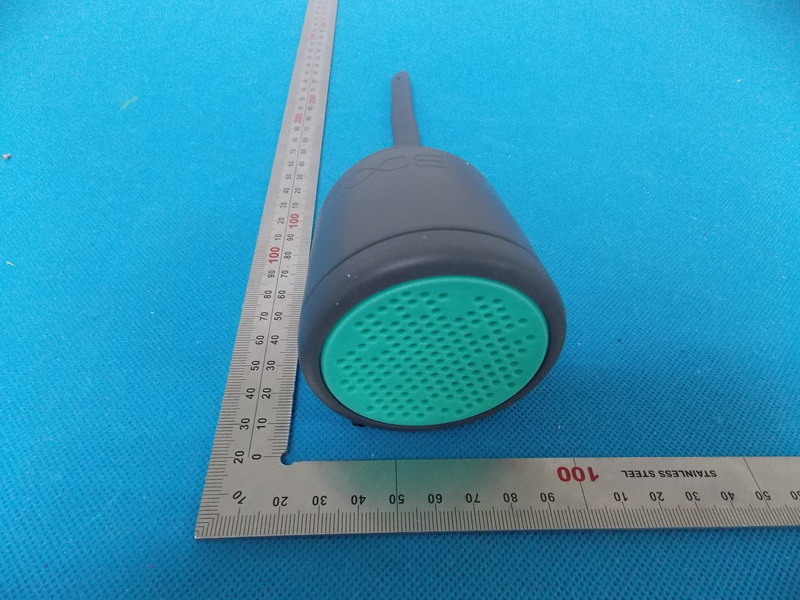
External Photos TOP VIEW OF EUT BOTTOM VIEW OF EUT FRONT VIEW OF EUT BACK VIEW OF EUT LEFT VIEW OF EUT RIGHT VIEW OF EUT

ID Label/Location Info

FCC ID Label Location Bluetooth Speaker Model: Swimmer Brand Name: BOOM FCC ID: RGHSWIMMER

Internal Photos

Internal Photos OPEN VIEW OF EUT‐1 OPEN VIEW OF EUT‐2 INTERNAL VIEW OF EUT‐1 INTERNAL VIEW OF EUT‐2 BT Antenna INTERNAL VIEW OF EUT‐3 INTERNAL VIEW OF EUT‐4

Test Report

Report No.: AGC00021130801FE03B Page 1 of 45 FCC Test Report Report No.: AGC00021130801FE03B FCC ID : RGHSWIMMER APPLICATION PURPOSE : Original Equipment PRODUCT DESIGNATION : Bluetooth Speaker BRAND NAME : BOOM MODEL NAME : Swimmer CLIENT : DEI Sales dba BOOM Movement DATE OF ISSUE : Aug.14,2013 STANDARD(S) : FCC Part 15 Rules REPORT VERSION : V1.0 Attestation of Global Compliance (Shenzhen) Co., Ltd CAUTION: This report shall not be reproduced except in full without the written permission of the test laboratory and shall not be quoted out of context. Report No.: AGC00021130801FE03B Page 2 of 45 Report Revise Record Report Version Revise Time Issued Date Valid Version Notes V1.0 / Aug.14,2013 Valid Original Report Report No.: AGC00021130801FE03B Page 3 of 45 TABLE OF CONTENTS 1. VERIFICATION OF COMPLIANCE ...................................................................................................... 5 2.GENERAL INFORMATION ................................................................................................................... 6 2.1PRODUCT DESCRIPTION............................................................................................................. 6 2.2 RELATED SUBMITTAL(S)/GRANT(S) .......................................................................................... 6 2.3TEST METHODOLOGY ................................................................................................................. 6 2.4 TEST FACILITY ............................................................................................................................. 6 2.5 SPECIAL ACCESSORIES ............................................................................................................. 6 2.6 EQUIPMENT MODIFICATIONS .................................................................................................... 6 3. SYSTEM TEST CONFIGURATION ...................................................................................................... 7 3.1 CONFIGURATION OF TESTED SYSTEM ..................................................................................... 7 3.2 EQUIPMENT USED IN TESTED SYSTEM .................................................................................... 7 4. SUMMARY OF TEST RESULTS .......................................................................................................... 7 5. DESCRIPTION OF TEST MODES ....................................................................................................... 8 6. ANTENNA REQUIREMENT ............................................................................................................... 9 6.1. STANDARD APPLICABLE ........................................................................................................... 9 6.2. TEST RESULT ............................................................................................................................. 9 7. RADIATED EMISSION ....................................................................................................................... 10 7.1 MEASUREMENT PROCEDURE ................................................................................................. 10 7.2 TEST SETUP ............................................................................................................................... 11 7.3 LIMITS AND MEASUREMENT RESULT ..................................................................................... 12 7.4 TEST RESULT ............................................................................................................................ 12 8. BAND EDGE EMISSION .................................................................................................................... 25 8.1. MEASUREMENT PROCEDURE ................................................................................................ 25 8.2. TEST SET-UP ............................................................................................................................ 25 8.3. TEST RESULT ........................................................................................................................... 26 9. 6DB BANDWIDTH ............................................................................................................................. 30 9.1. TEST EQUIPMENT LIST AND DETAILS .................................................................................... 30 9.2. TEST PROCEDURE ................................................................................................................... 30 9.3. SUMMARY OF TEST RESULTS/PLOTS .................................................................................... 30 10. CONDUCTED OUTPUT POWER ..................................................................................................... 33 10.1. MEASUREMENT PROCEDURE .............................................................................................. 33 10.2. TEST SET-UP (BLOCK DIAGRAM OF CONFIGURATION) ...................................................... 33 10.3. LIMITS AND MEASUREMENT RESULT ................................................................................... 33 11. MAXIMUM CONDUCTED OUTPUT POWER SPECTRAL DENSITY ............................................... 34 11.1 MEASUREMENT PROCEDURE ............................................................................................... 34 11.2 TEST SET-UP (BLOCK DIAGRAM OF CONFIGURATION) ....................................................... 34 Report No.: AGC00021130801FE03B Page 4 of 45 11.3 MEASUREMENT EQUIPMENT USED ...................................................................................... 34 11.4 LIMITS AND MEASUREMENT RESULT.................................................................................... 34 12. FCC LINE CONDUCTED EMISSION TEST ..................................................................................... 37 12.1 LIMITS .............................…

Text truncated - open the document above for the full version.

Test Setup Photos

Te s t Setup Photos FCC RADIATED EMISSION TEST SETUP

Contact Information

Applicant

Norbert Timothy Richardson(Director of NPD)
[email protected]410-764-5471Fax: 410-356-7238

Test Firm

Attestation of Global Compliance Shenzhen Co. Ltd.Forrest Lei
[email protected]86-755-29081966Fax: 86-755-26008484

Technical Specifications

#Rule PartsFrequency RangePower Output
115C2.40 GHz - 2.48 GHz3.40 mW
Confidentiality
Long Term
Grant Notes
Output power listed is peak conducted.

Other Applications from DEI Sales dba BOOM Movement

BLUETOOTH SPEAKER - FCC ID RGHURCHIN - DEI Sales dba BOOM Movement
RGHURCHIN

BLUETOOTH SPEAKER

Jan 28, 2013

Equipment Class

DSS - Part 15 Spread Spectrum Transmitter