RL4MR200MR-200
Muro Co., Ltd.
Click to zoom
Application Details
- Equipment Class
- JBP - Part 15 Class B Computing Device Peripheral
- Date of Grant
- Jul 07, 2005
- Application Purpose
- Original Equipment
- Date of Application
- Jul 07, 2005
- Equipment Note
- MR-200
- Company
- Muro Co., Ltd.
- Country
- South Korea
Documents & Files
Document Text
Text extracted from the exhibit documents filed with the FCC. Open a document above to read the original.
Users Manual
MR MR - - 200 MANUAL 200 MANUAL 2 Contents Contents Name of Each part Name of Each part Front, Back 3 Top, Bottom, Left/Right 4 Basic Operation Download File Connect to PC 5 Download File in Win2K, WinXP 6 Download File in Win98 SE Install Win98 SE Driver Install Win98 SE Driver 7 Charging / Firmware Upgrade Charging 13 Firmware Upgrade Reset Reset 14 Basic Operation Power On / Off 15 Volume Up / Down Hold On / Off Mode Mode 16 Mode Selection Type 1 17 Mode Selection Type 2 18 Music Listening to Music Listening to Music 19 Track Forward / Track BackFast Forward / Rewind Navigation Navigation 20 Play Menu Using Menu 21 Equalize 22 3D Sound 23 User EQ 24 Repeat Mode 25 Display Menu ID3 Tag 26 Language 27 Speed Menu Speed 28 Set Speed 29 File Menu File Info 30 Delete Bookmark 31 Other Functions Creating Bookmark 32 Delete File 33 Copy File 34 Repeat Section 35 Voice Record Voice Record Voice Record 37 Voice Record Quality 38 FM Radio Manual Mode / Preset Mode Manual Mode 39 Preset ModeSelect Manual Preset Mode 40 FM Band FM Band 41 Manual Mode FM Step 42 Selecting Station Manually 43 CH Auto ScanCH Auto Save 44 CH Auto Scan – Set Sensitivity Saving CH Saving CH 45 Preset Menu CH List 46 CH Delete Type 1 47 CH Delete Type 2 FM Radio Record FM Radio Record 48 Line in Record Line in Record Line in Record 49 Quality 50 CD Sync 51 Jpeg View Jpeg View File Information 52 Seeing Image 53 Seeing Motion Picture 54 System Manager Control Menu Memory 55 Version 56 Format 57 Screen Saver 58 Reset 59 LCD Color 60 Timer Menu Power Save 61 Sleep 62 1 2 Name of Each Part Name of Each part Name of Each part Name of Each part LCD Display ■Front ■Top■ Bottom ■Back ■Left / Right 4 3 Volume Up / Down REC / Mode Hold Reset Menu / Navi A-B / Speed REW( ◀◀ ) Play/Pause ( ▶ II ) FF( ▶▶ ) USB Connect Earphone Jack / Line in Jack Connect MIC Hole Basic Operation Basic Operation Download File Download File ■Connect to PC ■ Download File in Win2K, WinXP, MAC. 6 5 - Connect player to PC with USB Cable. - The player can be recognized as a removable disk. - Copy the files you want to download in your PC and paste them in the removable disk. - If your PC window system is Window98 SE, please install MR-200 Installer in your PC. Installer program is contained in the bundled CD. ■ Download File in Window98 SE MR-200 Basic Operation Basic Operation Install Win98 SE Driver Install Win98 SE Driver ■ Install Win98 SE driver No.1 8 7 - Put the bundled CD in your PC. The CD is executed automatically. - Choose Win98 SE driver by double click. - The below image appears and starts install. - Click “Next”. - Driver Installs. - Click “Next”. - Choose “Yes” and click “Finish”. - Your PC will re-boot.- After re-booting, connect the player to PC with USB. ■ Install Win98 driver No.2 Basic Operation Basic Operation Install Win98 SE Driver Install Win98 SE Driver 10 9 -After re-booting connect player to PC with USB. -The below window appears, and click “Next”.- The below window is for the choice for the driver searching way.- Choose the first one and Click “Next”. - Choose “designation of the location to be searched” and click “Search”. ■ Install Win98 SE driver No.3 ■ Install Win98 driver No.4 Basic Operation Basic Operation Install Win98 SE Driver Install Win98 SE Driver ■ Install Win98 driver 12 11 - As you can see the below, the dialogue box appears to tell you that the driver has been located. - Start the driver installation by clicking “Next”. - You will see the dialogue box which says that the driver has been properly set up. - Click “Finish” and end the driver installation. ■ Install Win98 SE driver No.5 - The player can be recognized as a removable disk. Basic Operation Basic Operation Charging / Firmware Upgrade Reset ■Charging■Firmware Upgrade 14 13 - The player can be charged when it is connected to PC. - Download the newest firmware file to player and remove the USB Cable and power on. Automatically firmware upgrade starts. ■Reset - You can reset the player if it has on some error status. Pock reset point with some pointed thing and power on again. Basic Operation Basic Operation ■ Power On / Off ■ Hold On / Off Basic Operation Mode ■ Volume Up / Down -Hold down ( ▶ II) to Power On / Off. - Push Vol.( ◀)/ ( ▶ ) to set Volume. - Volume range is 0 ~ 40. ← Hold Off → Hold On - If you set “Hold On”, Lock icon will be displayed if any button is pressed. ■ Mode - This product have 6 kinds of Mode as the below. -Music Mode - Line in Record Mode - FM Radio Mode-Voice Record Mode - Jpeg Viewer Mode-System Manager Mode 15 16 Basic Operation Basic Operation ■ Mode Selection Type 1 ■ Mode Selection Type 2 Mode Mode - Click ( ▶II ) to enter the selected Mode. - You can change to Mode which you want to move to.- Hold down (MODE) and Mode Selection Menu displays. - Push REW( ◀◀ )/FF( ▶▶ ) and to select Mode. - Click (MODE) and the current Mode image displays. - Push REW( ◀◀ )/FF( ▶▶ ) to shift by every Mode. - Click ( ▶II ) and you can enter the selected Mode. - The below is another way of Mode Selection.- Hold down (MODE) and the current Mode image displays. 17 18 ImageFlower Music Music ■ Listening to Music ■Navigation Listening to Music Navigation ■ Track Forward / Track Back ■Fast Forward / Rewind - Click ( ▶ II) to start music playback. - Default Music folder is set to Home. - Push REW( ◀ )/FF( ▶ ) to move to previous or next by one file. -Hold down REW( ◀◀ )/FF( ▶▶ ) in play file. -Navigate within the music file that is being played. - Hold down (NAVI) in Music Mode to enter Navigation Mode. - The highest file on the folder which the music being played is located should be selected. - In the music mode, just “mp3, wma, ogg” file are displayed. - In the Viewer mode, just “mp4, jpg” file are displayed. - Push REW( ◀◀ )/FF( ▶▶ ) to search file or folder. - Push Vol.( ◀ )/( ▶ ) to move to Upper Folder lever or Sub-Folder Level. - Click ( ▶ II) to play the selected song. 19 20 Music Music ■Using Menu ■Equalizer Play Menu Play Menu - Menu is f…
Text truncated - open the document above for the full version.
Block Diagram
www.muro.co.kr 01. Block Diagram -2 - Telechips TCC764 SDRAM 16Mbit Nand 1 Bed OLED LCD 96 X 64 Key Step-Down DC/DC USB 2.0 HS USB Charger Battery Li-Ionpolymer LDO(2.8V) Main I/O(USB) LDO(1.8V) Main Core Main I/O(2.85V) Audio Codec Earphone MIC Line-In FM Radio TCC200
External Photos
EMC Compliance Ltd. 82-1 JEIL-RI, YANGJI-MYUN, YONGIN-CITY, KYUNGGI-DO 449-825 KOREA TEL: 82 31 336 9919 FAX : 82 31 336 4767 This test report shall not be reproduced except in full, Without the written approval. External photos
ID Label/Location Info
EMC Compliance Ltd. 82-1, JEIL-RI, YANGJI-MYUN, YONGIN-CITY, KYUNGGI-DO, KOREA TEL: 82 31 336 9919 FAX : 82 31 336 4767 This test report shall not be reproduced except in full, Without the written approval ID Label EMC Compliance Ltd. 82-1, JEIL-RI, YANGJI-MYUN, YONGIN-CITY, KYUNGGI-DO, KOREA TEL: 82 31 336 9919 FAX : 82 31 336 4767 This test report shall not be reproduced except in full, Without the written approval ID Label Location
Internal Photos
EMC Compliance Ltd. 82-1 JEIL-RI, YANGJI-MYUN, YONGIN-CITY, KYUNGGI-DO 449-825, KOREA TEL: 82 31 336 9919 FAX : 82 31 336 4767 This test report shall not be reproduced except in full, Without the written approval Internal photos EMC Compliance Ltd. 82-1 JEIL-RI, YANGJI-MYUN, YONGIN-CITY, KYUNGGI-DO 449-825, KOREA TEL: 82 31 336 9919 FAX : 82 31 336 4767 This test report shall not be reproduced except in full, Without the written approval Main board
Operational Description
EMC Compliance Ltd. 82-1, JEIL-RI, YANGJI-MYUN, YONGIN-CITY, KYUNGGI-DO, KOREA TEL: 82 31 336 9919 FAX : 82 31 336 4767 This test report shall not be reproduced except in full, Without the written approval. Operation Description
Test Report
EMC Compliance Ltd. 82-1 JEIL-RI, YANGJI-MYUN, YONGIN-CITY, KYUNGGI-DO 449-825, KOREA TEL: 82 31 336 9919 FAX : 82 31 336 4767 This test report shall not be reproduced except in full, Without the written approval. Report No.: EMC-FCC-0303 Page : 19 of 19 EMI TEST REPORT Test report No.: EMC- FCC- 0303 Type of equipment: Digital Multi Player Model Name: MR-200 Variant Model: MR-200X, MR-200F, MR-200K FCC ID : RL4MR200 Applicant: Muro Co.,Ltd Factory#1: YOUNG CHAMP ELECTRONICS LTD. Factory#2: S.CAM CO.,LTD Test standards: FCC part 15 subpart B (Class B) Test Procedure and Items : AC Power Line Conducted Emissions Measurement: ANSI C63.4:2001 Radiated Emissions Measurement : ANSI C63.4:2001 Test result : Complied The above equipment was tested by EMC compliance Testing Laboratory for compliance with the requirements of FCC Rules and Regulations. The results of testing in this report apply to the product/system which was tested only. Other similar equipment will not necessarily produce the same results due to production tolerance and measurement uncertainties. Date of test: 2005. 07. 04~05 Issued date: 2005. 07. 08 Tested by : Approved by: You, Sang-Hun Chung, Min-Seok EMC Compliance Ltd. 82-1 JEIL-RI, YANGJI-MYUN, YONGIN-CITY, KYUNGGI-DO 449-825, KOREA TEL: 82 31 336 9919 FAX : 82 31 336 4767 This test report shall not be reproduced except in full, Without the written approval. Report No.: EMC-FCC-0303 Page : 19 of 19 [ Contents ] 1. Client information........................................................................................................3 2. Laboratory information................................................................................................4 3. Test system configuration...........................................................................................5 3.1 Operation Environment...............................................................................5 3.2 Measurement Uncertainty..........................................................................5 3.3 Sample calculation......................................................................................6 4. Description of E.U.T.....................................................................................................7 4.1 Product description.....................................................................................7 4.2 Peripherals...................................................................................................7 4.3 Operating conditions.....................................................................................8 4.4 Used cables..................................................................................................8 4.5 EUT test configuration................................................................................8 5. Summary of test results.............................................................................................9 5.1 Modification to the E.U.T............................................................................9 5.2 Standards & results....................................................................................9 6. Test results.................................................................................................................10 6.1 Conducted Emission..................................................................................10 6.2 Radiated Emission.....................................................................................13 7. Test graphs.................................................................................................................16 EMC Compliance Ltd. 82-1 JEIL-RI, YANGJI-MYUN, YONGIN-CITY, KYUNGGI-DO 449-825, KOREA TEL: 82 31 336 9919 FAX : 82 31 336 4767 This test report shall not be reproduced except in full, Without the written approval. Report No.: EMC-FCC-0303 Page : 19 of 19 1. Client information Applicant :Muro Co.,Ltd Address :8F Hana B/D, 118-5 NonHyon-Dong, KangNam-Ku Seoul, Korea 135-821 Telephone Number :+82-2-544-8112 Facsimile Number :+82-2-544-8056 Contact person :KWON JOON MO Manufacturer#1 :YOUNG CHAMP ELECTRONICS LTD. Address :Tailink Industrial Park Jinqiao Industrial Zone, Qing Xing, Dongguan Gauangdong, China Telephone Number :(0769)7736431 Facsimile Number :(0769)7739420 Manufacturer#2 :S.CAM CO., LTD Address :35, Buk-ri, Namsa-myon, Yongin city, Gyeonggi-do,Korea Telephone Number :+82-31-329-8700 Facsimile Number :+82-31-329-8729 EMC Compliance Ltd. 82-1 JEIL-RI, YANGJI-MYUN, YONGIN-CITY, KYUNGGI-DO 449-825, KOREA TEL: 82 31 336 9919 FAX : 82 31 336 4767 This test report shall not be reproduced except in full, Without the written approval. Report No.: EMC-FCC-0303 Page : 19 of 19 2. Laboratory information Address EMC compliance Ltd. 82-1, JEIL-RI, YANGJI-MYUN, YOUNGIN-CITY, KYUNGGI-DO, KOREA Telephone Number : 82 31 336 9919 Facsimile Number : 82 31 336 4767 FCC Filing No. : 793334 VCCI Registration No. : C-1713, R-1606 SITE MAP EMC compliance Yongin city EMC Compliance Ltd. 82-1 JEIL-RI, YANGJI-MYUN, YONGIN-CITY, KYUNGGI-DO 449-825, KOREA TEL: 82 31 336 9919 FAX : 82 31 336 4767 This test report shall not be reproduced except in full, Without the written approval. Report No.: EMC-FCC-0303 Page : 19 of 19 3. Test system configuration 3.1 Operation Environment Temperature Humidity Pressure OATS : 30 °C 47 % 995 hPa Shielded room : 24 °C 45 % 992 hPa Test site These testing were performed following locations; Shielded Room : Conducted Emission OATS (10m) : Radiated Emission 3.2 Measurement Uncertainty All measurements involve certain levels of uncertainties, especially in field of EMI. The factors contributing to uncertainties are test receiver, Cable Loss, antenna factor calibration, Antenna directivity, antenna factor Variation with height, antenna phase center variation, antenna Frequency interpolation, measurement distance variation, Site imperfection, mismatching, and system repeatability. Based on NIS 80, 81, the mea…
Text truncated - open the document above for the full version.
Test Setup Photos
EMC Compliance Ltd. 82-1 JEIL-RI, YANGJI-MYUN, YONGIN-CITY, KYUNGGI-DO 449-825, KOREA TEL: 82 31 336 9919 FAX : 82 31 336 4767 This test report shall not be reproduced except in full, Without the written approval. Test Setup photos Radiated Emission [USB up/download Mode] EMC Compliance Ltd. 82-1 JEIL-RI, YANGJI-MYUN, YONGIN-CITY, KYUNGGI-DO 449-825, KOREA TEL: 82 31 336 9919 FAX : 82 31 336 4767 This test report shall not be reproduced except in full, Without the written approval. [REC Mode] EMC Compliance Ltd. 82-1 JEIL-RI, YANGJI-MYUN, YONGIN-CITY, KYUNGGI-DO 449-825, KOREA TEL: 82 31 336 9919 FAX : 82 31 336 4767 This test report shall not be reproduced except in full, Without the written approval. [FM Tuner Mode] [Play Mode] EMC Compliance Ltd. 82-1 JEIL-RI, YANGJI-MYUN, YONGIN-CITY, KYUNGGI-DO 449-825, KOREA TEL: 82 31 336 9919 FAX : 82 31 336 4767 This test report shall not be reproduced except in full, Without the written approval. Conducted Emission [USB up/download Mode] EMC Compliance Ltd. 82-1 JEIL-RI, YANGJI-MYUN, YONGIN-CITY, KYUNGGI-DO 449-825, KOREA TEL: 82 31 336 9919 FAX : 82 31 336 4767 This test report shall not be reproduced except in full, Without the written approval. [REC Mode]
Contact Information
Applicant
Jum Taek Kim(Chief Engineer)
Test Firm
EMC Compliance LTDMin Seok Chung
Technical Specifications
| # | Rule Parts | Frequency Range | Power Output |
|---|---|---|---|
| 1 | 15B | - | - |
Other Applications from Muro Co., Ltd.

RL4LDP600
Sep 29, 2004Digital Audio Player
Equipment Class
DXX - Part 15 Low Power Communication Device Transmitter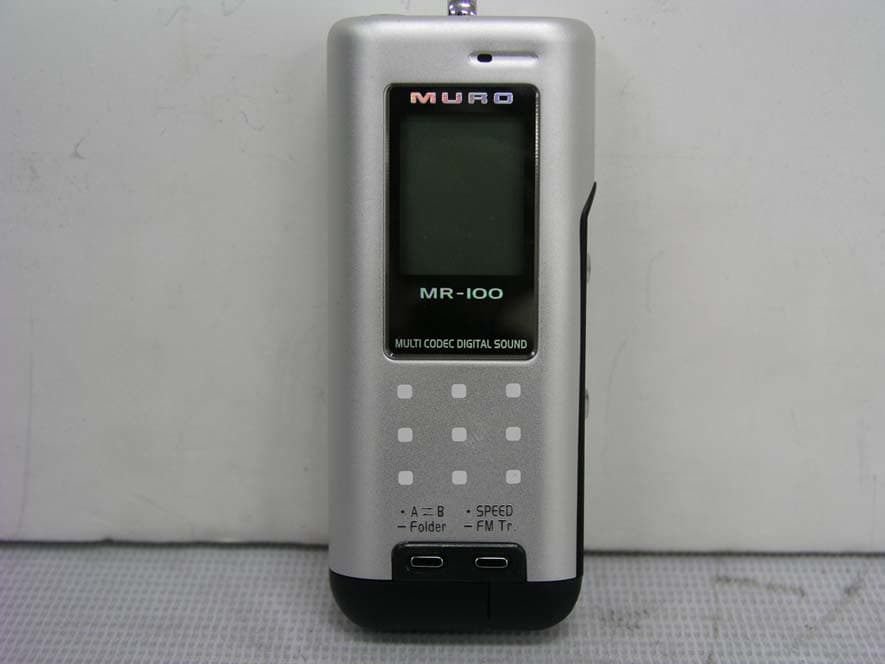
RL4MR100
Nov 16, 2003MP3 MUSIC PLAYER DIGITAL SOUND
Equipment Class
DXX - Part 15 Low Power Communication Device Transmitter