RQR-BT211Bluetooth Headset
Collex Communication Corp.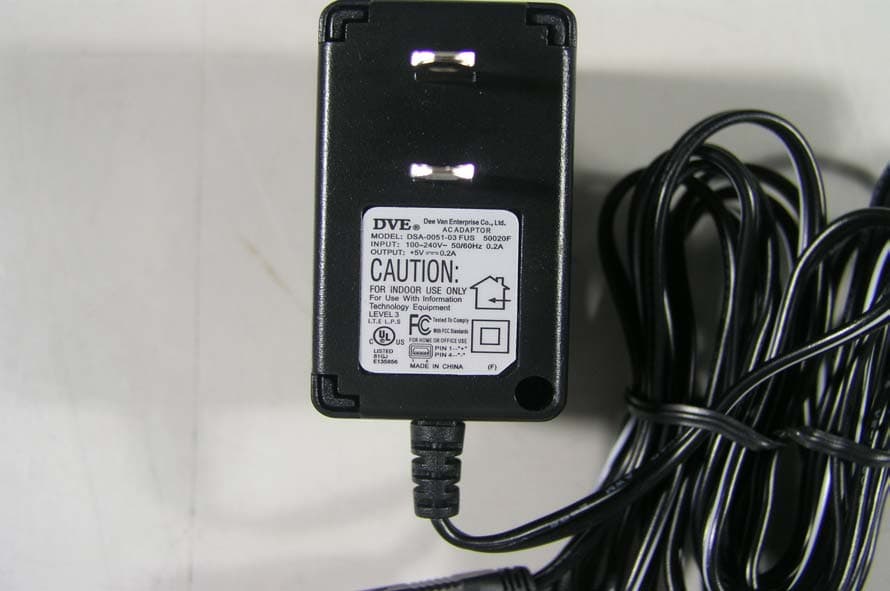
Click to zoom
Application Details
- Equipment Class
- DSS - Part 15 Spread Spectrum Transmitter
- Date of Grant
- Sep 20, 2004
- Application Purpose
- Original Equipment
- Date of Application
- Sep 20, 2004
- Equipment Note
- Bluetooth Headset
- Frequency Range
- 2402.00000000 - 2480.00000000
- Company
- Collex Communication Corp.
- Country
- Taiwan
Documents & Files
Document Text
Text extracted from the exhibit documents filed with the FCC. Open a document above to read the original.
Users Manual
Collex Communication Corp. Proprietary and Confidential 1 Introduce BT-211 is a solution based on Bluetooth wireless technology which propels you into a new dimension in connectivity. The technology offers fast and reliable transmission of voice and data information between compatible devices. Package y Bluetooth Headset y Charger y User manual Headset Overview 1. Charging connector 2. Call handling button 3. Indicator light 4. Volume up 5. Volume down 6. Ear hook 7. Speaker 8. Microphone Putting on the headset 1. Make sure the ear hook leans against speaker. Collex Communication Corp. Proprietary and Confidential 2 2. Place the ear hook behind your ear. 3. Adjust the headset and make sure the microphone is pointing towards your mouth. Adjusting Ear Hook To Wear 1. For your personal favorite, the BT-211 can be worn on the right or left ear. 2. Taking off the ear hook gently. a. Make sure the ear hook is positioned as shown in the picture. Collex Communication Corp. Proprietary and Confidential 3 b. Put your thumb on the circle which connects ear hook and headset. c. Hold the headset firmly then pull the hear hook towards your face. 3. According which ear you want to wear then remount the ear hook to a direction desired. a. Put the ear hook on the connector as shown in the picture. Collex Communication Corp. Proprietary and Confidential 4 b. Press the ear hook back into the connector. c. Adjust the ear hook to an appropriate position for wearing Charging 1. We recommended that you charge the battery until the headset indicator light turns off before using the headset at the first time 2. The headset comes with a built-in rechargeable Li-ion battery. If indicator light flashes red slowly, you need to recharge the battery. During charging, the indicator light shows a steady red light and turn off when the battery is fully charged. 3. When you use AC Adapter to charge the battery, the headset function is off. Getting Started Before you use your BT-211, you must pair it with a device, for example, a Bluetooth mobile phone. Mobile and headset can communicate as they are turned on and within range of the phone up to 10 m (30 ft) outdoors or up to 5 m (15 ft) indoors with no solid objects in between. Collex Communication Corp. Proprietary and Confidential 5 9 Pairing 1. Preparing your phone according to the phone’s user manual on adding a Bluetooth device. 2. When the headset is off, press and hold the call handling button for up to 10 seconds until the indicator light on the headset flashes green and red. Then headset is in the pairing mode. 3. Following the phone’s user manual, entering the headset PIN code: 1234. 4. When pairing has been completed, the headset indicator light flashes green. Note: You only need to add the headset to the phone once. If you want to use the headset with a new phone, you need to add it to that phone. 9 Turning on / off Headset To turn on headset, please press and hold the call handling button until you hear a short low tone. The headset indicator light flashes green. To turn off headset, please press and hold the call handling button until you hear a short high tone followed by a short low tone. The headset indicator light switches off. 9 Answering, Rejecting and Hang-up You can make and answer the calls using the buttons on the headset. When you hear the ring from headset, you just need to press the call handling button once to answer the calls and if you want to hang up this call, you also press the call handling button once to hang up. Due to the reason that phone functionality is still available when the headset is connected, if you use the keys on the phone to answer the calls, you will have to take this call from the phone rather than the headset. Besides, you can reject the incoming call by press and hold the call handling button about 2 to 3 seconds. Collex Communication Corp. Proprietary and Confidential 6 9 Adjusting The Volume During taking, you can adjust the volume from the buttons of headset. To increase the volume, press “+”. To decrease the volume, press “-”. Note: For safety and comfortable reasons, we recommend that do not tune the volume to the maximum level. 9 Using Voice Dialing Please make sure the phone and the headset are on and within range of each other. Press the call handling button about 1~2 seconds. During this time, you might hear a repeated tone in the headset. After the beep, voice dial as you normally would. In order to use voice dialing, you must make sure your mobile phone supports this function. Note: 1. If you fail using the voice commands you have recorded through your phone, record them through the headset instead. 2. Voice commands, such as dial, redial, answer and reject, can be very useful when you are using the headset. For more information on voice commands, refer to the phone's user guide. 9 Audio Transfer During a call, you can press and hold the call handling button until hearing a short low tone to transfer the sound to mobile phone. If the headset is turned on after a call has been initiated or the sound is on the mobile phone, you can transfer the sound to the headset by pressing the call handling button once. Collex Communication Corp. Proprietary and Confidential 7 Please Note The warranty will be invalid, if fail to follow the operation manual. Federal Communications Commission (FCC) Statement: 15.21 You are caution that changers or modifications not expressly approved by the part responsible for compliance could void the user’s authority to operate the equipment. 15.1.5 (b) This equipment has been tested and found to comply with the limits for a Class B digital device, pursuant to part 15 of the FCC rules. These limits are designed to provide reasonable protection against harmful interference in a residential installation. This equipment generates uses and can radiate radio frequency energy and if not installed and used in accordance with the instruction may cause harmful interference to radio co…
Text truncated - open the document above for the full version.
Cover Letter(s)
DOC-FCC007-2 2/19/04 Example of Agent Authorization Letter Please produce a letter on your company letterhead with the following information. The letter must be submitted in one of the electronic formats listed previously. attn: Reviewing Engineer Federal Communications Commission 7435 Oakland Mills Road Columbia, MD 21046 RE: LETTER OF AGENT AUTHORIZATION To Whom It May Concern: We, the undersigned, hereby authorize MET Laboratories, Inc. to act on our behalf in all matters relating to application for equipment authorization, including the signing of all documents relating to these matters. We also hereby certify that no party to the application authorized hereunder is subject to the denial of benefits, including FCC benefits, pursuant to Section 5301 of the Anti-Drug Abuse Act of 1988,21 U.S.C.853(a). This agreement expires one year from the current date. Sincerely,
Cover Letter(s)
DOC-FCC007-2 2/19/04 Agent Authorization Letter attn: Reviewing Engineer Federal Communications Commission 7435 Oakland Mills Road Columbia, MD 21046 RE: LETTER OF AGENT AUTHORIZATION To Whom It May Concern: We, the undersigned, hereby authorize SGS Taiwan Ltd. to act on our behalf in all matters relating to application for equipment authorization, including the signing of all documents relating to these matters. We also hereby certify that no party to the application authorized hereunder is subject to the denial of benefits, including FCC benefits, pursuant to Section 5301 of the Anti-Drug Abuse Act of 1988,21 U.S.C.853(a). This agreement expires one year from the current date. Sincerely,
External Photos
Report No: EF/2004/90012 ID: RQR-BT211 Issue Date: Sep. 16, 2004 The results shown in this test report refer only to the sample(s) tested unless otherwise stated. This test report cannot be reproduced, except in full, without prior written permission of the Company. SGS Taiwan Ltd. No. 134, Wu Kung Rd., Wuku Industrial Zone, Taipei Country, Taiwan. / 台北縣五股工業區五工路136之1號 台灣檢驗科技股份有限公司 t (886-2) 2299-3939 f (886-2) 2298-2698 www.sgs.com.tw 0513 ILACMR A APPENDIX 2 EXTERNAL PHOTOGRPHS OF EUT Report No: EF/2004/90012 ID: RQR-BT211 Issue Date: Sep. 16, 2004 The results shown in this test report refer only to the sample(s) tested unless otherwise stated. This test report cannot be reproduced, except in full, without prior written permission of the Company. SGS Taiwan Ltd. No. 134, Wu Kung Rd., Wuku Industrial Zone, Taipei Country, Taiwan. / 台北縣五股工業區五工路136之1號 台灣檢驗科技股份有限公司 t (886-2) 2299-3939 f (886-2) 2298-2698 www.sgs.com.tw 0513 ILACMR A All of EUT Front View of EUT Report No: EF/2004/90012 ID: RQR-BT211 Issue Date: Sep. 16, 2004 The results shown in this test report refer only to the sample(s) tested unless otherwise stated. This test report cannot be reproduced, except in full, without prior written permission of the Company. SGS Taiwan Ltd. No. 134, Wu Kung Rd., Wuku Industrial Zone, Taipei Country, Taiwan. / 台北縣五股工業區五工路136之1號 台灣檢驗科技股份有限公司 t (886-2) 2299-3939 f (886-2) 2298-2698 www.sgs.com.tw 0513 ILACMR A Back View of EUT Site View of EUT Report No: EF/2004/90012 ID: RQR-BT211 Issue Date: Sep. 16, 2004 The results shown in this test report refer only to the sample(s) tested unless otherwise stated. This test report cannot be reproduced, except in full, without prior written permission of the Company. SGS Taiwan Ltd. No. 134, Wu Kung Rd., Wuku Industrial Zone, Taipei Country, Taiwan. / 台北縣五股工業區五工路136之1號 台灣檢驗科技股份有限公司 t (886-2) 2299-3939 f (886-2) 2298-2698 www.sgs.com.tw 0513 ILACMR A Bottom View of EUT Adaptor
ID Label/Location Info
FCC ID LABEL FORMAT AND LOCATION Applicant: Collex Communication Corp. FCC ID: RQR-BT211 FCC ID: RQR-BT211 This device complies with part 15 of the FCC Rules. Operation is subject to the following two conditions: (1) This device may not cause harmful interference, and (2) this device must accept any interference received, including interference that may cause undesired operation. FCC ID LABEL AREA
Test Setup Photos
Report No: EF/2004/90012 ID: RQR-BT211 Issue Date: Sep. 16, 2004 The results shown in this test report refer only to the sample(s) tested unless otherwise stated. This test report cannot be reproduced, except in full, without prior written permission of the Company. SGS Taiwan Ltd. No. 134, Wu Kung Rd., Wuku Industrial Zone, Taipei Country, Taiwan. / 台北縣五股工業區五工路136之1號 台灣檢驗科技股份有限公司 t (886-2) 2299-3939 f (886-2) 2298-2698 www.sgs.com.tw 0513 ILACMR A APPENDIX 1 PHOTOGRPHS OF SET UP Report No: EF/2004/90012 ID: RQR-BT211 Issue Date: Sep. 16, 2004 The results shown in this test report refer only to the sample(s) tested unless otherwise stated. This test report cannot be reproduced, except in full, without prior written permission of the Company. SGS Taiwan Ltd. No. 134, Wu Kung Rd., Wuku Industrial Zone, Taipei Country, Taiwan. / 台北縣五股工業區五工路136之1號 台灣檢驗科技股份有限公司 t (886-2) 2299-3939 f (886-2) 2298-2698 www.sgs.com.tw 0513 ILACMR A Radiated Emission Set up Photos Report No: EF/2004/90012 ID: RQR-BT211 Issue Date: Sep. 16, 2004 The results shown in this test report refer only to the sample(s) tested unless otherwise stated. This test report cannot be reproduced, except in full, without prior written permission of the Company. SGS Taiwan Ltd. No. 134, Wu Kung Rd., Wuku Industrial Zone, Taipei Country, Taiwan. / 台北縣五股工業區五工路136之1號 台灣檢驗科技股份有限公司 t (886-2) 2299-3939 f (886-2) 2298-2698 www.sgs.com.tw 0513 ILACMR A Conducted Emission Set Up Photos
Contact Information
Applicant
Mint Chen
Test Firm
SGS Taiwan Ltd.Wyse Chiu
Technical Specifications
| # | Rule Parts | Frequency Range | Power Output |
|---|---|---|---|
| 1 | 15C | 2.40 GHz - 2.48 GHz | 1.30 mW |
Other Applications from Collex Communication Corp.

RQR-BTH05
Jul 18, 2005Bluetooth Headset
Equipment Class
DSS - Part 15 Spread Spectrum Transmitter
RQR-BTC01
Jun 04, 2005Bluetooth Wireless Car Kit
Equipment Class
DSS - Part 15 Spread Spectrum Transmitter
RQRAG301
Jun 29, 2004Bluetooth Audio Gateway
Equipment Class
DSS - Part 15 Spread Spectrum Transmitter