RRK2007050009IEEE802.11n Wireless Router
Alpha Networks Inc.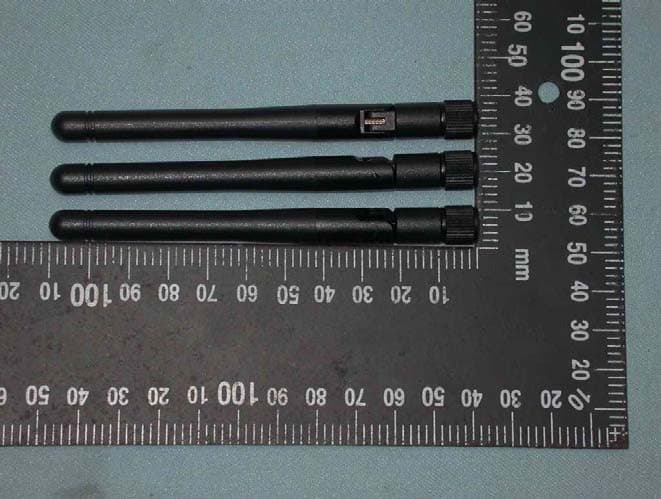
Click to zoom
Application Details
- Equipment Class
- DTS - Digital Transmission System
- Date of Grant
- Nov 06, 2007
- Application Purpose
- Original Equipment
- Date of Application
- Nov 06, 2007
- Equipment Note
- IEEE802.11n Wireless Router
- Frequency Range
- 2412.00000000 - 2462.00000000
- Company
- Alpha Networks Inc.
- Country
- Taiwan
Documents & Files
Document Text
Text extracted from the exhibit documents filed with the FCC. Open a document above to read the original.
Users Manual
WRG-N15 IEEE802.11n Wireless Router User Guide November 2007 Contents B EFORE Y OU S TART ..................................................................................................................... IV Installation Overview ................................................................................................................ iv P ACKING LIST...............................................................................................................................IV Installation Notes ....................................................................................................................... v Installation Information ............................................................................................................. vi INTRODUCTION..............................................................................................................................1 R OUTER D ESCRIPTION AND O PERATION ........................................................................................1 F RONT V IEW ..................................................................................................................................2 LED Display ...............................................................................................................................3 R EARPANELCONNECTIONS..........................................................................................................4 C ONNECTING DEVICES TO THE ROUTER........................................................................................5 Connect Router to Ethernet.......................................................................................................5 Connecting through 802.11 Wireless ........................................................................................5 General Guide to Setting Up a Wireless Network.....................................................................5 Installation Considerations for Wireless LAN............................................................................7 POWER ON WIRELESS BROADBAND ROUTER .........................................................................8 Factory Reset Button.................................................................................................................8 CONFIGURATION ...........................................................................................................................9 IP SETTINGS ON YOUR COMPUTER................................................................................................9 A CCESS THE C ONFIGURATION M ANAGER .......................................................................................9 Login to Home Page................................................................................................................10 W EB M ANAGER ...........................................................................................................................11 B ASIC C ONFIGURATION – H OME D IRECTORY M ENUS ...................................................................12 S ETUP W IZARD ............................................................................................................................13 B ASIC W IRELESS S ETUP ..............................................................................................................27 Wireless Security .....................................................................................................................28 Wi-Fi Protected Setup (WPS)..................................................................................................29 WAN C ONFIGURATION................................................................................................................34 Static IP Address Connection..................................................................................................35 Dynamic IP Connection ...........................................................................................................37 PPPoE Connection ..................................................................................................................39 Bridge Connection ...................................................................................................................41 PPTP Connection ....................................................................................................................42 L2TP Connection .....................................................................................................................44 LAN ............................................................................................................................................46 DHCP .........................................................................................................................................47 A DVANCED D IRECTORY M ENUS ...................................................................................................49 Virtual Server ...........................................................................................................................50 Applications .............................................................................................................................51 Firewall.....................................................................................................................................52 DMZ .........................................................................................................................................53 IP Filters...................................................................................................................................54 MAC Filters ..............................................................................................................................55 URL Blocking ...........................................................................................................................56 Domain B…
Text truncated - open the document above for the full version.
Users Manual
LinkTek WL11N Wireless Broadband Router User Guide 43 Configure the PPTP connection and click the Apply button to put the new settings into effect. See the table below for a description of the parameters configured for the connection. PPTP Parameters Description IP Address Type the IP address supplied by your ISP. Subnet Mask Type the Subnet mask supplied by your ISP. Gateway The gateway IP address is used provide access to resources outside your IP Subnet or ISP’s network. Type the gateway IP address given to you by your ISP. DNS This entry is for the IP address of your primary domain name server, which should also be provided to you by your ISP. Server IP/Name Enter the Server IP address for this protocol into this field. This is the IP address of the server computer that will be used, along with your computer, to create the Virtual Private Network. This field must be completed for both the Dynamic IP and Static IP options PPTP Account Enter the PPTP account name, provided to you by your ISP, here. PPTP Password Enter your password for this PPTP account here, as stated to you by your ISP. PPTP Confirm Password Retype the password entered in the PPTP Password field. Maximum Idle Time A value of 0 in this field means that the PPTP connection will remain connected. If your network account is billed according to the amount of time the router is actually connected to the Internet, enter an appropriate Idle Time value (in seconds). This will disconnect the router after the WAN connection has been idle for the amount of time specified. The default value = 5. MTU This field refers to the Maximum Transfer Unit, which is the maximum size of a packet, in bytes, that will be accepted by the router. The default setting is 1500 bytes. This field should not be altered unless instructed by your ISP. Connect Mode Select This function, with Connect-on-demand selected, will allow the router to connect any workstation on your LAN to the Internet upon request. If this function is set at Always-on, no request from the workstation will be needed to connect to the Internet. If Manual is selected, it will be necessary for the workstation on the LAN to manually connect to the Internet through this router. LinkTek WL11N Wireless Broadband Router User Guide 44 L2TP Connection If your ISP is using L2TP to provide your Internet connection, the ISP will give you the necessary information to configure the router. There are two ways to enable the router to become a L2TP client, one is through assigning the router an IP address dynamically, which means that the DHCP protocol will be implemented by the router to automatically configure the IP settings. The user may input the IP settings manually by choosing the Static IP option above the configuring area. L2TP Internet Connection configuration menu LinkTek WL11N Wireless Broadband Router User Guide 45 Configure the L2TP connection and click the Apply button to put the new settings into effect. See the table below for a description of the parameters configured for the connection. L2tP Parameters Description IP Address Type the IP address supplied by your ISP. Subnet Mask Type the Subnet mask supplied by your ISP. Gateway The gateway IP address is used provide access to resources outside your IP Subnet or ISP’s network. Type the gateway IP address given to you by your ISP. DNS This entry is for the IP address of your primary domain name server, which should also be provided to you by your ISP. Server IP/Name Enter the Server IP address for this protocol into this field. This is the IP address of the server computer that will be used, along with your computer, to create the Virtual Private Network. This field must be completed for both the Dynamic IP and Static IP options L2TP Account Enter the L2TP account name, provided to you by your ISP, here. L2TP Password Enter your password for this L2TP account here, as stated to you by your ISP. L2TP Confirm Password Retype the password entered in the L2TP Password field. Maximum Idle Time A value of 0 in this field means that the L2TP connection will remain connected. If your network account is billed according to the amount of time the router is actually connected to the Internet, enter an appropriate Idle Time value (in seconds). This will disconnect the router after the WAN connection has been idle for the amount of time specified. The default value = 5. MTU This field refers to the Maximum Transfer Unit, which is the maximum size of a packet, in bytes, that will be accepted by the router. The default setting is 1500 bytes. This field should not be altered unless instructed by your ISP. Connect Mode Select This function, with Connect-on-demand selected, will allow the router to connect any workstation on your LAN to the Internet upon request. If this function is set at Always- on, no request from the workstation will be needed to connect to the Internet. If Manual is selected, it will be necessary for the workstation on the LAN to manually connect to the Internet through this router. LinkTek WL11N Wireless Broadband Router User Guide 46 LAN You can configure the LAN IP address to suit your preference. Many users will find it convenient to use the default settings together with DHCP service to manage the IP settings for their private network. The IP address of the router is the base address used for DHCP. In order to use the router for DHCP on your LAN, the IP address pool used for DHCP must be compatible with the IP address of the router. The IP addresses available in the DHCP IP address pool will change automatically if you change the IP address of the router. See the next section for information on DHCP setup. To access the LAN IP menu, click the LAN link in the Home directory. LAN Settings – Router IP address menu To change the LAN IP Address or Subnet Mask , type in the desired values and click the Apply button. Your web browser should automatically be redirected to the new IP address. You will asked to login again to the …
Text truncated - open the document above for the full version.
Cover Letter(s)
October 15, 2007 Federal Communications Commission Authorization and Evaluation Division FCC ID: RRK2007050009 Confidentiality Request Pursuant to Sections 0.457 and 0.459 of the Commission s Rules, the Applicant hereby requests confidential treatment of information accompanying this Application as outlined below: 1. Schematics 2. Operational Description 3. Block Diagram The above materials contain trade secrets and proprietary information not customarily released to the public. The public disclosure of these matters might be harmful to the Applicant and provide unjustified benefits to its competitors. The Applicant understands that pursuant to Rule 0.457, disclosure of this Application and all accompanying documentation will not be made before the date of the Grant for this application. Sincerely, Leeming Li / Senior Manager Alpha Networks Inc. Tel: 886-3-563666 ext.6613 Fax: 886-3-5665091 E-mail: [email protected]
Cover Letter(s)
Date: October 12, 2007 Compliance Certification Services Certification Division 561F Monterey Road Morgan Hill, CA 95037 To whom it may concern: We, the undersigned, hereby authorize the Taiwan office of Compliance Engineering Services, Inc., d.b.a. Compliance Certification Services and hereafter referred to as CCS TW, to act on our behalf in all manners relating to application for equipment authorization, including signing of all documents relating to these matters. Any and all acts carried out by CCS TW on our behalf shall have the same effect as acts of our own. We, the undersigned, hereby certify that we are not subject to a denial of federal benefits, that includes FCC benefits, pursuant to Section 5301 of the Anti-Drug Abuse Act of 1988, 21 U.S.C. 853(a). In authorizing CCS TW as our agent, we still recognize that we are responsible to: h) Comply with the relevant provisions of the certification program; i) Make all necessary arrangements for the conduct of the evaluation, including provision for examining documentation and access to all areas, records (including internal audit reports) and personnel for the purposes of evaluation (e.g. testing, inspection, assessment, surveillance, reassessment) and resolution of complaints; j) Make claims regarding certification only in respect of the scope for which certification has been granted; k) Do not use our product certification in such a manner as to bring the Certification Division into disrepute and not make any statement regarding our product certification which the Certification Division may consider misleading or unauthorized; e) Upon suspension or cancellation of certification, discontinue use of all advertising matter that contains any reference thereto and return any certification documents as required by the Certification Division; l) Use certification only to indicate the products are certified as being in conformity with specified standards; g) Endeavor to ensure that no certificate or report nor any part thereof is used in a misleading manner; h) Ensure that any reference to our product certification in communication media such as documents, brochures or advertising, complies with the requirements of the Certification Division; i) Keep a record of all complaints made known to the us relating to the product compliance with requirements of the relevant standard and to make these records available to the Certification Division when requested; j) Take appropriate action with respect to such complaints and any deficiencies found in products or services that affect compliance with the requirements for certification; k) Document the actions taken. This authorization is valid until further written notice from the applicant. Sincerely, Leeming Li / Senior Manager Alpha Networks Inc. Tel: 886-3-563666 ext.6613 Fax: 886-3-5665091 E-mail: [email protected] REMARK: 1. This authorization letter will be sent along with your application when filing with the Certification Division. 2. Please follow the format and type it on company letterhead and send original to us.
Cover Letter(s)
1 Lucy Tsai From: alice.lan [[email protected]] Sent: Monday, November 05, 2007 11:48 PM To: application.2007 Cc: Lucy Tsai Subject: Re:Re:FW: Alpha Networks Inc., FCC ID: RRK2007050009, Assessment NO.: AN07T7287, Notice#1 Attachments: WRG-N15_Label(961106).pdf; WRG-N15_User Manual(961105).pdf; WRG-N15_Test Setup Photo(961019).pdf; WRG-N15_Test Report(961019).pdf Dear Lucy, Sorry for delay the case for a long time. Please find the attchment for this case. If you have any questions regarding this case, please contact with me. Thank you very much. Best Regards, Alice Lan 藍怡蘭 Compliance Certification Services Inc. Tel:+886(3)591-0068 Ext:504 Fax:+886(3)582-5720 [email protected] application 寄件人: alice.lan 藍怡蘭 2007/11/06 03:24 PM 收件人: alice.lan/ccsemc@ccsemc 副本抄送: 主旨: Re:FW: Alpha Networks Inc., FCC ID: RRK2007050009, Assessment NO.: AN07T7287, Notice#1連結 "Lucy Tsai" <[email protected]> 2007/11/06 09:20 AM 收件人: "application" <[email protected]> 副本抄送: 主旨: FW: Alpha Networks Inc., FCC ID: RRK2007050009, Assessment NO.: AN07T7287, Notice#1 2 Hi Alice, Any status on this application? Best Regards, Lucy -----Original Message----- From: Lucy Tsai Sent: Thursday, October 18, 2007 5:37 PM To: [email protected] Cc: Lucy Tsai Subject: Alpha Networks Inc., FCC ID: RRK2007050009, Assessment NO.: AN07T7287, Notice#1 Hi Alice, Please address following issues. Q#1: Since the EUT is larger enough that the statement of 15.19 should be added into the equipment label. Please revise the label format. Q#2: Page 77-78 of user manual indicates two types of antenna are applied. One is built-in diversity antenna and other is external dipole antenna. They do not agree with the application. Please explain. Q#3: RF exposure statement indicates on page 87 of user manual are not enough. EUT is a mobile device that the safe distance 20cm should be maintained. Please revise. Q#4: Output power indicates in page 77-78 for g and b modes are 14dBm and 16dBm which have more 6dBm different than the measured value specified in test report. Please explain why have such big difference. Q#5: FCC ID indicates on test report and test set up photos is RRK20070500009 which is different from label format and other exhibits, please confirm which one is correct and do the necessary revise. Best Regards, Lucy The items indicated above must be submitted before processing can continue on the above referenced application. Failure to provide the requested information within 30 days of the original e-mail date may result in application dismissal and forfeiture of the filing fee. Also, please note that partial responses increase processing time and should not be submitted. Any questions about the content of this correspondence should be directed to the e-mail address listed below the name of the sender. ________________________________________________________________________ 3 This e-mail transmission is confidential and intended solely for being reviewed by the recipient(s) identified above. If you are not an identified recipient, please ensure that this communication remains confidential and promptly return it to the sender. Please contact immediately by phone (Tel: 886-2-2299-9720) for any problem with this transmission. Thank you for your attention.
External Photos
Compliance Certification Services Inc. Report No.70802004 Page 1 of 17 External Photo Compliance Certification Services Inc. Report No.70802004 Page 2 of 17 Compliance Certification Services Inc. Report No.70802004 Page 3 of 17 Internal Photo Compliance Certification Services Inc. Report No.70802004 Page 13 of 17 Power Adapter Photo Compliance Certification Services Inc. Report No.70802004 Page 14 of 17 Compliance Certification Services Inc. Report No.70802004 Page 15 of 17
ID Label/Location Info
Please put the label in this position.
Internal Photos
Compliance Certification Services Inc. Report No.70802004 Page 4 of 17 Compliance Certification Services Inc. Report No.70802004 Page 5 of 17 Compliance Certification Services Inc. Report No.70802004 Page 6 of 17 Compliance Certification Services Inc. Report No.70802004 Page 7 of 17 Compliance Certification Services Inc. Report No.70802004 Page 8 of 17 Compliance Certification Services Inc. Report No.70802004 Page 9 of 17 Compliance Certification Services Inc. Report No.70802004 Page 10 of 17 Compliance Certification Services Inc. Report No.70802004 Page 11 of 17 Compliance Certification Services Inc. Report No.70802004 Page 12 of 17 Compliance Certification Services Inc. Report No.70802004 Page 16 of 17 Compliance Certification Services Inc. Report No.70802004 Page 17 of 17
Parts List/Tune Up Info
Specification 1. Electrical Properties : 1.1 Frequency Range............ 1.2 Impedance .................. 1.3 VSWR ..................... ... 1.4 Return Loss.................. 1.5 Radiation ..................... 1.6 Gain............................2.0dBi typ. 1.7 Polarization............... ...Linear Vertical 1.8 Admitted Power............ 1.9 Cable........................ ...RG-178 Coaxial Cable 1.10 Connector.................. ...SMA Plug Reverse 2. Physical Properties : 2.1 Antenna Cover...............TPE 2.2 Antenna Base............... PC 2.3 Antenna Base............... PBT 2.4 Operating Temp. ......... ...-10 ~ +60 2.5 Storage Temp. ............ ...-10 ~ +70 2.6 Color ........................ .White(WY-051) RF Antenna Cable Assembly Omni-directional 1W 2.4GHz ~ 2.5GHz 50Ω Nominal 1.921 Max. -10 dB Max. 1 2 RF Antenna Assembly P/NOSSR-71267) SPEC :2.4~2.5 GHz 2007/3/30 3 0 345 330 315 300 285 270 255 240 225 210 195 180 165 150 135 120 105 90 75 60 45 30 15 -20-100 dB Far-field amplitude of C037-510794-A SSR-71267 H E-PLANE.nsi 2.400000 GHz2.450000 GHz2.500000 GHz 4 0 345 330 315 300 285 270 255 240 225 210 195 180 165 150 135 120 105 90 75 60 45 30 15 -20-100 dB Far-field amplitude of C037-510794-A SSR-71267 V H-PLANE.nsi 2.400000 GHz2.450000 GHz2.500000 GHz 5 6 7 8 MATERIAL SAFETY DATA SHEET 1. General Information Product name : HAMBURG H-2 Supplier :HANPAO CO.,LTD. Tel: 0755-28126898 Fax: 0755-28126080 Emergency Tel. No. : HANPAO CO.,LTD. Tel: 0755-28126898 2. Composition Irradiated cross-linkied, flexible polyolefin, flame retardant, hea shrinkable tubing. 3. Hazards Identification Most important hazards: If the product is overheated or burned, harmful vapors shall be formed. The heated product has the potential to cause thermal burns, if touched. < Note >Durning heat-shrinking process, a slight characteristic odor of plastic may be noticed. This odor is not harmful. 4. First aid measures Inhalation : If vapors from the burning or overheated product are inhaled, provide fresh air. If symptoms are not reduced, seek medical advice. Skin contact: If the heated product contacts skin, remove the product immediately. Eye contact: If the heated product contacts eyes, rinse thoroughly with plenty of water for at least Ingestion: Seek medical advice. 5. Fire-fighting measures Suitable extinguishing media: water spray, dry powder, CO2 foam. <Note>The product is flame-retarded(self-extinguish), but will burn, if continuously exposed to flame. Use the extinguishing media appropriate for the source of the fire. The self-contained breathing apparatus and the personal protective equipment may be needed in the evnt of large fires. jianshe Rd., longsheng chun longhua town, bao An District,shenzhen city, Guangdong,china. jianshe Rd., longsheng chun longhua town, bao An District,shenzhen city, Guangdong,china. 9 MATERIAL SAFETY DATA SHEET 6. Accidental release measures Personal precautions: Avoid contact with the heated product. Gloves may be required to handle the product, when hot. If overheated, avoid breathing fumes which may be emitted. Environmental precaution: In common with all good industrial practice, install in well ventilated areas only. Methods for cleaning up: Sweep up and down in a disposal container. 7. Handling: No special handling advice required. Storage: Store at room temperature in unopened packs to avoid direct sunlight. 8. Exposure controls / personal protection Technical measures: Normal manufacturing environment. Personal protection equipment: Under normal operation, not necessary. Hand protection: Gloves may be required to handle the product, when hot. Eye protection: Under normal operation, not necessary. Other protection: Under normal operation, not necessary. 9. Physical and chemical properties Form: : liquor(tubing) Color(standard): Black, red, yellow, green, blue and white Odor: Slight characteristic plastic odor. Melting point/range : The material has melting point, 90 nominal, but it will not flow over Boiling point/range: Not applicable Flash point: Unknown Ingintion point: Unknown Explosive properties : Not applicable Vapor pressure: Not applicable Specific gravity(20 : 1.35 nominal Water solubility (20 : Small molecular solubility in water 10. Stability and preparation Stability: Stable at normal conditions. Recommended max. operating temperature is 125. Don't heat over 300 to avoid harmul vapors which may be formed at high temperature. Material to avoid: None Hazardous decomposition products: None under normal conditions. If the product is overheated or burned, harmful vapors (carbon monoxide and hydrogen halides) maybe be generated. 10 MATERIAL SAFETY DATA SHEET 11. Toxicological information Acute toxicity: Unknown Skin: Not irritating, but the heated product has potential to cause thermal burn. Eyes: If the product is overheated or burned, vapors may irritate eyes. Inhalation : Harmful vapors produced by overheating or burning may cause irritation to the upper respiratory tract. Ingestion : Not digestible. Further information: During heating process of the product, slight plastic smell may cause discomfort for susceptible persons. 12. Ecological information Biodegradability: Unknown (no data) Aquatic toxicity: Unknown (no data) Further information: Unknown (no data) 13. Disposal considerations: Product: Incinerate or bury in accordance with local and national regulations. Contact proper local authorities Contaminated packin g: Cardboard boxes and reels can be delivered to local recycling facilities. 14. Transport information Not classified as dangerous with regard to the transport regulation. 15. Regulatory Information According to EC directive: Unknown Symbol: Not applicable R-phrase: Not applicable S-phrase: Not applicable 16. Other Information The information provided in this Product Safety Data Sheet is correct to the best of our knowledge, information and belief at the date of its publication. The information given is designed only as a guidance for safe h…
Text truncated - open the document above for the full version.
Test Report
Compliance Certification Services Inc.FCC ID RRK2007050009 Refer No. 70504007-RP1 Report No.70802004-RP1 Page 1 of 140 FCC 47 CFR PART 15 SUBPART C AND ANSI C63.4 : 2003 TEST REPORT For IEEE802.11n Wireless Router Model : WRG-N15 Trade Name : Alpha Issued for Alpha Networks Inc. No. 8, Li-shing Road VII, Science-based Industrial Park, Hsinchu, Taiwan R.O.C. Issued by Compliance Certification Services Inc. Hsinchu Lab. Rm. 258, Bldg. 17, NO.195, Sec.4 Chung HsingRd., ChuTung Chen, Hsinchu, Taiwan 310, R.O.C TEL: (03) 591-0068 FAX: (03) 582-5720 Note: This report shall not be reproduced except in full, without the written approval of Compliance Certification Services Inc. This document may be altered or revised by Compliance Certification Services Inc. personnel only, and shall be noted in the revision section of the document. The client should not use it to claim product endorsement by TAF, NVLAP or any government agencies. The test results in the report only apply to the tested sample. Compliance Certification Services Inc.FCC ID RRK2007050009 Refer No. 70504007-RP1 Report No.70802004-RP1 Page 2 of 140 TABLE OF CONTENTS TITLE PAGE NO. 1. TEST REPORT CERTIFICATION........................................................................................... 3 2. EUT DESCRIPTION.................................................................................................................. 4 2.1 DESCRIPTION OF EUT & POWER.................................................................................... 4 3. DESCRIPTION OF TEST MODES .......................................................................................... 5 4. TEST METHODOLOGY............................................................................................................6 5. FACILITIES AND ACCREDITATIONS .................................................................................. 6 5.1 FACILITIES .......................................................................................................................... 6 5.2 EQUIPMENT ........................................................................................................................ 6 5.3 LABORATORY ACCREDITATIONS LISTINGS................................................................... 6 5.4 TABLE OF ACCREDITATIONS AND LISTINGS ................................................................ 7 6. CALIBRATION AND UNCERTAINTY .................................................................................... 8 6.1 MEASURING INSTRUMENT CALIBRATION ..................................................................... 8 6.2 MEASUREMENT UNCERTAINTY....................................................................................... 8 7. SETUP OF EQUIPMENT UNDER TEST................................................................................ 9-10 8. APPLICABLE LIMITS AND TEST RESULTS ....................................................................... 11 8.1 6dB BANDWIDTH ................................................................................................................ 11-24 8.2 99% BANDWIDTH ............................................................................................................... 25-38 8.3 MAXIMUM PEAK OUTPUT POWER ................................................................................. 39-53 8.4 MAXIMUM PERMISSIBLE EXPOSURE ..............…
Text truncated - open the document above for the full version.
Contact Information
Applicant
Kelly Tsai(Director)
Test Firm
Compliance Certification Services Inc.Winnie Chen
Technical Specifications
| # | Rule Parts | Frequency Range | Power Output |
|---|---|---|---|
| 3 | 15C | 2.41 GHz - 2.46 GHz | 181.13 mW |
Other Applications from Alpha Networks Inc.
RRK-MSSS2571
Jul 22, 2026Z-Wave 800 module
Equipment Class
DTS - Digital Transmission SystemRRK-W1700A3
Jul 22, 2026Wi-Fi 7 Router
Equipment Class
6ID - 15E 6 GHz Low Power Indoor Access Point
RRK-BW1600A
Oct 10, 2023LTE Data and Voice (ATA) In-Home Gateway
Equipment Class
NII - Unlicensed National Information Infrastructure TX
RRK-ARSSM01
Feb 08, 202179G Radar
Equipment Class
VRD - Part 95 Vehicular Radar Systems
RRK-ARSSA07
Feb 08, 2021Radar (UART), Radar (CAN)
Equipment Class
VRD - Part 95 Vehicular Radar Systems